
A Monday standup is supposed to create clarity. Instead, the team opens a shared calendar packed with meetings, an editorial calendar filled with upcoming posts, and a Gantt timeline tracking the next product launch. Each view contains a different date for the same campaign, and nobody knows which deadline is real.
That confusion isn't a calendar problem alone. It's a planning problem caused by using one view for work that needs three different kinds of visibility. A shared calendar shows availability and commitments, an editorial calendar shows content stages and publishing rhythm, and a Gantt or timeline view shows sequence, dependencies, and schedule risk.
The Monday Morning Calendar Problem
At 9:00 a.m., the podcast producer says the episode is scheduled for Wednesday. The editor points to an editorial board where Wednesday means “final review,” not publication. The product marketer opens a Gantt timeline and says the launch can't happen until the landing page, product screenshots, and legal review are complete.
All three people may be looking at accurate information. The problem is that each calendar answers a different question:
- Shared calendar: Who is available, and what commitments already exist?
- Editorial calendar: What content is moving through which production stage?
- Gantt or timeline: What has to happen first, and what delay will affect the final milestone?
When these views compete, the first hour of the week disappears into reconciliation. Producers compare dates in Slack, editors update a board, and project leads manually move events in a personal calendar. By the time the team starts planning, the plan is already out of date.
Practical rule: Don't ask one calendar to represent every type of work. Decide which view owns each planning decision.
This matters even more for content teams working across podcasts, articles, video, newsletters, social clips, and repurposed archive material. A podcast episode may need a production rhythm and publishing slot, while a product video needs parallel editing, captioning, motion design, approvals, and distribution. Treating both as simple calendar events hides the work that makes the deadline possible.
Automation can help, but it won't solve unclear ownership or conflicting sources of truth. For a useful overview of how AI transforms calendar planning, look for systems that suggest schedule changes while leaving the team in control of the underlying rules.
The practical choice isn't shared calendar versus editorial calendar versus Gantt timeline. Most mature teams use all three. The choice is deciding which view is authoritative for a specific workflow, then making the other views reflect that decision.
What a Project Calendar Actually Does
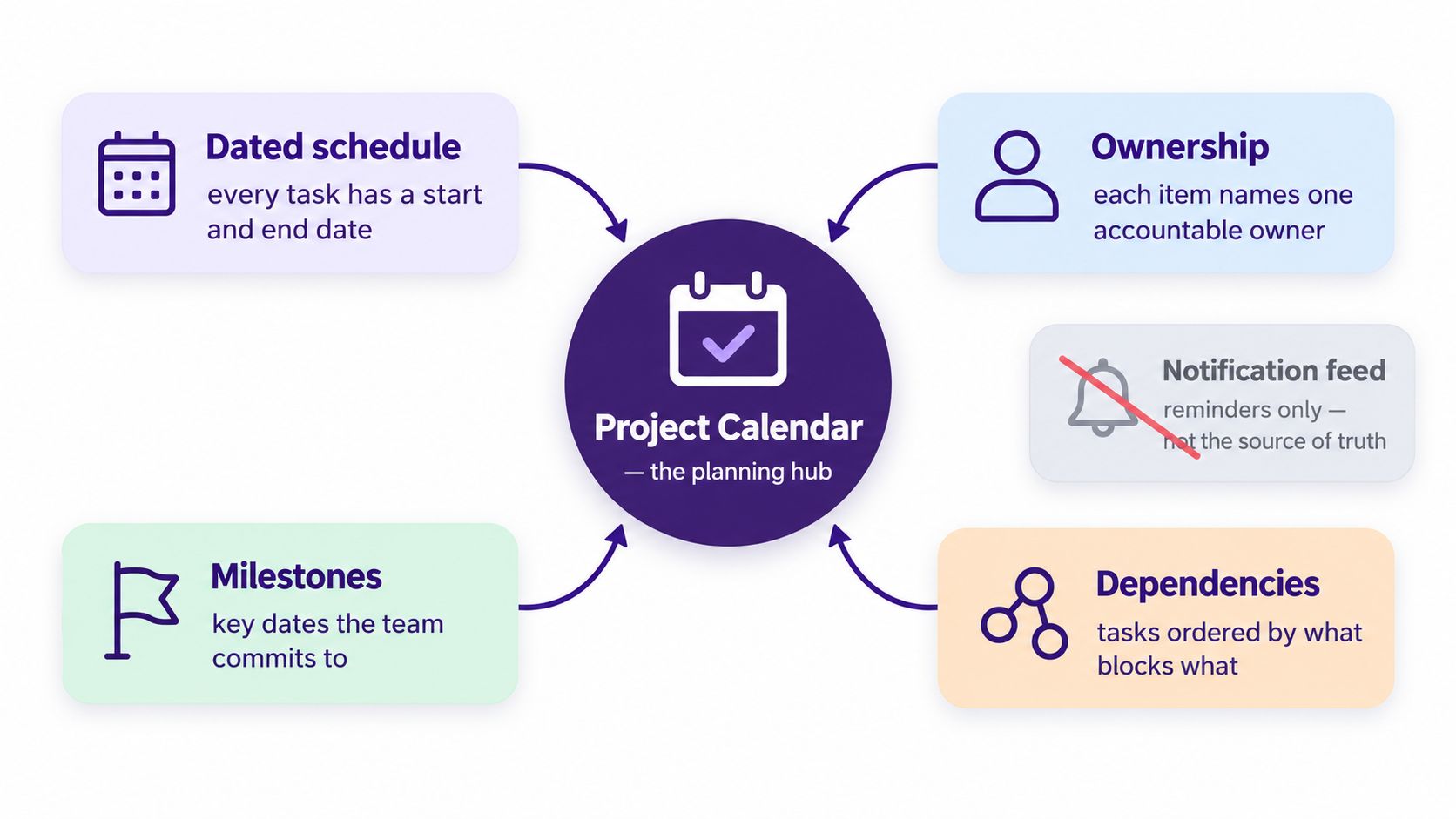
A project calendar is a dated, ownership-aware schedule of work, milestones, and dependencies. It isn't a notification feed. It should tell the team what must happen, who is accountable, what blocks the next step, and which dates are commitments rather than guesses.
The reliable way to build one is dependency-first scheduling. Map the work before assigning dates. Give every task an owner, identify its predecessor, and then calculate dates from the sequence of work. A milestone should emerge from the tasks required to reach it, not from a preferred launch date copied into several tools.
This approach follows the development of modern project controls. Karol Adamiecki introduced the harmonogram in 1896, Henry Gantt popularized the Gantt chart in the early 1910s, and CPM and PERT emerged in 1957–1958. These methods moved scheduling beyond date lists by making sequence, dependencies, and risk visible. The history of project management milestones shows why today's project calendar is closer to a control system than a wall planner.
Four jobs the calendar must perform
A useful calendar earns its place by doing four jobs at the same time:
- Visualize sequence: Show what starts, overlaps, waits, and blocks downstream work.
- Assign accountability: Name one owner for each deliverable instead of assigning responsibility to a department.
- Signal capacity: Reveal when the same editor, designer, producer, or reviewer carries competing commitments.
- Act as the record: Give connected tools one schedule to reference when dates or milestones change.
Critical path analysis is valuable, but the first critical path isn't permanent. Research on project schedule behavior found critical path instability in 63% of projects. Among projects with multiple near-critical paths and slack under 10%, path switching occurred in 87% of projects, compared with 28% when the next-longest path had more than 20% slack. Projects with path switching averaged 31% longer durations. These findings are documented in PERT analysis of critical path instability.
That is why a calendar needs slack-aware dependencies, not just attractive milestone cards. For complex work, use a deterministic critical-path baseline and Monte Carlo simulation to estimate overrun probability and contingency, as outlined in schedule risk analysis guidance.
For teams coordinating seasonal launches, podcast series, or high-volume creative work, the same logic applies. A practical approach to managing seasonal campaign workflows starts by making handoffs and blockers visible before a deadline becomes urgent.
Choosing Between Shared, Editorial, and Gantt Calendars
The best calendar view depends on the planning job, not on which tool has the most attractive interface. Shared calendars are strong at showing commitments. Editorial calendars are strong at showing content status. Gantt and timeline views are strong at showing sequence.
| Planning Job | Shared Calendar | Editorial Calendar | Gantt/Timeline |
|---|---|---|---|
| Ownership and availability | Strong for meetings, leave, recurring commitments, and personal availability | Useful when ownership is attached to a content item | Possible, but generic task names can hide the accountable person |
| Workflow stage tracking | Weak unless events are manually updated | Strong for briefs, drafts, edits, approvals, and publishing | Moderate, with status fields added to tasks |
| Dependency mapping | Weak, because events rarely show what must happen first | Moderate, but dates often behave like content slots | Strong, with linked tasks, overlaps, slack, and milestones |
| Recurring work | Strong for recurring meetings and operating rhythms | Strong for newsletters, series, and recurring content formats | Useful for repeated project templates, but heavier to maintain |
| Capacity visibility | Strong for scheduled time and availability | Moderate, if workload fields are maintained | Strong when resources and assignments are configured |
| Critical path management | Poor | Limited | Strong |
| Best use | Coordination and shared commitments | Content operations and channel planning | Complex delivery and dependency-heavy work |
A shared Google Calendar or Outlook calendar should answer, “Can this person attend or complete work at this time?” It works well for recording sessions, review meetings, launch events, holidays, and recurring operating rhythms. It generally doesn't model a predecessor task that must finish before a launch can proceed.
An editorial calendar in Notion, Airtable, CoSchedule, or Trello's Calendar power-up should answer, “Where is this content in the workflow, and where will it appear?” It makes channel ownership, copy status, formats, campaign themes, and publishing slots easy to scan. It becomes misleading when a content date is treated as proof that all production dependencies are complete.
A Gantt or timeline view in Microsoft Project, ClickUp, Asana, or Smartsheet should answer, “What sequence gets us to the milestone?” It handles dependency arrows, parallel work, critical paths, and schedule changes well. Its trade-off is maintenance. If owners don't update dates and status, the visual precision becomes false confidence.
The view should follow the decision. The source of truth should follow the workflow.
For a content team, one project may use an editorial calendar as its operating hub, while its video production stream uses a Gantt view for post-production. A shared calendar can then display only meetings, recording blocks, review sessions, and committed milestones. The system works when each view has a defined purpose.
Teams building a publishing workflow can also use this content calendar planning framework to separate strategic planning from production execution. The decision rule is simple: use more than one view, but never maintain more than one authoritative schedule for the same piece of work.
Designing Templates for Content Workflows
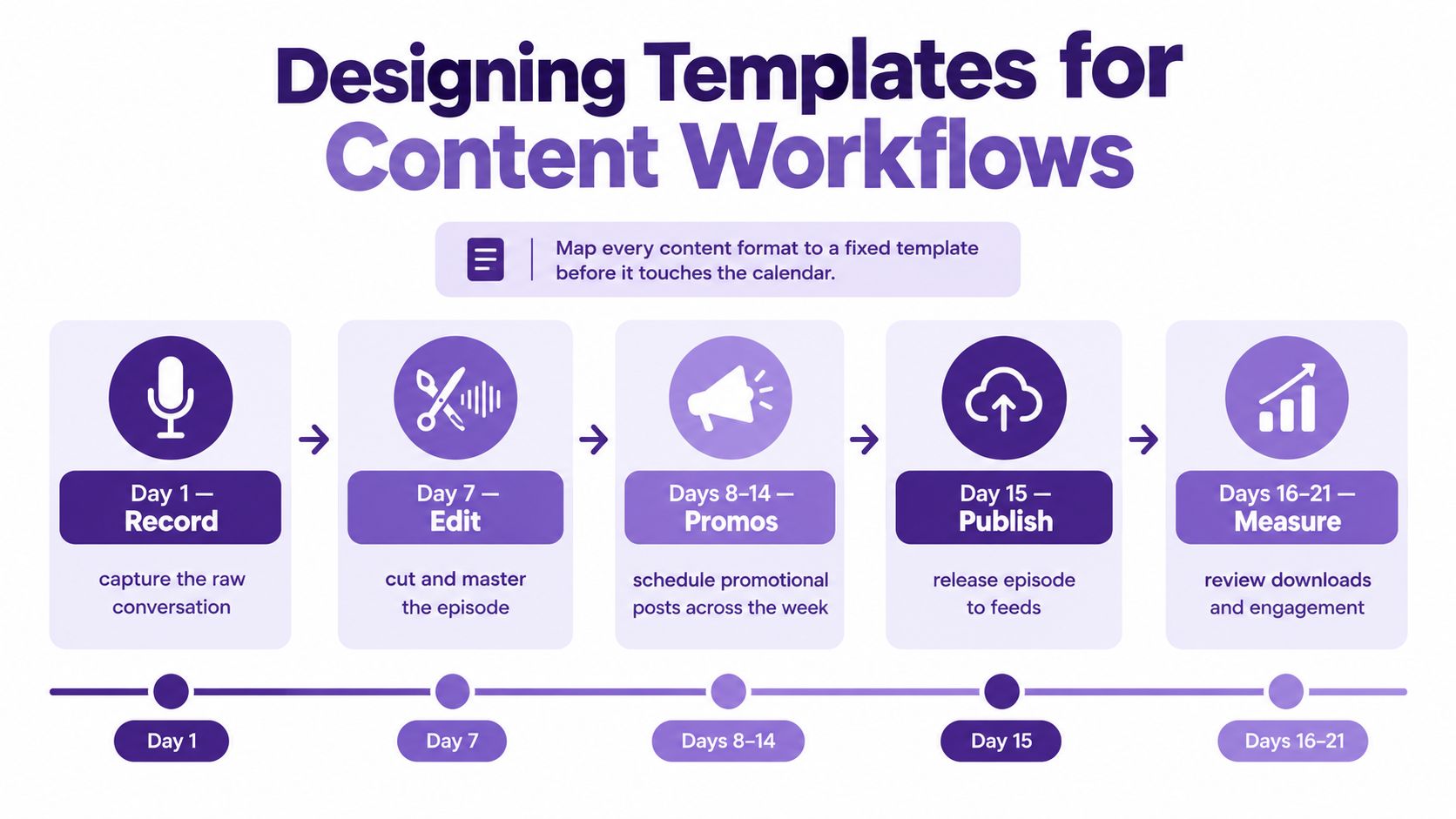
A calendar becomes useful when it reflects how work moves in practice. Start by creating a fixed production template for each format before anyone adds dates. The template should define lanes, owners, dependencies, required fields, and the event that moves an item into the next stage.
A podcast is a good example because the production rhythm is repeatable but not simple. A practical 21-day clock can run like this:
- Day 1, record: Confirm the brief, guest, recording setup, and intended audience.
- By day 7, edit: Complete the cut, audio cleanup, title, description, and approval pass.
- Days 8 to 14, promote: Schedule clips, quotes, email content, and social posts.
- Day 15, publish: Release the episode and confirm that feeds, pages, and links work.
- Days 16 to 21, measure and repurpose: Review engagement, select reusable moments, and feed strong ideas back into future content.
The calendar shouldn't contain only “publish podcast.” It should carry the production stages that make publication possible. If the editor finishes late, the promotional sequence should show the impact instead of continuing as though nothing changed.
Match the horizon to the format
Articles benefit from a 90/30/7 planning model. The 90-day layer holds strategic pillar dates and major themes. The 30-day layer locks the topic, angle, keyword, and intended audience. The 7-day layer contains only the immediate production work, such as drafting, editing, fact-checking, and publishing. Guidance on content calendar horizons and sustainable scheduling supports separating strategic, tactical, and operational planning rather than forcing every decision into one crowded view.
That separation protects writers from premature detail. A topic can remain flexible at the strategic layer while the immediate production slot stays clear and actionable.
Video is usually Gantt territory. Editing, motion design, color, captions, thumbnail variants, legal review, and uploads often run in parallel. Add explicit handoffs, because “video in progress” tells a stakeholder almost nothing about whether the cut is waiting for captions, feedback, or a final export.
Each template should carry the same operational fields:
- Owner: The person accountable for the next outcome.
- Status: The current workflow stage, not a vague health label.
- Predecessor: The work that must happen first.
- Milestone: The commitment visible to stakeholders.
- Distribution fields: Channel, format, audience, and publication destination.
- Archive connection: Related source material that can support repurposing.
For a deeper look at editorial workflow management software, focus on whether the system can preserve context as content moves from research to production, distribution, and reuse. The calendar should help the team create new value from existing work, not just record another deadline.
Rules for Ownership, Recurrence, and Versioning
Calendar reliability depends less on decorative views than on operating rules. The first rule is simple: every entry has exactly one owner. A team, department, or shared inbox can support the work, but one named person must be accountable for the next decision or deliverable.
Ownership transfers should be explicit events. If an editor hands a cut to a producer, update the owner and record the handoff. Silent reassignments create the illusion that work is still moving when nobody knows who has the next action.
Recurrence belongs to stable rhythms, not uncertain project work. Use it for a weekly newsletter, a monthly audit, or a regular content review. Freeze recurring items one cycle ahead, keep the immediate 30-day planning window editable, and treat later repetitions as a forecast rather than a promise.
Color coding should show status, not people. If blue means “owned by the editor,” the calendar becomes difficult to interpret when roles change. If blue means “in review,” the meaning survives team changes.
| Rule | What It Locks | Failure Mode It Prevents |
|---|---|---|
| One accountable owner | Responsibility for the next outcome | Group ownership and silent handoffs |
| Explicit transfers | The moment accountability changes | Work disappearing between departments |
| Recurrence for stable rhythms | Repeatable operating patterns | Manual recreation and missed routines |
| One cycle frozen ahead | Near-term commitments | Constant changes to imminent work |
| One calendar of record | The authoritative schedule | Conflicting copies in Slack and task descriptions |
| Status-based colors | A consistent visual language | Confusion when people or roles change |
| Named backup | Coverage during leave or absence | Deadlines waiting for one unavailable person |
Versioning means the calendar of record lives in one tool. Slack threads, Trello descriptions, meeting notes, and personal calendars can mirror selected information, but they shouldn't become competing schedules. Link back to the source instead of copying dates into several places.
Working time also needs deliberate configuration. Microsoft Project starts with a base calendar, then allows different working days and hours for projects, resources, or tasks. It can even treat Saturdays as working days and Mondays as nonworking days, as explained in Microsoft's guidance on project calendars. Holidays aren't preset there, so teams must add them manually through Change Working Time and define recurrence when appropriate.
Protect launch weeks with freeze windows. During a freeze, only an identified decision-maker can move a committed milestone, and every change records its reason, impact, and owner.
Syncing With PM Tools and Personal Calendars
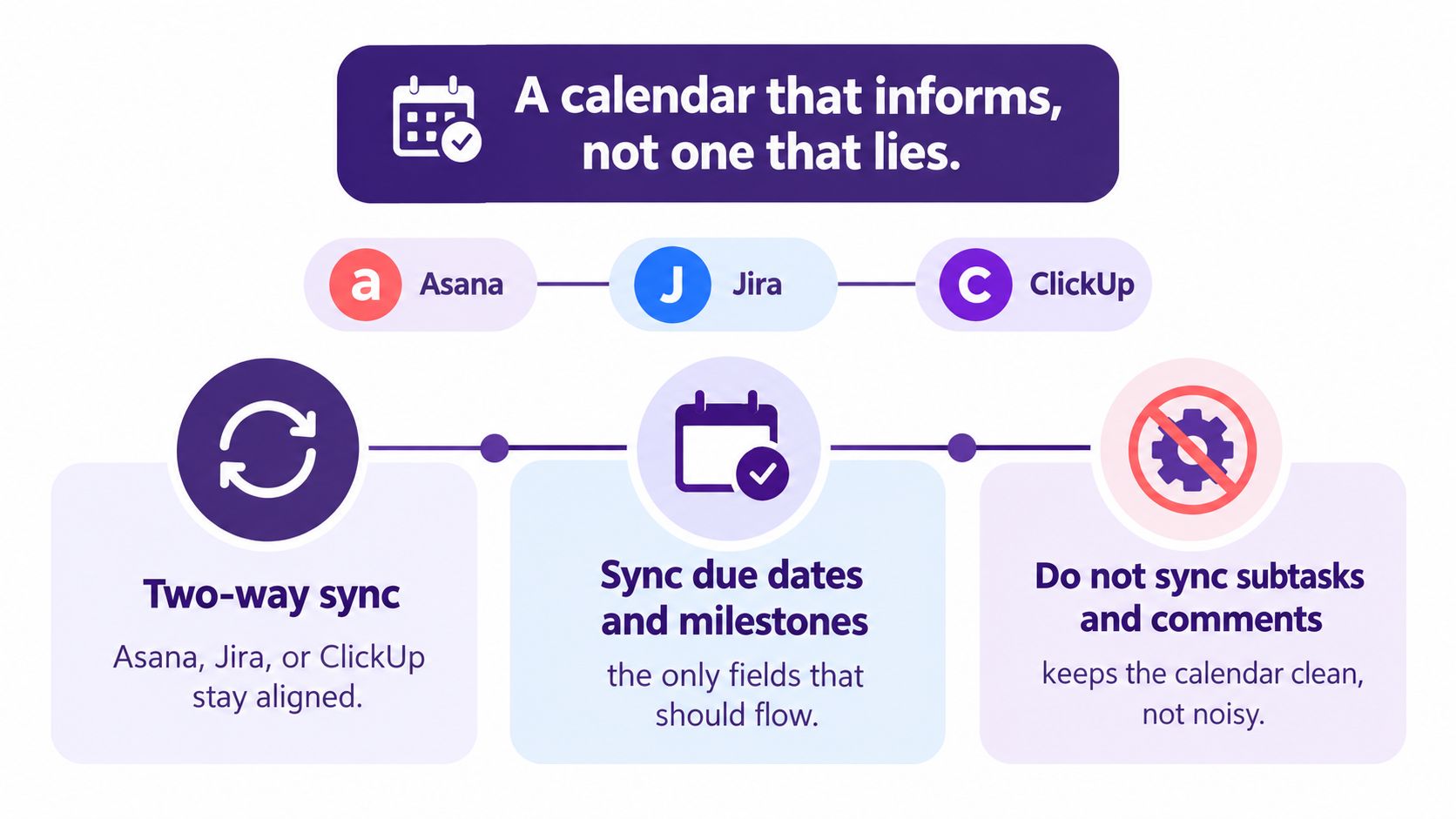
A calendar that isn't connected to the system where work changes will eventually lie. Two-way sync with Asana, Jira, or ClickUp keeps selected dates aligned, but syncing every task edit creates noise and trains people to ignore the calendar.
Sync due dates and milestones, not every subtask, comment, label, or status note. Personal calendars should show the commitments that affect time, such as milestones, deadlines, recording sessions, review blocks, and preparation windows. They shouldn't display a full task list that turns a personal schedule into an unreadable project database.
Treat time zones as schedule data
Store the source time zone in the project management tool and let connected calendars render the event locally. A 9 a.m. standup in Berlin should not become a midnight alert in Austin because somebody entered a floating time without a zone.
Separate shared commitments from focus time. A channel may block a personal calendar for a review session, while the project system retains the underlying task and its dependency. This keeps individual schedules useful without exposing every internal change.
Recurring schedules deserve the same care. A recurring lesson, editorial review, or training session should preserve its intended rhythm while still respecting exceptions and availability. The practical pattern used by systems that offer a calendar that handles recurring lessons is useful here: define the repeatable structure, then manage exceptions explicitly rather than creating unrelated events.
Keep the sync narrow and auditable
Set up the connection in this order:
- Choose the source: Resolve date conflicts in the PM tool, not in a personal calendar.
- Select fields: Send only milestones, deadlines, and time-bound commitments.
- Preserve zones: Store the originating time zone and verify local rendering.
- Test exceptions: Check holidays, leave, rescheduled reviews, and canceled events.
- Audit weekly: Remove orphaned events and investigate dates that no longer match.
The calendar needs context, but it doesn't need every piece of project data. For teams that want a durable record of briefs, decisions, and source material alongside schedule information, a project notebook for project management can complement the calendar without turning it into a document archive.
A good sync informs people about work they need to plan around. A bad sync floods them with changes they can't act on. Keep the calendar clean enough that a deadline alert still means something.
Putting It Into Practice This Week
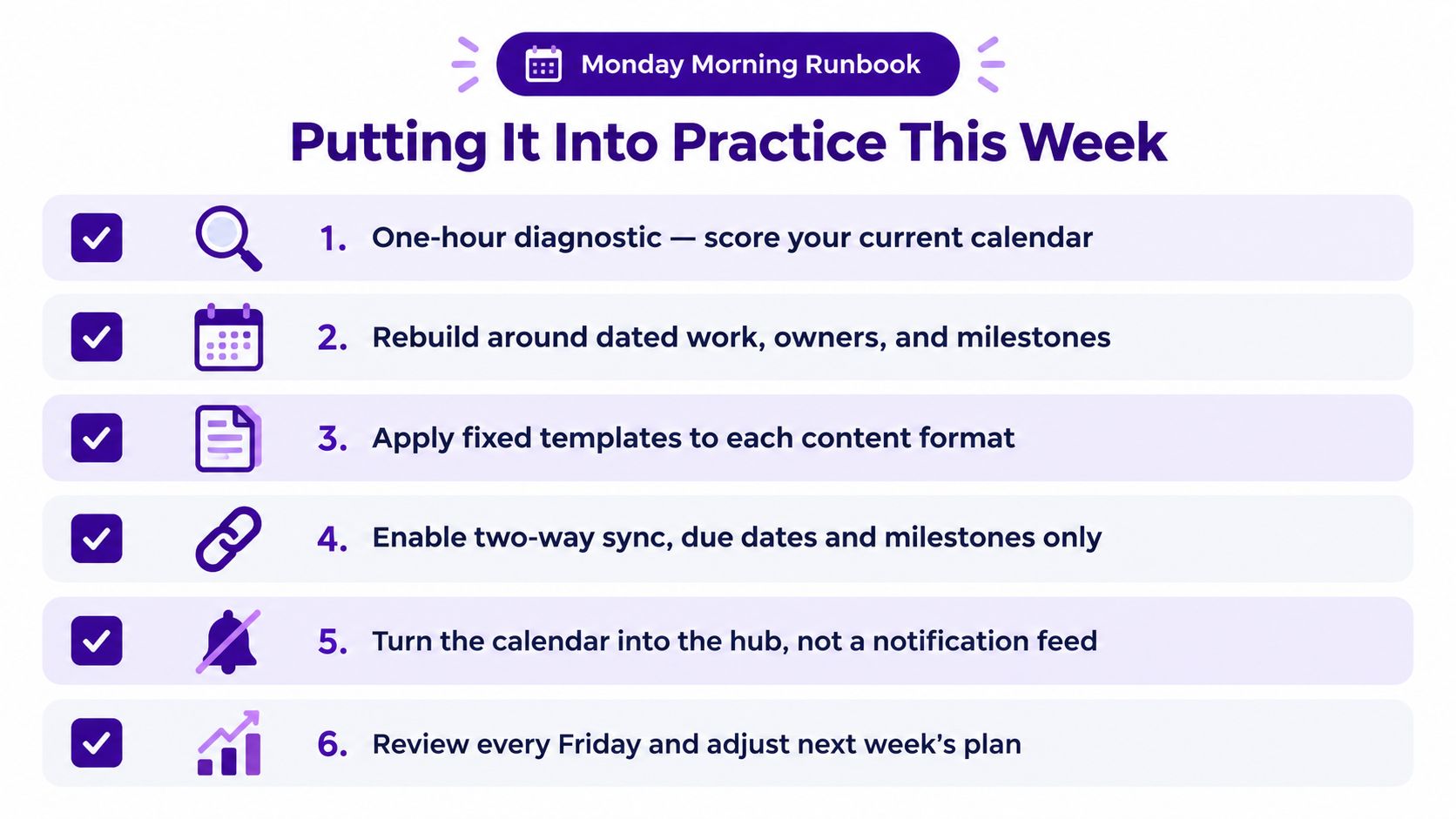
Start with a one-hour diagnostic rather than a platform migration. Open the current calendar, list the active workflows, and score each one against the three views:
- Shared calendar: Does the workflow mainly depend on availability, recurring commitments, or attendance?
- Editorial calendar: Does it mainly depend on stages, channel ownership, and publishing slots?
- Gantt or timeline: Does it mainly depend on sequence, handoffs, parallel work, or a fixed delivery milestone?
Mark where each current view collapses. A podcast may be fine in an editorial calendar until post-production becomes complex. A campaign may look manageable in Outlook until legal review starts blocking several assets. Those failure points tell you where to add a different view.
Then run the rollout across the working week:
- Monday: Choose the primary view for each workflow. Assign one owner per item and define which recurring work is allowed.
- Tuesday: Move one live project into the appropriate podcast, article, or video template. Lock the 90/30/7 horizons where the article workflow needs them.
- Wednesday: Enable two-way sync with the chosen PM tool and one personal calendar. Send due dates and milestones only, with time zones preserved.
- Thursday: Publish a one-page calendar charter covering ownership, recurrence, versioning, freeze windows, and capacity expectations.
- Friday: Hold a 30-minute retrospective with editors, producers, and video leads. Record which dates were unclear, which handoffs were missed, and which fields the team used.
The first month is calibration, not perfection. Watch where people create shadow dates, where recurring work overwhelms capacity, and where the chosen view hides dependencies. Adjust the template or ownership rule before adding another tool.
The calendar is a living artifact. It should change as the work changes, while its source of truth, accountability rules, and planning logic remain stable.
If your team has a growing library of podcasts, videos, articles, or research, Contesimal helps organize that material so people and AI can discover connections and turn existing content into new workflow opportunities. Use it alongside your project calendar to connect production planning with the knowledge and assets your team already owns.