
You open the archive to find a podcast transcript, a raw interview, a signed release, and a sponsor contract sharing the same folder and permissions. Search returns dozens of near-duplicates, nobody knows which video is the source master, and a contractor receives sensitive footage because the folder inherited access from an old production project. The library contains valuable material, but the team can't reliably search it, govern it, or turn it into new content.
A document classification policy fixes that by connecting labels, metadata, access, retention, and review. For content creators, publishers, producers, and marketing teams, it becomes more than a security document. It becomes the operating system for a mixed media library, helping people organize research, reuse longform work, clear rights, and collaborate with AI without handing policy decisions to a black box.
Why Most Content Libraries Break Without a Policy
A content library usually breaks gradually. One producer creates folders called “Final,” another uses “Final Final,” and a third stores source files by client name even though the business later reorganizes around shows or channels. Departed staff leave orphaned files behind, inherited taxonomies remain in place, and nobody can explain whether a transcript is a working draft, an approved script, or an archival record.
The operational symptoms are predictable:
- Search returns noise: Similar filenames and uncontrolled tags bury the source asset under derivatives, exports, and outdated versions.
- Retention rules get guessed: Teams keep everything because nobody knows what should be retained, archived, or destroyed.
- Sensitive footage ships accidentally: A vendor receives a folder containing unreleased interviews, personal information, or contractual material alongside ordinary production files.
- Rights clearances stall: Legal or editorial teams can't locate the master, release, license, or source note connected to a published asset.
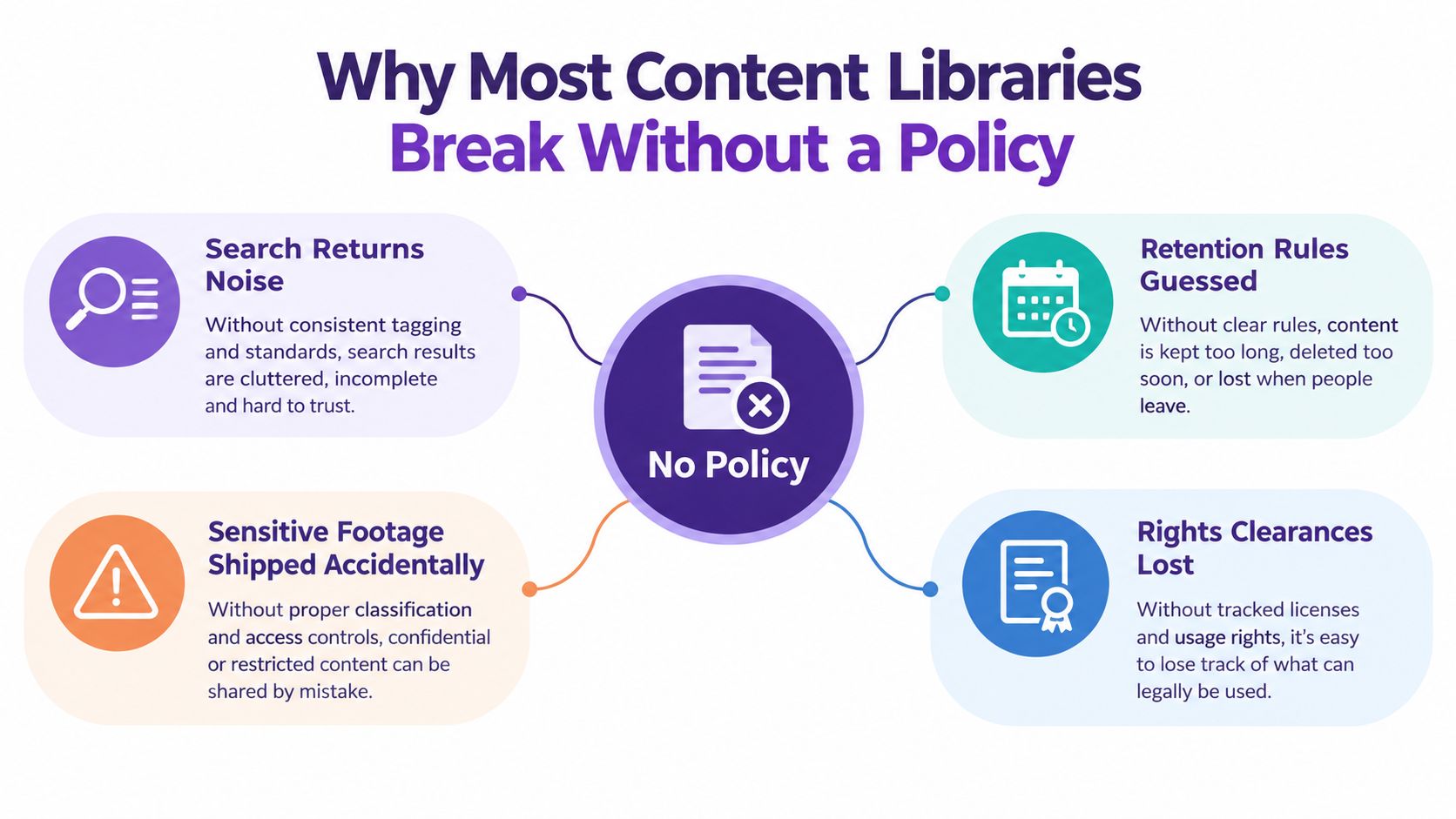
The root problem isn't the DAM, cloud drive, or AI tagger. It's the absence of an agreed decision system. Without explicit labels and handling rules, every downstream tool guesses what a file is, who should access it, and how long it matters.
Practical rule: If a producer can't determine a file's sensitivity, owner, lifecycle status, and business function from its label and metadata, the policy isn't operational yet.
Start with a working template, not an elaborate theory document. Define the tiers, map them to real content types, assign ownership, and connect the results to upload, search, sharing, and disposition workflows. That foundation lets a creator reuse an old interview safely, lets an editor find the approved source, and lets an AI system suggest useful relationships without inventing governance.
What a Document Classification Policy Actually Does
A document classification policy is a written standard for deciding what information is, how sensitive it is, and what must happen to it next. A practical content operation can use four tiers, Public, Internal, Confidential, and Restricted, provided each tier has a clear definition and enforceable consequences.
The tiers translate risk into an action a producer, editor, lawyer, or automated system can apply during intake. Public material may be approved for distribution. Internal material supports the organization but isn't ready for public release. Confidential material can expose commercial, personal, contractual, or operational risk. Restricted material requires the strongest access, storage, and review controls.
ISO 27001 Annex A control 5.12 requires a formal information-classification scheme based on confidentiality, integrity, availability, legal obligations, and business criticality, with labeling and secure handling controls. A useful ISO 27001 classification policy reference also emphasizes monitoring, sampling, and documented audits, which means a policy must govern decisions after the initial label is assigned.
| Tier | Access | Handling | Lifecycle Trigger |
|---|---|---|---|
| Public | Approved users and public audiences | Distribution through approved channels | Publication, correction, or withdrawal |
| Internal | Authenticated members of the organization | Organization-managed systems and controlled sharing | Project closure, ownership change, or review |
| Confidential | Role-based, need-to-know access | Controlled storage, approved transmission, and rights checks | Contract, rights, sensitivity, or business-value change |
| Restricted | Named or explicitly approved users | Strongest access, storage, transmission, and audit controls | Legal hold, incident, ownership change, or formal review |
Records management gives the policy its lifecycle dimension. The United Nations Archives describes classification as a hierarchy of functions, activities, and transactions, and says classification supports titling, access, retrieval, and disposition decisions. The same principle applies to a video library: “Production” is more durable than a department name, while “Interview recording” is more useful than a vague folder called “Media.”
A classification label isn't a retention schedule, an access list, or a disposition order. It is the decision point that lets those controls work together without collapsing into one confusing rule.
Recommended Sections for a Reusable Policy Template
Build the policy in the order people use it. The following structure gives content operations, legal, engineering, and publishing teams a practical shell they can adapt.
Purpose and scope: State what the policy governs and who must follow it. Example: all documents, transcripts, images, video, audio, research notes, contracts, and derivatives created or received by the organization.
Definitions: Define terms that cause disputes later. Example: “source master” means the highest-quality original asset retained for controlled reuse, while “publish package” means the approved group of files prepared for distribution.
Roles and responsibilities: Name decision owners, custodians, reviewers, and exception approvers. Example: the Production Lead owns raw masters, while the Records Manager owns retention and disposition.
Sensitivity tiers: Describe each label using business consequences and real examples. Example: an unreleased interview containing personal information may be Restricted, while an approved episode page may be Public.
Labeling rules: Explain where labels appear and how systems enforce them. Example: store
classification=confidentialas controlled metadata and displayCONFIDENTIALin the asset interface.Metadata schema: List required fields such as
assetID,sensitivity,contentType,owner,rightsStatus,sourceSystem,retentionClass,classificationConfidence, andlastReviewedDate. Don't make these free-text fields if a controlled vocabulary can do the job.File plan mapping: Connect assets to business functions, activities, and transactions. Example:
Production / Raw Masters / Interview Recording, rather than a folder named after a temporary project team.AI-assisted classification guidance: Define when an automated suggestion can be applied, when a human must review it, and what evidence gets logged. The model can propose a label, but the policy owns the decision.
Review and audit: Set the sampling method, responsible role, findings register, and remediation process. Example: sample content by function, source system, label, and confidence rather than reviewing only the easiest files.
Exceptions: Require a written reason, risk owner, alternative control, approval, expiry, and review date. A vendor needing temporary access to a Restricted master should receive a documented exception, not an informal message.
Revision history: Record the policy version, effective date, approver, and material changes. Taxonomy changes must be traceable because old labels may still exist in exports and archives.
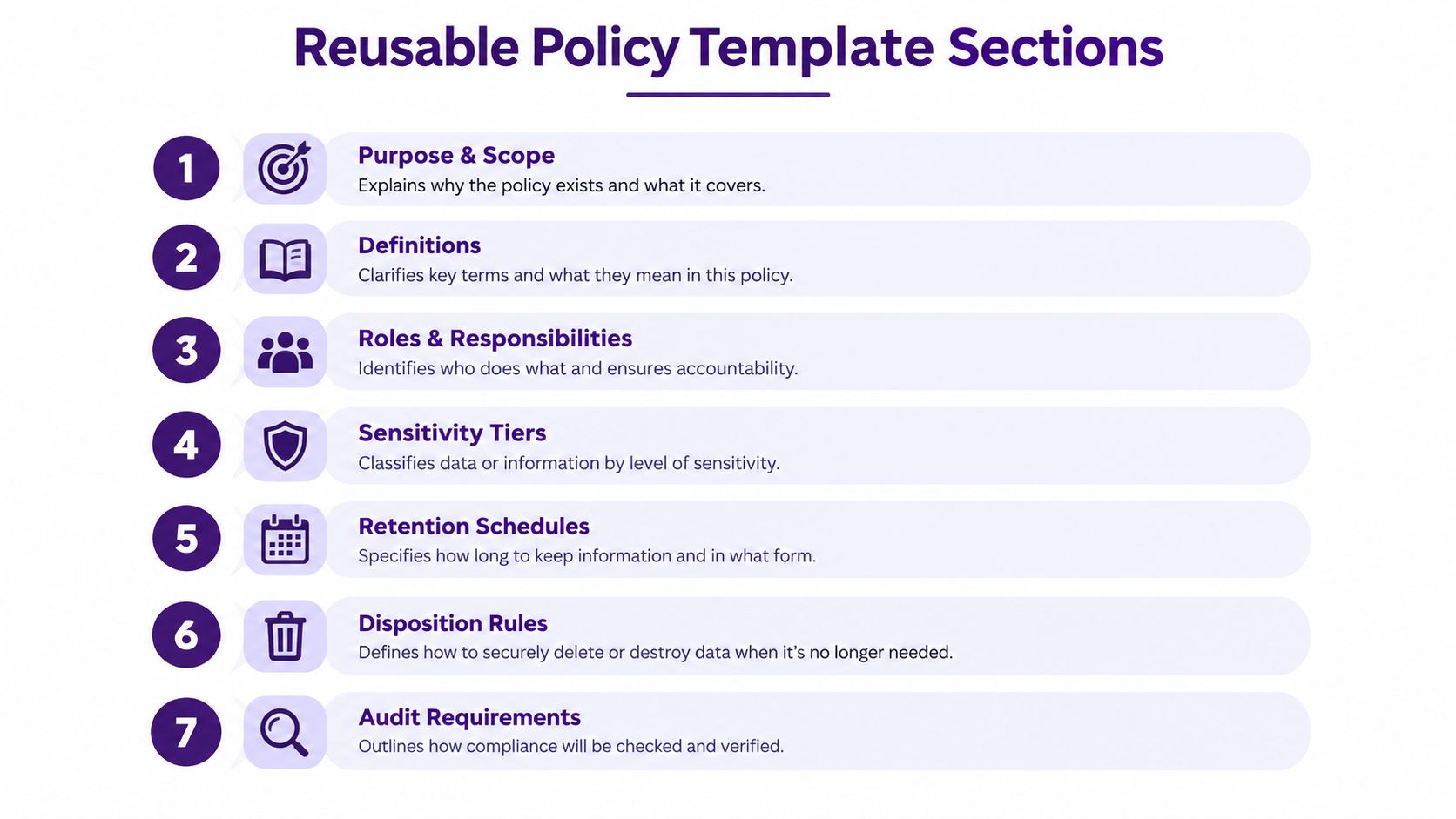
Treat this as a starting shell, not a statute. Test every section against an actual upload, edit, approval, vendor handoff, republish, and deletion scenario. If the team can't follow the rule inside the DAM or collaboration tool, rewrite the rule before approval.
Labels, Rules, and Metadata Standards That Hold Up
Labels are what people see. Metadata is what systems query, filter, enforce, and audit. A policy fails when it has attractive tier names but no reliable way to connect those names to owners, storage locations, rights, or review decisions.
Use a controlled set of labels. Public, Internal, Confidential, and Restricted is enough for many content libraries, with a separate Regulated tag only when legal or regulatory handling requires it. Don't create a new tier to solve a metadata problem. Add a context field such as rightsStatus, client, or legalHold instead.
| Label | Access Rule | Storage Location | Required Metadata |
|---|---|---|---|
| Public | Approved for external distribution | Approved publishing and archive systems | assetID, contentType, owner, rightsStatus, lastReviewedDate |
| Internal | Authenticated organizational access | Managed collaboration or DAM environment | assetID, contentType, owner, sourceSystem, retentionClass, lastReviewedDate |
| Confidential | Role-based, need-to-know access | Controlled storage with approved sharing | assetID, sensitivity, contentType, owner, rightsStatus, retentionClass, lastReviewedDate |
| Restricted | Named or explicitly approved access | Dedicated controlled storage with audit logging | All core fields plus classificationConfidence, reviewer, modelVersion, and legalHold where applicable |
Consider three ordinary assets. A podcast transcript might be Internal, with owner=Editorial and sourceSystem=Transcription API. A raw video master may be Restricted, owned by Production, stored in Studio Ingest, and retained while the cut remains active. Research notes may be Confidential when they include licensed material, unpublished findings, interviewee details, or contractual restrictions.
Lock the vocabulary early. Use one casing convention, reject prohibited characters, resolve synonyms through a maintained mapping, and prevent users from creating near-duplicates such as confidential, Confidential, and sensitive-private. The metadata model should also distinguish a label from a confidence score. A machine suggestion of Restricted with low confidence isn't equivalent to a human-approved Restricted label.
The SFU Archives file classification guidance supports a function-based scheme, controlled vocabulary, documented taxonomy, and classification at an appropriate aggregation level such as a series or file. That approach keeps metadata usable when a library grows beyond manual item-by-item tagging.
Building a Function-Based File Plan That Survives Reorgs
Department folders are fragile because departments change. A file plan anchored to business functions survives longer because the work remains recognizable even when Marketing merges with Communications or Production changes reporting lines.
Start with one function per top-level folder:
- Research: Briefs, Source Material, Reference, Interview Notes
- Production: Raw Masters, Working Cuts, Approvals, Project Files
- Distribution: Publish Packages, Channel Exports, Performance Reports
- Legal Hold: Notices, Preserved Records, Release Evidence
- Finance: Budgets, Invoices, Revenue Reports, Vendor Records
Keep the hierarchy shallow. Use no more than three nesting levels before files live in flatter folders with metadata. Every folder needs an owner-of-record field, and “team folder” isn't an acceptable owner.
A research notes folder illustrates the difference between project naming and activity naming. Research / Source Material / Interview Notes tells a future editor what the files are and why they exist. Marketing Rebrand / Alex’s Stuff tells them almost nothing after the project closes or Alex leaves.
A durable file plan describes the work, not the org chart.
Each function should carry default access and lifecycle settings, but those defaults must not override asset-specific restrictions. A raw master might inherit Production access while a release form linked to the same project receives a stricter classification. Store the relationship through metadata and references, not by placing every related file under the most restrictive folder.
Use this content tagging taxonomy framework to refine the vocabulary that sits alongside the file plan. The taxonomy should help people discover themes, formats, audiences, and reuse opportunities, while the classification policy controls sensitivity, ownership, handling, and lifecycle.
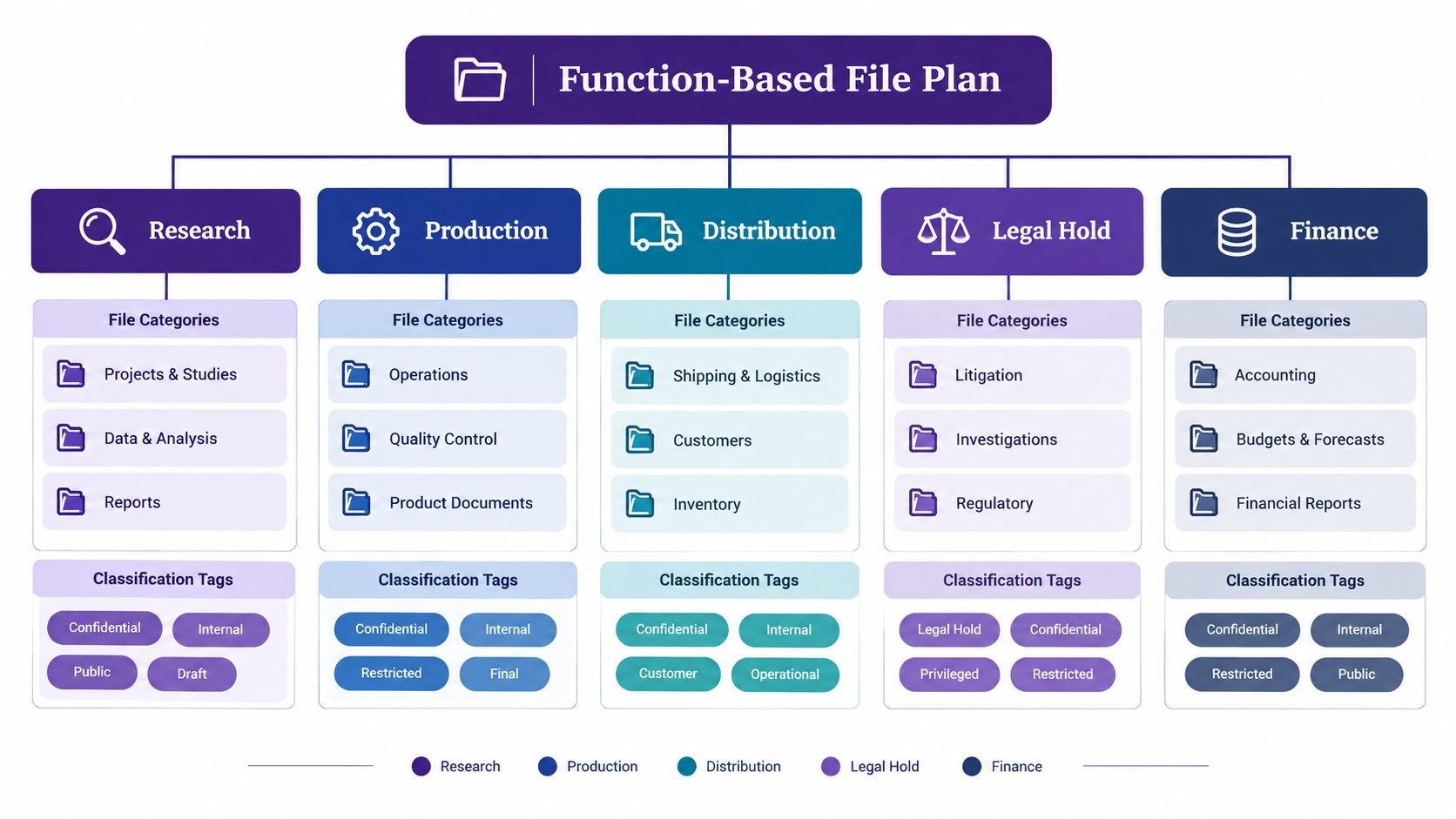
A sensible sequence is simple: assign the business function, assign the activity, apply the sensitivity label, attach the owner, then add content and rights metadata. That sequence gives search tools enough structure to find reusable assets without confusing topical tags with governance controls.
Watch the practical walkthrough below for another way to think about a function-based library.
Governance Roles and Decision Rights
A policy without named owners becomes a wiki page nobody trusts. Give each decision to a specific role, and make the escalation path visible in the policy and the workflow.
- Information Governance Lead: Owns the policy, approves label changes, resolves cross-functional disputes, and sponsors revisions.
- Content Owners: Usually function leads who classify material in their domain, approve access exceptions, and confirm business context.
- Records Manager: Owns retention and disposition, maintains schedules, and can override ordinary disposition when a legal hold applies.
- AI Classification Steward: Monitors automated labels, evaluates thresholds, reviews drift, and signs off on classifier changes.
Use a simple decision-rights model:
| Decision | Accountable Owner | Required Input | Final Action |
|---|---|---|---|
| Create a new label | Information Governance Lead | Content Owner and Records Manager | Approve, reject, or merge |
| Approve an exception | Content Owner | Records Manager or Legal where relevant | Record time-limited approval |
| Reclassify after an incident | Information Governance Lead | Security, Content Owner, AI Steward | Apply new label and log cause |
| Decommission a tier | Information Governance Lead | All affected owners | Migrate labels and update controls |
Set a quarterly policy review, a monthly label audit, and ad hoc reclassification within five business days of a triggering event. The event owner must create the audit entry, not leave the task for an unnamed administrator.
Every document must resolve to exactly one named owner. A shared mailbox, department name, or “content team” can be a custodian or collaboration group, but it cannot be the accountable owner. If ownership changes, update the owner field and review the classification rather than allowing the asset to drift into administrative limbo.
Review Cycles, Audits, and Reclassification Triggers
A classification label has an expiration problem even when the file doesn't. A draft becomes approved, an interviewee withdraws consent, a contract ends, a vendor relationship changes, or a previously harmless research note becomes sensitive after publication. The policy must make those changes visible.
Run three review cadences:
- Monthly spot-checks: Focus on high-risk categories such as legal material, personal information, and financial records.
- Quarterly sampling: Draw a stratified random sample across source systems, business functions, labels, and classifier confidence.
- Annual revalidation: Recheck the taxonomy, policy, ownership, retention mapping, and controls after regulatory or organizational change.
The sample must test the decision, not only the presence of a label. Review whether the content matches the label, whether the owner is still valid, whether access is appropriate, and whether the retention class reflects the current business context.
Use explicit triggers:
| Trigger | Owner | Deadline | Required Log Entry |
|---|---|---|---|
| New regulation | Information Governance Lead | Within five business days | Affected labels, controls, and policy decision |
| Content owner's departure | Function Lead | Within five business days | New owner and reclassification result |
| Security incident | Information Governance Lead | Within five business days | Incident link, label decision, remediation |
| Taxonomy version change | AI Classification Steward | Within five business days | Old label, new label, migration result |
| User appeal | Content Owner | Within five business days | Appeal reason, reviewer, final decision |
Don't rely on an error list alone. Maintain a findings register with the root cause, affected workflow, corrective action, owner, and closure evidence. Repeated errors usually point to a confusing label definition, a missing metadata field, or an enforcement gap.
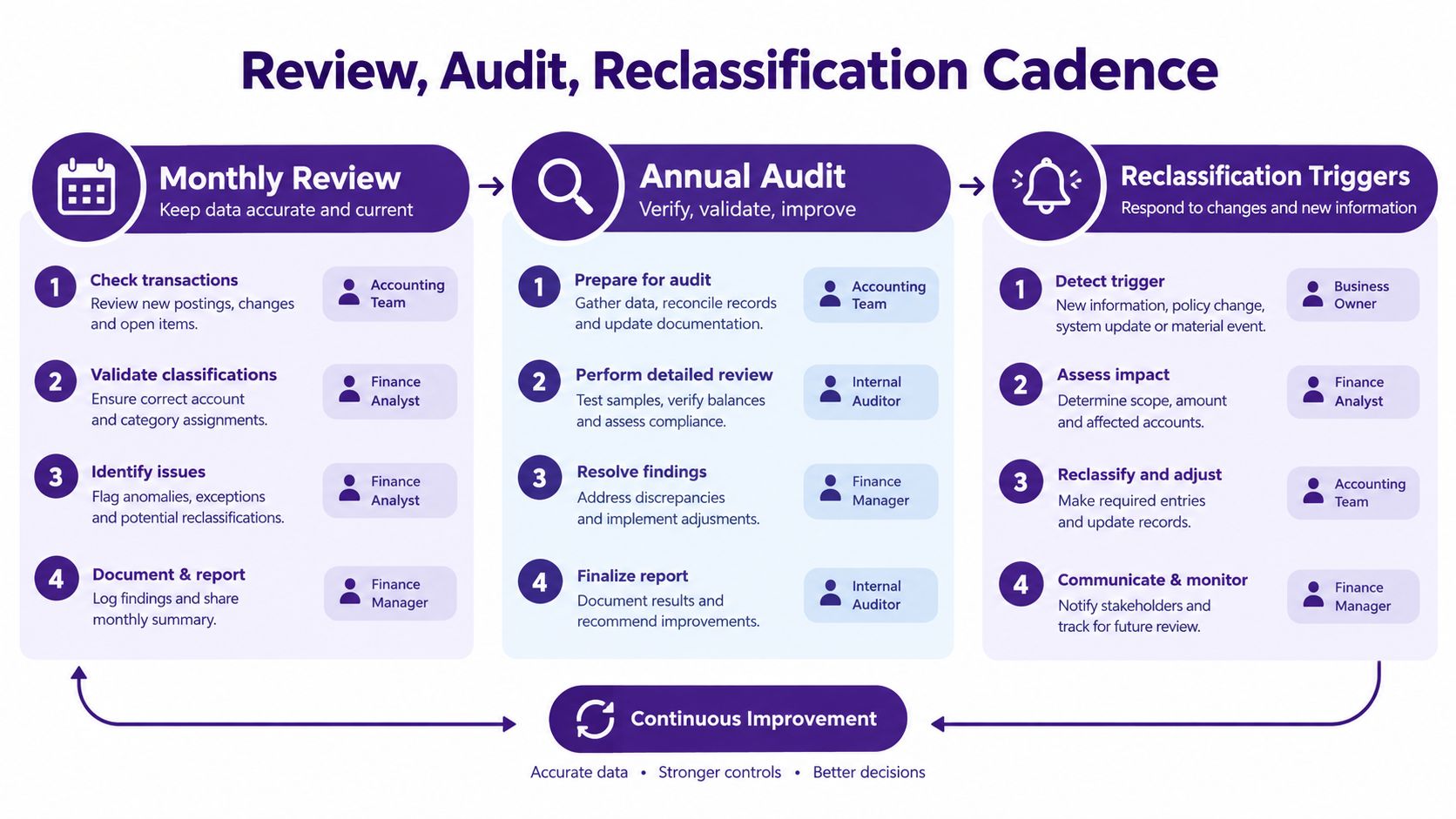
Leadership needs a one-page dashboard covering label distribution, confidence drift, overdue reviews, open exceptions, and repeated root causes. Classification quality stays trustworthy when executives can see it and owners must act on it.
Working With AI-Assisted Classification Systems
AI classification is an enforcement accelerator, not the policy. The organization still owns the labels, thresholds, handling requirements, review rules, and exceptions. The model proposes an application at scale, and the governance process decides whether that proposal is safe to use.
Set confidence bands with explicit actions:
| Confidence Band | Action | Reviewer | Audit Trail Entry |
|---|---|---|---|
| Above 0.95 | Auto-apply where policy permits | AI Classification Steward monitors | Model version, confidence, label, timestamp |
| 0.70 to 0.95 | Queue for human review | Content Owner or trained reviewer | Proposed label, evidence, reviewer decision |
| Below 0.70 | Reject automatic application | Content Owner determines label | Rejection reason, final label, reviewer |
These thresholds are operating choices, not universal truths. Test them against real production content and change them only through documented governance. A classifier that performs well on documents may fail on transcripts, video masters, image frames, or mixed-format archives, so report accuracy by modality rather than hiding weak performance inside one blended result.
Keep four controls in place:
- Training set refresh: Update labeled examples on a recurring review cycle so new formats and edge cases appear.
- Holdout evaluation: Test against real production content that the model hasn't used for adjustment.
- Drift monitoring: Watch label distribution, confidence patterns, and emerging false positives.
- Kill switch: Disable auto-apply when error rates breach the policy threshold or an incident exposes systematic failure.
Teams handling contracts and privileged material can also review guidance on intelligent document review for lawyers, particularly when automated extraction needs legal oversight.
For content teams, document classification methods can help separate classification logic from the broader tagging and discovery model. Store the model version, confidence, reviewer, evidence, and final decision with every AI-suggested label. An auditor should be able to reconstruct why the system tagged a raw interview as Restricted, who accepted or changed the result, and which policy version governed the decision.
Where Classification Ends and Retention Begins
Teams create avoidable risk when they treat sensitivity, access, retention, and disposition as one setting. They are related controls with different questions, owners, triggers, and audit records.
| Control | What It Decides | Owner | Trigger | Example for Restricted Sales Contract |
|---|---|---|---|---|
| Classification | What the document is and how sensitive it is | Content Owner | Creation, receipt, or material change | Label remains Restricted |
| Retention | How long the record stays available | Records Manager | Contract execution or another schedule event | Clock starts at contract execution |
| Access | Who can read or edit it | Content Owner and system custodian | Role change, request, or review | Sales Legal and approved stakeholders |
| Disposition | Transfer, destruction, or archival action | Records Manager | Contract end plus retention requirement | Destroy, archive, or transfer as scheduled |
A Restricted label doesn't automatically tell you to delete the document. A retention schedule does not make the document less sensitive. If a legal hold applies, disposition pauses even when the ordinary retention period has ended.
Separate the clocks. A label change never restarts a retention clock, and a retention rule never changes a label.
Federal records guidance requires every federal record to be covered by a NARA-approved records schedule, and agencies must not destroy records until the schedule authorizes destruction. The schedule describes content, format, context or function, and whether records may be destroyed or transferred to the National Archives, as explained in NARA records scheduling guidance.
For content organizations, the same discipline prevents two expensive mistakes. Teams won't keep sensitive material forever merely because it is searchable, and they won't destroy evidence because an asset moved from one folder or format to another.
A Phased Implementation Roadmap
Roll out the policy in four 90-day phases, with a named owner and a hard exit condition for each phase. Don't launch a taxonomy until the organization knows how it will be enforced and reviewed.
Phase one aligns people and decisions
The Information Governance Lead convenes Content Owners, Records, Legal, Security, and Engineering. Inventory current labels, folders, file plans, retention schedules, rights fields, and AI tags, then draft the policy using the reusable sections above.
Exit criteria: leaders approve the tier definitions, decision rights, scope, and exception path. The DAM, cloud storage, collaboration tools, and archival systems are listed as implementation surfaces.
Phase two builds the data model
The Content Operations Lead defines mandatory metadata, controlled vocabulary, function mappings, ownership fields, rights status, retention classes, and review dates. Pilot the model across a few representative content types, such as transcripts, video masters, and research notes.
Exit criteria: each pilot asset receives one owner, one classification label, one business function, and a usable metadata record. The team can retrieve approved and restricted material separately.
Phase three connects policy to workflows
Engineering and the DAM Administrator add classification to authoring, upload, review, vendor handoff, and publication workflows. Run a supervised AI classification test on a 5,000-asset sample, then evaluate precision, errors, confidence, and modality-specific performance before enabling automation.
Exit criteria: low-confidence items reach human review, policy violations generate an action, and every automated decision leaves an audit trail.
Phase four formalizes governance
The Information Governance Lead appoints the four governance roles, schedules quarterly review, starts monthly label audits, and adds audit sampling at 2% of monthly volume. Leadership receives the first dashboard showing distribution, drift, open exceptions, and overdue reviews.
Exit criteria: ownership is explicit, reclassification triggers are active, exceptions expire visibly, and the team can demonstrate the policy in operation rather than merely display the document.
One-Page Quick Reference for Your Team
Pin this beside the intake queue, DAM dashboard, and review workspace.
Classification labels
- Public: Approved for external distribution.
- Internal: Intended for authenticated organizational use.
- Confidential: Requires role-based, need-to-know access and controlled sharing.
- Restricted: Requires named or explicitly approved access and the strongest handling controls.
Required metadata
Every managed asset must include:
- Asset ID: Use a stable identifier that survives file movement and derivative creation.
- Sensitivity: Apply exactly one approved classification label.
- Content type: Use the controlled vocabulary, such as transcript, raw master, research note, or publish package.
- Owner: Name one accountable person, never a team folder.
- Rights status: Record release, license, clearance, restriction, or unresolved status.
- Retention class: Map the asset to the applicable lifecycle rule.
Add sourceSystem, classificationConfidence, lastReviewedDate, reviewer, and modelVersion when the workflow or automated classifier supplies them.
Governance
- Information Governance Lead: Own the policy and approve label changes.
- Content Owner: Classify domain material and approve access exceptions.
- Records Manager: Own retention, disposition, and legal-hold overrides.
- AI Classification Steward: Monitor model labels, thresholds, drift, and audits.
Review cycle
- Monthly: Spot-check high-risk categories.
- Quarterly: Sample the full label set by source, function, and confidence.
- Annually: Revalidate policy, taxonomy, ownership, retention mapping, and controls.
Reclassification triggers
- Legal hold: Pause disposition and review the asset.
- Ownership change: Assign a named owner and reassess handling.
- Confidence below threshold: Route the machine suggestion to human review.
Machine labels are advisory until human review clears confidence at 0.85 or higher. Record the proposed label, confidence, model version, reviewer, final decision, and reason for every override.
Contesimal helps content organizations classify, organize, and search documents, podcasts, videos, and articles while building layered taxonomies and custom tags for reuse. Use the Contesimal platform to turn a governed archive into a searchable working library, then visit the site to see how it can support safer collaboration between your team and AI.