
You've got a podcast episode, a YouTube series, and a weekly newsletter running at the same time. Each format has its own tab, calendar, approval thread, and half-finished notes. By Friday, the same idea has been researched three times, the newsletter is waiting on a transcript, and the video draft is buried in a private document nobody remembers approving.
That's not a creativity problem. It's a content creation workflow problem. A reliable system turns one approved idea into coordinated audio, video, written, and social assets, with clear ownership at every handoff. It also gives AI a useful role without allowing automation to decide what your brand publishes.
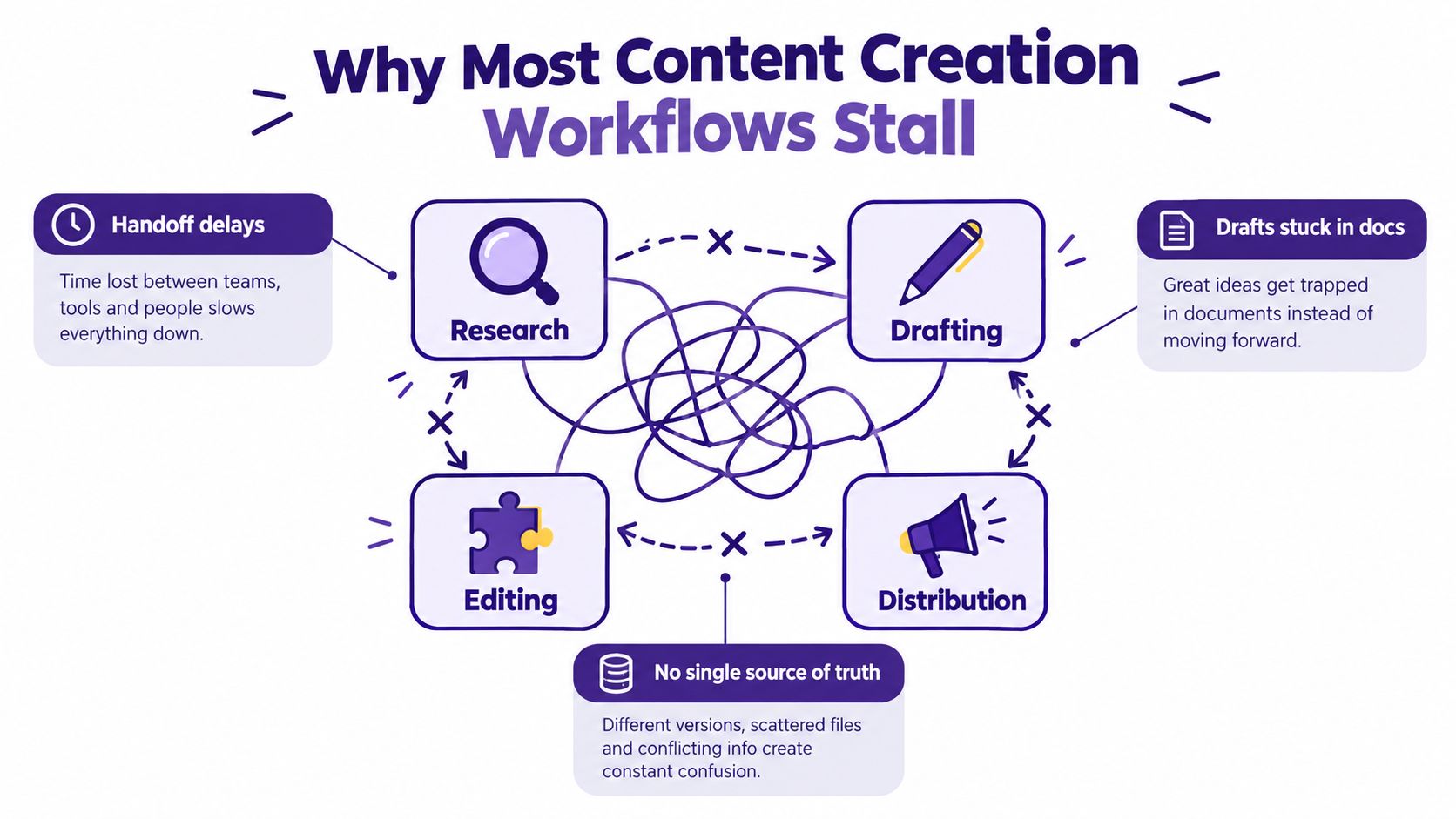
Why Most Content Creation Workflows Stall
Creator-led teams usually don't fail because they lack tools. They fail because every tool solves one narrow task while nobody owns the movement between tasks. A researcher works in one application, a writer drafts somewhere else, an editor leaves comments in a third place, and the distribution lead discovers the asset only after the planned publishing date has passed.
The pattern is predictable:
- Research gets repeated: The podcast producer, video creator, and blogger each gather sources for the same topic.
- Drafts get stranded: A document reaches “almost finished” status, but nobody knows whether it needs editing, fact-checking, or approval.
- Distribution starts too late: Social posts and newsletter adaptations become rushed summaries instead of planned derivatives.
Three root causes sit underneath the mess.
The missing source of truth
Your team needs one approved brief that contains the audience, angle, evidence, format, channel, owner, and success metric. That brief should remain connected to every derivative asset. Without it, each format slowly develops its own interpretation of the original idea.
Ownership disappears between stages
A writer may own the draft, but who owns the handoff to SEO? Who sends the revised script to the video editor? Who decides whether a factual concern requires a rewrite or a legal review? If the answer is “whoever notices it,” the workflow has no real owner.
Done means something different to everyone
A creator may consider an article done when the prose reads well. An editor may still need source links, metadata, alt text, internal links, and compliance approval. Define “done” as a gate with visible requirements, not as a feeling shared in a chat thread.
A unified workspace doesn't mean every contributor does everything. It means audio, video, written content, and social output are downstream artifacts of one brief, rather than parallel tracks competing for attention. If you're comparing practical approaches to connecting creation tasks, boost content workflow with revid.ai offers another useful perspective on structuring production around repeatable outputs.
The Four Stages Every Workflow Needs
A practical content creation workflow has four stages: Ideation and Brief, Production, Review and QA, and Distribution and Repurposing. Each stage accepts a defined input, produces a specific artifact, and has one role responsible for moving the work through its exit gate. The four-stage structure aligns with the commonly used sequence of research, drafting, review, and publishing described in this workflow guide.
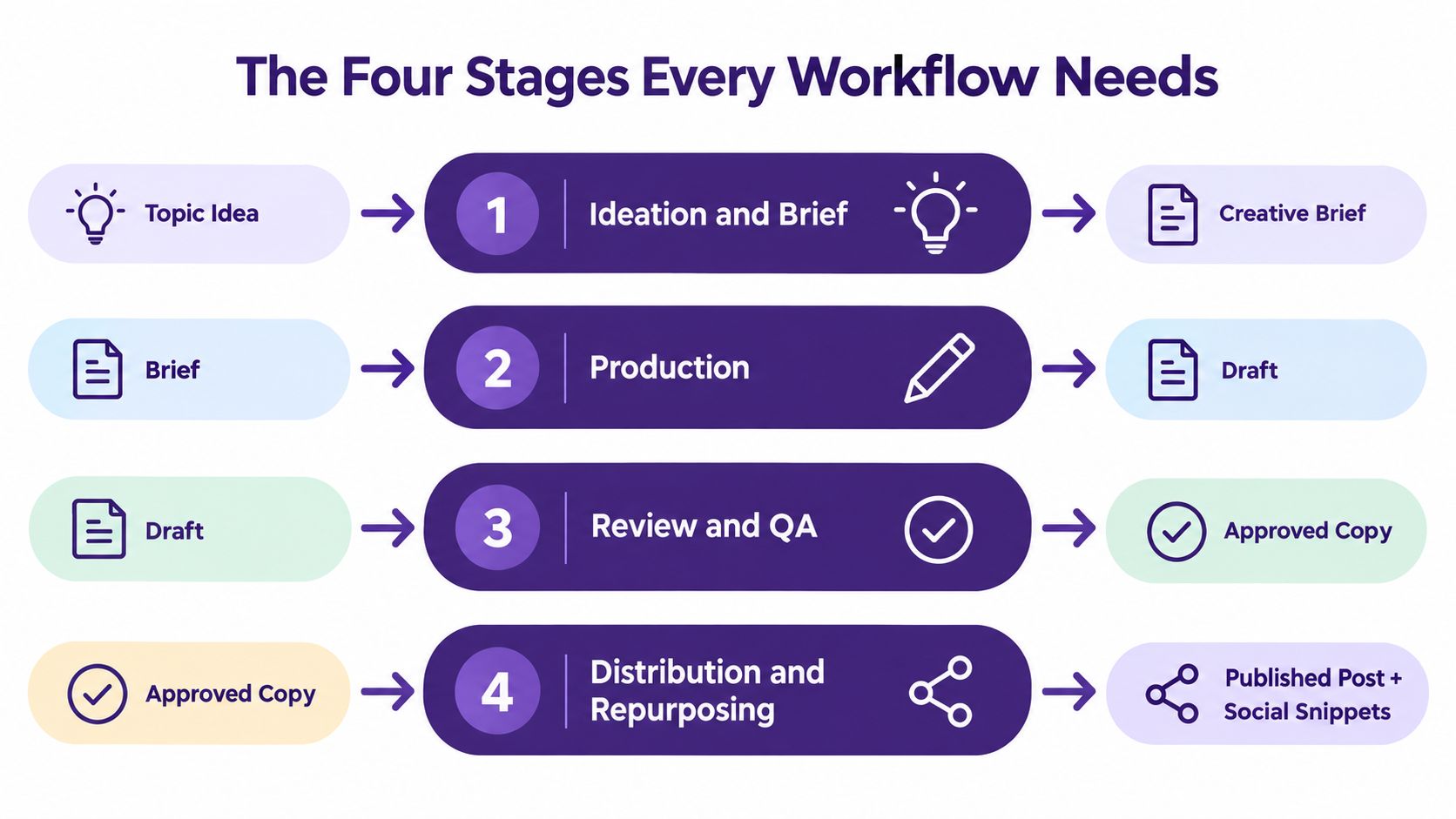
1. Ideation and Brief
Input: audience research, existing library insights, and business goals.
Output: an approved creative brief.
Handoff owner: Content Strategist.
The strategist turns a loose idea into a decision-ready brief. It should state the audience, central angle, proof points, format, primary channel, supporting channels, desired action, and success metric. A topic such as “how creators use AI” isn't ready for production until the team knows whether it's becoming a podcast discussion, a YouTube tutorial, a newsletter analysis, or a coordinated package.
2. Production
Input: approved brief.
Output: draft asset or draft asset package.
Handoff owner: Producer.
The producer assigns the work, resolves dependencies, and protects the brief from scope drift. The creator's job is to make the first viable version, not to polish every sentence before anyone can review it. Production may include a script, recording, transcript, article draft, thumbnail direction, or source file package.
3. Review and QA
Input: draft asset.
Output: approved copy or approved media.
Handoff owner: Editor.
This is the quality gate. Review should cover factual accuracy, cited evidence, brand voice, readability, SEO structure, accessibility, legal concerns, and format requirements. An editor should use a rubric so the team can distinguish a correctable issue from a strategic problem.
4. Distribution and Repurposing
Input: approved source asset.
Output: published primary asset plus owned derivative assets.
Handoff owner: Distribution Lead.
Publish the primary asset once, then create channel-specific adaptations from the approved source. A short video needs a different opening from a newsletter segment, and a social post needs a different level of context from a blog introduction. The distribution lead tracks owners, deadlines, links, and post-publish results.
Operational rule: Every stage has one exit gate. If work fails that gate, return it to the stage that created the gap. Don't push unfinished problems downstream.
Teams that need a more detailed system for briefs, approvals, and handoffs can review editorial workflow management software as part of their process design.
Defining Roles and Decision Rights
A shared workspace works only when collaboration doesn't erase accountability. I use five core roles for creator-led teams, even when one person performs several of them. The roles may overlap in staffing, but their decision rights must not overlap.
Five roles with separate lanes
| Role | Decision Rights | Stage Ownership |
|---|---|---|
| Content Strategist | Owns topic priority and brief approval. Recommends audience angle and content positioning. Defers production timing to the Producer. | Ideation and Brief |
| Producer | Owns calendar, dependencies, assignments, and stage gates. Recommends resource changes. Defers creative execution to the Creator. | Production operations |
| Creator | Owns craft, structure, delivery, and voice within the approved brief. Recommends creative alternatives. Defers factual, legal, and publish-readiness decisions to the Editor. | Draft creation |
| Editor | Owns quality gates, source verification, brand consistency, and publish readiness. Recommends revisions. Defers channel packaging and scheduling to the Distribution Lead. | Review and QA |
| Distribution Lead | Owns channel selection, repackaging, scheduling, and performance review. Recommends future distribution choices. Defers strategic topic priority to the Strategist. | Distribution and Repurposing |
The strategist shouldn't rewrite a creator's sentences because they'd choose different wording. The creator shouldn't overrule an editor on whether a claim has adequate support. The distribution lead shouldn't change the article's central promise after production has started without sending the brief back for approval.
A practical RACI-style rule
For each decision, assign one Accountable owner. Contributors can be Responsible, Consulted, or Informed, but only one person owns the final call. This is especially important for titles, factual claims, compliance flags, publish dates, and repurposing priorities.
Use a shared workspace where roles collaborate in common rooms but retain separate lanes. The project should show who approved the brief, who delivered the draft, who cleared the review, and who scheduled distribution. A clear project management and collaboration workflow can make these decisions visible without forcing every discussion into meetings.
Two roles cannot own the same decision. Shared ownership sounds collaborative, but it usually produces stalled handoffs, duplicate edits, and approval loops.
Where AI Belongs in the Workflow
AI belongs in the workflow wherever the task is repetitive, pattern-based, or easy for a human to verify. It shouldn't own strategy, factual sign-off, or publication. The latest industry evidence points toward that human-in-the-loop model: a 2026 publisher survey reported that 72% of publishers use AI tools in editorial workflows, with 31% using AI for first-draft generation and 41% limiting AI to research and outline assistance. The same source reported that AI-assisted content with human editing earned 12% more citations in AI search results than purely human-written content, while the average cost of a 2,000-word article fell from $480 to $268 since 2024. See the publisher workflow findings for the full context.
Assign AI tasks, then assign human checkpoints
| Stage | AI Tasks | Human Checkpoint Required | Audit Artifact |
|---|---|---|---|
| Strategy | Topic clustering, gap analysis, seed-keyword brief generation | Strategist reviews audience fit, angle, evidence, and priority | Prompt, output, approved brief |
| Creation | Outlines, transcripts, captions, B-roll shot lists, draft transformations | Creator and editor reshape the material into brand voice | Source file, prompt, revised draft |
| Review | Grammar checks, SEO scoring, claim comparison against cited sources, plagiarism checks | Editor makes the final quality and factual decision | QA report, source links, approval log |
| Distribution | Platform variants, scheduling suggestions, asset tags, metadata drafts | Channel owner approves wording, timing, and destination | Final variant, schedule record, approver |
AI adoption is broad, but full-process integration remains limited. Adobe's 2025 global creator study reported that 86% of creators use generative AI, while only 24% use it across the full creative process; the study also reported use for ideation at 37% and editing at 26%. That gap explains why teams often feel faster in isolated tasks while still experiencing slow handoffs across the whole operation. The AI content creation for marketers guide is useful for mapping specific marketing tasks before you automate them.
Governance rule: AI never publishes or signs off on factual claims without human review.
Log prompts, outputs, source material, revisions, and approvers in a shared sheet or project record. This creates an audit trail for hallucinations, tone drift, unsupported claims, and weak outputs. It also shows where AI creates genuine value rather than merely adding another review burden.
Distinguish orchestration AI from generative AI. Orchestration AI routes work, assigns tasks, detects missing inputs, and moves assets between stages. Generative AI drafts, summarizes, transforms, and creates variants. The first manages the system. The second creates material inside the system. A collaboration model such as human and AI collaboration keeps those responsibilities clear.
Pre-Publish Checklist and KPIs That Matter
Pin this checklist inside your project tool. Don't bury it in an onboarding document nobody opens after the first week. Editorial operations commonly use explicit checkpoints from idea approval through performance review, and a practical team workflow may include at least 13 checkpoints, including brief approval, drafting, editing, SEO review, asset preparation, CMS upload, pre-publish QA, distribution, and performance review, as outlined in this editorial workflow checklist.
Editor-owned checks
- Brief alignment: Confirm the asset matches the approved audience, angle, format, channel, and success metric.
- Source integrity: Verify every factual claim and attach its source link.
- Voice and readability: Complete the brand voice pass and resolve awkward or unclear passages.
- SEO structure: Set the meta title and description, confirm heading logic, and add required internal links.
- Accessibility: Write useful image alt text and check captions or transcripts where applicable.
- Compliance: Clear legal, rights, and regulatory flags before publication.
Distribution-owned checks
- Channel variants: Adapt the approved asset for each selected platform rather than copying the same text everywhere.
- Metadata: Confirm titles, descriptions, tags, thumbnails, links, and calls to action.
- Scheduling: Record the publication time, destination, and responsible channel owner.
- Approval record: Log the approver's name before the asset enters the publishing queue.
Track operational health
The useful KPIs measure friction and output quality, not applause:
- Brief-to-first-draft time: How long production takes after the brief is approved.
- Review cycle count: How many revision rounds an asset needs.
- Approval-to-publish lag: Whether approved work is sitting idle.
- Publish-to-index time: How quickly search engines make the asset discoverable.
- Organic traffic per asset at 30 and 90 days: Whether the library earns sustained attention.
- Repurposed asset count per pillar piece: Whether the team extracts more value from finished work.
- AI-generated content percentage kept under human review: Whether automation remains governed.
Define content velocity as:
Assets shipped per producer per week × average 90-day traffic per asset
Review the fixed dashboard weekly in a short meeting. Assign one owner to each metric, discuss the largest variance, and change one workflow decision at a time. A sprawling report hides bottlenecks. A stable dashboard exposes them.
Use this short video as a practical visual companion while you turn the checklist into a repeatable publishing habit:
Common Workflow Pitfalls and How to Fix Them
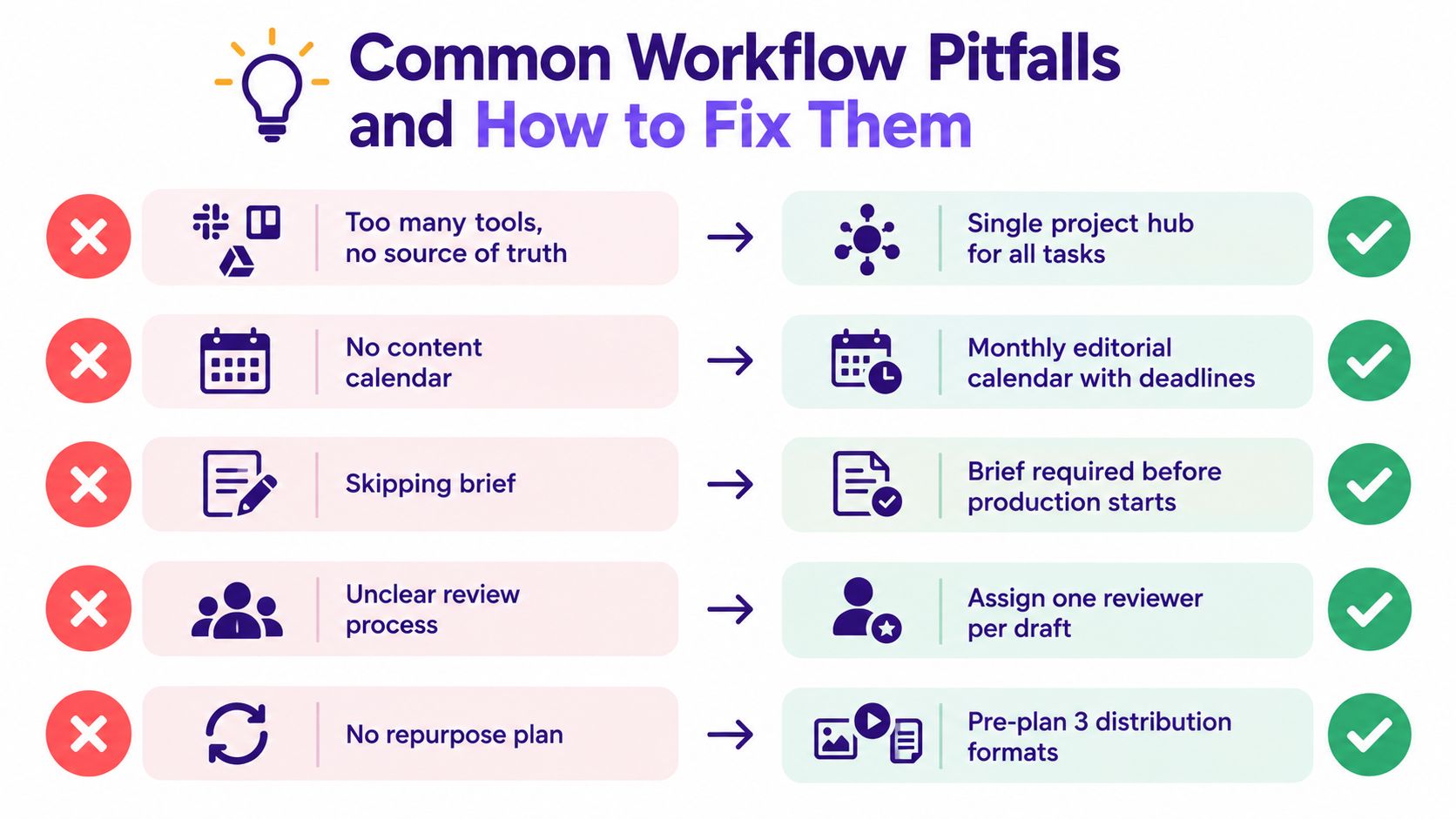
I've seen creator-led teams add software to solve problems caused by unclear decisions. More tools rarely repair a broken content creation workflow. They usually create another place for work to disappear.
Pitfall one, too many tools and no source of truth
Fix: Choose one project hub, one document system, and one digital asset manager. Retire redundant tools within 30 days. Keep the system that makes ownership, status, files, and approvals easiest to inspect.
Pitfall two, approvals routed through chat
A thumbs-up in a direct message isn't a durable approval. It has no reliable context, timestamp, or visible relationship to the final file.
Fix: Put every approval in the project tool with the asset version, approver, timestamp, and decision. Keep chat for discussion, not governance.
Pitfall three, briefs that read like wishes
“Make something engaging for creators” isn't a brief. It gives the writer no audience boundary, proof standard, format constraint, or definition of success.
Fix: Require the audience, angle, proof points, format, channel, and success metric before production starts. If one of those is missing, the strategist hasn't approved the work.
Pitfall four, no repurposing plan at brief stage
Teams often finish a video or article, then ask what else they can make from it. By then, they may not have captured clean pull quotes, source data, transcript sections, or usable B-roll.
Fix: List derivative assets in the brief. Ask production to capture the materials those derivatives require during the first pass.
Pitfall five, reviewing KPIs too late
A quarterly review tells you that a process has been broken for weeks or months. It doesn't tell the producer which handoff failed last Tuesday.
Fix: Review the seven operational and performance metrics from the previous section every week. Give each metric a named owner and record the decision made from the result.
Enterprise teams add further sign-offs when the subject requires them, including editorial, subject matter expert, legal or compliance, final approval, production, publication, distribution, and performance monitoring. That layered model is useful when claims or rights create material risk, but small teams should add only the gates they can operate consistently.
The workflow is a contract. Every handoff needs a written input, a named owner, and a visible exit condition.
Repurposing as the Compounding Engine and a 30-Day Rollout
Repurposing shouldn't begin after publication. It belongs in the brief, because the source asset determines what derivatives the team can create efficiently. A long-form article, podcast episode, or recorded webinar should act as a pillar asset, with each derivative given its own angle, audience context, and channel purpose.
A single 2,000-word pillar can produce:
- Short-form video scripts: Extract one problem, example, or method per script.
- Quote cards: Select precise, self-contained ideas that make sense without the full article.
- Newsletter segments: Add context and a reason for subscribers to continue reading.
- Threaded social posts: Break the argument into a sequence with a clear opening and final action.
- Search updates: Turn newly verified insights into revisions to related library assets.
The Distribution Lead owns the repurposing handoff, but the Producer must capture the required source materials during production. If you're working with technical material, content repurposing for developers offers a useful way to think about adapting one source for different audiences without flattening its meaning.
A 30-day rollout
Week 1, audit and simplify. Map the current path from idea to publication. Identify duplicate research, stalled approvals, private documents, and unused software. Select the project hub and name one workflow owner.
Week 2, document and assign. Write the four stages, define each exit gate, assign the five roles, and publish the pre-publish checklist. Use one active content track for the first implementation rather than redesigning every format at once.
Week 3, pilot AI carefully. Apply AI-assisted research and drafting to one track. Require prompt, output, source, revision, and approver logging. Keep human review on every factual claim and every final asset.
Week 4, measure and lock. Review cycle time, approval latency, repurposing ratio, and the dashboard metrics. Remove steps that add no control, repair the handoff causing the most delay, and lock the revised standard operating procedure.
The strongest sign of derivatives per pillar asset per month is when a workflow has moved beyond raw output and one well-produced asset consistently generates a meaningful family of useful formats, instead of disappearing after its first publication.
Contesimal helps creators and content organizations classify, organize, and search documents, podcasts, videos, and articles so existing libraries can inform new work. Visit Contesimal to explore a human and AI collaboration system for turning organized content knowledge into briefs, derivatives, and repeatable production workflows.