
You've got hundreds of posts, videos, or episodes sitting in a library that still feels strangely useless. The team remembers the hits, forgets the rest, and every new campaign starts with the same question, what should we reuse, what should we update, and what can make money now?
A content strategy template gives that library a job. Instead of treating old work like a pile of leftovers, it turns the archive into a system for deciding what to publish, what to keep, what to improve, and what to distribute again across channels. That shift matters because modern templates are no longer simple calendars, they're operational systems that combine audits, governance, distribution, and measurement, the same workflow shape you see in major template guidance from Smartsheet, Content Marketing Institute, and other frameworks used by content teams.
Why Your Content Library Is Sitting on Hidden Revenue
A podcaster can sit on 300 episodes and still feel stuck. The show has an audience, the feed has history, but the archive isn't organized well enough to tell which episodes should become clips, which ones deserve updated show notes, and which topics could support brand deals or lead magnets. The same problem shows up with YouTube channels, blogs, and publisher libraries, lots of output, not enough structure.
A content strategy template fixes that by turning the archive into a decision system. Modern frameworks consistently define the work as a sequence of goals, inventory, planning, promotion, and measurement, and template providers now treat traffic, page views, bounce rate, time on site, social shares, and lead generation as normal performance measures, not afterthoughts. That evolution is visible in Smartsheet's five-step framework, which treats the template as a management system rather than a calendar, and it lines up with how Content Marketing Institute frames the content inventory and audit as the base for evaluating asset value over time.
What changes when the archive gets organized
Once the library is mapped, the business conversation changes. A creator can look at a backlog of interviews, tutorials, or explainers and decide which assets support new campaigns, which ones fit a stronger format, and which ones should be retired because they no longer match the brand. That's the practical difference between “we have content” and “we have a content operation.”
Practical rule: if the team can't point to the inventory, it usually can't defend the update plan.
This is also where the template starts acting like infrastructure instead of paperwork. A good example is the kind of library-first thinking discussed in this Contesimal article on maximizing ROI from your content library, because the opportunity isn't just publishing more, it's making older work searchable, classifiable, and reusable. For creators moving from hobbyist to revenue-generating operation, that structure is what lets a back catalog become an asset instead of a memory.
Building Your Quantitative Content Inventory and Qualitative Audit
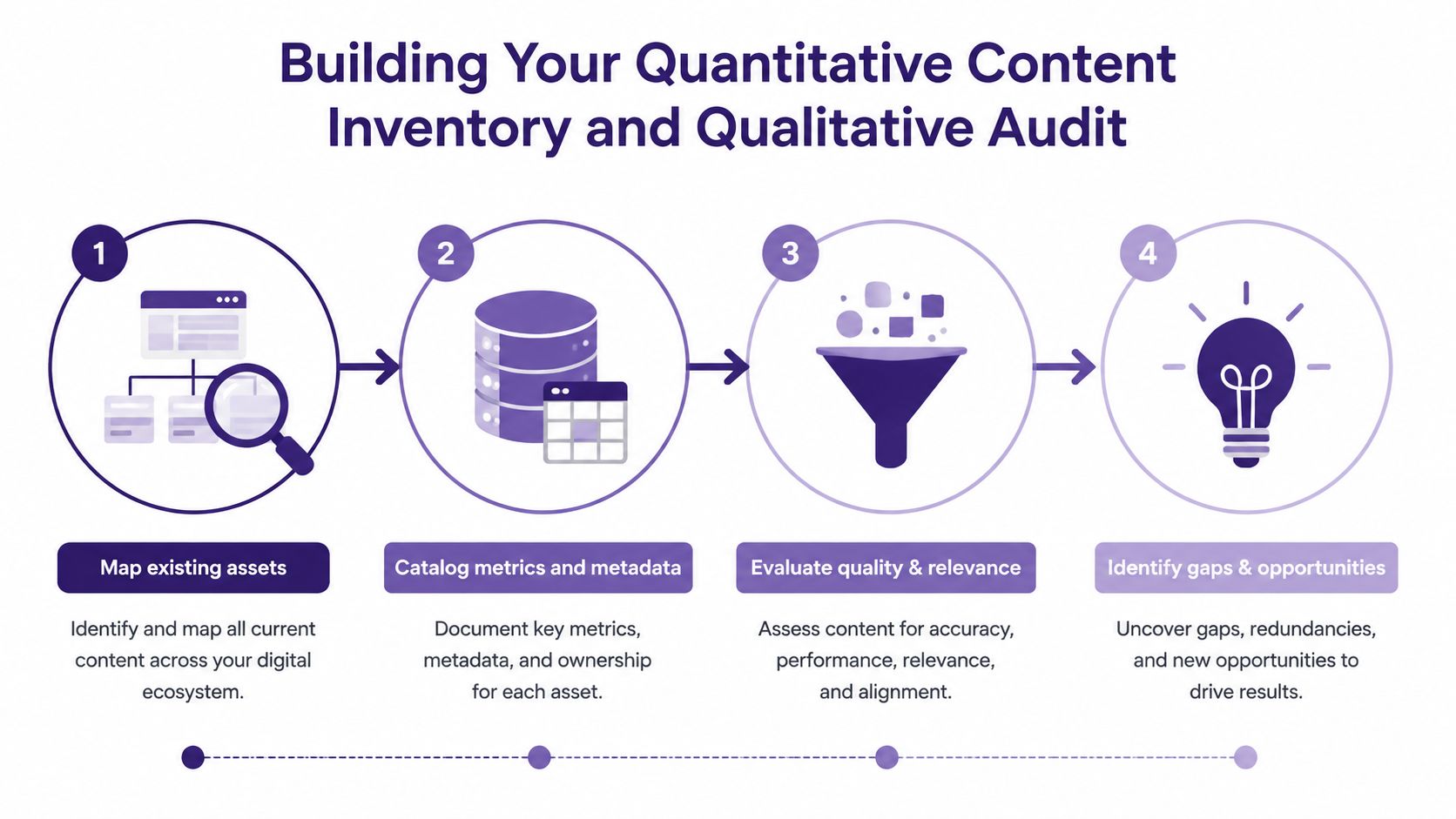
Start with the inventory, not with ideas. A strong template begins by capturing the facts you'll need later, URLs, metadata, links, author, last-updated date, and target keywords, then layers on a qualitative audit that checks quality, accessibility, brand fit, traffic performance, and audience relevance, the sequence described in Moz's content strategy template guidance.
The fields to capture first
For mixed libraries, the inventory needs to be boring and consistent. A spreadsheet or database should track what each asset is, where it lives, who created it, when it was last updated, and what topic or keyword it targets. That gives you one baseline for podcasts, videos, articles, newsletters, and research assets without forcing each format into a different system.
The mistake is jumping into repurposing before the archive is mapped. At that point, teams confuse underperforming content with missing content, and they waste time refreshing the wrong assets.
A useful way to keep the inventory practical is to separate hard facts from judgment calls. Hard facts belong in the inventory. Judgment calls belong in the audit.
- Inventory fields: URL, title, format, author, date, topic, target keyword, primary channel.
- Audit fields: quality, clarity, accessibility, audience fit, brand alignment, performance, reuse potential.
- Decision fields: keep, update, combine, repurpose, archive.
How to handle a large library
When the archive is large, the work is classification. A podcast episode might become a blog post, a short clip, a newsletter excerpt, or a research summary, but only if someone has tagged it correctly. That's why Traffic Think Tank's template guidance matters, it explicitly starts with exporting the full URL list, then using that inventory to identify gaps, priorities, and what should be removed or kept.
If the library spans different formats, don't audit everything with the same depth on day one. Triage the content into high-value, moderate-value, and low-value groups, then audit the high-value assets first. For teams that need a reusable operating system for this stage, this content inventory template guide is a useful companion reference because it reinforces the move from unstructured archive to measurable baseline.
The Core Content Strategy Template Structure
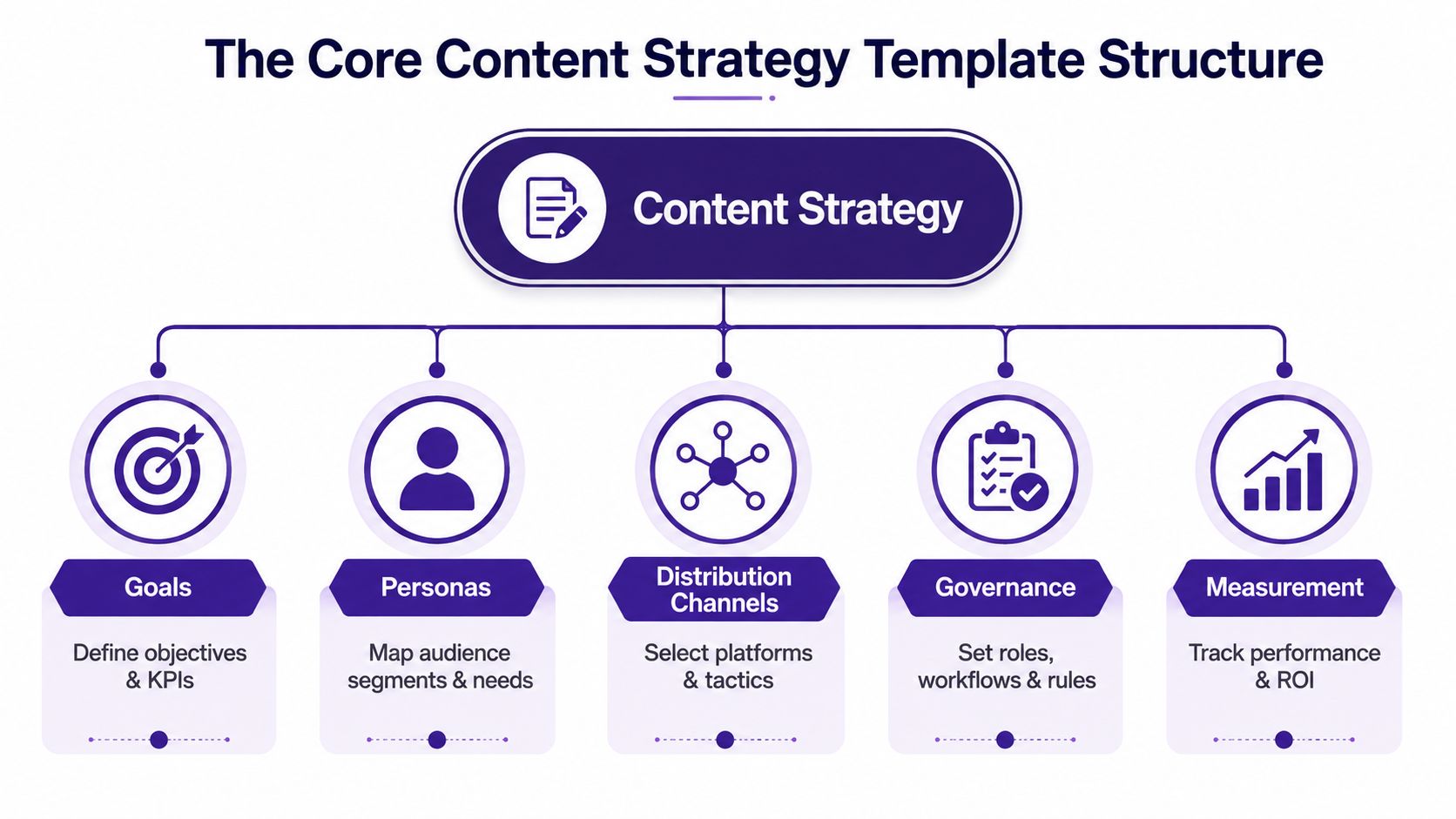
A template only becomes useful when it binds the whole workflow together. The strongest versions don't separate goals, audiences, channels, governance, and measurement into disconnected docs, they force those pieces into one working system, which is exactly how Mural's content strategy template and Canva's enterprise content strategy guidance describe strategy as a document that helps teams plan, create, distribute, manage, and govern audience-targeted content.
A simple one-page structure that actually works
A one-page strategy can stay lean and still be operational. It should include high-level goals, the metrics that show success, a rough growth forecast, a 3-month content calendar, the main distribution channels, and a measurement cadence, which matches the rule described in Superpath's one-page strategy template. That format helps teams move fast without losing governance.
Here's a practical filled-in example for a publisher or creator team:
- Goals: grow repeat visits, improve content reuse, support revenue conversations.
- Personas: loyal readers, podcast listeners, first-time visitors, brand partners.
- Distribution channels: website, newsletter, YouTube, LinkedIn, podcast feed.
- Governance: one owner for approval, one owner for tagging, one owner for reporting.
- Measurement: weekly checks for distribution, monthly review for performance patterns.
Why ownership and outcomes have to be defined together
If the goal says “grow audience” but nobody owns search optimization, promotion, or updates, the plan stalls. If the channel is chosen before the audience is defined, the strategy drifts into busywork. Mural's framework is useful here because it sequences initiatives, goals, metrics, audiences, channels, timeframes, and ownership in a way that makes execution possible.
For creators building a thought-leadership library, plan your Forever Book positioning can help frame long-form assets as durable authority pieces instead of one-off posts. That kind of positioning pairs well with strategy templates because it pushes the team to treat content as a reusable business asset, not just a publishing task.
A strong template also reflects a quality standard. Canva's guidance describes content as valuable, relevant, and consistent, which is the right lens for teams deciding whether a back-catalog episode belongs in the next campaign or needs a deeper rewrite.
Filled-In Template Examples for Podcasters, Bloggers, and Video Creators
The same template behaves differently depending on the library. A podcaster, a blogger, and a video creator all need goals, personas, channels, governance, and measurement, but they don't fill those fields in the same way. That's where teams get clarity, because the framework stays fixed while the content plan changes.
| Template Field | Podcaster Example | Blogger Example | Video Creator Example |
|---|---|---|---|
| Primary goal | Turn evergreen episodes into clips, blog posts, and sponsor-ready topic clusters | Refresh underperforming articles and strengthen organic discovery | Organize playlists into repeatable themes and expand cross-platform reach |
| Audience | Listeners who want practical, searchable advice and short takeaways | Search-driven readers looking for updated answers | Viewers who binge by topic and follow creators across platforms |
| Best distribution channels | Podcast feed, YouTube Shorts, newsletter, LinkedIn | Blog, newsletter, search, social syndication | YouTube, Shorts, TikTok, Instagram Reels |
| Governance rule | Only repurpose episodes after topic tags and guest permissions are confirmed | Only update pages with a clear owner and a revision note | Only publish cuts that match the playlist theme and brand format |
| KPIs | Reuse rate, clip performance, subscriber growth, referral traffic | Organic traffic, page views, time on site, internal links | Watch time, playlist retention, shares, cross-platform clicks |
A podcaster transitioning from hobbyist to professional usually starts with the archive. The most useful episode is often the one already proving interest, so the template should flag strong conversations, recurring guest patterns, and topics that can be split into multiple formats. The revenue angle comes from packaging those assets better, not from chasing novelty every week.
A blogger with a deep archive needs a different posture. The job is less about creating from scratch and more about sorting old posts by utility, which ones deserve a rewrite, which ones should be merged, and which ones should be left alone. A content marketer in that situation should pair the template with the kind of content audit workflow discussed earlier, then use the data to choose the next update cycle.
For video creators, the template becomes a programming tool. Playlists and thematic buckets give the channel a structure that viewers can follow, and the governance rules keep random one-off videos from diluting the brand. That's the difference between a content pile and a content library with editorial intent.
KPIs and Measurement That Actually Prove Content Value
Vague goals kill content strategy. “Increase engagement” sounds nice, but it doesn't tell a team what to fix, what to keep, or what to stop funding. Leading templates now track a wide mix of business indicators, including 5 marketing KPIs, 10 SEO KPIs, 8 PPC KPIs, 6 social media KPIs, 7 email KPIs, and 8 website KPIs, according to the KPI-heavy template set in this content strategy template resource.
Match the metric to the job
For awareness, track the indicators that show discovery and visibility. Smartsheet's framework highlights web traffic, page views, bounce rate, time on site, social shares, and lead generation outputs as standard measures, and those are the right starting points for libraries that need proof of reach.
For engagement, look at the signals that show attention and interaction. The same KPI set from the template resource above includes click-through rate, open rate, organic traffic, keyword rankings, bounce rate, and referrals or backlinks, which gives you enough detail to compare formats without relying on vague sentiment.
For lead generation, the best metrics are the ones that connect content to next-step behavior. Form completions, email subscribers, conversion rate, and assisted actions matter because they show whether the content is moving someone closer to a relationship with the business.
Measurement rule: if a metric doesn't change a decision, it doesn't belong in the main dashboard.
Keep the reporting rhythm simple
A good cadence helps teams stay honest. Monthly review is usually enough to see patterns without overreacting to daily noise, which lines up with the regular reporting approach in Siteimprove's framework. Weekly checks can still make sense for launches or promotions, but the strategy review itself should look for trends across time periods, channels, and formats.
The value of measurement is comparison. Once old content is tagged, updated, and redistributed, teams can see whether the new version earned more traffic, stronger retention, or better downstream action than the original. That turns the archive into a test bed instead of a museum.
Rollout Checklist and AI Governance for Modern Content Teams
A content strategy template only works when the team applies it the same way every time. Start with a clear workflow, inventory, audit, plan, create, distribute, review, then define who owns each step, which channels are in scope, and how results will be judged. For larger libraries with recurring topics and mixed formats, that discipline keeps the archive from sliding back into disorder after the first round of cleanup.
A practical rollout sequence
- Complete the content inventory: capture the URLs, titles, formats, and metadata before approving new work.
- Run the audit: classify quality, brand fit, audience relevance, and reuse potential.
- Set the template rules: define goals, personas, channels, owners, and the reporting cadence.
- Launch one pilot lane: repurpose a narrow slice of the library first, then compare outcomes.
- Review the results: update the taxonomy, retire weak fields, and tighten the approval path.
AI governance now matters as much as planning. The question is how to control AI use inside the template, because many templates stop at ideation and leave out the harder work of classifying AI-assisted assets, preserving editorial review, and tracking whether AI improved reuse, speed, or performance. That gap shows up in Relato's content strategy template discussion, and it is where a team should add a review layer for source classification and human approval.
For teams that need a structured way to support research collaboration and library classification, Contesimal is one tool that helps organize and search large sets of documents, podcasts, videos, and articles while keeping human and AI contributors in the same workflow. The goal is not automation for its own sake, it is keeping the archive searchable, governed, and measurable as the team grows.
This RFI template guide is useful when the content operation needs tighter internal coordination across stakeholders, because large libraries usually stall when ownership is fuzzy and review requests drift. Build the process so that quarterly reviews are routine, not a crisis response. Use the same discipline when you adapt old episodes, blog archives, and video back catalogs into new revenue paths.
If your content library feels bigger than your process, Contesimal can help you turn old posts, podcasts, and videos into a structured, searchable system for reuse and measurement. Visit it if you want a practical way to organize archival content, classify assets, and build a clearer path from research to revenue.