
Most creators are sitting on a customer experience goldmine and calling it an archive. Every old episode, article, clip, comment thread, and search query contains clues about what audiences wanted, where they hesitated, and what made them return. CX has also stopped being a soft brand conversation, major data now ties it directly to revenue, with companies that focus on CX seeing an 80% increase in revenue and 60% higher profits, while 73% of customers say CX is the number one factor in buying decisions (Zendesk).
That matters for publishers and creators because the experience doesn't start when someone subscribes or buys. It starts when they discover a title, skim a transcript, bounce from a playlist, or search for a topic you already covered. If the library is messy, those signals get lost. If it's organized, they become customer experience insights you can use to repurpose smarter, monetize older assets, and create the next piece with more confidence. A useful framing for that shift is the idea of building new value from what you already own, which is why content libraries deserve the same strategic attention as any other revenue system, as outlined in this guide on content libraries and brand relationships.
Why Your Content Library Is a Customer Experience Goldmine
The biggest mistake creators make is treating archives like storage instead of evidence. A back catalog is not just old work sitting in folders, it records how people found you, what they ignored, what kept them engaged, and where the relationship broke down. Read that way, the library stops being a graveyard and starts acting like a field report.
For creators and publishers, the business case is plain. Audience experience shapes whether people return, subscribe, share, or pay, and that comes from the quality of the path through your library, not from a slicker logo or a cleaner homepage. Older assets often reveal which topics earn trust, which formats create friction, and which entry points lead to revenue. That is where the practical value sits, and it is why a content library deserves the same attention as any other revenue system, as outlined in this guide on content libraries and brand relationships.
Content archives already contain experience signals
Every archive holds a trail of behavior. A podcast episode with high completion but low follow-up tells a different story than one with heavy clicks but shallow listening. A blog post that attracts search traffic but no return visits points to a relevance problem, not just a discovery win. Those signals are the raw material of customer experience insights, even if nobody labeled them that way when the content first shipped.
Emplifi estimates the global CX management market at USD 11.4 billion in 2023, projected to reach USD 20.4 billion by 2028 at 12.2% annually (Emplifi). The same source says 86% of consumers would leave after as few as two poor experiences, and 49% already left a brand in the past year because of poor CX. For content businesses, that is a warning sign. A weak archive experience can kill repeat attention long before anyone files a complaint.
Practical rule: if an old post still gets attention, but people do not move deeper into your library, the problem is not the topic. It is the path.
What Customer Experience Insights Actually Mean for Creators
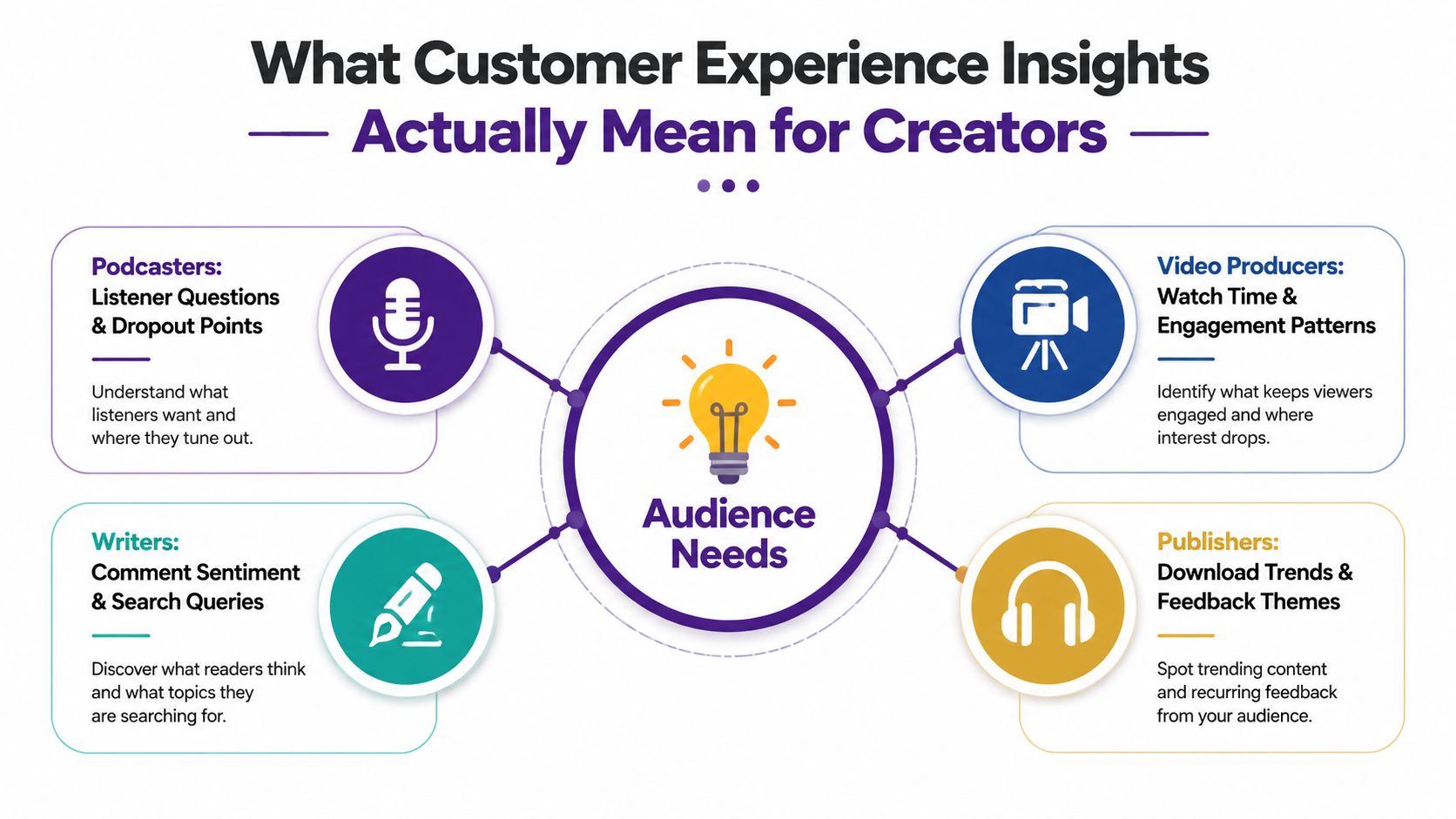
For creators, customer experience insights aren't call-center dashboards or generic NPS slides. They're the patterns you uncover when you study how an audience discovers, consumes, and revisits your work across formats. In plain terms, the question isn't “Did people like it?” The question is “What did they do next, and what does that tell us about what they needed?”
A useful analogy is this, traditional CX looks at a company's service desk, while creator-centric CX looks at the entire content journey. A listener might hear half a podcast episode, search for the guest name, then subscribe to the newsletter. A reader might skim a longform article, open three related links, then leave a comment that reveals what they're still trying to solve. Those are not vanity metrics. They're signals about intent, friction, and trust.
Surface metrics are not the same as experience insights
Page views, downloads, and impressions tell you that content got seen. They don't tell you whether the audience understood it, wanted more, or hit a wall. Real insight shows up when you connect behavior to context, for example, a playlist that keeps people moving across episodes, a recurring topic that sparks more questions than answers, or a format that consistently loses attention halfway through.
A strong working definition is simple. Customer experience insights are the repeatable patterns you find in audience behavior, feedback, and friction points that help you decide what to create, what to repurpose, and what to retire. That's much closer to a journey view than an isolated content view, which aligns with the customer journey focus in the Journal of Service Management paper on multi-touchpoint experience analysis (Journal of Service Management).
Data Sources and Methods for Extracting Audience Insights
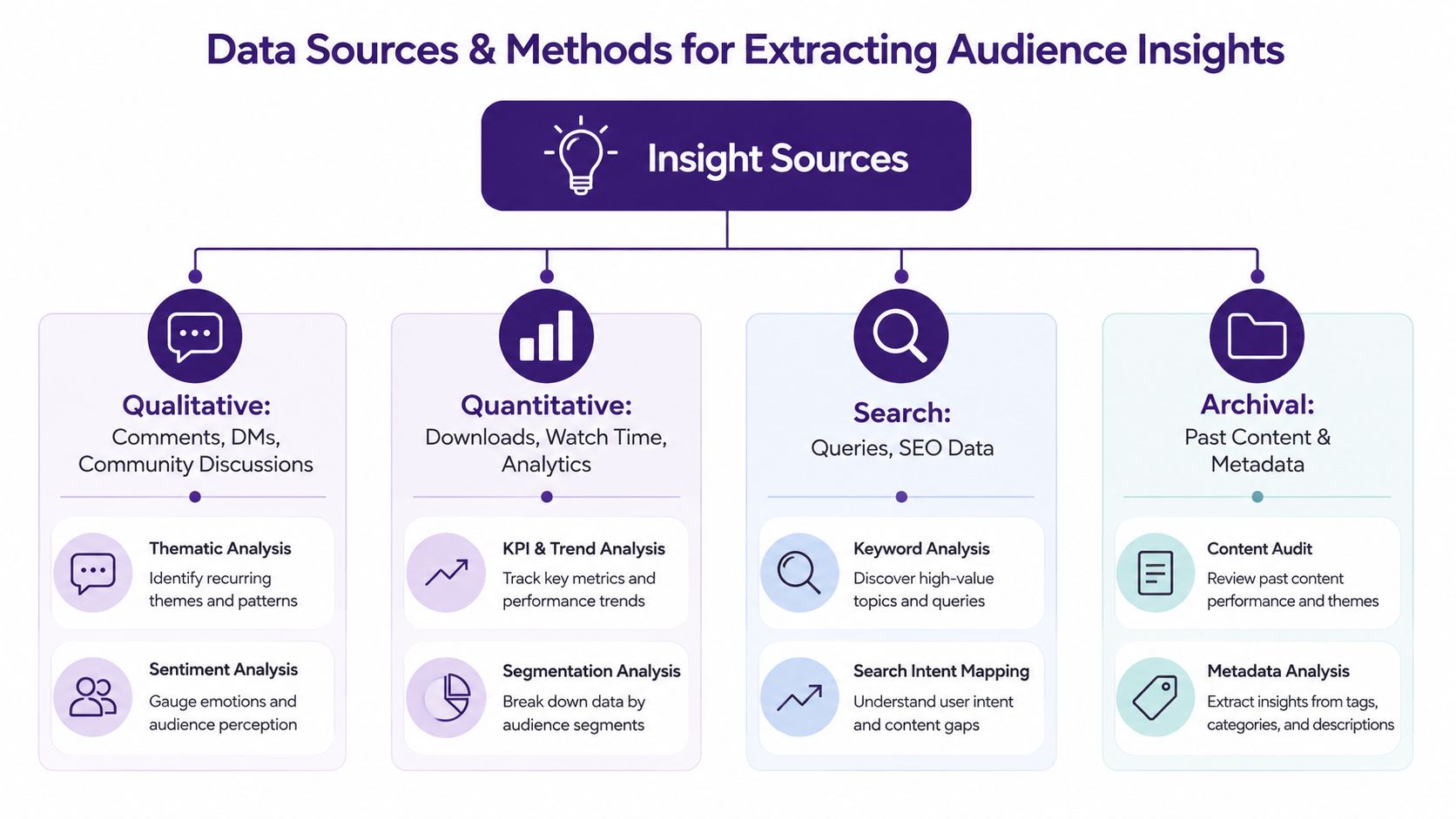
The best insight work starts by refusing to trust any single signal. Surveys matter, but so do comments, search queries, support tickets, and what people do on the page or in the player. If you only listen to self-reported feedback, you'll miss the silent majority who never fill out a form but leave very clear behavioral fingerprints.
Four signal types do most of the heavy lifting
Qualitative feedback comes from comments, DMs, community threads, and replies. Audiences say what they meant, often in messy language. Quantitative behavior comes from watch time, drop-off points, page depth, search queries, and repeat visits. That's where the actual journey shows up.
Support and interaction signals are the questions people ask when content isn't enough, for example, FAQ requests, email replies, and community follow-ups. These are especially useful for spotting confusion that never appears in public comments. Archival analysis uses old content, metadata, and topic history to spot repeated interests, neglected clusters, and repackaging opportunities.
The mistake is treating these channels as separate reports instead of one model. Quantum Metric recommends unifying feedback data, behavioral signals, support interactions, and digital performance data so analysts can see what customers said, what they did, and where the system failed (Quantum Metric). That same logic works for creators. You want the transcript, the click path, the search term, and the comment thread in one view.
For reputation-oriented feedback loops, the discipline is similar to the one used in reputation management tips from LPagery, because the point isn't just collecting opinions. It's turning them into a pattern you can act on.
The fastest useful workflow
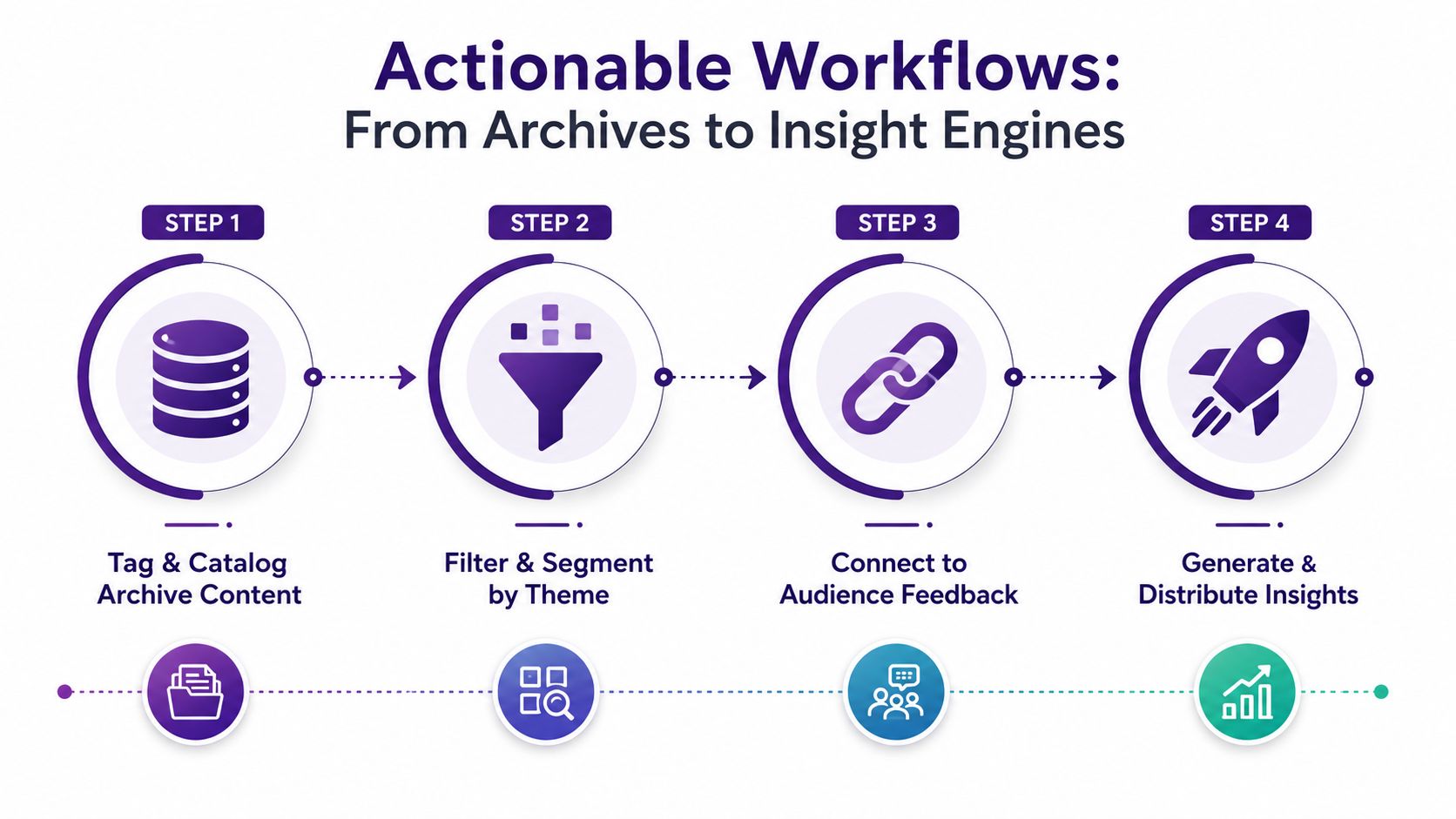
Start with a small corpus. Pull a few months of content, tag by topic, format, and audience intent, then compare what people said with what they consumed. After that, layer in support and search. The goal is to find mismatches, not just praise.
If you're already working through messy qualitative material, it helps to separate comments into themes before you argue about meaning, which is exactly why a structured process matters. A practical framework for that is covered in how to analyze qualitative data.
Actionable Workflows to Operationalize Insights From Archives
Insight doesn't change revenue until someone turns it into a repeatable workflow. A creator who does this well treats the archive like a searchable research engine, not a dump of finished work. The practical move is to organize content around audience language first, then map it back to internal categories later.
Build tags around audience intent
Start by tagging content with the words your audience would use, not the terms your team invented in planning meetings. A “behind the scenes” episode may belong in a cluster about process, workflow, or creator economics, depending on how listeners engage with it. That difference matters because people search and respond to meaning, not your folder structure.
Then segment by format and journey stage. A short clip, a long interview, and a recap post may all touch the same subject, but they serve different jobs. Tagging those distinctions gives you better repurposing options and makes it easier to see which format carries the strongest signal.
Keep one rule in mind, archives only become useful when someone can ask a question in plain language and get a relevant answer back quickly.
Use conversational research to surface hidden links
AI chat interfaces are useful here when they're tied to a clean taxonomy. Ask questions like which episodes led to the most follow-up questions, which articles attracted repeat searches, or which guest topics kept reappearing across formats. The point isn't to replace editorial judgment. It's to surface relationships that would take hours to find manually.
Then classify the results into reusable buckets, for example, recurring pain points, evergreen explanations, seasonal spikes, or cross-format opportunities. If your team can't describe the bucket clearly, it probably isn't a real category yet. The output should support decisions, such as what to update, what to bundle, and what to promote again.
If you need a tool example for integrations and workflow planning, a practical starting point is the integrations directory, because any archive workflow only works if your systems can talk to each other.
Video can help teams see the workflow in motion, especially when they're trying to move from theory into an operating rhythm.
Key Metrics and KPIs That Actually Drive Revenue
Vanity metrics are comforting because they move fast and look good in slides. Revenue-linked CX metrics are harder to manage because they force you to confront friction, churn risk, and the quality of the journey itself. For content businesses, the second category is the one that pays the bills.
| Metric Type | Vanity Example | Revenue-Linked CX Metric | Why It Matters |
|---|---|---|---|
| Traffic | Total views | Return frequency | Repeat visits show whether the audience trusts your library enough to come back |
| Consumption | Downloads | Completion rate or deeper session behavior | Shows whether the content held attention or just attracted clicks |
| Engagement | Likes | Cross-format movement | Reveals whether one asset leads naturally to another asset |
| Feedback | Positive comments | Customer effort score and friction themes | Helps identify where the experience feels hard, confusing, or slow |
| Loyalty | Subscriber count | Repeat purchase or renewal behavior | Connects experience quality to commercial outcome |
The trap is over-indexing on self-reported satisfaction while ignoring behavior. UQ Business warns against relying on a single metric and recommends combining quantitative measures like satisfaction, churn, and response time with qualitative comments and text mining to identify root causes (UQ Business). That advice is especially relevant for creators, because a happy comment on one post doesn't mean the audience will stay engaged with the next one.
Track the friction that predicts revenue
For service-heavy content businesses, first contact resolution, average handle time, queue abandonment rate, and customer effort score are useful because they tie operational friction to audience experience. Zoom's CX analytics guidance notes that FCR is one of the strongest predictors of CSAT, while CES is strongly correlated with churn risk (Zoom). For publishers and creators, the equivalent is whether people find the answer, follow the path, and stop needing to ask around for help.
Qualtrics adds a hard revenue link, reporting that a one-point increase in CX scores can generate over $1 billion in revenue, brands risk losing 9.5% of revenue on average because of poor CX, and 94% of customers rating a CX as “very good” were very likely to buy again, compared with 18% of those rating it “very poor” (Qualtrics). Those numbers are not creator-specific, but the direction is clear. Better experience changes repeat behavior, and repeat behavior is where library monetization lives.
Real-World Examples and Quick Wins for Content Creators
A podcast network I've seen work this way had a back catalog full of episodes that were doing fine individually but never grouped into a clear audience need. After sorting episode notes, guest themes, and listener questions, the team found an underserved cluster around one practical problem their audience kept returning to. They turned that cluster into a premium series, then repackaged the best moments into shorter clips and newsletter entries.
A digital publisher had the opposite problem, too many internal labels and not enough audience language. Search terms were pointing to topics the site already covered, but the content was buried under editorial taxonomies that made sense to staff and confused everyone else. Once the publisher restructured around audience search behavior, people found related articles faster, and the archive started acting more like a product than a warehouse.
Three quick wins that usually work
First, pull your top recurring comments and support questions into one sheet, then group them by intent. That tells you what people still don't understand.
Second, compare your highest-retention content against your strongest search terms. If the overlap is thin, you've got a repurposing opportunity.
Third, look for episodes, articles, or videos that create follow-up behavior. Those are the best candidates for premium bundles, sequels, or edited compilations.
A video creator can use the same playbook. Comment sentiment may reveal that the audience wants more tactical breakdowns, while watch-time data shows exactly where they stay engaged. That combination is enough to decide whether a long video should become a clip series, a transcript article, or a paid guide.
One practical option for teams that want to manage this kind of archive work is Contesimal, an AI content intelligence platform that helps organize, classify, and search historical libraries while teams review patterns across documents, podcasts, videos, and articles. Used well, that kind of system turns old content into a source of new decisions instead of a storage problem.
Tooling Considerations and Common Implementation Pitfalls
The wrong tool choice usually fails in the same boring ways. Teams buy survey software, collect a few polite responses, and assume they've solved CX. Or they build a taxonomy that mirrors the org chart instead of the audience's language, which makes the archive easy to manage internally and hard to use externally.
What good tooling needs to do
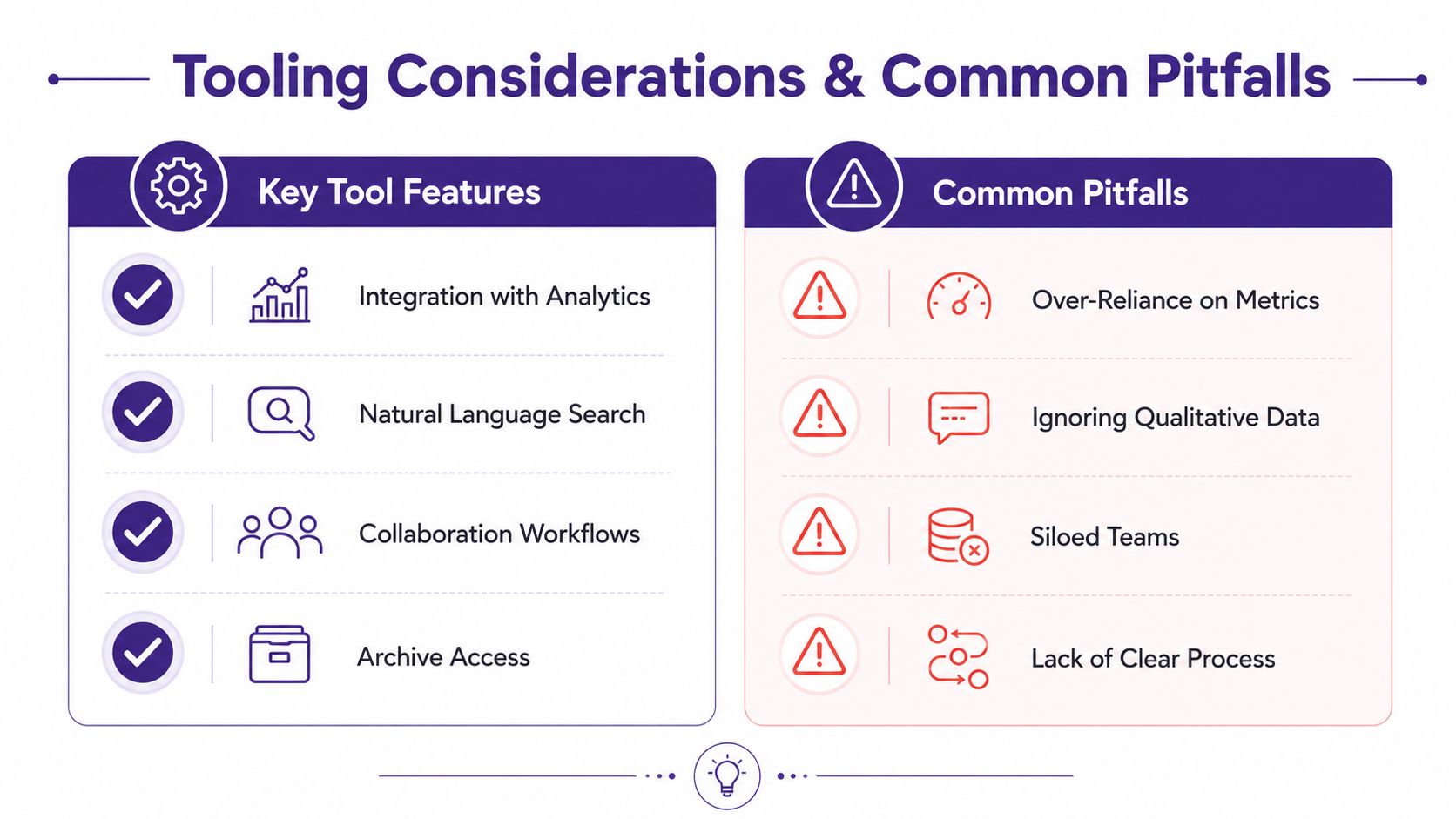
Look for tools that can search across content types, support layered tagging, and let humans and AI collaborate without making the workflow feel like a science project. If the system can't connect old episodes, articles, transcripts, and feedback in one place, the team will keep reverting to manual spreadsheets and fragmented notes. That's not insight operations, that's clerical drag.
A platform evaluation should also include the ability to surface qualitative themes and not just count them. The best systems help teams move from raw material to grouped patterns, then from grouped patterns to actions. If a tool can't show you where people get stuck or which topics keep resurfacing, it's probably optimized for reporting, not decision-making.
Practical rule: a useful CX stack makes the next action obvious. A pretty dashboard that no editor or producer uses is just expensive wallpaper.
Common mistakes that slow teams down
Over-relying on metrics is the first trap. Numbers without context can make weak content look strong, or hide the fact that strong content is hard to find. Ignoring qualitative data is the second trap, because the “why” usually lives in comments, transcripts, and replies.
The third trap is building separate systems for content, support, and audience research. That creates silos, which means the same problem gets diagnosed three different ways and solved none of them. The fourth trap is treating CX insights as a one-time audit. Audience behavior changes, search behavior changes, and your archive has to be reclassified as the business evolves.
For teams comparing tools and implementation models, the broader category discussion in Contesimal's content intelligence platform overview is useful because it frames the difference between simple storage and a workflow that supports analysis.
Your Next Steps to Transform Content History Into Revenue
The core move is simple, even if the execution takes discipline. Your archive already contains customer experience insights, but they only matter if you can organize them, understand them, and use them to make better repurposing decisions. The creators and publishers who win here won't be the ones with the most content, they'll be the ones who can turn history into a clearer next step.
A sensible 30-60-90 day approach looks like this. In the first 30 days, tag a manageable slice of the library around audience language and recurring themes. In 60 days, compare those clusters with comments, search behavior, and repeat engagement. By 90 days, turn the strongest patterns into repurposed assets, updated bundles, or premium offers that fit the audience's actual behavior.
Start with one content line, one audience segment, and one question that matters commercially. That's enough to prove whether the archive can produce useful signals or just more clutter. If the answer is clear, expand from there.
Contesimal helps teams organize content libraries, search across archival assets, and classify material so audience patterns are easier to spot. If you want to turn old episodes, articles, and videos into usable customer experience insights, visit Contesimal and see how the platform can support that workflow.