
You're trying to plan your next video, podcast episode, or article series, and you know you've covered the idea before. You can remember the conversation, the guest, maybe even the moment it clicked for listeners. What you can't remember is the exact title, date, or wording you used at the time.
You type the words you'd use today and get nothing useful back. That gap between how you remember an idea and how you originally worded it is exactly where search gets frustrating, especially once a library grows past a handful of pieces. Understanding What Is Semantic Search helps you close that gap, but it also helps you know when not to trust it. The useful question isn't whether semantic search replaces keywords. It's which method fits the query you're typing right now.
Semantic Search Defined in Plain Language
Say you're searching your archive for videos about feeling burnt out at work. Nothing is titled with those exact words, yet several episodes discuss exhaustion, overload, and struggling to keep up at the office. A good search should still find them.

Semantic search ranks content by its underlying meaning and the relationships between ideas, instead of relying only on exact word matches. Think of keyword search as a card catalogue that matches only the words printed on each card. Semantic search is closer to a librarian who knows that burnout, exhaustion, and feeling unable to keep up can point to the same topic.
Three everyday examples
- Different words, same topic: A query for car coverage finds an article titled auto insurance.
- A rephrased question: You ask why your team feels tired on video calls, and it finds an episode about remote meeting fatigue.
- A vague theme: Feeling stretched thin surfaces episodes about workload, boundaries, and recovery time.
The same idea scales well beyond content libraries, including code discovery at enterprise scale, where developers also describe what they need in varied wording. You'll get a ten item test at the end so you can check these claims on your own library instead of taking them on faith.
Semantic Search Versus Keyword Search Compared
Start with this side by side view. It shows where each method is strong before you worry about how either one works underneath.
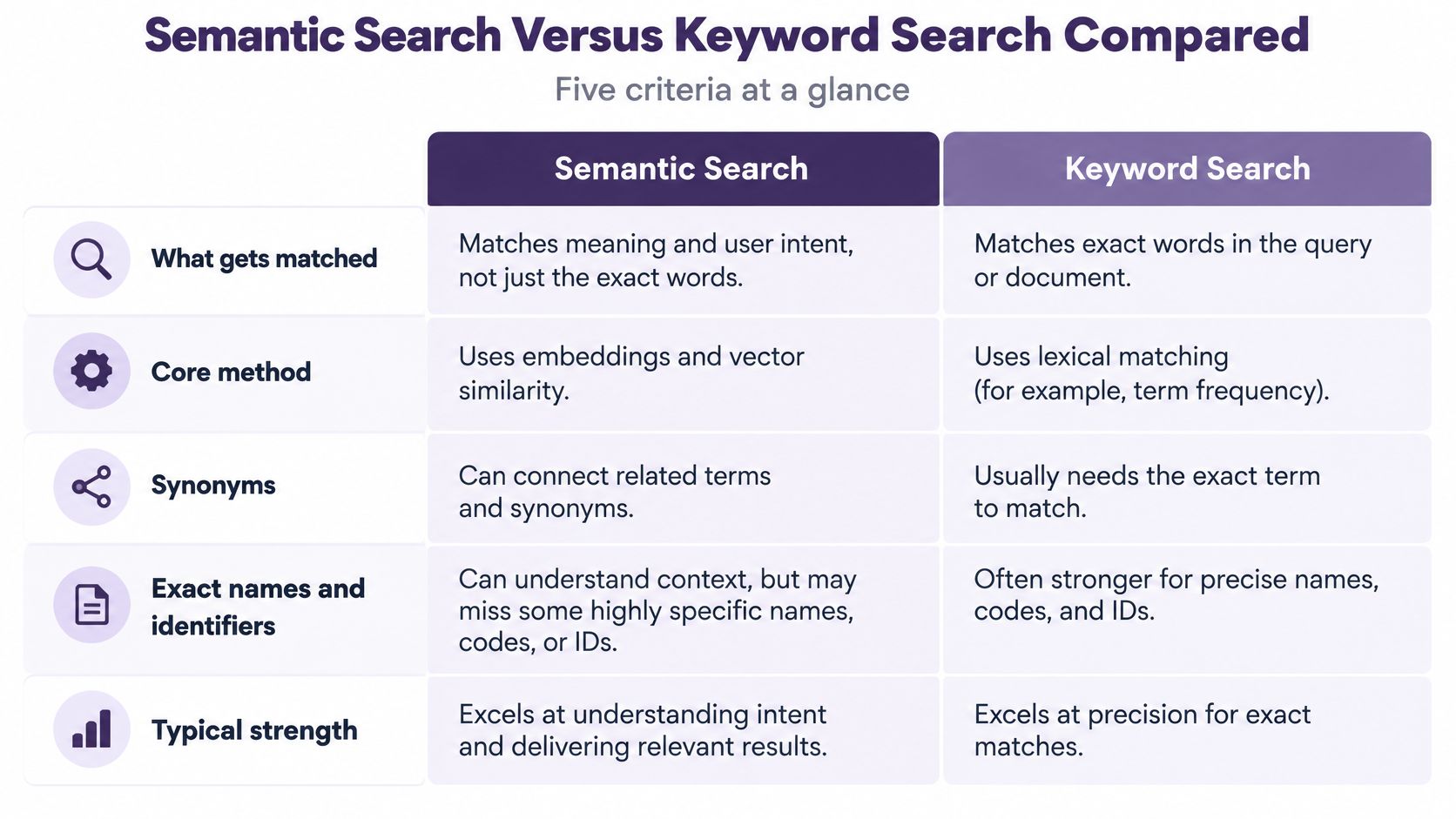
| Aspect | Keyword search | Semantic search |
|---|---|---|
| What it matches | Exact words and word stems | Concepts, paraphrases and synonyms |
| Core method | Term frequency and inverse document frequency (BM25) | Vector embeddings compared by similarity |
| Synonyms | Only if added manually | Learned from context |
| Exact names and IDs | Strong | Can drift to related but wrong items |
| Typical cost | Low and fast | Higher compute for embeddings and reranking |
What it matches is the core split. Keyword search looks for the words you typed, while semantic search looks for content about the same concept. That's why car repairs can miss vehicle servicing in one system and find it in the other.
The core method follows from that split. Keyword ranking counts how often a term appears and how rare it is across the collection. Semantic ranking compares numerical representations of meaning, so wording can differ while the topic stays close.
Where the difference bites
Synonyms expose the trade off clearly. A keyword system usually needs someone to add burnout equals exhaustion by hand, while a semantic system learns that link from context. Flip the query to a guest name, episode number, or product code, and keywords win because there's no useful synonym for an identifier.
Cost matters too. Creating embeddings and reranking candidates takes more computing power than counting words, so semantic search is typically slower and more expensive to run.
Practical rule: Start from the keyword baseline and add semantic retrieval where wording varies.
How Meaning Becomes Numbers in Semantic Search
The idea predates modern neural models. Latent Semantic Indexing, introduced by Scott Deerwester and colleagues in a 1990 article in the Journal of the American Society for Information Science, reduced a term document matrix with singular value decomposition so documents and queries could be compared in a lower dimensional concept space, addressing the problem that different words can express one concept while one word can carry several meanings, as recorded in the ERIC record for the 1990 LSI article.
Modern systems do the same job with better tools. Here's the sequence in plain steps.
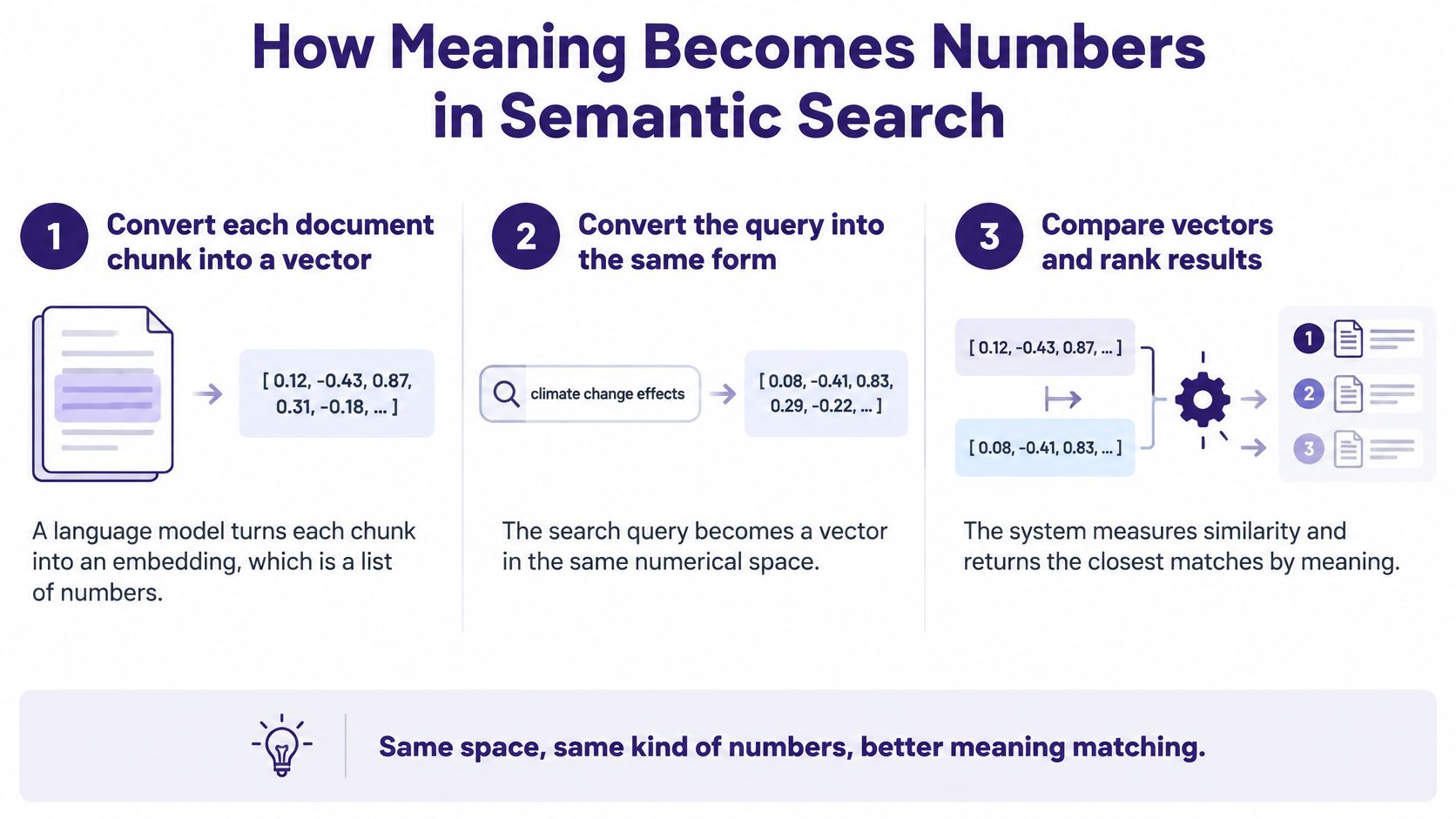
- Chunk and convert the content: The system splits each document into smaller chunks and turns each chunk into an embedding, which is a list of numbers produced by a language model. A podcast transcript becomes many chunks, each representing a short stretch of conversation.
- Convert the query the same way: Your search text becomes the same kind of number list, called a vector. Because both sides use the same format, they can be compared directly.
- Measure similarity: The system compares the query vector with stored vectors, often with cosine similarity, which scores how closely two vectors point in the same direction. Automobile insurance and car coverage land near each other, so they score as close.
- Return the closest items: You get a ranked list, often the top few matches. These are nearest in meaning, not necessarily nearest in wording.
- Rerank if needed: A more precise model can recheck the top candidates and reorder them. This extra pass costs more but usually improves the final order.
Why newer models read context
Early dense embeddings gave each word one fixed vector. A review of semantic search milestones on arXiv notes that word2vec popularized dense word embeddings in 2013, while BERT, introduced in 2019, produces representations influenced by surrounding words, helping distinguish bank in a financial versus river context. That context sensitivity is a big reason modern results feel smarter, and it's closely tied to how natural language processing turns text into structure.
Chunking is the quiet make-or-break step. Split a long episode badly and a key point loses its surrounding context, so its numbers represent only half an idea. You can sanity-check any system by running one query and reading the top five results closely to see whether they're about your topic.
When Keywords Still Beat Semantic Search
Semantic search isn't universally better, and treating it as a straight replacement will cost you relevant results. The evidence points to a conditional answer that depends on query type.
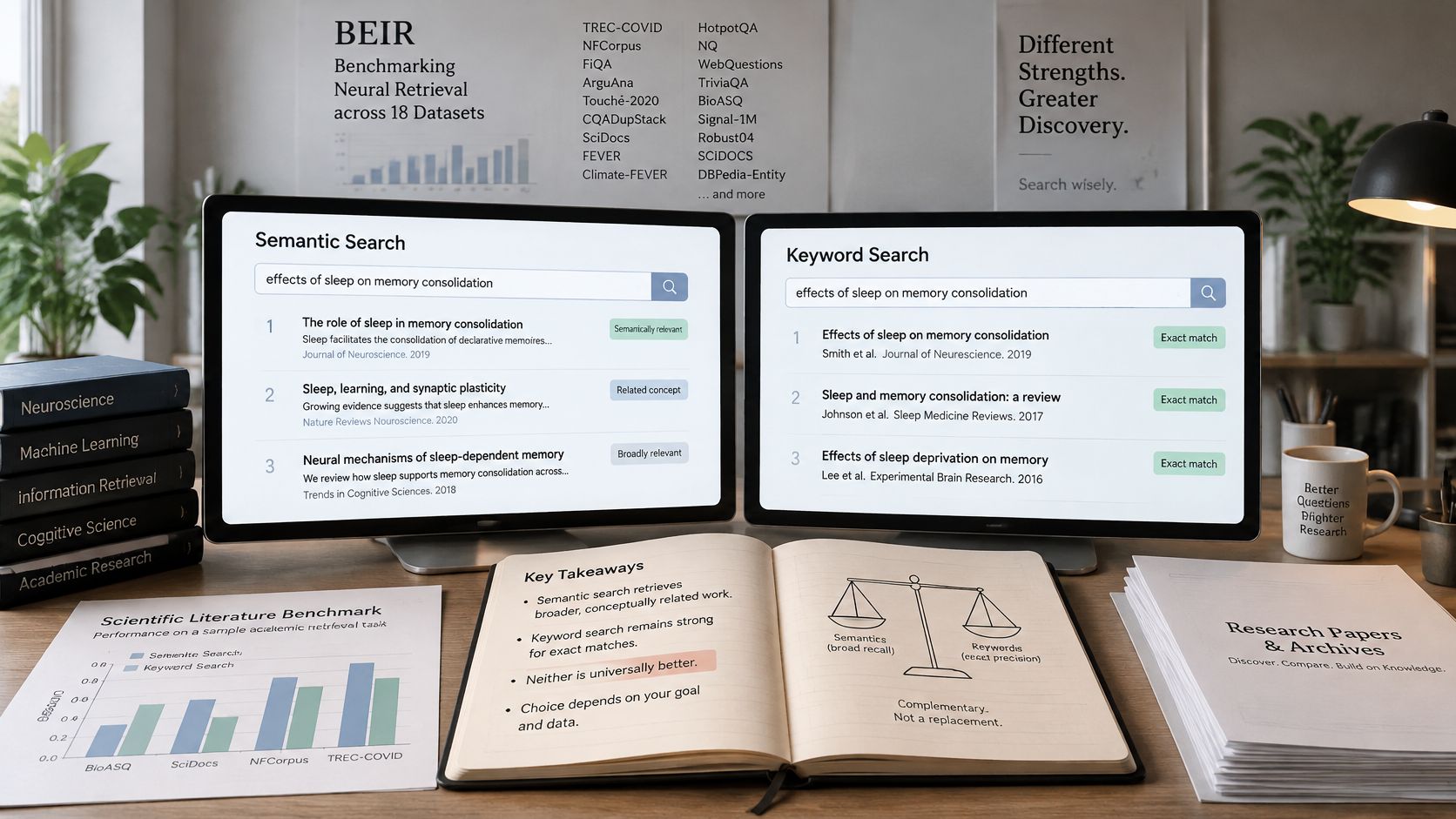
The BEIR benchmark across 18 datasets found BM25 to be a baseline, while a scientific literature benchmark reported a 24.8 percentage point Recall@5 gap between BM25 and leading dense retrievers when terminology was precise. A 2026 study of e-commerce search found that pure dense retrieval showed no significant overall gain and underperformed BM25 on long, attribute heavy queries, while hybrid retrieval and cross encoder reranking improved ranking quality over BM25.
The reason is simple. Semantic similarity is not factual relevance. A result can discuss a related idea while missing the exact person, date, claim, or phrase you asked for. Related feels helpful until you needed that specific guest quote from a specific episode.
This short walkthrough shows the contrast in action before you apply the table below.
| Query type | Better fit | Why |
|---|---|---|
| Exact quote or phrase | Keyword | Wording must match precisely |
| Person name, date or episode number | Keyword | Identifiers rarely have useful synonyms |
| Vague theme, such as episodes about burnout | Semantic | Wording varies widely across sources |
| Paraphrase of a remembered idea | Semantic | Meaning matches despite different words |
| Product code or technical term | Keyword | Exact tokens carry the meaning |
| Mixed archive request | Hybrid | Combine both methods, then rerank the results |
Semantic search finds things that are about your topic. Keyword search finds the exact thing you named.
For most libraries, the sensible default is hybrid retrieval. You combine lexical matching for names, dates, and quotations with semantic retrieval for paraphrases and themes, then rerank the combined top candidates.
Making Semantic Search Work on Messy Archives
Real archives aren't clean text. Meaning is spread across speech, video frames, scanned pages read by OCR, metadata, abbreviations, spelling variation, and sometimes several languages. Search can fail before any embedding model gets involved.
Three failures that happen first
- A mistranscribed name: Your transcript turns a guest surname into a similar sounding word, so neither search method ever sees the correct name.
- A point split across chunks: The setup sits in one chunk and the conclusion in the next, so neither chunk alone matches your query well.
- A visual reference with no text: A presenter points at a chart and says this is the problem, but the chart never enters the text index.
Each failure looks like a search problem from the outside. In reality, the system only ever searches the representation built by transcription, chunking, OCR, and metadata. If that representation is wrong or incomplete, better ranking won't rescue it.
Research on messy collections backs a combined approach. A study of multimodal archival retrieval found that hybrid semantic lexical retrieval consistently outperformed vector only retrieval across diverse and noisy inputs, while clinical concept search research found semantic matching helped with paraphrases and cross lingual variation but poorly represented abbreviations and partial, as typed input.
That pattern will feel familiar if your library mixes formal articles with casual spoken episodes. A concept described carefully in writing may appear as shorthand, slang, or a half finished thought in speech. One aggregate accuracy score hides exactly those gaps.
Measure by slice, not by average
Split your checks by modality, language, transcript quality, and content type. A system that scores well on articles may fail on older podcasts with noisy audio. Slicing your results shows you where to fix inputs instead of swapping models at random, which is the same discipline behind learning how to search archives systematically.
Start with three low effort fixes. Clean up recurring speaker and guest names in transcripts, overlap your chunks slightly so key points aren't cut in half, and tag each item with its source type so you can filter and audit by format.
What Semantic Search Changes for Content Strategy
You don't need to rewrite your library. Three habits make your existing and future content easier for both search methods to find.
Write each piece around one clear concept. Name the related ideas people say out loud, such as burnout, exhaustion, and overwhelmed, somewhere in the text or show notes. That gives keyword search real words to match and gives semantic search clearer signals about the topic.
Add a short summary at the top. Two or three sentences at the start of a long episode or article help every chunk carry its topic. A listener searching months later benefits, and so does anyone skimming before they commit to the full piece.
Tag themes, topics, and audiences. Tags give the system extra context beyond the raw transcript. A 60 minute podcast on remote work might carry a summary, timestamps, and tags like remote team fatigue and async communication, so a search for working from home exhaustion finds the right segment. This kind of structure is also what separates a simple search box from what enterprise search tries to do across a whole organization.
A smaller, well tagged archive often outperforms a larger, messy one.
Structure beats volume here. Clear concepts, summaries, and tags help semantic and keyword search at the same time, and they make repurposing easier because you can find the right segment before you try to reuse it.
Test Semantic Search on Your Own Library First
You can run a useful test in one afternoon with material you already know well. Don't start with your whole archive.
- Pick ten items you know well: Choose episodes, videos, or articles whose content you can judge from memory.
- Write three queries per item: Use one exact keyword query, one paraphrase, and one vague theme.
- Run both methods: Put each query through keyword search and semantic search.
- Check the top five: Record whether the correct item appears in the first five results.
- Count wins by query type: Note where each method wins and where it loses.
The pattern tells you which method to trust for which kind of question. If keywords win on names and quotes while semantic wins on themes, you've just made the case for hybrid retrieval with your own evidence.
One option for running this kind of test is Contesimal, a content intelligence platform that helps users turn old content in historical libraries into new revenue and research opportunities. You connect a YouTube channel, upload podcasts, or import document archives, and it builds a thematic map with tags for themes, topics, and audiences. Whatever tool you use, let your ten item results decide.
Ready to find out what your archive is really worth once it's searchable by meaning as well as by exact words? Visit Contesimal to connect your YouTube channel, podcasts, or document archives, organize them with thematic tags, and start turning old episodes and articles into new clips, posts, and revenue opportunities.