
The episode is recorded, the article is drafted, and the campaign brief is technically complete. Yet the video editor is waiting for a transcript, the writer can't find the approved research notes, legal is reviewing an outdated version, and nobody knows who owns the final upload. Everyone is busy. The library keeps growing. The value does not.
That's the content-team version of a workflow problem. Workflow optimization isn't about turning creative work into a factory line. It's about making the right information available at the right moment, reducing avoidable waiting, and giving people clear ownership without flattening judgment or originality. For creators, publishers, podcasters, researchers, and marketing teams, the prize is practical: organize the library, understand how work moves, and take action where friction is stealing capacity.
Why Content Workflows Stall Before They Scale
A small creator team can survive on memory, chat messages, and a folder named “final_final_revised.” Scale exposes the weakness. A podcast episode may move from research to recording, transcript cleanup, editing, show notes, clips, thumbnails, approvals, publishing, and social distribution. Each handoff creates a place where context can disappear.
The shift from paper-based routing to digital execution made these movements easier to record, but it also made hidden delays more visible. Workflow management became a distinct discipline for coordinating digital work, rather than merely routing ad hoc tasks, through foundational business-process research by Wil van der Aalst in 2001 (foundational workflow management paper). Modern assessments still look at cycle time, task completion, resource utilization, consistency, waiting time, and compliance, because those measures reveal whether a process works beyond a single heroic employee.

Busy is not the same as productive
A team can publish regularly and still lose value through rework. Editors may polish material that should have been approved at brief stage. Social managers may recreate ideas buried in old episodes. Researchers may repeat searches because nobody recorded what had already been found.
That's why the first useful question isn't “Which automation tool should we buy?” It's “Where does work wait, loop, or lose meaning?” A strong workflow reduces unnecessary movement while protecting the moments where humans need to interpret evidence, shape a story, or make a risky editorial call.
For podcast teams, a practical guide to streamline pre-production to publishing can help establish shared stages before you add more tooling. The same principle applies to blogs, video channels, publishing houses, and research groups. A process needs a common language before it needs more software.
Practical rule: Fix the decision logic before automating the movement.
Your content library is part of that logic. It isn't only an archive of finished files. It contains themes, arguments, clips, sources, characters, questions, and audience signals that can support future work. Clear process documentation examples make ownership and repeatability easier to see, especially when several people and AI systems contribute to the same body of knowledge.
The operating mindset is simple: Organize. Understand. Take Action. Organize the assets and the workflow. Understand where time and context disappear. Take action on the smallest change that improves the path from idea to published value.
Audit and Map Your Current Content Workflow
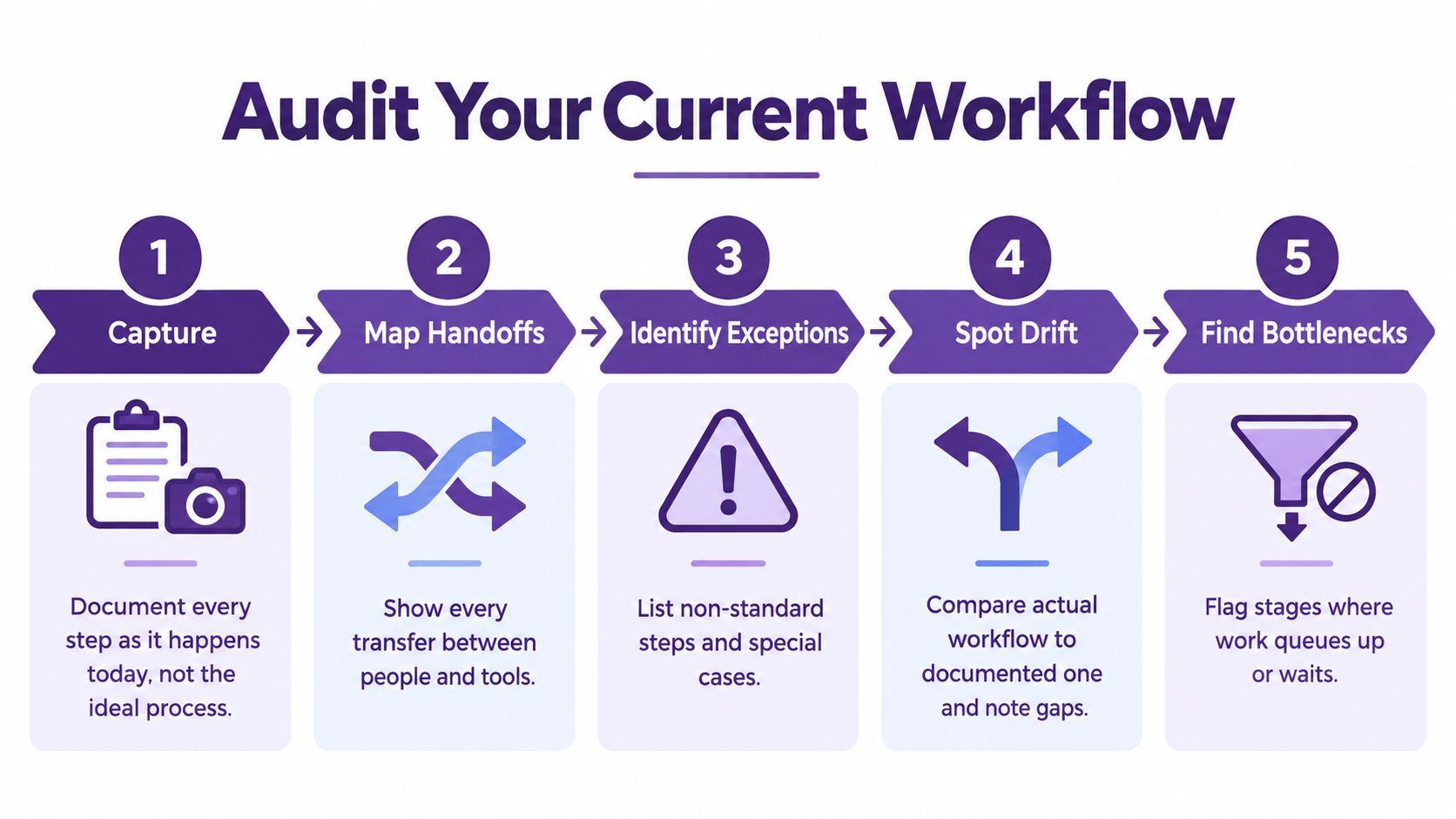
Start with the workflow that exists, not the workflow people describe in meetings. Follow several recent assets from request to distribution and record what each person did. Include the informal steps, such as asking for missing context in Slack, searching personal drives, exporting a transcript twice, or waiting for an approval that nobody formally assigned.
Capture the real path
Write down every stage across creation, editing, and distribution. For each stage, record the owner, input, output, tool, decision, and next handoff. If a YouTube video starts with a research document, moves through a producer, returns to the creator for clarification, and then enters a separate thumbnail queue, the map should show every transfer.
Look for four kinds of friction:
- Handoffs: Mark every transfer between people, tools, folders, and platforms.
- Decision rules: Record what determines whether an asset needs fact-checking, legal review, a second edit, or localization.
- Exceptions: List special cases, such as sponsor changes, missing releases, sensitive claims, or source material in an unusual format.
- Drift: Compare the documented process with the one people follow when deadlines tighten.
A current-state map should make waiting visible. Put timestamps beside intake, assignment, first draft, review, revision, approval, and publication. You don't need an elaborate platform at first. A shared spreadsheet, project board, or whiteboard can expose a surprising amount of queue time.
Rank processes before redesigning them
Not every workflow deserves equal attention. Score candidate processes against five criteria: volume, manual effort, stability over the last 12 months, documentation quality, and measurable outputs. A recurring show-notes process may outrank a rare flagship campaign because it happens often, consumes repeatable effort, and produces clear deliverables.
Ownership needs its own column. Assign a responsible person for each stage, identify who approves the output, and name the person who receives the handoff. “The content team” isn't an owner. It's a crowd.
Use a content audit checklist to turn the map into a shortlist of processes worth redesigning. Then test that shortlist with the people doing the work. If the diagram looks elegant but the editor says, “That's not how we get the transcript,” believe the editor.
The most expensive mistake is automating a broken process. Map the actual path, clarify the rules, remove unnecessary loops, and define ownership first. Automation should make a sound process easier to execute, not help a confused process fail faster.
Choose Metrics That Reveal Bottlenecks
A content library can grow while its workflow loses value. Measure both the effort required to produce each asset and the delays or errors that reduce its reuse. Before changing the process, capture a baseline for processing time per unit, error rate, cost per unit, weekly volume, and end-to-end cycle time. These measures provide a practical pre-launch baseline, followed by checks at 30, 60, and 90 days in this workflow automation failure analysis.
| Metric | What It Tells You | How to Capture It |
|---|---|---|
| Processing time per unit | How much active effort one asset consumes | Log hands-on time for a defined asset type |
| Error rate | Where quality problems enter the workflow | Count factual, formatting, metadata, or routing errors |
| Cost per unit | Whether the process uses resources proportionate to its value | Combine labor time and direct production costs |
| Weekly volume | How much demand the workflow must absorb | Count completed and incoming assets by type |
| End-to-end cycle time | How long an asset takes from intake to publication | Timestamp the first request and final distribution |
Measure the gaps between actions
Active processing time shows effort, not the whole workflow. A podcast transcript may take little hands-on work yet stay open for days while an editor waits for context. A publisher may have finished copy sitting in an approval queue, while a researcher loses time requesting the same source files again. Track step-level start and finish times, task dependencies, and exception frequency. That evidence lets you compare workflow options instead of relying on instinct, as research on business process optimization and workflow quality demonstrates (workflow optimization research).
Read the numbers as patterns, not a scoreboard. Long waiting time often points to unclear ownership, overloaded reviewers, or a dependency that could run in parallel. Rework usually starts with an incomplete brief, inconsistent source material, or a decision rule introduced too late. A high metadata error rate may show that people are typing repeated fields manually, while a controlled field or reusable template could protect the library's consistency.
Metrics should also show whether an asset remains useful after publication. Track reuse, approved derivatives, searchability, or the share of assets that reach their intended channels when those measures fit the team's goals. Podcasters may prioritize transcript turnaround and clip-ready segments. Publishers may watch update time and reuse across formats. Researchers may prioritize source traceability and review duration. Standardize fields and definitions, while leaving interpretation and editorial judgment with named owners.
Build a bottleneck list
Create a short diagnostic sheet for each important workflow:
- Queue location: Where does work wait longest?
- Rework loop: Which change sends the asset backward?
- Dependency: What must finish before the next task starts?
- Exception pattern: Which unusual cases recur often enough to deserve a rule?
- Owner: Who can change this stage?
Process documentation alone does not manage a workflow. A widely cited BPM summary reports that 69% of companies had documented, repeatable processes, while only 4% measured and managed them (BPM efficiency statistics). The gap explains why teams can maintain detailed playbooks yet keep losing time at handoffs.
Choose a small set of measures people can maintain without a special data project. The sheet should answer two practical questions: “What is slowing this asset today?” and “Did the redesign improve its path without damaging quality or future reuse?”
Automate and Augment With AI Without Breaking Flow
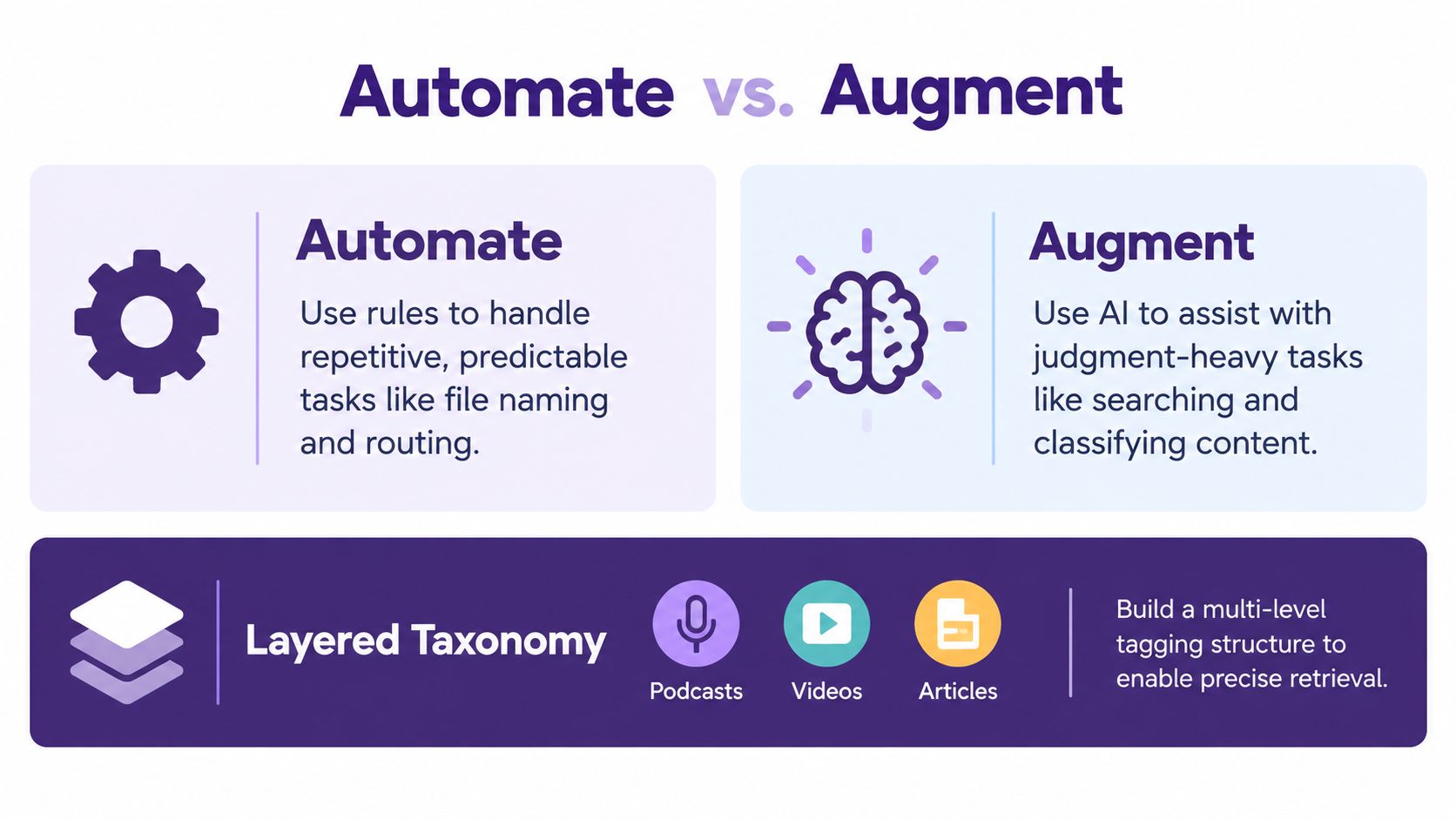
Automation and AI solve different problems. Rules are strongest when the task is predictable. AI is useful when the work involves classification, retrieval, comparison, or suggestions that still need human judgment. Confusing the two creates brittle systems that either over-automate editorial decisions or waste expensive intelligence on file routing.
Use the right tool for the right uncertainty
| Workflow need | Prefer automation when | Prefer AI augmentation when | Keep a human responsible for |
|---|---|---|---|
| File naming and routing | Rules are stable and outputs are predictable | A system must infer missing context | Final taxonomy exceptions |
| Transcript processing | Formats and destinations are fixed | Topics, entities, or themes need classification | Meaning, sensitivity, and factual nuance |
| Content search | Metadata is structured | The query is conceptual or exploratory | Selecting evidence for publication |
| Repurposing | Templates and channel requirements are known | Ideas need adaptation for audience and format | Voice, editorial judgment, and claims |
| Approval routing | Risk categories are explicit | Risk is ambiguous or context-dependent | Final approval and accountability |
Build a layered taxonomy rather than a flat tag pile. A podcast, video, or article may need format, subject, audience, series, person, claim type, publication status, rights information, and reuse potential. Layering lets a producer search broadly for a theme, then narrow to a particular format, date range, series, or approval state.
AI classification can accelerate discovery, but it shouldn't become the source of truth. Store the reason for a classification where possible, let a human correct important labels, and feed those corrections back into the system. Teams using several models need orchestration rules, not just several subscriptions. In 2025, 67% of enterprise content teams reported using three or more generative AI models in production workflows, while roughly 89% of firms saw no measurable labor-productivity improvement over the previous three years, according to reported AI content workflow trends. More models won't repair unclear ownership or missing feedback loops.
Keep the handoff human when the cost of a wrong interpretation is higher than the cost of review.
A practical build order looks like this: standardize intake, automate predictable routing, add AI-assisted classification and search, create reusable transformation templates, then monitor the outputs. Teams considering a content automation platform should test the platform against real library material, including messy transcripts, duplicate files, incomplete metadata, and old assets with uncertain reuse rights.
The useful outcome is one longform asset becoming a coordinated set of platform-ready possibilities, not a pile of automatically generated fragments. The creator still decides what deserves to exist. The workflow makes those decisions easier to find, repeat, and distribute.
Make Change Stick With Real World Playbooks
New workflows fail when people must remember too many rules or when ownership remains socially ambiguous. A project board won't help if the producer still has to chase every reviewer, and an AI assistant won't help if nobody decides whether its classification is trusted.
Start with one visible owner for each handoff. Give every stage an entry condition, an exit condition, and a backup person. Keep low-risk work moving through a lighter path, while material involving sensitive claims, rights, sponsors, or regulatory review receives the scrutiny it needs.

A podcaster moving beyond hobby work
A growing podcaster should treat each episode as a source asset with a defined reuse path. Create buckets for recurring themes, audience questions, guest expertise, and proven formats. After publication, route the transcript, audio, video, quotes, and research notes into those buckets so the next episode can build on what already exists.
The producer owns intake and metadata. The host owns voice and editorial selection. The editor owns technical quality. A social lead owns platform adaptation. That division prevents the host from becoming the default approver for every caption and thumbnail.
A publisher expanding library value
Publishers often have rich archives but weak retrieval. A backlist article, chapter, interview, or review may contain useful material for newsletters, collections, classroom resources, social posts, or a new editorial package. Build playlists around durable concepts, not only publication dates.
For distribution choices, a practical small business social playbook offers a useful reminder to match content and channel purpose rather than posting identical material everywhere. The publisher's workflow should preserve the core idea while changing the format, context, and call to action for each audience.
Use a weekly library meeting with one question: “What existing asset can answer a current audience need?” Keep the meeting short, record the decision, and assign the next handoff before closing.
Here's a concise visual reminder for teams turning operating habits into repeatable practice:
A researcher moving into collaboration
Researchers need shared knowledge, not just shared storage. Create dossiers for questions, sources, disagreements, definitions, and open leads. Let contributors add findings to a common structure, while a named editor maintains scope and resolves conflicting interpretations.
The handoff isn't “I finished my research.” It's “I added evidence, explained its relevance, identified uncertainty, and marked what another person should verify.” That small change turns solitary work into a usable knowledge base for writers, producers, editors, and AI collaborators.
Measure Compound Value and Keep Improving
A workflow earns its place when the team can see what changed, identify the cost of friction, and choose the next adjustment. Recheck the baseline at 30, 60, and 90 days, following the workflow optimization method referenced earlier. Review active effort, waiting time, errors, throughput, adoption, and output quality together. Faster production has little value if it fills the library with material nobody can use.
Adoption needs a separate measure. The earlier methodology sets 90% workflow adoption by day 90 as an operating target. Treat that figure as a prompt for investigation, not a badge. If people avoid the new process, interview them before blaming compliance. They may be protecting a necessary exception, struggling to find assets, or waiting on an owner who does not respond.
Use a 30-60-90 review rhythm
At 30 days, inspect visible friction: missing fields, unclear statuses, duplicate uploads, and handoffs without owners. At 60 days, compare asset types and see which workflow variant holds up under real conditions. At 90 days, decide what to standardize, what to retire, and where human review still protects quality.
The review should also measure library value. One roundup reports that a single blog post can be repurposed into 8 to 12 content pieces across platforms (content repurposing statistics). Useful output will vary by asset, audience, and channel, but the one-to-many principle gives teams a practical test. Can the workflow identify related formats, assign the right owner, and preserve the human judgment behind each adaptation? Automation can prepare derivatives. Editors still decide whether they deserve publication.
Unused content creates an organizational cost. A research digest reports that Forrester has repeatedly estimated 60% to 70% of generated B2B content goes unused by internal sales teams and target audiences (B2B content repurposing research digest). Better organization cannot guarantee distribution, yet clear metadata, searchable themes, and named handoffs can surface relevant material when a sales question, editorial theme, or audience need appears.
Keep the final review lightweight:
- Visibility: Can the team see where each asset is waiting?
- Consistency: Do people use the same definitions and handoff rules?
- Quality: Are errors and rework falling without hiding difficult work?
- Reuse: Can the library surface related material quickly?
- Value: Does repurposed output support audience growth, engagement, or revenue goals?
Every review should end with a decision. Remove a redundant step, clarify an owner, improve a taxonomy, or preserve a human checkpoint. Those choices build library value over time because each finished asset becomes easier to find, adapt, and hand off.
Contesimal helps creators, publishers, and research teams organize libraries of articles, podcasts, videos, and documents, then use collaborative search and AI-assisted discovery to find themes and repurposing opportunities. Visit Contesimal to turn existing content into a clearer, more actionable workflow.