
Archival data is information kept for enduring evidential, legal, cultural, or creative value, together with the context needed to interpret it later, not merely old files or a backup. That's a mouthful, so let's translate it for a working library.
You've got a drive full of episodes, drafts, thumbnails, and guest interviews. Some of it's gold, some of it's duplicates, and some of it you can't legally touch again. Until you can tell which is which, you've got storage, not an archive.
What Archival Data Is and Is Not
Say a YouTuber opens an old external drive. There's a folder called "Season 2 FINAL final," three exports of the same episode, a guest's raw interview, and a spreadsheet that might list the music licenses. Or might not. The files survived, but can anyone prove which cut aired, who approved it, or whether that interview can be reused?
That's the gap. Archival data is information selected for enduring value so people can verify events, do research, or reuse it later, and it's kept with enough context to make sense years from now. Think manuscripts, government records, books, maps, photographs, sound recordings, films, and electronic resources, not just dusty paper in a vault.
The scale helps. UNESCO's Memory of the World announcement notes its International Register grew from 38 inscriptions in 1997 to 570 documentary-heritage collections in 2025. Those 570 collections span 72 countries and four international organizations. UNESCO didn't inscribe them because they were old. It inscribed them because they remain evidence of science, women's contributions, cooperation, and other things people still need to understand.
Four stores people mix up
| Store | What it keeps | How available it is | Main job |
|---|---|---|---|
| Backup | Duplicate copies of live files or systems | Restore after loss or failure | Continuity of operations |
| Inactive storage | Data identified as inactive and moved off production systems | Not for routine use, restored when needed | Relieve live systems while retaining retrieval |
| Archive | Appraised information plus identity, provenance, and context | Planned for future access by a known community | Evidence, accountability, research, and reuse |
| Working content library | Articles, episodes, video, scripts, images, and production records | Usually immediate if files are organized | Ongoing publishing and repurposing |
A backup answers one question. Can we get it back after a crash? Inactive storage answers another. Can we move it off the expensive, busy system without throwing it away? Neither job requires you to know who created the file, why it exists, or whether you have permission to publish it again.
An archive requires exactly that knowledge. Someone appraised the material, decided it's worth keeping, and attached the information a future person needs to interpret it. A working content library sits closer to daily publishing. It holds articles, episodes, scripts, images, transcripts, and production records your team still draws from, but it only becomes archival when you manage the long-term context on purpose.
Quick test: If a new editor found this file cold in two years, could she tell what it is, which version it is, who made it, and whether she can use it?
Apply that test to one past episode. If the answer is mostly "I'd have to ask sort of guess," the episode isn't archival data yet. It's undeleted. There's a difference, and that difference is where the value lives.
What Makes a File Archival
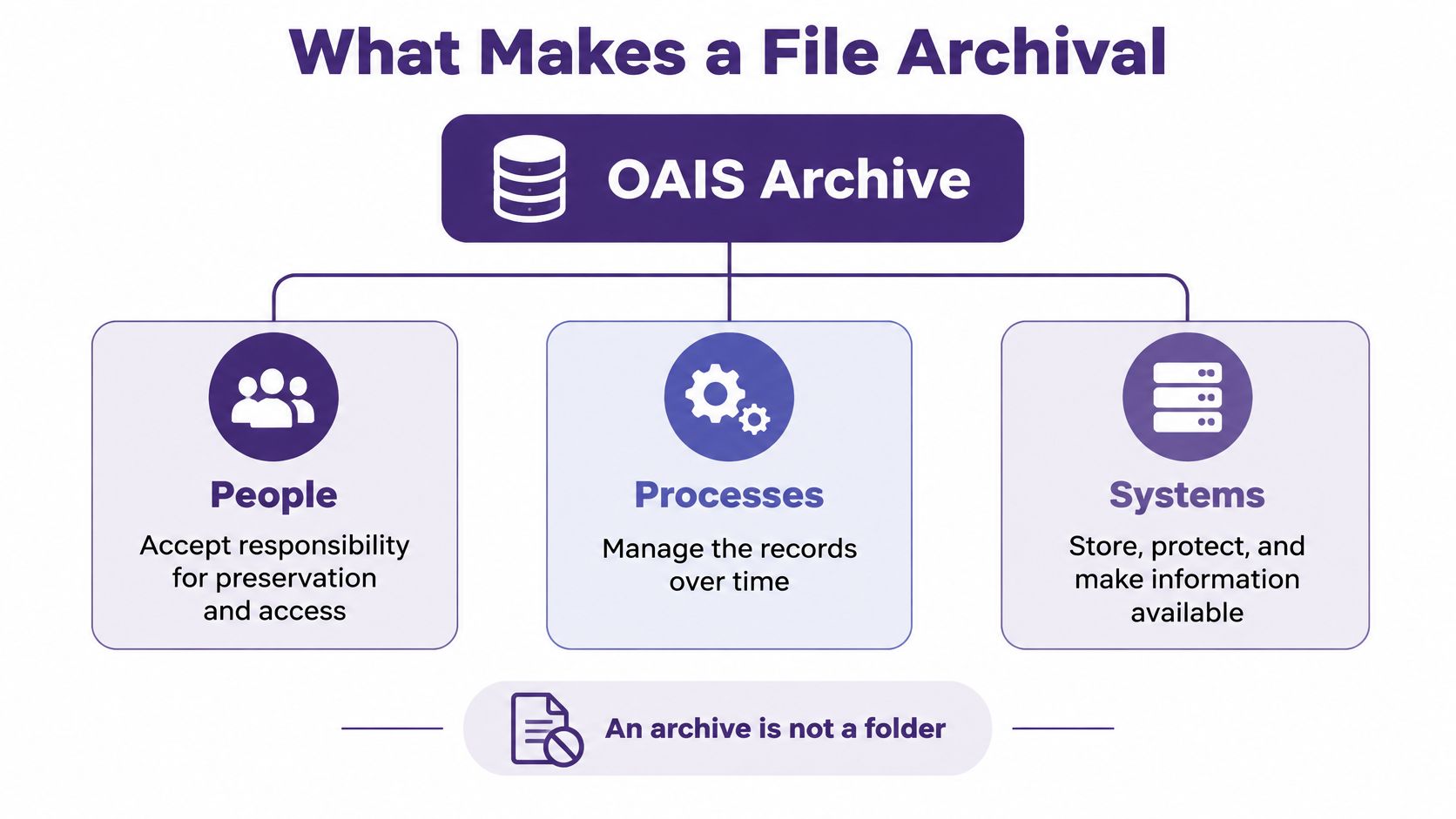
An archive isn't a folder with better manners. Under the ISO 14721 OAIS model, it's people, processes, and systems that accept responsibility for preserving information and making it available to a designated user community. That definition is covered in the Library of Congress format sustainability guidance, which stresses preserving both the content and the information needed to interpret it later.
For your library, the designated community might be future editors, a cohost, brand partners, researchers, or your audience. Name them. An archive built for "everybody, someday" usually serves nobody well.
Five kinds of metadata that do the heavy lifting
The Library of Congress points to five categories. Each one looks like this on a real episode or article.
- Representation information: How do you open or render it? For video, that's the codec and caption format. For a transcript, it's the file structure or schema. For a magazine page, it's layout information that tells you which text belongs to which story.
- Reference information: How do you identify this specific thing? Use a stable ID, episode number, slug, or canonical URL. "Interview final v3" isn't an identifier. It's a future argument.
- Contextual information: Why was it made? Keep the assignment brief, show notes, publication purpose, series name, and the question the piece was meant to answer. Context stops a later reader from mistaking a satire segment for a news claim, or a draft sponsor read for approved copy.
- Fixity information: Has the file changed? This is the checksum trail that lets you detect corruption or silent edits. You'll use it as a routine, not just as a field in a spreadsheet.
- Provenance information: Who had custody, and what changed along the way? Record the path from raw interview to edit, to transcript correction, to final export, including who approved each step.
If you're coming from music or podcast credits, a plain-English refresher like music metadata explained for artists can help you see why titles, contributors, and rights fields aren't clerical decoration. They're how the work stays attributable and usable.
What to ingest with every master
Don't upload a lone master and promise to "add details later." Later is where context goes to die. Ingest each item with its identifier, creation and publication dates, contributors, rights, transcript or schema, source relationships, and revision history.
That package matters even more when AI enters the room. Give a model a transcript with no date, guest role, or publication status and it won't say "I don't know." It'll often produce a plausible summary that merges a guest's opinion with your narration, or treats an unpublished draft as your official position.
Good archival data prevents that kind of confident nonsense. It tells humans and machines what the file is, where it came from, and how far its claims should travel.
Sources and Formats Creators Already Hold
A season folder can look like one archive until an editor needs a specific interview, release form, or approved image. Archives gather evidence in many formats, and each item needs enough context to be understood and used.
The Library of Congress catalog guide describes more than 175 million books, periodicals, manuscripts, maps, music, recordings, images, and electronic resources through more than 20 million catalog records. Special collections are often described as groups, with finding aids explaining what they contain, rather than as a separate catalog record for every item.
That arrangement is familiar to creators. One podcast season folder might hold raw interviews, final mixes, transcripts, photos, release forms, and research notes. A folder name gives you a starting point, but it cannot explain what each file is or how the pieces relate.
Individual collections show the same sprawl, with some holdings running to tens of thousands of documents or items. Different creators, dates, rights, and levels of description may sit side by side. The challenge is not just keeping the files together. It is preserving the context that helps someone find and use the right one.
Map the formats in your own library
| Source | Typical carrier | Context that must travel with it | Creator example |
|---|---|---|---|
| Print and manuscripts | Paper, bound issues, scans | Title, date, creator, rights, condition | Magazine or book backlist |
| Photographs and stills | Prints, scans, RAW files | Caption, date, credit, usage rights | Thumbnails and behind-the-scenes |
| Sound | Tape, WAV masters, podcast files | Transcript, air date, guests, music rights | Podcast seasons and raw interviews |
| Moving image | Film, camera originals, exports | Version, edit history, captions, release date | YouTube, vlogs, and screeners |
| Born-digital documents | CMS exports, PDF, docs, email | Author, version, canonical URL, status | Blog posts and newsletters |
| Research notes and data | Spreadsheets, databases | Schema or data dictionary, source, date | Show research and analytics exports |
Each row pairs a format with the information that makes it usable. A RAW photo without credit or usage rights may look ready to publish while carrying unanswered questions. A spreadsheet without a schema can be hard to interpret, even if every cell is intact.
Born-digital material needs the same care as paper. Email threads, CMS exports, and shared documents can hold approvals and corrections, so teams need guardrails for sensitive messages and attachments. Guidance on choosing Exchange Online data loss prevention can help frame that work for business mail. Preservation and protection belong in the same conversation when an inbox is part of the production record.
Effective use depends on metadata, provenance, finding aids, full-text or media indexing, and relationships among items. A finding aid does not have to be a formal document. For a creator, it could be a playlist with useful episode descriptions, a series index, or a research dossier connecting a story's transcript, sources, cuts, and stills.
Try a small audit: choose one successful series and list every format belonging to one episode, including unpublished takes and the thumbnail that lost the A/B test. That inventory shows what the season folder alone cannot: a file becomes archival data when its context, rights, and integrity travel with it. A backup preserves a copy; discovery takes a separate map.
How Preservation Keeps Files Trustworthy
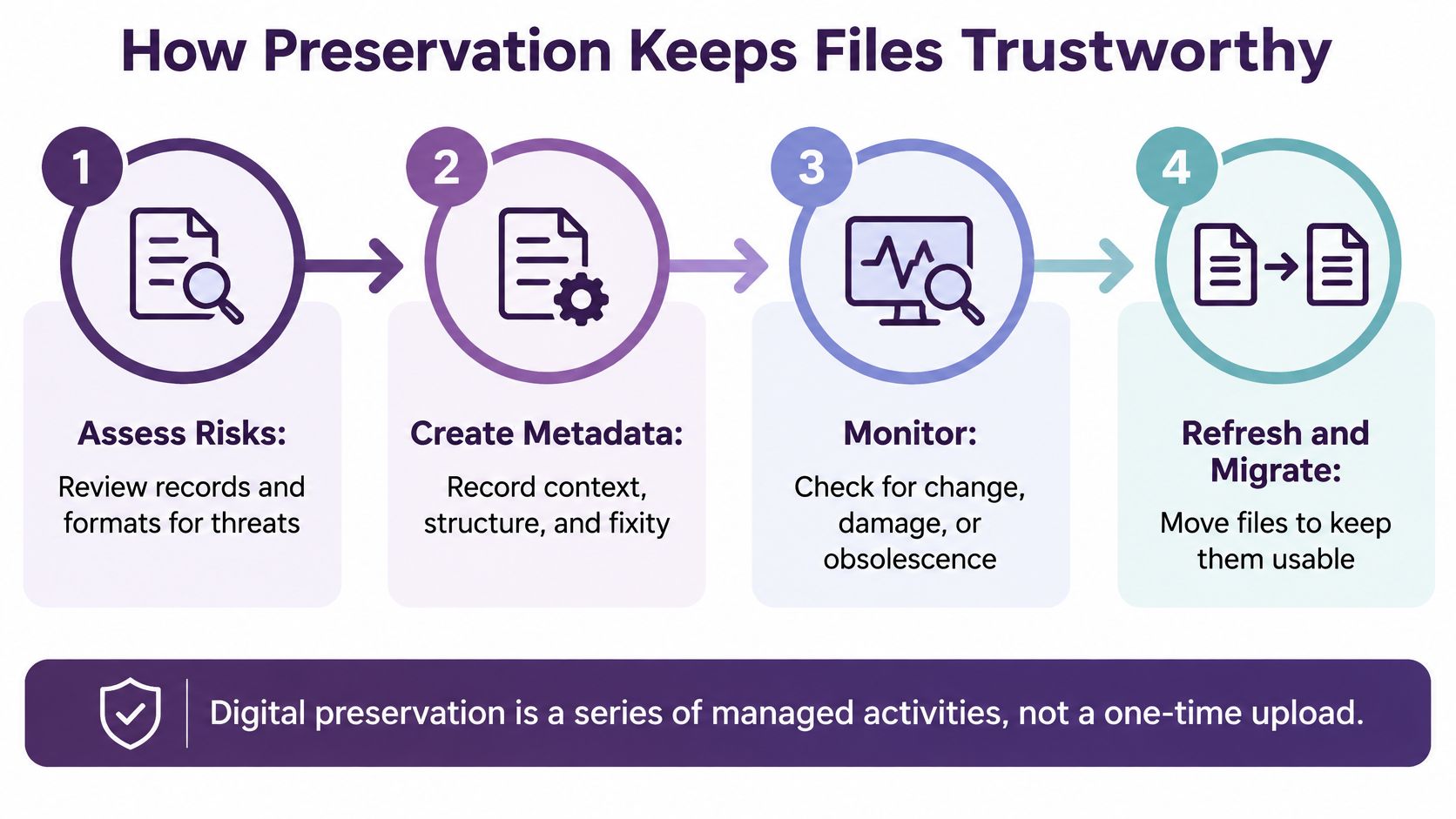
A file becomes trustworthy archival data when its context, rights, and integrity stay attached over time. Preservation is the work of keeping both the file and evidence about it dependable. That means assessing risks to records and formats, recording technical and administrative metadata, and migrating files when changing software threatens their readability.
A key integrity check is fixity. The U.S. National Archives digital preservation strategy describes fixity as a checksum or cryptographic hash calculated from a file or set of files and compared later. A mismatch can reveal accidental corruption or an unexpected change, though a hash alone cannot establish why it happened. The strategy describes inventorying incoming files, logging ingest and later lifecycle events, checking fixity at ingest, and conducting annual sample audits of stored born-digital files and digital surrogates.
A small team can apply the same logic without building an institutional archive. The aim is a repeatable record of what came in, what changed, and which copy remains the master.
A five-step minimum you can actually run
- Hash every master on upload. Record the hash, algorithm, and timestamp as early as possible. Use SHA-256 or a stronger SHA algorithm consistently. MD5 can help detect accidental corruption, but its collision weaknesses make it unsuitable for checking deliberate tampering. If you rename a master, log the change.
- Store a manifest with the collection. Keep hashes for individual files and, where useful, the collection as a whole. That lets you check one episode or a full season without guessing which files were included.
- Log every derivative. Record when captions, transcripts, social cuts, refreshed articles, or transcoded exports are made, and link each one to its master. The relationship matters: a transcript is useful, but it is not a substitute for the source recording.
- Re-check a sample each year. Compare current hashes with the manifest. Set aside any file with an unexpected mismatch until someone can explain and document the change.
- Migrate formats before they become difficult to render. Favor openly documented or community-supported formats where practical. Keep data dictionaries and schemas beside structured files so the information remains interpretable.
A backup and preservation solve different problems. Advice on keeping device data safe with myhalo can help protect against loss, but a backup may faithfully restore a corrupted or mislabeled file. Preservation checks whether the restored file is the intended one, whether it still opens, and whether its history is recorded.
You do not need a vault. You need a habit that catches changes before they cause trouble for a client, listener, or lawyer.
Stable masters and logged derivatives also make later transcription, indexing, and search easier to reproduce. The guide to archival best practices offers a way to turn these basics into a working checklist.
Migrate when a format is becoming hard to render, poorly documented, or dependent on software your team no longer controls. Changing formats just because a newer one exists can introduce risk of its own. Preservation is risk management, not redecorating.
Why Searchable Files Can Still Stay Hidden
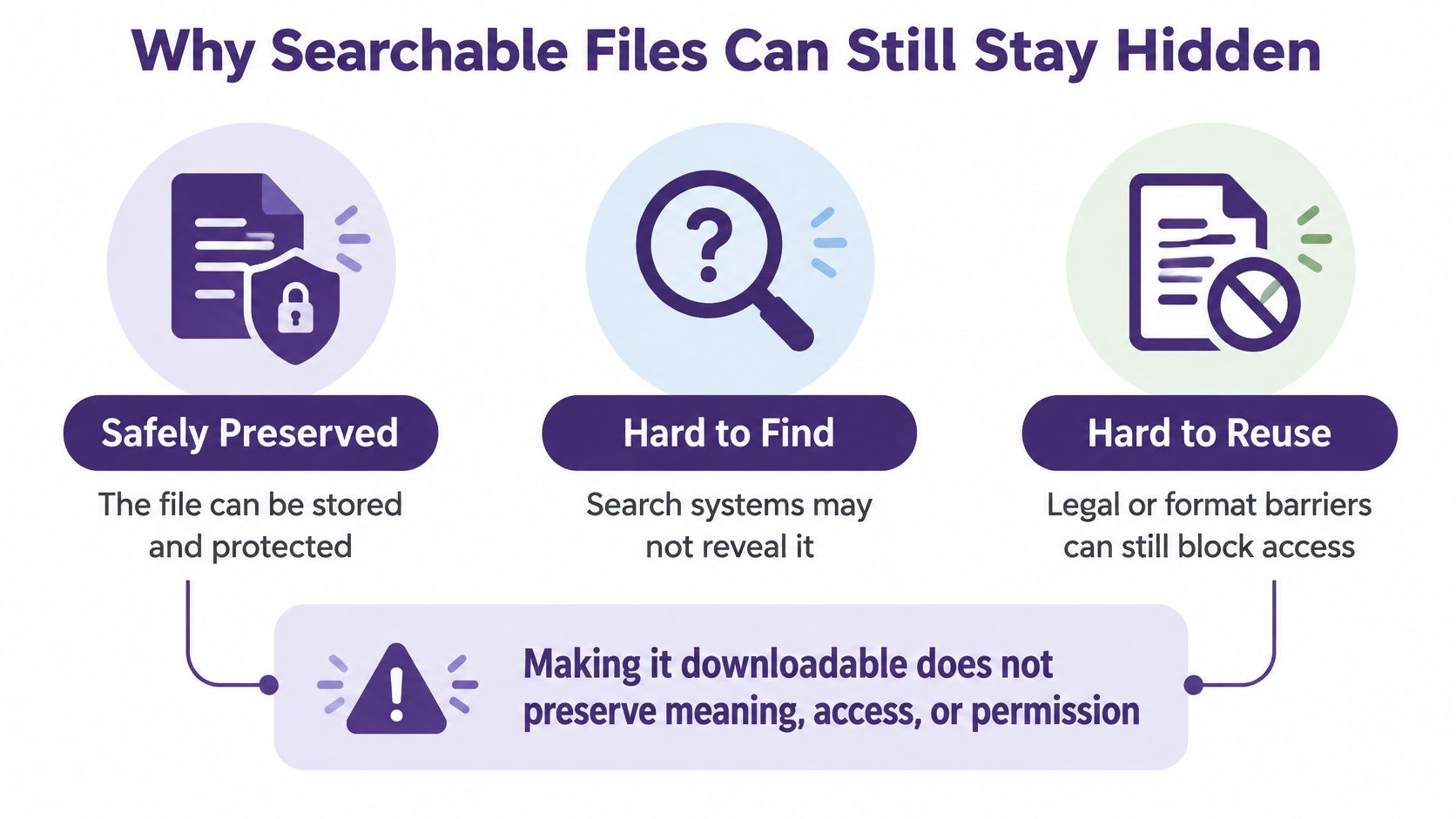
A file can be safely preserved and still be hard to find, hard to understand, or impossible to reuse legally. The reverse is also true. Making a file downloadable doesn't preserve it.
That's the split many libraries miss. Preservation keeps the object and its meaning intact over time. Accessibility gets the right person to the right item, with enough context and permission to use it. They're related jobs, but they aren't the same workflow.
Search alone doesn't close the gap. A transcript might match a keyword while hiding that the speaker was quoting someone else. An article might surface beautifully while its image license expired years ago. A video might be indexed under a guest's misspelled name, which is technically searchable and practically invisible.
Who is still excluded after digitization
The Wellcome survey on archives, manuscripts, and material culture found that 68% of respondents experienced collection-access constraints caused by location, cataloguing, format, or permissions. It also found that 42% identified digital fragility and obsolescence as a major research risk. Digitization didn't magically remove the doors. In some cases, it just put the doors online.
Creator libraries have their own version of those doors.
- Weak description: Titles made for the feed don't always describe the evergreen topic inside.
- Bad transcripts: Multilingual audio, crosstalk, names, and technical terms get flattened into errors that search then repeats.
- Missing context: A clip loses the setup, correction, or date that changes its meaning.
- Rights uncertainty: Nobody knows whether the music, photo, guest segment, or sponsor mention can run again.
- Access limits: Paywalls, privacy restrictions, private drafts, and files needing obsolete software block legitimate use.
- Interface friction: If only the original editor knows the magic search phrase, the archive has a gatekeeper, not a catalogue.
AI can help recover missing metadata, flag sensitive records, search beyond exact keywords, and anonymize faces. But it also raises governance questions about privacy, intellectual property, and orphaned files whose owners or permissions are unclear. Speed isn't a sufficient measure.
Judge AI indexing by better questions. Does it cover your languages and formats? Can a human see why it applied a tag? Does it preserve uncertainty instead of laundering guesses into facts? Does it make overlooked material more visible, or just make your already popular hits easier to recycle?
If you're improving discovery next, pair this lens with practical tactics for how to search archives so better retrieval starts from rights-aware, context-rich records.
How Old Assets Become New Work
Old assets become new work when description travels with them. Without description, you don't repurpose. You spelunk.
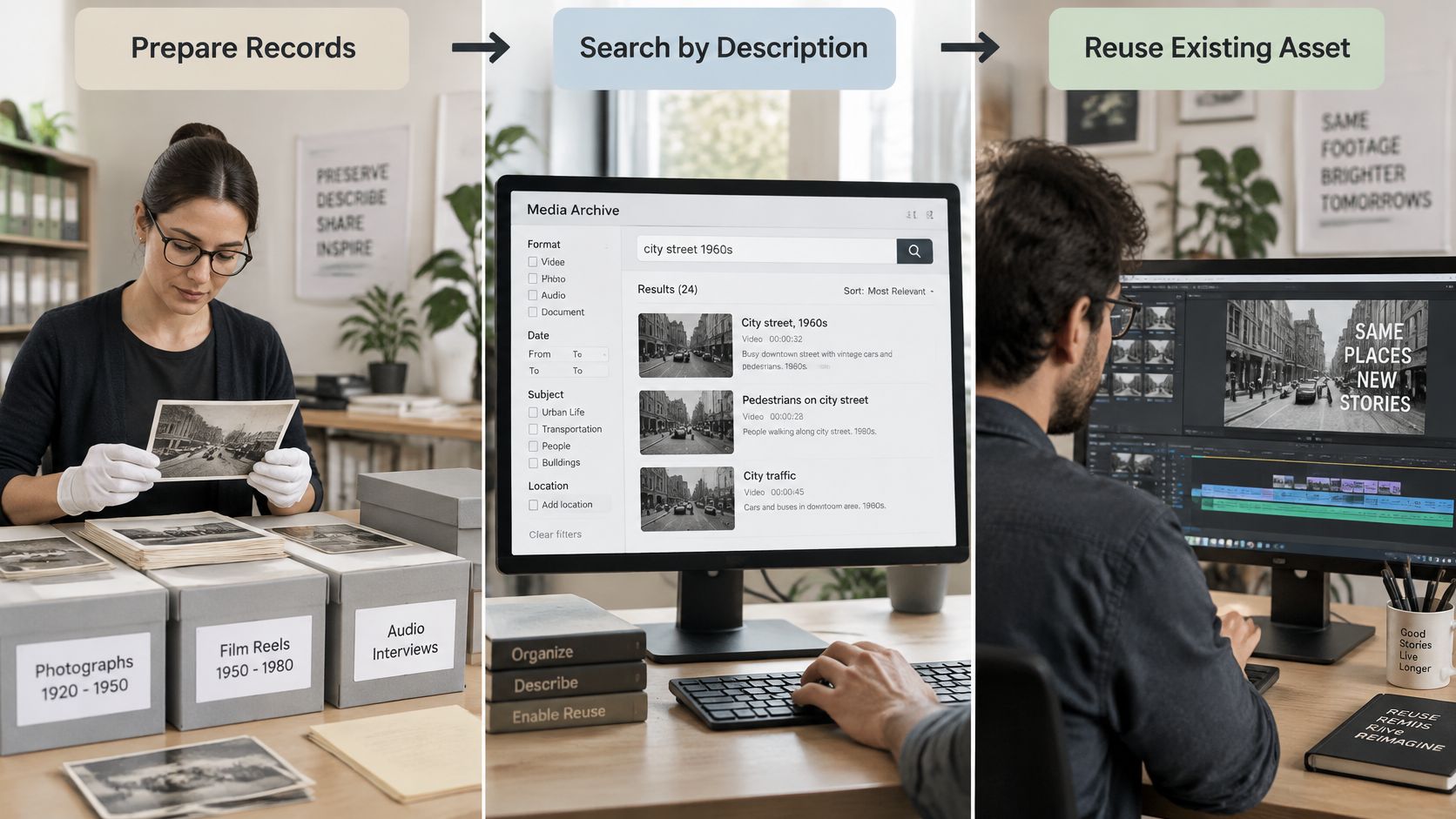
The U.S. National Archives digitization strategy treats digitization as a complete access workflow, with preparation, preservation and access review, screening, refiling originals, and collecting descriptive and technical metadata. NARA reports series-level descriptions for more than 85% of its permanent records and more than 2,000,000 digitized copies of holdings. The scan is only the middle of the story. The catalogue entry is what lets someone find and trust it.
This short visual shows the shape of that work, from organizing records to finding the piece you can use.
One interview, several responsible reuses
Say a podcaster recorded a long interview with a chef two years ago. With context attached, that single session can become a corrected transcript, three short clips, a newsletter anecdote, and the research spine for a new episode on restaurant costs. Each reuse depends on small facts: the guest's correct name and title, the recording date, which take was approved, where a claim was corrected, and whether the guest agreed to clips beyond the original episode.
The same pattern works for a publisher. Tag one season or series by date, theme, contributor, and rights status, and recurring stories start to appear. A theme you visited in fragments can become a new cut, an updated explainer, or a bundle for new subscribers. That's the practical heart of what is content repurposing when the source library is trustworthy.
The video below gives another view of how organized historical material can feed fresh creative work.
Reuse should sometimes stop. Don't republish when music rights are unclear, a guest limited a topic to one appearance, a draft was never meant to publish, or a correction changed the original claim. "We found it" isn't permission.
The value was already sitting in the library. The missing piece was a reliable way to find the right item with its context, credit, and limits intact.
Start One Series as a Real Archive
Don't start with the whole drive. You'll make a heroic spreadsheet, lose steam by Thursday, and learn to fear your own archive. Pick one playlist, season, column, or backlist title that already earns views, listens, or sales.
Run five actions on that one series
- List the set. Gather every master, transcript, cut, still, caption file, and source note that belongs to it.
- Attach the basics. Add identifier, creation and publication dates, contributors, rights, and version to each item.
- Mark reuse status. Label what can be republished, what needs permission, and what stays private.
- Note the patterns. Record themes, recurring stories, strong quotes, and questions your audience keeps asking.
- Draft from the organized set. Only then make the next episode, article, bundle, or campaign from what you've verified.
That's how a hobbyist library starts behaving like a publisher's archive. Organize. Understand. Take action. Your older longform can move across platforms without losing credit, chronology, or the reason it worked in the first place.
This is the workflow Contesimal is built to support. Users connect existing content, such as YouTube channels, podcasts, and document archives, and the platform organizes and tags it thematically. Its research agents locate specific keywords, recurring themes, and hidden stories across historical media, and you can create dossiers and share findings with collaborators. The Transform layer uses AI to turn raw podcasts, videos, and documents into structured data, searchable assets, and ready-to-use formats, while you keep ownership of your inputs and outputs.
The decision: Treat the next upload as archival data with context attached, or keep paying with time to rediscover work you already made.
Start with one series this week. Give its files names, dates, rights, and relationships that a future collaborator can trust. Future you is part of that designated community, and future you deserves better than a folder called "misc gold maybe."
Bring one season, playlist, or backlist into Contesimal and turn it from a pile of surviving files into archival data your team can search, trust, and reuse across platforms. We'll help you organize the library, surface recurring themes and hidden stories, and save findings your collaborators can build on. Start with the series that already earns attention, and let your next piece come from work you've already paid to create.