
A podcaster can have a brilliant episode ready to publish and still lose the week to process failure. The audio is edited, the transcript is somewhere in Google Drive, the guest release form is buried in a Slack thread, and the person preparing social clips is waiting for a final title that nobody officially owns. By the time the team finds the missing asset, the upload deadline has drifted.
That pattern affects far more than podcasts. Bloggers, YouTubers, publishers, editors, and content marketers often have plenty of tools and plenty of ideas, but no shared system for moving an asset from concept to publication, then into its next useful format. Creating a workflow means making ownership, dependencies, decisions, and quality controls visible before production pressure exposes them.
Why Your Content Process Feels Broken
The first cracks usually appear when a solo creator adds collaborators. A process that worked inside one person's head becomes fragile when a writer, editor, producer, or publisher needs to interpret it. One person names files differently, another starts from an outdated draft, and a third assumes that approval happened because the asset moved into a “ready” folder.
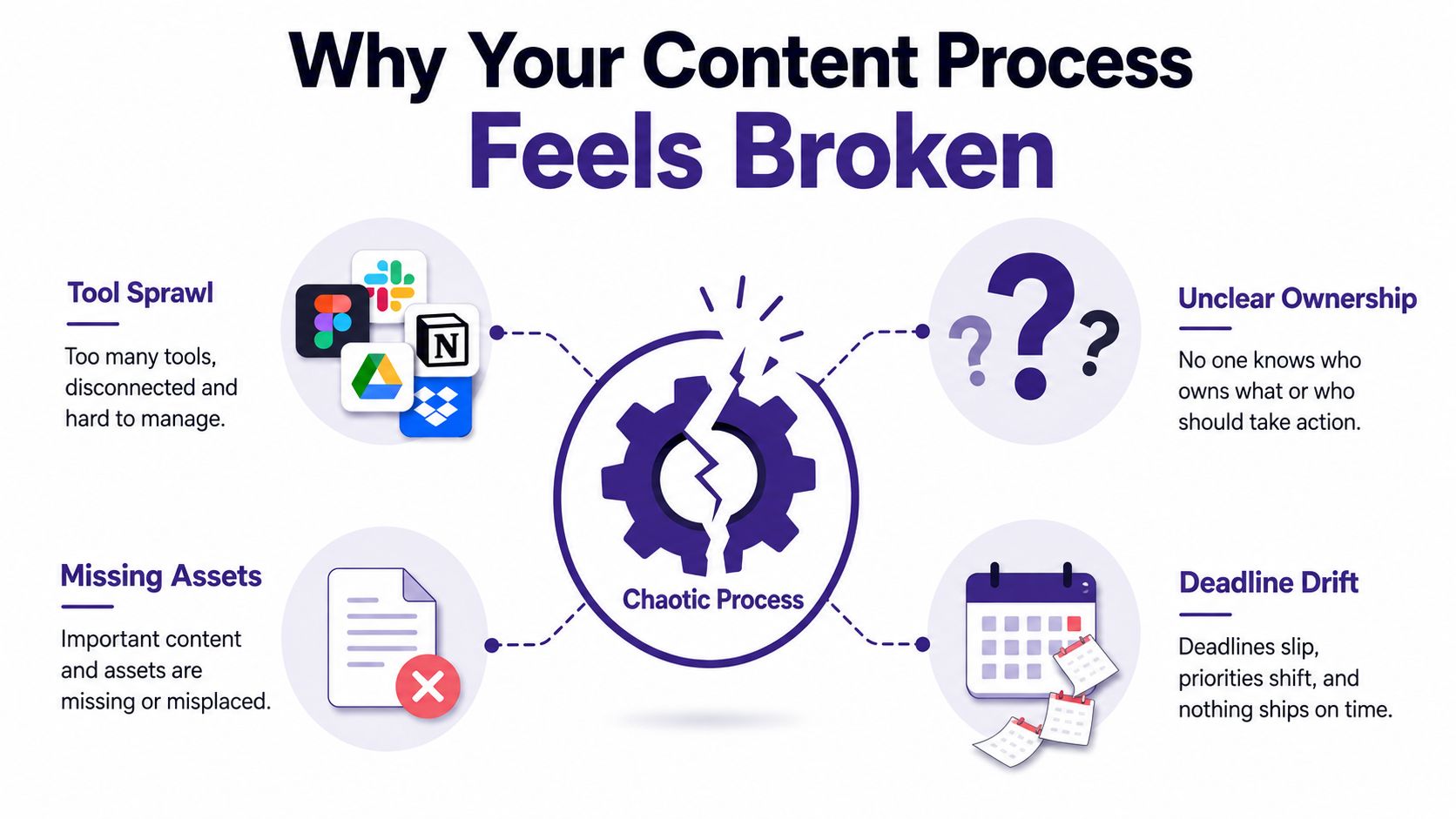
That isn't a tooling problem alone. It's a coordination problem created by unclear ownership, invisible dependencies, and weak handoffs. A project board may show activity without showing accountability. A shared drive may contain every asset without making the latest approved version obvious. Slack may contain the decision, but only if someone knows which conversation to search.
The cost of adding people
A team of three or more reveals failure points that a solo creator can absorb:
- Version conflicts: The editor works from a draft that the writer revised elsewhere.
- Orphaned assets: A thumbnail, transcript, release form, or source file has no named owner.
- Repurposing bottlenecks: Nobody knows when the long-form asset is stable enough to turn into clips, posts, or newsletter material.
- Deadline drift: Each person waits for a decision that exists only in another person's memory.
These problems create what I call workflow debt. Every skipped naming rule, undocumented approval, and informal handoff saves a little time today while adding friction to every future production cycle. Eventually, the team spends more energy reconstructing context than creating content.
Practical rule: If a new collaborator has to ask who owns an asset, which version is final, or what “ready” means, the workflow isn't finished.
The fix isn't a more complicated board. It's a process that separates content states, assigns responsibility at each transition, and records the evidence required for approval. Once that structure exists, tools can support it instead of pretending to replace it.
Sketching Your Workflow Before Building It
Start with a model, not an app. Before opening Asana, Notion, or an automation platform, draw the process on paper or a whiteboard. An abstraction-first sketch lets the team inspect the shape of the work before software turns assumptions into rules. Guidance on modeling a workflow before implementation makes the same practical point: define the process first, then map it onto a system.
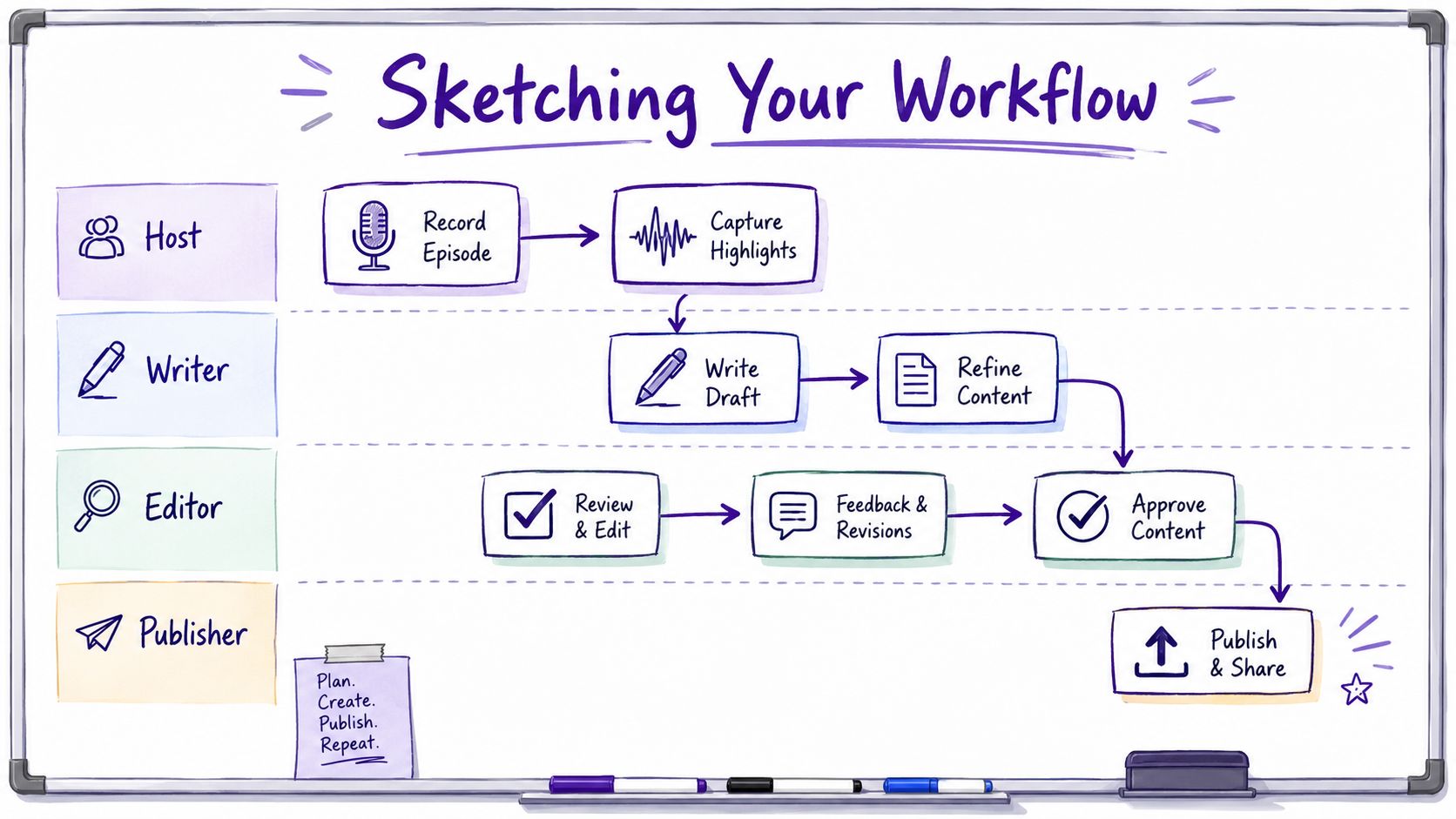
Draw a swimlane for each role involved. For a typical video workflow, that might be Host, Writer, Editor, and Publisher. Put actions in the lane of the person responsible for completing them, not the person who happens to receive the resulting file.
Map states and triggers
Use clear states such as Draft, In Review, Approved, Scheduled, and Archived. Then write the trigger that moves an asset from one state to the next. “Editor finished” is vague. “Audio cleaned, transcript attached, source links checked, and editor marked the draft ready” is actionable.
For a YouTube creator repurposing a long-form video, the sketch might look like this:
- The host records the episode after the brief, title direction, and recording requirements are confirmed.
- The writer receives the recording and creates or verifies the transcript.
- The editor selects Shorts only after the transcript and time-coded source are available.
- The writer reshapes the approved video into a blog post and newsletter snippets.
- The publisher checks titles, descriptions, links, metadata, and scheduling details across channels.
- The team archives the source, final exports, derivative assets, and performance notes together.
The transcript is a dependency, not a side product. If clip selection depends on it, the workflow should show that relationship explicitly. Otherwise, the editor starts early, discovers missing context, and creates avoidable rework.
Validate the sketch before choosing software
Ask three questions before building anything:
- Ownership: Does every asset have one responsible owner at its current stage?
- Handoff quality: Are the entry and exit criteria explicit enough to prevent guesswork?
- Onboarding: Could a new team member follow the process without tribal knowledge?
Only after the sketch survives those questions should you configure automation. Teams that want a deeper operational framework can also review how to streamline campaigns using SleekPost. For teams managing research, drafts, and historical assets together, the editorial workflow management software guide offers another useful reference point.
Automation should remove repetitive movement, not decide what the process means. If the sketch is wrong, automation moves mistakes faster.
Designing Approval Gates and Handoff Rules
AI can accelerate drafting, summarization, editing, and repurposing, but speed doesn't define a safe workflow. Industry reporting cited 72% enterprise B2B marketing adoption of generative AI alongside only 19% of teams with formal governance in 2025, as reported in AI content workflow trends. A separate DAM study found 90% of teams consider human oversight essential, with quality control, risk management, and compliance among the leading concerns, according to the same report.
The practical response is to design approval gates around risk, not around habit. A short social post may need one informed reviewer. A sponsored podcast episode may require editorial, commercial, and legal review. A research-heavy article needs evidence checks even when the prose itself looks polished.
Define entry and exit criteria
An editor shouldn't receive a draft because a writer moved a card. The draft should enter editing only when the required inputs exist:
- Brief attached: The angle, audience, format, and intended action are documented.
- Sources linked: Research claims have traceable references.
- Scope checked: The draft stays within the agreed format and target.
- Assets available: Releases, images, transcripts, and brand materials are present.
- Self-review complete: The creator has checked obvious factual, structural, and formatting issues.
The exit criteria should be equally concrete. For example, an edited article may need a clean headline, checked links, approved visuals, metadata, and a named publisher before it can enter scheduling.
| Content Type | Risk Level | Approval Layers | Primary Reviewer | Escalation Timeline |
|---|---|---|---|---|
| Organic social post | Low | Editorial review | Channel owner | Nudge when stalled |
| Standard blog post | Medium | Writer and editor review | Managing editor | Escalate to content lead |
| Sponsored podcast episode | High | Editorial, commercial, and legal review | Executive producer | Escalate to department owner |
| Research-heavy publisher article | High | Editorial, source, and compliance review | Senior editor | Escalate to publishing lead |
Route exceptions instead of hiding them
A freelance blogger may submit a draft with a strong structure but incomplete sources. The correct route is not to send it back with a vague comment. Mark the missing evidence, assign the writer a clear correction, and keep the asset in a visible revision state.
A publisher managing a multi-author calendar needs a similar path for conflicts. If two writers claim the same topic, the managing editor should resolve the overlap through a defined decision rule, not through a private message that the rest of the team can't see.
Use escalation timers carefully. A reminder can surface a stalled review, but automatic reassignment should preserve context and permissions. The purpose isn't to punish a late approver. It's to prevent one absent person from stopping every downstream task. Teams reviewing broader automation approaches may find ways to streamline operations with Wisely useful when designing these routes.
Setting Up Metadata and Asset Governance
Metadata is the scaffolding that lets a library stay useful after publication. Without it, a team may own years of interviews, videos, articles, research notes, and exports but still struggle to find the right source for the next project. With consistent context, old long-form content can support new formats, new audiences, and new editorial decisions.
Start with the taxonomy before uploading the first asset. A practical metadata management framework should define the fields that every asset needs, the allowed values, and the person responsible for maintaining the system.
Build a controlled vocabulary
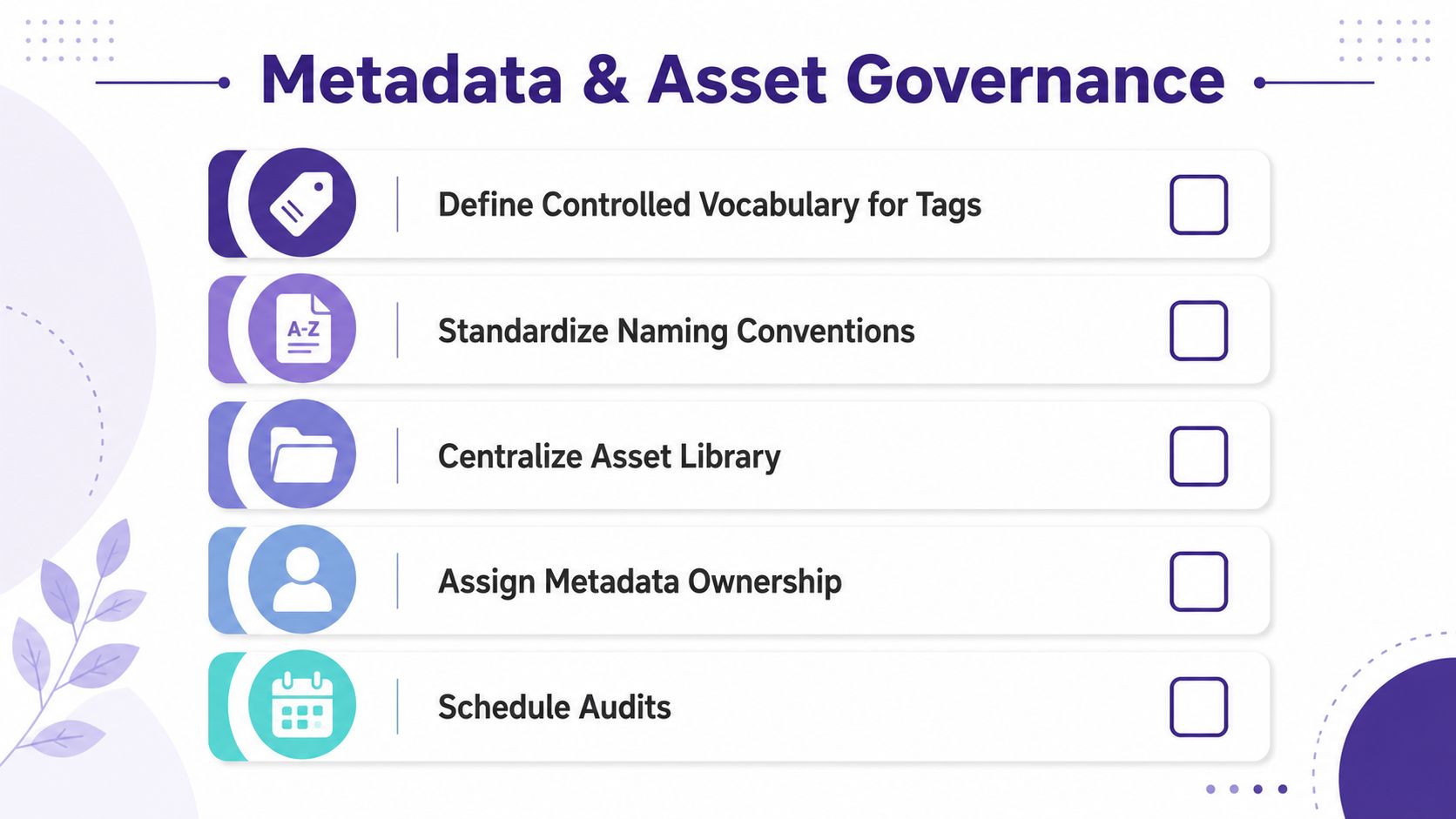
Free-text tags feel flexible but create fragmentation. One person adds “YouTube,” another adds “YT,” and a third writes “video platform.” Use controlled dropdowns for fields such as:
- Format: Podcast episode, video, article, newsletter, short clip.
- Topic: Select from approved subject categories.
- Audience: Choose the intended audience segment.
- Lifecycle: Draft, published, archived, or restricted.
- Rights status: Confirm whether the asset can be edited, syndicated, or reused.
- Source relationship: Connect derivative assets to the original long-form item.
Naming conventions should work for someone in another time zone who has no access to the producer's memory. Include a stable project identifier, content type, descriptive subject, and version status. Separate raw files, working drafts, review exports, and approved masters so that a final cut isn't confused with an early render.
Assign ownership and review dates
A podcaster preparing distribution across Spotify, Apple, and YouTube needs consistent episode titles, descriptions, guest names, topics, rights information, and links. A publisher may need required schema fields completed before an article goes live. In both cases, metadata is a deliverable, not administrative cleanup.
Assign one owner to taxonomy changes and document how new values are approved. Add validation rules that block an upload when required fields are missing. A content-library best-practices guide also recommends assigning a review date to every asset at upload, with alerts 30 and 7 days before expiry, as described in content library governance guidance.
Schedule recurring audits for stale tags, duplicate assets, broken relationships, and outdated rights information. Governance becomes sustainable when the team reviews the system itself, not just the content moving through it.
Balancing Speed and Safety in Your Workflow
Fast publishing and safe publishing aren't opposites. The mistake is applying the same review burden to every asset. A personal opinion post and a compliance-sensitive financial guide may come from the same editorial team, but they shouldn't follow identical routes.
The right design uses conditional routing. Low-risk work can move through a compact review path, while sensitive material adds the people who can identify legal, factual, commercial, or reputational problems. AI-assisted production makes this distinction more important because tools can create drafts quickly without carrying responsibility for the final decision.
| Content Type | Risk Level | Review Layers | Avg. Turnaround | Example Scenario |
|---|---|---|---|---|
| Personal opinion post | Low | Writer and editor | Short | A blogger shares an editorial perspective |
| Routine newsletter snippet | Low | Creator or channel owner | Short | A previously approved idea is adapted |
| Standard interview episode | Medium | Producer and editor | Moderate | A podcast episode uses a signed release |
| Sponsored podcast episode | High | Editorial, commercial, and legal | Longer | A paid episode includes claims and brand obligations |
| Compliance-sensitive guide | High | Editorial, subject, and compliance | Longer | A publisher addresses regulated financial topics |
Keep senior reviewers out of low-risk queues
A senior editor shouldn't approve every minor derivative asset. Route the work to the closest qualified reviewer, then reserve escalation for specific conditions. A claim involving regulated advice, an unresolved rights question, a sensitive guest, or a material brand change should add review layers automatically.
Creators using AI-assisted formats can evaluate an AI UGC creator tool as part of production experimentation, but the tool shouldn't determine the approval path. The workflow still needs a human checkpoint for factual accuracy, rights, tone, and audience fit.
Audit the gates, not just the outputs
A gate that nobody can explain is probably performative. Review whether each approval catches a distinct risk, whether the reviewer has enough context, and whether the escalation route works when that person is unavailable. Remove duplicate checks, but keep controls that protect the audience and the business.
Measuring Workflow Impact on Output and Revenue
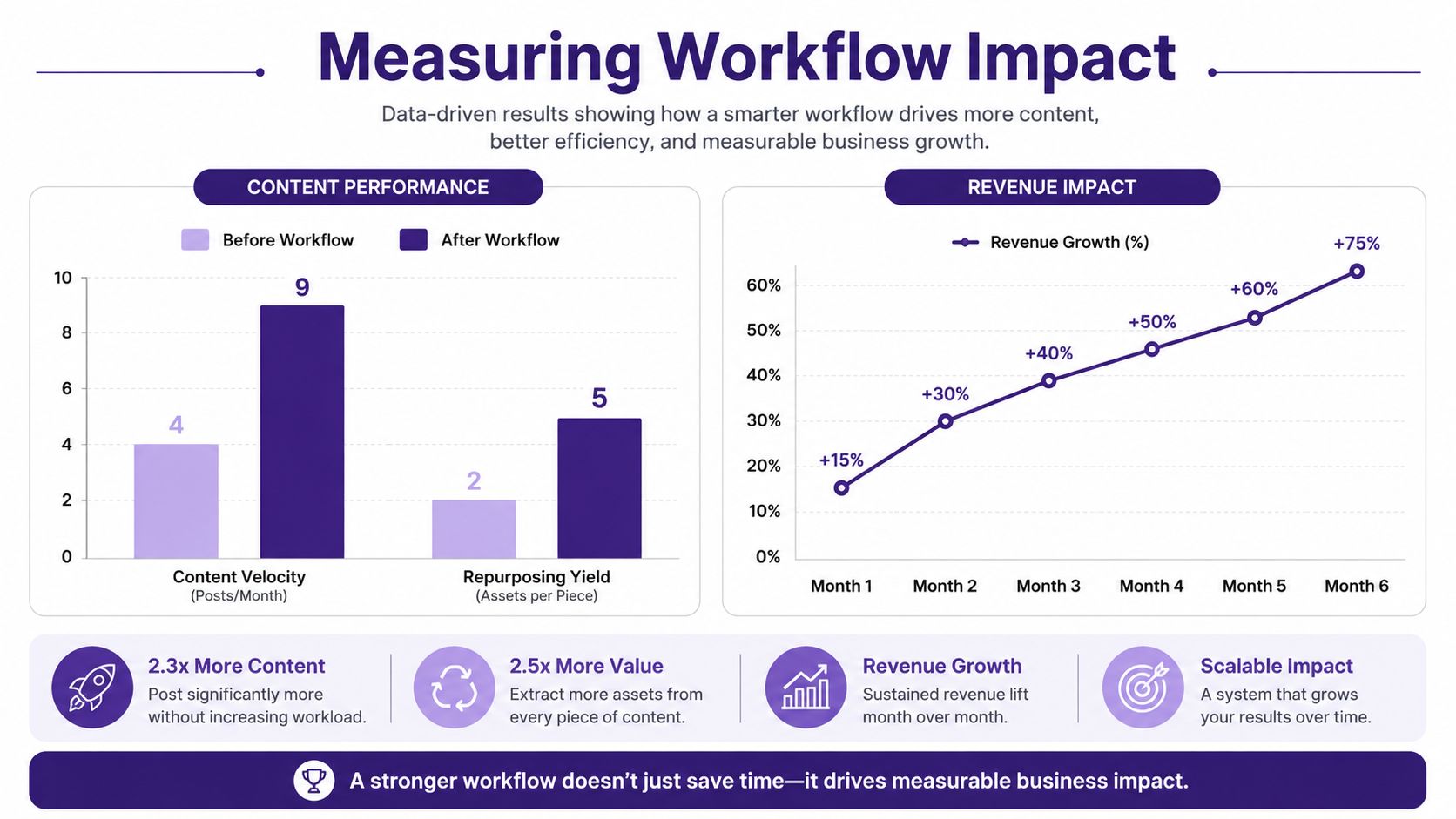
A workflow that produces activity without improving outcomes is bureaucracy with a Kanban board. Measure the points where work slows, multiplies, or creates value. Useful signals include draft-to-publish cycle time, time spent waiting for approval, derivative assets created from each long-form piece, rework caused by missing inputs, and revenue attributed to the originating asset.
Industry summaries report typical productivity increases of 25–30% and error reductions of 40–75% for workflow automation, while roughly 60% of organizations implementing automation programs report ROI within 12 months, according to workflow automation statistics and trends. Those figures shouldn't become targets copied blindly. They show why teams need baseline measurements before changing a process.
Measure the library, not only the launch
Repurposing is where a well-governed workflow can create additional value. One industry roundup reports that repurposed content can generate 60% more engagement than single-format original content, and that one blog post can become 8–12 content pieces across formats, as reported in content repurposing ROI statistics. Another marketing statistics page reports that repurposing can save 60–80% of creation time and reduce production costs by up to 65% when AI is involved, according to content repurposing statistics for 2026.
Track each derivative back to its source. A video creator should know whether a transcript became clips, a blog post, a newsletter segment, and social updates. A publisher should see which archived themes generate new assignments, subscriptions, leads, or sales conversations.
A lightweight dashboard can include:
- Flow time: How long an asset remains in each state.
- Handoff failure: How often work returns because required inputs are missing.
- Repurposing yield: How many approved derivatives come from each source asset.
- Quality signals: Corrections, retractions, broken links, and rights issues.
- Commercial contribution: Revenue or pipeline associated with the content family.
For teams organizing a large library while combining human research with AI-assisted discovery and content creation, Contesimal provides a platform for classifying, searching, and connecting documents, podcasts, videos, and articles into project-based workflows. It can help creators organize existing assets and turn their research library into material for new content rather than treating every assignment as a blank-page exercise.
If your team is losing time to scattered assets, unclear approvals, or forgotten repurposing opportunities, start by sketching one real content process and marking every handoff that currently depends on memory. Then visit Contesimal to explore how a searchable, organized content library can support collaboration between people and AI while turning existing work into new publishing opportunities.