
Metadata management is the discipline of describing, organizing, and governing the information about your content so people and AI can find, trust, and reuse it. Dublin Core began in 1995 with a core set of 15 properties, while modern metadata programs now connect technical, operational, and business context across an entire content library (ISO 15836).
You probably know the frustrating version of this problem. A sponsor wants a clip from an old interview, a producer remembers that the perfect quote exists somewhere, and you're searching cloud drives, shared folders, editing projects, email threads, and chat messages. The content exists, but your library can't tell you where it is, what it means, whether you can reuse it, or which version is safe to publish.
That's why metadata management matters for creators. It turns dormant archives into searchable, remixable, and potentially monetizable assets. Instead of treating every new video, podcast, article, or newsletter as a fresh research project, you build an operating layer that helps your team organize, understand, and take action.
What Metadata Management Means for Creators
A sponsor requests a clip from an older interview. The footage sits in one drive, the transcript is attached to an old email, and the project file is stored in a former collaborator's workspace. Nobody knows whether the guest approved commercial reuse. The content still exists, but fragmented records make it costly to find, verify, and publish.
Metadata management gives that clip a working identity. It connects the title, format, subject, people, source episode, transcript, owner, rights status, publication history, related derivatives, and other details someone needs to judge whether the asset is relevant and usable. The practice grew from formal enterprise work during the 1990s, including standards associated with ISO 11179, Dublin Core, CDIF, and CWM (metadata history).
For creators, metadata functions like an index card attached to every asset. It can bring a podcast episode from 2021 back into view when it suits a new campaign, instead of leaving it buried in an archive. It also gives AI more context. A tool can distinguish an approved interview excerpt from a rough transcript, or a published claim from an unverified note.
Practical rule: A file name tells you what an asset is called. Metadata helps you understand what the asset is for.
That distinction matters as a library expands. Content creators, YouTubers, podcasters, bloggers, publishers, filmmakers, and content marketers may own substantial archives while lacking a reliable view of what is available. A consistent metadata practice improves search, supports responsible reuse, reduces dependence on one person's memory, and creates clearer routes to licensing, sponsorship, repackaging, and distribution.
The operational cost of fragmented metadata appears in repeated searches, duplicate production, uncertain rights decisions, and useful material that never reaches a new audience. A folder stores files. A managed library connects assets to meaning, ownership, permissions, and possible next uses. For a practical comparison of approaches and platforms, see this guide to metadata management tools. That operating layer helps dormant archives become searchable, remixable, and potentially monetizable assets long after publication.
The Three Types of Metadata Every Creator Deals With
You already create metadata, even if you've never called it that. Your camera writes technical details, your publishing workflow creates operational records, and your editorial judgment supplies business meaning.
Consider one long-form video episode.
Technical metadata describes the asset's structure and file characteristics. It can include format, resolution, duration, codec, bitrate, field type, file length, storage location, and other machine-readable details. A video editor or content system may capture much of this automatically. Think of it as the shipping label on a package. It tells a system what the item physically is and how it can be handled.
Operational metadata describes what happened to the asset. It can include origin, lineage, upload date, edit version, approval status, transcription file, publish URL, relationships to source footage, and downstream derivatives. This resembles a tracking number. It shows where the asset came from and how it moved through your workflow.
Business metadata explains meaning and intended use. For the same episode, that might include audience, topic, guest, campaign, sponsor, rights window, monetization tier, content warning, or editorial status. It works like a customs form because it tells people what the package contains, who should handle it, and whether restrictions apply.
The document indexing guide is helpful when you're applying the same logic to articles, research files, transcripts, and other text-heavy assets.
| Metadata Type | What It Describes | Example Values for One Video Episode |
|---|---|---|
| Technical | File structure and machine-readable properties | MP4, high-definition resolution, 42-minute duration, original camera file |
| Operational | Origin, workflow history, lineage, and relationships | Recorded interview, approved edit, published URL, transcript attached, short clips derived |
| Business | Meaning, audience, rights, and commercial context | Creator economy, professional creators, sponsor-approved, podcast promotion, reusable excerpt |
Confusing these layers creates predictable trouble. A tag such as “approved” doesn't tell you whether the video file is technically ready for a platform, whether legal review is complete, or whether the sponsor approved the specific excerpt. Keeping the categories distinct makes search more precise and reuse safer.
The Five Working Parts of a Metadata Program
A metadata program isn't a pile of tags. It's a connected practice that determines what you call content, which fields you capture, how you apply them, where they enter the system, and who keeps them accurate.
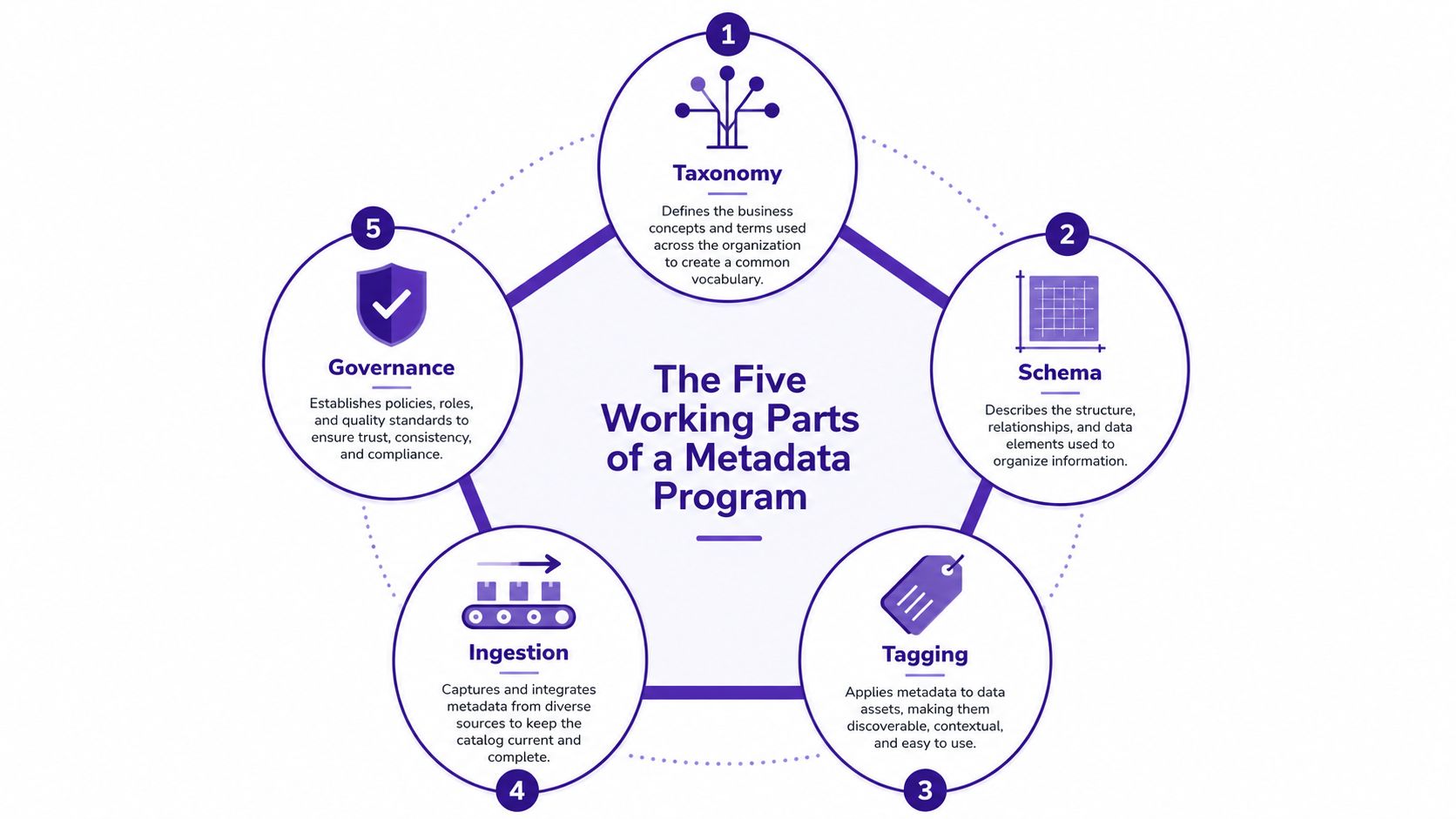
Taxonomy gives your library a shared language
A taxonomy is the controlled vocabulary behind your categories. Without one, your archive may contain “thriller,” “Thriller,” “suspense,” and “crime drama” as separate values, even when your team intends to group them together. Dublin Core was designed to support interoperability across languages and disciplines, which is one reason standards can help mixed-format libraries communicate consistently (Dublin Core Metadata Terms).
Schema decides what every asset should contain
A schema is the field structure. It might require a podcast episode to have a title, guest, topic, transcript, status, publish date, rights status, and related clips. ISO 15836-2 expands the original Dublin Core set with 40 properties and 20 classes, giving teams more expressive options when a basic structure doesn't capture enough context (ISO 15836-2).
Tagging applies meaning to the asset
Tagging is the editorial act of assigning values from your schema and taxonomy. Add tags during production when possible. A producer finishing a YouTube episode already knows its audience and subject, while someone revisiting the archive later may have to reconstruct that context from memory.
Ingestion captures and enriches information
Ingestion is the point where assets and metadata enter your system. It may include importing CMS fields, extracting technical properties, generating transcripts, identifying people and themes, or attaching an article to related episodes. Automatic capture at the source is a strong governance principle, and UN Global Platform guidance recommends preserving metadata with version history and accompanying published statistics with metadata (Snowflake's metadata management overview).
Governance keeps the library usable
Governance assigns responsibility and sets the rules. A lightweight program might define who approves taxonomy changes, how rights are recorded, when stale records are reviewed, and which fields are mandatory. Effective metadata governance includes roles, policies, procedures, metrics, and automation, rather than treating metadata as optional documentation (metadata governance best practices).
These parts depend on one another. A schema without a taxonomy creates inconsistent values. Tagging without ingestion makes the work manual and easy to skip. Governance without clear fields produces meetings instead of usable records. The same pattern applies whether you're managing a podcast feed, a YouTube back catalog, or a Substack archive.
For practical implementation guidance, review these metadata management best practices and start with the smallest structure that supports your next real workflow.
Building Your Metadata Practice in Five Phases
You don't need to rebuild your entire content operation before metadata starts helping. A staged rollout works better because each phase produces something usable and exposes the next problem.
Phase one starts with an inventory sprint
List every place your content lives, including cloud drives, editing software, publishing platforms, local disks, transcript folders, and shared workspaces. Mark duplicates, missing source files, broken links, unfinished drafts, and assets with unclear ownership. Don't try to classify everything perfectly on the first pass. Establish what exists.
Phase two defines a starter structure
Choose a compact schema for one content library. A practical starting set can include title, format, topic, audience, status, publish date, rights, and source. Write one plain-language rule for each field, such as “status means draft, approved, published, or archived.” If a field doesn't support search, reuse, collaboration, or commercial decisions, leave it out for now.
Phase three pilots tagging on one format
Start with long-form videos, podcast episodes, or articles, not every asset type at once. Apply your controlled vocabulary to a manageable group and test real searches. Can you find every episode about a theme? Can you identify clips derived from one interview? Can you separate sponsor-approved assets from material that needs review?
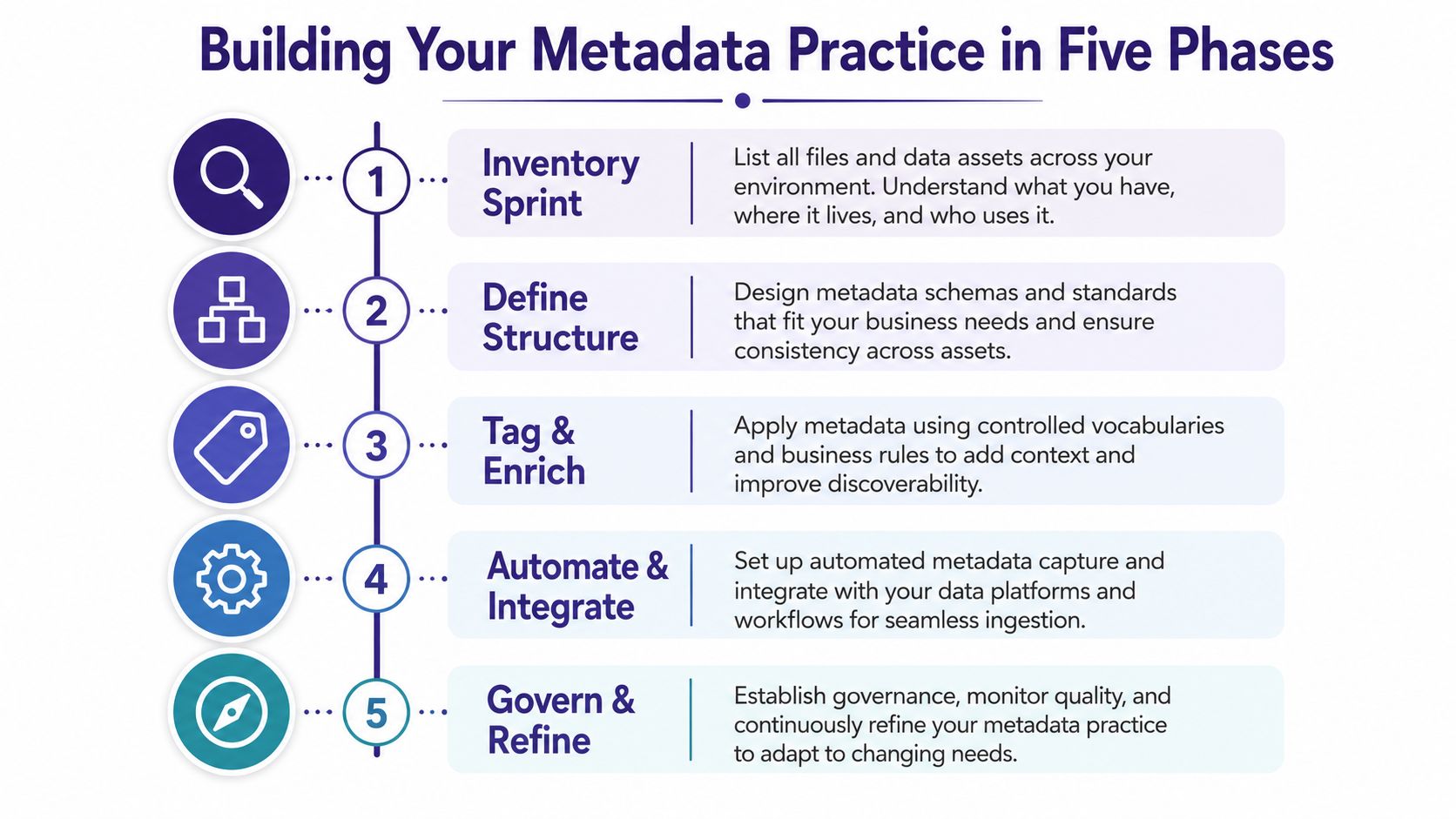
Phase four adds lightweight governance
Name one owner, even if that person rotates. Set a review rhythm, document the naming convention, and decide who can add or change controlled terms. Governance should make decisions visible without turning a small creative team into a committee.
Phase five measures what improves
Track how quickly people find assets, how often existing material becomes part of new work, and how complete the records are. Pick measures that reflect your actual goals, such as preparing a sponsorship package, producing a clip series, or aligning content across platforms.
Solo creators can often complete the inventory, starter structure, and pilot through two focused weekends, while small teams may spread ownership and measurement work across a month. Treat that as a planning suggestion, not a promise. The right pace depends on archive size, tool access, and how much cleanup the library needs.
What Changes When Your Library Is Properly Tagged
Before metadata works, a creator may spend a long stretch hunting for one B-roll clip, guessing which episode introduced a guest, rebuilding a thumbnail that already exists, or searching for audience information before a sponsor meeting. The work feels like production, but much of it is retrieval and verification.
After a usable metadata layer is in place, the same creator can search by topic, person, format, audience, approval status, or relationship to a source episode. Transcripts can point back to clips, derivative assets can remain connected to their original files, and rights fields can support a cleaner review before distribution.
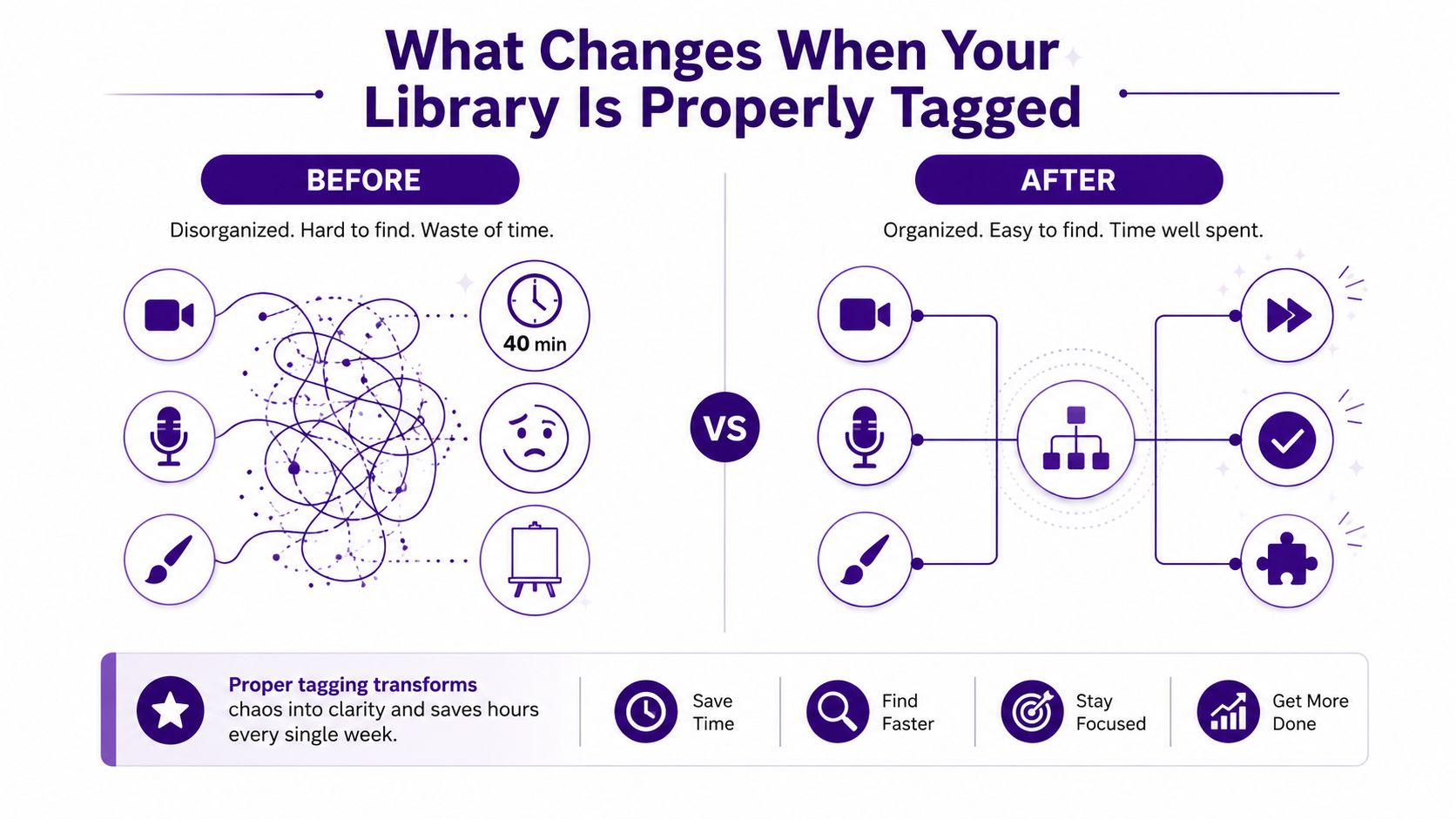
Four changes matter most:
- Discoverability: Team members can find assets without asking the one person who remembers the archive.
- Reuse: Old interviews, research, quotes, visuals, and transcripts become building blocks for new work.
- Monetization: Rights-aware records make licensing, sponsorship packaging, syndication, and platform distribution easier to assess.
- Collaboration: Editors, writers, producers, marketers, and AI tools can work from shared context instead of private folders.
Teams managing large media libraries also face a less visible cost. A 2026 streaming and FAST sector pulse survey reported that 86% of practitioners identified metadata reformatting for different platform requirements as their biggest operational drag, while 71% said content-owner metadata often arrived incomplete. The same survey reported that 86% believed poor metadata was costing money through weaker discovery, lost advertising revenue, or deprioritization (Amagi industry pulse coverage).
For a practical perspective on organizing your asset library, Sovran's documentation offers a useful reference for structuring the places where creative files accumulate.
A metadata layer also improves AI readiness. Transcript generators, recommendation systems, search tools, and creative assistants all need descriptive context to distinguish related assets, identify approved material, and connect a derivative to its source. The metadata doesn't replace editorial judgment. It gives humans and AI a clearer surface on which to apply it.
This video provides another way to think about the shift from scattered files to connected content operations:
The Metadata Mistakes That Cost Creators the Most
Most metadata failures don't look dramatic. They appear as small inconsistencies that make every later search, handoff, and reuse decision slower.
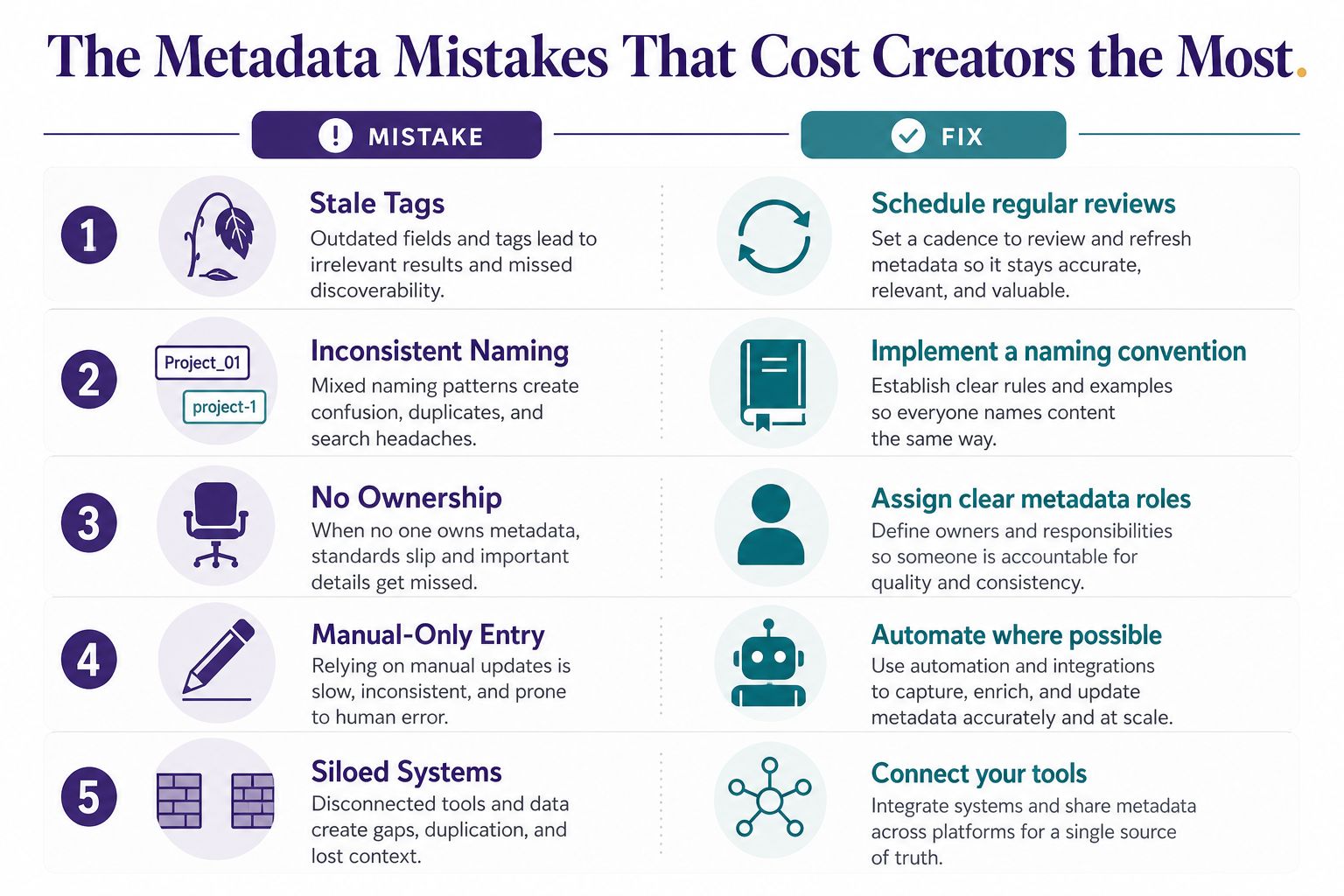
Stale tags
A topic changes, a series expands, or a rights agreement expires, but the original record stays untouched. Ask, “Would the tags still help someone make a decision today?” Schedule reviews alongside new production rather than waiting for a major archive cleanup.
No accountable owner
When tagging belongs to everyone, it often belongs to nobody. Ask, “Who has the authority to correct a wrong term or incomplete record?” Assign one accountable person or rotate the role on a defined schedule.
Schema sprawl
Teams add fields for every project until the system becomes harder to use than a folder. Ask, “Does this field support a recurring search, workflow, or business decision?” Keep the starter schema compact and require a review before adding another field.
Documentation disconnected from assets
A shared spreadsheet may describe content, but the file can move, change, or get duplicated without the spreadsheet following it. Ask, “Can a person understand this asset from the asset's own record?” Attach metadata to the content object or connect the record through a reliable system.
Inconsistent naming
“Creator economy,” “Creator Economy,” and “creator-economy” can fragment results even though they appear to describe the same subject. Ask, “Would two people entering the same concept choose the same value?” Use a controlled vocabulary at entry, with approved alternatives where necessary.
The broader lesson is that metadata must behave like infrastructure. Guidance from Informatica connects technical metadata such as field type, field length, profiling, and lineage with faster tracing, more consistent controls, and less manual validation when the context stays current (Informatica metadata management).
Measuring Success and Knowing Where You Stand
Measurement doesn't need to become another reporting burden. Choose indicators that tell you whether the library is easier to use and whether people are turning existing assets into new work.
Start with four practical KPIs:
- Average findability time: Record how long it takes to locate a specific asset, verify its context, and confirm it's usable.
- Reuse rate: Calculate the share of new outputs that include files, excerpts, research, transcripts, or other material from the existing library.
- Tag coverage: Calculate the share of assets with all required schema fields completed, not merely the share with one tag.
- AI-readiness score: Check whether the asset has structured metadata that language models and related tools can parse, including meaning, source, status, relationships, and usage constraints.
Don't force a universal benchmark onto every creator. A solo podcaster, a magazine publisher, and a production company have different libraries and different definitions of “fast” or “complete.” Establish a baseline first, then set a modest improvement target for the next review.
A four-rung maturity ladder
Ad Hoc means files are stored in several places and people rely on memory or chat messages to find them. Documented means fields and naming rules exist, but adoption is uneven. Managed means an owner reviews quality, ingestion follows a repeatable process, and teams use the metadata in daily work. Optimized means metadata actively supports discovery, reuse, distribution, governance, and AI-assisted workflows.
Ask yourself:
- Can a new collaborator find a relevant asset without personal guidance?
- Do records connect source material to published and derivative content?
- Can you identify rights, approvals, and current versions quickly?
- Does your system capture metadata automatically where it can?
A quarterly review can stay simple. Pick two KPIs, measure them against the previous review, choose one improvement target, and repeat. Over time, that habit turns metadata from a one-time cleanup project into a working part of production.
Contesimal helps content organizations classify, organize, and search document sets, podcasts, videos, and articles while connecting themes, people, episodes, and derivatives. If you're ready to turn your existing library into a more searchable and collaborative source of new content value, visit Contesimal and explore how it can fit your workflow.