
You already know this feeling.
You've published videos, interviews, blog posts, podcast episodes, research notes, slide decks, transcripts, and draft ideas across years of work. Some of it performed well. Some of it almost worked. A lot of it is still valuable. But when you need one old quote, one overlooked angle, or one strong clip for a new project, your library suddenly feels less like an asset and more like a storage locker with bad lighting.
Most creators don't have a content problem. They have a retrieval problem.
That's where document classification software gets interesting. Not as dry back-office tech. Not as another folder system. As the layer that helps you sort, understand, and reuse what you've already made so you can turn old work into fresh output, stronger packaging, and more revenue opportunities.
Your Content Library Is a Goldmine Not a Graveyard
A creator records for years and thinks they're building a catalog. Then one day they try to use it.
They search old drives for “audience retention ideas.” They open transcripts with vague filenames. They skim newsletter drafts. They hunt through PDFs from interviews, workshops, and planning sessions. By the end, they've spent an afternoon retrieving material they already owned.
That's the quiet cost of a messy library. Not just wasted time. Missed publishing windows, repeated research, weaker repurposing, and stalled ideas.
Why this problem keeps growing
The backlog expands faster than it can be organized manually. Every new format adds friction. Audio transcripts live in one place, article drafts in another, scanned notes somewhere else, and design references inside PDFs nobody has named clearly.
For creators and publishers, document classification software transitions from a “nice to have” to operational infrastructure. The broader market around document management systems was valued at $8.85 billion in 2024 and is projected to reach $27.43 billion by 2033, according to Verdocs' document lifecycle management statistics. That projection matters because classification is increasingly built into the systems teams already use to manage content workflows.
Think like a publisher, not a pack rat
A strong archive should answer questions like these:
- What themes have we already covered well
- Which interview moments can become shorts, clips, quotes, or essays
- What content belongs together as a series, playlist, issue package, or course
- Which old material is still timely enough to relaunch
Your archive becomes valuable the moment you can ask it a business question and get a usable answer back.
Without classification, your library stays passive. It stores files. It doesn't help you think.
With classification, the same library starts acting more like a working editorial system. It can group related material, separate content types, surface patterns, and help you move from collection to action. That's how a digital graveyard turns back into a goldmine.
What Is Document Classification Software Anyway
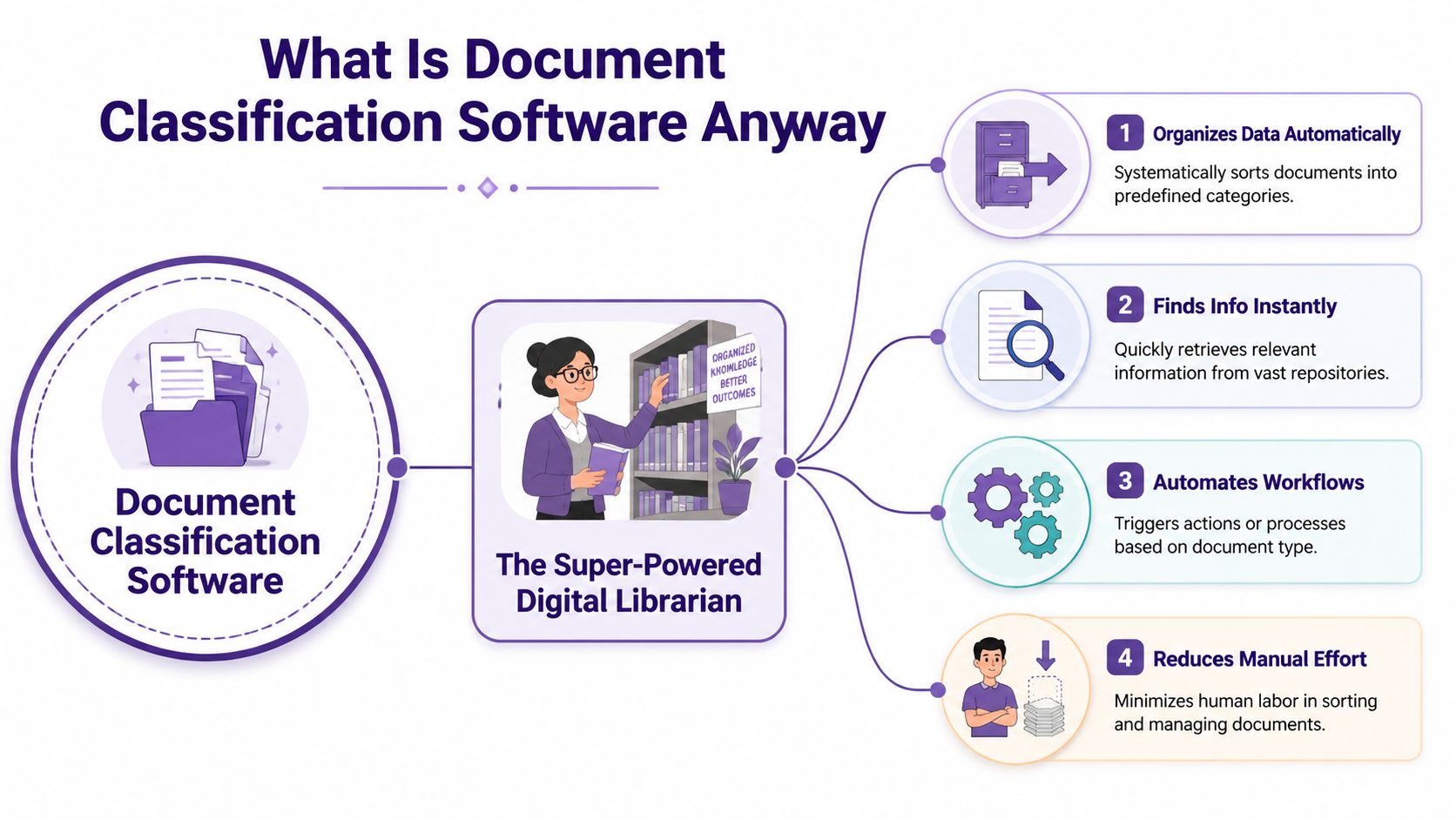
At the simplest level, document classification software is a system that looks at a file and decides what it is.
Not just by filename. Not just by where you dragged it. By the content inside it.
Think of it as a super-powered digital librarian. A normal folder system waits for you to decide where something belongs. A digital librarian reads the material, notices what it's about, and places it into the right shelf or category for you.
What it does in plain language
Let's say you upload a mixed content library that includes:
- Podcast transcripts with recurring themes like creator burnout, audience growth, and monetization
- Scanned magazine pages from older issues
- Contracts, briefs, and release forms tied to production work
- Research notes and interview summaries for future stories
A basic storage tool gives you folders.
Document classification software goes further. It can recognize that one file is an interview transcript, another is a legal document, another is a feature draft, and another belongs to a recurring topic cluster.
How it differs from folders and tags
Folders are location-based. Manual tags are memory-based. Classification is content-based.
That difference matters because humans get tired, rushed, and inconsistent. One teammate tags a file “audience.” Another uses “growth.” Another forgets to tag it at all. The result is a library that only makes sense to the person who last touched it.
A classifier is more consistent. Modern systems often combine OCR, machine learning, and NLP so they can categorize both text-based and image-based files without manual sorting. In practical terms, scanned documents become machine-readable first, then the system assigns a label based on its content, as described in Klippa's guide to document classification.
Practical rule: If your system depends on perfect file naming and heroic memory, it isn't organized. It's fragile.
Why creators should care
This isn't just about tidiness. It affects output.
When your content is classified well, you can find the right quote for a newsletter faster. You can group old material into a new series. You can locate all past discussions on a topic before recording a sequel episode. You can build packages from your archive instead of starting from zero each week.
For a creator, that means less digging and more publishing. For a publisher, it means the archive starts generating fresh editorial value instead of collecting digital dust.
How AI Makes Document Classification Smart
The reason modern document classification software feels different from old filing systems is AI. But the “AI” part doesn't need to stay mysterious.
The easiest way to understand it is to see it as a ladder. Each rung gets the software closer to how an experienced editor or archivist would sort material.
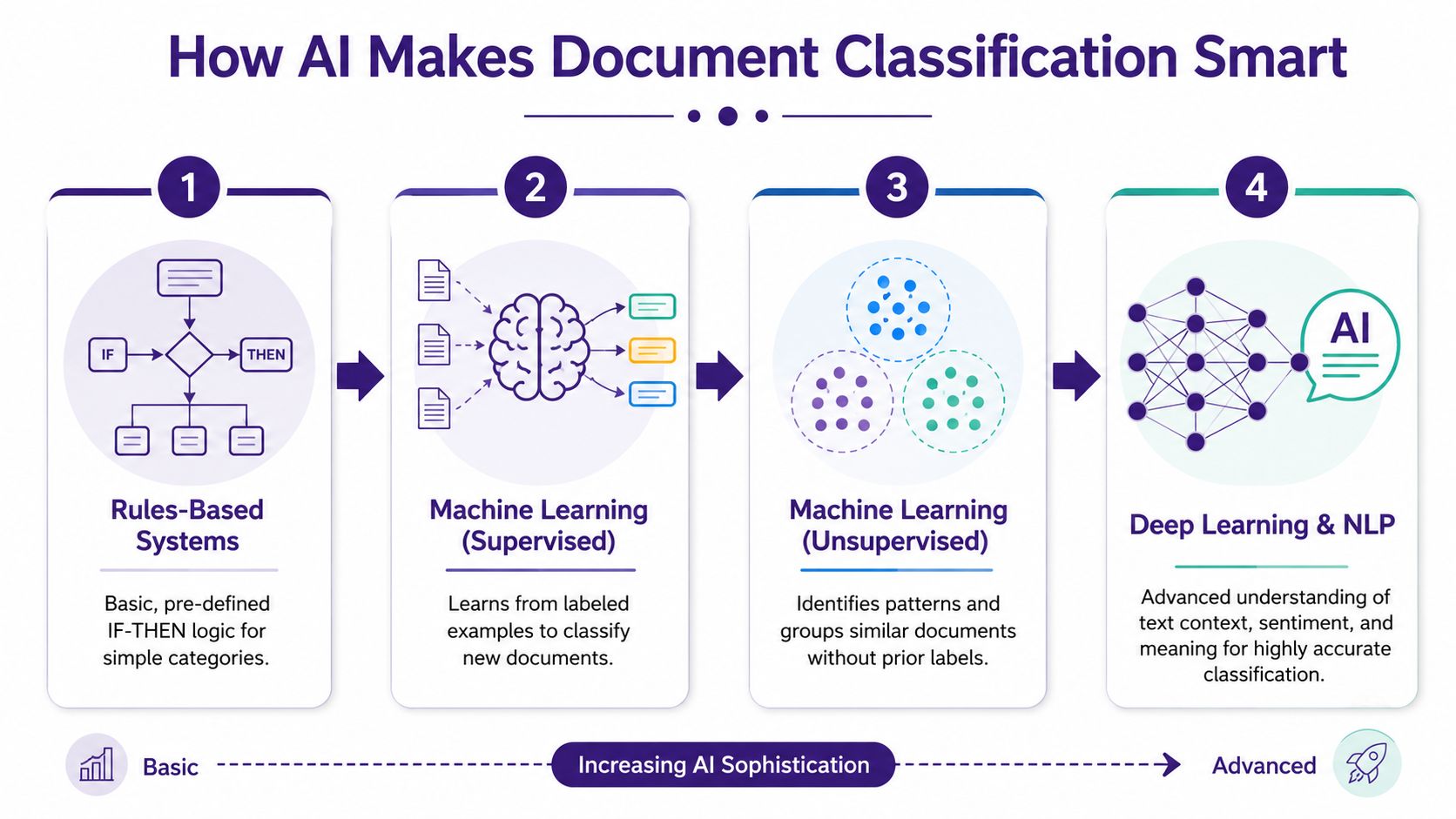
The first rung is rules
Rules-based systems follow instructions.
If a file contains “invoice,” send it to finance. If a document includes a specific phrase, assign a certain label. This works for narrow, predictable situations. It's like telling an assistant, “Anything with this keyword goes in that bin.”
The problem is that creative libraries are rarely neat. The same topic can appear under different wording. A transcript may imply a theme without naming it directly. A scanned page may contain useful structure but messy text.
Rules help. They just don't understand much.
The next rung is learning from examples
Machine learning improves the process by teaching the system with examples. Instead of writing every rule yourself, you show the model documents that belong in certain categories. Over time, it learns patterns.
The standard workflow is well established. Systems take labeled documents, convert text into numerical features such as TF-IDF or embeddings, then train models such as Naive Bayes or SVM. Teams evaluate performance using accuracy, precision, recall, and F1-score, as explained in Docsumo's overview of document classification.
That sounds technical, so bring it back to a creator example.
If you feed the system a set of interview transcripts labeled “founder stories,” another set labeled “tutorial content,” and another labeled “industry commentary,” the model starts noticing the language patterns that separate those buckets. Then it can classify new material based on what it has learned.
For a deeper look at the larger workflow around ingestion and automation, this explainer on intelligent document processing is a useful companion.
A quick visual can help make the jump from concept to process.
NLP helps the system read more like a human
Natural language processing, or NLP, is what helps software move past keywords and toward meaning.
A basic system might see “publish,” “release,” and “launch” as unrelated terms. A smarter one can detect that they often show up in similar editorial contexts. That matters when you're searching for ideas, themes, or reusable sections rather than exact wording.
NLP is also why document classification software can help with rough, real-world material like transcripts, draft documents, and hybrid records that weren't written to be clean databases in the first place.
Some documents need visual understanding, not just text
Often, people get confused by this. They assume classification is always a text problem.
It isn't.
A scanned zine, a magazine spread, an annotated PDF, or a historical archive may carry meaning in layout, tables, stamps, side notes, and formatting. In those cases, text extraction alone can flatten the signal. The software may need to preserve the original visual structure to classify the material well.
That's why the smartest systems aren't just “reading words.” They're interpreting documents.
Key Features That Matter for Content Creators
A creator doesn't need every enterprise feature under the sun. You need the features that make old work usable again.
That changes how you should evaluate document classification software. Don't start with vendor language. Start with the moments in your week where content gets lost, repeated, or underused.
Search by idea, not only by filename
The first important capability is semantic retrieval. You want to search for a concept and pull back related material, even if the exact words differ.
If you're a podcaster, that could mean finding every past discussion about pricing psychology, even when one episode used “premium positioning” and another used “high-ticket offers.” If you're a publisher, it could mean pulling all archive pieces tied to one theme before packaging a new issue.
Support for messy formats
Creative libraries are mixed by nature. They include clean text files, rough transcripts, image-heavy PDFs, scanned pages, slide decks, and old production documents.
That's why format handling matters so much. Advanced systems go beyond text with Visual NLP Classification, which classifies documents based on their original visual layout. That's especially useful for image-heavy PDFs, magazines, and scanned archives because layout-aware models can catch signals that text-only pipelines miss, as noted in John Snow Labs' write-up on visual document classification.
Metadata that actually helps you create
Good metadata shouldn't feel like admin work. It should help you make decisions.
A useful system can organize content by topic, format, audience, project, status, or source. Then you can answer practical editorial questions faster.
- Reuse planning helps you spot old material that can become clips, quote cards, email sequences, or follow-up episodes.
- Series building helps you identify recurring themes that deserve their own playlist, category, or product.
- Collaboration clarity gives writers, editors, and producers a shared structure instead of everyone inventing their own labels.
If your team wants cleaner organization logic, these metadata management best practices are worth reviewing.
Features worth prioritizing
Here's a simple creator-first view of what matters most:
| Capability | Why it matters to creators |
|---|---|
| Content-based classification | Sorts material by what it is, not what you happened to name it |
| OCR support | Makes scanned and image-based files searchable |
| Topic grouping | Helps turn isolated assets into reusable clusters |
| Searchable metadata | Speeds up scripting, clipping, repackaging, and planning |
| Layout-aware analysis | Preserves meaning in visual documents and designed pages |
If a tool only helps you store files, it solves yesterday's problem. If it helps you retrieve and recombine ideas, it helps you publish.
Unlock New Value With a Creator Roadmap
Once your library is classified, the payoff shows up in very practical ways. Not in abstract efficiency language. In publishable outputs.
Think of the process as three moves: organize, understand, take action. Classification handles the first move. The next two are where creators start extracting value.
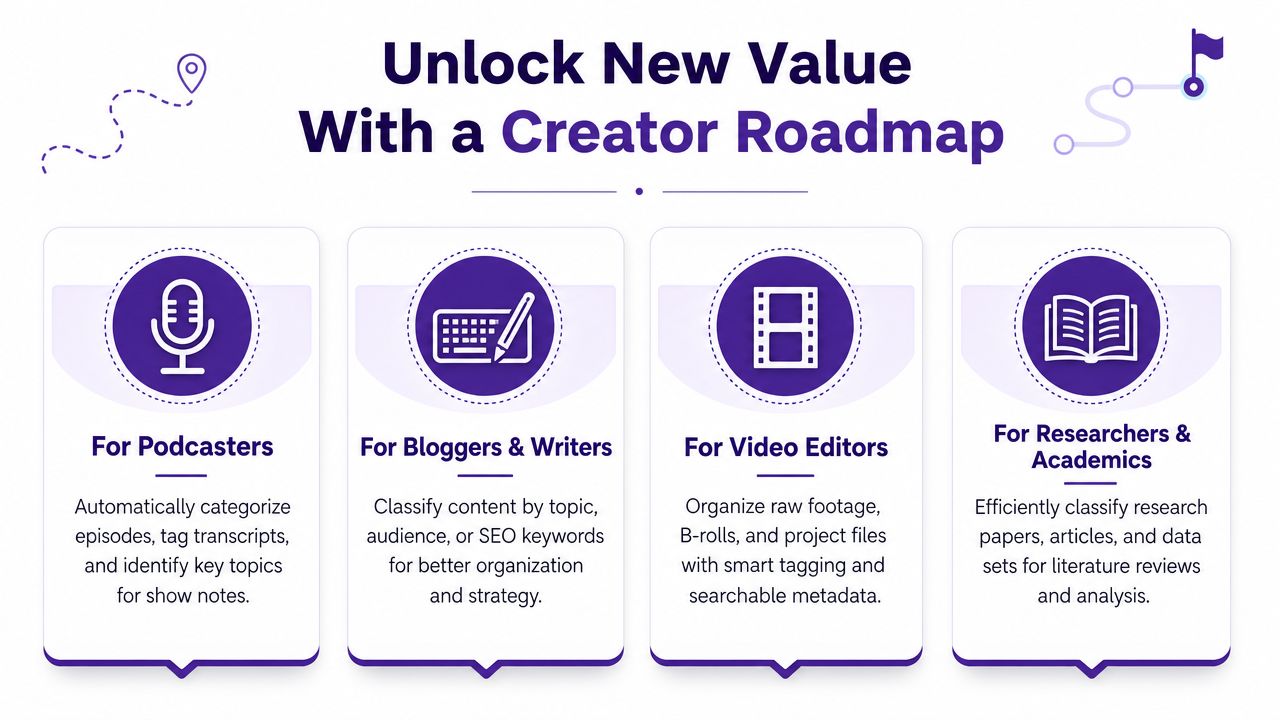
A podcaster can build faster from past conversations
Say you've recorded dozens or hundreds of episodes. You know you've talked about burnout, pricing, hiring, or audience trust before. You just don't remember where.
With a classified archive, you can pull together every episode segment tied to one topic, then use that material to create:
- A compilation episode
- A premium members-only feed
- A short-form clip series
- A themed email sequence drawn from your best past insights
That changes your archive from reference material into production fuel.
A YouTuber can identify repeatable winners
Video creators often have strong instincts but weak memory across a large back catalog. One title format worked. One concept generated great discussion. One recurring question kept appearing in comments and scripts.
Classification makes those patterns easier to spot because the library is grouped by themes, formats, and content types instead of scattered across folders and exports.
A practical workflow might look like this:
- Group old videos by core topic such as tutorials, commentary, breakdowns, or reactions.
- Pull transcripts and outlines tied to the best recurring subjects.
- Identify subtopics that appeared across multiple high-interest pieces.
- Build a new series from proven ideas rather than brainstorming in the dark.
A publisher can resurface archives with context
Publishers and editorial teams often sit on deep libraries with long half-lives. Old interviews, features, essays, and explainers may still be useful if someone can locate the right package at the right time.
This becomes more important when archives contain bundled files or mixed packets. UiPath notes that a single file can contain multiple logical document types across different page ranges, and stronger classifiers can return multiple results for the correct spans of pages, as described in UiPath's document classification overview.
For a publisher, that nuance matters. A scanned packet may include correspondence, article drafts, permissions, and clippings in one file. If the system can separate those pieces accurately, the archive becomes much more usable.
The best reuse strategy isn't “make more from scratch.” It's “find what already deserves a second life.”
A simple creator roadmap
Here's a practical way to put classification to work:
- Start with one library slice such as transcripts, PDFs, or article drafts.
- Define a few useful categories based on your real workflow, like topic, format, audience, and repurposing value.
- Review the output manually so your system reflects editorial reality, not just technical guesses.
- Turn categories into actions by creating clip lists, sequel ideas, archive bundles, or research packs.
That's when the software stops being organizational software and starts becoming a creative engine.
Choosing the Right Software and Getting Started
The wrong way to choose document classification software is to get impressed by broad claims about AI.
The right way is to ask whether the tool matches your library, your formats, and the decisions you need to make. A solo creator, a podcast network, and a publishing team may all use classification, but they won't need the same setup.
What to evaluate before you buy
Use this short checklist when comparing tools:
- Ease of training. Can you teach the system with examples from your own content, or does setup feel like a technical project?
- Format coverage. Does it handle transcripts, PDFs, scans, and mixed media documents in a way that fits your archive?
- Search experience. Can your team retrieve useful material quickly, or do results still depend on exact keywords and filenames?
- Editorial fit. Can it classify by categories that matter to creators, such as theme, format, audience, series, or asset type?
One non-obvious question matters more than most demos suggest: how does the software handle files that contain more than one document type?
A key differentiator is whether a system can identify and label distinct sections within a single file, like one PDF that contains different document types across different page ranges. That capability is essential for complex archives, according to the earlier-linked UiPath documentation.
Questions worth asking a vendor
Instead of asking only “How accurate is it?”, ask:
| Question | Why it matters |
|---|---|
| Can it split and classify mixed files correctly | Archives often contain bundled PDFs and scanned packets |
| Does it preserve layout when needed | Visual documents can lose meaning in text-only pipelines |
| Can non-technical staff review and correct output | Classification works best as a human-AI workflow |
| Can categories reflect our editorial taxonomy | Generic labels won't help much in creative operations |
Buy for your messiest real files, not for the polished sample set in the demo.
A simple way to get started
Adoption doesn't need to be dramatic. Keep it small and useful.
- Pick one painful use case. For example, finding reusable quotes across transcripts.
- Collect a focused sample set from one content type or one archive segment.
- Define a manageable taxonomy with categories your team already uses in planning.
- Review and refine results so the software learns from editorial feedback.
- Attach the output to workflow by using it for scripting, clipping, packaging, or archive resurfacing.
That last step is where many teams stall. They organize beautifully, then stop. The goal isn't a neat system. The goal is more output, stronger reuse, and better monetization from work you've already created.
From Content Chaos to Content Gold
A disorganized library doesn't just slow you down. It hides your best ideas from you.
Document classification software changes that by making your archive legible. It helps you sort mixed files, retrieve ideas by meaning, and reconnect scattered assets that belong together. For creators and publishers, that's the difference between constantly starting over and building on what already works.
The primary benefit isn't cleaner folders. It's advantage.
You can revive old interviews, repackage timeless insights, surface overlooked research, and turn years of content into new episodes, articles, clips, products, and editorial packages. If you want a related foundation for making archives easier to retrieve and use, this guide to document indexing is a smart next read.
Your library already contains more value than you're probably using. The job now is to make that value reachable.
Frequently Asked Questions
Is document classification software just a fancy folder system
No. A folder system stores files where you put them. Document classification software examines the content and helps sort material based on what it is. That's a big difference when your archive includes transcripts, scans, drafts, and bundled PDFs that don't fit neatly into one manual structure.
Is this only useful for big companies with compliance teams
Not anymore. The same underlying ideas that help enterprises manage records can help solo creators, podcast teams, and publishers manage archives. If you have a growing back catalog and you want to repurpose it, classification becomes useful very quickly. The problem isn't corporate scale. It's content complexity.
Will AI do all the work for me automatically
It helps a lot, but it shouldn't operate without human judgment. The best setup is collaborative. The software handles the heavy lifting of sorting and pattern recognition. You review categories, correct edge cases, and shape the taxonomy around your editorial goals. That gives you a system that gets smarter without handing over creative control.
What kinds of files are hardest to classify
Mixed files are usually the tricky ones. Scanned packets, image-heavy PDFs, and single files that contain multiple document types take more care than clean text documents. That's why layout handling and page-level classification matter so much for serious archives.
What's the fastest first use case for a creator
Start with transcripts or article drafts tied to one recurring theme. That usually gives you the clearest payoff because it helps with sequel content, clips, newsletters, and content planning right away.
If your archive is full of good ideas you can't easily retrieve, Contesimal can help you turn that backlog into usable knowledge. It's built for teams and creators who want to classify, search, and activate their libraries so old content becomes new output, stronger collaboration, and real business value.