
Your content library is already full of raw material. The problem isn't a lack of ideas, it's that many teams bury their best videos, podcast episodes, articles, and clips in folders that nobody wants to touch twice. That's how archives turn into dead weight instead of revenue engines.
The good news is that document management best practices aren't just for legal teams and IT admins. For creators, publishers, and marketing teams, they're the difference between a chaotic pile of assets and a system that makes repurposing faster, collaboration cleaner, and monetization more realistic. Once your library is organized, you can spot what deserves a sequel, what should become a playlist, and what can be packaged into something new.
The pressure is real because retrieval pain is everywhere. In one industry survey, 46% of employees said they sometimes or almost always struggle to find the information they need, 66% of businesses have trouble with document approvals and reviews, and workers lose time to versioning issues every day at an 83% rate, according to FileCenter's summary of document management statistics. Separate survey data cited by Business.com shows 48% of respondents struggle to find documents quickly and efficiently, and 47% say their company's online filing system is confusing and ineffective, which is exactly why creators need systems that make old work easy to reuse.
1. Hierarchical Taxonomy System for Content Classification
A strong taxonomy is the difference between a messy archive and a library that pays rent. If you run a YouTube channel, podcast, or publishing operation, you need a naming and tagging structure that mirrors how audiences think about your content, not how random exports landed on a hard drive.
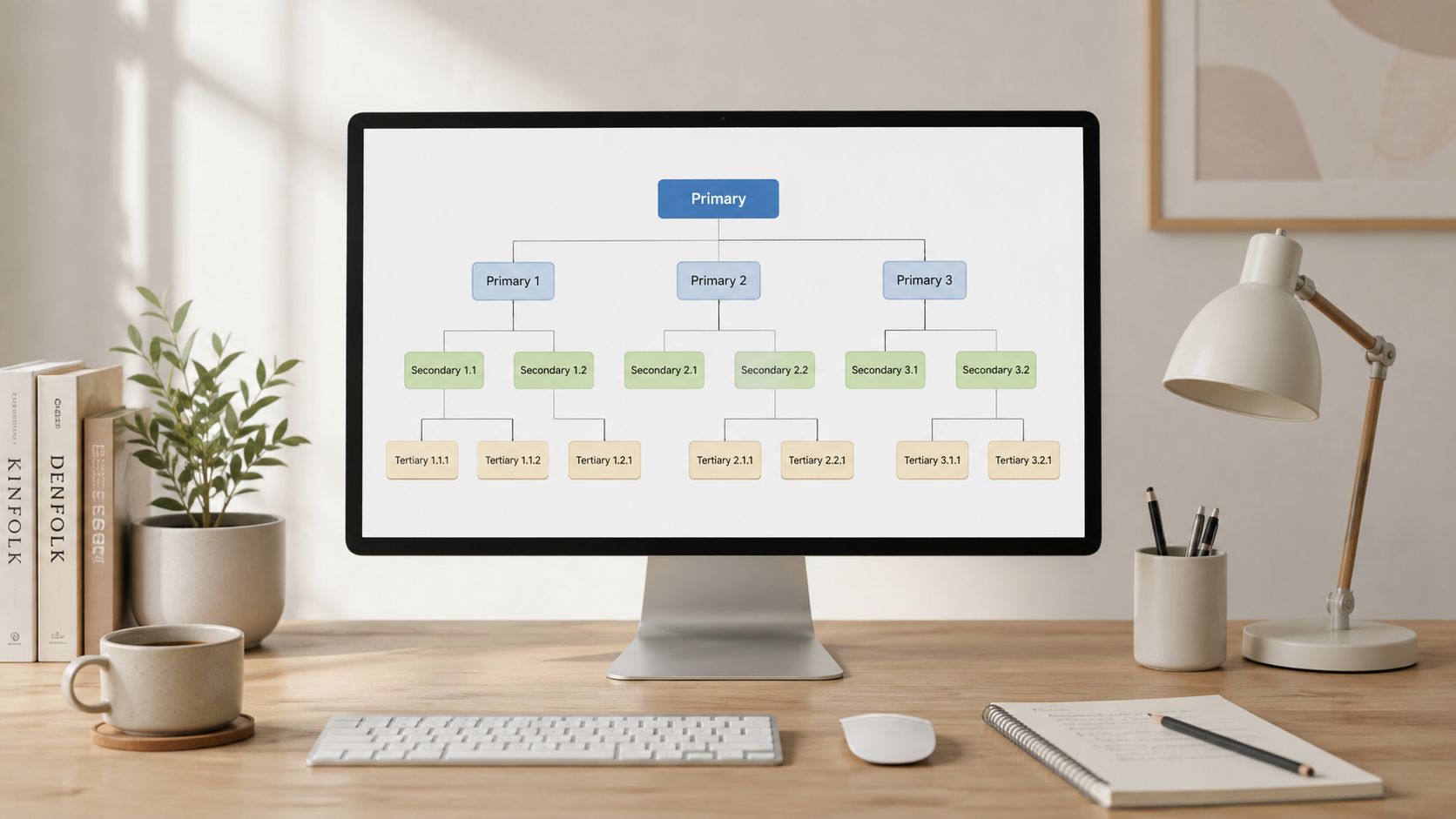
Build the tree before the pile grows
Start with a few broad buckets, then drill down. A cooking creator might organize content as Cooking → Baking → Bread-Making, while a podcast network might sort by guest type, season, and format. That structure makes it easier to see repeatable themes, identify gaps, and turn one strong episode into a content series that audiences can follow.
Practical rule: one person should own the taxonomy. If everyone tags differently, search quality collapses fast.
The most useful taxonomies stay small at the top and flexible underneath. You don't need fifty categories on day one, you need three to five primary ones that can grow as the library grows. Consistent naming conventions matter here too, because your taxonomy only works if the same topic is labeled the same way everywhere.
Here's the part many teams skip, then regret later. Old content usually predates the taxonomy, so AI-assisted tag suggestions can help retro-fit structure onto older assets without manually reopening every file. Just keep the taxonomy alive by reviewing it quarterly, or it'll drift as your format mix changes.
2. Content Inventory Management and Metadata Standardization
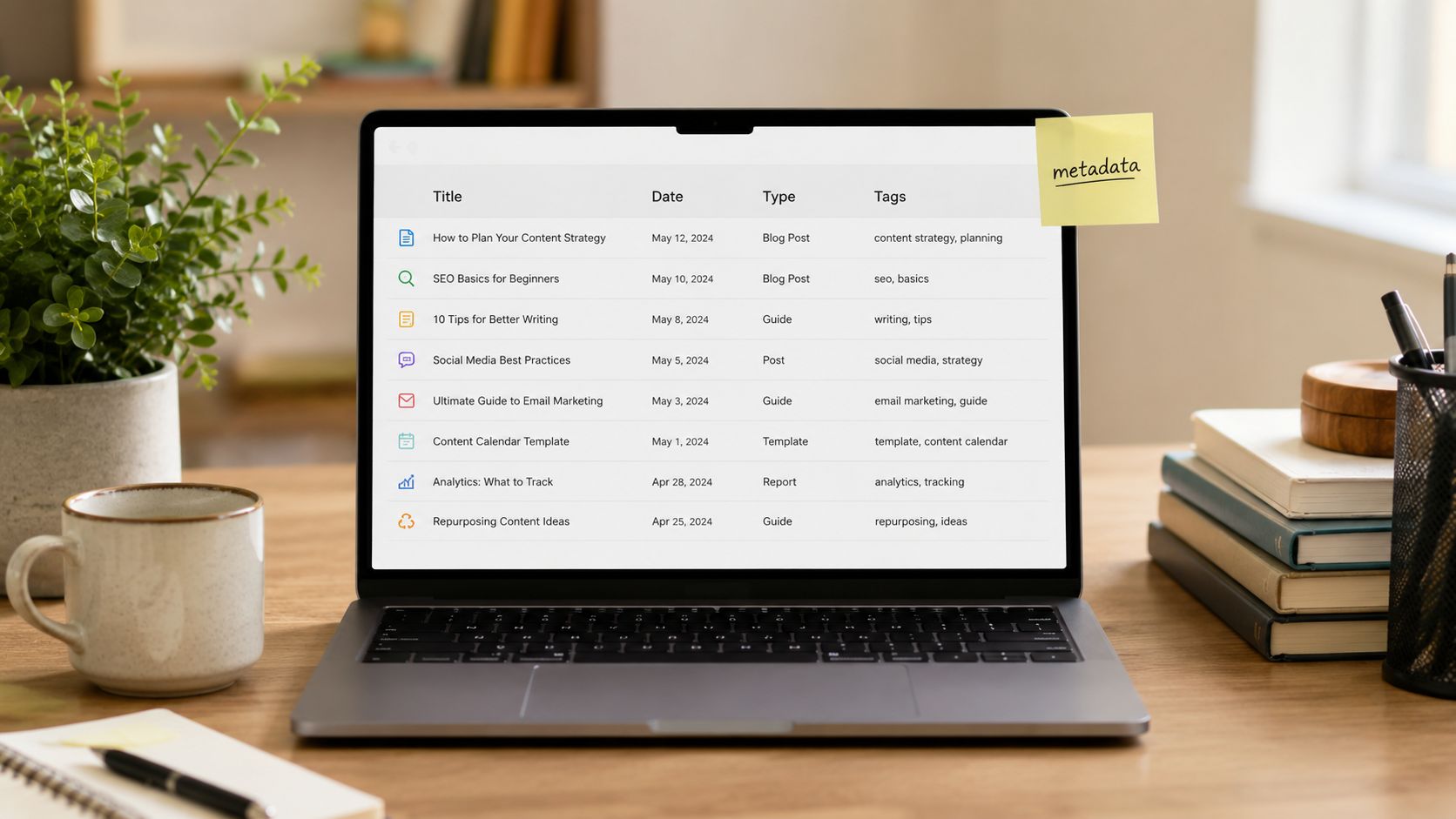
A content inventory turns your archive into a queryable business asset. Instead of guessing which video, episode, or article deserves a second life, you can look at a master list that tracks type, date, performance, audience, source material, length, format, keywords, and repurposing status.
For creators, that means fewer “Did we already use this?” moments. For publishers and marketers, it means a cleaner view of what's underperforming, what's still unreused, and what's worth expanding into a lead magnet, webinar, or course. A simple spreadsheet is enough to start, as long as the fields are consistent and useful.
The teams that do this well treat metadata like infrastructure, not decoration. Dates should follow one format, durations should mean the same thing everywhere, and metrics should be defined the same way across the library. If one person logs “published date” and another logs “release date” differently, the inventory stops being trustworthy.
A good first pass is to test the system on 10-20 existing pieces before rolling it wider. Then audit it monthly, not because it's glamorous, but because new uploads and old gaps creep in constantly. The goal is to know which assets are high-value and which ones are just taking up space.
A useful inventory does more than catalog history. It shows where the next revenue opportunity is hiding.
A lot of creators like the idea of metadata, then stop when the tagging becomes inconsistent. That's why a smaller, disciplined metadata model usually beats a sprawling one. Contesimal's guide on metadata management best practices fits that mindset, especially if you want a system that can scale without turning into admin theater.
3. Content Series and Episodic Bucket Organization
Audiences don't just follow topics, they follow rhythms. When you organize content into series, seasons, or buckets, you give people a reason to come back and a reason to binge.
Make the pattern obvious
A series works when the audience can recognize the structure immediately. A YouTube education channel can build sequential playlists, a podcast network can group episodes into arcs, and a publisher can turn a backlist into a recognizable franchise. The value isn't only in retention, it's in making the library easier to understand and easier to monetize across formats.
Creators often think every new post needs to be a fresh standalone idea. That mindset leaves money on the table, because strong series can become blog collections, downloadable guides, email sequences, or even book concepts. The trick is to build the series around a theme that already proved itself in your inventory.
Useful constraint: test a new series with 3-5 pilot episodes before you commit to a full run.
Naming also matters more than people admit. If the series relationship isn't clear in the title, the audience won't feel the connection, and your archive won't organize itself around a recognizable promise. That's why series planning docs should spell out the narrative arc, the expected episode count, and the core theme before production gets ahead of strategy.
4. Collaborative Content Review and Annotation Workflows
Solo creators can survive on intuition for a while. Once editors, marketers, designers, and executives enter the process, you need a shared layer where people can mark up content without turning feedback into a scavenger hunt.
Annotations beat scattered comments because they're tied to exact moments or passages. In video, that means timestamps. In text, that means specific lines. The result is a shared memory of why something worked, where it can be repurposed, and what needs fixing before it ships.
Film teams use frame-by-frame markup to isolate trailer moments, and podcast teams flag transcript sections for social clips. Publishing teams can do the same with manuscripts, cover concepts, and chapter-level notes. The key is to keep feedback structured enough that future creators can search it later, not just read it once and forget it.
Use a few simple annotation types and keep the rules consistent. Highlights can mark standout sections, comments can add context, and action items can move the work forward. If everything is treated like a generic note, the value disappears into noise.
Good collaboration produces reusable knowledge, not just approvals.
That's also where approval discipline matters. Contesimal's link to approval workflows for marketing teams fits naturally here, because annotation without a decision path just creates more talking. The best teams convert feedback into editorial judgment quickly, then keep moving.
5. Cross-Platform Content Repurposing Mapping
A creator who waits until publication day to think about repurposing usually ends up rushing clips, captions, and newsletter copy. A better setup starts with the original asset and maps every downstream use before the draft is finished. That gives editors, producers, and marketers a real plan for how one piece can fuel the rest of the library.
That mapping matters because a strong long-form asset can carry far beyond its first publish date. A single video, interview, or article can become clips, posts, graphics, threads, newsletters, or search-friendly follow-ups when the structure is built with reuse in mind. The work only looks like extra volume from the outside. Inside the workflow, it is a way to get more return from the same creative effort.
Build the map around the original asset
A 20-minute video can become a Shorts clip, a TikTok cut, a LinkedIn post, an email excerpt, and a discussion prompt for a community channel. A podcast interview can become a standalone episode, a blog article, a social graphic, or a course module. The value comes from planning those offshoots while the source material is still fresh, not from treating repurposing like cleanup after launch.
One well-mapped piece of content can generate 10-15 secondary pieces across platforms, based on the plan notes provided for this workflow. That only works when the repurposing is tied to production, not treated like a later marketing chore. If the team knows which lines can become hooks, which segments can become clips, and which ideas can become follow-up posts, the archive starts producing revenue instead of sitting idle.
Contesimal's content repurposing strategies fit this approach because the library becomes the source of new assets, not just a storage bin for finished work. For more on how to repurpose calls into content ideas, keep a platform requirements reference nearby, build repurposing tasks into the workflow, and track which formats pull audience attention.
6. Version Control and Content Evolution Tracking
Version control is where teams either get disciplined or get lost. If you publish often, revise often, or collaborate across roles, you need a clear history of what changed, why it changed, and what effect the change had.
That matters for creators, but it matters even more for teams working with reusable assets. A headline test, thumbnail revision, or podcast intro change shouldn't disappear into a memory hole. It should become a repeatable lesson.
Treat edits like evidence
If a YouTube creator tests two thumbnails, the later version shouldn't just be “the one we liked better.” It should be tracked as a version with a rationale, a timestamp, and whatever performance context matters to your team. The same applies to blog updates, cover variations, and podcast intros.
A formal version history also prevents the classic “which file is current?” disaster. That confusion is exactly what version control policies are meant to solve, and it's why version history should be part of the workflow instead of an afterthought.
Track changes that matter. If the edit wouldn't change the outcome, it probably doesn't need to become a version.
Good version control gives editors a learning loop. Over time, you'll spot patterns in what kinds of changes improve results and which ones just add noise. That's useful whether you're optimizing for clicks, engagement, or conversion.
7. Content Performance Analytics and Engagement Pattern Recognition
If your archive isn't measured, it's just sentiment. Performance analytics tells you which assets deserve a sequel, which formats create return visits, and which topics belong in the next production cycle.
A practical analytics system starts small. Pick the metrics that map to your goals, then compare patterns across content types, creators, topics, and formats. Views alone won't tell you much, but watch time, completion, shares, conversions, and audience segments can reveal what deserves more attention.
Many content teams get trapped in vanity thinking. They celebrate raw traffic but ignore which pieces move the business forward. A piece with fewer views can still be the best repurposing candidate if it brings the right audience or converts well later in the funnel.
YouTube channels, podcast networks, and publishers all benefit from the same discipline. You're looking for repeatable patterns, not one-off wins. Once those patterns are visible, your library starts functioning like a planning engine instead of a storage locker.
Benchmark against your own archive, not your hunches.
The best performance systems don't just report. They feed the next editorial decision. If a topic cluster keeps outperforming, that cluster deserves more depth, more distribution, and more repurposed formats.
8. Content Library Search and Discovery Optimization
Your library only creates value when people can find things. Search and discovery are what turn hidden assets into usable assets, especially when your archive spans years, formats, and team members.
Strong search isn't just keyword lookup anymore. It should understand synonyms, context, and semantic relationships so a search for one topic can surface relevant content even if the exact phrase never appears in the title. That matters for creators, because it helps you find your own best material fast.
Make the archive easy to interrogate
Invest in metadata first, because search quality can't outrun weak descriptions. Then watch what people search for, what they click, and where they abandon the results page. If users keep searching for a topic and finding nothing useful, that's a content gap, not a user failure.
This also helps internal teams avoid duplication. A producer can quickly find prior segments on the same topic, an editor can locate older examples, and an executive can review how a theme has evolved across the archive. Good discovery saves time and sharpens consistency.
Contesimal's content discovery platform fits here because search is no longer just a library feature. It's a way to reveal what's already in your house before you spend more time building from scratch.
9. Workflow Automation and Templated Content Processes
Automation should take over the repetitive work, not the creative judgment. That's the line worth protecting when you're building a content operation that needs to scale without turning the team into full-time production clerks.
Podcast transcripts, caption generation, upload scheduling, format conversion, and distribution sequencing all fit naturally into templates. So do editing checklists, thumbnail handoffs, and post-publication follow-ups. The more predictable the task, the more likely it belongs in a workflow rather than in someone's inbox.
Automate the machine parts first
Start by documenting the process as it exists today. Then automate the most repetitive steps, especially the ones that eat time without requiring strategic decisions. If a task still needs judgment, build review gates so automation doesn't outrun accountability.
The strongest teams use automation to widen creative capacity, not to erase human oversight. That's especially important for creators who are shifting from hobbyist mode into a real publishing business. You need speed, but you also need control.
Automation should shorten the path from idea to distribution, not create invisible errors.
When the workflow is templated well, new team members ramp faster and output becomes more consistent. That consistency matters when your archive is supposed to be a revenue engine, not just a storage folder with a nicer interface.
10. Multi-Stakeholder Content Governance and Approval Frameworks
The bigger the content operation, the more important decision rights become. Once legal, brand, marketing, editorial, and executive stakeholders all weigh in, the archive can't rely on informal approval habits anymore.
Governance is what keeps speed from collapsing under its own weight. A clear framework defines who approves what, how feedback moves, when escalation happens, and what to do when people disagree. Without that structure, even a strong library gets slowed down by bottlenecks and conflicting edits.
For content organizations, this is especially important when a single asset has multiple business uses. A clip might need editorial approval, brand signoff, and a distribution decision. If nobody owns the final call, the asset stalls and the repurposing opportunity gets stale.
A good framework also keeps policy drift under control when new tools enter the stack. As AI-assisted workflows become more common, the question isn't only what gets automated, it's who validates the output and what happens when the system gets it wrong. The practical advantage of governance is that it keeps the archive usable without turning it into a free-for-all.
Clear approval rules protect both quality and momentum.
Contesimal's approach is relevant here because content libraries only create value when classification, search, and collaboration are governed well enough to trust. If you need a formal angle on policy design, the data governance advice from F1Group is a useful adjacent reference for larger teams.
10-Point Comparison of Document Management Best Practices
| Approach | Implementation complexity | Resource requirements | Expected outcomes | Ideal use cases | Key advantages |
|---|---|---|---|---|---|
| Hierarchical Taxonomy System for Content Classification | Medium, design taxonomy and enforce conventions | Moderate, taxonomy owner, tagging tools, occasional AI assistance | Improved internal discoverability; clearer thematic structure; faster repurposing | Growing libraries, multi-author teams, cross-platform catalogs | Logical navigation, pattern discovery, supports automation and collaboration |
| Content Inventory Management and Metadata Standardization | High, audit legacy content and define schema | High, DAM/database, manual auditing, integration with analytics | Queryable content database; data-driven repurposing; less duplication | Publishers, large archives, teams needing actionable content insights | Enables analytics, rights tracking, consistent metadata for reuse |
| Content Series and Episodic Bucket Organization | Low–Medium, planning, naming conventions, consistent branding | Low–Moderate, editorial planning, templates, branding assets | Increased audience retention and predictable content cadence; easier repurposing | Creators building loyalty (podcasts, channels), educational series | Builds audience habits, favors algorithmic promotion, simplifies repurposing |
| Collaborative Content Review and Annotation Workflows | Medium, tooling, roles, and structured feedback templates | Moderate, collaboration platform, reviewer time, training | Faster, traceable reviews; captured institutional knowledge; more repurposing moments | Teams with editors, multi-stakeholder production (video, podcast, publishing) | Timestamped, searchable feedback; clearer approvals; human-AI validation |
| Cross-Platform Content Repurposing Mapping | Medium, create mapping templates and platform rules | Moderate, planning time, multi-skill execution (edit, copy, design) | Multiplied content ROI; consistent cross-channel messaging; efficient distribution | Multi-platform creators, agencies, brands maximizing reach | Scales content value, reduces decision fatigue, speeds multi-channel output |
| Version Control and Content Evolution Tracking | Medium, versioning policies and comparison tools | Moderate, storage, versioning tooling, discipline to log changes | Clear audit trails, rollback ability, learnings from edits tied to performance | High-frequency publishers, teams testing variations, collaborative editors | Prevents version conflict, supports experimentation, documents improvements |
| Content Performance Analytics and Engagement Pattern Recognition | High, integrate data sources and build analytics models | High, analytics infrastructure, analysts, compliance processes | Evidence-based strategy, identification of high-performers, measurable ROI | Publishers, marketing leaders, data-driven content teams | Data-driven decisions, predictive insights, links content to business outcomes |
| Content Library Search and Discovery Optimization | High, implement semantic/NLP search and ranking tuning | High, search infrastructure, quality metadata, ongoing tuning | Faster content finding, higher engagement, reduced redundant creation | Large archives, platforms prioritizing discovery, internal knowledge bases | Semantic retrieval, recommendations, improves internal and external discovery |
| Workflow Automation and Templated Content Processes | Medium, map processes and build automation templates | Moderate, automation platform, integrations, template creation | Time savings, consistent output, scalable production without proportional hires | High-volume production teams, small teams scaling output | Eliminates repetitive tasks, enforces standards, increases throughput |
| Multi-Stakeholder Content Governance and Approval Frameworks | High, define roles, SLAs, escalation paths and policies | High, stakeholder time, approval tooling, legal/compliance input | Controlled publishing, reduced risk, clear decision rights and accountability | Enterprises, regulated industries, cross-functional marketing orgs | Clear approval paths, audit trails, balances speed with compliance |
Organize, Understand, and Take Action Today
Implementing document management best practices isn't about making folders look neat. It's about turning your content library into a system that helps you find what matters, reuse what works, and move faster without losing control. For creators, that means more repurposing opportunities. For publishers and marketing teams, it means a cleaner path from archive to audience to revenue.
The most effective teams don't try to fix everything at once. They start with one practical layer, like a content inventory or a naming system, then build the next layer on top of it. That's how scattered assets become a working library, and how a working library becomes a business advantage.
The payoff shows up in everyday operations first. People waste less time searching, approvals stop stalling so often, and teams can finally tell the difference between an old file and a reusable asset. When the system is solid, content stops feeling like clutter and starts behaving like capital.
Contesimal fits this kind of workflow because it's built to help content organizations classify, search, and collaborate around large libraries of documents, videos, podcasts, and articles. If your archive already holds material worth repackaging, the next move is to make it easier to discover, easier to organize, and easier to turn into something new.
Contesimal helps creators, publishers, and content teams organize historical libraries so they can find, classify, and reuse assets with less friction. If you're ready to turn old episodes, drafts, and articles into a more useful content system, visit Contesimal and see how a structured library can support your next round of repurposing.