
You've got the archive. The problem isn't a lack of content, it's that the useful parts are buried under folders, old episode files, draft posts, research notes, and half-finished ideas. An AI chat interface changes that moment by giving your team a conversational way to ask, “What have we already made, what connects, and what should we turn into next?”
That's why this topic matters now. AI chat has moved from a novelty to a mainstream interface layer, with independent roundups reporting roughly 987 million people worldwide using AI chatbots in 2025 and market estimates projecting growth from about $7.76 billion in 2024 to $27.3 billion by 2030, a CAGR of roughly 23.3% Rev.com's chatbot statistics roundup. The practical meaning for creators and publishers is simple. More people already know how to talk to software, and more software is being built to answer, search, summarize, and act through conversation rather than menus.
What an AI Chat Interface Is
A creator opens a drive full of archived videos and sees the same mess everyone sees, titles that made sense at upload time, old thumbnails, transcripts in one folder, notes in another, and a dozen ideas that were never connected back to the original work. A standard chatbot and an AI chat interface serve different jobs in that setting. A chatbot may answer a narrow question. An AI chat interface becomes a working layer on top of a knowledge base, search, and content operations, so someone can move from “I have stuff” to “I can use this stuff.”
Chatbot, chat interface, and AI chat interface
A chatbot usually follows fixed paths. It handles common questions, canned flows, or simple support tasks. A chat interface is the visual conversation surface, the text box, the transcript, the buttons, the feedback controls, and the surrounding UI that makes the exchange usable.
An AI chat interface adds a language model and often retrieval, memory, and tools. That combination changes the job. Instead of only answering from built-in scripts, it can pull from a content library, remember session context, and help a team explore a library as if they were talking to a well-organized research assistant. For a plain-language overview of how conversational systems are being used in discovery and search, LLMrefs has a useful explainer on chatbots in modern search. For the language side of that setup, a clear primer on natural language processing helps explain why the interface can parse a messy request and turn it into something the system can work with.
The adoption curve matters because it explains why this has become a default interaction pattern. Market trackers say North America remains the largest regional market by revenue share, and that lines up with the concentration of enterprise adoption in the U.S. and Canada Rev.com. When people already expect to ask software questions in plain language, the interface stops feeling experimental.
The catalog analogy
A useful comparison is a catalog system, not a shelf. A weak system shows one folder at a time and assumes the user already knows where everything lives. A stronger one indexes the library, connects related items, and keeps track of the path the user has already taken. That is what changes when a chat layer sits on top of a real content library. The interface is no longer just a box for questions. It becomes the front end to taxonomy, retrieval, and content discovery, which is where a lot of teams first feel the difference between a demo and a product that fits into daily work.
The Core Building Blocks Under the Hood
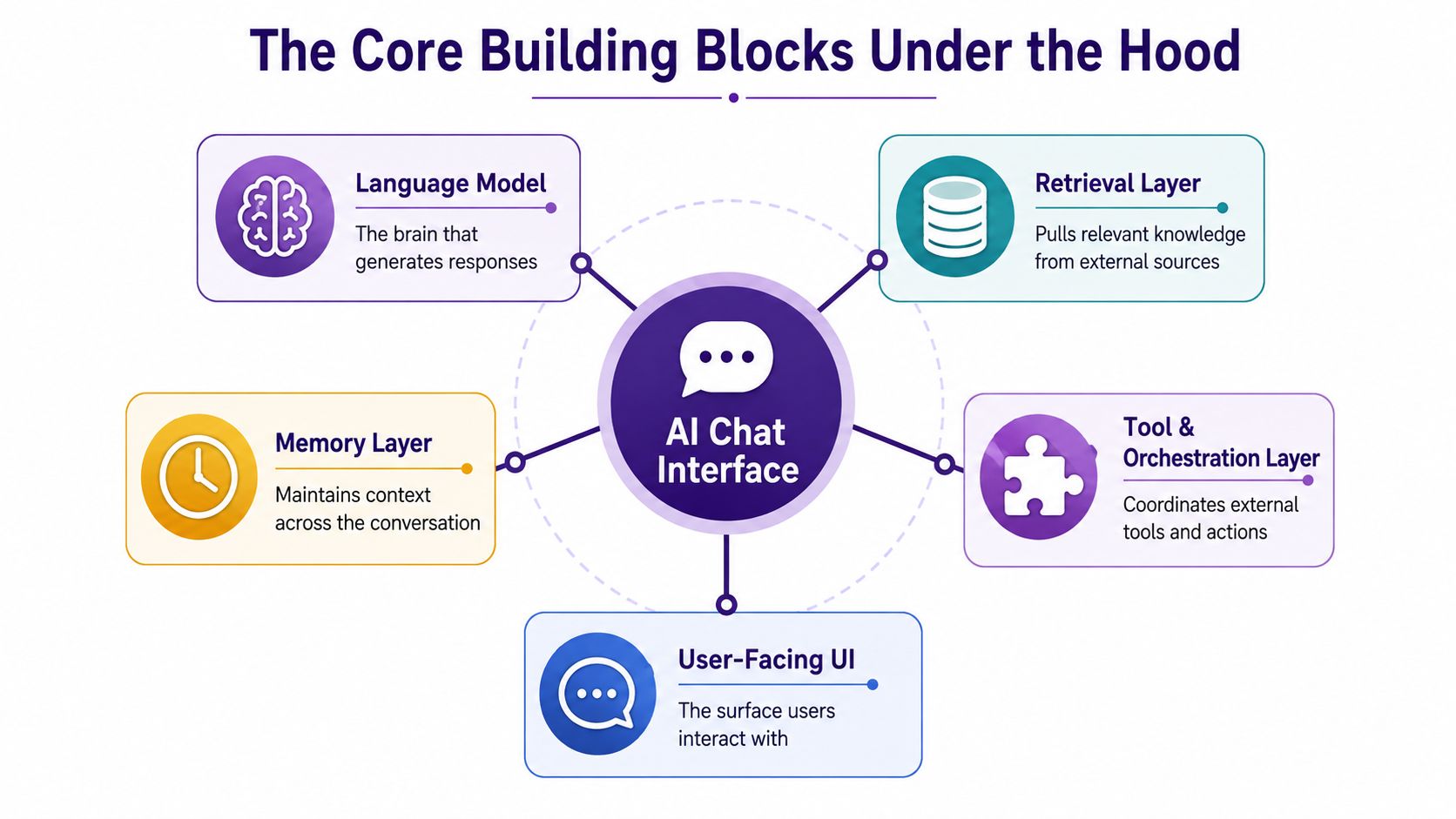
A useful AI chat interface is built from five parts, and each one does a different job. If you only evaluate the text bubble, you'll miss the product underneath it. The model writes. The retrieval layer finds. Memory keeps continuity. Tools let the system act. The UI decides whether the experience feels clear or slippery.
Start with the model
The language model is the part that turns context into language. It can summarize, rephrase, compare, draft, and answer, but it does not magically know your archive unless something else feeds it. That is why a model on its own feels clever in a demo and limited in a real workflow. For a plain-language primer on how systems turn messy requests into usable input, see natural language processing for content systems.
Add retrieval and memory
The retrieval layer is what turns chat into a usable research surface. It pulls relevant documents, transcripts, notes, or other sources from outside the model. The memory layer keeps track of the conversation and, in some products, earlier sessions too. Without memory, the assistant behaves like a helpful stranger every time you reload the page. With it, the interface can remember that you were comparing two podcast episodes, or that you already excluded a source set.
For content teams, this is the part that makes the chat layer more than a reply box. It connects the prompt to the actual library, so answers can reflect the sources you trust instead of guessing from general training.
Tools and UI are not decoration
The tool and orchestration layer is where the system calls external services, runs workflows, or triggers actions. That can mean search, export, tagging, summarizing, or any other operation the product allows. The user-facing UI is the control surface that makes all of this understandable. It should show what the assistant can access, what it did, and what the user can do next.
A system that cannot show its source trail is not trustworthy. The same logic applies here. For content teams, the value is not only in generating text. It is in making the library legible enough that people can reuse it with confidence.
Architectural Patterns Worth Knowing
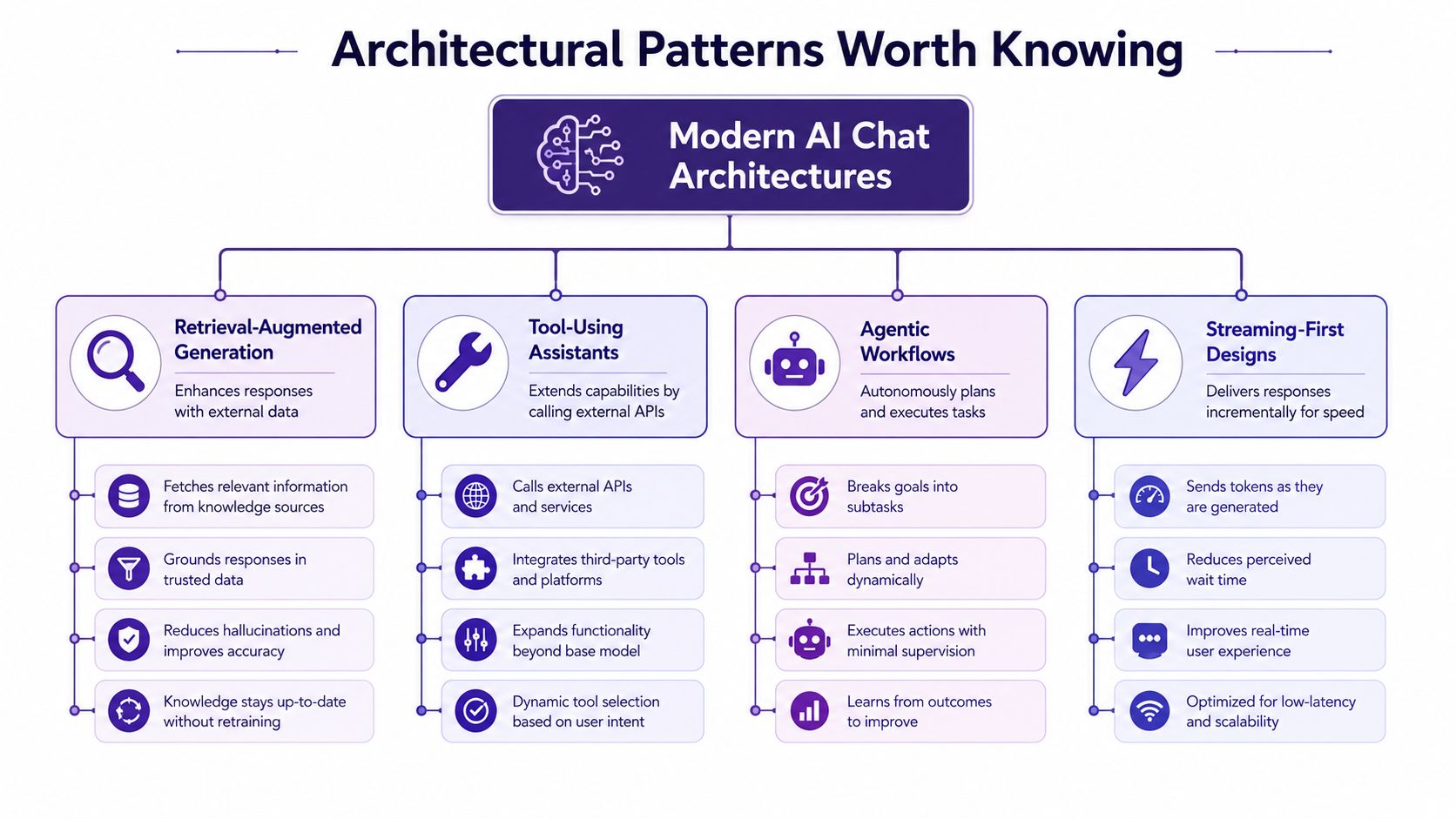
A chat interface can look like one simple box and still be built on very different foundations. One version answers from a source library. Another reaches for tools and systems. Another tries to plan a sequence of steps. A fourth is built to keep the screen moving as it works. Once you know which pattern you are looking at, the product pitch becomes much easier to read.
Four patterns you'll keep seeing
Retrieval-augmented generation is the pattern that answers from outside content it gathers first. For documentation, libraries, and archived knowledge, that matters because the reply can stay tied to your source set instead of drifting into generic model guesses. The weak point is still retrieval quality. If chunking or ranking misses the right material, the answer may sound clean and still be wrong.
Tool-using assistants go beyond answering. They call APIs, search systems, read files, or trigger workflows to finish a task. That makes them useful when the question is not only “what does the library say?” but “tag these items, export that set, or compare these episodes.” The tradeoff is more moving parts, which means more permissioning, more logging, and more places for the flow to break.
Agentic workflows plan and carry out a chain of steps with limited guidance. They are appealing because they can take on multi-step work, but they are harder to supervise. For content teams, that can help with internal research or draft support, yet it still needs human review before anything sensitive is handed off. A good rule is simple, the more autonomy the system has, the more visible its steps need to be.
Streaming-first designs focus on speed the user can feel. Instead of waiting for a full response, the interface renders output as it arrives, which matters in long research sessions and in multimodal products. Google's Gemini Live API shows the technical side of this approach with a stateful WebSocket (WSS) protocol, raw 16-bit PCM audio at 16 kHz input and 24 kHz output, plus JPEG 1 FPS image and video input Google Gemini Live API docs. That detail matters because modern chat is often a live transport layer, not a simple request box.
For teams comparing chat with source browsing, the search layer still matters. A useful companion is enterprise search design, especially when people need to move back and forth between conversation and the underlying library.
Useful question to ask vendors: does the product retrieve, act, plan, or merely chat? The answer shows where the value sits, and where the risk sits too.
Anatomy of a Strong Chat UX
A chat surface can look polished and still feel fragile the moment a real team starts using it. The gaps usually show up in the small things. Can users see the assistant working? Can they inspect where the answer came from? Can they recover when something breaks? Those questions matter more than a friendly mascot or a glossy gradient.
What trust looks like on screen
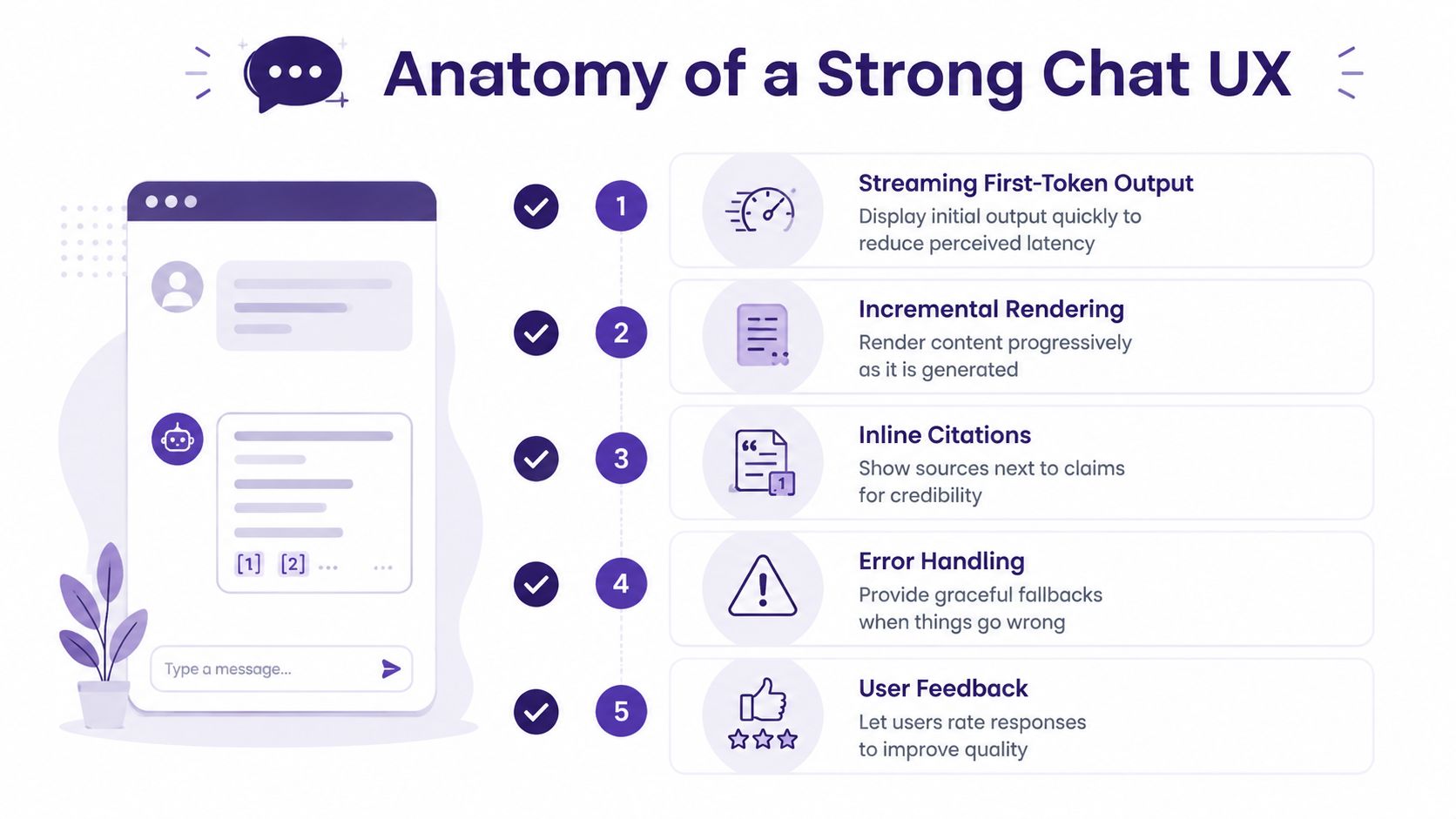
A strong interface starts with streaming first-token output and incremental rendering so users are not staring at a blank page while the system works. That kind of response flow lines up with low-latency transport in Google's live API design, where partial rendering helps the interface feel alive before the full answer arrives. In plain English, the assistant should show signs of life quickly.
Then come the trust markers. A serious product shows inline citations next to the claim they support, not buried at the bottom. Nielsen Norman Group advises setting realistic expectations and telling users to verify sources because citations can still be inaccurate, and it recommends placing those citations right beside the claim NN/g on explainable AI. That is the difference between “sounds right” and “I can check this.”
Controls matter as much as output
Users need model and version labels, especially when teams compare output across time. They also need per-message actions like regenerate, edit, and share, because conversation is not always linear. Sometimes the best next step is to fix one prompt and run it again, not start over.
Observable error states matter just as much. When rate limits, content filters, or network issues happen, the interface should say so plainly. Hidden failures waste time and make people blame themselves for a system problem.
The UI functions as a safety surface, and it should communicate risk clearly. If the product can invoke tools or workflows, the design should show what the model can see, what it can do, and what still needs human approval. For teams tying chat to a real knowledge base, that clarity belongs alongside content structure, which is one reason many products now pair conversation with a content intelligence platform instead of treating chat as a standalone box. If the product stays vague here, it is not ready for enterprise use.
Connecting a Chat Interface to Your Content Library
The value shows up when the chat layer sits on top of a living archive, not a toy dataset. That's where taxonomy, ingestion, and retrieval quality stop being backend trivia and become product decisions that shape what the team can find. A clean chat box over a messy library doesn't solve much.
The pipeline that makes the interface useful
First comes programmatic upload and fast file ingestion. If a creator, publisher, or research team can't get content in quickly, adoption stalls before the assistant ever answers a question. Then comes taxonomy construction, which is the part many teams underestimate. The system has to know whether a file is an episode, an excerpt, a source document, a transcript, a clip, or an edited derivative.
After that, content gets chunked and embedded so the retrieval layer can find relevant pieces later. Chunking is where a lot of quality is won or lost. Too coarse, and the system misses detail. Too fine, and the assistant loses context. The goal is to make the archive searchable in a way that still respects how people think about their work.
The moment of interaction is where the system mediates data in real time. A good research workflow doesn't just return a blob of text. It helps people compare sources, surface patterns, and move from a raw archive to a usable knowledge set. That is the point at which chat becomes a discovery layer, not just a question box.
Why collaboration changes the design
In shared workflows, humans and AI contributors often work side by side. The assistant can surface a theme, suggest a bucket, or pull supporting material, while a person decides what matters. That's especially useful for teams that are already organizing playlists, content buckets, or series concepts and want the archive to feed the next piece instead of sitting unused.
The main lesson is simple. If the library isn't curated, the chat layer can't compensate forever. Good taxonomy and ingestion practices make the difference between a conversational interface that feels magical and one that just talks fast.
Bottom line: content quality up front determines whether the assistant can become part of the workflow later.
Use Cases and Measurable Benefits for Creators
A podcaster with a large back catalog does not need another blank page. They need a way to ask, “What themes kept coming up in the interviews that I never turned into a series?” A good AI chat interface can surface repeated topics, guest overlaps, and underused segments so the team can build the next episode faster and with more confidence.
A blogger with a deep archive has a different problem. The old posts are there, but the relationships between them are not obvious anymore. A chat layer can pull related articles, identify recurring language, and help turn older material into a fresher angle without starting from scratch every time. That saves research time and makes repurposing less random.
What teams do with the output
A publisher might use the interface to compare source documents before assigning an editor. A marketing team might use it to keep one core idea aligned across a newsletter, a landing page, and a short-form video script. A screenwriter or producer might use it to search for motifs, references, or recurring character patterns across a long project archive.
For a practical view of the broader studio production toolkit, the tools for content creators is a useful way to think about how many tools already sit around the same workflow. The chat layer becomes valuable when it helps the team move through that stack with less friction.
The measurable outcomes tend to cluster around three areas. Research gets faster because teams spend less time hunting through folders and more time asking focused questions. Search gets more useful because the interface can return related material, not just exact matches. Engagement improves when teams turn old material into new material with less guesswork. Those are not abstract gains, they are the kinds of changes content teams feel when they stop treating the archive like a storage bin.
Where Chat Is the Wrong Default Interface
Chat feels natural until the task becomes heavy on comparison, inspection, or precise manipulation. Then it starts to behave like a keyhole. You can see one slice of the problem at a time, but not the whole surface. That's where structured views beat a transcript.
The keyhole effect is especially obvious in data work, source review, and anything that requires side-by-side judgment. An arXiv paper on data analysis argues that chat narrows visibility and makes it harder to compare and inspect complex information than hybrid interfaces that combine chat with tables, filters, canvases, or side panels arXiv on the keyhole effect. That point matters for content teams because editors and researchers rarely need only one answer. They need to verify, compare, and choose.
Hybrid beats pure chat in specific workflows
Editing a transcript is easier when the transcript is visible as text, not trapped inside a reply. Comparing two episodes is easier when the differences are laid out in a table or side panel. Reviewing source documents is easier when chat can initiate the search, then a structured view can handle the evidence.
A mature product doesn't force every step through the transcript. It lets chat start the task, then hands off to the right interface for the job. That might mean a canvas for planning, filters for narrowing a library, or a side-by-side source view for verification. The assistant stays useful, but it stops pretending that conversation alone can solve everything.
The best teams push for hybrid design early. They don't ask, “Can this be chat?” They ask, “Where does chat help, and where does it get in the way?”
Trust, Privacy, and a Practical Rollout Checklist
A chat layer that reaches into a real content library changes the stakes. The assistant may see drafts, transcripts, source files, and internal notes, so trust cannot sit at the end of the project plan. Teams need to know what data the system can access, how long it keeps that data, who can review it, and what happens when the model gives a wrong or incomplete answer. In higher-stakes settings, that also means a human contact path, safeguards against misuse, and a way to review unintended effects PMC on equitable conversational AI.
What to check before you pilot
Ask vendors how they handle privacy and data handling. Look for role-based access, clear storage policies, and controls around sensitive material. Ask how they test factual reliability. The University of Bern comparison of chatbots found that 70% of prompts were identified in accordance with a baseline for veracity, and in English ChatGPT reached 79% accuracy versus 66% for Bing Chat, which shows that reliability still varies across systems University of Bern study.
Check tool execution governance too. If the interface can trigger actions, it should use validation, permissions, logging, and human confirmation for sensitive steps. For user trust, the interface should show model labels, inline citations, uncertainty indicators, and an easy escalation path to a human. Nielsen Norman Group's advice to place citations next to the supported claim fits this kind of interface well NN/g on explainable AI.
A rollout checklist that fits a content team
- Define the first job: choose one workflow the assistant should help with, such as archive search, episode research, or source comparison.
- Test the source trail: confirm the answer can be traced back to content, not just plausible text.
- Review access rules: make sure only the right people can reach the right materials.
- Check recovery paths: verify that users can edit, regenerate, or escalate when the system misses.
- Run a human review loop: let editors, producers, or researchers judge whether the assistant is saving time.
If the pilot lowers friction without weakening judgment, the interface earns a place in the stack. If it creates more cleanup than discovery, it is not ready yet.
Contesimal helps content organizations organize libraries, surface patterns in real time, and turn archival material into new value through a chat-based research layer and tooling around it. If you are trying to make old episodes, posts, documents, or transcripts easier to search, compare, and reuse, visit Contesimal and see how a content library can start working like a living knowledge system.