
A historical records collection is a selected set of documents, images, sound, video, and born-digital files that stays valuable only when it is described, preserved, searchable, and rights-clear.
That cuts against the most popular advice you'll hear. Scan everything. Upload everything. Let AI sort it out later.
That order is backwards. A bigger pile isn't a better archive. If a teammate can't find a quote, check who owns it, or open the master next year, you've got storage, not a working library. For creators and publishers who want old work to earn again, research readiness is the measure that matters.
What a Historical Records Collection Really Is
Say a magazine has twenty years of PDFs in a shared drive. Files are named final_v7, scan_004, and old_interview_EDIT. The editor-in-chief knows one of them contains a perfect quote for next month's anniversary piece. Nobody can find it without opening files one by one.
That's not a collection. It's a vault full of unlabeled gold. Heavy, impressive, and useless until someone weighs, marks, and shelves it.
A real historical records collection is a chosen body of manuscripts, articles, photos, maps, sound, video, and born-digital files that an organization has decided to keep, describe, and find again.
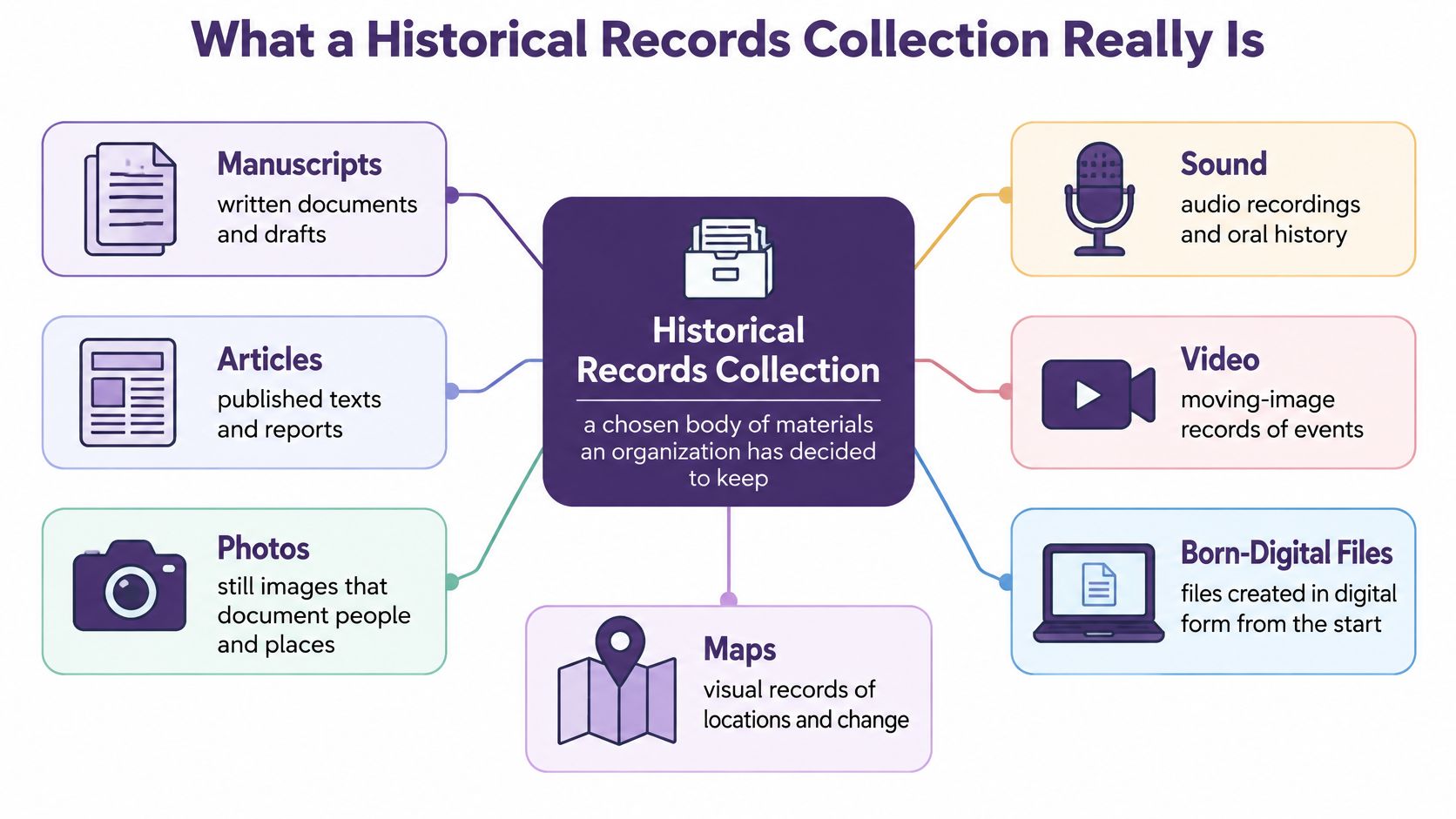
Archives moved past government paper a long time ago. UNESCO established the Memory of the World Programme in 1992 to safeguard manuscripts, books, maps, photographs, sound recordings, and audiovisual materials, and its register grew from 38 inscriptions in 1997 to 570 inscriptions in 2025. Your YouTube back catalog, podcast season archive, magazine run, or book list follows the same logic, even if the stakes are commercial rather than cultural.
The Four Jobs Every Item Must Support
Every item you keep needs to pass four tests.
- Selection: Why is it in? A season finale, a bestselling issue, or a donor's papers earned a place for a stated reason, not because someone feared deleting it.
- Description: What is it? Title, creator, date, people, and topic let an editor judge relevance without playing the whole file.
- Preservation: Will it still open later? A master stored safely matters more than ten compressed copies scattered across laptops.
- Discovery: Can a teammate find a quote, face, theme, or clip? If search ends at a filename, discovery has failed.
Age alone doesn't create value. Documented significance, provenance, format diversity, and continued access do. An old episode nobody can search is worth less than a recent one with a clean transcript and clear rights.
Discovery also shapes what enters the collection in the first place. If you're gathering material from the web to fill gaps, it helps to understand how web scrapers work before automated collecting brings in duplicates and context-free pages you'll have to clean up later.
If you can't find it, quote it, and clear it, you don't own an asset. You own a file.
Score usability first. Revenue conversations get much simpler after that.
Score Research Readiness Before You Add Files
Digitized doesn't mean searchable. That's the uncomfortable starting point.
A 2025 study of pseudo-digitization describes archives that create image-only scans without machine-readable text, leaving users unable to conduct full-text search, entity discovery, or large-scale analysis. The study estimates that only 5 to 6% of Russia's archival holdings had been digitized, while paper records continued to grow.
Use this comparison before you buy more scanning or ask AI to summarize your archive.
Research-Ready Versus Image-Only Collections
| Check | Image-only or filename dump | Research-ready collection |
|---|---|---|
| Full-text search | Pages or frames with no machine-readable text | OCR or transcription tied to the item |
| Hard material | Handwriting, tables, marginalia, and non-Latin script left unread | Human review or specialized recognition where ordinary OCR fails |
| Metadata | A filename and a folder date | Descriptive, structural, rights, and preservation fields |
| Provenance | Unknown source and silent edits | Recorded source, agent, and processing history |
| Language coverage | One default language assumed | Languages and scripts labeled so search matches the item |
| Export | Locked images or a platform you cannot leave | Masters, text, and metadata you can take out |
Walk the rows with your own library.
Full-text search is the gate. A scanned magazine page with no OCR is a photograph of an article. A producer can't search for a name across three hundred issues, so the research stops before it starts. The same applies to podcasts and video. No transcript, chapters, or speaker labels means an editor watches in real time to find a thirty-second answer.
Hard material is where cheap processing fails. Handwritten margin notes, tables, and non-Latin scripts often defeat ordinary OCR. A book publisher scanning author manuscripts needs handwriting recognition or human transcription for those pages, and a sample checked by a person to measure the error rate.
Metadata and provenance decide whether you can trust what you find. A filename tells you almost nothing. A record that states creator, date, source, and what processing happened lets a researcher cite the item and lets an editor defend it if a reader asks where a quote came from.
Language coverage trips up multilingual libraries. If a Spanish-language interview is tagged as English, search terms won't match and transcription quality drops. Label language and script per item, not per folder.
Export is your exit test. Can you take the master, the text, and the metadata out together? If you can only watch the file inside one platform, you don't control your own archive.
The scale of this gap is visible at national level. The National Archives held more than 13.5 billion pages of historically valuable federal records in 2024, with fewer than 300 million digitized and available through its catalog. Most of a major archive still can't be searched by text.
Decision rule: A smaller, well-transcribed and richly described collection can produce more research and more new posts than a much larger image-only repository.
Score your library on the six rows. Fix the weakest rows for one series you care about. Adding more unsearchable files widens the gap you're hoping AI will close later.
Classify, Digitize, and Open Access Carefully
Five decisions set the shape of your collection. Make them once, write them down, and a new editor can repeat them without guessing.
Choose a classification by source first. Group by series, such as a magazine year, a podcast season, or a donor's papers, before grouping by topic. A 2019 episode stays with its season even when you later tag it under three themes, so provenance survives every reorganization.
Build a controlled vocabulary. Keep a short approved list of topic terms, people, places, and eras, with a rule for who may add a term and how synonyms map to it. Keep the taxonomy shallow, three levels at most, so editors use it without a manual. Our guide to the digitization of historical documents walks through how this discipline carries into scanning choices.
Set digitization standards once. Scan at a resolution that supports the physical original, keep the master lossless, and derive access copies from it. Don't let each scanner operator pick settings per box.
Pick recognition per material. Use standard OCR for clean printed text. Use handwriting recognition or human transcription for manuscripts, tables, and marginalia. Pull a reviewer sample from every batch and measure the error rate before you accept the batch.
Decide access tiers. Give public full-text search to cleared items. Hold restricted or privacy-sensitive items for internal or reading-room access. Document an exception path for when a rights holder objects. It also helps to manage document access and retention as a written policy, so those tiers survive staff changes.
Done well, the taxonomy becomes the index your team searches. The tiers keep a good scan from going public by accident.
Four Metadata Layers That Stay With Every Item
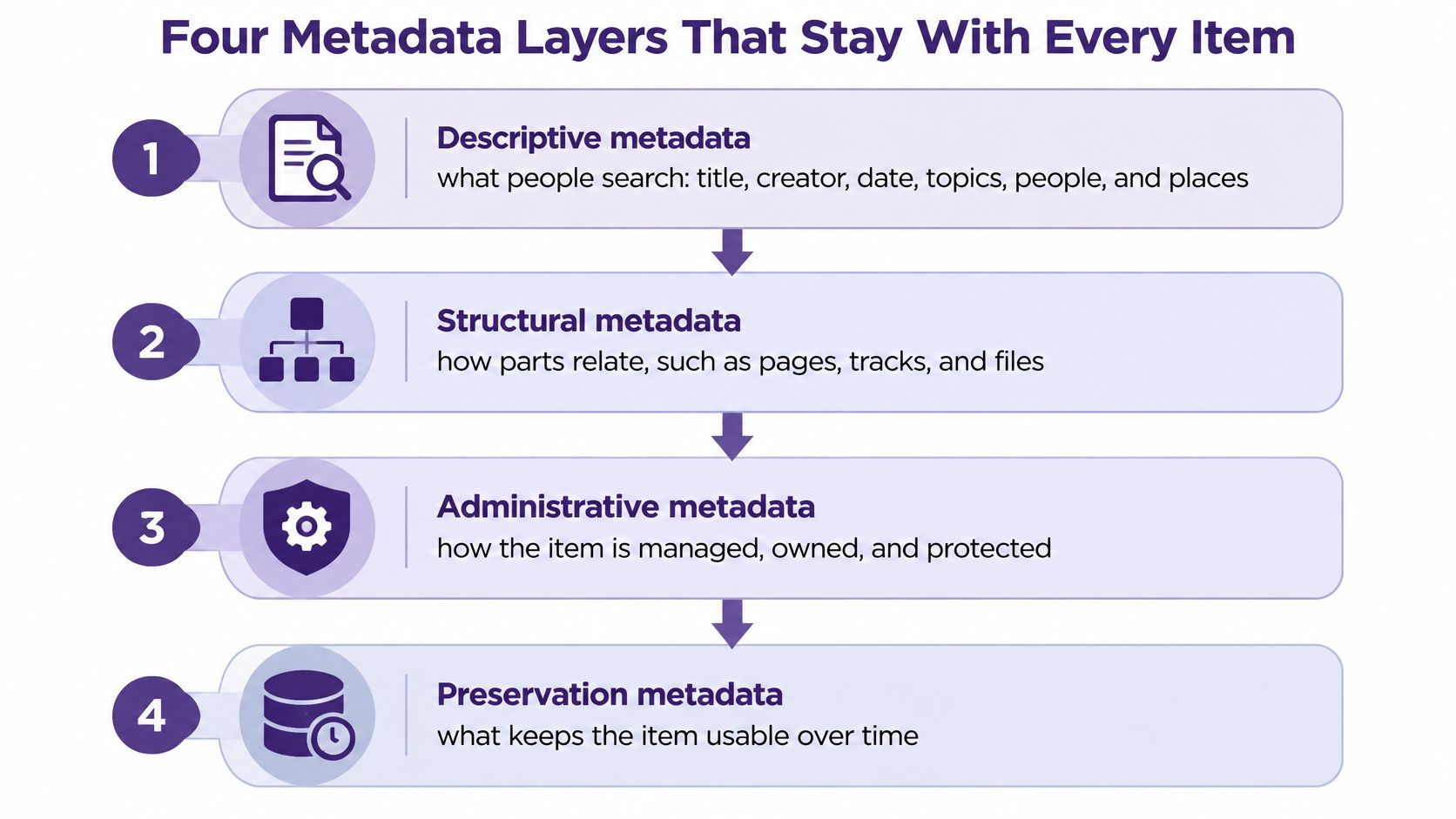
Metadata sounds dry until you're the producer searching at midnight. Think of it as four layers attached to every item, each doing a different job. Mix them into one flat tag list and guesses start looking like facts.
Descriptive and Structural Layers
Descriptive metadata is what people search. Title, creator, date, topics, people, and places. A podcast episode titled only Episode_112_FINAL hides its guest and subject. A record naming the guest, the three topics discussed, and the recording date lets an editor find it in seconds.
Structural metadata shows how parts relate. Pages in a manuscript, tracks on an album, chapters in a video, segments in a long interview. A two-hour documentary with timecoded segments gives you a clip library. Without them, you have one long file and a lot of scrubbing.
Administrative and Preservation Layers
Administrative metadata covers rights, source, and who may manage the file. This layer answers the questions that stop a launch. Who owns this photo? Can we use it commercially? Which account may edit or delete it?
Preservation metadata records technical dependencies and what was done to keep the file usable. Format, software needed, migration history. When a player stops supporting a format in five years, this layer tells you what you have and what to convert.
Established standards already separate these jobs. The Library of Congress metadata standards identify METS as a standard for encoding descriptive, administrative, and structural metadata, while PREMIS supplies the core preservation metadata model. Match the schema to the medium, too. TextMD can describe text objects, MIX image characteristics, and AudioMD or VideoMD technical properties for sound and moving images. If you're setting fields for the first time, these metadata management best practices give a workable starting structure.
One Pattern You Can Copy
Use this implementation pattern across the library.
- Stable object identifier: One permanent ID per item that never changes when filenames do.
- Linked derivatives: Every access copy, transcript, or proxy points back to a preservation master.
- Rights and source beside the item: Stored with the record, not in a separate spreadsheet someone loses.
- Clean discovery layer: Editors search a normalized view while the full record stays intact underneath.
The payoff is practical. A researcher can search and interpret a transcript without altering the master. A later migration or AI label doesn't erase the evidentiary record, because the original description and processing history remain traceable.
Start with a minimum record today. For a podcast episode or a magazine PDF, capture identifier, title, date, creators, topics, rights status, master location, and the linked transcript or scan. Eight fields, filled in consistently, beat forty fields filled in sometimes.
Ingest Files So Copies Never Replace the Master
Integrity is designed at intake, not bolted on after search goes live. The image below shows the core habit. Every derivative should trace back to one validated master.
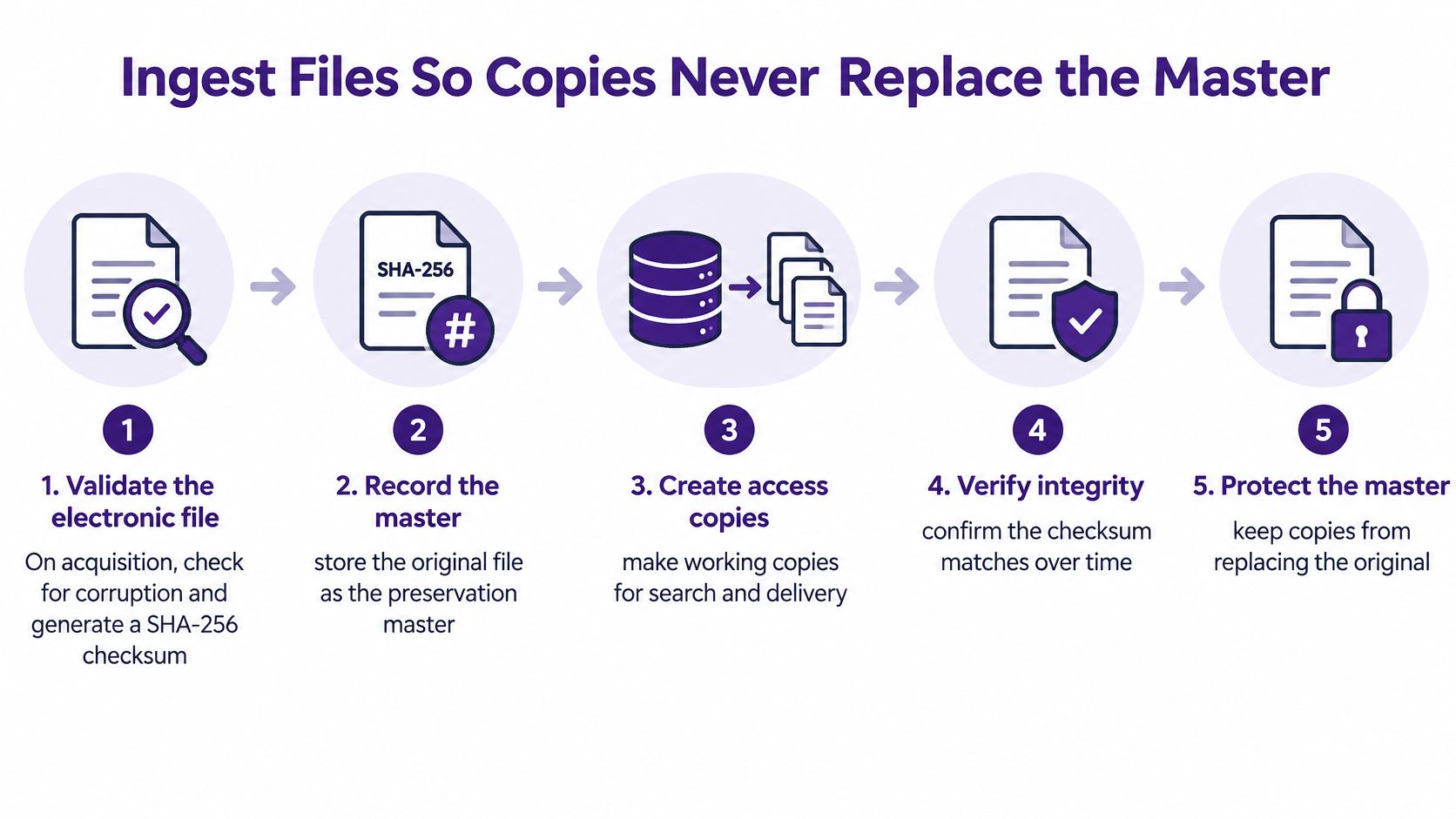
The U.S. National Archives digital preservation guidance states that transferred electronic files should be validated for corruption, carry recorded fixity information for auditing, and have actions taken on them recorded and tracked. Here's that guidance as a working procedure.
Five Intake Steps and Their Failure Modes
Validate on acquisition. Check the file for corruption and generate a SHA-256 checksum the moment it arrives. Skip this and you'll never know whether damage happened before or after ingest.
Store the fixity value separately. Keep the checksum apart from the content. If the checksum travels only inside the file it describes, a damaged file can end up carrying a matching bad value and pass your check.
Record the context. Capture reference, provenance, context, and representation information alongside fixity, in the spirit of the OAIS preservation model. Without it, a verified file is just bytes you can't interpret or defend.
Recheck on a schedule. Re-verify checksums at replication, at migration, and during periodic integrity audits, and write down each result. Silent corruption stays silent until someone checks.
Keep an event log. Record normalization, OCR, transcription, metadata enrichment, and export, each with a timestamp, the responsible system or person, input and output identifiers, and the validation result. An undocumented edit breaks your chain of custody even when the edit itself was harmless.
The operational point is simple. A transcript, compressed audio file, or proxy video can be rebuilt if its link to the validated master is intact. Silent corruption or an undocumented change can't be undone, and it undermines the item's evidentiary value.
This short walkthrough shows what clean ingest looks like in practice, before files multiply across drives.
Treat an AI summary as a derivative interpretation, never as a replacement for the historical item. Summaries get regenerated. Masters get protected.
Work in batches you can count. Move a set number of files, log the count, confirm the checksums match, and only then start the next batch. Boring, yes. Cheaper than discovering a corrupted season archive on publication day.
Why Preservation Is a Repeating Cost Not a Folder
Preservation is operations, not a one-time project with a ribbon-cutting. The Library of Congress works at a scale you won't match, but its numbers make a useful model for the shape of the problem.
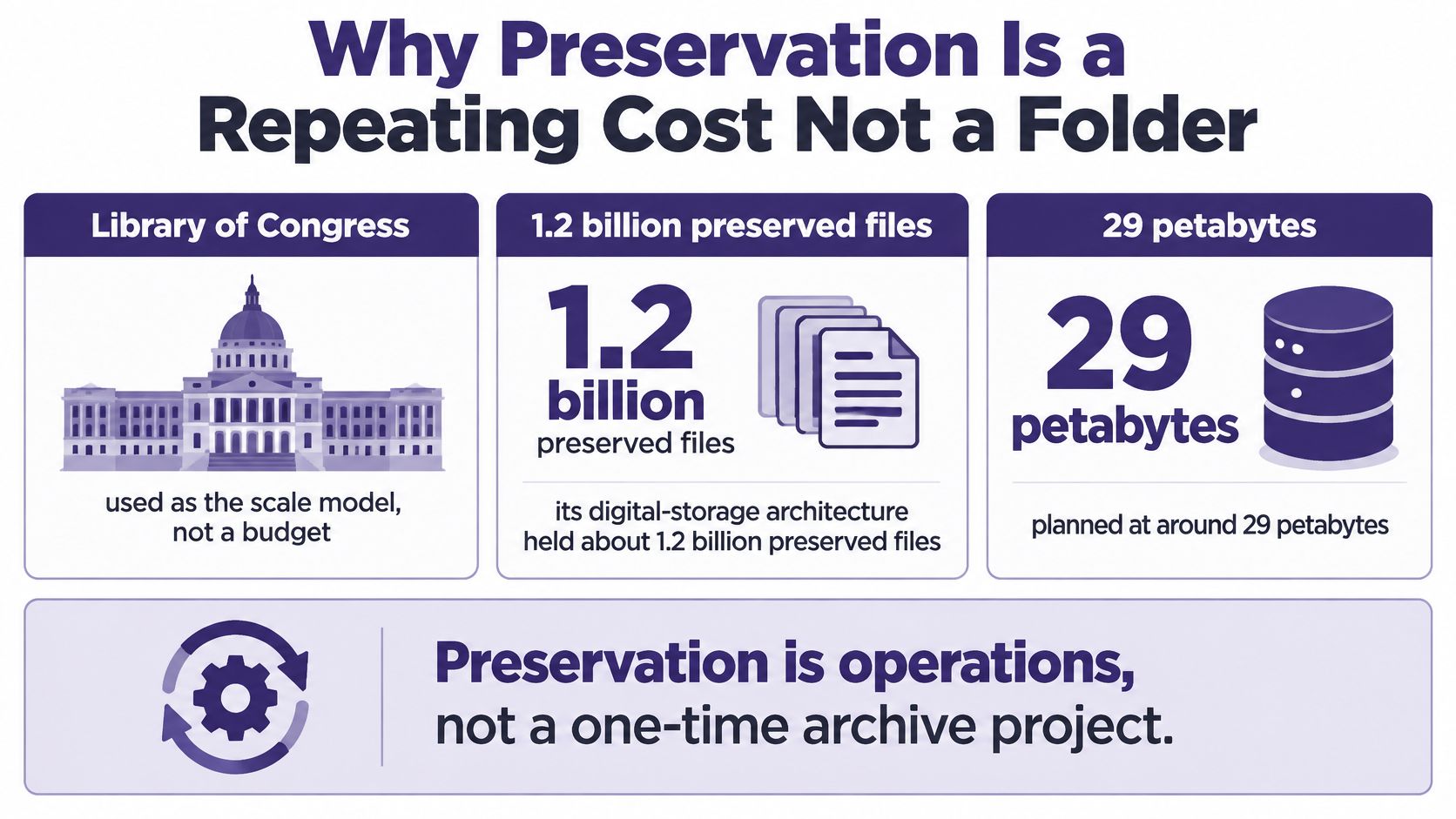
The Library of Congress digital-storage architecture presentation reported approximately 1.2 billion preserved objects occupying 31.2 petabytes, with annual growth of about 10%. Between 2020 and 2025, total content storage increased by 85%, from roughly 57 petabytes to 105 petabytes, while estimated enterprise storage costs more than doubled from about $1.07 million per year to $2.2 million.
The architecture uses three copies of data, two storage technologies, and one off-site copy, including AWS Glacier. It also assumes perpetual migration, meaning files keep moving or transforming as storage systems change. These archival best practices scale the same thinking down for teams without petabytes.
A podcast network won't hit petabytes soon. The curve still appears. Raw camera files, show masters, and social cuts pile up on one drive, growth compounds, and one failure wipes the lot.
A Maintenance Rhythm That Fits a Small Team
- Record batch counts and volume: Know how many files and how much storage each batch adds.
- Log every copy: Note which copies exist and where the off-site copy lives.
- Watch formats: Flag formats that players and editors are dropping support for.
- Schedule migration: Put it on a calendar instead of hoping a folder still opens in 2030.
This is about capacity and continuity. Budget for it as a repeating cost, and your library survives the next platform change.
Rights Status Before You Repurpose a Single Clip
Owning a copy isn't a license. Holding an old article, recording, photo, or manuscript doesn't authorize publication, adaptation, redistribution, or monetization.
A World Intellectual Property Organization document on copyright permissions explains that licenses may range from simple permission for one individual use to complex negotiated arrangements covering an entire collection, and that libraries and museums commonly rely on permissions and licenses to access copyrighted works in digital formats and in particular ways.
Reuse Checks Before a Historical Item Goes Public
| Activity | Record before you start | Stop if |
|---|---|---|
| Publish online | Owner, territory, duration, attribution | The license is limited to one private use |
| Adapt into a new episode | Permitted formats and derivative rights | Access is granted but adaptation is not |
| Cut Shorts or social clips | Commercial reuse and platform scope | Commercial use is excluded |
| Brand or sponsorship use | A collection license that names this activity | The deal covers one title only |
| Internal research | Access permission and citation rules | The item is restricted or privacy-sensitive |
Record the copyright owner, permitted formats, territory, duration, attribution requirements, and whether commercial reuse is allowed for each planned activity. A collection-level license helps only when its wording covers what you plan to do with these specific items.
Once rights are clear, platform thresholds become planning targets. YouTube's Partner Program eligibility rules state that where the expanded program is available, a creator can apply for earlier fan-funding and shopping features after reaching 500 subscribers, making three valid public uploads within the previous 90 days, and achieving either 3,000 qualified public watch hours in the previous 12 months or 3 million qualified public Shorts views in the previous 90 days. Advertising and YouTube Premium revenue requires 1,000 subscribers plus either 4,000 qualified public watch hours in the previous 12 months or 10 million qualified public Shorts views in the previous 90 days, and Shorts-feed watch time doesn't count toward the 4,000 hours.
Stop rule: If commercial reuse isn't granted, keep the item for internal research only.
Long-form adaptations build watch hours. Shorts play a separate 90-day game. Neither justifies uploading material you haven't cleared.
Put Your Library to Work Across Platforms
A research-ready library earns its keep when teams share it. Five actions turn organization into audience and revenue.
Pick one proven slice. Start with a successful series, season, or magazine year, not the whole drive. A bounded set lets you finish, measure, and repeat.
Connect what you already publish. Bring a YouTube channel, a podcast feed, and document archives into one place so thematic tags replace folder memory. If your team also juggles academic sources, it's worth taking time to compare source management tools for thesis writers to see how citation habits translate to a shared library.
Use the taxonomy as your index. Download it, review it, and correct any label that overreaches the evidence. An AI-generated theme is a suggestion until an editor confirms it against the item.
Share a research dossier. Give editors, marketers, and producers the sources, quotes, and themes behind the next video, post, or article. Collaboration beats three people researching the same question alone.
Refresh only what's rights-clear. Rewrite for current brand voice and new platform formats, starting with items whose permissions you've already recorded.
A tool carries the routine work. Contesimal is a content intelligence platform that helps users turn old content in historical libraries into new revenue and research opportunities. Users connect existing content, such as YouTube channels, podcasts, and document archives, and the platform organizes and tags it thematically. Customers keep ownership of their content, and Contesimal processes it securely to build a searchable taxonomy and power its internal AI agents.
Organize. Understand. Take action. One strong long piece can travel across platforms, but only if the library behind it is labeled, searchable, and cleared.
Turn your historical records collection from a pile of files into a searchable, rights-aware library your whole team can research from and publish against. Connect your channels and archives with Contesimal, build a taxonomy you own, and start making your old long-form content earn again.