
At some point, every creator discovers that a content library can become harder to use than it was to create. A podcast archive fills with episodes, interviews, transcripts, clips, and research. A publisher accumulates drafts across titles. A YouTuber remembers recording the perfect explanation, but not which drive, folder, or project contains it.
That's where knowledge management software earns its place. It doesn't just store more files. It creates a usable layer of meaning around them, so you can find the idea, person, quote, source, or visual you need and turn it into the next piece of work.
The Day Your Content Library Became a Liability
At 11 p.m., Maria is still at her desk. She's an independent podcaster with 400 episodes across nine series, stored in a Dropbox folder that seemed perfectly manageable when the archive was smaller.
A sponsor has asked about a guest from episode 217. The guest mentioned a framework that might fit an upcoming campaign, but Maria can't remember whether the useful passage is in the transcript, show notes, a Google Doc, or an email thread. She opens six apps, searches several variations of the guest's name, and finds three files with almost identical titles.
The problem isn't that Maria lacks content. She has too much of it, and almost none of it is connected in a way she can act on quickly. The audio is there, but buried. The research is there, but separated from the episode. The show notes exist, but don't point back to the exact moment in the conversation. Her archive looks like an asset in a spreadsheet and behaves like a liability at midnight.

Maria's breakthrough comes when she asks a knowledge tool a plain-language question: which guests discussed that framework, and where did they explain it? The system returns a relevant episode, identifies the topic, and points to timestamps in the transcript. She can review the original context, extract a clip, update the show notes, and brief the sponsor without replaying hours of audio.
That moment captures what this category delivers. A repository stores files. A knowledge layer makes stored material retrievable, connected, and reusable.
Before choosing software, creators should also understand the condition of the archive they're bringing into it. A practical content audit checklist can reveal duplicate assets, missing metadata, stale drafts, and valuable material that has effectively become invisible.
The core problem is simple to name: how do you turn stored content into retrievable knowledge?
What Knowledge Management Software Actually Does
Start with a shared Google Drive folder. It's useful because everyone can upload files, but the folder depends on filenames and memory. A writer might save a research clip as interview-final-v3, while an editor uses the guest's name and a publisher uses the working title. Search can locate words in a file, but it can't reliably recover the surrounding idea.
That's the first distinction. File storage answers “where is the document?” Knowledge management answers “what do we know, and how can we use it?”
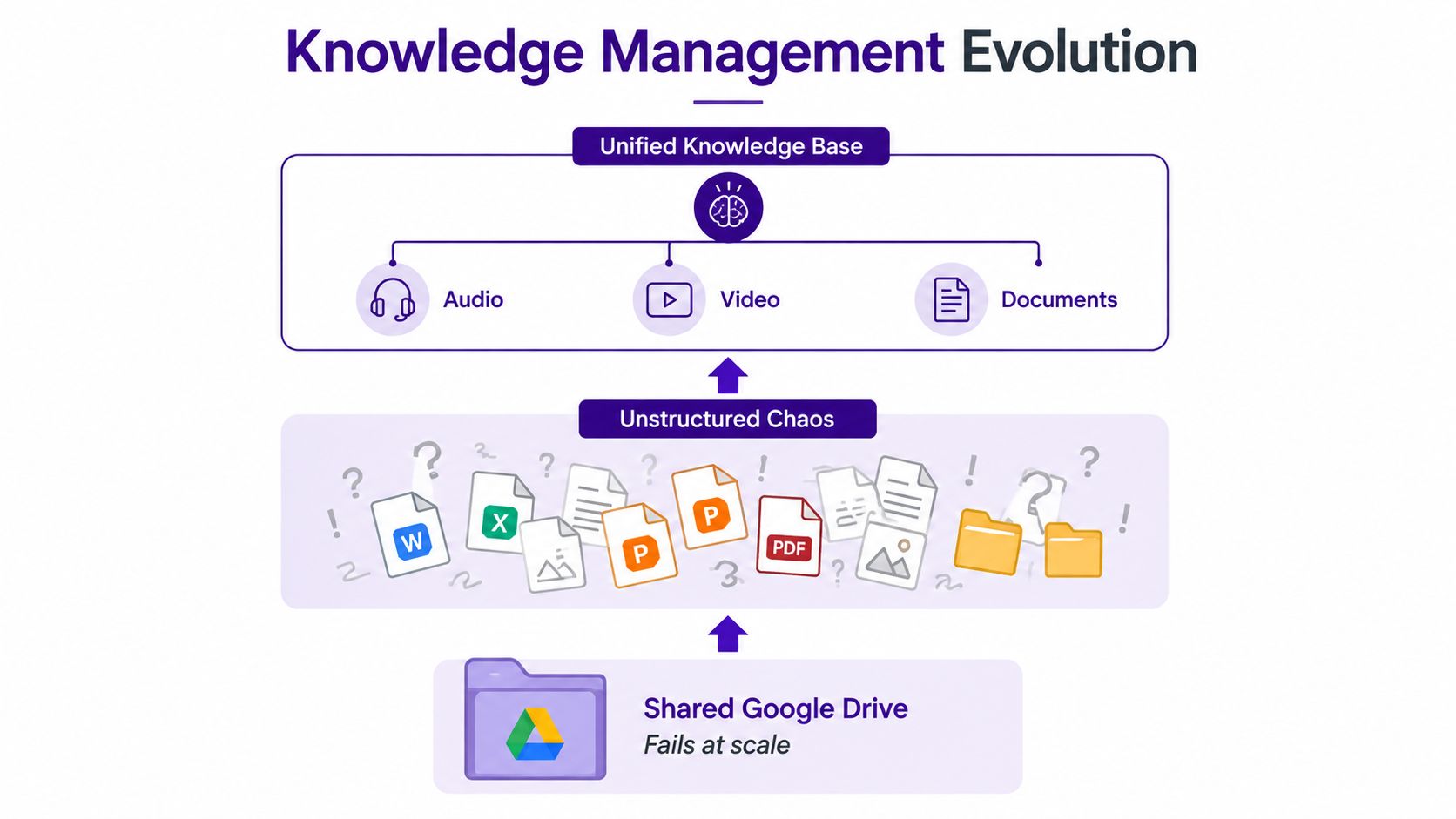
The librarian's first upgrade adds folders, tags, descriptions, and basic search. A publisher can separate titles. A podcaster can mark guests, topics, seasons, and rights. A researcher can connect an interview with its transcript and source notes.
Modern knowledge management software goes further. It typically combines several layers:
- Ingestion: Bringing in documents, audio, video, transcripts, web material, and other content.
- Metadata enrichment: Adding details such as author, date, topic, format, audience, rights, and status.
- Taxonomy: Applying a consistent classification system so people use the same language for related material.
- Search: Combining exact keyword retrieval with semantic understanding, so a question can find conceptually related content.
- Governance: Controlling who can edit, approve, publish, archive, or retire knowledge.
- Reuse tracking: Showing where an asset, insight, or source has already informed another piece of work.
The technical taxonomy described in this research on knowledge management systems separates the field into document management, information management, searching and indexing, expert systems, communications and collaboration, and intellectual asset systems. That division matters because one repository rarely handles every job equally well.
A document manager protects versions and lifecycle rules. A search system improves findability. A collaboration layer captures discussion and decisions. A strong architecture connects those functions instead of pretending they're interchangeable.
Creators also need a way to distinguish information from expertise. If you're building a team around a topic, a useful subject matter expertise guide can help clarify who knows what, which sources carry authority, and how that expertise should influence editorial decisions.
For a deeper look at the search layer, see what enterprise search means in practice. The important takeaway is that KM software isn't a glorified file cabinet. It's a value-extraction system for content libraries.
Core Features That Separate Real Tools From File Folders
A feature list can make every product look similar. The better test is to connect each capability to a failure you already recognize in your workflow.
A YouTuber with ten years of footage needs broad ingestion. If the platform only handles neatly formatted documents, the archive remains split across drives and editing systems. Working ingestion should accept the formats the creator owns, preserve useful context, and make the imported material available for search and linking.
A podcaster may already have accurate transcripts. That doesn't mean the archive is usable. Metadata extraction adds names, topics, themes, dates, series, and other attributes that help a producer move from a vague memory to a relevant passage. Without it, transcripts become searchable walls of text.
Research teams need taxonomy and controlled vocabulary. One person may call a topic audience growth, another calls it distribution, and a third calls it channel strategy. A controlled vocabulary gives those ideas stable names while allowing useful synonyms and relationships. The failure mode is taxonomy drift, where similar material becomes harder to compare over time.
A publisher needs semantic search, not just keyword matching. A search for “how creators build trust” should be able to surface a passage about credibility, community, or audience confidence even if the exact phrase never appears. You can learn more about the underlying process in this guide to document indexing.
Collaboration solves a different problem. In a podcast network, producers can easily create multiple versions of the same notes, clip list, or guest brief. Version control, ownership, review status, and comments make the working state visible.
Analytics then connect activity to value. A creator may need to show a sponsor that research was reused across an episode, newsletter, video, and social campaign. The useful signal isn't a decorative dashboard. It's evidence that the library supports repeatable work.
Finally, AI augmentation lets a writer ask conversational questions over the archive. That's helpful only when the answer points back to governed source material. A fluent answer with no provenance can create more editing work, not less.
| Feature | Plain File Folder | KM Software |
|---|---|---|
| Ingestion | Stores what someone uploads | Brings together multiple content types and preserves context |
| Metadata | Depends on manual filenames | Adds structured fields, tags, and extracted meaning |
| Taxonomy | Folders become inconsistent | Uses shared categories and controlled vocabulary |
| Search | Mostly filename or exact text matching | Combines keyword and semantic retrieval |
| Collaboration | Creates version sprawl | Tracks ownership, status, approvals, and reuse |
| Analytics | Shows storage activity | Connects discovery and reuse to workflow outcomes |
| AI assistance | Usually separate from the archive | Answers questions against indexed, governed knowledge |
For small content teams, the three highest priorities are usually ingestion, retrieval, and governance. A beautiful interface can't compensate for missing footage, weak search, or stale answers.
Matching the Tool to the Creator
The right tool depends less on the size of your archive than on the shape of your work. A solo podcaster and an academic researcher may both need search, but they search for different things and judge reliability differently.
| Archetype | Must-Have Capabilities | Nice-to-Haves | Red Flag |
|---|---|---|---|
| Solo podcaster | Transcript search, timestamp retrieval, clip extraction, show-note reuse | Guest relationship mapping, sponsor research views, automated topic suggestions | A polished dashboard with weak audio ingestion |
| Independent publisher | Multi-title taxonomy, rights metadata, editorial workflows, version control | Cross-title trend discovery, approval automation, content performance links | Strong page editing but no rights or lifecycle controls |
| Academic researcher | Citation graphs, source provenance, controlled vocabulary, document indexing | Collaborative annotations, theme clustering, research chat | AI summaries that don't expose source context |
| Multi-format creator | Cross-asset links between audio, video, articles, and research | Repurposing recommendations, audience views, campaign workspaces | A social scheduler presented as a knowledge system |
The podcaster's central question is often, “Where did we say that?” The publisher asks, “Which version is approved, and what rights apply?” The researcher asks, “What is the source, and how does it connect to the other evidence?” A multi-format creator asks, “How can this interview become the next video, article, newsletter, and clip?”
Those questions should shape the trial. Don't accept a generic product tour when you can bring one difficult archive and test it directly.
Buying rule: If two of your top three needs aren't among the vendor's documented strengths, keep looking.
A creator moving from hobbyist work into a revenue-generating operation also needs to think about people. Growth usually brings editors, producers, researchers, or marketing partners into the process. Permissions, review states, shared vocabulary, and clear ownership matter before the archive becomes a team sport.
For the wider production stack, this guide to creator hardware and software can help separate recording and publishing equipment from the knowledge layer that makes the resulting content reusable. They solve different problems, and buying one won't replace the other.
Evaluating Vendors Without Falling for the Demo
A vendor demo is a performance. Your evaluation should be a controlled experiment.
Score each criterion from one to five, then multiply the score by the suggested weight. The weights below are not universal rules, but they force the conversation toward operational value rather than visual polish.
| Criterion | Weight out of 10 | Live test prompt |
|---|---|---|
| Ingestion breadth | 10 | “Can you import a sample containing audio, video, PDF, web, and chat material?” |
| Taxonomy flexibility | 8 | “Can we change fields, relationships, and controlled terms without professional services?” |
| Governance controls | 10 | “Show ownership, permissions, review dates, approvals, and retirement handling.” |
| Collaboration depth | 7 | “How do two editors resolve conflicting changes and preserve an audit trail?” |
| AI quality | 8 | “Answer this archive-specific question and show every supporting source.” |
| Analytics clarity | 6 | “Which reports show search success, reuse, and unanswered questions?” |
| Total cost | 7 | “What costs change as storage, users, ingestion, or integrations expand?” |
| Migration support | 9 | “How will you validate imported legacy content before we make it authoritative?” |
Use a simple template:
- Criterion: Write the category.
- Weight: Assign its importance.
- Score: Rate the live result from one to five.
- Evidence: Record the exact test, limitation, or response.
- Weighted score: Multiply weight by score.
Disqualify any vendor scoring below 60% on ingestion plus governance combined, regardless of how impressive the AI demo looks. If the system can't bring in your real archive or control what becomes trusted knowledge, conversational search only makes the wrong foundation easier to query.
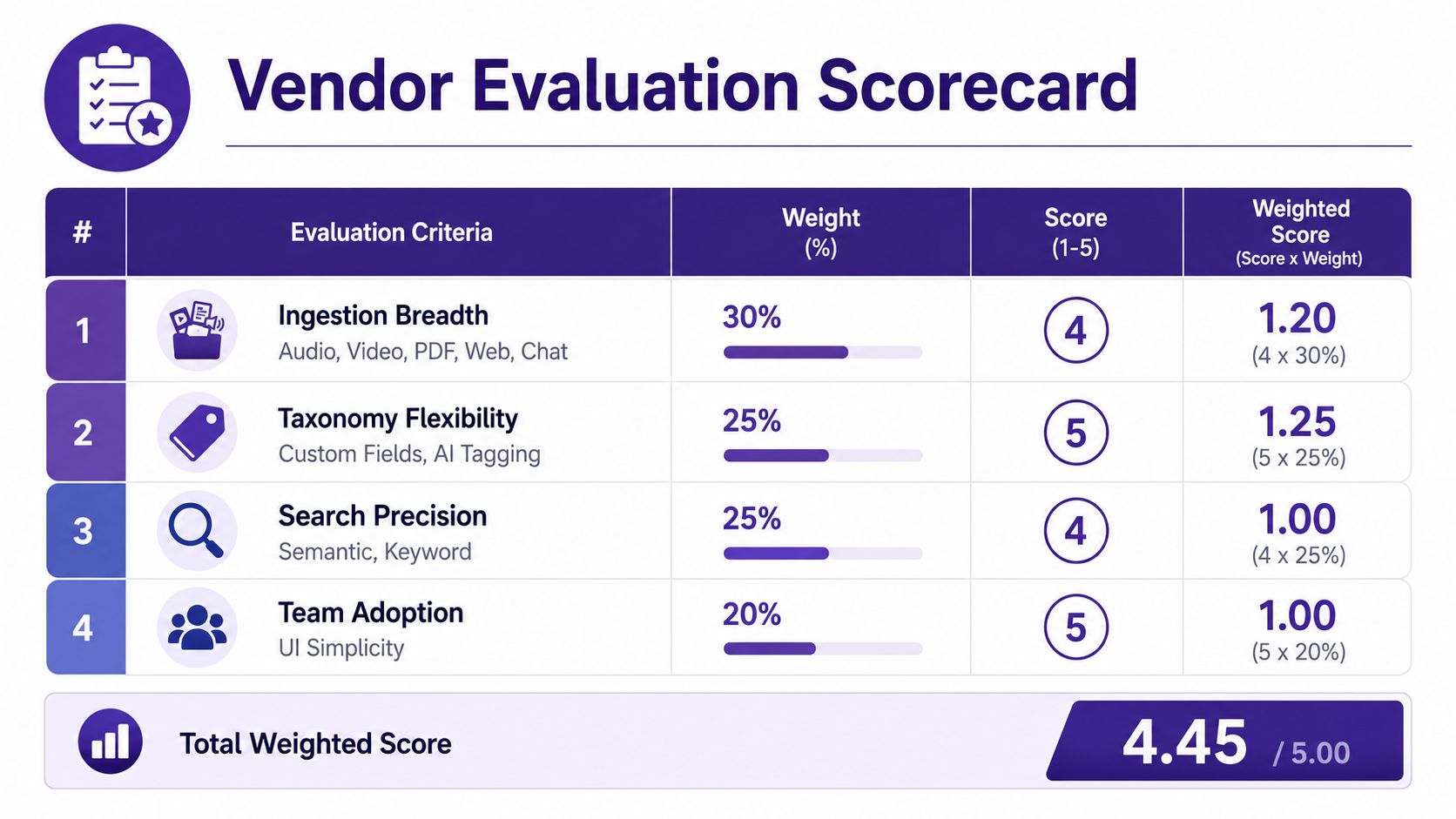
Watch for pre-seeded data, scripted questions, and answers that avoid permission boundaries. Ask the vendor to work with your messiest sample, not a collection they prepared.
An Implementation Roadmap You Can Actually Follow
A small team doesn't need to migrate everything before it learns anything. Start with the content stream where retrieval and reuse could change the weekly workflow.
During weeks one and two, inventory the archive and ingest the highest-value corpus. The deliverable should be a named inventory, not a general feeling that the files are “mostly organized.” Include content type, owner, topic, status, rights, and likely reuse value.
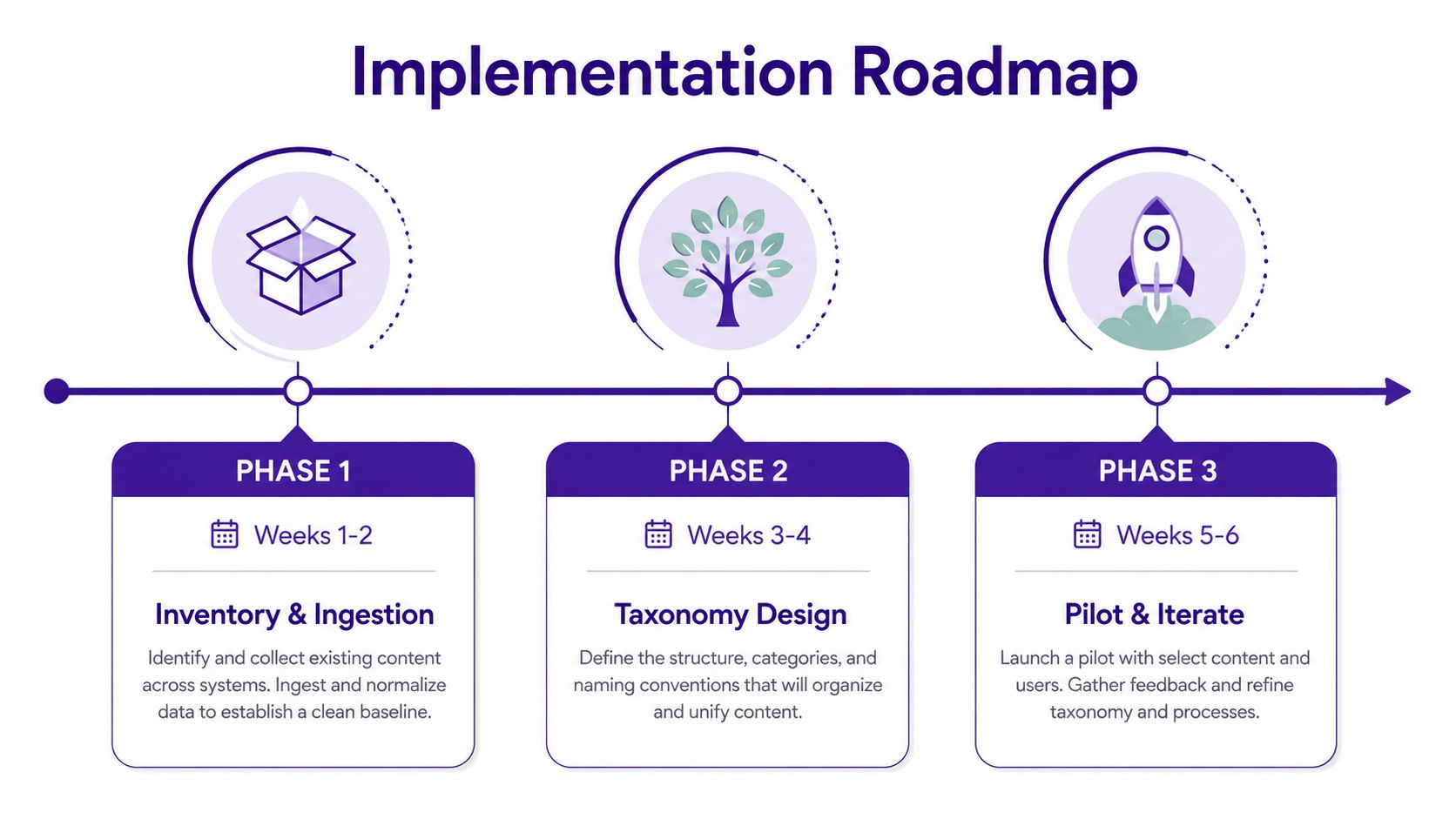
During weeks three and four, design the taxonomy. Begin with three top facets that reflect how people work, such as topic, audience, and content stage. Add a controlled vocabulary for terms that currently appear in several forms.
During weeks five and six, write governance rules. Name the owner for each knowledge area, define freshness reviews, establish approval states, and decide when content is archived or retired. The archive needs a way to say, “This was useful then, but don't use it now.”
During weeks seven and eight, connect the system to publishing and reuse workflows. A producer should be able to find a source while planning an episode. An editor should be able to identify the approved version. A marketer should be able to discover related material without asking the original researcher to repeat the work.
During weeks nine and ten, establish baseline metrics and ROI instrumentation. APQC maintains standardized measures for KM program performance, and its knowledge management measures and ROI resources support a more disciplined approach than counting uploads.
The shortcuts are predictable. Teams skip vocabulary design, ingest everything immediately, and hope AI will impose order later. That usually creates a larger, faster-moving archive with the same ambiguity.
Legacy migration deserves its own discipline. Run a parallel import, sample the results for transcription and metadata quality, and keep the old archive available during a 30-day shadow period before making the new system authoritative.
The Hidden Failure Mode Nobody Warns You About
AI search can find a messy answer faster than a human. It can't make an unreliable source reliable.
Retrieval quality falls when metadata is inconsistent, categories drift, duplicates accumulate, and nobody owns deprecation. A publisher might add 50 new articles weekly, and within four months, 30% of search results could point to stale or contradicted guidance in the scenario described here. Those figures are an implementation warning, not a universal benchmark, and they illustrate why freshness must be measured rather than assumed.
The publisher's problem isn't a lack of embeddings. It's a lack of decisions. Which article is current? Which recommendation changed? Who reviews older guidance? What should the search system do when two documents disagree?
A knowledge steward can answer those questions. That person doesn't need to edit every asset, but they do need authority over taxonomy changes, review schedules, ownership gaps, and retirement rules.
AI amplifies the condition of the knowledge it receives. Clear knowledge becomes easier to use. Confusing knowledge becomes easier to spread.
Teams that run regular freshness audits can identify stale-content flags, missing owners, and contradictory guidance before those issues become trusted answers. Teams that rely only on vector retrieval may wonder why results feel plausible but wrong.
Demand these governance signals from any vendor claiming AI augmentation:
- Stale-content flags: The system identifies assets that may no longer be current.
- Last-reviewed dates: Users can see when someone last validated the material.
- Taxonomy drift alerts: Administrators can identify new terms, duplicates, and competing categories.
- Source provenance: Answers point back to the asset and relevant passage.
- Retirement workflows: Content can leave active search without disappearing from the historical record.
- Human approval: Suggested changes remain reviewable before they alter trusted knowledge.
The best AI feature may be the one that tells you it can't answer safely yet.
Your First 30 Days and What to Measure
A useful first month should produce evidence, not another abandoned workspace. Keep the scope narrow enough that creators can test the system against real publishing decisions.
In week one, inventory the archive, hand-tag a sample of 100 assets, and write down the three questions you most need answered faster. Those questions should come from actual work, such as finding a guest quote, confirming rights, comparing overlapping drafts, or locating source material for a new episode.
In week two, run a vendor shortlist against that sample. Measure time-to-first-useful-answer, not whether the system returns something. A result becomes useful when a human can verify it, understand its context, and act on it without reopening the entire archive.
Week three should focus on one content stream. Assign a named steward, test the taxonomy, and record where the system misses context. Week four is for baselines: time saved per search, reuse of existing assets, and one outcome connected to revenue or audience growth.
| Week | Focus | Key Tasks | Measurable Output |
|---|---|---|---|
| 1 | Archive inventory | Sample assets, identify owners, write priority questions | Inventory and question set |
| 2 | Vendor trial | Test search, provenance, ingestion, and answer usefulness | Time-to-first-useful-answer |
| 3 | Focused pilot | Ingest one stream, apply taxonomy, assign steward | Pilot corpus and issue log |
| 4 | Measurement | Establish workflow and outcome baselines | KPI dashboard and month-two plan |
Track these KPIs consistently:
- Search-to-publish time: How long it takes to move from discovery to a usable draft or production decision.
- Content reuse percentage: How often existing assets contribute to new work.
- Hours saved per week: Time recovered from searching, duplicate research, and manual sorting.
- Duplicate-work deflection: Repeated requests or research tasks avoided because the answer is already discoverable.
- Outcome metric: A revenue or audience measure connected to the workflow you changed.
Use a simple maturity ladder to decide what comes next:
- Chaos: Content exists, but people depend on memory and scattered apps.
- Searchable: Assets can be found, though meaning and ownership remain uneven.
- Governed: Taxonomy, review dates, permissions, and retirement rules are active.
- Compounding: Each new project improves the library and makes future reuse easier.
Measure before switching tools. A new interface won't fix missing ownership, weak metadata, or a taxonomy nobody uses.
Contesimal provides AI-assisted organization for documents, podcasts, videos, and articles, with chat-based research, keyword search, browsing by themes and audiences, metadata management, and layered taxonomies. If you want to turn a historical content library into a searchable source for new research and production, visit Contesimal and explore how your archive can support the next piece of work.