
You've got years of work scattered across cloud drives, editing software, podcast hosts, email attachments, and folders named “final,” “final-new,” and “use-this-one.” Somewhere in that pile are strong interviews, overlooked footage, valuable research, and evergreen articles that could support your next release. The problem isn't a lack of content. It's that your library doesn't yet behave like a library.
Archival content management systems turn stored files into organized, governed, searchable assets. They combine preservation practices with the practical needs of creators, publishers, editors, and marketing teams. The aim isn't to lock old work away. It's to make that work discoverable, trustworthy, reusable, and ready for a second life.
Why Archival Systems Matter for Modern Content Libraries
A publisher staring at thousands of unused video files, podcast episodes, photographs, transcripts, and articles often sees an untidy storage problem. A digital archivist sees inventory. The difference is whether each asset has enough context for someone to find it, understand it, clear its rights, and use it again.
Teams often treat an archive as a warehouse. They upload files, preserve folder names, and hope search will rescue them later. A practical archival CMS takes a different approach. It creates a controlled path from ingestion to description, preservation, discovery, access, and reuse, much like the principles behind content lifecycle management.
Three losses caused by an unmanaged archive
Poor organization creates more than irritation.
- Rediscoverability drops: A strong interview may exist, but nobody remembers which episode contains it or which filename holds the usable recording.
- Rights status becomes unclear: A photograph, music clip, guest appearance, or commissioned illustration may have restrictions that aren't visible beside the file.
- Derivative value disappears: Without reliable transcripts, timestamps, topics, and relationships between assets, teams can't efficiently create clips, compilations, reissues, newsletters, teaching materials, or new episodes.
The cost compounds because every new asset adds another decision that someone must make later. If the archive doesn't capture that decision at ingest, the team has to reconstruct it from memory, inboxes, contracts, and scattered notes.
Treat the archive as inventory
Inventory requires more than storage capacity. It needs descriptive metadata, rights information, persistent identity, and a clear record of what happened to each file. A podcast episode might need its title, guests, topics, transcript, original recording, edited master, promotional clips, release date, and usage restrictions connected as one meaningful group.
That structure helps a creator build recurring content buckets, revisit successful concepts, and develop new work without starting research from scratch. It also supports publishers managing large article collections, filmmakers handling mixed media, and content marketers aligning material across platforms.
An archival CMS creates the bridge between raw content and ongoing value. Preservation keeps assets intact, metadata makes them understandable, search makes them reachable, and access rules keep reuse responsible. Once those foundations are in place, your archive can support new editorial work instead of collecting digital dust.
From Filing Cabinets to Digital Preservation
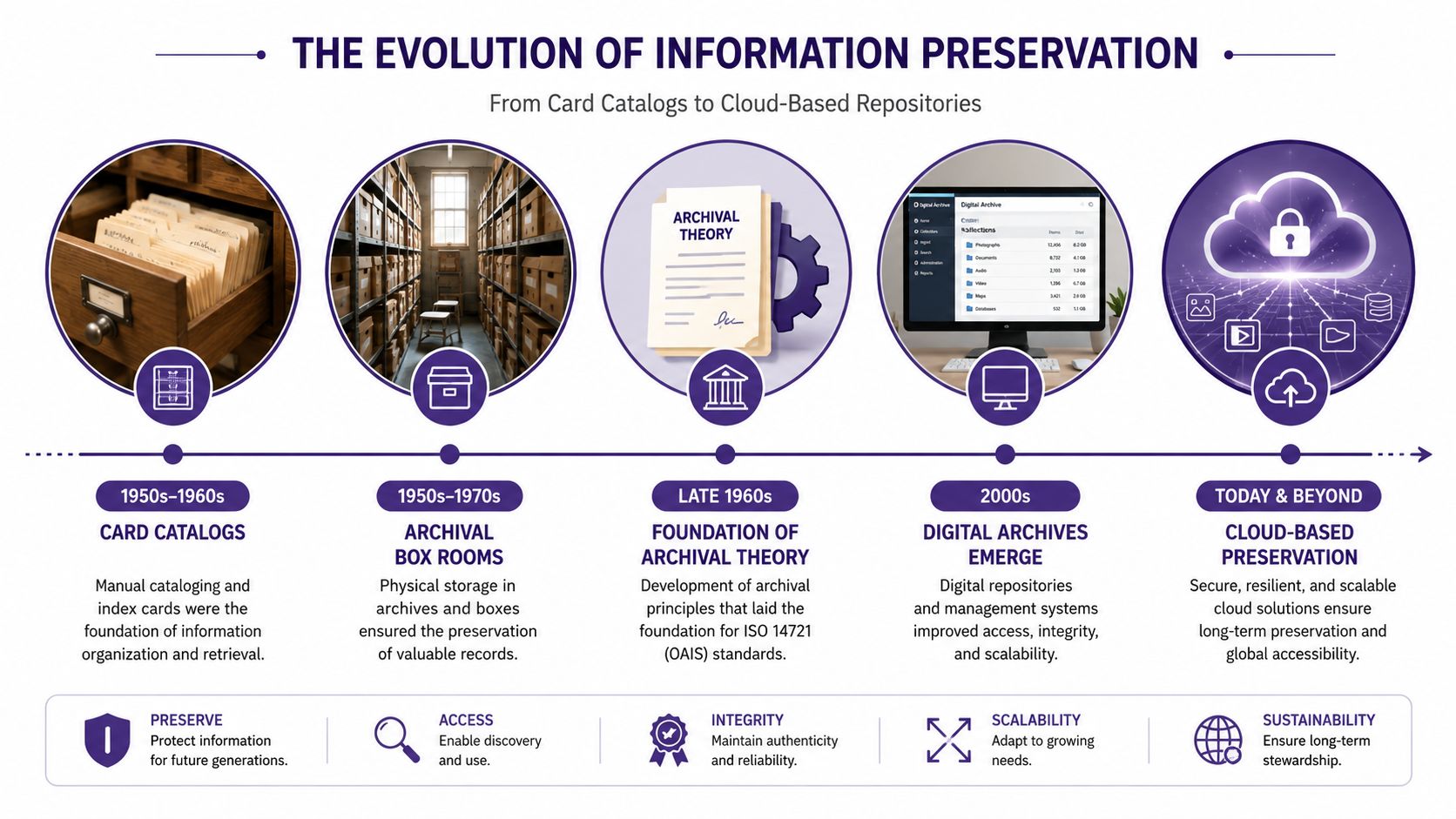
Before cloud repositories and keyword search, archivists worked with card catalogs, accession registers, finding aids, and storage rooms. A card could identify a photograph or box, but the physical object still depended on careful labeling, stable shelving, and a person who understood the collection's arrangement.
By the late 1960s, national archives, data archives, and cultural institutions in several countries were already formalizing digital preservation programs. Those institutional practices helped shape the archival thinking that later informed the OAIS reference model, associated with ISO 14721 and finalized in 2002. The model gave digital preservation a shared vocabulary for accepting information, maintaining it, and making it available over time.
Publishing systems changed the scale
The web introduced a parallel story. Content management systems made it easier to publish fresh pages, update websites, and manage editorial workflows. Their center of gravity was usually the active site, not the long-term history behind it. A publisher could have a working website and still lack a dependable record of older versions, source files, associated rights, or the relationships between assets.
That gap matters because CMS technology now sits at internet scale. The 2025 Web Almanac CMS report found that CMS-driven sites accounted for over 54% of observed websites. The progression is striking, from institutional preservation programs to content infrastructure used across more than half of the visible web.
For business systems, the same principle appears in specialized work on data archiving for SAP evolution. Older information needs planned retention, understandable context, and controlled access, not a larger storage bucket.
Modern archival CMS platforms fill the space between publishing convenience and preservation discipline. They borrow the usability people expect from contemporary software while applying stronger controls to identity, metadata, integrity, and long-term access. Good document management best practices help with the everyday order, but archival systems add the deeper promise that the content will remain interpretable after tools, staff, and formats change.
The Five Core Pillars of an Archival CMS
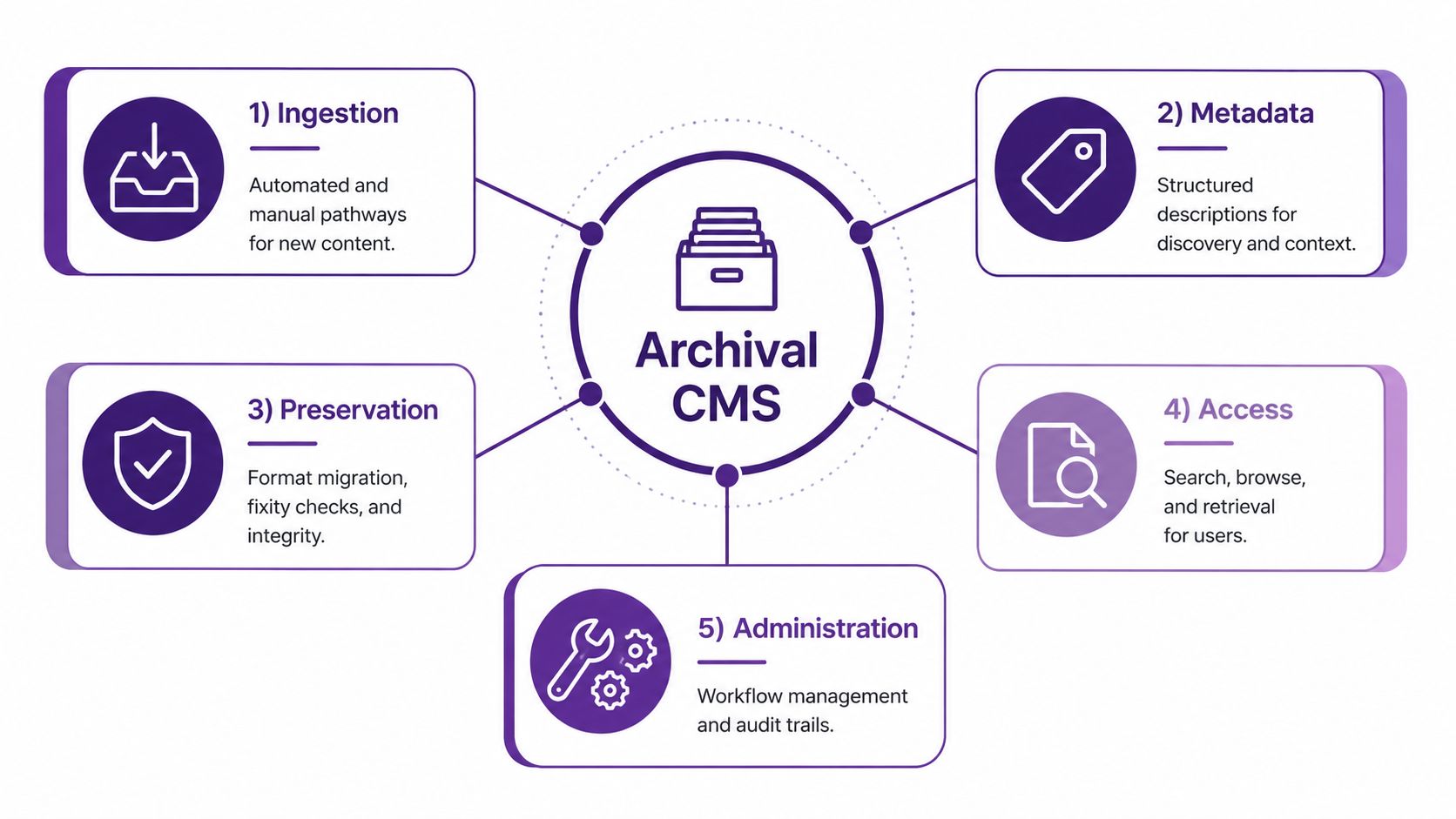
An archival CMS functions through five interdependent layers, each enabling the next. Material must enter with enough identity to be understood, metadata must connect it to its context, preservation must protect its integrity, search must make it usable, and administration must govern access and responsibility. Weakness in one layer limits the value of the others.
1. Ingestion
Ingestion is the controlled entry point for new material. A workflow may receive a camera export, podcast master, transcript, contract, or batch of scanned pages through an automated connection or manual upload.
At this layer, the system establishes identity and records basic context. It can validate file types, capture source details, connect related objects, and flag missing information. It should also distinguish an original recording from an edited master or compressed preview, so a derivative does not become the accidental preservation copy. Detailed SIP, AIP, and DIP design belongs in the workflow architecture described later. Here, the concern is the quality and identity of what enters the system.
2. Metadata and taxonomy
Metadata answers practical questions about an asset. It can identify people, places, subjects, dates, formats, rights conditions, related episodes, source projects, and intended audiences.
Taxonomy gives those descriptions a shared structure. If one editor selects “climate policy,” another enters “environmental legislation,” and a third uses “climate politics,” search results fragment unless the system manages preferred terms, alternatives, and relationships deliberately. Good metadata connects a file to the work around it, rather than leaving it as an isolated object.
3. Preservation
Preservation protects the content and the evidence needed to trust it. It includes stable storage, redundancy, format monitoring, and fixity checks. Guidance on fixity recommends checking integrity at ingest, creating fixity information when it is missing, and checking again at regular intervals. The Digital Preservation Coalition guidance on fixity and checksums explains how cryptographic hashes, including MD5 or SHA, can help detect corruption and support repair from redundant copies.
A preserved file that nobody can interpret remains a weak archive. Preservation protects the object, while metadata protects its meaning.
4. Search and retrieval
Search is the working interface between the collection and its users. It should support full-text queries, faceted browsing, structured filters, and relationships between objects. A producer should be able to find a video by guest, subject, date, rights status, transcript term, or related episode, instead of guessing from filenames.
5. Access controls and administration
Access controls define how an item may be used. They can distinguish public, internal, embargoed, channel-licensed, and rights-team-only material.
Administration provides governance behind the interface. Audit trails, workflow assignments, review states, and policy changes show who described, edited, approved, or accessed an asset.
Practical rule: A preservation workflow without metadata produces a safe but unfindable collection. Rich metadata without access controls creates a rights problem.
Designing a Metadata and Taxonomy Architecture That Lasts
Metadata becomes durable when each field answers a clear question. Who made this? What is it about? Which files belong together? What happened to it? Who may use it? If one giant notes field tries to answer everything, the archive becomes difficult to search, validate, and migrate.
OAIS calls the information needed to preserve digital content Preservation Description Information, or PDI. It has five components: Reference Information, Context Information, Provenance Information, Fixity Information, and Access Rights Information. Together, these describe identity, relationships, custody history, integrity, and permissions, rather than treating the file as an isolated object.
Match the standard to the question
The standards below work best as complementary layers.
| Standard | Primary Purpose | Best Used For |
|---|---|---|
| PREMIS | Recording preservation metadata and events | Provenance, rights, fixity, migrations, and preservation actions |
| Dublin Core | Basic descriptive discovery metadata | Titles, creators, subjects, dates, and broad search |
| MODS | Rich bibliographic description | Detailed intellectual and publication information |
| METS | Structural packaging for complex objects | Linking pages, images, captions, files, and metadata |
| LMER | Preservation-specific metadata specification | Supporting structured digital stewardship practices |
The Library of Congress overview of preservation metadata standards identifies four basic functional groupings and names PREMIS and LMER as preservation-specific specifications. Dublin Core can make a resource discoverable, while MODS and METS help describe and hold together more complicated objects, such as a scanned book with pages, images, and captions. PREMIS records events such as a format migration, along with relevant provenance and rights details.
For audiovisual libraries, file-level details also matter. A practical reference on metadata fields in video processing can help teams distinguish technical properties from descriptive and administrative fields.
Keep the taxonomy usable
Start with terms your team can apply consistently. Use controlled vocabularies for recurring subjects, formats, audiences, platforms, and rights states. Add persistent identifiers so an episode, person, project, or source file can remain recognizable even if its filename changes.
Keep simple collections simple. A small creator library may need a modest descriptive layer, stable identifiers, rights fields, and preservation events. A publisher with complex books, magazines, video, and research material benefits from layered schemas and structural packaging.
The key is not maximum metadata. It's reliable metadata that survives staff turnover, software change, and reuse. A useful metadata management approach starts with the decisions people make, then expands only when additional structure creates clear value.
How Ingest, Storage, and Delivery Workflows Connect
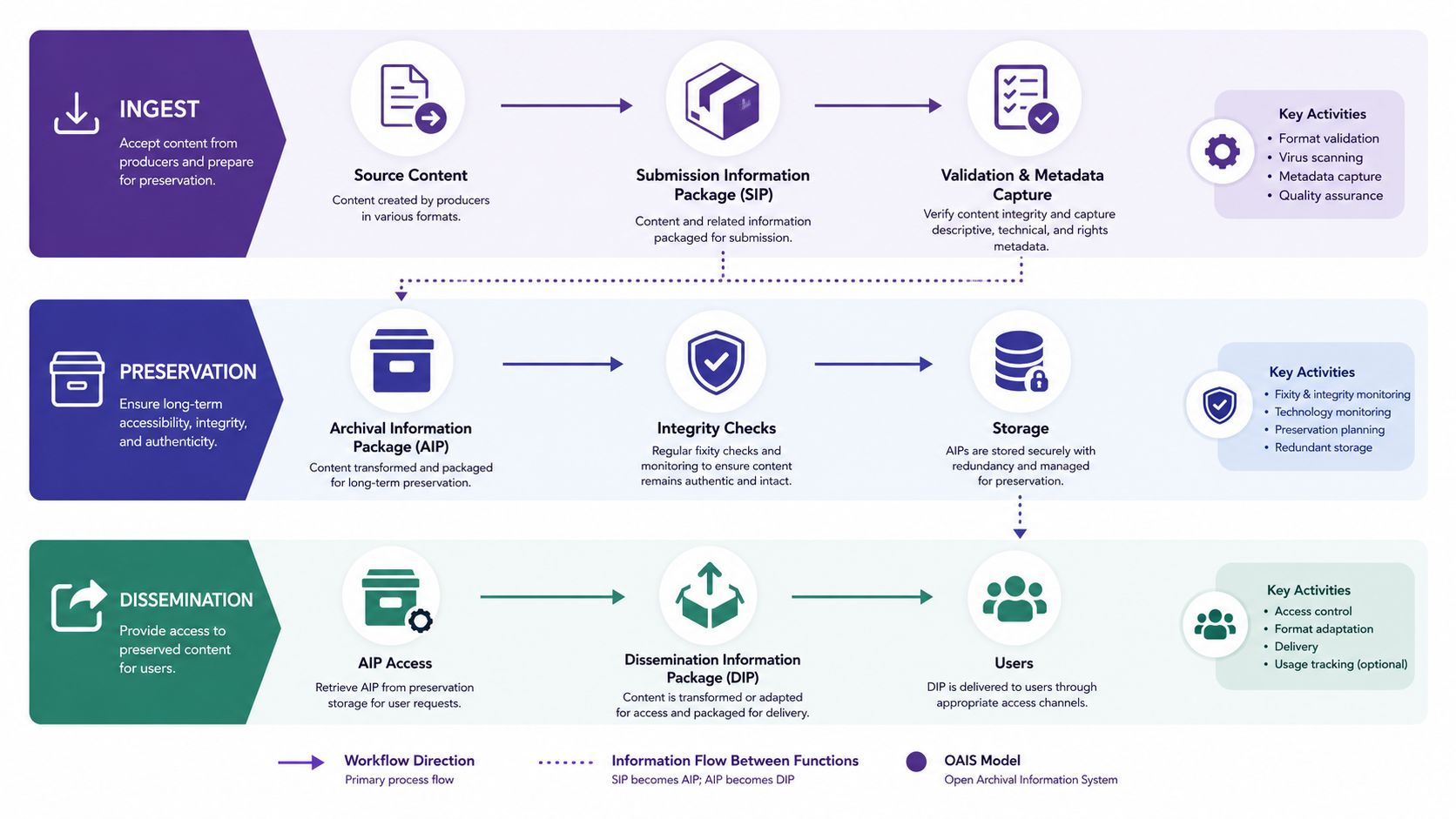
A file shouldn't move directly from an upload button to a public search result. OAIS separates the journey into three connected packages and workflows, each with a different responsibility.
Ingest creates the checkpoint
The Submission Information Package, or SIP, is what the archive receives for processing. A creator might submit a video master, its transcript, a release form, descriptive notes, and related stills. During ingest, the system validates the files, captures metadata, checks for duplicates or missing components, and records fixity information.
This is the moment to catch avoidable problems. If a file lacks a clear source, format, or rights status, the team can resolve the issue while the context is still available.
Preservation creates the managed record
After validation, the SIP can be transformed into an Archival Information Package, or AIP. The AIP is designed for long-term storage. It includes the content and the metadata needed to understand, verify, manage, and preserve it.
The preservation workflow can apply replication rules, schedule fixity verification, monitor formats, and document migrations. The storage layer should protect the preservation copy from casual editorial changes. Editors need flexibility, but the archive needs a stable record of what was originally received and what preservation actions occurred.
Delivery creates the usable view
A Dissemination Information Package, or DIP, is generated for access. It may contain a streaming version, a web image, a transcript excerpt, a downloadable document, or a rights-filtered research result. The DIP can be transformed for speed and usability without altering the preservation package.
The European Commission's eArchiving conformant solutions framework defines SIP, AIP, and DIP as separate package types. It also identifies CITS SIARD for preserving relational database content and CITS ERMS for electronic records management systems.
Separating these stages keeps preservation decisions out of the front-end experience. Users get fast, appropriate access, while the archive retains a carefully governed source of truth.
Where AI Enrichment Fits and Where It Does Not
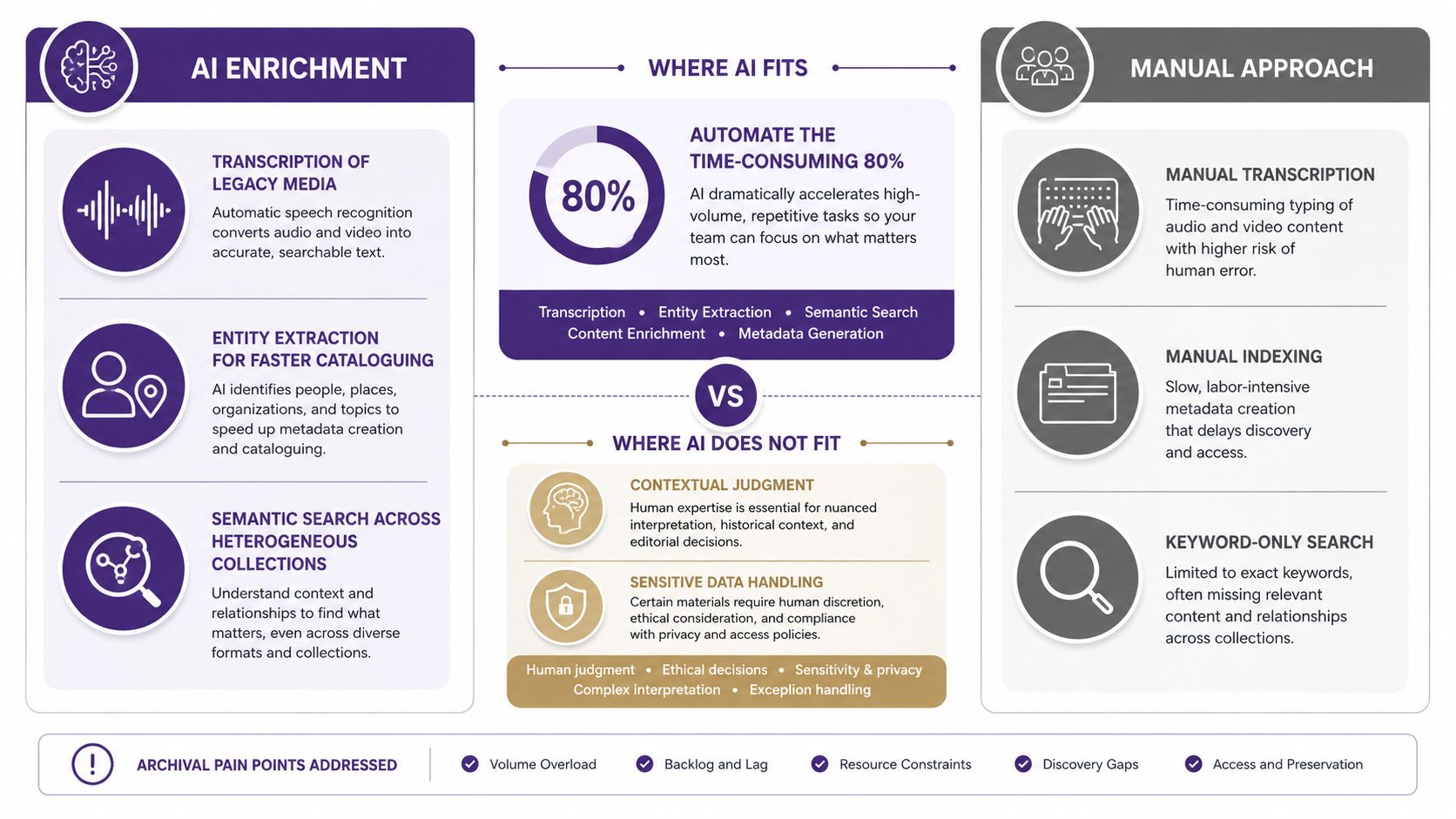
AI can make a large archive easier to explore, but it can't turn uncertain evidence into reliable history. Its strongest role is enrichment, where it helps people add useful signals to material that already has a governed place in the collection.
For legacy audio and video, speech-to-text can create a starting transcript. Entity extraction can identify names, organizations, locations, and recurring subjects for cataloguing review. Semantic search can connect a user's idea with related language across articles, interviews, transcripts, and production notes, even when the exact keyword isn't present.
Let people verify the machine's suggestions
AI-generated labels should enter a review workflow, not become unquestioned archival truth. A transcription may confuse names. An entity model may merge two people. A summary may omit a qualification that changes the meaning of an interview.
A chat-based research layer, such as Contesimal, can help users query a content library conversationally and surface relationships across documents and media. That can support brainstorming for a new episode, locating source passages, building a thematic collection, or finding older material for repurposing. The result remains useful only when the underlying records expose provenance, confidence, rights, and source context.
Know what AI cannot repair
AI cannot manufacture missing provenance. It can't establish that a guest granted worldwide commercial rights when the contract is absent. It can't replace checksum monitoring, confirm that a file hasn't changed, or decide whether a sensitive recording should be released.
The 2026 research on AI for audiovisual preservation emphasizes preservation metadata, rights accountability, and governance, including standards such as PREMIS. That emphasis points to a practical order of operations: first build trustworthy metadata and policy, then use AI to accelerate discovery and enrichment.
AI can help a team find more value in an archive. It shouldn't be allowed to decide what the archive means without human review.
Evaluating Vendors and Architectures for Your Library
Vendor selection is a fit problem, not a contest for the longest feature list. A solo creator with a growing video and podcast library may need a hosted, opinionated platform with clear workflows. An institution with developers, preservation specialists, and complex collection types may justify a modular stack built around tools such as Archivematica and a separate access layer.
Treat fixity support, PREMIS export, format migration tooling, and API openness as foundational questions. Then evaluate onboarding, permissions, search quality, bulk operations, audit trails, accessibility, and the total cost of ownership.
| Library Profile | Recommended Path | Strengths | Watch For |
|---|---|---|---|
| Independent creator or small editorial team | Lightweight DAM or hosted archival CMS | Faster setup, simpler administration, practical search | Limited preservation depth, export restrictions, shallow rights models |
| Publisher or institution with preservation needs | Enterprise DAM with OAIS alignment | Strong governance, package workflows, metadata controls | Higher implementation effort, training needs, complex licensing |
| Technical organization with specialized requirements | Build-your-own repository stack | Maximum flexibility, custom integrations, full control | Ongoing maintenance, migration responsibility, dependence on internal expertise |
Ask vendors to demonstrate a real ingest rather than a polished homepage. Give them a mixed sample containing a large media file, a transcript, rights information, and related derivatives. Watch how the system preserves relationships, flags missing data, records fixity, and produces a usable access view.
Your due-diligence script should include specific questions:
- Service commitment: What does the SLA cover, and how are incidents communicated?
- Exit path: Can you export files, metadata, relationships, audit history, and rights data in usable formats?
- Format risk: How does the vendor identify obsolescence and document migration decisions?
- Rights governance: Can the system represent embargoes, territory restrictions, licenses, and review dates?
- Integration: Can your existing publishing, storage, and analytics tools connect through documented APIs?
The right architecture is the one your team can operate consistently, not the one with the most impressive demo.
Turning Archives Into Long-Term Content Value
Preservation discipline creates advantage. A clean ingest pipeline gives each asset a dependable starting point. Durable metadata makes old work understandable. Rights-aware access tells your team what can be reused, where, and by whom.
Three habits keep that value growing:
- Keep integrity checks continuous: Fixity and format review belong in routine operations, not a one-time cleanup project.
- Treat taxonomy as infrastructure: Review terms as your subjects, audiences, platforms, and editorial priorities change.
- Place AI above governance: Use enrichment to accelerate transcription, discovery, and research, but keep provenance, rights, metadata review, and preservation controls in charge.
The broader market reflects sustained demand for this infrastructure. Records and information management was estimated at about $22.8 billion in 2025 and projected to reach roughly $52.9 billion by 2032, implying a 12.8% CAGR, according to Annex's RIM industry report. Separate coverage estimates records storage services at about $8.0 billion in 2023, rising to around $14.0 billion by 2032 at 6.5% annually, while archiving software is projected from $6.66 billion in 2025 to $18.29 billion by 2032 in market coverage from 360iResearch.
An archival CMS isn't compliance overhead. It's a quiet engine for second-act value, helping your library support research, licensing, reissues, new stories, and platform-specific content long after the original publication date.
Contesimal helps creators and publishers organize document, podcast, video, and article libraries with searchable taxonomies and AI-assisted research workflows. Visit Contesimal to explore how your existing archive can become a more usable source for collaboration and new content.