
You know the feeling. You spent days recording a strong podcast interview, weeks polishing a YouTube video, or hours shaping a long blog post, and then the piece goes live, gets its moment, and sinks into the back catalog. A month later, you're already chasing the next upload while hundreds of useful ideas sit buried in old transcripts, unused clips, rough notes, and forgotten drafts.
That's where a lot of creators stall out. They don't have a content problem. They have a library problem.
The shift from hobbyist to professional usually starts when you stop treating old work like leftovers and start treating it like inventory. The creators who scale don't just publish. They organize, understand, and act. They build a system that lets one strong piece of longform content keep creating value across platforms, across formats, and across time.
Your Content Library Is a Goldmine Not a Graveyard
A creator with a few years of output usually has more material than they realize. There are old interviews that still contain sharp insights, evergreen tutorials hidden under outdated thumbnails, B-roll nobody tagged, half-finished outlines that could become a newsletter series, and transcripts full of clips that never made it to social.
The problem is that most of it feels dead because nobody can find it quickly enough to use it.
That's expensive. Businesses spend approximately 25% to 30% of their overall budget on content production and content marketing, yet often use only a small fraction of what they create because lifecycle management breaks down, according to Brandfolder's content lifecycle management analysis. If that's true for businesses with teams, it's even easier for solo creators and small media brands to lose track of what they already own.
What the graveyard actually looks like
It rarely looks dramatic. It looks normal.
- A YouTuber has 200 uploads but can't remember which video contained the best explanation of a core topic.
- A podcaster has years of interviews but no searchable way to pull recurring themes, quotes, or stories.
- A publisher has a strong archive, but old articles sit untouched even when audience interest returns.
- A creator-business keeps making new content because searching the old library feels slower than starting from scratch.
That's how digital clutter builds. Not from laziness, but from friction.
Old content usually doesn't fail because it lacks value. It fails because the value is trapped in a format, a folder, or a workflow nobody can access fast enough.
Content lifecycle management fixes that by giving every asset a job beyond its first release. A podcast episode can seed clips, articles, email sequences, quote cards, topic clusters, lead magnets, or research for the next series. A longform video can become Shorts, Reels, a blog post, and a future compilation. Musicians and audio creators are seeing a similar shift in audience-building strategy, which is why this guide on monetizing music in 2026 is worth reading if you're thinking beyond one platform and one release cycle.
A neglected archive can become a creative engine when you treat it like a system, not storage. If you're thinking about how old content can strengthen both revenue and brand relationships, this breakdown on turning content libraries into new revenue and stronger brand relationships adds a useful business lens.
What Is Content Lifecycle Management Really
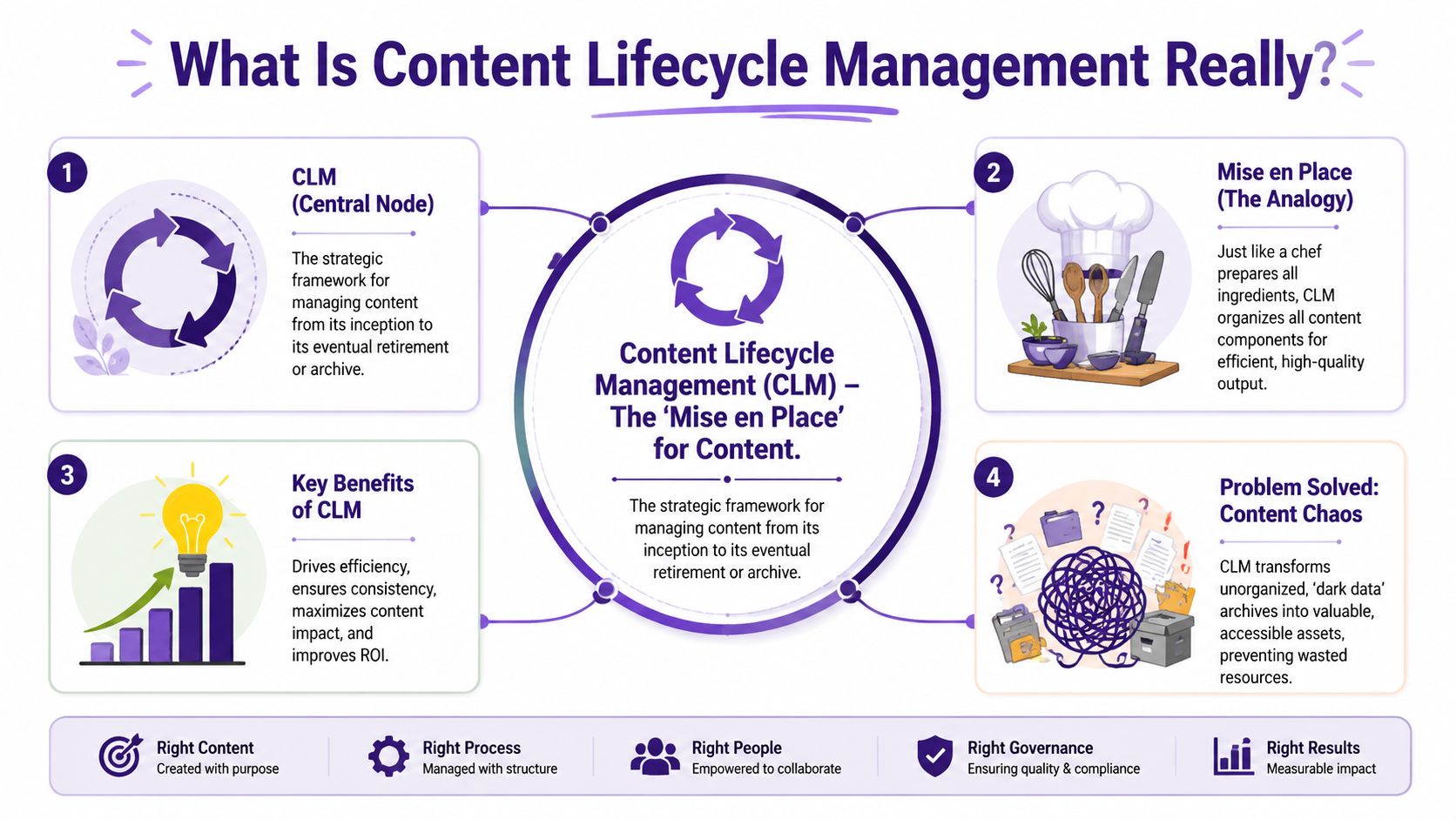
The cleanest way to understand content lifecycle management is to borrow a kitchen term. It's the mise en place of a content business.
A good chef doesn't start cooking by hunting for a knife, then the salt, then the pan, then the onions. The ingredients are prepped. The station is organized. The sequence is clear. That setup doesn't kill creativity. It protects it.
Content works the same way. If your files are inconsistent, approvals are fuzzy, drafts are scattered, and older assets are unsearchable, your team wastes creative energy on retrieval and cleanup. If your system is clear, you spend that energy making better work.
The difference between publishing and managing
A lot of creators think they have a system because they have a CMS, a Google Drive, or a Notion workspace. Those tools help, but they aren't the whole discipline.
Content lifecycle management is the repeatable operating model behind the tools. It covers how content is planned, created, reviewed, published, measured, maintained, and eventually archived or retired. It's the reason a growing creator brand can bring in editors, researchers, marketers, and collaborators without everything turning into folder spaghetti.
According to industry analysis citing Optimizely research, implementing content lifecycle management can reduce content that becomes irrelevant or unused by 60%. That number matters because it points to the outcome. Less waste. Less duplication. More useful output from the same library.
What professionals do differently
Professionals don't rely on memory. They rely on structure.
Here's what that looks like in practice:
- They name assets consistently so people can locate raw footage, transcripts, graphics, and final versions without guessing.
- They track status clearly so everyone knows what's in draft, what needs approval, what's live, and what needs an update.
- They organize for reuse so one interview or essay can feed multiple formats later.
- They preserve context with tags, metadata, and notes, so a clip isn't just a file. It's a usable asset.
Practical rule: If finding and reusing an old asset takes longer than creating a rough new version, your content lifecycle management is weak.
That's why the best systems feel boring in the right places. A creator should be improvising in the script, the story arc, the thumbnail angle, or the hook. They shouldn't be improvising file names, approval rules, or archive logic every week.
If you're evaluating what a stronger operational layer looks like, this guide to content intelligence platforms helps connect organization, discovery, and decision-making in one view.
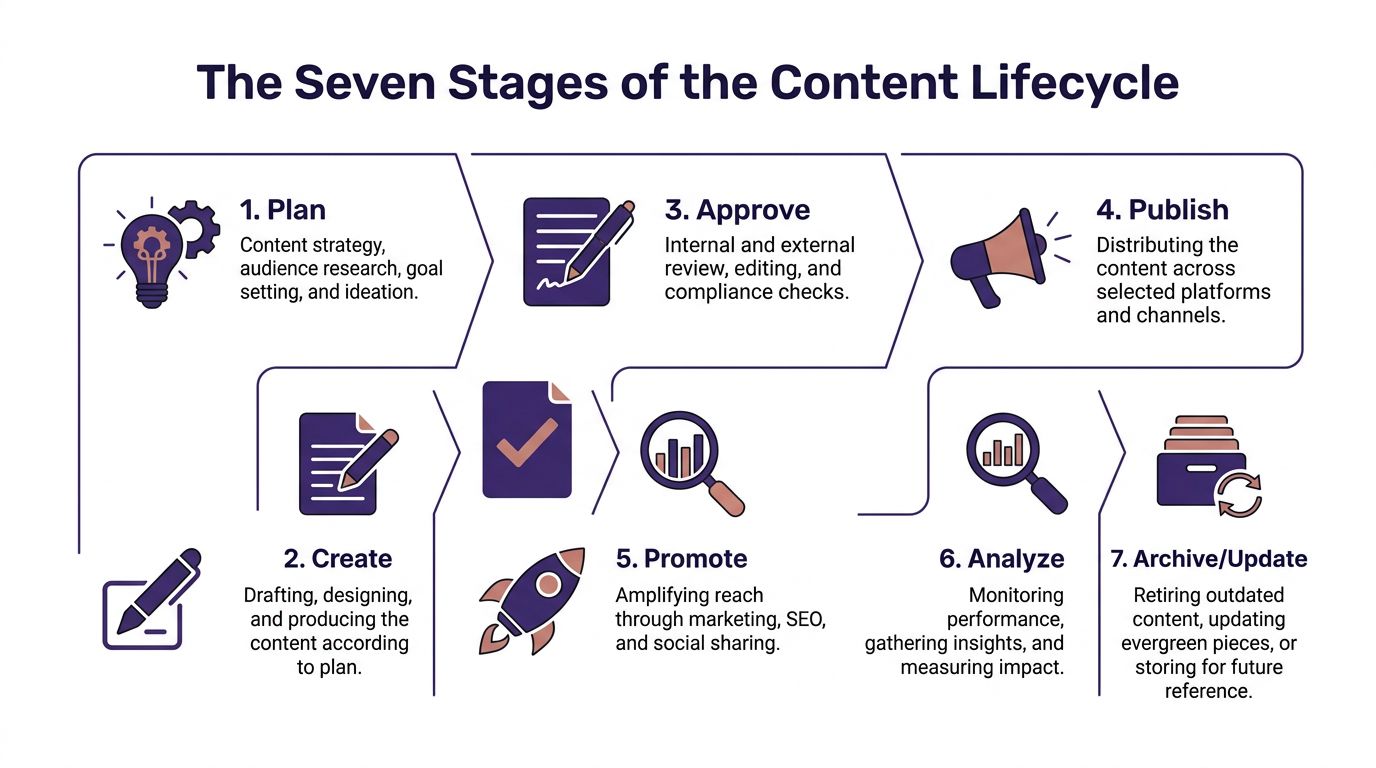
The Seven Stages of the Content Lifecycle
Once you stop seeing content as a one-time post, the lifecycle becomes easier to manage. Every asset moves through a sequence. The exact tools can change, but the stages stay recognizable.
Plan and strategize
Content earns its purpose before anyone hits record or opens a draft.
For a YouTuber, that may mean choosing a topic based on recurring audience questions and deciding in advance which parts can later become Shorts. For a podcaster, it may mean identifying themes to pull into a newsletter. For a publisher, it means deciding whether an article is newsy, evergreen, or part of a larger series.
A practical move here is to define three things before creation begins: primary audience, primary format, and repurposing path.
Create and capture
Now the raw material gets made. This includes writing, recording, filming, designing, and collecting source material.
Creators often rush this stage and only think about the finished piece. That's a miss. Capture with reuse in mind. Save clean audio, preserve transcripts, keep B-roll separate, and store source files in a way another person could understand later.
A strong creator doesn't just make the episode. They make the assets around the episode usable.
Enrich and review
This stage is usually where content either becomes scalable or becomes chaos.
“Enrich” means adding the context that makes future reuse possible. That includes tags, metadata, working titles, descriptions, keywords, speaker names, topic labels, and notes about standout moments. “Review” means quality control. Check facts, tighten structure, align voice, and make sure the content is fit for the audience and platform.
A raw file is not a library asset yet. It becomes one when someone can understand what it is, why it matters, and where it belongs.
Publish and launch
Publication is the formal release. Launch is the coordinated moment around it.
Those aren't always the same thing. A blog post can be published initially before it's featured in a newsletter. A podcast can go live overnight, then get pushed across social later that morning. A video can premiere with comments monitored in real time.
At this stage, consistency matters more than theatrics. Check the links, the visuals, the formatting, and the landing experience.
Distribute and promote
A lot of content underperforms because creators confuse publishing with distribution.
Distribution means adapting the core asset for the places people discover it. That may include email, search, social clips, community posts, reposted excerpts, or collaborations. Promotion is where the content meets audience behavior instead of waiting to be found.
A useful habit is to create a channel map for every major piece:
- Primary home: Where the full piece lives
- Discovery channels: Where new people encounter it
- Support assets: The clips, quotes, summaries, or visuals that carry it outward
Analyze and evaluate
At this stage, creators either learn or repeat themselves blindly.
You're looking for signals that help the next cycle. Which hook worked. Which section held attention. Which clip format drew the right audience. Which updated article regained traction. Which topics deserve a series instead of a single post.
If your team needs a practical framework for this step, a content audit checklist can make review less abstract and more operational.
Archive and repurpose
This is the most neglected stage and the one with the most hidden value.
Archiving doesn't mean tossing content into a cold basement. It means storing it so it stays searchable, understandable, and available for future use. Repurposing means extracting new formats, new angles, new bundles, and new revenue from what already exists.
Here's what smart archival behavior looks like:
| Asset type | Archive action | Future use |
|---|---|---|
| Long YouTube interview | Tag by topic, guest, story beat, and standout quotes | Shorts, newsletter, documentary research |
| Podcast transcript | Organize by theme and chapter | Blog post, ebook chapter, social quotes |
| Evergreen blog post | Mark review cadence and update notes | Relaunch, internal resource, lead magnet |
| B-roll and unused cuts | Label mood, location, and use case | Reels, promos, intros, ad creative |
The archive isn't the end of the lifecycle. It's the shelf where future ideas wait.
Building Your CLM Framework With Governance and Metrics
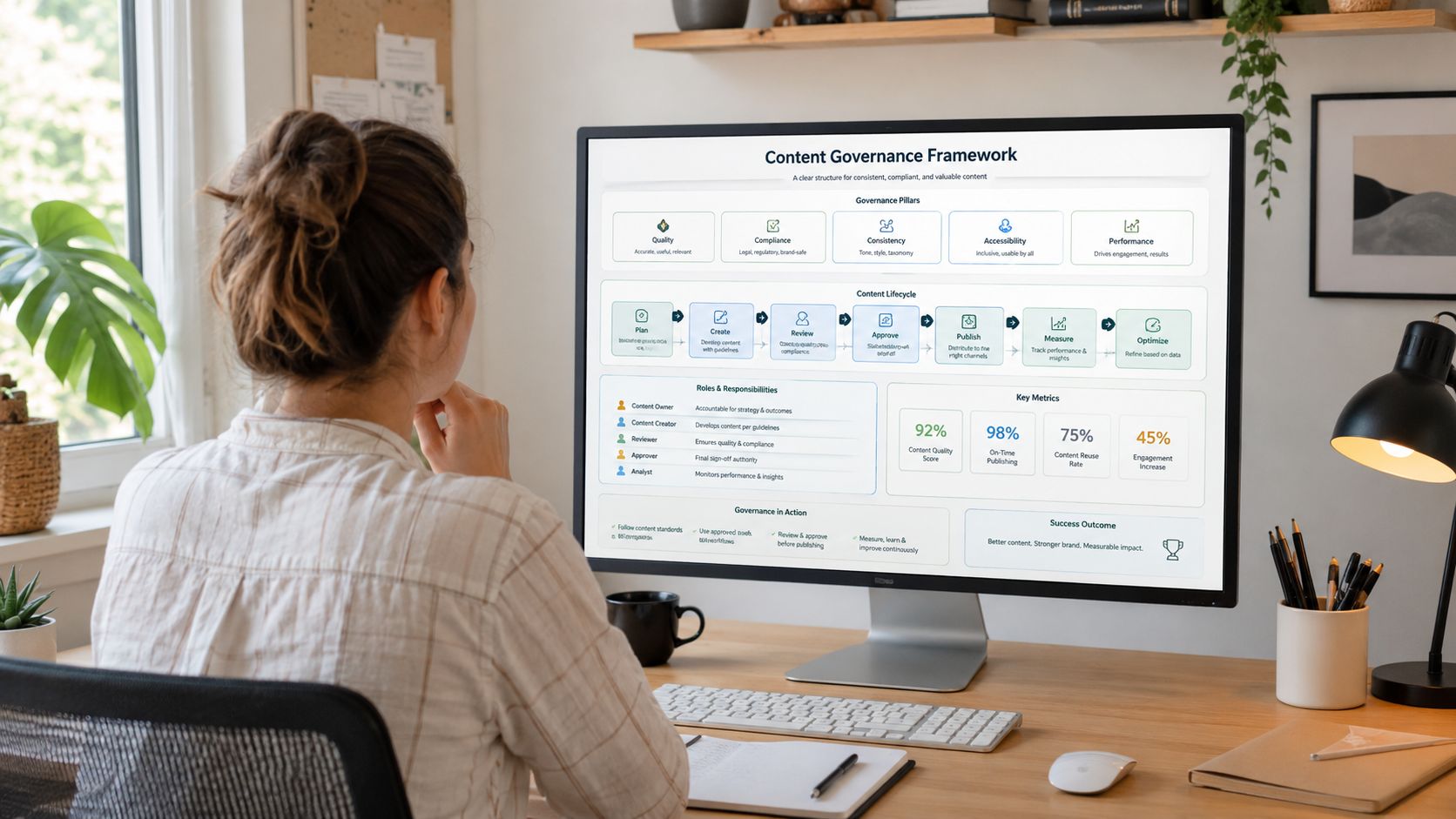
Most creators hear the word “governance” and imagine corporate sludge. In practice, good governance is just a small set of rules that saves you from repeating avoidable mistakes.
If you work alone, governance is how you keep future-you from cursing present-you. If you have a team, it's how everyone moves without constant clarification.
Keep governance light but non-negotiable
You don't need a policy manual. You need a few standards that always apply.
Start with these:
- File naming: Decide how you label projects, dates, versions, and final exports.
- Tagging rules: Pick the tags every asset must have. Topic, format, speaker, platform, campaign, and status are common starting points.
- Ownership: Every asset needs someone responsible for review and maintenance.
- Review cadence: Decide when evergreen content gets checked and when dated content gets retired.
- Version control: One source of truth beats five “final final” folders every time.
Archives gradually become obsolete. According to Canto's guidance on content lifecycle management, effective CLM requires a rigorous archival and retirement strategy where teams periodically audit libraries to identify outdated, inaccurate, or off-brand assets, then choose a defined action: refresh, archive, or delete.
Track metrics that reflect library value
A weak measurement setup over-rewards novelty. A stronger setup tells you whether your library is compounding.
That means looking beyond vanity metrics and asking better questions.
- Repurposed asset engagement: Are clips, excerpts, and derivative pieces pulling attention from old longform content?
- Updated content performance: Does refreshed content regain audience traction after maintenance?
- Reuse rate: Are teams using archived material in new production cycles?
- Search and retrieval speed: Can people find what they need without hunting?
- Lead or revenue contribution: Does older content support subscriptions, sponsorships, product discovery, or inquiries?
A creative system is healthy when old work keeps helping new work.
If audience discovery across AI systems matters to your strategy, this piece on how to improve AI visibility with content is useful because it pushes measurement beyond platform-native metrics and into findability.
A simple governance layer gives creators more freedom, not less. Once the repetitive decisions are standardized, your attention goes back where it belongs: choosing ideas, shaping stories, and building audience trust.
CLM in Action Use Cases for Modern Creators
The easiest way to understand content lifecycle management is to watch it work in different creative businesses. The workflow changes by medium, but the logic holds.
A YouTuber builds a content flywheel
Start with one strong longform video. A creator plans the topic around a proven audience need, records the episode, reviews the cut, publishes it on YouTube, and then distributes selected moments across Shorts and other short-form channels.
The advantage becomes clear later. During analysis, the creator notices that one section about a recurring audience pain point gets stronger comments than the rest. That insight becomes the seed for the next video, a newsletter issue, and a pinned community post. In the archive stage, B-roll, transcript sections, and outtakes are tagged for future use.
A week later, the creator isn't staring at a blank page. The previous video already left a trail of usable material.
A podcaster turns one interview into a series of assets
A podcaster records a long conversation with a guest. During creation, they make sure the audio is clean and the transcript is preserved. During review, they identify chapters, quotes, and story turns worth isolating.
That single interview can become:
- Audiograms for social discovery
- A written article built from the transcript
- Quote graphics for email and social
- Research material for later episodes
- A thematic chapter in a future book or premium resource
Content lifecycle management pays off for creators moving from hobby to business. The audience sees one episode. The operator sees a package of reusable assets.
A publisher or blogger reactivates the archive
A publisher with years of articles often sits on quiet assets that are still useful but no longer current enough to compete. Instead of writing from zero every time, they audit the archive, choose pieces with strong underlying substance, update them, improve structure, and republish them with fresh context.
That strategy isn't just tidy. It can move traffic. According to Bynder's summary of HubSpot research, updating content periodically and maintaining freshness can drive up to 106% growth in organic traffic.
Updating old work is often a better growth move than publishing another average new piece.
A blogger can also bundle a cluster of older posts into a guide, workbook, or paid ebook. A magazine publisher can pull related articles into a special issue. An author can turn research notes and supporting essays into bonus material for readers.
Same framework, different expression
Here's how the seven stages show up across these creator types:
| Creator type | Strongest lifecycle payoff |
|---|---|
| YouTuber | Clips, follow-up episodes, searchable footage library |
| Podcaster | Transcript reuse, quote extraction, thematic packaging |
| Blogger or publisher | Content refreshes, bundles, evergreen relaunches |
The point isn't to force every asset through every channel. The point is to stop letting a finished piece become a finished opportunity.
The AI Advantage How Contesimal Powers Your Content Lifecycle
Most content libraries don't fail because the content is weak. They fail because search is weak, context is thin, and retrieval is slow. That problem gets worse as the archive grows.
That's where AI changes the economics of content lifecycle management. It helps creators and teams work with the library they already have instead of treating the archive like a storage bill.

The dark archive problem
A lot of historical content turns into “dark data.” It exists, but nobody can use it well.
According to Agility CMS on content lifecycle management, 60% to 70% of enterprise content assets are dark data stored in archives, podcasts, and legacy documents, rarely searched or repurposed for new insights. For creators, that might mean old videos, interview transcripts, rough cuts, newsletters, or notes that still contain value but remain practically invisible.
AI helps by making the archive legible again.
Where AI fits in the lifecycle
The strongest use of AI isn't replacing creative judgment. It's reducing the drag around organization, discovery, and first-pass production.
Here's where AI has real leverage:
- Planning: Ask your library what themes have appeared repeatedly, which audience questions remain unanswered, or which past episodes connect naturally into a new series.
- Enrichment: Generate transcripts, summaries, tags, topic labels, and searchable metadata from audio, video, and documents.
- Distribution: Turn longform material into short summaries, social-ready excerpts, clip ideas, and repackaged supporting content.
- Archiving: Organize old assets so they can be found by concept, not just by filename.
That's especially useful for creators with a lot of longform material. A podcast archive, a YouTube catalog, or a publisher's document stack becomes much more useful when the system can read, listen, classify, and surface relationships on demand.
The best AI workflow doesn't invent value from nowhere. It reveals value you already created and couldn't access fast enough.
There's also a visibility benefit. If your archive is being refreshed, structured, and turned into clearer derivative assets, it becomes easier to present useful information in formats machines can parse and people can trust. If that angle matters for your distribution strategy, these AI citation optimization strategies are worth studying alongside your repurposing workflow.
The practical win is simple. AI helps humans stop wasting time on the scavenger hunt. Instead of digging through folders, relistening to entire episodes, or guessing where an idea first appeared, teams can surface the relevant material quickly and build from it. That turns the archive from cold storage into active creative infrastructure.
Frequently Asked Questions About Content Lifecycle Management
Is content lifecycle management the same as a CMS
No. A CMS like WordPress helps you store, edit, and publish content. Content lifecycle management is the broader operating system behind the work.
A CMS can be one tool inside the process, but CLM covers more ground. It includes planning, review, distribution, analysis, maintenance, and archival decisions. If a CMS is the kitchen appliance, CLM is the way the kitchen runs.
Is this only for large teams and publishers
Not at all. Solo creators may benefit even more because they have less margin for wasted work.
A small creator setup can start with a spreadsheet, a consistent folder structure, a transcript workflow, and a repeatable tagging method. The goal isn't to mimic a media company. The goal is to make your own output easier to reuse, update, and monetize as the library grows.
What's the first practical step if my archive is messy
Pick one old piece of longform content and run a simple reset on it.
Use this sequence:
- Choose one asset that still has useful ideas.
- Gather the related materials such as transcript, clips, notes, and graphics.
- Tag it clearly by topic, format, and audience.
- Create two or three derivative assets from it.
- Document what you'd want future-you to know so the next reuse is faster.
That small exercise usually reveals the bottleneck. It might be search, file naming, approvals, missing transcripts, or poor metadata.
How often should I update or archive content
It depends on the type of content.
Evergreen pieces deserve periodic review. Time-sensitive content needs a shorter shelf-life and a clear retirement path. A creator doesn't need a complex formula here. A simple rule works well: if a piece is still strategically useful, refresh it; if it's useful only as reference, archive it; if it creates confusion, delete it.
What does successful content lifecycle management feel like day to day
It feels lighter.
You stop reinventing your workflow every week. Your team knows where things live. Old work starts feeding new work. You spend less time searching, less time duplicating, and less time wondering what to make next because the answers are already sitting in your own library.
If you've built a valuable archive but can't easily organize it, search it, or turn it into new output, Contesimal is worth a close look. It helps creators, publishers, and content teams classify their libraries, collaborate with AI and humans in one workflow, and uncover new revenue opportunities from work they've already created.