
Your dashboard used to load before you finished taking a sip of coffee. Now it hangs for thirty seconds. Your podcast archive returns clips that contain the right words but miss the actual topic, while a research collection surfaces a technically related document instead of the useful one. In each case, the system received a question, made a plan, and either spent too much effort answering or chose the wrong evidence.
Query optimization is the discipline of improving that plan. It applies to a SQL statement selecting rows from connected tables, but the same thinking helps content teams improve search across articles, podcasts, videos, transcripts, and research files. You need to know what the system is trying to retrieve, what it expects the work to cost, and where those expectations diverge from reality. For a useful distinction between literal matching and meaning-based retrieval, compare semantic search and keyword search.
The practical payoff is straightforward. You'll learn how database optimizers choose execution plans, why inaccurate estimates create slow queries, how diagnostic tools expose the problem, and how to apply the same planning logic to a messy media archive. The database and content-search examples look different on the surface, but both depend on planning, estimating, retrieving, and learning from the result.
When a Query Becomes the Bottleneck
A slow query rarely announces itself as a database problem. A marketing executive sees a dashboard that stops responding. A publisher notices that an editor can't find the interview segment needed for a new article. A producer searches a back catalog for a theme, receives hundreds of vaguely related results, and gives up before finding the strongest clip.
The visible symptom is delay or irrelevance. Underneath, the system may be scanning too much data, joining tables in an inefficient order, choosing an access path that doesn't fit the request, or ranking content from incomplete metadata. Query optimization doesn't change the question. It changes the route used to answer it.
One question, many possible plans
Suppose a SQL query asks for customers who purchased a particular product during a period. The database could scan the entire orders table, locate matching product records first, use an index on the date, or combine several smaller lookups. Each route can return the same answer, but the work involved can differ dramatically.
A search system faces a similar choice. It might match exact terms in a transcript, retrieve documents associated with a topic, search embeddings for related meaning, or combine metadata filters with full-text results. A useful system must balance relevance against retrieval effort. It also needs enough context to distinguish a passing mention from the central subject of an episode.
Practical rule: A fast wrong answer is still a failed query, and a relevant answer that arrives too late is also a failed query.
The optimizer's job is to make a reasoned choice before execution. It estimates how many rows or documents each step will produce, how much data must move, and which operation can eliminate irrelevant material earliest. When its estimates are sound, it can avoid unnecessary work. When they're wrong, one poor decision can affect every later step.
Why content teams should care
Content libraries create a particularly difficult search environment. A single idea may appear as a phrase in an article, a spoken expression in a podcast, a chapter in a video, or an implied theme in a screenplay. Titles, descriptions, speaker names, dates, tags, and transcripts add useful signals, but those signals can be inconsistent.
That makes optimization a library problem, not just a keyword problem. Your team needs to organize the corpus, expose relationships between entities and themes, and observe which searches lead to useful discoveries. The same habits that help a DBA tune a workload can help a content organization turn old longform material into new episodes, posts, clips, and research leads.
How a Cost-Based Optimizer Thinks
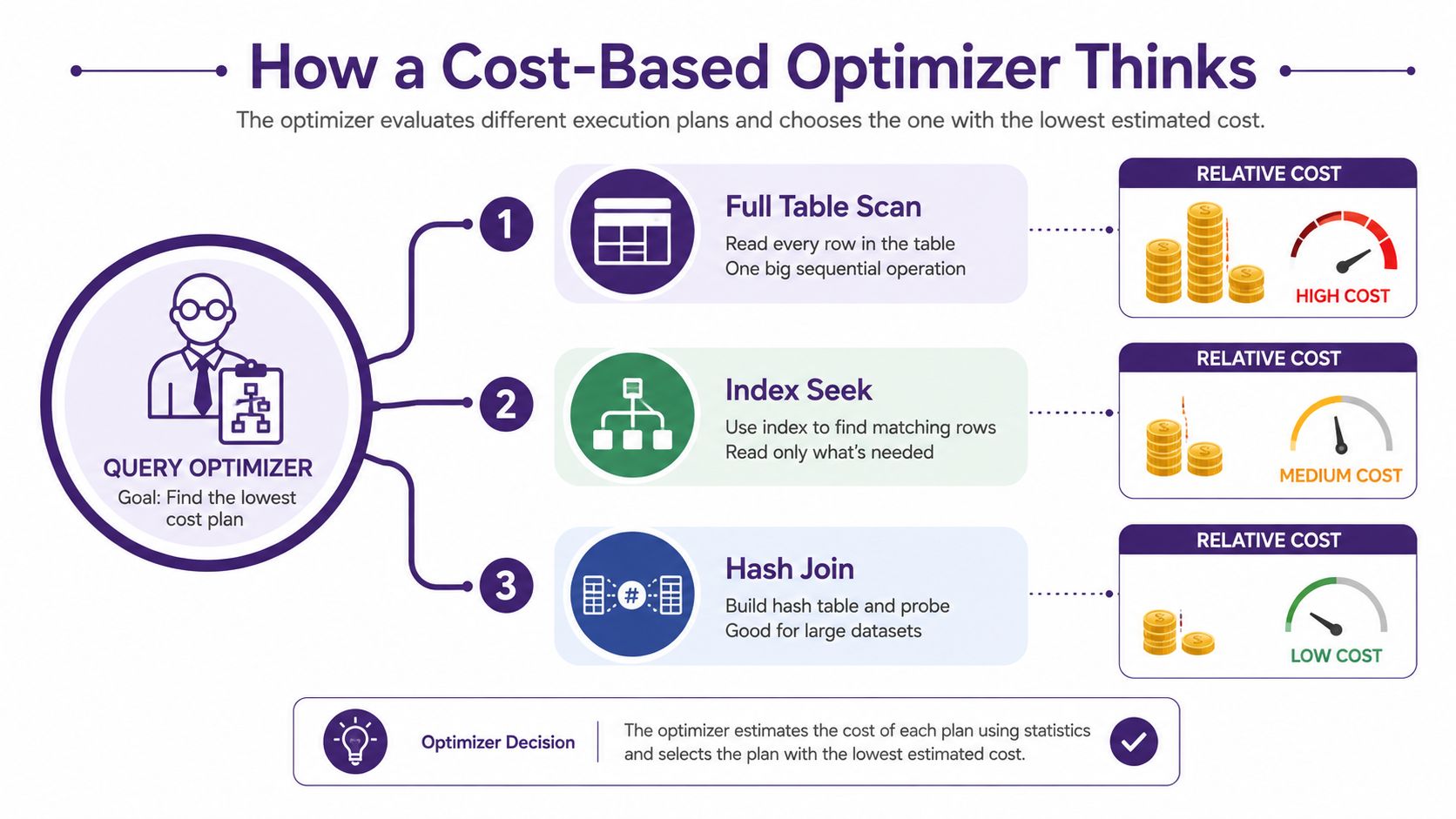
A cost-based optimizer is a planner. It considers alternative execution plans, assigns each a relative cost, and selects the plan with the lowest estimated total. Oracle describes this cost as a relative numerical value assigned to plan steps, with estimates that can include I/O, CPU, memory, cardinality, data distribution, and available access structures. See the Oracle explanation of query optimizer concepts for the underlying mechanics.
Consider a road trip. One route is shorter but passes through heavy traffic. Another is longer but uses a faster road. A third avoids tolls but consumes more fuel. You don't choose by distance alone. You combine estimates for time, fuel, traffic, and route conditions, then select the option that appears cheapest for your priorities.
The statistics behind the estimate
Classic database teaching identifies a small group of foundational statistics:
- Tuple counts tell the optimizer how many rows a table or intermediate result contains.
- Tuple size estimates how much data each row occupies, which affects memory and I/O.
- Page counts indicate how many storage pages the system may need to read.
- Distinct values help estimate how selective a filter will be.
These inputs aren't abstract bookkeeping. If a column contains many distinct customer identifiers, a filter for one identifier may return a small result. If most rows share the same status value, filtering on that status may eliminate very little. The optimizer uses those expectations to compare scans, index access, joins, sorting, and aggregation.
Oracle's historical optimizer documentation traces cost-based planning to object statistics gathered by the ANALYZE command in documentation from 1996. Modern systems continue to use the same broad idea, while expanding the model to include table cardinality, column distributions, and resource costs across CPU, memory, network, and disk. Vertica and Couchbase provide contemporary examples of systems that model these broader resource considerations. The Oracle optimizer documentation provides the historical context.
The estimate is not the execution
The optimizer doesn't usually run every possible plan to completion. It predicts the work, compares alternatives, and commits to one. That keeps planning practical, but it creates a dependency on statistics quality.
For content search, the equivalent inputs might include document length, term frequency, topic labels, speaker names, dates, format, and usage history. A system that knows a transcript is long, a topic tag is rare, and a speaker appears frequently can make a more informed retrieval choice than one that sees only an undifferentiated text field.
Optimization, then, isn't one magic algorithm. It's a planning process whose quality depends on the information available to the planner.
Common Bottlenecks That Slow Everything Down
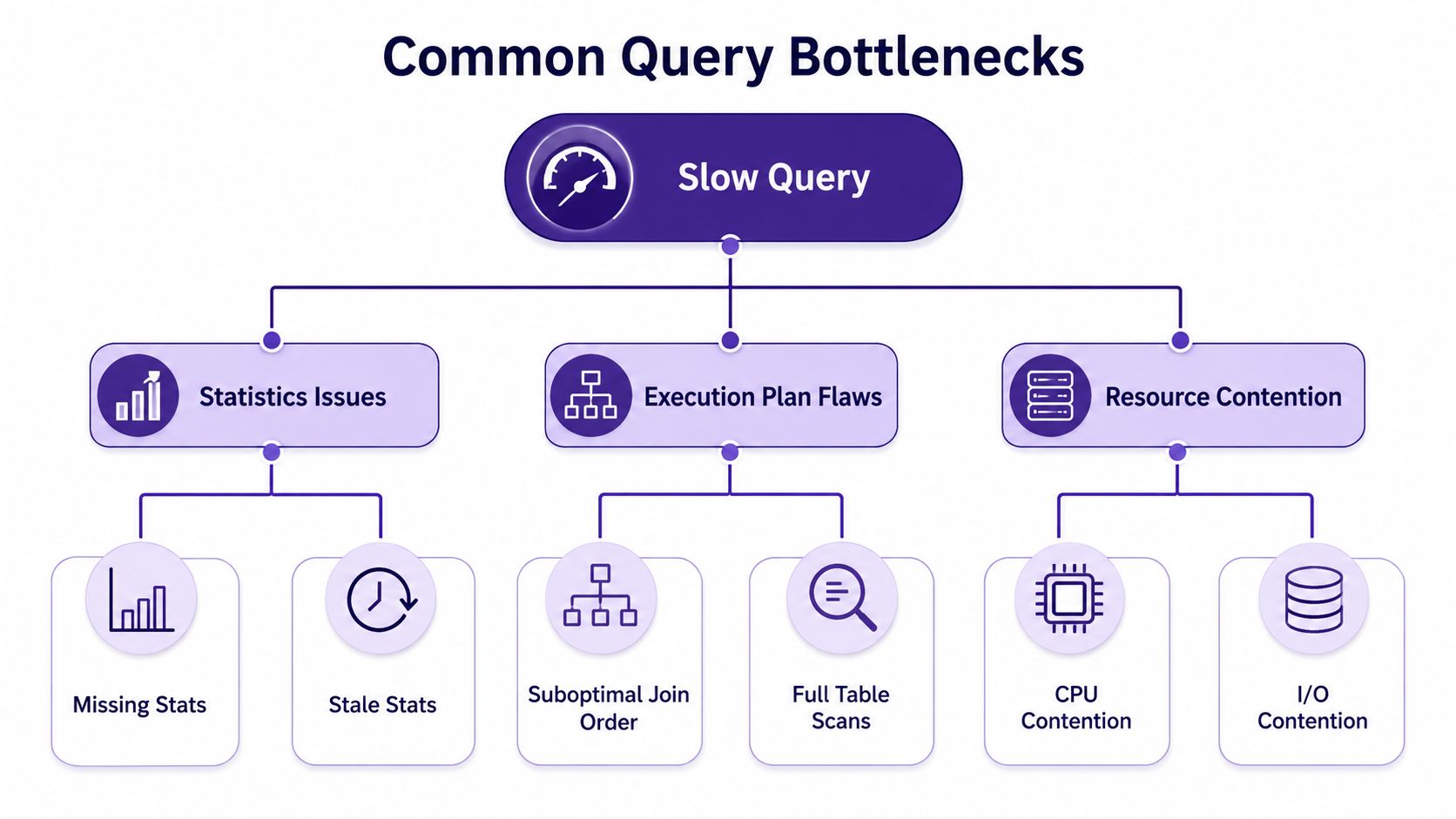
Most slow queries follow familiar patterns. The system either lacks a useful route to the data, misunderstands the shape of the data, or competes with other work for the same resources.
Statistics issues
Missing statistics leave the optimizer with weak evidence. Stale statistics create a different problem. The metadata exists, but it no longer reflects the current distribution of values, table size, or index contents.
SQL Server uses column-distribution statistics to estimate row counts, and those estimates influence whether it chooses an index seek or an index scan. Microsoft's statistics documentation for SQL Server also explains why higher-fidelity updates, including FULLSCAN in relevant partitioned-index scenarios, can improve the information available to planning.
The consequence is often a cardinality error, meaning the optimizer expects a different number of rows than the operation produces. A VLDB study reported a median cost-model cardinality error of 38% when estimated cardinalities were compared with true cardinalities (VLDB study on cardinality estimation). That figure matters because a bad estimate at one step can distort join order, memory allocation, sorting, and I/O decisions later.
Execution-plan flaws
A missing index may force a table scan when a selective lookup would be more appropriate. A poor join order can create a large intermediate result before the query applies a filter that could have reduced the data earlier. An overly wide table can make every read more expensive, while unstructured blobs can prevent the engine from using targeted access paths.
Look for recognizable signatures:
- High actual rows after low estimated rows often indicates a selectivity or statistics problem.
- Repeated scans may indicate missing or unsuitable indexes.
- Large intermediate joins can point to join-order mistakes or weak filters.
- Excessive sorting and spilling suggests that memory estimates or query shape need attention.
Resource contention
A query can be logically reasonable and still run poorly when other workloads consume CPU, memory, disk, or network capacity. A dashboard refresh, an archive export, and a content-ingestion job may all compete for the same resources.
The first response shouldn't be “add more hardware.” Measure the plan, compare estimated and actual work, and identify whether the bottleneck comes from access paths, estimates, query shape, or workload contention. Optimization works best when the diagnosis matches the failure mode.
Indexing and Schema Strategies That Actually Help
Adding indexes indiscriminately can make a system harder to maintain and can increase write overhead. The better question is, which access path helps the optimizer answer this workload with less work?
A B-tree index suits ordered lookups and range scans. If users frequently request records within a date range, an ordered structure can help the engine access the relevant portion directly instead of inspecting every row. Column order matters when a query filters or sorts on several fields, because the leading columns influence how effectively the index can be used.
A covering index includes the fields needed to satisfy a query, reducing the need to return to the base table for additional values. A partial or filtered index focuses on a subset, such as active records or a particular content state, when that subset is queried often and the condition remains stable.
Match the structure to the workload
Index choice should follow observed queries rather than personal preference.
- Start with the predicate. Identify the fields used in filters, joins, and sorting.
- Check the output. If the query reads a small, predictable set of columns, a covering design may avoid extra lookups.
- Inspect selectivity. An index is less useful when a condition matches most of the table.
- Refresh the evidence. SQL Server's guidance makes clear that statistics quality affects the choice between an index seek and a scan.
- Test writes too. Every additional index can add maintenance work when rows change.
Schema design shapes the same decision. Normalize frequently updated entities when consistency and targeted updates matter. Denormalize read-heavy paths when repeated joins dominate a stable access pattern. Partition large fact tables when queries naturally restrict themselves by a partitioning key. For document collections, separate searchable metadata from large payloads so the search engine can filter and rank without loading every full object.
For a broader example of tracing application performance issues from symptoms to root cause, analyzing Hattafoodhub performance offers useful context beyond database indexes.
A worked example without magical claims
Suppose an editorial dashboard asks for recent published assets by channel and returns a small set of fields. The initial query filters on status and published_at, then joins to a channel table. The plan shows a broad scan, followed by a filter and a lookup for columns already needed by the dashboard.
A sensible revision is to create an index that reflects the filter order and includes the projected fields, then refresh statistics and compare the actual execution plan. Don't claim success because the index exists. Confirm that the new plan reads fewer pages, estimates rows more accurately, and avoids unnecessary lookups under a representative workload.
For content discovery, full-text search provides a useful complement to structured indexes. Metadata filters can narrow the corpus, while full-text structures handle words and phrases inside transcripts or documents.
Profiling and Diagnostic Tools Worth Knowing
Optimization becomes reliable when you can compare the plan the engine expected with the work it performed. Each database exposes a different window into that gap.
A practical comparison
| System | Primary Tool | What It Reveals | Best For |
|---|---|---|---|
| SQL Server | Actual execution plans and Query Store | Estimated versus actual rows, operators, regressions over time | Finding plan changes and recurring expensive queries |
| PostgreSQL | EXPLAIN ANALYZE and pg_stat_statements |
Runtime behavior, row counts, timing, and workload-level query frequency | Diagnosing individual queries and prioritizing the workload |
| MySQL | Optimizer trace | Planning decisions and rejected alternatives | Understanding why the optimizer selected a particular route |
| Couchbase | EXPLAIN for N1QL |
Index use, joins, scans, and projected operations | Inspecting document-query plans and index selection |
SQL Server's actual execution plan is useful when estimates and reality diverge. Query Store adds a historical view, which helps identify a query that became slower after a plan change or data-distribution shift.
PostgreSQL's EXPLAIN ANALYZE runs the query and reports observed behavior, so use it carefully on expensive or write-producing statements. pg_stat_statements helps surface the queries that consume attention across the workload rather than only the query someone happened to report.
MySQL's optimizer trace offers a closer look at planning reasoning, while Couchbase's EXPLAIN output helps N1QL users inspect document indexes and access paths.
Measure before modifying: A new index or rewritten query is only a hypothesis until the plan and runtime confirm that it improved the intended workload.
Optimizer quality itself can also be benchmarked. The OptMark toolkit measures search-space quality, not only execution time, and the JOB-Complex benchmark contains 30 SQL queries with nearly 6,000 execution plans for evaluating optimizer and cost-model behavior (OptMark and JOB-Complex benchmark). That distinction matters because an optimizer may find a strong plan while spending too much effort searching for it.
The New Shape of Search Queries in an AI World
SQL users usually submit a structured statement and expect a result set. AI-driven search users increasingly ask a question, inspect an answer, add clarification, and refine the request. That turns retrieval into a conversation rather than a single lookup.
A 2026 search-trends dataset reports that 58% of AI-driven search queries are longer than six words, 41% of AI interactions include follow-up prompts, and users ask 2.7 times more clarifying questions in generative formats (generative AI search trends data). These figures describe a different optimization target from traditional keyword ranking.
From keyword matches to complete answers
A keyword-focused archive may retrieve an episode containing the phrase “audience growth.” It may miss a conversation about subscriber retention, community habits, or distribution strategy because the guests used different language. A conversational search agent can ask a follow-up such as, “Which examples apply to independent video creators?” That second question requires entity coverage, format awareness, and relationships between topics and audiences.
The content team's job is to make those relationships legible. A podcast transcript should connect to its episode, speakers, themes, publication date, related clips, and derivative articles. A video should expose chapters, subjects, transcript passages, and audience context. An article should preserve its concepts and supporting references rather than exist as an isolated page.
This is why enterprise search needs more than a large text box. The retrieval layer must understand structure, preserve provenance, and return material that supports the next question.
The archive becomes the search surface
AI overviews and citation-backed answers can reduce the importance of standard blue-link metrics because users may receive a synthesized response before visiting individual pages. That doesn't make discoverability irrelevant. It changes the quality bar from “contains the phrase” to “contains enough trustworthy context to answer the question.”
For creators and publishers, answer completeness means covering the entities, relationships, definitions, examples, and formats a user may request next. Keyword density still has a role, but it's no longer a sufficient optimization strategy for a multi-turn journey.
A Practical Playbook for Content Organizations
A content organization can borrow the optimizer's habits without becoming a database team. Start by treating the archive as a corpus with structure, usage patterns, and measurable outcomes.
Build the corpus before tuning retrieval
Inventory articles, books, videos, podcasts, transcripts, scripts, images, and research notes. Create a layered taxonomy that connects topics to formats, people, audiences, series, dates, themes, and permissions. Keep the original file and its provenance attached to every extracted insight.
Transcription is often the first practical step for spoken material. Teams comparing capture workflows may find an AI transcription app for iPhone useful when they need searchable text from interviews, field recordings, or production notes.
Collect the evidence a planner needs
Track which assets users open, save, reuse, cite, or reject. Record the queries that produce no useful result and the follow-up questions that reveal missing context. Google Cloud's history-based optimization for BigQuery learns from previously completed executions of the same or similar queries, applies improvements to later runs, and lets users inspect effects in INFORMATION_SCHEMA (BigQuery history-based optimizations).
The content equivalent is a retrieval history that shows which archive paths help people create something new.
Tune workloads, not isolated searches
A single successful query doesn't prove that the library is well organized. Test recurring editorial tasks: finding clips for a theme, assembling research for an episode, locating every reference to a person, or identifying content that can be repackaged for a new audience.
Recent research describes a shift toward tighter feedback between optimization and execution, workload-level optimization instead of single-query tuning, and composable rather than monolithic architectures (research on real-world query optimization). Autonomous tuning can help when the workload is repetitive and feedback is trustworthy. It can hurt when governance, reproducibility, or cost predictability matter more than local speed.
Measure answer quality
Use human review for relevance, completeness, source traceability, and usefulness to the next action. For a podcast network, the workflow might look like this:
- Classify the back catalog by show, guest, topic, audience, date, transcript, and clip.
- Connect related assets so an answer can point from a transcript passage to the episode and its derivative articles.
- Log retrieval behavior to identify unanswered follow-ups and repeated research paths.
- Test representative editorial workloads rather than one polished demo query.
- Review citations and provenance before an AI-assisted answer becomes published content.
- Turn strong discoveries into formats, such as a new episode, newsletter, video segment, or themed playlist.
Contesimal is one platform option for organizing and searching content libraries, supporting keyword-based discovery, saved searches, research dossiers, and AI-assisted analysis across documents, podcasts, videos, and articles. The broader principle is independent of any tool: organize the corpus, observe how people search it, test real workloads, and measure whether retrieval creates useful editorial action.
Visit Contesimal to organize your historical library, connect research across formats, and turn stronger retrieval into new content ideas. Start with one archive, one recurring search task, and one measurable workflow your team wants to improve this week.