
Full-text search is the magic that lets you search for information inside the entire body of your documents, not just their titles or metadata. It’s the difference between judging a book by its cover and having a librarian who has read every single word on every page.
For content creators, YouTubers, and publishers, this is the technology that unlocks the real value buried deep inside your content library, reigniting your old work and making it a money-maker today.
What Is Full-Text Search, Really?
Imagine you run a popular podcast. You want to find every single time you mentioned a specific guest, "Dr. Anya Sharma," across 200 episodes.
A traditional search might only scan your episode titles or the metadata you typed into the show notes. If her name isn't in those specific fields, you’ll come up empty-handed—even if you had an hour-long conversation with her. This is the exact kind of frustrating dead-end that full-text search was built to solve.
Instead of just skimming the surface, it dives deep into the actual content itself. For a podcaster or YouTuber, this means searching through every word in your automatically generated transcripts. For a blogger, it's about scouring the complete text of every article you've ever written. It turns your entire archive from a simple collection of files into a dynamic, completely searchable knowledge base, allowing you to upcycle your old content and create new value.
The Hyper-Intelligent Librarian for Your Content
Let's use an analogy. Think of a standard search as a library catalog. It's useful, but limited. You can find a book if you know the title, author, or subject—the metadata.
Full-text search, on the other hand, is like a hyper-intelligent librarian who has memorized the contents of every single book in the library.
You can walk up and ask, "Show me every book that mentions 'the creative process in filmmaking'," and the librarian can instantly point you to the exact page in every relevant book, even if those words never appear in the title. This is precisely what Contesimal does for your content library—it reads everything so you can find anything. You can see how this fits into the bigger picture in our article about what an information retrieval system is.
This whole concept revolutionized how we access information back in the early 1990s, becoming a cornerstone for digital libraries. A major milestone was the 1990 release of the Connection Machine Searcher, one of the first commercial systems that could index and query massive datasets. If you're curious, you can learn more about the evolution of the text analytics market and how it has grown since.
Traditional Search vs. Full-Text Search at a Glance
To really nail down the difference, it helps to see them side-by-side. The table below breaks down the limited scope of a traditional search versus the comprehensive power of full-text search.
| Search Type | Where It Searches | Best For Finding | Example |
|---|---|---|---|
| Traditional Search | Titles, tags, filenames, keywords, descriptions. | Documents where you already know the title/topic. | Searching "Episode 152" to find a specific podcast file. |
| Full-Text Search | Every single word inside the entire document. | Specific quotes, concepts, or passing mentions. | Searching "imposter syndrome" to find all clips where it's discussed. |
As you can see, one method helps you find the container, while the other helps you find the exact idea hidden inside.
How Full-Text Search Actually Works
So, how does a search engine manage to rifle through millions of words across thousands of documents in the blink of an eye? It’s not magic, but it is a ridiculously clever process of preparation. Think of it like creating the ultimate, hyper-detailed index for a massive library of cookbooks before anyone even asks for a recipe.
Instead of frantically flipping through every single book each time someone wants to find "chocolate chip cookies," the search engine has already done all the heavy lifting upfront. This prep work happens in three core steps, turning a chaotic mess of content into a highly organized, instantly searchable asset.
The diagram below gives you a bird's-eye view of how your raw documents become quickly searchable results.
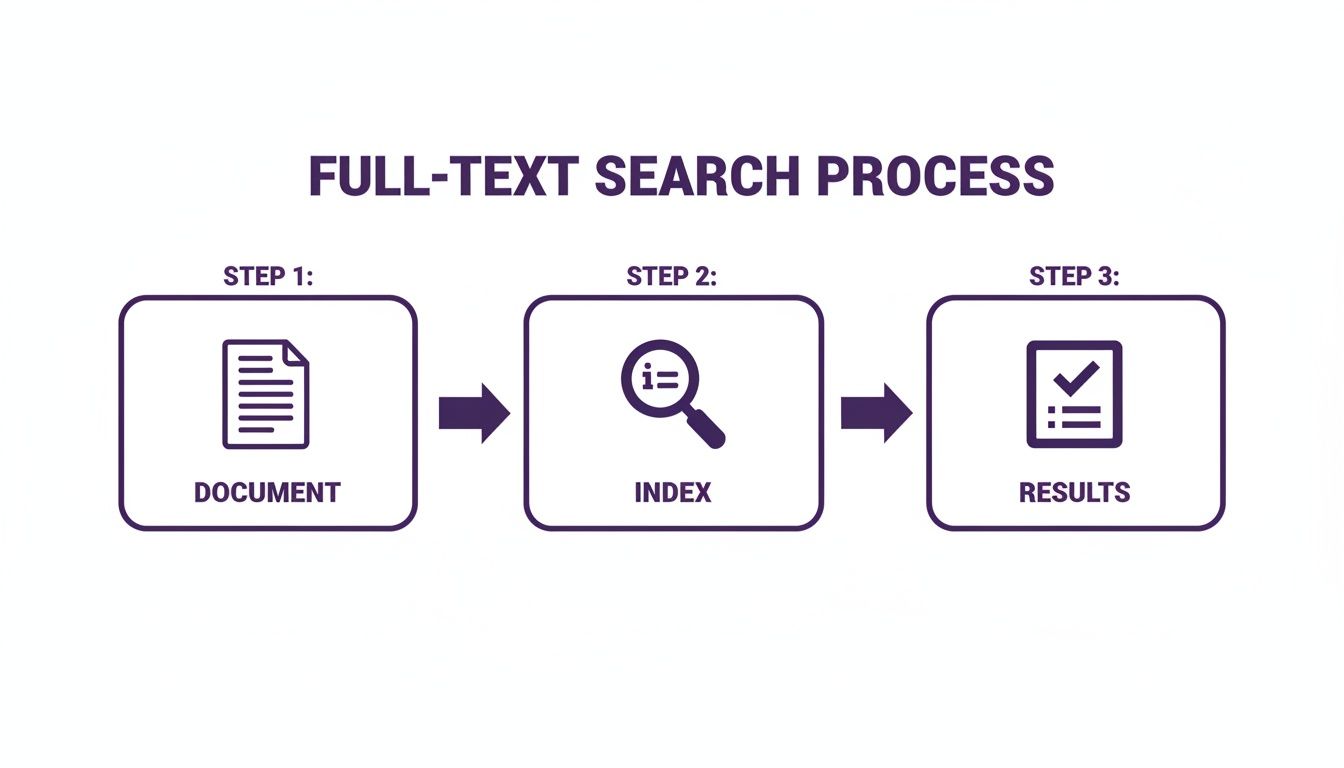
As you can see, the system isn't searching your files directly when you hit "enter." It's querying a purpose-built index that makes finding what you need incredibly fast.
Step 1: Tokenization and Normalization
First things first, the system has to break down all your content into its smallest meaningful parts. This is called tokenization, where every sentence gets chopped up into individual words, or "tokens." For instance, the phrase "Upcycle your old content" becomes three separate tokens: "Upcycle," "your," and "content."
But just chopping up words isn't enough. What about "Run," "running," and "ran"? Or "Creator" versus "creators"? They all point to the same core idea, right? This is where normalization comes in. The system cleans up and standardizes these tokens by:
- Lowercasing: "Search" and "search" are treated as the exact same word.
- Stemming/Lemmatization: This is a fancy way of saying it reduces words to their root form. "Creating" and "created" both get traced back to the base word, "create."
- Removing Stop Words: It filters out common, low-value words like "the," "a," and "is" that add clutter but not much meaning to a search query.
This cleanup process is what allows the engine to intelligently find all variations of a word when you search, giving you much more relevant results.
Step 2: Building the Inverted Index
Once all the words are tokenized and normalized, the system builds its secret weapon: the inverted index. This isn't just a list of words; it's a sophisticated map that links every single unique word to the exact documents and positions where it appears.
Imagine a giant glossary for your entire content library. Next to the word "podcast," there would be a list pointing to every single document (blog post, transcript, you name it) that contains that word—sometimes right down to the specific paragraph or sentence.
The inverted index is the core data structure that makes full-text search so fast. Instead of scanning documents one by one, the engine just looks up your search term in this pre-built index and instantly knows where to find it.
This index acts as a direct pointer, completely eliminating the need to read through irrelevant documents. If you want to dive deeper into how this works, check out our guide on what document indexing is.
Step 3: Scoring and Ranking Results
When you finally type in your search query, the engine doesn't just find all the documents that contain your words—it has to figure out which ones are the most helpful. It ranks them by relevance using a scoring algorithm.
This algorithm weighs several factors to decide what goes on top:
- Term Frequency (TF): How often does your search term pop up in a document? More mentions often signal higher relevance.
- Inverse Document Frequency (IDF): How common or rare is your term across the entire content library? A rare, specific term is weighted more heavily than a common one.
- Proximity: Are the search words close together in the document, like in a specific phrase? That's a strong signal.
By crunching these factors together, the system calculates a relevance score for each document and serves them up in a ranked order, with the best matches right at the top. This is precisely how platforms like Contesimal can deliver the right answers from a huge archive in milliseconds.
From Simple Keywords to Smart Queries
Once your content library is fully indexed, the real fun begins. You can finally move beyond just typing in a single keyword and hoping for the best. Modern full-text search isn’t a one-trick pony; it’s a whole toolkit of different query types, each designed to solve a specific problem.
Think of these as different "superpowers" for digging through your own archives. Understanding how to use them is what turns a simple search bar into a powerful discovery engine. It’s how you find that one specific quote or uncover a broad, abstract theme hidden across dozens of videos, empowering you to generate more audience across platforms.
The Building Blocks of Precise Search
At its core, full-text search gives you a set of foundational techniques for granular control. These methods act like powerful filters, helping you slice through thousands of potential matches to find the handful that are actually useful. Mastering these basics can save you countless hours of manual digging.
Here are the essentials you’ll use all the time:
- Boolean Search: This is probably the most fundamental tool in the box. It uses simple operators like AND, OR, and NOT to combine or exclude terms. A podcaster could search for
“AI” AND “ethics”to find clips where both topics are discussed, instantly filtering out segments that only mention one. - Phrase Search: When you need to find an exact sequence of words, this is your go-to. Just wrap your query in quotation marks, like
“the future of content creation”. This tells the engine to find only the documents where those words appear in that specific order. It’s perfect for locating exact quotes or brand taglines. - Proximity Search: This is a seriously powerful feature. It lets you find documents where two or more words appear within a certain distance of each other. A blogger could search for
"collaboration" NEAR "tools"to find articles where these concepts pop up in the same paragraph, which is a strong signal of a contextual link.
These tools are the difference between a vague, hopeful search and a targeted investigation. They let you zero in on specific moments and ideas buried deep within your content.
Moving into Advanced and Intelligent Search
Beyond the basics, modern search engines are getting much smarter, with sophisticated capabilities that start to mimic human understanding. These advanced methods are what truly unlock the creative and strategic potential of your content library, helping you find connections you might not have even known existed.
One of the most useful advanced techniques is fuzzy search. This feature cleverly accounts for typos and misspellings. If you search for "enterpreneur," a fuzzy search will still pull up every instance of "entrepreneur." For anyone dealing with imperfect auto-transcriptions or just plain old human error, this is an absolute lifesaver.
But the true evolution is the move towards semantic search. This is where AI really enters the picture, allowing a search engine to understand the meaning and intent behind your query, not just the keywords themselves.
With semantic search, you can ask a question in natural, everyday language. A YouTuber could search for "clips that discuss strategies for growing an audience" and get results that mention "subscriber growth tactics," "channel promotion," or "community building"—even if the exact words you searched for never appear.
This is the ultimate goal for creators: a search that understands concepts, not just characters on a screen. It transforms your content library from a passive archive into an active collaborator, helping you discover thematic threads and reignite old ideas for new projects.
Choosing the Right Search Type for Your Needs
Knowing which tool to grab for the job makes all the difference. This table breaks down which search capability to use for common creative tasks, helping you get to the right content faster.
| Your Goal | Search Type to Use | Practical Example for a Content Creator |
|---|---|---|
| Find a specific, exact quote you said. | Phrase Search | Searching "create infinite content value" to find the exact video clip. |
| Find all content where two topics intersect. | Boolean Search | Searching “monetization” AND “podcast” to find all relevant discussions. |
| Explore a broad theme or concept. | Semantic Search | Asking "how to repurpose long-form video" to find relevant segments. |
| Find a term despite potential typos. | Fuzzy Search | Searching for "Contesimal" and still getting results if it was misspelled. |
Whether you need the precision of a phrase search or the conceptual reach of semantic search, matching the right capability to your goal is key. It’s what allows you to move from simply finding things to truly discovering the hidden value within your library.
Real-World Use Cases for Content Creators
This is where the rubber meets the road. Full-text search stops being a technical idea and starts becoming a real creative advantage. If you've got a growing library of content, this is the tech that solves those nagging problems and turns tedious manual tasks into quick, strategic wins. It’s all about making your past work actually work for you.

The efficiency boost is no joke. We're talking about 3-5x faster retrieval than systems that only skim metadata, with precision hitting 90% in well-tuned search engines. For anyone swimming in content, a weak search is a money pit. Adopting full-text search can cut those losses by 40% simply by making your library discoverable again.
For Podcasters and YouTubers
Picture this: You have hundreds of hours of video or audio. A guest dropped a brilliant insight, a customer shared a killer testimonial, or you mentioned a specific tool… but you have no idea which episode it's buried in. This is a classic roadblock for creators trying to repurpose their gold.
But when you apply full-text search to your transcripts, the game completely changes.
- Create Killer Compilation Episodes: Instantly find every single mention of a recurring guest, a theme like "imposter syndrome," or a running joke across your entire back catalog. You can stitch these moments together into a high-value "best of" episode, breathing new life into old recordings.
- Generate Social Media Clips in Seconds: A topic is blowing up on social media, and you know you've talked about it. Instead of scrubbing through hours of footage, a quick search for
“AI” AND “ethics”pinpoints the exact timestamps of that conversation. Clip it, share it, and jump into the trend with relevant content.
For Bloggers and Publishers
For writers, authors, and publishers, your archive is a goldmine of forgotten assets. As trends shift and keywords evolve, old articles can be polished up and relaunched to catch new waves of traffic. The trick is just finding them.
Full-text search lets you scan your entire library for conceptual relevance, not just a keyword you happened to stick in the title.
By transforming your archive into a searchable database, you can unearth evergreen content that's ripe for an update. An old article on "social media tips" can be quickly found, refreshed with current information, and republished to attract a new audience.
This goes beyond just technical search tricks. It’s about making all your content searchable. For instance, understanding how captions improve video SEO shows how adding a text layer makes video more discoverable—a core principle that applies to every piece of media you own.
For Marketers and Content Executives
To create content that truly hits home, marketers need to get inside their audience's head. Full-text search is the key. It lets you analyze massive amounts of unstructured text from customer feedback, support tickets, and social media comments.
This is how you identify key pain points, frequently asked questions, and emerging trends—straight from the mouths of your audience. By searching all that feedback for terms like "confusing" or "wish it had," you can pinpoint exact content gaps and opportunities.
Your next video, blog post, or podcast episode will be built to address a proven need. It’s a data-driven approach to content strategy, powered by the voice of your own community.
How Full-Text Search Tech Actually Works
So, you get what full-text search is and why it's a massive win for anyone managing a content library. The next obvious question is, what’s the magic behind the curtain? How does it all work?
Every great search bar has some serious technology powering it, turning your simple text queries into incredibly fast, relevant results. You don't need to be a systems engineer to use it, but knowing a bit about the engine helps you appreciate the horsepower you're working with.
At a high level, the tools that make full-text search possible fall into two main camps: standalone search engines and search features built right into databases. Both get the job done, but they take slightly different roads to get there.
Standalone Search Engines
Think of these as specialized, high-performance applications built for one thing and one thing only: search. They are the powerhouses designed to index and query massive amounts of text data with mind-bending speed and flexibility.
These engines operate separately from your main database and are fine-tuned for handling complex queries, sophisticated relevance scoring, and scaling up to handle enormous volumes of content.
The heavy hitters in this space are:
- Elasticsearch: This is an industry titan. It’s the engine behind the search bars of giants like Netflix, Wikipedia, and eBay. Elasticsearch is famous for its raw speed, scalability, and a feature set that goes way beyond just finding words in a document.
- Apache Solr: Built on the same core library as Elasticsearch (Apache Lucene), Solr is another open-source giant. It’s incredibly customizable and has been the go-to for enterprise-level search on major websites for years.
When you use a platform like Contesimal, you're tapping into the raw power of one of these specialized engines without ever having to wrestle with the complex setup. It’s like having a world-class pit crew for your content library’s search function.
Integrated Database Features
The other common approach is using full-text search capabilities baked directly into a database system. Many modern databases have realized that users need more than just simple data lookups, so they now pack their own powerful text search tools. Think of it as having a really solid, all-purpose multitool instead of a single specialized instrument.
For a lot of applications, this is a fantastic and super-efficient solution. PostgreSQL, a hugely popular and powerful open-source database, has excellent built-in full-text search. This allows developers to roll out robust search without adding a whole separate engine to their technology stack.
The image below gives you a peek at the PostgreSQL documentation for text search, showing how it breaks down components like parsing and dictionaries.
This just goes to show that even the "built-in" solutions involve some deep engineering to wrestle with the complexities of human language. It's a streamlined way to get powerful search running and a clear sign of how essential this functionality has become. The best platforms pick the right tool for the job, often blending these technologies to give you a completely seamless experience.
Unlocking Your Content Archive with Search and AI

Throughout this guide, we've treated full-text search as the master key to your content library. It’s the one tool that finally lets you read every page of every book in your digital archive, turning a pile of old files into a dynamic, searchable goldmine. Without it, your past work is just a locked vault of untapped ideas.
But these days, just finding keywords isn't enough. The real magic happens when you pair that powerful search with artificial intelligence, smart organizational tools, and a space to collaborate. That’s when a simple lookup tool becomes a strategic engine for creating and monetizing your next big thing. For a deeper look at this, our guide on what enterprise search is really breaks it down.
From Static Archive to Active Asset
Here’s the core idea for every creator, publisher, and marketer out there: your old content isn't a liability gathering digital dust. It’s a living, breathing database of insights and opportunities just waiting to be found. Every podcast transcript, blog post, and video file is another piece of your own personal knowledge graph.
This is exactly the principle platforms like Contesimal are built on. They help humans and AI collaborate seamlessly, enabling you to organize your content library, create new value, and ultimately make money with it. This is how you unearth forgotten stories, link disparate ideas, and breathe new life into old content for today's audiences. For more on how AI is changing the game in content archiving, check out lunabloomai's blog.
Your content library isn't just a record of what you've done; it’s the raw material for everything you'll do next. By making it fully searchable and layering it with intelligent tools, you turn history into your most valuable creative partner.
Building Your Next Great Idea
Ultimately, getting a grip on full-text search shifts your whole mindset. Stop seeing your archive as a digital attic filled with musty boxes. Start seeing it for what it is: a dynamic database, meticulously indexed and ready to answer your next question.
Whether you're hunting for the perfect clip to create a viral short, an old article to update for a trending topic, or a thematic thread to weave your next project around, the answer is already in your library. You just need the right key to unlock it.
This is the future of content creation—a seamless flow between human creativity and smart technology, all powered by the simple, profound ability to search everything. Your next great piece of content is in there waiting. Go find it.
Answering Your Questions About Full-Text Search
As you start to see what full-text search can do, a few questions usually pop up. Let's walk through the common ones so you can get a real-world feel for this tech, especially from a creator's perspective.
Isn't This Just My Computer's Search Function?
Not even close. While your computer's search bar can find a file name or maybe a word inside a document, it’s slow and pretty basic. It has to read every file from scratch, one by one, every single time you search. That’s why it feels like an eternity to find something in a big folder.
Full-text search engines are specialized systems built for one thing: finding the right information at lightning speed. They do all the heavy lifting upfront by pre-processing and indexing your content. This creates a highly organized "map" that allows for near-instant results and clever queries—like finding words near each other or understanding synonyms—that your desktop search can only dream of.
Can Full-Text Search Handle My Videos and Podcasts?
On its own, no. Full-text search is a master of text, but it can't understand the pixels in a video or the soundwaves in an audio file. However, when you pair it with AI transcription services, it becomes an absolute game-changer for multimedia creators.
This combo is the secret sauce.
- An AI tool listens to your video or podcast and turns every spoken word into a text transcript.
- The full-text search engine then indexes that mountain of text.
This is exactly how a platform like Contesimal lets you find any word spoken across your entire library of videos and podcasts. It effectively turns all that audible content into a completely searchable goldmine.
What’s the Hardest Part of Using Full-Text Search?
Hands down, the biggest challenge is keeping search results fast and relevant as your content library explodes. Going from a few dozen files to thousands (or even tens of thousands) makes finding the right answer a seriously complex puzzle.
The real trick isn't just finding every document with a keyword. It's about ranking them so the most helpful result is always right at the top. This means constantly fine-tuning the search algorithm, dealing with different languages, and keeping the underlying tech humming.
This is why so many creators and publishers eventually turn to a managed solution. It handles all the complex engineering behind the curtain, so you can stay focused on what you do best: making incredible content and unearthing the brilliant ideas hiding in your own archive.
Ready to turn your content library from a dusty archive into a dynamic, searchable asset? Contesimal brings powerful search and AI together to help you find, repurpose, and monetize your best ideas. See how you can reignite your content at https://contesimal.ai.