
A search can look huge and still miss the one paper that would change your script, your article, or your next episode. Research article search is less about typing harder and more about proving the net actually caught what you already know matters.
Exact words are the labeled pockets in a suitcase. Meaning-based search is the pocket you rummage when you only remember the shape of the thing. You want both, plus a short list of trusted papers so you can test the results instead of trusting a long page of hits.
Pick the Right Discovery Tool Before You Type
In a 2010 study of 2,063 academic researchers in the natural sciences, engineering, and medicine, 96.3% preferred electronic resources and only 3.7% preferred print, according to a survey across five U.S. research universities. Citation databases were the main tools, with general web search close behind. Google was familiar to nearly all of those researchers.
Serious readers don't live in one interface. They pair a specialist index with a wide net.
A specialist database is a curated library with a librarian who already knows the shelves. A broad web index is a huge flea market. You'll find treasures there, and you'll also sort a pile of lookalikes yourself.
| Tool | Best for | Coverage strength | Main limit |
|---|---|---|---|
| Google Scholar | Fast first pass across all disciplines | Very broad index with citation links | Huge result sets and limited field controls |
| PubMed | Biomedicine and life sciences | MEDLINE indexing with MeSH subject terms | Weak coverage outside health and life sciences |
| Scopus | Multidisciplinary search and citation analysis | Curated journals with citation tracking | Subscription access, usually through an institution |
| Web of Science | Curated citation analysis | Selective indexing with long citation history | Subscription access and a smaller journal list |
| IEEE Xplore | Engineering, computing and electronics | Journals, conference papers and standards | Mostly IEEE and partner publishers |
| arXiv | Preprints in physics, mathematics and computer science | Earliest versions of papers, often before peer review | Not peer reviewed, so check status before citing |
| Semantic Scholar | Concept-based exploration and citation graphs | AI-assisted ranking and citation context | Ranking logic is less transparent and coverage varies by field |
| University library discovery | Getting full text you can actually open | Links to licensed journals and e-books | Limited to what your institution subscribes to |
| Personal tagged content library (Contesimal) | Searching your own past research, transcripts and drafts | Taxonomy tags plus chat-based search across your documents | Only as complete as what you uploaded and tagged |
A three part starter rule
Open one specialist database for your field, one broad index for coverage, and one citation tool to walk references backward and forward. Health stories often start in PubMed plus Google Scholar. Engineering explainers often start in IEEE Xplore plus a citation view. Your own tagged library is a later pass, not a substitute for those public indexes.
How to Build a Query From Your Research Question
A query is a fishing net. Each concept block sets the mesh. Too many AND blocks and you catch nothing. Too few and you haul in the whole lake.
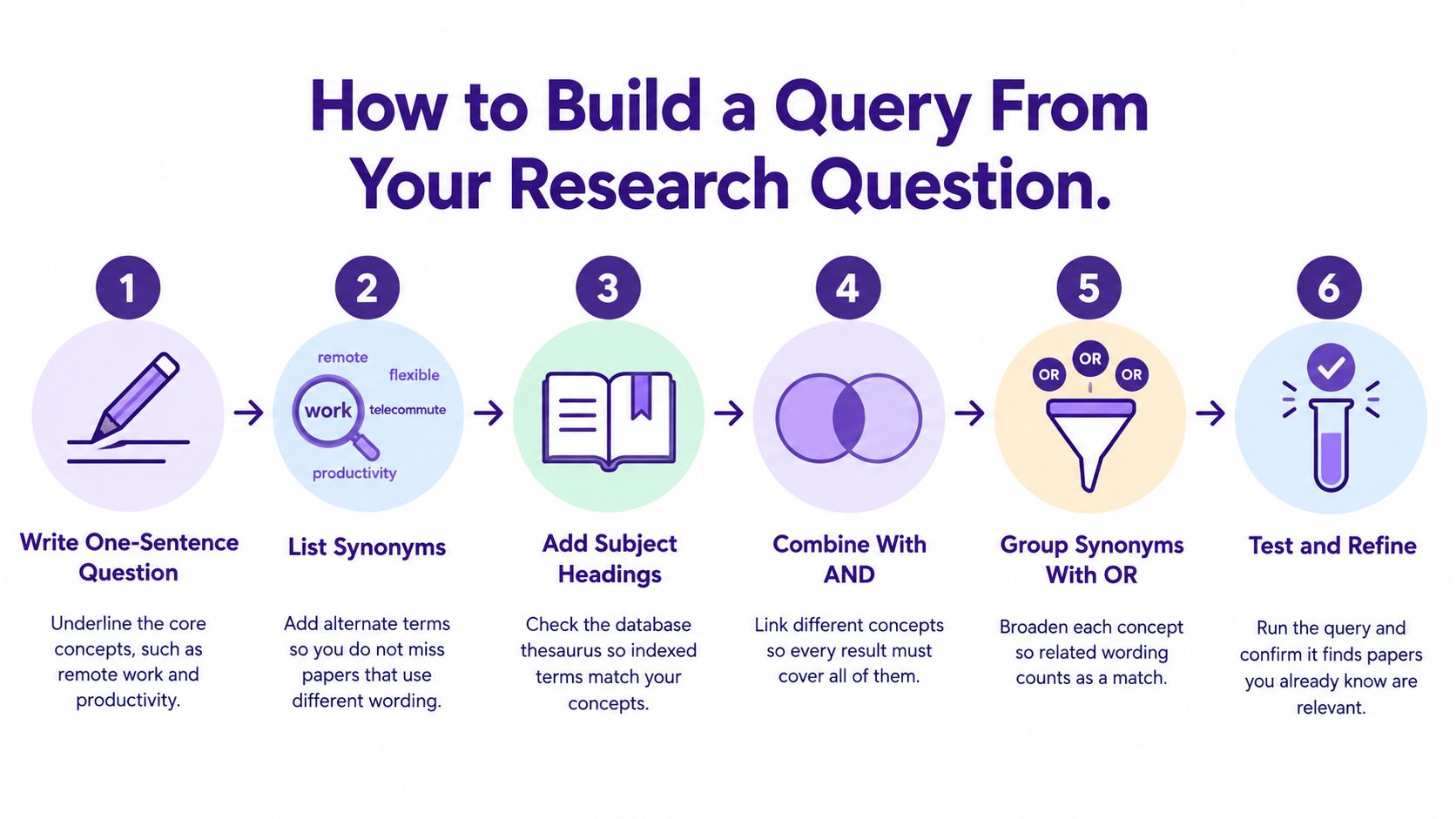
- Write one sentence and mark the cores. "Do software engineers stay productive when they work remotely?" The cores are remote work, productivity, and software engineers. Extra adjectives usually shrink the net for no good reason.
- List synonyms before you touch a database. Remote also shows up as hybrid, telework, telecommuting, and work from home. Add plurals and both British and American spellings, such as organisation and organization.
- Check a thesaurus when the database has one. PubMed's MeSH headings pull papers the indexer filed under a subject even when the abstract uses a different phrase. Skip this in a plain web box, because there is no thesaurus to consult.
- Join different concepts with AND, and stop at two or three blocks. Each AND is another hole the paper must pass through. A fourth block, such as AND agile, throws out solid papers that never use that word.
- Group the synonyms for one concept with OR, then lock phrases.
(remote OR hybrid OR telework OR "work from home")counts any of those wordings. Quotes keep "remote work" from matching remote plus some other work. Truncation such asproduct*catches productivity and productive. One missed spelling is enough to hide a whole cluster of papers. - Run it, read the first 30 titles and abstracts, and change one term at a time. Save every version. If you don't, you can't tell which edit helped.
Three slips that quietly empty the net
- A fourth concept block: Valid papers use different wording and vanish.
- One spelling only: Behaviour and behavior are not the same string.
- No saved versions: You can't tell which change helped.
Worked query:
("remote work" OR hybrid OR telework OR "work from home") AND (product* OR efficiency OR output) AND ("software engineer" OR developer OR programmer)
The two-concept version, remote work AND productivity, mostly returns papers that use those exact words. Adding the synonym block surfaces titles that say hybrid, telework, or output instead. You don't need a magic hit count. You need a before-and-after you can reread.
Operators and Field Tags That Narrow Results
Search sleep across every field and you'll get papers that mention it once in a reference list. Restrict it to the title and abstract in PubMed, sleep[tiab], and you're much closer to papers that are actually about sleep. That's the whole point of a field tag. It tells the database where the word has to live.
Operators decide which words must show up. Field tags decide where.
| Operator or tag | What it does | Example | Where it works |
|---|---|---|---|
| Double quotes | Searches an exact phrase | "remote work" | Most databases and Google Scholar |
| AND | Requires every term or block | remote AND productivity | Nearly all databases |
| OR | Accepts any listed synonym | (remote OR hybrid OR telework) | Nearly all databases |
| NOT | Excludes a term; can drop relevant papers | NOT editorial | Most databases, use sparingly |
| * (truncation) | Matches word endings and variants | therap* finds therapy and therapeutic | Most databases; Google Scholar ignores it |
| or # (wildcard) | Matches one character or spelling variant | wom?n | Varies by database; check the help page |
| ( ) parentheses | Groups blocks so operators apply in order | (sepsis OR septicemia) AND mortality | Nearly all databases |
| [tiab] tag | Restricts a term to title and abstract | sleep[tiab] | PubMed |
| [MeSH] tag | Searches the controlled subject heading | "Sleep Deprivation"[MeSH] | PubMed |
| TITLE-ABS-KEY() code | Restricts a phrase to title, abstract and keywords | TITLE-ABS-KEY("remote work") | Scopus |
| allintitle: command | Requires all words in the title | allintitle: remote work productivity | Google Scholar |
| author: command | Limits results to a named author | author:Hinton | Google Scholar |
Free text versus a tight field
A free-text search for remote work and productivity sweeps the whole record, including bibliographies and author affiliations. The same idea inside Scopus as TITLE-ABS-KEY("remote work") AND TITLE-ABS-KEY(productivity) keeps the phrase in the title, abstract, or keywords. The list gets shorter because passing mentions drop out. In Google Scholar, allintitle: remote work productivity is stricter still, since every word must sit in the title. author:Hinton is a different kind of narrow, useful when you already know who wrote the work.
NOT is the sharp tool. NOT editorial can hide a research article that mentions an editorial in its references. Use it only for a term you are sure you don't want, then spot-check what disappeared.
Wildcard symbols aren't universal. Some databases treat ? as one character, some use #, and Google Scholar ignores *. Check that database's help page before you trust a count.
Put the field tag on the concept that matters most, and leave secondary concepts as free text. Stay strict where it counts and loose everywhere else.
Filters That Trim Noise Without Losing Good Papers
A 2013 test of Google Scholar as a systematic-search tool produced 291,190 hits across seven searches. Relative recall ran from 76.2% to 100%, and overall recall was 92.9%. Overall precision was 0.13%, with single searches between 0.05% and 0.92%, as reported in that evaluation of Google Scholar. Finding the good papers wasn't the hard part. Screening the pile was.
Recall is relevant papers found divided by all relevant papers available. Precision is relevant papers found divided by everything you retrieved. Recall is how many needles you grabbed from the haystack. Precision is how much of that handful is actually needle.
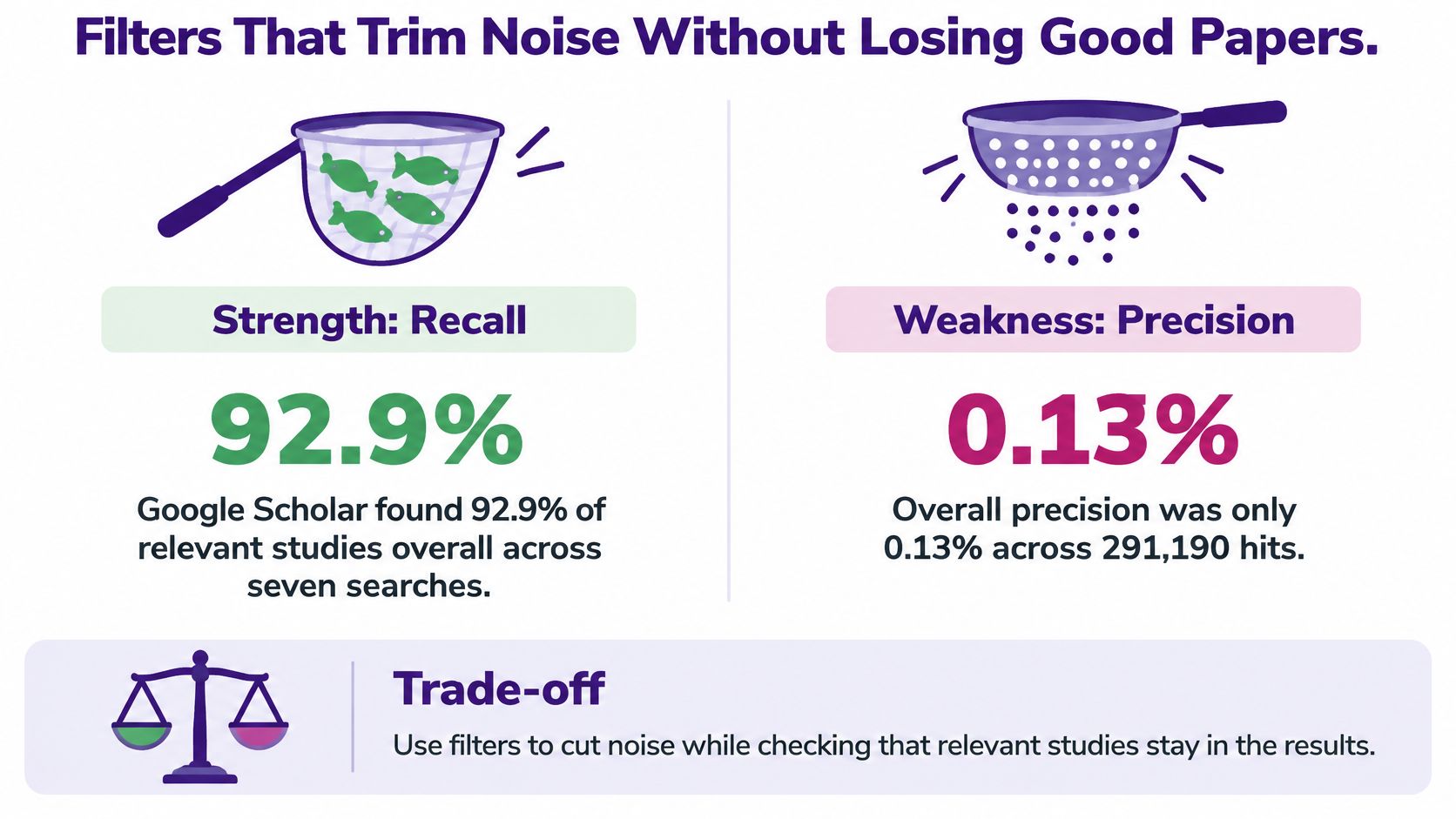
Filters are how you shake hay off the handful. Each one can also shake off a needle.
- Publication year: A tight range drops older foundational work that later papers still rely on.
- Document type: Limiting to journal articles can hide the preprint or conference paper that leads a fast-moving field.
- Language: An English-only filter misses studies you could still screen from an abstract or a translation.
- Subject area: Useful when a word means something else in another field, and risky when your topic sits between fields.
- Open access: Handy for speed, and it hides paywalled papers you can still open through a library.
Sort by relevance first. Treat citation counts as a signal of influence, not a grade for quality. A new methods paper can be excellent with almost no citations yet.
If the first 50 results hold fewer than five relevant papers, widen the concept blocks before you add another filter. More filters on a bad query just make a smaller bad list.
A short walk-through of how those choices feel in practice is in this video.
Semantic and Hybrid Search Compared With Keywords
In one benchmark, combining keyword and semantic retrieval raised recall while adding relatively little latency, as the study of hybrid retrieval reports. The result shows why it helps to match words in more than one way. Exact terms work like a street address: they can take you to the right door when you know its name. Semantic search works more like directions from a landmark, finding related material when your wording differs from the paper's.
| Method | How it matches | Strength | Failure mode |
|---|---|---|---|
| Keyword and Boolean | Exact terms and operators against an index | Author names, acronyms, gene symbols and formulas | Misses paraphrases and different wording |
| Semantic embeddings | Meaning and conceptual similarity | Paraphrases and vague or exploratory questions | Can miss exact identifiers and rare terms |
| Hybrid | Combines keyword and semantic signals | Can improve recall while keeping latency costs relatively small | More tuning needed and harder to explain |
| Controlled vocabulary and taxonomies | Pre-assigned subject terms such as MeSH or a team thesaurus | Consistent results across synonyms | Only as good as the indexing; new terms lag behind |
| AI assistant summaries | Synthesizes an answer from retrieved papers | Fast orientation to an unfamiliar topic | Can invent or misstate citations; every source must be checked |
To compare search setups, track recall@k, precision@k, latency, and performance by query type. Recall measures how many relevant papers appear in the results; precision measures how many results are relevant. A single overall score can conceal a useful distinction: a setup may handle paraphrases well while missing acronyms.
Where a tagged library fits
AI chat can help with paraphrases and neighboring ideas, but its summary is not evidence. Open each paper it names and check the claim against the PDF.
A practical hybrid search combines an inverted index for author names, acronyms, gene symbols, legal citations, and formulas with embeddings for looser wording. The same approach can work across a private archive. A taxonomy-tagged library gives articles, transcripts, and videos consistent labels, then lets a team search both by tag and by meaning. Tags connect files labeled with different synonyms; semantic retrieval can surface a related file the tags missed.
Check why a result appeared before relying on it. Look at the matched phrase, the cited concept, or a neighboring document that explains the connection. For a side-by-side explanation of the two matching styles, see this guide to semantic search versus keyword search.
Grey Literature and Preprints Without Losing Trust
Journal articles aren't the whole evidence pile. You'll also need dissertations, preprints, government reports, conference papers, datasets, working papers, patents, and policy documents.

A survey found that 57% of systematic-review authors searched grey literature, with no consensus on which types belonged, and the most reported barrier was worry about quality and level of detail, according to that survey of authors and editors. Grey sources aren't automatically weaker. They're uneven, so you judge them one rung at a time.
A source ladder
- Peer-reviewed journals: The anchor. Still check for corrections.
- Conference papers and dissertations: Where emerging work often shows up first, sometimes with more method detail than the later article.
- Preprints on arXiv, SSRN, and medRxiv: Label them as not peer reviewed.
- Government and agency reports: Strong for official statistics and policy context.
- Patents: Useful for technical claims and prior art, written to protect an idea rather than to persuade a referee.
- Datasets: The raw numbers behind a claim, when the paper's table isn't enough.
For every rung, note who published it, whether it's a preprint, accepted, or retracted, which institution stands behind it, whether the methods are clearly described, the update date, and whether an independent source agrees.
Grey sources can surface a result earlier, and they can also overstate it. Look for a later version of a preprint, a retraction notice, and a published replication. Write the status next to the citation in your notes and in the piece you publish. A practical way to sort those trust checks is covered in this guide to reliable research sources.
Prove Your Search Missed Nothing and Start Benchmarking
A long results list is extensive. It isn't automatically thorough. A 2025 methodological study found that objective sensitivity testing is rarely reported, and 44% of the reviewed systematic-review reports omitted the search strategy or gave only databases, partial keywords, or vague descriptions, as shown in a practical guide to relative recall. Adding another database doesn't prove you found the evidence. A benchmark does.
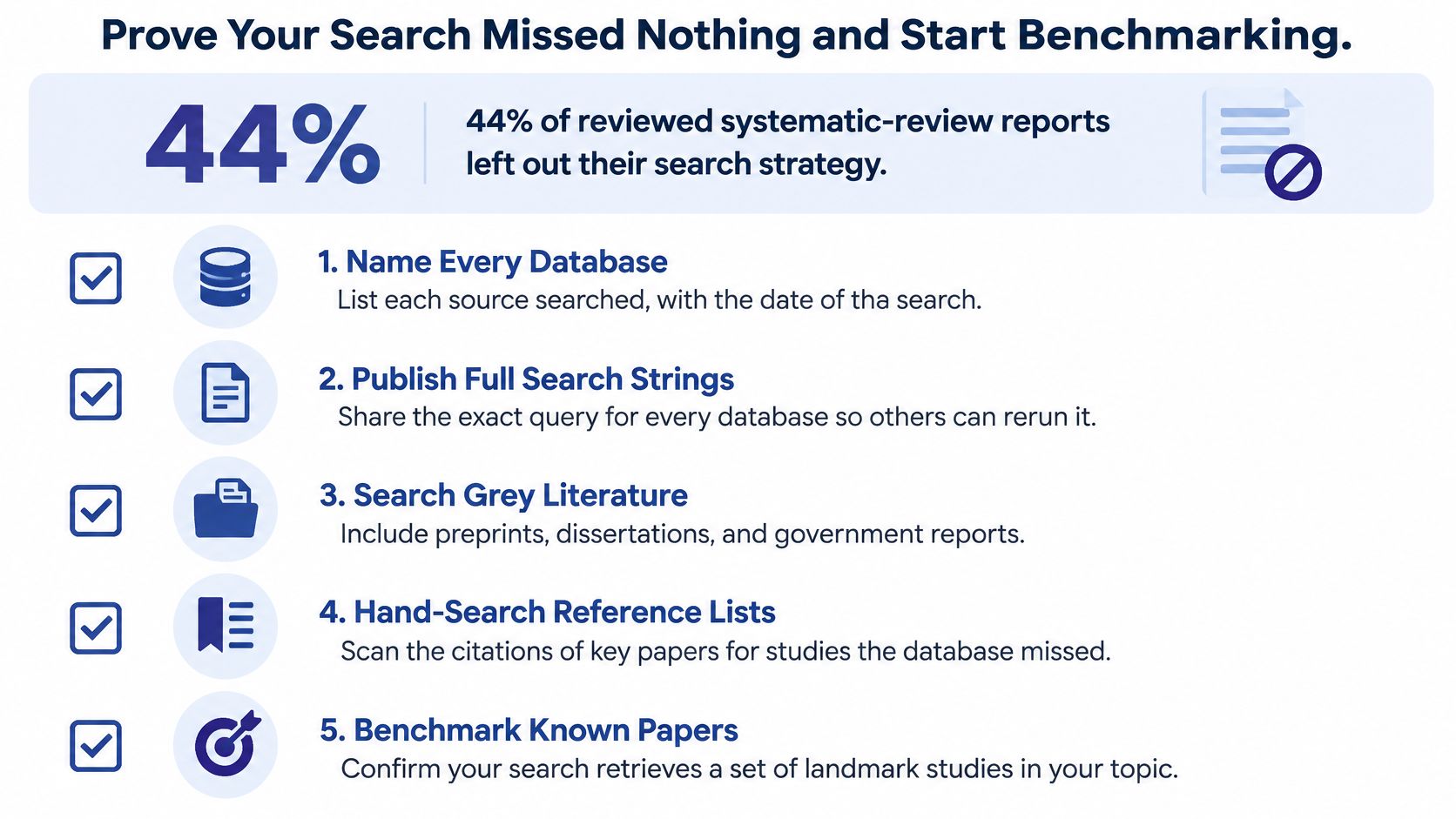
Recall here is the relevant records you found divided by the relevant records available. Precision is the relevant records divided by everything retrieved. Extra synonyms, spelling variants, truncation, and database subject headings raise recall and also raise junk. Narrower terms do the opposite. Build the known-item list before you freeze the query, and don't paste one syntax unchanged into every database.
For a fast, precision-leaning review, that guide suggests trying to identify at least 80%–90% of known studies. When a missing study would bias the conclusion, favor sensitivity instead.
Five steps you can run this week
- Collect five to ten papers you already know are relevant. Pull them from a reading list or from the reference lists of two key articles.
- Run the query and mark hits and misses. Relative recall is the share of those known papers that came back.
- Read each miss for the wording you lacked. Maybe the paper says "distributed teams" and your block only says remote.
- Add that term, rerun, and write down the new share. One change at a time, same as when you built the query.
- Repeat the test in a second database. A hole in Scopus can be filled by PubMed, IEEE Xplore, or your library discovery layer.
The search log
Keep four fields for every version.
- Databases used: Name each one, not "the main databases."
- Date run: Indexes change, so a July search isn't a January search.
- Full query string: Exact text, including quotes and tags.
- Known papers retrieved: A simple fraction, such as 7 of 10.
A version that finds more known papers with less noise wins. A version that finds the same papers under a bigger pile of lookalikes doesn't. Stop when new synonyms add no known papers and only add duplicates or low-relevance results. More hits, by themselves, are not a better search.
If your research lives in transcripts, scripts, and videos, the same test works on that archive. Contesimal can organize the folder into layered taxonomies and search it by tag and by meaning in one chat. Upload one folder, tag it with five to ten benchmark concepts, and see which known items appear from the tag and which appear only from the semantic match. The steps for writing that test up so someone else can rerun it are laid out in this overview of systematic literature review methodology.
Contesimal helps you organize a library of articles, transcripts, and videos into layered taxonomies, then search that library by exact tag and by meaning in one chat. That's the same benchmark habit you just practiced, pointed at the archive you already own, so old research can support the next piece instead of sitting in a folder. See how it works at Contesimal.