Think of your entire library of content—every blog post, podcast episode, and video script you've ever created—as a massive, disorganized attic. That brilliant idea from last year? The perfect quote for a social post? That viral clip? It's all in there somewhere.
The problem is, finding anything specific feels like searching for a needle in a digital haystack.
For countless professional creators, this is the daily reality. Your content library, which should be your most valuable asset, becomes a source of creative chaos. You know there's gold in there, but you have no map to find it. This is precisely where understanding document indexing changes the game.
Your Content Library Is An Untapped Goldmine

Document indexing is that map. It’s the system that turns your chaotic attic into a perfectly organized, searchable library. Instead of just storing files, indexing actually analyzes their contents—the text, audio transcriptions, metadata—and creates a detailed guide to what's inside.
It's a simple but profound shift in how you see your own work.
- Without indexing: You're forced to remember the exact title of a video from three years ago or scroll endlessly through folders to find a specific podcast episode.
- With indexing: You can just search for a concept like "productivity hacks for remote work" and instantly pull up every article, video segment, and podcast clip where you've ever discussed it.
This isn’t just a technical fix; it's a strategic advantage. It’s the foundational step for any creator who is serious about moving from hobbyist to a real revenue-generating business. When you can instantly access any idea you’ve ever had, you unlock entirely new possibilities for growth.
To make this concept crystal clear, here’s a quick breakdown.
Document Indexing At A Glance
| Concept | Simple Explanation | Why It Matters For Creators |
|---|---|---|
| Indexing | Creating a searchable "map" of your content library. | Instantly find and reuse any idea, clip, or quote you've ever made. |
| Metadata | Descriptive tags (like keywords, topics, dates) attached to your files. | Helps you filter and sort your content to find hyper-specific assets. |
| Searchability | The ability to find information using keywords or concepts. | Eliminates manual searching and speeds up content repurposing workflows. |
| Retrieval | The final step: pulling the exact content you need, when you need it. | Turn old content into new social clips, blog posts, or compilations in minutes. |
This table shows how indexing moves you from a passive content owner to an active content strategist.
For creators focused on views, engagement, and monetization, an unindexed library is a dead end. Every piece of old content represents untapped potential—for new social media clips, compilation videos, or updated blog posts. Without a system to find and reuse these assets, you're constantly forced to reinvent the wheel. That wastes time and kills creative energy.
By organizing your content, you do more than just clean up your digital space. You create a system that allows you to understand your own work, identify hidden patterns, and take immediate action on new opportunities.
Effective document indexing is a cornerstone of robust knowledge management. It’s the key to reigniting your content library, bringing old assets back to life, and creating infinite value from the work you’ve already done.
From Punch Cards to AI: How We Learned to Find Anything
To really get why modern document indexing is such a big deal, you have to look back. Believe it or not, the struggle to manage huge piles of information isn't a new internet problem—it’s a challenge we've been wrestling with for over a century. The core question has always been the same: how do you turn a sea of data into something you can actually search and use?
The journey from physical records to AI-powered insights started with a surprisingly simple piece of cardboard. This isn't just a history lesson; it's the story of creators and innovators constantly hunting for better ways to organize, understand, and act on their own knowledge.
Paper Cards, Digital Files, and the Dawn of Search
Long before the first computer whirred to life, information overload was already a national headache. The whole idea of document indexing really goes back to the late 19th century, when a guy named Herman Hollerith invented the tabulating machine. His invention used punch cards to index and tally data for the 1890 U.S. Census.
Think about that for a second. His system chewed through 62 million cards in just 2 years, slashing the census completion time from nearly a decade down to a few months. That was a mind-blowing 90% efficiency gain. This is the same problem we face today—without good indexing, an estimated 80% of enterprise data remains "dark," totally unsearchable and unused.
That simple idea—translating information into a structured, machine-readable format—is the direct ancestor of every search engine and content management system we have now. The punch card was the original "tag" that made a massive dataset manageable.
The Leap to Digital Search
The mid-20th century kicked off the digital revolution, and as computers took over, the principles of indexing grew up with them. Instead of physical holes in a card, we started creating digital pointers to words and phrases inside documents. This gave birth to the first searchable databases and, eventually, the internet as we know it.
When Google came along, it applied this same principle on an unbelievable scale. It didn't just store webpages; it built a colossal index of the entire internet, mapping out the relationships between words, concepts, and links. This is a powerful concept you can dive deeper into in our guide to information retrieval systems.
The real magic wasn't just storing the data, but creating a lightning-fast map to navigate it. That's exactly what modern indexing does for your content library. It builds an internal "Google" for your own creative universe.
This history shows a clear pattern: as the mountain of information gets bigger, the need for smarter indexing becomes absolutely critical. Every new technology, from punch cards to web crawlers, was built to solve the same problem you face as a creator: finding the specific signal in an ever-growing amount of noise.
The AI-Powered Next Chapter
Today, we're in the middle of the next big leap. AI doesn't just index keywords; it understands context, intent, and meaning. It can "read" a transcript, "watch" a video, or "listen" to a podcast and pull out themes, topics, and even emotions.
For creators, this changes everything. You no longer have to spend hours manually tagging every clip or trying to remember the exact words you used. AI-driven platforms like Contesimal act as your automated librarian, researcher, and creative partner, all rolled into one. By indexing your content library with this level of intelligence, you transform a static archive into a living, interactive knowledge base—ready to spark your next big idea.
Core Indexing Techniques Every Creator Should Know
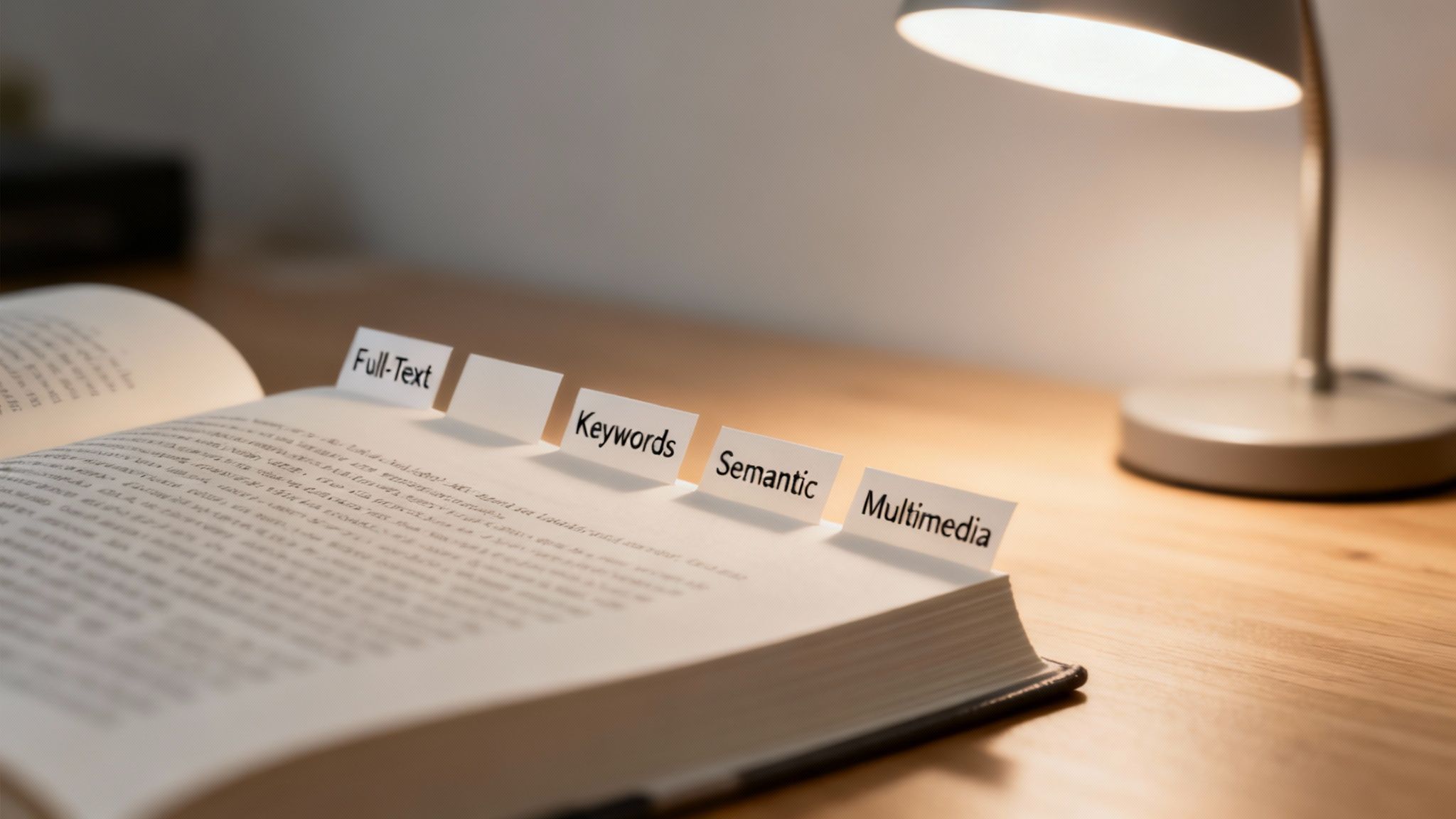
Document indexing isn't a one-size-fits-all game. Think of it like a filmmaker choosing the right lens for a specific shot—different indexing techniques are built for different types of content and search needs. Getting a feel for these methods helps you understand what’s happening "under the hood" of your favorite platforms and organize your own creative assets a whole lot smarter.
These techniques are really just different ways to build a map to your content treasure. Some draw a broad overview, while others detail every single landmark along the way. For creators looking to upcycle old content, knowing the difference is the key to unlocking your library's full potential.
Full-Text Indexing: The Universal Search
Full-text indexing is the most direct and powerful method out there. It’s like having a digital assistant that reads every single word in every document, video transcript, and podcast note you've ever created. When you search for a term, the system zips through this massive word list to find every single instance of it.
This is the very technology that powers the internet's biggest search engines. It's what allows Google to handle 8.5 billion daily queries. For a YouTuber, this means finding every video where you mentioned a specific product, even if it wasn't in the title or description. It's the ultimate tool for digging deep into your own archives.
Keyword-Based Indexing: Your Content Hashtags
If full-text indexing reads the entire book, keyword-based indexing just reads the chapter titles and a few hand-picked highlights. This method works by assigning specific tags or metadata to your content, a lot like using hashtags on social media.
Instead of scanning every word, the system only looks at these predefined keywords. A podcaster, for example, might tag an episode with "Marketing," "SEO," and "Content Strategy." This makes filtering and sorting your library incredibly fast and organized. For bloggers, it's about creating intentional pathways to quickly find all related content for a new project.
Inverted Indexing: The Book's Secret Weapon
Behind the scenes, many indexing systems—especially full-text ones—use what’s called an inverted index. It sounds technical, but the idea is beautifully simple. Just think of the index at the back of a textbook.
Instead of listing the page and then the words on it, an index lists a word and then all the pages where it appears. An inverted index does the same for your digital content, creating a master list of every unique word and pointing to every document, video, or podcast where it's located.
This is what makes search feel so instantaneous. Rather than scanning millions of words every time you search, the system just looks up your term in its pre-built index and immediately knows where to find it. Understanding how something as traditional as a book's internal index is structured gives you a great mental model for this powerful digital concept.
Semantic and Multimedia Indexing: The AI Frontier
This is where indexing gets really exciting for creators. We're moving beyond simple word matching and into understanding meaning and context.
-
Semantic Indexing: This goes beyond keywords to understand the meaning behind your words. It knows that "AI," "artificial intelligence," and "machine learning" are all related. A search for one can surface content about the others, revealing connections in your work you might have completely forgotten.
-
Multimedia Indexing: This applies the same smarts to your non-text content. AI can analyze the audio of your podcast to identify speakers, topics, and even sentiment. It can "watch" your videos to recognize objects, scenes, and faces, making your visual content just as searchable as a blog post.
For filmmakers and YouTubers, this is a game-changer. It means you can search for "all clips featuring a cityscape at sunset" and get results in seconds, turning hours of manual logging into a simple query. It transforms your content library from a pile of files into an interconnected web of ideas.
Comparing Common Indexing Methods
To pull it all together, here's a quick look at how these different techniques stack up, designed to help you see where each one shines.
| Indexing Type | How It Works (Simple Terms) | Best For… | Example For Creators |
|---|---|---|---|
| Full-Text | Reads and catalogs every single word in your content. | Exhaustive, deep searches when you need to find every mention of a term. | A podcaster searching for every episode where they mentioned a specific guest's name. |
| Keyword-Based | Uses predefined tags or "hashtags" to categorize content. | Quickly sorting and filtering large libraries into organized buckets. | A blogger tagging posts with "email marketing" to easily create a new e-book on the topic. |
| Semantic | Understands the meaning and context of words, not just the words themselves. | Discovering related ideas and concepts you might have forgotten about. | A researcher searching for "climate change" and also getting results for "global warming" and "carbon emissions." |
| Multimedia | Analyzes the content of audio and video files (speakers, objects, scenes). | Making your visual and audio content as searchable as text. | A YouTuber searching for every video clip that shows a "golden retriever." |
Each of these methods offers a different level of depth and control. The most advanced systems, like those used in intelligent document processing workflows, often blend these techniques to give you the best of all worlds—speed, precision, and deep contextual understanding.
Turning Your Indexed Library Into A Revenue Engine
Knowing the different ways to index content is one thing. Actually connecting those techniques to real-world results? That’s where the magic happens.
A well-indexed library isn't just a tidy digital archive; it's an engine for growth, engagement, and revenue. For any creator or publisher trying to build a sustainable business, indexing is the investment that turns yesterday's work into tomorrow's profits.
The whole mindset shifts from seeing old content as "done" to seeing it as a vault of reusable assets. A podcaster can instantly pull up every clip where a specific guest dropped a killer one-liner. A YouTuber can find every single B-roll shot of a particular city without scrubbing through hours of raw footage. This isn't just about saving a bit of time—it's about creating new value on demand.
Unlock New Content Without Starting From Scratch
The most immediate win from an indexed library is the power to upcycle your old content. Just think about the effort that went into every article, video, and podcast you’ve ever made. An indexed system lets you slice, dice, and reassemble that work into completely new formats.
- Whip Up Compilation Videos: A YouTuber who reviews tech can search for every time they mentioned "battery life" and instantly create a "Best Battery Life Phones of the Decade" video.
- Launch Themed Content: A blogger can find every single post that touches on "email marketing" and bundle them into a compelling e-book or a paid newsletter series.
- Generate Social Media Clips: A podcaster can pull short, punchy quotes from past episodes and spin them into dozens of shareable audio-grams for Instagram or video clips for TikTok.
This process completely changes your production schedule. Instead of staring at a blank page, you’re building on concepts and ideas you already know resonate with your audience. You can check out our guide on how enterprise search systems make this possible at a larger scale.
The financial cost of not indexing is genuinely staggering. Stats show that indexed systems lead to 60-80% faster information retrieval. In 2023, enterprises generated 120 zettabytes of data, yet a mind-boggling 80% stayed locked away in silos, costing U.S. firms alone $3.1 trillion a year in lost productivity. For creators, simply indexing historical posts can uncover 18% untapped reuse opportunities, turning digital dust into dollars.
Enhance The Audience Experience
A searchable library doesn't just make your life easier—it massively improves the experience for your audience. When your website or platform has a sharp internal search function, you empower visitors to find exactly what they need, right when they need it. This keeps them on your site longer, drives up engagement, and builds some serious loyalty.
A great search experience turns your website from a simple blog into a valuable resource. It tells your audience that you have a deep well of knowledge they can explore, encouraging them to return again and again.
This better experience translates directly to business outcomes. An engaged user is far more likely to subscribe to your newsletter, buy a product, or become a paying member. Platforms like Contesimal are designed to help you build this exact kind of searchable knowledge base, allowing your audience and your own team to discover new value from your library.
Identify Your Next Big Idea
Finally, an indexed library is an incredible tool for R&D. By analyzing what people are searching for within your own content, you get a direct line into what your audience wants most. You can spot patterns and recurring themes in your most popular work.
Are people constantly searching your blog for "beginner photography tips"? That’s a massive signal to create a comprehensive course or a dedicated video series on that very topic. Did a particular podcast episode get a ton of engagement around one specific subject? That's a perfect candidate for a deep-dive follow-up.
Indexing gives you the data to make smarter, more strategic decisions, ensuring your next piece of content is exactly what your audience is waiting for.
A Creator's Guide To The Modern Indexing Workflow
Knowing the theory behind document indexing is one thing, but seeing it in action is where it all clicks. A modern, AI-powered workflow isn't some scary, technical beast. It’s actually a pretty logical sequence that turns your raw content into a goldmine of searchable assets.
This process takes your creative output—audio, video, text—and transforms it from a bunch of static files into an interconnected library of ideas. For creators, this is huge. It means you can finally stop guessing where that perfect clip is buried and start building on your past work with total confidence.
Let's walk through the four key stages of how you can organize, understand, and finally take action on all that great content you've already made.
Stage 1: Ingest And Transcribe
The journey starts with ingestion. This is just a fancy way of saying "getting your content into the system." You might upload a folder of old blog posts, connect your podcast's RSS feed, or link up your YouTube channel. The goal is simple: bring all your scattered assets into one central hub.
Once your content is inside, the real magic begins. For any audio or video you've uploaded, the system automatically transcribes it, turning every single spoken word into searchable text. Suddenly, that two-hour podcast episode isn't just an opaque audio file anymore; it's a fully readable document, ready for someone (or something) to analyze. This first step is the foundation for everything else.
Stage 2: Classify And Tag
With your content ingested and transcribed, the system gets to work on classification. Think of this stage like hiring a super-powered librarian who instantly understands what every piece of your content is about. It’s not just looking for keywords; it’s identifying core concepts, topics, and themes.
This stage involves a few key things:
- Topic Identification: It automatically figures out that a video is about "filmmaking techniques," "camera gear," and "lighting."
- Entity Recognition: It pinpoints the names of people, brands, or specific locations you mentioned.
- Sentiment Analysis: It can even gauge whether a particular segment has a positive, negative, or neutral vibe.
A publisher, for instance, could dump their entire article archive into the system and watch as it automatically tags every single piece by genre, author, and subject. This automated tagging adds rich layers of context, turning a flat list of files into a structured, sortable database without you having to lift a finger.
Stage 3: Build The Index
Now that your content is neatly transcribed and tagged, the system is ready to build the index. Imagine creating the ultimate, hyper-detailed table of contents for your entire creative universe. It takes all the words from your transcriptions and all the tags from the classification stage and maps everything out.
This isn't just a list of files. It’s a complex web of connections that links every idea to every single piece of content where it appears. This is what makes search feel instantaneous and intelligent.
When you search for something, the system doesn’t have to frantically re-read every document from scratch. It just consults its pre-built index and pulls up the right results in a snap. This behind-the-scenes work is the engine that powers the speed and accuracy of modern content platforms like Contesimal.
Stage 4: Search And Analyze
This last stage is where you get to cash in on all that hard work. With a fully indexed library at your fingertips, you can now search, explore, and analyze your content in ways that just weren't possible before. This is where you shift from simply organizing your stuff to actively creating with it.
A podcaster could ask, "Show me every clip where my guests talked about overcoming creative block." The system would instantly pull up precise timestamps from dozens of different episodes. A content marketer could see which topics appear most frequently alongside positive audience reactions, helping them map out their next big campaign.
This is the whole point of document indexing: to transform your library from a dusty, passive archive into an active partner in your creative process. It helps you find those hidden connections, repurpose old gems, and spark your next big idea—all from the amazing work you’ve already done.
Putting Your Content Library To Work Today
Theory is great, but let's be honest—action is so much better. It's time to stop letting your amazing content collect digital dust and start building a searchable library you can actually use and monetize. This is the moment you go from understanding indexing to doing something with it.
The first step is usually the simplest: a good old-fashioned content audit. Take stock of what you actually have. Where are your video files, podcast episodes, and blog posts living? Getting a clear picture of all your assets is the foundation for creating a powerful, organized system. This isn't just about cleaning up; it's about prepping your library to become an active, living part of your business.
The diagram below breaks down the modern indexing process into four clean steps, showing how raw files get turned into searchable gold.
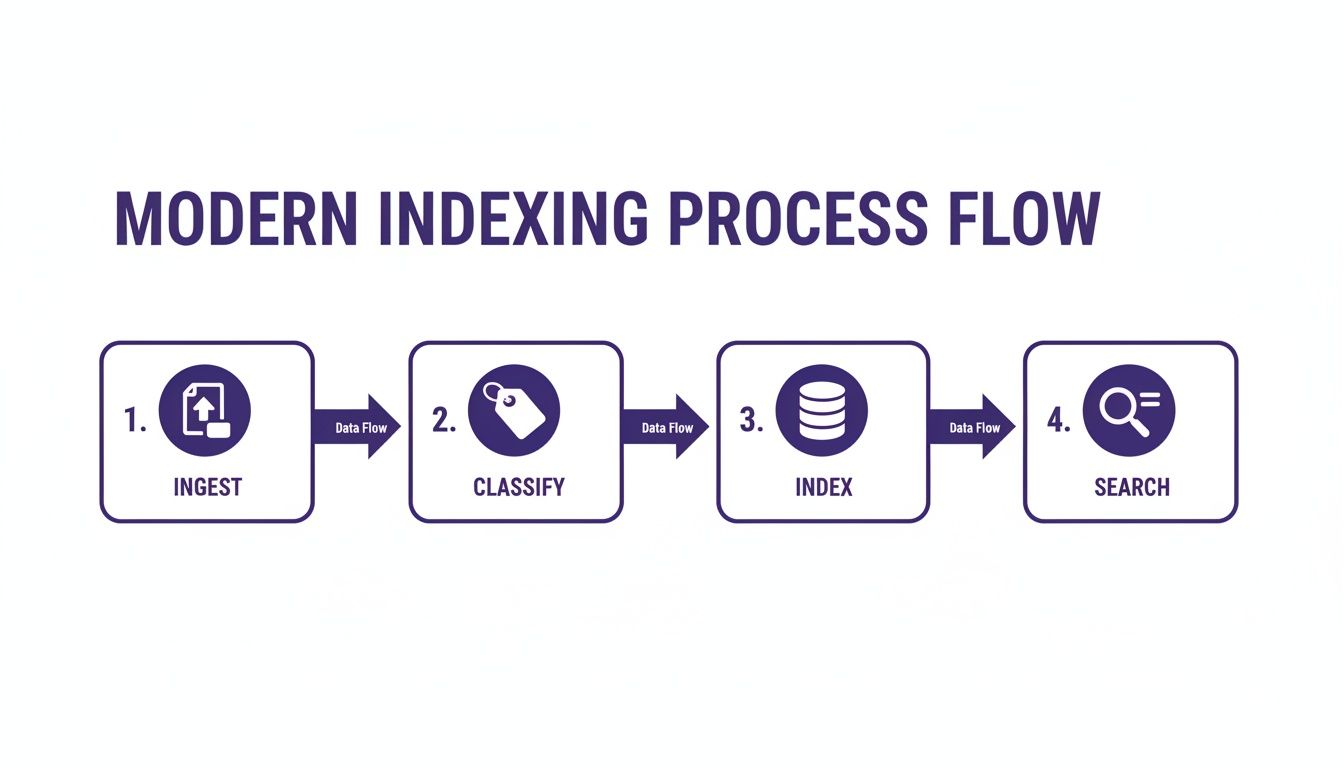
This workflow shows you exactly how your content goes from just sitting on a drive to being an active, searchable tool that helps you create new value.
Bring Your Content Library To Life
Once you know what you've got, you need a way to bring it all together. This is where a platform like Contesimal comes in. It was built specifically for creators and publishers who need to organize their work, understand it better, and make smart moves. Contesimal handles the heavy lifting we've been talking about.
Its AI-driven classification means you don't have to spend weeks manually tagging old files. The system ingests your content and immediately starts building a rich, searchable map of your entire creative universe. It lets you and your team huddle around your own knowledge base, sparking connections and ideas that were totally buried before.
The real goal here is to reignite your entire library. By making every piece of content instantly discoverable, you're not just organizing files—you're building an engine to find your next great idea and repurpose your best work.
Instead of staring at a blank page, you can literally ask your content library questions. Imagine searching for "every time I've mentioned audience growth" and instantly pulling up clips, quotes, and articles ready to go. That's the power of a fully indexed library.
It transforms your past work from a static archive into a dynamic, interactive partner that helps you create faster and smarter. The next step is yours.
Got Questions About Document Indexing?
Jumping into something like document indexing for the first time usually brings up a few questions. It's a powerful idea, and getting the details straight is the key to actually putting it to work. Let's tackle some of the most common things creators ask when they start thinking about organizing their content libraries.
Think of this as clearing up the last few details before you can see the full picture—how indexing can turn a static archive into a dynamic, opportunity-generating machine.
How Is Indexing Different From Just Having A Good Folder Structure?
Look, a neat folder structure is a great first step. But it's like organizing your attic by putting everything into perfectly labeled boxes. You still have to physically open each box and dig through it to find that one specific thing you're looking for. It’s a totally manual process that relies on you remembering exactly where you put something months or even years ago.
Document indexing, on the other hand, is like having a detailed, searchable catalog of everything inside every single box. You don't need to know which folder a video file is in; you just search for a concept like "product launch advice," and the system instantly pulls up the exact file and the precise timestamp where you talked about it. It’s the difference between a paper map of your town and a GPS that guides you straight to a specific front door.
Isn't Setting Up An Index Going To Take Forever?
If you were doing it manually? Oh, absolutely. Tagging years of accumulated content by hand would be a soul-crushing project. This is precisely where modern AI-powered platforms completely change the game.
Tools like Contesimal are built to do all the heavy lifting for you. The whole process is surprisingly simple:
- You connect your content sources, like a YouTube channel, podcast feed, or cloud drive.
- The AI gets to work, automatically transcribing audio and video, identifying key topics, and building that deep, searchable index in the background.
- You start searching. That’s pretty much it. The initial setup is hands-off, letting you focus on the creative payoff instead of the tedious grunt work.
Indexing isn’t about adding another chore to your list. It's about making a one-time investment in a system that kills off repetitive, low-value tasks—like manually scrubbing through old footage—so you can spend your time actually creating.
Can Indexing Really Help Me Understand My Audience Better?
Without a doubt. A fully indexed library isn't just for finding old clips; it's an incredibly powerful analytics tool hiding in plain sight. When you can see which topics, guests, or themes pop up most often in your most successful content, you start to spot patterns you would have otherwise missed.
For example, a podcaster might realize that their top 5 most-shared episodes all happen to feature discussions around "overcoming creative burnout." That's not a coincidence; it's a clear signal from your audience about what they truly value. This gives you a data-backed direction for future content that you know will hit the mark.
Ready to turn your messy content attic into an intelligent creative partner? Contesimal is designed to help you organize, understand, and act on your entire library of work. Stop searching and start creating. Explore how it works.