
You've probably got a folder full of good content that still isn't working hard enough for you. A podcast back catalog sits half-tagged, a video drive has five versions of the same clip, and a pile of articles keeps getting published once, then forgotten. That's not a content problem so much as a media asset management problem, because the library exists, but the system for finding, reusing, and monetizing it doesn't.
Why Your Content Library Is Sitting on Untapped Revenue
A lot of creators treat their archive like a storage closet. Files go in, names get messy, and six months later nobody can remember where the best clips, interviews, and visuals live. A podcaster knows there's a strong guest answer buried somewhere in episode 84. A YouTuber can't quickly find the B-roll from last quarter. A publisher has years of articles that could become newsletters, scripts, or social posts.
The issue runs deeper than content volume. It's a media asset management gap, because the library exists, but the system for finding, reusing, and monetizing it does not. AWS describes media asset management as organizing media files like images, audio, and video so teams can discover, retrieve, and use them efficiently, and notes that a well-cataloged library supports reuse, search, and cost-effective delivery AWS on media asset management. For creators and publishers, that means the archive stops being passive history and starts acting like working inventory.
From content graveyard to working library
The first mental shift is simple. Your back catalog is raw material. A searchable archive helps you pull a clip from a long interview, turn one article into multiple formats, or reuse visuals across campaigns without starting from scratch.
A practical way to judge it is straightforward. If you can't search it, tag it, and trust it, you can't really monetize it. That is also why many creators work to tag content effectively, because naming and labeling determine whether an asset gets reused or forgotten.
Practical rule: if a file can't be found in under a minute, it is effectively lost for commercial use.
For mid-size publishers and independent creators, that lost time matters because content production already stretches across platforms. YouTube, newsletters, short-form video, podcasts, and web articles all want different outputs from the same source material. A proper library structure makes that reuse routine instead of lucky.
Why this matters more now
The market around these systems is growing because the business case is clear. One report places the media asset management market at $6.04 billion in 2024, rising to $7.22 billion in 2025 and $16.31 billion by 2029, while a separate report estimates US$2.3 billion in 2024 and US$5.7 billion by 2030 GII Research market report. The point is the direction, not the exact baseline. Content operations are moving toward systems that can handle video, audio, images, and the reuse opportunities sitting inside them.
If you've been making new content while your archive just collects dust, the fix is not more hustle. It is structure.
Core Components and Architecture of a MAM System
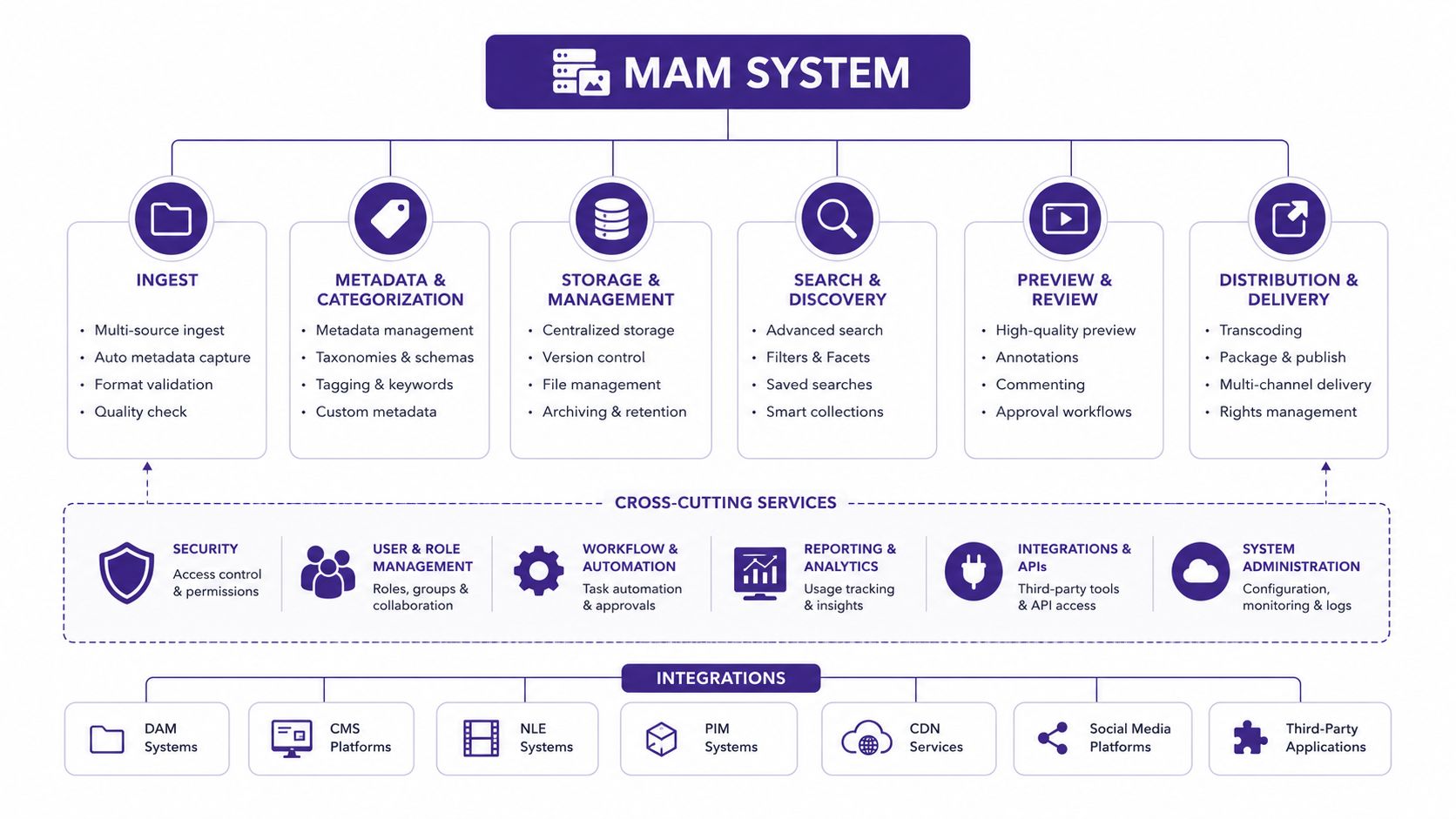
A content library starts generating value only after the system can store, describe, protect, and retrieve assets in ways that match real publishing work. For independent creators and mid-size publishers, that means the architecture has to support reuse. A clip, episode, or master file should move from archive to revenue use without someone manually hunting through old drives.
The storage layer does the heavy lifting
Hybrid and cloud-native storage usually sit at the base of a media asset management setup. Prasar Bharati's technical specification calls for a poly-cloud MAM, support for major cloud platforms, and multiple configurable storage tiers with archival mechanisms that move data to lower-cost storage Prasar Bharati technical specification. That split matters because active projects and long-term archives should not compete for the same expensive storage.
For creators, the practical setup usually looks like this:
- Hot storage for the files you are editing right now.
- Warm storage for projects you will revisit soon.
- Archive storage for older content that still needs to stay searchable.
The point is to keep the library fast for current work while preserving older material for future reuse, licensing, or repackaging.
Metadata and search are where the value lives
A MAM system starts to pay off when it can explain what is inside each file. Titles, tags, transcripts, guests, topics, rights, and technical details such as format or timecode all help turn a raw file into something searchable and reusable. Good metadata makes search behave like retrieval, while weak metadata turns the archive into a guessing game.
The other piece is control. The strongest systems support collaboration through roles, versions, and permissions, so the right person can edit, review, approve, or export without exposing everything else. A published best-practices guide recommends backup and disaster recovery, version control, role-based permissions, automation for transcoding and format conversion, integration with editing tools, asset lifecycle management, and regular audits Dalet best practices guide.
That is why taxonomy work outside the software still matters. If creators tag content effectively before the library grows, the system has cleaner inputs, and discovery becomes much easier later.
If you are comparing platforms, a digital asset management comparison guide can help separate MAM features from broader file libraries.
A MAM system works best when it behaves like the operating system for content, with storage, metadata, permissions, automation, and retrieval working together.
How MAM Differs From DAM and PIM Systems
Buyers often get stuck here. The terms sound similar, and plenty of vendors blur the boundaries. But the system you choose should match the kind of assets you manage.
A DAM is usually built for brand and marketing files, logos, campaign images, approved graphics, and other materials where consistency matters. A PIM handles product information for catalogs and e-commerce workflows. MAM is built for rich media, especially audio and video, where time, versioning, and reuse inside long-form content matter more than simple file delivery.
MAM vs DAM vs PIM Comparison
| Feature | MAM | DAM | PIM |
|---|---|---|---|
| Core asset type | Video, audio, rich media | Brand and marketing assets | Product data |
| Best fit | Podcasts, video libraries, publisher archives | Marketing teams, brand libraries | Retail and catalog operations |
| Time-based media support | Strong | Limited | Not a fit |
| Transcript and timecode search | Common in advanced systems | Sometimes partial | No |
| Format transcoding | Common | Sometimes | No |
| Primary goal | Find, manage, reuse, and distribute media | Control brand assets and approvals | Maintain clean product records |
If your main pain is finding the right episode clip, interview segment, or past video asset, a generic DAM usually won't solve it. If your pain is keeping product attributes clean across a catalog, MAM is the wrong category. If you're comparing broader asset platforms, this overview of digital asset management software can help clarify where DAM ends and MAM begins.
The cleanest way to decide is to ask what changes most often. Product records belong in PIM. Campaign-ready visuals belong in DAM. Raw footage, audio sessions, transcripts, and long-form archives belong in MAM.
Decision shortcut: if the asset still needs to be searched inside a timeline or transcript, you're in MAM territory.
Real-World Use Cases for Creators and Publishers
A content archive can look healthy on paper and still leave money behind. The files are there, but if no one can find the right clip, article, or interview segment fast enough, the archive behaves like storage, not inventory. Media asset management changes that by making old material easy to search, reuse, and package into new revenue opportunities.
A podcaster with 300 episodes often needs better retrieval more than more recording time. If each episode is transcribed and tagged by guest, topic, quote, and segment type, one interview can feed a week of short clips, a teaser sequence, and a set of social posts that send listeners back to the full episode. The archive starts doing discovery work instead of collecting dust.
How different teams extract value
A magazine publisher sees a different kind of return. Years of features can turn into newsletter series, audio scripts, social carousels, or refreshed roundups once the article archive is searchable by theme and format. One strong reporting piece can support a small content network when the library is organized well.
Researchers and academics use the same method in a collaborative setting. Interview recordings, source documents, and field notes can live in one place with clear metadata, so co-authors do not waste time rebuilding context from scratch. The benefit is not only speed, it is fewer missed references and cleaner reuse of source material.
Repurposed content also lowers production pressure. A team that reuses assets well spends less time recreating the same ideas and more time testing new angles, sponsors, and audience segments. Adobe's cited IDC result on DAM found that 79% of organizations using DAM realized revenue gains of 10% or more, while 97% reduced asset-creation costs of 10% or more and 97% increased productivity by 10% or more Adobe on ROI and DAM.
What reuse looks like in practice
- Podcast clips: Pull one strong answer, create multiple short-form cuts, and send traffic back to the archive.
- Article libraries: Convert evergreen pieces into newsletters, summaries, scripts, and topic hubs.
- Video back catalogs: Re-edit old footage into new formats for reels, ads, or explainers.
- Research archives: Recombine source assets into new reports, talks, or collaborative briefs.
The useful question is not whether the content exists. It is whether the team can find the right piece quickly enough to make it earn again.
Taxonomy and Metadata Best Practices for Discoverable Content
A media library without clean metadata can turn into a hidden pile of revenue. The files are there, but the team still burns time hunting through them, and the best clips never reach a new audience. That is why taxonomy sits at the center of media asset management.
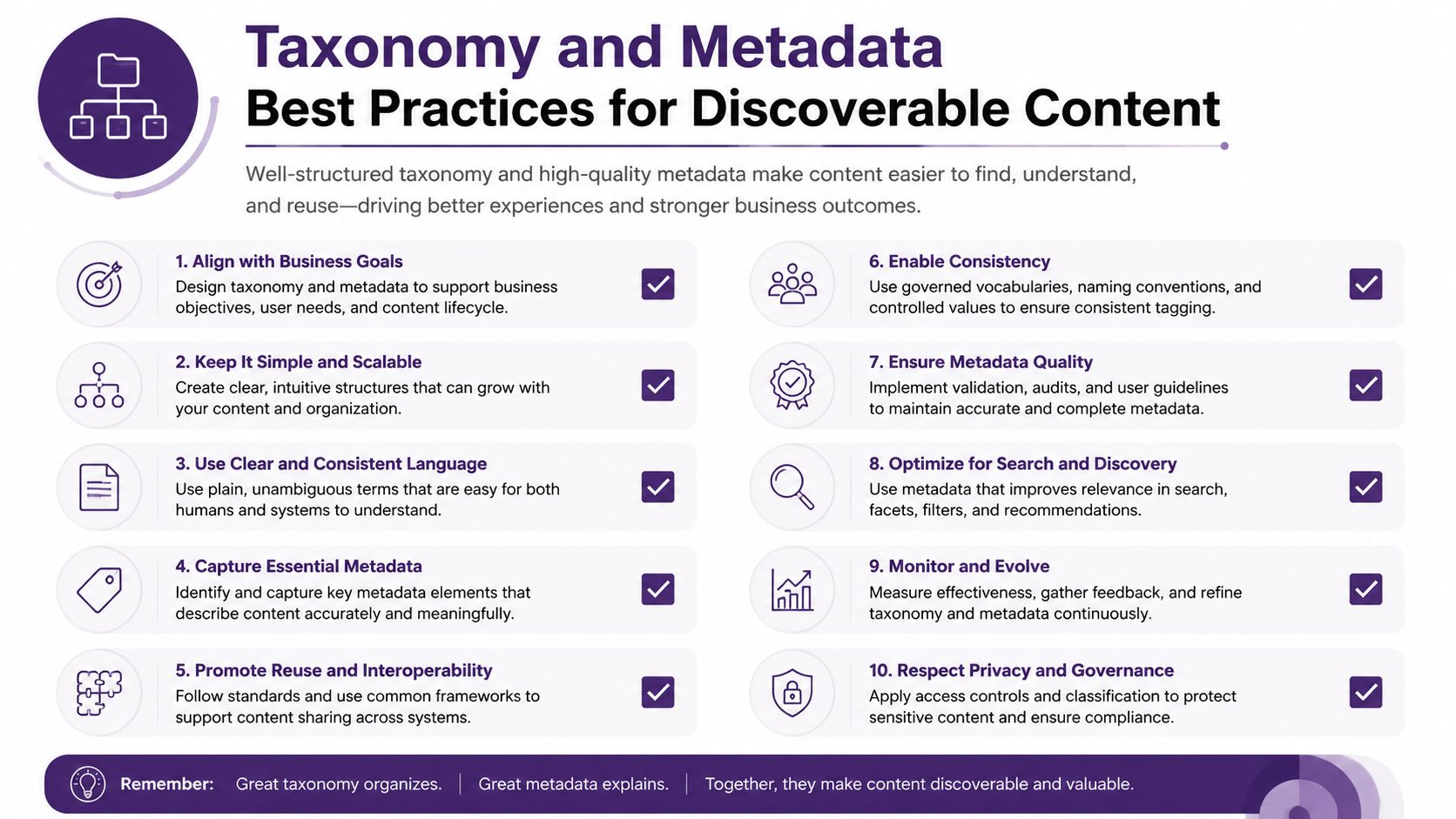
Start with structure, not a loose tag dump. Broad categories should flow into narrower ones so the archive behaves like a filing system instead of a junk drawer. For a podcast archive, that can mean show, season, guest, topic, format, and rights status. For a video library, it can mean project, client, scene type, talent, usage window, and platform. For an article archive, it can mean beat, format, audience stage, publication date, and related themes.
Build metadata that humans and AI can both use
A strong taxonomy needs both descriptive metadata and administrative metadata. Descriptive fields help people find the asset, such as title, guest, subject, or location. Administrative fields help teams use it correctly, such as ownership, licensing limits, and reuse permissions.
The rights layer matters even more once AI-assisted workflows start moving quickly through old archives. Industry guidance treats usage rights, ownership, sidecar files, and clean offboarding as buying criteria, not afterthoughts 10 MAM questions. If the metadata does not say what can be reused, the system may make the file easy to find and still hard to use safely.
Practical rule: tag for the question you will ask later, not just the name of the file today.
A useful structure for a podcast episode might look like this:
- Show and episode number: the anchor for the asset.
- Guest name and role: who appears in the content.
- Topics and themes: what the conversation covers.
- Segment markers: intro, quote, takeaway, sponsor read.
- Rights and reuse notes: what can be clipped or redistributed.
The same logic works for a video library with scenes, talent, format, and platform version. Article archives can use beat, angle, audience, and distribution channel. Good taxonomy lowers search friction and gives AI cleaner structure to work with, which matters when a team wants to turn one asset into many revenue-generating variants. For a practical look at how search behavior changes once metadata is organized well, see AI-powered search in content libraries.
AI-Enhanced Search and Automated Workflows
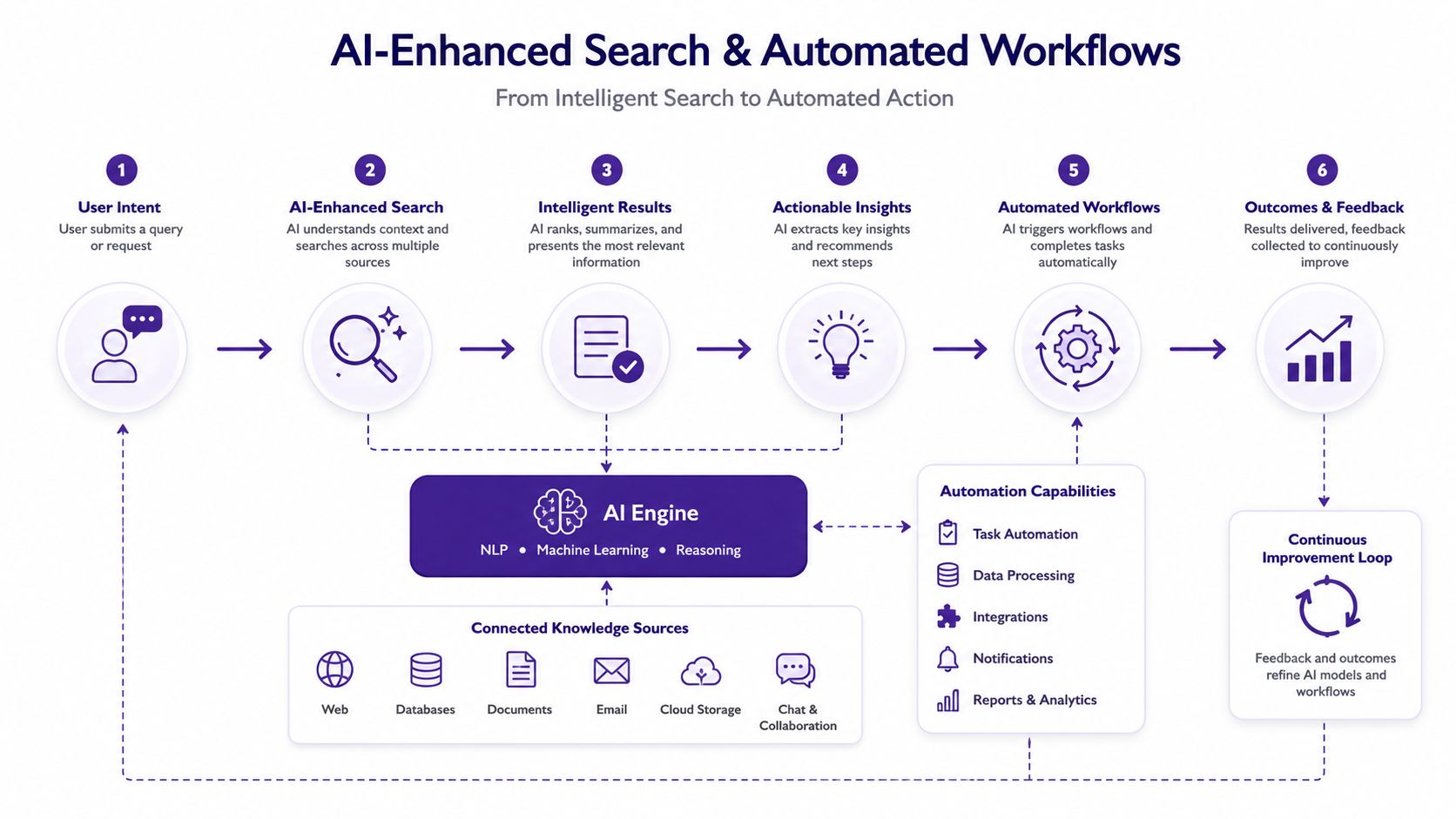
A content library becomes more valuable when people can find the right asset fast and reuse it without guesswork. AI pushes media asset management from passive storage into active discovery, so the archive starts working like a revenue engine instead of a locked cabinet. As noted earlier, MAM is the system that helps teams securely edit, process, tag, and distribute rich media. AI makes those steps faster and less manual, especially for teams working through transcripts, large video libraries, and mixed-format archives.
Transcription is usually the first place teams feel the difference. Once spoken words are searchable, a creator can pull a quote, a topic, or a moment from a long interview without scrubbing through the whole file. That matters for podcasts, webinars, and talking-head video, where one strong segment may be buried inside an hour of content.
What AI does inside the workflow
Computer vision can tag objects, faces, and scenes in video and images. Natural language search can match meaning instead of exact file names. A search for “guest talking about audience growth” can surface assets that never used those exact words in the title.
Automation extends the library after discovery. Teams can generate summaries, draft show notes, surface likely clips, and route assets into distribution workflows without rebuilding everything by hand. AI-assisted workflow design is also changing how search results turn into action, as outlined in this AI-powered search overview.
For creators, that shift matters because speed and reuse are tied together. Better search means faster repurposing. Faster repurposing means more clips, more variants, and more chances to make the same archive work across different channels.
Used well, that setup helps teams connect human judgment with AI assistance instead of choosing one or the other. Contesimal is one option in this space, with tools for organizing libraries, custom tagging, and metadata editing that support search and reuse across documents, videos, and articles.
Implementation Checklist and Measuring Your ROI
A useful rollout starts with the archive you already own. Audit it first, then decide which assets need metadata cleanup, which need migration, and which can stay where they are for now. If you try to move everything at once, the team will spend more time on logistics than on reuse, and the point of media asset management is to make old material work harder.
A practical rollout path
- Inventory the library. List the main asset types, where they live, and who uses them.
- Set naming and tagging rules. Decide the minimum metadata every upload needs so people are not guessing later.
- Choose the right platform. Look for permissions, versioning, search, automation, and storage controls.
- Migrate in stages. Move the highest-value assets first so the team sees value early.
- Train the team. Give creators a simple workflow they will follow.
- Review and maintain. Audit metadata quality, permissions, and archival rules on a schedule.
A workable implementation does not need perfection on day one. It needs consistency. If the team keeps tagging the same way and storing the same way, search gets better, reuse gets easier, and the archive becomes a business asset instead of a filing problem.
How to measure whether it's paying off
Track signals that connect directly to output. Time spent searching for assets should go down. Duplicate asset creation should drop. Repurposed content should rise. If you publish across several channels, the archive should start producing more material without a matching increase in production pressure.
The ROI conversation is stronger when it includes both productivity and reuse. The content marketing ROI guide gives a practical way to think about payback in terms creators can see in their workflow. Better asset management can link to revenue gains, lower creation costs, and higher productivity. For independent creators and mid-size publishers, that usually shows up as faster retrieval, fewer repeat edits, and more archive material turning into new clips, posts, or episode support.
Start small, prove the workflow, then expand the archive only after the team feels the gain.
Contesimal helps content teams organize, classify, and search libraries of documents, podcasts, videos, and articles so old work can become new output. If you are ready to turn a scattered archive into a system for reuse, discovery, and revenue, visit Contesimal and see how a structured library can start doing more of the heavy lifting.