
Your episode is edited, but nobody knows whether the guest approved the clips. A writer is hunting for an interview you recorded last year. Meanwhile, tomorrow's video still needs a thumbnail, and the person who makes thumbnails thinks it's scheduled for next week.
It's a kitchen with talented cooks and unreadable order tickets. The recipe might be excellent, but without station handoffs and a shared pantry, dinner arrives late. Content workflow management gives creators the same practical coordination: a clear route from an idea to something published, findable, and worth using again.
What Content Workflow Management Means
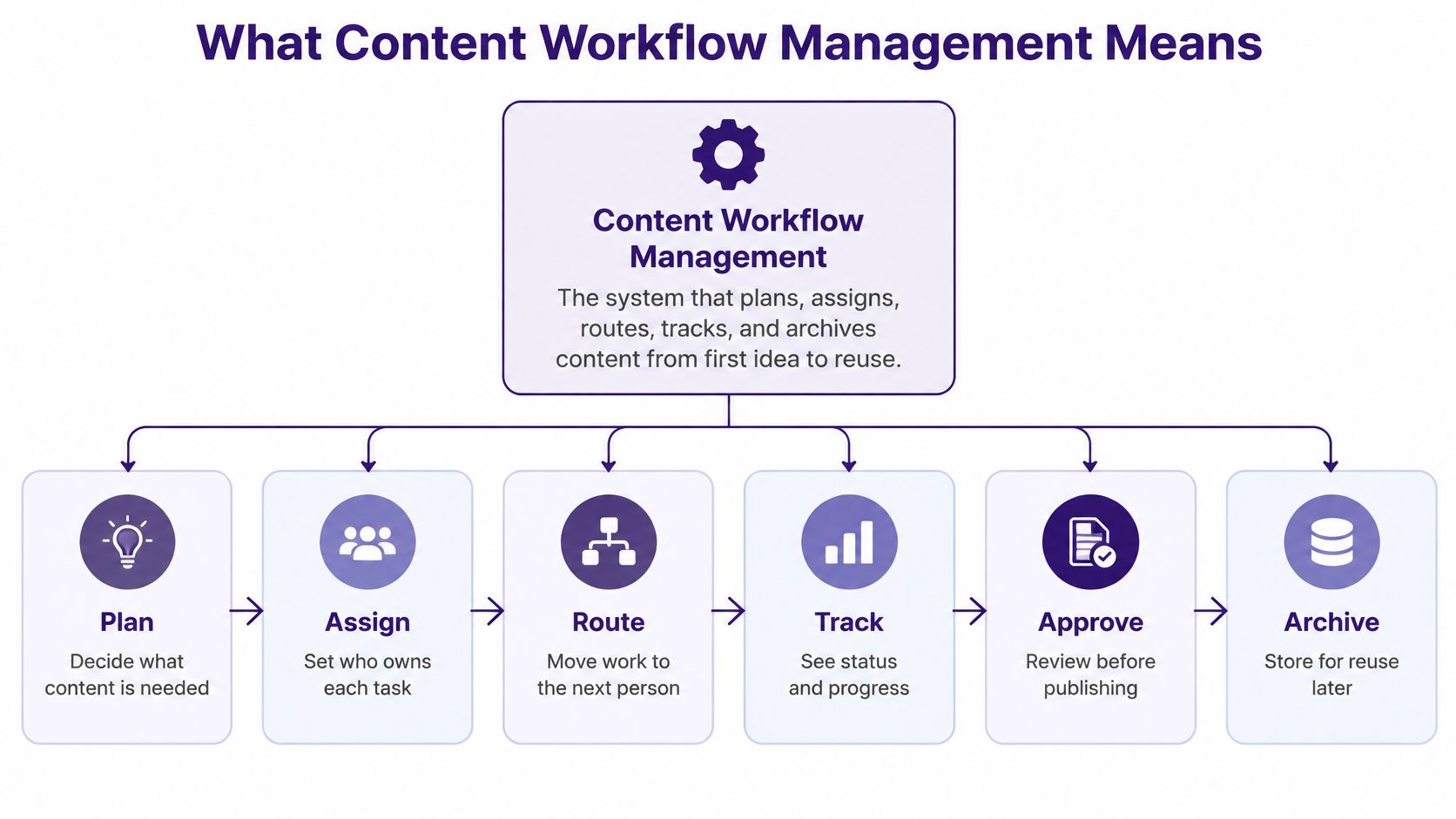
Content workflow management is the system that plans, assigns, routes, tracks, and archives content from first idea to reuse. It defines who does each task, in what order, using which files, approvals, and deadlines.
A podcast team with brilliant hosts but no shared tracker has the same problem as that disorganized kitchen. Individual talent doesn't tell the editor which recording is approved or tell the publisher whether the episode description is final.
The layers beneath the schedule
A useful workflow connects more than a list of tasks.
- Tasks: Who researches, records, edits, reviews, and publishes, with a clear deadline for each responsibility.
- Assets: Where scripts, recordings, transcripts, cuts, source notes, and approved versions live.
- Decisions: Who can approve the work, what they're checking, and what counts as done.
These layers need to agree. A task marked complete means little if the approved file is still sitting on somebody's laptop.
The Content Marketing Institute's B2B findings reported that in 2025, 76% of B2B marketers had a dedicated content marketing team or person, while 33% identified workflow or content-approval issues as a challenge. Having people assigned to content doesn't automatically give them a dependable production system.
The basic route looks like this:
A workflow outlives a launch
Say an editor starts researching a new interview. Last year's conversation already contains the explanation they need, but nobody can find the notes, so they repeat the work.
That's a workflow failure even if the new piece ships on time. The team has paid again for knowledge it already owns.
Project planning coordinates a particular launch. A workflow repeats across launches and keeps the resulting material useful afterward.
Quick test: Can your team find the last approved script or episode in under two minutes, without asking its creator?
Treat that as a practical exercise, not an industry benchmark. If the search depends on someone remembering a filename, your workflow needs a better shared pantry.
Typical Workflow Stages by Content Format
Use this comparison as a working production map. Podcasts, articles, and videos have different ingredients, but they pass through the same basic stations.
Workflow stages by content format
| Stage | Podcast | Article | Video |
|---|---|---|---|
| Ideation and research | Guest shortlist, topic brief, prior episode check | Keyword and angle brief, source list | Concept pitch, shot ideas, reference clips |
| Production | Recording and remote track capture | Drafting and data pulls | Filming and B-roll capture |
| Editing | Audio cleanup and show notes | Line edit and fact check | Rough cut, colour, captions |
| Review and approval | Host and legal sign-off | Editor and subject-matter check | Producer and brand sign-off |
| Publishing and distribution | Hosting, feeds and clip posts | CMS scheduling and social posts | Platform upload, thumbnail and description |
| Repurposing and archiving | Transcript, quote cards and short clips | Newsletter, slides and video summary | Shorts, audio extract and blog post |
Follow the work, not the software
Start ideation with an audience question and an archive search. A podcaster might discover that a previous guest already answered part of the question; an article writer might find a useful source list; a filmmaker might locate reference footage.
Production turns that brief into usable material. Capture source information alongside the work, rather than asking an editor to reconstruct it later.
Editing is where format differences become obvious. Audio needs intelligibility and pacing; articles need coherent arguments and checked claims; video needs visual continuity, readable captions, and clean sound.
Review should answer specific questions, not invite unlimited opinions. Ask the subject-matter reviewer to check accuracy and the brand reviewer to check presentation, rather than sending everyone a vague request for thoughts.
Give each station an exit condition
Publishing includes the packaging: titles, descriptions, thumbnails, feed settings, and promotional posts. Repurposing then gives the original material another useful form, while archiving preserves its context.
- Podcasts: Watch guest scheduling, missing remote tracks, and audio cleanup. Don't book an edit before the recording files are available.
- Articles: Watch source verification and CMS scheduling. An approved document isn't necessarily a publication-ready page.
- Video: Watch rough-cut feedback, caption corrections, and thumbnail approval. Separate these deliverables so a finished cut doesn't hide unfinished packaging.
Not every piece needs every possible review. A licensed documentary segment needs more clearance than a creator's routine update, so route work according to its risk.
Keep the shared skeleton even when tools differ. A team using Google Docs, an audio editor, and YouTube Studio can still agree on common statuses and exit conditions.
A stage without a named owner is usually the stage that slips. Copy the table into a spreadsheet and add columns for current owner and average wait time, then mark where work stops rather than where you assume it stops.
Roles and Handoffs That Keep Work Moving
Look between tasks before asking people to work faster. A completed draft can sit untouched while everyone assumes somebody else has picked it up; the handoff, not the writing, becomes the delay.
A shared view helps people see who's holding the work:

Roles, responsibilities and handoff points
| Role | Owns | Hands off to | Common failure |
|---|---|---|---|
| Producer | Schedule, budget and final delivery | Editor | Deadlines drift without one owner |
| Writer or host | Scripts, angles and interviews | Editor | Drafts arrive without source notes |
| Editor | Structure, accuracy and final cut | Publisher | Edits made in parallel versions |
| Designer or video editor | Thumbnails, graphics and cuts | Publisher | Assets named inconsistently |
| SEO or distribution lead | Titles, metadata and scheduling | Publisher | Keywords added only after publishing |
| Rights reviewer | Licensing and clearance | Approver | Clearance requested too late |
| Approver | Final sign-off | Publisher | Silence treated as approval |
Make the transfer explicit
A handoff happens when ownership changes, not when someone attaches a file to a chat message. The next person needs enough context to act without reopening the entire conversation.
Every item should carry:
- Brief: A paragraph explaining the audience, purpose, and intended deliverable.
- Status: The current stage and what has already been checked.
- Source files: Links to the authoritative working files and supporting evidence.
- Open questions: Unresolved issues, including anything blocking approval.
- Next owner: A named person and the date their work is due.
The practical connection between shared tasks and shared decisions is explored further in this guide to project management collaboration.
Small teams combine roles. You might write in the morning, edit later, and publish the next day, but a written handoff between those hats still prevents you from mistaking an unfinished draft for an approved asset.
For another perspective on coordinating collaborative work:
Plan for an unavailable approver
A silent approver can stall the whole queue. Set an escalation route: the producer follows up, moves the release, or requests a designated backup reviewer.
Don't convert silence into permission. A deadline without an accountable owner is just a hopeful date on the calendar.
Nothing moves to the next owner without a named person and a due date.
Organizing the Library So Old Work Gets Reused
A document-management statistics compilation from Axis Intelligence cites research showing that 46% of employees sometimes or almost always struggle to find the information required to perform their jobs. That finding concerns workplace information broadly, but content teams will recognize the problem: the file exists, yet nobody can retrieve it confidently.
As articles, recordings, and videos accumulate, folders alone become awkward. You need searchable descriptions and clear relationships between originals and adaptations.
Label assets for discovery and safe reuse
The Library of Congress metadata overview distinguishes descriptive, administrative, and structural metadata. In everyday production, those categories answer different questions.
- Descriptive metadata: What's in it? Record the title, topic, speaker, and date.
- Administrative metadata: Can we use it? Record ownership, rights, permissions, and approval status.
- Structural and technical details: How does it fit together and play? Record relationships between components alongside format, codec, resolution, and duration.
Keep structural relationships distinct from technical measurements in your schema, even if your interface displays them together. A chapter-to-book relationship isn't the same kind of fact as a video's frame rate.
Preserve technical facts captured from the source file. Keep descriptive changes and AI-generated labels versioned so an automated guess never replaces an original fact without notice.
Establish a minimum asset record
Use a documented metadata profile, following the governance pattern in the Library of Congress guidance on metadata-enabled access. Define permitted values rather than letting every contributor invent new labels.
For example, choose a standard format list such as article, audio, video, and document. Define topic and audience lists around your actual editorial coverage, and use explicit statuses such as draft, approved, restricted, and retired.
Minimum record to copy
| Field | What to enter |
|---|---|
| Stable ID | A persistent identifier that doesn't change with the title |
| Title and format | Human-readable name and controlled format value |
| Date and owner | Relevant creation or publication date and responsible person |
| Rights and status | Permitted uses and current editorial state |
| Source link | Location of the authoritative original |
| Parent asset | ID of the source from which this item was derived |
When evaluating repositories, compare digital asset management software against this record, not just its folder display.
Store masters separately from edited derivatives, use consistent filenames, and keep backup copies in another location. Generate searchable transcripts for recordings so colleagues can find a quotation or theme without replaying the entire file.
Automating Steps Without Losing Editorial Control
Automate the repeated checks before automating creative judgment. On an assembly line, a sensor can flag a missing part; it shouldn't decide whether your story is fair, accurate, or worth publishing.
An effective setup connects triggers, checks, review tasks, and logs. Isolated AI features can generate more material without making its journey any clearer.
Build an event-driven pipeline
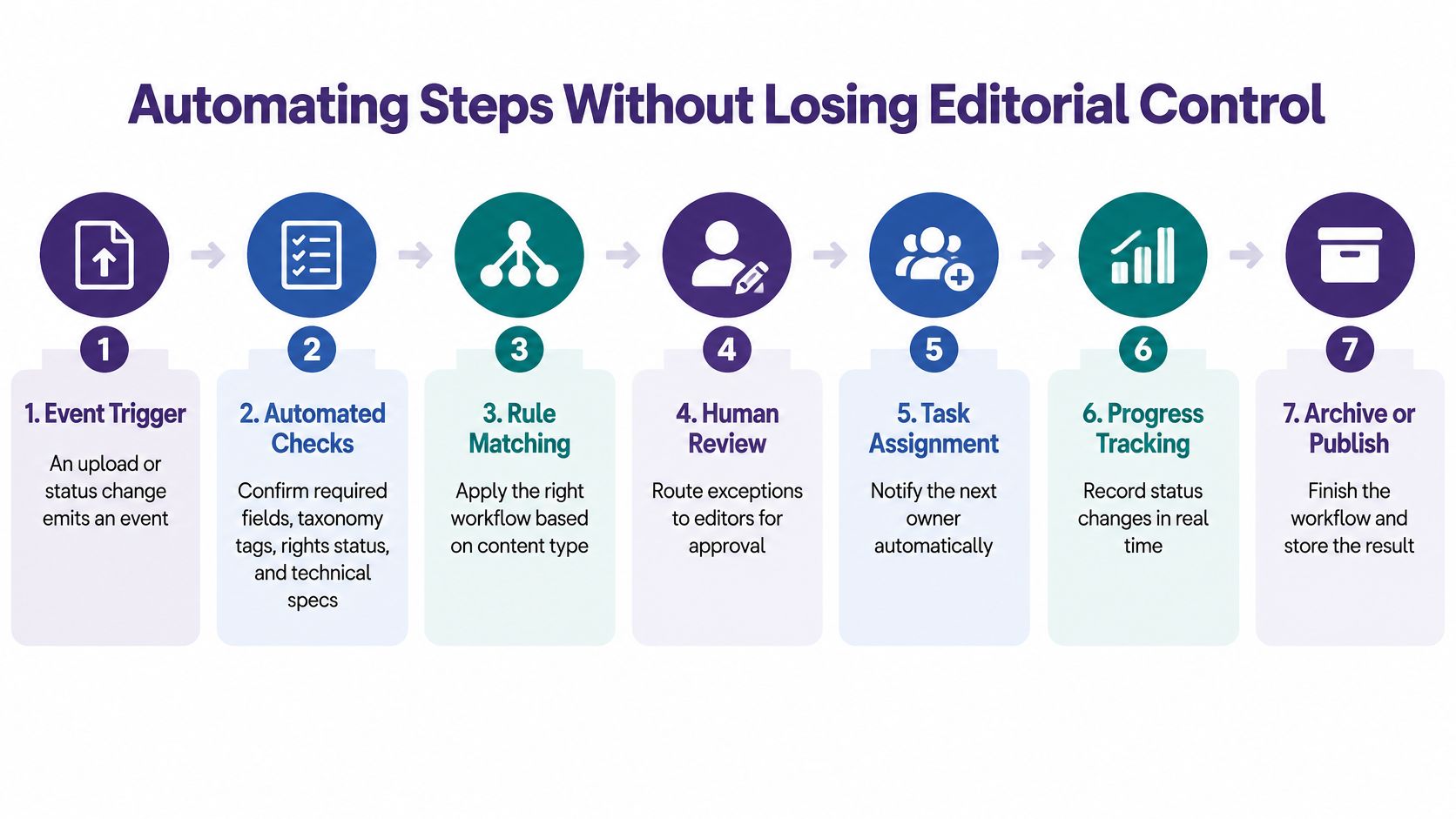
- Trigger the workflow. An upload or editorial-status change emits an event containing the asset ID and current version.
- Automated checks confirm required fields, taxonomy tags, rights status, and technical specifications such as resolution and duration.
- Explain failures. A failed check creates a review task with an actionable reason, such as missing permission evidence, rather than a generic error.
- Passing items receive enrichment, including transcripts, summaries, and suggested tags, with links back to their sources.
- Require human approval. A designated reviewer decides whether the material can move toward publication.
- Approved masters generate derivatives such as clip candidates, quote cards, and newsletter drafts, each subject to the appropriate review.
- Log every transition. Record the actor, timestamp, version, previous state, new state, and reason for the change.
The routing view below shows how those controls fit into a managed process:
A 2025 academic implementation in a commercial-bank setting reported an 87.5% reduction in content-management time and an 80% reduction in data-entry errors versus a manual process, using CMS webhooks, AI-based validation, logging, and notifications. This was a single organization and workflow, not a universal benchmark.
Let uncertainty change the route
AI classification needs a fallback path. High-confidence tags can apply automatically when they're low risk; medium-confidence suggestions should reach an approver; low-confidence items should go to manual review.
Don't treat the model's confidence as proof. Test suggested labels against human-reviewed examples, and apply stricter review to sensitive topics, permissions, and claims about people.
For AI-assisted drafts, Rankira's guide to humanizing AI content offers a useful companion to an editorial review checklist. Natural phrasing is only part of that review: editors must also verify meaning, attribution, source support, and whether the adaptation serves its audience.
Automation boundary: A system can confirm that a rights field is filled in. A person may still need to decide whether the permission covers the intended use.
Logs let the producer distinguish slow processing from unattended queues. They also support rollback and measurement of cycle time, rework, exceptions, and automation accuracy.
Make retries safe so a repeated event doesn't create duplicate posts or derivative files. Keep failed jobs visible, with an owner who can resolve them, rather than letting them disappear into an error log.
Start with repetitive metadata and file-specification checks. Keep publication decisions with people until you can explain, test, and audit every route the material takes.
KPIs That Show Whether the Workflow Pays Off
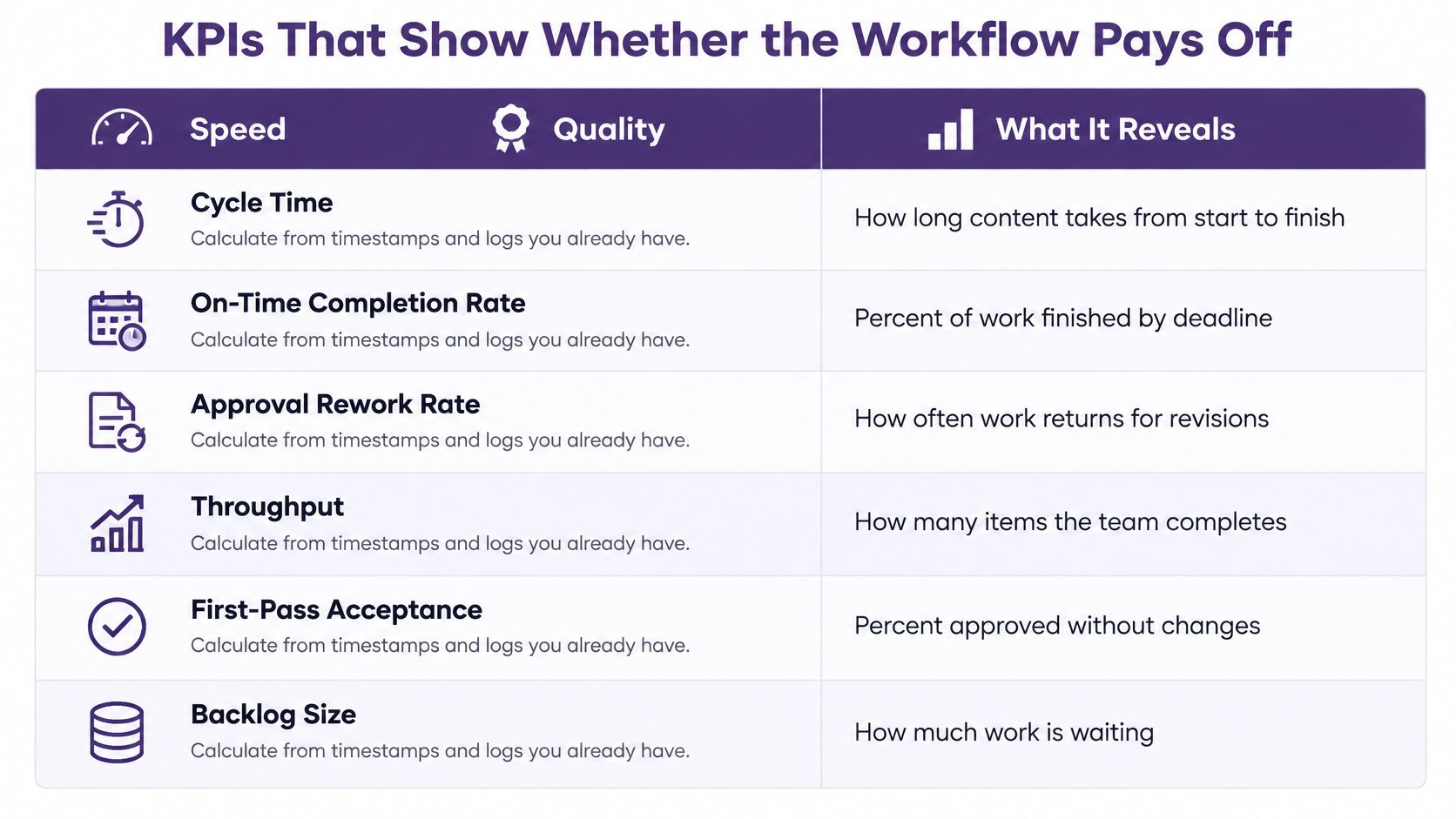
Pair speed with quality, and activity with results. A team can publish quickly while repeatedly revising weak work or ignoring valuable material already in its archive.
Use timestamps and logs you already collect. Keep definitions stable so a change in measurement doesn't look like a change in performance.
Workflow KPIs, calculations and warning signs
| KPI | What it shows | How to calculate | Warning sign |
|---|---|---|---|
| Cycle time | Speed from brief to publication | Publish date minus brief date, median per format | Median rising for one format or stage |
| Handoff wait time | Idle time between owners | Hours an item sits in a queue before the next owner acts | Items waiting several days in one queue |
| Approval turnaround | Review bottlenecks | Hours from submission to decision | Approvals older than the agreed deadline |
| Rework rate | First-draft quality | Items sent back to an earlier stage divided by items completed | More than one return per item on average |
| Exception rate | Automation failures | Flagged items divided by items processed | Exception rate rising after a process change |
| Reuse rate | Value extracted from the archive | Derived assets divided by archived assets per quarter | Every new piece starts from scratch |
| Audience outcome per asset | Downstream results | Views, sessions, subscribers or conversions per asset, read against content age | High output with flat results |
Measure the queue and the pantry
Start with cycle time, handoff wait time, and reuse rate. Together, they reveal how long production takes, where work sits idle, and whether the library contributes to current output.
For reuse, define your denominator. Use the same eligible archive population each reporting period, and distinguish published derivatives from unused generated drafts.
For rework, count both affected items and return events if repeated revisions are a concern. A simple proportion of returned items can hide a piece that bounces between reviewers repeatedly.
A broader dashboard can balance completion measures with acceptance and backlog measures:
Read results against content age
In the Content Marketing Institute's 2025 technology-marketer survey, 62% reported difficulty attributing return on investment to content, while 58% struggled to track customer journeys. Don't force a clean revenue story where the customer's route is uncertain.
An article may assist a purchase after a reader encounters a podcast and newsletter. Record that contribution without claiming the article caused the sale.
Use fixed observation windows, such as 30, 90, and 365 days, as a measurement convention. Compare similarly aged assets, rather than judging a newly published episode against a long-established article.
Content decay means an asset loses usefulness or audience attention over time. Some pieces keep attracting viewers, while others need updated claims, refreshed packaging, or retirement.
Use a consistent method to analyze content performance, connecting each derivative to its parent. Faster production can hurt results if editors choose weaker topics or distribute adaptations that don't fit the platform.
Include qualitative evidence too: an editor found a relevant interview without repeating research, or a researcher documented time saved. These outcomes matter even when revenue can't be assigned to a particular asset.
Choose One Bottleneck and Fix It First
Pick a content format and observe its real production process over two weeks. Mark every ownership change and how long the item waits before someone acts.
Don't redesign the whole kitchen while dinner is being served. Choose the queue that causes the clearest disruption, then make a small change you can evaluate.
Run a focused improvement cycle
- Map the current route. List the format's actual stages and owners, including informal reviews that happen in chat.
- Use your KPI records to find the longest queue. Separate time spent working from time spent waiting.
- Repair that handoff. Introduce a standard brief and assign a named owner who can accept or reject incomplete submissions.
- Automate the most repetitive check, such as missing metadata or invalid file specifications, before adding more ambitious AI tasks.
- Add a reuse deliverable. Require a transcript, clip list, or quote bank alongside the finished piece, chosen for its likely audience value.
Say your video editor repeatedly waits for approved source material. A clearer intake requirement may help more than a faster editing tool, because the delay happens before editing begins.
Give the change a fair test using comparable work. If the queue shrinks but revisions increase, tighten the acceptance criteria rather than celebrating speed alone.
Judge software by the missing capability
A spreadsheet can expose queue delays, a shared repository can centralize files, and a research platform can help teams discover reusable material. Choose according to the bottleneck rather than buying a large system in the hope that people will organize themselves around it.
Contesimal is an AI-powered option for organizing and searching historical libraries of documents, podcasts, videos, and articles, with human and AI collaboration supporting research and workflows across creation, editing, and distribution. It fits most directly when finding and reusing existing material is the constraint.
Ask any platform provider:
- Handoffs and approvals: Can you record who transferred work, who approved it, and which version they reviewed?
- Metadata flexibility: Can you define your own fields and controlled values?
- Portability: Can you export your content, metadata, and relationships if you change systems?
Taking longform content across platforms in one click is an appealing goal, but distribution isn't the same as adaptation. The audience, permissions, and editorial context still need attention.
Software can help colleagues gather around shared knowledge and create new value from it. It can't resolve unclear ownership on its own.
This week, pick a bottleneck, name its owner, and set a date to measure it again.
Contesimal helps teams organize, search, and collaborate around existing content libraries so past work can inform new episodes, articles, and adaptations. Visit Contesimal to explore how a searchable library can support your reuse workflow and turn overlooked material into new audience and revenue opportunities.