
You usually discover the need for disaster recovery planning at the worst possible moment. An editor can't open the CMS. Scheduled posts vanish from the queue. A producer realizes yesterday's podcast draft lived only in one shared folder. Someone says, “We have backups,” and then the room gets quiet when nobody can answer the next question, which is whether those backups can restore today's publishing run.
For content teams, outages rarely look like dramatic infrastructure failures. They look like a missed newsletter, a broken homepage package, a lost interview transcript, a sponsor placement that doesn't publish on time, or a week of half-finished drafts that nobody can cleanly recover. That's why disaster recovery planning for media operations has to start with editorial reality, not server diagrams.
A strong plan protects more than systems. It protects story pipelines, archives, publishing cadence, collaboration history, and the trust readers place in your team to show up on schedule.
Why Content Teams Need a Real Recovery Plan
The moment this becomes real is usually mundane. A writer opens a draft and finds an older version. The image desk can't reach the digital asset manager. A homepage editor can still log in, but publish actions fail. At that point, the technical outage becomes an editorial outage.
That gap is bigger than many teams admit. A 2019 cloud disaster recovery survey found that 71% of respondents experienced downtime in the previous year and 21% reported outages in the previous month, while the same study estimated that 31% of companies of all sizes would lose at least $100,000 per day from downtime and 26% of enterprise respondents said one day of downtime would cost more than $1 million (business continuity preparedness findings). For publishers, the direct cost matters, but the secondary damage often hurts longer: missed launches, lost syndication windows, stale landing pages, and broken audience habits.
Documentation isn't the same as readiness
Many organizations have paperwork. That doesn't mean they have a working recovery capability. A long-running benchmark reported that documented business continuity plans rose to 93% in the 2014 study and remained at 94% in the 2023 update, and that 75% of businesses had some form of formal disaster recovery plan or program, while 16% intended to implement one within the next year (business continuity statistics roundup). Formal planning is common now. Useful planning is still uneven.
For content teams, the weak point is usually not intent. It's translation. A generic corporate DR plan rarely tells a managing editor what to do when the CMS fails an hour before a sponsored feature goes live.
Practical rule: If your plan doesn't tell an editor how to recover drafts, assets, schedules, and audience-facing updates, you don't have a publishing recovery plan. You have an IT document.
The risk sits inside the archive
Creators, publishers, podcasters, and marketers often think about growth in terms of reach. More channels. More playlists. More cross-platform packaging. More ways to upcycle old work into new revenue. That only works if the archive is organized and recoverable.
If your team depends on a deep back catalog, metadata, transcripts, revisions, and reusable assets, your recovery plan has to treat the content library as a business asset. Good archival best practices make recovery faster because they reduce confusion over where the canonical file lives, which version is final, and which assets have rights or usage limits attached.
Mapping Risks to Your Publishing Workflow
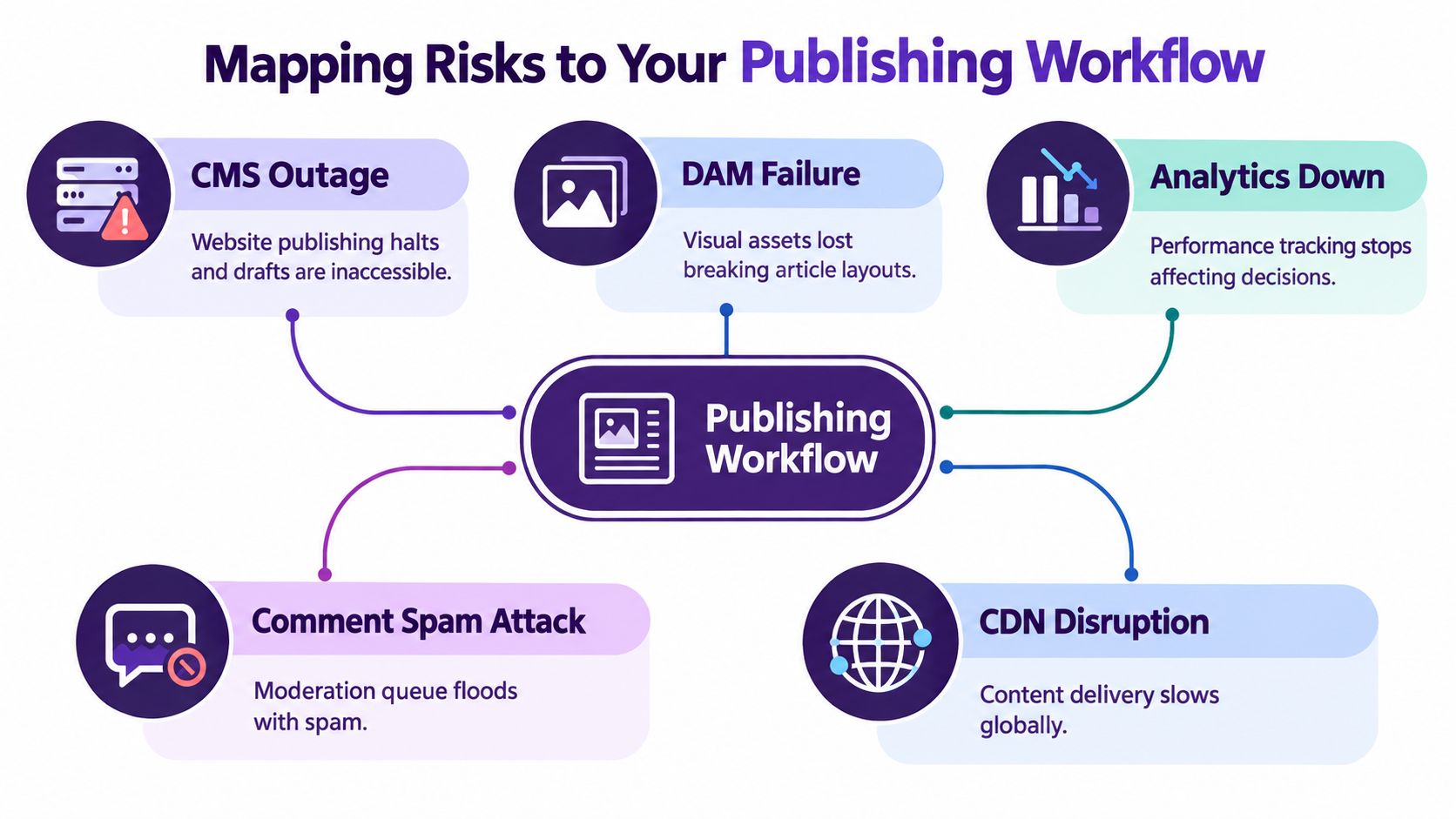
A common misstep is starting in the wrong place. Teams list threats like ransomware, cloud failure, accidental deletion, or bad deploys, but they never map those threats to the actual path a story takes from pitch to publication. That's how disaster recovery planning turns abstract.
Start with the workflow. A basic publishing chain usually looks like this: planning, drafting, editing, asset assembly, scheduling, publishing, distribution, analytics, and archive. Then ask one blunt question at each step: what breaks here, and who feels it first?
Map failure to editorial consequences
A CMS outage isn't just an application problem. It can freeze drafts, block homepage updates, and trap scheduled posts right when traffic demand is highest.
A DAM failure creates a different kind of damage. The article text may still exist, but broken image references can wreck layouts, sponsored placements, and social packaging. In one newsroom rebuild, the text recovered quickly, but image metadata didn't. Editors spent far too long figuring out which hero asset matched which story package. That's the kind of recovery friction a system-level checklist won't catch.
Use a short matrix like this during risk mapping:
- Workflow stage: Drafting, editing, asset prep, scheduling, publish, archive.
- System dependency: CMS, cloud drive, DAM, newsletter tool, CDN, analytics stack, comment platform.
- Failure mode: Outage, corruption, accidental deletion, permission error, sync conflict, bad deployment.
- Editorial impact: Missed publish window, lost revisions, broken embeds, inaccessible media, dead links, reporting blind spot.
- Fallback option: Manual publish path, static page, alternate file source, cached assets, queue freeze.
The fastest way to improve a DR plan is to replace “system unavailable” with “homepage cannot update lead story and newsletter producer cannot pull final copy.”
Include tools beyond the publishing stack
Content operations now span more than the CMS. Podcast teams depend on transcripts, wave files, show notes, ad markers, and distribution dashboards. Video teams rely on proxies, project files, graphics packages, and caption exports. Marketing teams need landing page variants, UTM governance, campaign calendars, and performance baselines.
That means the risk map must cover adjacent systems too:
- Audience systems: Email platform, paywall, CRM, push notifications.
- Collaboration systems: Shared docs, chat, review tools, task boards.
- Revenue systems: Ad serving, sponsorship trackers, affiliate modules.
- Trust systems: Authentication, permissions, audit logs, moderation tools.
Rank what must return first
Not every service deserves the same recovery priority. The right ranking usually starts with what restores public publishing capability first, then what restores workflow quality second.
For a solo creator, “first back” may mean episode files, outlines, and the website. For a multi-site publisher, it may mean homepage publishing, article retrieval, ad placements, and CDN delivery before analytics dashboards or comments. The point isn't elegance. It's choosing what gets your stories moving again.
Setting RTO and RPO for Editorial Assets
Teams often hear RTO and RPO and translate them into IT jargon. For content work, they're more useful if you phrase them in plain publishing language.
Recovery Time Objective (RTO) is the maximum time a system can stay unavailable before the impact becomes unacceptable. Recovery Point Objective (RPO) is the point in time to which data can be recovered after an outage. NIST SP 800-34 Rev. 1 defines them this way and notes that RPO is not part of Maximum Tolerable Downtime (NIST definitions summarized here).
Translate the terms into editorial loss
If your podcast episode page can be down for a few hours without major harm, its RTO may be relatively loose. If your election-night live blog or breaking-news homepage package can't be down beyond a very short window, its RTO is tight.
RPO is about acceptable data loss. If your weekly archive export means you could lose several days of draft edits, comments, tags, or transcript corrections, that may be acceptable for a low-priority internal library. It's not acceptable for a fast-moving editorial desk publishing throughout the day.
A useful way to set targets is to classify assets by editorial consequence:
| RTO and RPO Targets by Editorial Asset Type | |||
|---|---|---|---|
| Asset Type | Example | RTO Target | RPO Target |
| Live publishing surface | Homepage, live blog, front-page article templates | Minutes to a few hours, depending on audience expectation | Near-current state if frequent publishing happens |
| Active draft workspace | In-progress features, scripts, show notes | Short enough to avoid missed deadlines | Very tight if many people edit daily |
| Media asset library | Photos, audio masters, video clips, graphics | Can be longer than front-end publishing if fallback assets exist | Tight for newly uploaded or licensed assets |
| Scheduled distribution | Newsletters, social queues, podcast release schedules | Before the next send or release window | Tight enough to preserve scheduled metadata |
| Archive and research store | Older articles, transcripts, evergreen references | Longer if core publishing can continue | Depends on how often metadata changes |
Set targets by business criticality
A 2026 industry summary reported that only 60% of organizations achieved their RTO and only 30% met their RPO, which suggests that data-loss tolerance is often the harder problem. The same source reported that organizations using cloud DR averaged 4-hour RTOs versus 12 hours on on-premises systems (industry summary on RTO and RPO performance). Treat that as a caution, not a promise. Tooling helps, but bad dependency mapping still sinks recoveries.
For content teams, the common mistake is setting aggressive targets without funding the workflow to support them. If you want near-current recovery for live drafts, you need frequent versioning, reliable sync, and a tested restore path. If you want rapid site recovery, you need more than backups. You need application order, credential access, and a known failover sequence.
Set the tightest RPO where editorial work changes fastest. Drafts, transcripts, metadata, and scheduled publish queues usually deserve more protection than older static archives.
Backups and Replication Strategies Compared
Content teams tend to look for one answer. There isn't one. A healthy disaster recovery planning model layers cheap, slow methods with faster, narrower ones.
The biggest distinction is this: backups help you recover data from the past. Replication helps you stay available in the present. You usually need both.
What each method protects, and what it doesn't
Here are six approaches content teams use:
| Backup and Replication Strategies for Content Platforms | ||||
|---|---|---|---|---|
| Strategy | Typical RPO | Cost | Complexity | Best For |
| Nightly database dump | Up to the last nightly run | Low | Low | Small CMS sites that need a baseline restore option |
| CMS export of posts and pages | Depends on export cadence | Low | Low | Portability of editorial text and metadata |
| Object storage versioning or replication | Near the versioning or replication interval | Moderate | Moderate | Media libraries, images, audio, video, documents |
| Hot-standby database | Much tighter than batch backup methods | Higher | Higher | Teams that can't tolerate long content-store outages |
| Active-active multi-region setup | Very tight for availability-focused recovery | High | High | Large publishers with constant publishing and broad audience reach |
| SaaS content platform with built-in redundancy | Depends on vendor architecture and export options | Variable | Lower operational burden | Teams that want managed resilience with less infrastructure ownership |
A nightly dump is cheap and useful. It also means you may lose a day of revisions, tags, comments, or scheduled publish changes. CMS exports are good for portability, but they often miss surrounding context such as embedded assets, permissions, plugin states, or third-party workflow rules.
Cross-region object storage replication protects media against a regional outage. It won't save you from corrupted files that synced faithfully into the secondary location. Hot-standby systems reduce downtime pressure, but they add operational overhead and usually require cleaner change control.
Editorial trade-offs matter more than technical elegance
A small creator team can do well with a layered baseline:
- Primary layer: Frequent platform-native exports for text and metadata.
- Second layer: Versioned cloud storage for raw media and project files.
- Third layer: A documented manual publish fallback for critical launches.
A larger newsroom usually needs stronger separation:
- Publishing database protection for current content.
- Independent media library resilience.
- Recovery paths for scheduling, homepage controls, and revenue dependencies.
- Tested rollback for bad deployments and corrupted templates.
If your team also creates on phones in the field, especially photo, audio, or short-form video, it helps to standardize practical phone file recovery strategies before those files ever touch the main editorial system. Field capture is often the first weak link.
One more caution: migrations often expose backup gaps nobody noticed before. If your archive spans old CMS instances, shared drives, podcast hosts, and image stores, clean mapping matters as much as the backup itself. That's why a disciplined content inventory during platform moves matters so much, especially when following best practices for data migration.
Writing Runbooks Your Team Can Actually Follow
The recovery plan becomes real when it turns into a runbook. This is the document somebody can use at 2 a.m. when the homepage is stale, the CMS admin won't load, and Slack is filling up with “is it just me?” messages.

Start with trigger conditions and first actions
A runbook should open with plain-language trigger conditions. Not “initiate continuity protocol following confirmed service degradation.” Say what happened.
Examples:
- CMS failure: Editors can log in but cannot save or publish.
- CDN failure: Site is up in origin but readers see stale or unavailable pages.
- DAM failure: Existing articles load, but new asset retrieval or replacement fails.
- Accidental deletion: Draft, media package, or taxonomy set disappears from the working library.
Then list the first thirty minutes. Not theory. Actions.
- Minute 0 to 10: Confirm incident scope using status pages and internal checks.
- Minute 10 to 20: Freeze nonessential publishes and name an incident commander.
- Minute 20 to 30: Move to fallback publishing path or static holding update if needed.
Assign roles by decision, not title prestige
The strongest runbooks don't depend on the CTO being awake. They define ownership clearly:
- Incident commander: Makes timing and escalation calls.
- Comms lead: Updates staff, leadership, readers, and advertisers.
- Content owner: Decides which stories or assets get recovery priority.
- Technical responder: Executes restore, failover, rollback, or vendor escalation.
Runbooks fail when engineers write for engineers. Editors under pressure need verbs, links, names, and sequence.
Add direct links to credential vault entries, status dashboards, vendor contacts, rollback docs, and emergency publishing templates. Don't bury those in a separate wiki maze.
Show the level of detail
A useful runbook excerpt looks more like this than expected.
Scenario
CMS publish action fails for multiple editors.Immediate check
Confirm whether draft retrieval still works. Confirm whether API-driven front-end pages still refresh.Editorial decision
If draft retrieval works but publish fails, move critical copy to approved fallback channel and pause nonessential updates.Reader-facing message
If public pages are stale, post a brief service note on available channels.Recovery checkpoint
After technical restore, validate latest draft version, scheduled posts, homepage modules, and sponsor placements before resuming full workflow.
For teams that need examples of operational writing style, these process documentation examples are useful because they show how much ambiguity to remove from action documents.
Later in the planning cycle, it helps to review a walkthrough like this one before your own team drill:
Testing Discipline That Closes the Gap
An untested disaster recovery plan is documentation theater. It may satisfy a checklist. It won't save a publishing day.
The data on this is blunt. A global preparedness survey found that more than 60% of respondents lacked a fully documented DR plan, around one-third tested only once or twice a year, and 23% never tested at all. The same survey found that only one in four organizations that failed the first DR test re-tested as part of follow-up, and 40% said their existing DR plan was not very useful during their worst event (testing and DR usefulness findings).
Use a tiered cadence
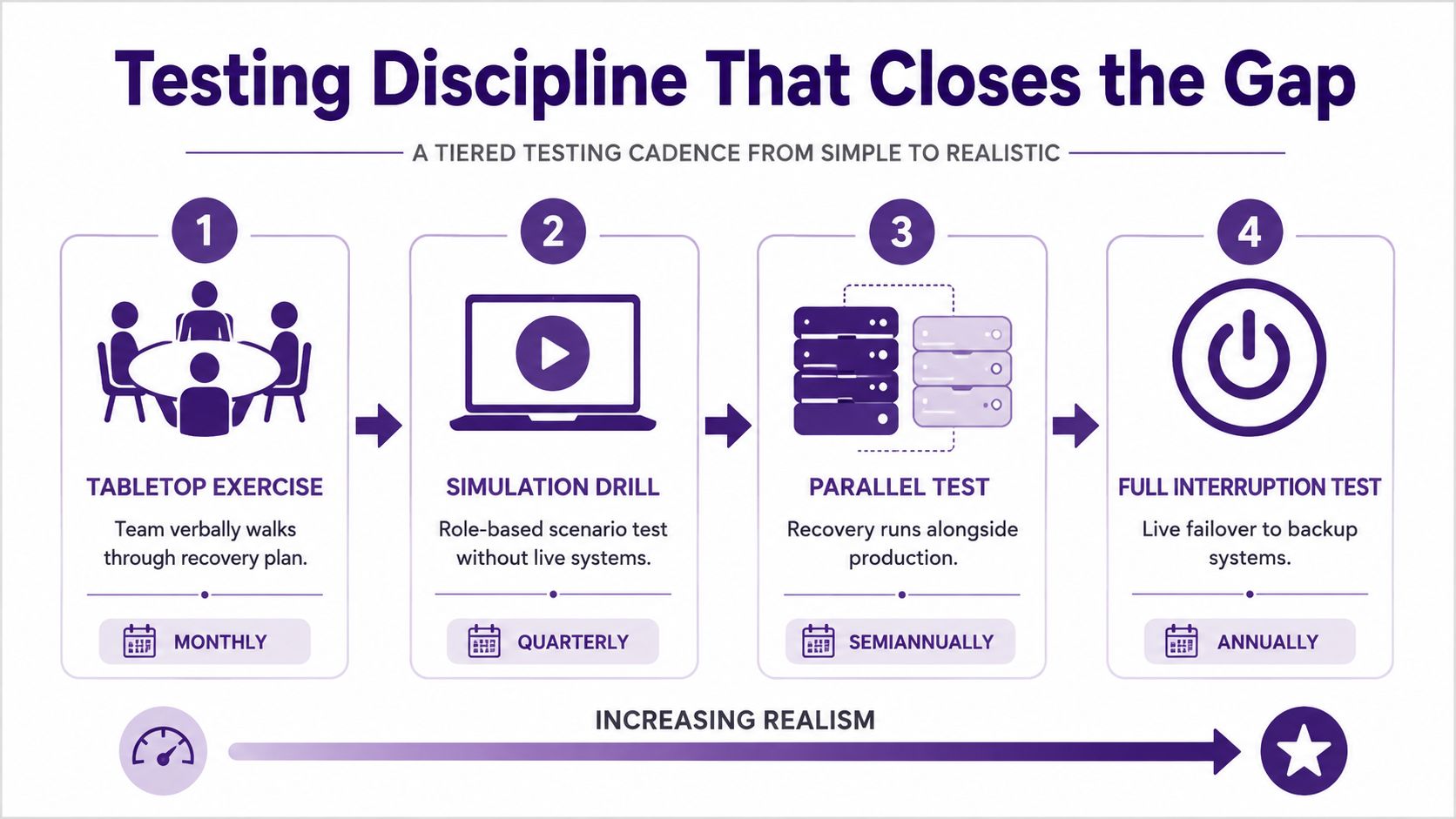
ISO 22301 doesn't prescribe a fixed DR test frequency. It requires organizations to exercise and test business continuity procedures at planned intervals, then review and act on the results, with cadence set by risk and criticality (NIST publication page for SP 800-34 Rev. 1 and continuity reference context). Industry guidance commonly turns that into a tiered pattern such as quarterly full or parallel tests for mission-critical systems, semi-annual simulation for business-important systems, and annual walkthroughs for deferrable systems (tiered DR testing guidance).
For content teams, a practical cadence looks like this:
- Tabletop review: Editorial ops owner walks through a lost-draft or failed-publish scenario with editors and engineering.
- Partial simulation: Restore one content type, such as image assets or newsletter templates, without touching live production.
- Parallel test: Bring up recovery publishing capability alongside production and validate key workflows.
- Full interruption drill: Execute real failover for the most critical publishing path when risk allows.
Track the findings that matter
Don't stop at “test passed.” Log what slowed the team down.
- Detection lag: How long before someone recognized this as an incident.
- Failover friction: Which manual steps created delay or confusion.
- Access problems: Missing permissions, outdated credentials, bad vendor contacts.
- Correction velocity: How quickly the team fixed the issues found in the test.
If security validation is part of your recovery workflow, especially before restoring from a suspected compromise, it helps to pair technical recovery with evidence you can hand to stakeholders. Tools that generate compliance-ready pentest reports can support that handoff when you need to document system condition before bringing services fully back.
Your 30-Day Disaster Recovery Kickoff
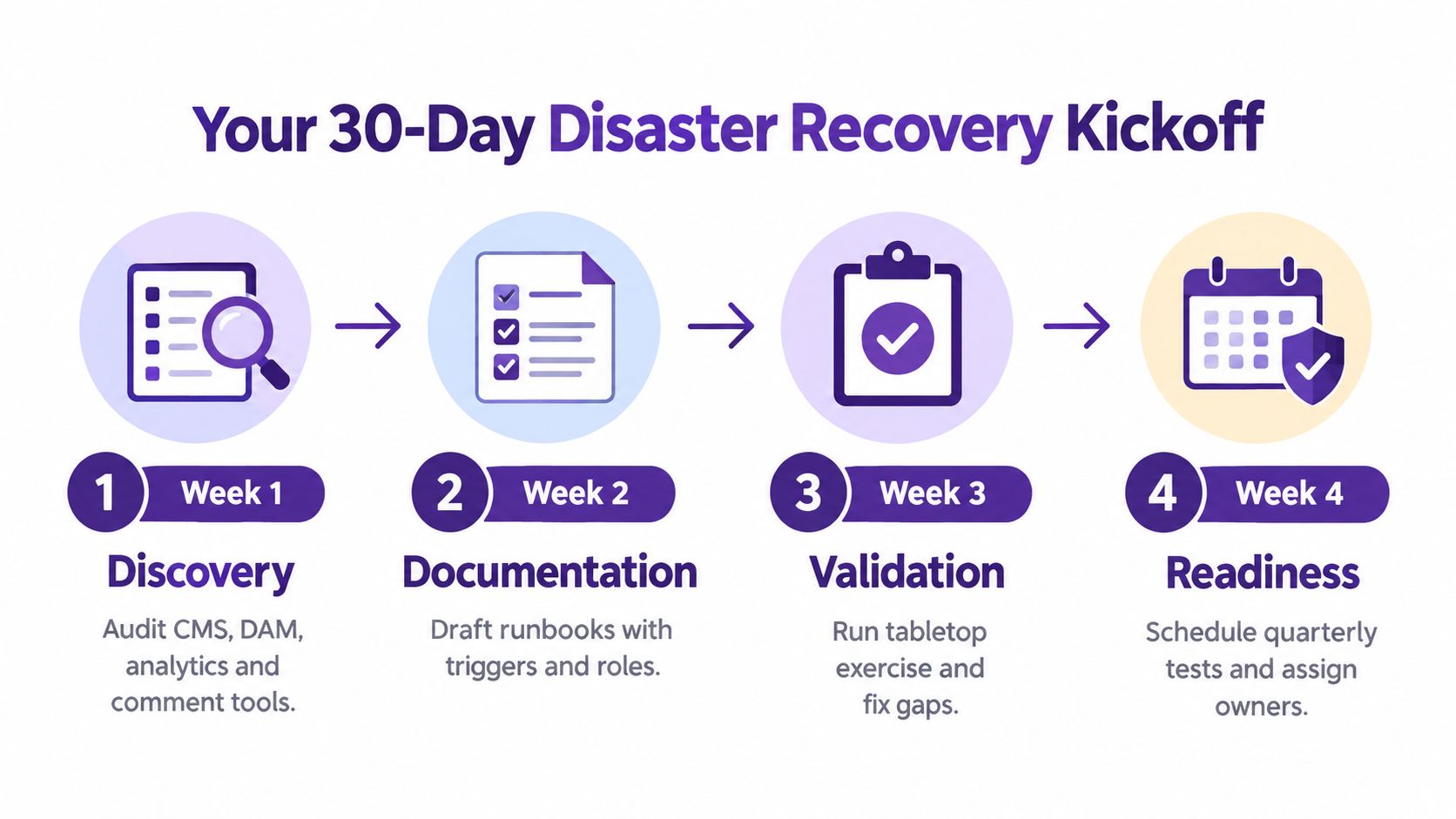
Most content teams don't need a giant transformation project to start. They need a short, owned kickoff with deadlines, artifacts, and a rehearsal.
Week-by-week rollout
Week 1 belongs to discovery. The owner is editorial operations or whoever currently keeps the publishing machinery from drifting apart. Inventory the CMS, DAM, analytics stack, comment tools, newsletter platform, shared drives, and audio or video repositories. Interview editors, producers, and marketers about what they'd panic over losing first. The deliverable is a ranked asset inventory. The artifact is a dependency map tied to workflow stages.
Week 2 is about numbers and tolerance. The owner should be editorial ops with engineering input. Assign RTO and RPO by asset class, then document what backup or replication already exists. Don't chase perfection. The deliverable is a target matrix. The artifact is a simple gap register showing where current recovery capability misses business need.
Week 3 turns policy into action. The owner is the person who will coordinate incidents in practice, not the person with the highest title. Draft the incident runbook, comms tree, fallback publish instructions, and escalation path. The deliverable is a team-usable runbook. The artifact is a contact sheet with current owners, vendors, and emergency publishing links.
Week 4 is rehearsal. Run a tabletop on a lost-draft or failed-publish scenario. Capture every hesitation, access problem, and missing step. The deliverable is a post-mortem. The artifact is a remediation list with owners and due dates.
Keep the plan from decaying
The plan starts dying the moment people treat it as complete. Put a recurring quarterly review on the calendar. Re-check systems, owners, publish paths, and fallback assumptions. If your team adds a new platform, workflow, or revenue dependency, update the recovery plan then, not after the next incident.
A content team doesn't need a perfect disaster recovery plan to get safer. It needs a current one, a tested one, and one that matches how stories actually move.
Contesimal helps content teams organize archives, working files, and research so the material you've already created is easier to find, reuse, and protect when workflows get disrupted. If you're trying to make your content library more recoverable and more valuable at the same time, visit Contesimal and see how it supports structured collaboration around the assets your team can't afford to lose.