
You finish a script, blog post, white paper, or episode notes. You've quoted a sharp point from a YouTube interview, pulled a timestamp from a tutorial, and referenced a lecture that made your argument stronger. Then the annoying part shows up. How do you credit the video correctly in Chicago style without losing half an hour to formatting rules?
That's where most creators stall. The citation itself is short, but the decisions behind it matter: who counts as the author, whether the channel name belongs in the citation, when to include a timestamp, and which Chicago system you're using.
If you've been searching for how to cite youtube video chicago, the useful answer isn't just a formula. It's knowing why Chicago asks for specific details, and how to turn those details into a fast, repeatable workflow you can use across articles, research notes, newsletters, video essays, and content libraries.
Why Accurate YouTube Citations Matter
YouTube isn't a fringe source anymore. The Chicago Manual of Style, first published in 1906, has now evolved through 18 editions, and its latest edition explicitly addresses online multimedia such as YouTube videos under section 14.167, reflecting a world where 500 hours of content are uploaded every minute according to the official CMOS guidance on online documentation.
That matters for more than academic papers. If you publish research-backed content, build educational videos, write explainers, or manage a growing archive of episodes and posts, your citations do three jobs at once:
- They prove traceability. Readers can find the exact source you used.
- They protect credibility. Clear attribution shows you didn't lift ideas loosely.
- They preserve your own library. Months later, you can still tell where a quote, clip, or claim came from.
For creators, this is practical, not ceremonial. A sloppy citation breaks trust fast, especially when your audience can click through and check.
Accurate citation turns a borrowed insight into a usable reference instead of a vague memory.
Chicago gives you two common paths. Notes and Bibliography works well when you're using footnotes or endnotes, which is common in humanities writing and many essay-style publications. Author-Date works better when you're using parenthetical citations inside the text.
If your work depends on source quality, it also helps to think beyond formatting and ask what makes a source reliable in the first place. This short guide on what is a credible source is a useful companion to citation rules.
Citing YouTube Videos in Notes and Bibliography Style
For many creators, this is the format you'll use most. If your piece includes footnotes, endnotes, or a bibliography, Notes and Bibliography is usually the cleanest fit.
A university guide reflecting the CMOS 18th edition gives the notes format as Author, "Title," posted [date], by [channel], YouTube, runtime, URL and shows this example: "Library Orientation Video 2024," posted August 20, 2024, by shapirolibrary, YouTube, 4:11, as described in the SNHU Chicago citation guide for YouTube videos.
The quick structure
Use this full note format:
First note
Firstname Lastname, "Video Title," posted Month Day, Year, by Channel Name, YouTube, runtime, URL.
Use this bibliography format:
Bibliography entry
Lastname, Firstname. "Video Title." Posted Month Day, Year. By Channel Name. YouTube. Runtime. URL.
What each part is doing
The structure looks fussy until you understand the logic.
- Author identifies the creator responsible for the content. If you know the individual, use the individual.
- Title goes in quotation marks because it's a specific video, not a larger standalone book or journal.
- Posted date tells readers which version you referenced.
- By channel helps when the uploader and the creator aren't identical in plain sight.
- YouTube names the platform.
- Runtime distinguishes the full video from a clip, repost, or excerpt.
- URL gives the direct path back to the source.
Creators often save time by being systematic in this process. Don't scrape details loosely from memory. Open the video page once and capture the creator, title, date, channel, runtime, and URL in one pass.
A copy-ready model
If you're citing a standard YouTube video and know the creator's name, your note might look like this:
Jordan Lee, "How to Light a Home Studio," posted March 2, 2024, by Jordan Lee Studio, YouTube, 12:18, https://www.youtube.com/example
And the bibliography version:
Lee, Jordan. "How to Light a Home Studio." Posted March 2, 2024. By Jordan Lee Studio. YouTube. 12:18. https://www.youtube.com/example
The short form for later notes is simpler:
Lee, "How to Light a Home Studio."
That short note is one reason Notes and Bibliography still works well for long-form creator writing. You don't need to repeat the full citation every time after the first mention.
A quick visual example can help if you prefer seeing citation logic in action:
What works in practice
When I edit creator-facing essays, the most reliable approach is simple: cite the video as a piece of published media, not as a casual web page. That mindset keeps you from dropping key details.
Here's the fast check I use before approving a note:
- Named creator present if available
- Exact video title in quotation marks
- Posted date included
- Channel identified
- Runtime included
- Direct URL added
If one of those is missing, the citation usually feels incomplete for a reason.
Using the Author-Date System for YouTube Citations
If your writing uses parenthetical references in the text, Chicago's Author-Date system is the better fit. This is common in research writing where readers expect a quick in-text cue and a full reference list entry at the end.

The format is straightforward. The reference list entry is Lastname, Firstname. Year. "Title." Platform, Month Day. Video, runtime. URL. A cited example is HISTORY. 2022. "Rosa Parks Channel Post." YouTube, May 5. Video, 4:20. [URL], with the matching in-text citation (HISTORY 2022, 1:51) in Scribbr's Chicago guide to YouTube citations.
The two parts you need
For Author-Date, you need both pieces:
| Part | Format |
|---|---|
| In-text citation | (Author Year, timestamp) |
| Reference list entry | Lastname, Firstname. Year. "Title." Platform, Month Day. Video, runtime. URL. |
The timestamp is especially useful when you're citing a specific moment instead of the whole video.
A clean example
Suppose you're citing a video from an organizational channel rather than a named individual. You'd write the in-text citation like this:
(HISTORY 2022, 1:51)
And the reference list entry like this:
HISTORY. 2022. "Rosa Parks Channel Post." YouTube, May 5. Video, 4:20. https://www.youtube.com/example
That setup is practical for creators who publish research summaries, trend analyses, or educational pieces where readers want quick source verification without footnotes cluttering the page.
Use Author-Date when the source needs to stay visible inside the sentence flow. Use Notes and Bibliography when you want cleaner reading and don't mind footnotes.
The key trade-off
Notes and Bibliography is easier on the eye. Author-Date is easier for scanning references at speed. Neither is more “correct” in the abstract. The right one is the system your publication, client, professor, or house style already uses.
Where people go wrong is mixing them. They'll use parenthetical citations in the text, then build a footnote-style source list at the end. Chicago wants consistency. Pick one system and carry it all the way through.
Handling Tricky YouTube Citation Scenarios
Citation gets real here. Most YouTube sources don't arrive in neat textbook form. A creator uses a screen name. A brand uploads a talk. A playlist matters more than a single video. You only need one quote from the middle.
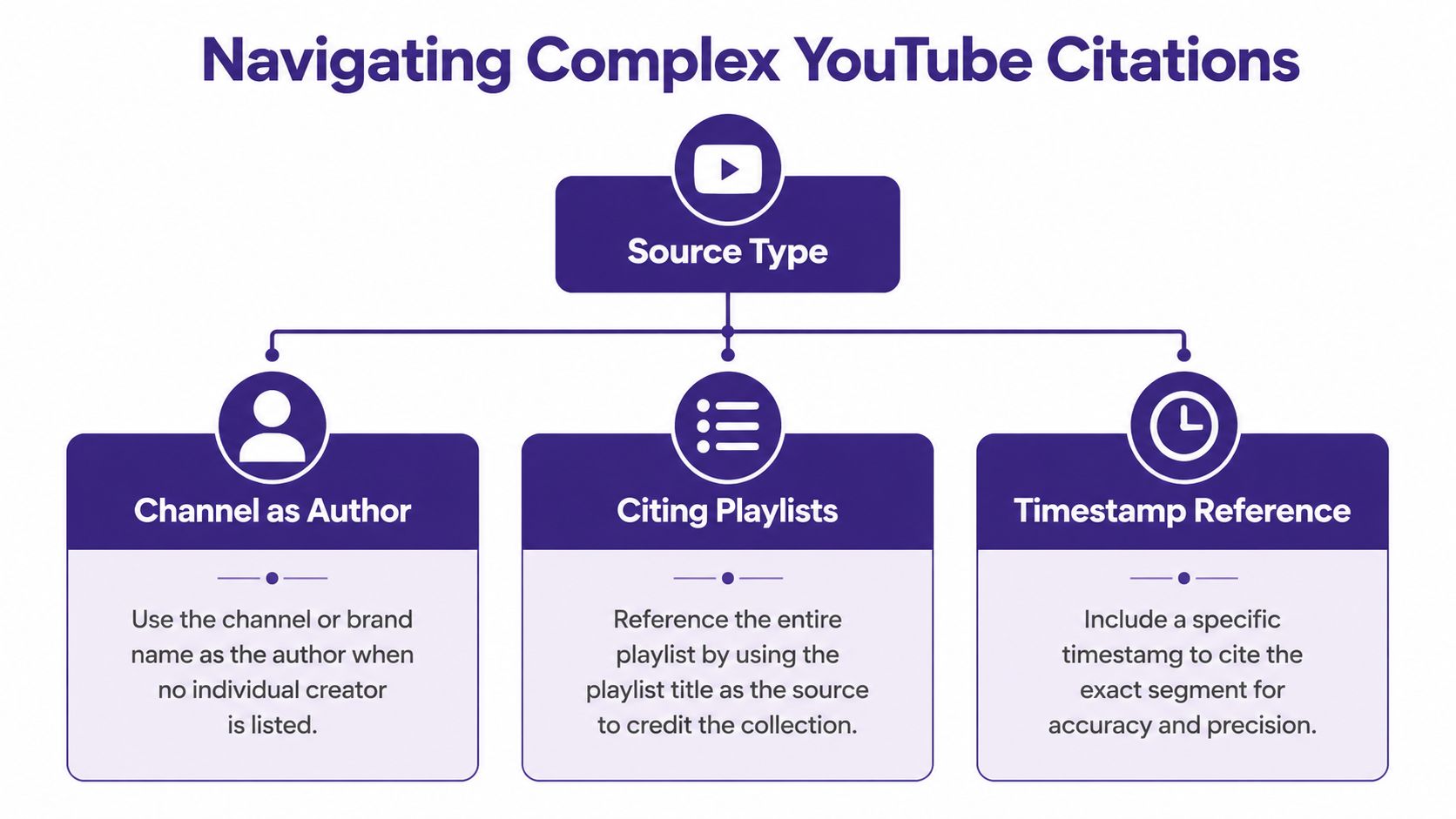
When the channel is the author
You're citing a video from a channel like HISTORY, TEDx Talks, or another organization, and no individual author is clearly credited. In that case, use the channel name as the author.
That's normal. Don't force a person's name into the citation if the platform doesn't clearly present one.
Example in Author-Date
(HISTORY 2022, 1:51)
Reference entry
HISTORY. 2022. "Rosa Parks Channel Post." YouTube, May 5. Video, 4:20. https://www.youtube.com/example
The practical rule is simple. If a channel functions as the publishing identity, cite the channel.
When no clear author is listed
This is common with reposts, clips, and promotional uploads. Chicago's own FAQ advice emphasizes researching the original creator beyond the platform where possible and filling in identifying details so the source remains traceable.
That matters because YouTube often displays the uploader more clearly than the actual creator. If the video is a speech, lecture, interview, or event recording, look for the original speaker or producing body before defaulting to the channel name.
Practical rule: credit the most responsible creator you can verify, not just the account that happened to upload the file.
If you can't verify an individual creator, use the channel or organization.
When you need a timestamp
Creators often cite YouTube because of one sharp line, one demonstration, or one scene. In that case, add the timestamp in the note or parenthetical citation so readers can jump to the relevant moment.
Examples:
- Notes style
Jordan Lee, "How to Light a Home Studio," posted March 2, 2024, by Jordan Lee Studio, YouTube, 12:18, https://www.youtube.com/example. - Author-Date in text
(Jordan Lee 2024, 3:14)
If you're also sharing the source with collaborators or readers, it helps to generate a direct timestamped link. This guide on adding a timestamp to a YouTube link is handy when you want the citation and the share link to point to the same exact moment.
When the playlist is what matters
Sometimes a single video isn't the actual source. A playlist is. That happens with course modules, serialized explainers, archived event collections, and interview series.
In that case, cite the playlist as a collection only if your discussion refers to the playlist as a whole. If you're drawing from one specific video inside it, cite the individual video instead.
That distinction saves a lot of confusion:
- Cite the playlist when you're discussing the collection itself.
- Cite the video when you're quoting or analyzing one item from inside it.
When the title or metadata looks messy
Some YouTube titles are loaded with emojis, all caps, or marketing language. Don't “clean them up” unless your style guide explicitly tells you to normalize them. For a citation, accuracy matters more than elegance.
If the metadata is incomplete, don't guess. Missing information is better than invented information.
Common Mistakes to Avoid When Citing YouTube Videos
Most citation errors come from habits people learned on the open web. Chicago asks for sharper distinctions than “video title plus link.”
Mistake one: listing YouTube as the author
YouTube is the platform, not the creator. The author should be the person, channel, or organization responsible for the content.
Wrong:
YouTube. "Video Title."
Better:
Creator Name. "Video Title." … YouTube …
Mistake two: dropping the runtime
Runtime often gets skipped because it feels optional. In practice, it helps identify the exact item you used and makes the citation more complete.
If a guide example includes runtime, follow that pattern. It's especially useful when videos have similar titles or when clips and full uploads both circulate.
Mistake three: forgetting quotation marks around the title
A YouTube video title is typically treated as a short work, so it belongs in quotation marks, not italics.
This is one of the easiest visual tells of an incorrect citation. If I'm scanning drafts quickly, title formatting is often the first thing that reveals whether the writer used Chicago style.
Mistake four: mixing systems
A common hybrid looks like this: the writer uses a parenthetical in-text citation, then writes a note-style bibliography entry. That creates friction for readers and editors.
Use one complete system:
- Notes and Bibliography for notes and bibliography entries
- Author-Date for parenthetical citations and a reference list
Mistake five: guessing at missing details
If the creator name, date, or original source isn't obvious, some writers fill the gaps with assumptions. That's worse than leaving the uncertain part out.
If you can't verify a detail, don't manufacture one. Citation is documentation, not reconstruction.
A fast proofreading pass
Before you publish, check these five items:
- Author field uses a person or channel, not the platform
- Title formatting uses quotation marks
- Date matches the posted date shown on the video page
- Runtime appears where your chosen format expects it
- System consistency stays Chicago Notes or Chicago Author-Date from start to finish
That quick audit catches most problems.
Your Quick-Copy Chicago Citation Templates
Good citation practice does more than satisfy a style guide. It makes your research usable, your content more defensible, and your archive easier to search later. If you're building a serious body of work, that matters.
If you want another practical companion for building source references into your workflow, this guide on how to add citation is worth bookmarking.
Quick copy formats
Notes and Bibliography first note
Firstname Lastname, "Video Title," posted Month Day, Year, by Channel Name, YouTube, runtime, URL.
Notes and Bibliography bibliography entry
Lastname, Firstname. "Video Title." Posted Month Day, Year. By Channel Name. YouTube. Runtime. URL.
Author-Date in-text citation
(Author Year, timestamp)
Author-Date reference list entry
Lastname, Firstname. Year. "Video Title." YouTube, Month Day. Video, runtime. URL.
The fast rule to remember
Use the creator as author, the exact video title in quotation marks, the posted date, the platform, the runtime, and the URL. Then stay consistent with the Chicago system you chose.
That's the practical answer to how to cite youtube video chicago. It's not hard once you stop treating YouTube as informal media and start treating it like a source readers may need to verify.
If you're building a content library where citations, source tracking, research notes, and reusable media references need to stay organized, Contesimal can help you turn scattered source material into a searchable, usable system. It's built for creators, publishers, and research-heavy teams that want to extract more value from the content they already have.