
An overflowing inbox is more than just a nuisance; it's a direct threat to a creator's momentum. It buries partnership opportunities, hides crucial audience feedback, and turns finding a simple file into a frantic search.
For YouTubers, podcasters, and writers trying to build a business, this digital clutter isn't just an annoyance—it's a barrier to growth. When your content is your career, a disorganized inbox can genuinely cost you money. This is especially true as you transition from a hobbyist to a revenue-generating entity and need to organize your content library to create new value.
This guide isn’t about chasing the mythical ‘Inbox Zero.’ It’s about building a practical, sustainable system that works for you. The goal is to turn your inbox from an anxiety-inducing to-do list into an efficient command center that actually supports your creative work. It’s about knowing exactly where to find that sponsorship contract, a guest’s bio, or that golden nugget of audience feedback that could inspire your next big hit.
The Power of Quick Triage
The foundation of any organized inbox is quick, decisive action. Think of it as a "touch it once" philosophy. When a new email arrives, you have to make a choice on the spot: delete, delegate, reply, or archive.
This simple decision tree is how I visualize the process. It's less about a rigid set of rules and more about building an instinct for what matters.
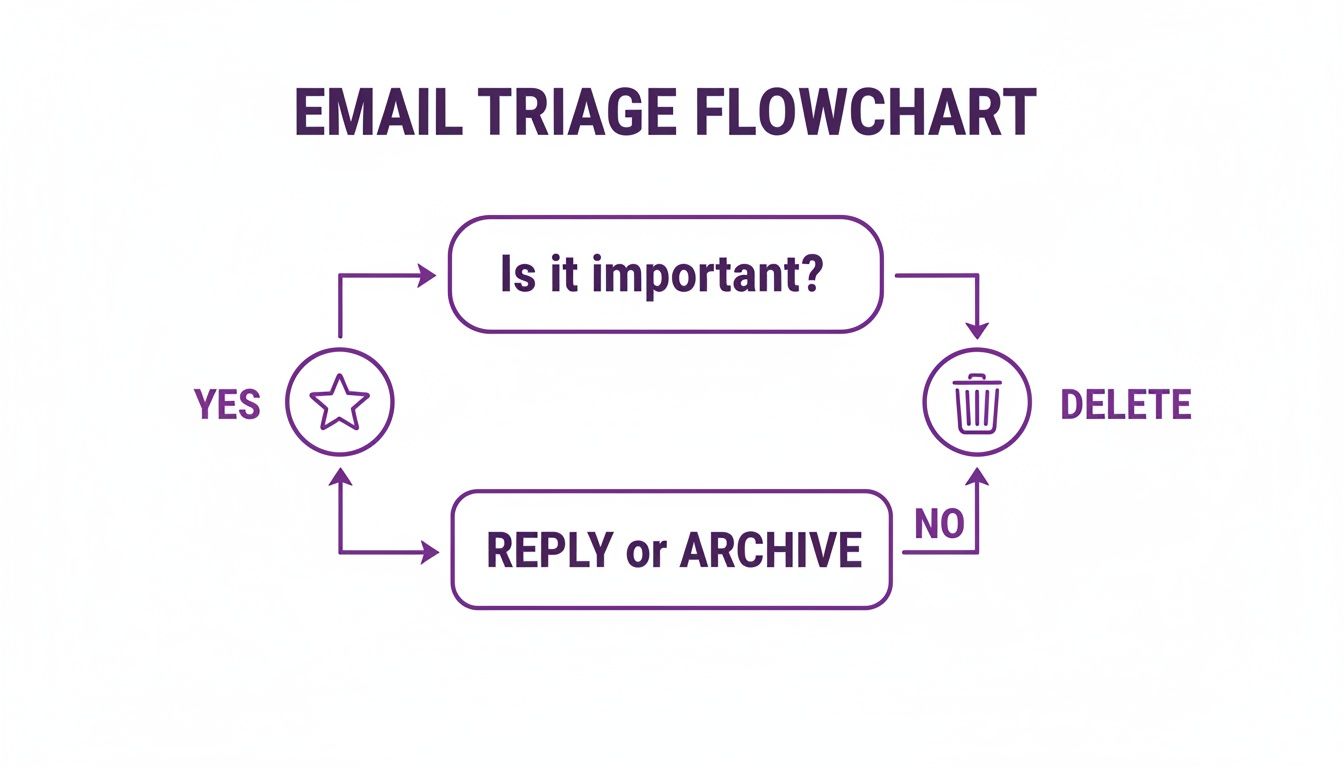
Internalizing this flow stops you from using your inbox as a messy holding pen and starts treating it like a processing station. For a creator, this is non-negotiable. A single email could be a potential six-figure sponsorship deal or just another newsletter. Treating them with the same indecision is a recipe for missed opportunities and can stall your growth.
Before you start cleaning house, it helps to pick a guiding philosophy. There are several popular methods, but they all boil down to processing information efficiently so you can take action.
Core Email Triage Philosophies for Creators
Here’s a look at some common approaches to help you find a starting point that fits your personality and workflow.
| Method | Core Principle | Best For Creators Who… |
|---|---|---|
| Inbox Zero | The inbox is not a to-do list. Process every single email until the inbox is empty. | …are disciplined, thrive on completion, and get anxiety from seeing unread counts. |
| Getting Things Done (GTD) | Capture everything, clarify its purpose, and organize it into actionable lists. If an email takes less than 2 minutes to handle, do it immediately. | …are content marketers or publishers managing multiple complex projects (like a podcast, blog, and course) and need a system that integrates tasks beyond just email. |
| The 4 D's | Every email is either Deleted, Delegated, Done, or Deferred (snoozed or moved to a task list). | …are decisive, often work with a team or VA, and prefer a simple, action-oriented framework. |
| Email Batching | Check and process email only at specific, scheduled times during the day (e.g., 9 AM and 4 PM). | …are easily distracted and want to protect large blocks of time for deep creative work like writing or video editing. |
You don't have to follow one method religiously. In my experience, the best systems often borrow elements from a few different philosophies. The key is to commit to a system, whatever it looks like for you.
An organized inbox isn't about having zero emails. It’s about having zero doubt about what needs your attention.
By setting up a clear system now, you're laying the groundwork to manage collaborations, audience engagement, and production workflows like a pro. This is a core practice for any creator moving from hobbyist to a revenue-generating business. Your ability to organize, understand, and take action on information is what separates the stalled from the successful.
Your Game Plan for Getting to Inbox Zero

Staring at an inbox with a five-figure unread count can feel like trying to empty the ocean with a teaspoon. The trick is to stop trying to deal with every single message and start with a few big, satisfying wins. This isn't about perfectly sorting every email from 2017; it's about a hard reset.
For creators, this is more than just tidying up. Your email history is a hidden part of your content library, full of potential contacts, ideas, and feedback. Right now, it's just a mess. Let's fix that and reignite its value.
Rip Off the Band-Aid: The Bulk Archive
Your first move is the easiest and most impactful: the mass archive. This is where you move everything older than a certain date out of your inbox with a single click. It gives you a clean slate and an immediate sense of accomplishment.
Don't get lost in the details here. Just pick a cutoff date—say, 30 or 60 days ago—and archive everything older. Trust me, your email client's search bar is more than capable of digging up an old message if you ever actually need it.
Remember, archiving isn't deleting. You're just moving old mail from your active workspace to a digital filing cabinet. This simple action transforms your inbox from a cluttered archive into a true to-do list, which is a massive mental shift for any professional creator.
This is the fastest way to get rid of that visual clutter and the mental weight that comes with thousands of old emails.
Go on an Unsubscribe Spree
A huge chunk of your daily email headache comes from subscriptions you signed up for years ago and never read. Going through them one by one to find the unsubscribe link is a surefire way to get frustrated and quit. Instead, let's automate it.
Services like Unroll.Me or built-in features from clients like Edison Mail are brilliant for this. They'll scan your inbox and give you a single, clean list of every subscription you have.
- Spot the Junk: Quickly scroll through the list. You'll instantly see all the old promotional offers, software updates, and newsletters you haven’t touched in ages.
- Be Ruthless: If an email doesn't add real value, just unsubscribe. It's not a permanent decision; you can always sign up again if you find you miss it (you probably won't).
- Curate the Good Stuff: Keep the subscriptions that are genuinely useful—the industry newsletters with great insights, your competitors' updates, or content that actually inspires your next video or podcast episode.
Taking 15 minutes to do this can easily cut your incoming email volume by 20-50%. For a busy creator, that's fewer distractions and more brainpower for what really drives your business forward.
Make Space for Creative Work
This whole process is a lot like clearing out a messy garage. You have to get rid of the junk you no longer need before you can organize the tools you use every day. A cluttered digital life leads directly to a cluttered mind, making it nearly impossible to focus on deep, meaningful work.
Think about it: a YouTuber could miss a huge brand collaboration because it’s buried under 50 marketing emails. A publisher could overlook a promising author's pitch lost in a sea of spammy notifications.
By taking these first steps, you’re turning your inbox from a source of stress back into a tool for opportunity. This isn't just a one-off cleanup; it's the foundation for a system that helps you find what you need, act on what matters, and grow your brand.
Alright, you’ve survived the great inbox purge. The backlog is gone. Now for the important part: building a system so it never gets that bad again. This isn't just about tidying up; it's about transforming your inbox from a chaotic mess into an intelligent command center that works for you.
This is the exact shift I see creators make when they go from a side hustle to a real, revenue-generating business. They stop reacting to every ding and start directing their attention where it matters most, organizing their assets to create new value.
From Folders to a Content Command Center
Let's get one thing straight: basic folders like "Work" and "Personal" just won't cut it anymore. A wedding planner might organize by vendor, sure, but as a YouTuber, podcaster, or blogger, your inbox needs to reflect the unique rhythm of your creative business.
Think in terms of your content lifecycle and the different hats you wear every day. Your labels (Gmail) or folders (Outlook/Mail) should be a mirror of your actual operations.
Here are a few categories that have been a game-changer for creators I've worked with:
- Sponsorships & Partnerships: This is where every conversation about brand deals lives, from the first "hello" to the final payment confirmation.
- Podcast Guests: All pitches you get, your own outreach, scheduling back-and-forths, and those crucial pre-interview notes.
- Audience Gold: I love this one. It’s for noteworthy comments, deep questions, and feedback that you can upcycle into future content.
- Money & Admin: A simple bucket for invoices, software receipts, and payment notifications.
- Production Pipeline: A temporary home for things like transcripts, graphics, B-roll links, or any asset sent over for a specific project.
Suddenly, your inbox isn’t a junk drawer; it’s a searchable, powerful database. Need to find that affiliate contract from six months ago? It's right there in "Sponsorships." Looking for an amazing audience question for your next Q&A video? You’ve got a list waiting in "Audience Gold."
I always tell people this isn't just organization; it's a form of content insurance. You're building a private knowledge base. That folder of audience questions becomes a goldmine for your next ten video ideas.
This is the kind of system that grows with you. Down the road, when you hire a virtual assistant or an editor, you can give them access to specific labels. It creates a seamless workflow without you having to hand over the keys to your entire digital life.
Putting Your Inbox to Work with Filters
Now, labels are great, but they’re only half the story. The real magic happens when you pair them with filters (or rules in Outlook). Think of filters as your personal inbox robot. You give them simple instructions, and they scan every incoming email, automatically applying labels, archiving messages, or flagging things for your attention.
Honestly, setting up a few smart filters is the single most powerful thing you can do to keep your inbox clean for good. I've seen studies showing that checking email just three times a day can seriously reduce stress. Filters are what make that a reality, because they ensure your main inbox only contains emails that genuinely need you, right now.
When you go to create a filter in Gmail, you'll see this little menu. Don't underestimate it.
This simple box is the control panel for your entire email strategy. You can build rules based on who sent the email, the subject line, specific words, and more. This is where you teach your inbox how to think, saving yourself hours of manual sorting every single week.
Essential Filters for Every Content Creator
Let's build a few filters you can set up in the next 10 minutes. I'm using Gmail for these examples, but the logic is the same in Outlook or any other modern email client.
1. The Financial Filter
Automatically file all those receipts and invoices so they don't distract you.
- Look For: Emails with the words
invoiceORreceiptORpayment confirmationin the subject or body. - Do This:
Skip the Inbox (Archive it)andApply the label: Money & Admin. - The Payoff: All your financial records are filed away without ever hitting your main inbox. You can just pop into that label once a month to do your books.
2. The Notification Tamer
Keep social media pings and platform updates out of your face but still easy to find.
- Look For: Emails from
*@youtube.comOR*@facebook.comOR*@linkedin.com. - Do This:
Skip the Inbox (Archive it)andApply the label: Notifications. - The Payoff: No more getting derailed by every new comment or connection request. You can batch-process these when you have dedicated time for community management.
3. The VIP Filter
Make absolutely sure you never miss an email from a key partner or collaborator.
- Look For: Emails from
sponsor@bigbrand.comOReditor@yourpublisher.com. - Do This:
Star itandMark as important. - The Payoff: High-priority emails get visually flagged and pushed right to the top. They simply can't be missed.
By combining specific, meaningful labels with these kinds of automated filters, you build a system that’s truly resilient. This is how you organize your inbox in a way that scales as you grow, letting you focus your energy on what you do best: creating great content.
Automating Your Content Workflow for Peak Productivity

Having a neat inbox with smart folders and filters is a great first step. But the real game-changer is when you start making that system work for you, turning your email from a chore into a genuine productivity tool.
For any serious content creator or publisher, this isn't just a nice-to-have. Every minute you spend on repetitive admin is a minute you're not spending on your next video, podcast, or newsletter. Let's dig into some practical ways to automate those tasks and get that time back.
The Power of Templates and Quick Replies
How often have you found yourself typing out a nearly identical response to a sponsorship pitch, a collaboration request, or a common question from your audience? I'm guessing it's more times than you can count. This is exactly what templates (or "canned responses" in Gmail) were made for.
Instead of re-writing the same message over and over, you create a pre-written version you can pop in with just a click.
Here are a few templates I recommend every creator set up right away:
- The Polite "No": A graceful way to decline guest posts or collaborations that just aren't the right fit.
- Sponsorship Inquiry: A quick reply that asks for more details and maybe includes a link to your media kit.
- Audience FAQ: A go-to answer for the top 3-5 questions you get from your community.
- Affiliate Details: A simple message explaining your affiliate program terms to anyone interested in partnering up.
Setting up just these four templates can easily save you hours every single month. It’s a simple, one-time setup that keeps you responsive and professional without derailing your creative work.
Your Inbox Is a Research Goldmine—Learn to Dig
One of the most powerful but overlooked parts of email management is mastering the search function. Think about it: your email archive is a massive, searchable database of your entire career. It's a living part of your content library, filled with conversations, attachments, and old ideas just waiting to be rediscovered and upcycled.
I often treat my inbox like a personal content library. With the right search query, you can instantly pull up that PDF brief a sponsor sent last year or that amazing audience story someone shared back in 2019 that could be the seed for your next viral hit.
Get comfortable with these search operators—they’re incredibly useful:
from:[email address]to find everything from a specific person.has:attachment filename:pdfto find all emails that have a PDF attached.subject:(sponsorship OR partnership)to find emails with either of those words in the subject line.before:2022/01/01to pull up all messages sent before a certain date.
Once you start combining them, you can get incredibly specific. A query like from:teammate@email.com has:attachment filename:script will pinpoint exactly what you need in seconds. Your inbox stops being just a place for messages and becomes a research assistant that helps you unearth old assets and revive past conversations.
The table below provides some specific, practical examples of how content creators can set up automation rules in common email clients like Gmail and Outlook.
Sample Automation Rules for Content Creators
| Email Type | Rule/Filter Action | Benefit |
|---|---|---|
| Guest Appearance Request | Gmail: Has the words: "guest on your podcast" -> Apply label "Podcast Guests" & Star it. Outlook: Subject includes: "guest appearance" -> Move to "Guest Pitches" folder & Flag for follow-up. |
Instantly isolates potential collaboration opportunities for review, separating them from general inquiries. |
| Sponsorship Pitch | Gmail: Has the words: "sponsorship OR brand deal" -> Apply label "Sponsors" & forward to sponsorships@[yourdomain].com. Outlook: Subject or body includes: "partnership" -> Categorize as "Sponsorships" & move to "Brand Deals" folder. |
Automatically sorts and archives all partnership offers in one place. Forwarding can loop in a manager or agent. |
| Newsletter/RSS Updates | Gmail: from:noreply@* OR "unsubscribe" -> Apply label "Newsletters" & Skip the Inbox (Archive). Outlook: Sender address includes: "newsletter" -> Move to "Reading List" folder & Mark as read. |
Keeps your primary inbox clean by moving non-urgent reading material to a designated folder you can check later. |
| Comment Notifications | Gmail: from:noreply-comment@youtube.com -> Apply label "YT Comments" & Skip the Inbox. Outlook: From contains: "wordpress.com/comments" -> Move to "Blog Comments" folder. |
Prevents your inbox from being flooded with notifications while still keeping a record of them for later review. |
These rules are just a starting point. The goal is to train your email client to do the initial sorting for you, so you only have to focus on what truly requires your attention.
Connecting Your Inbox to Your Workflow
The final step is to bridge the gap between your email and the other tools you rely on. Manually copying a guest's info from an email and pasting it into your Asana or Trello board is a perfect example of a task that should be automated.
Integrations using tools like Zapier or IFTTT let your inbox "talk" to your other apps.
Imagine this: a podcast guest confirms their interview time in an email. Instead of manually opening your project management tool, creating a task, and copying over the details, you can set up an automation. For example, many tools, including Asana, give you a special email address for each project. Simply forwarding the guest's confirmation email to [project]@asana.com can automatically create a task with the email's content.
This might seem like a small tweak, but these seamless connections add up. It removes friction and makes sure actionable items don't get lost in your inbox. For any creator, publisher, or content marketer trying to scale, building these automated workflows is essential. It pulls you out of the administrative weeds so you can focus on what you do best: creating.
Collaborative Email Management for Teams

There comes a point in every growing creative project where your personal inbox just can't keep up. What once felt manageable is now a firehose of sponsorship deals, editorial feedback, and guest pitches. Important opportunities get buried, and you find yourself wondering if that crucial email ever got a reply.
When you start bringing on help—an editor, a virtual assistant, a sponsorship manager—the chaos only multiplies. This is the moment when you move beyond working alone on research and need to collaborate. The last thing you want to do is pass around your personal login details. That's not a system; it's a security risk and a recipe for confusion. What you really need is a shared workspace built for clarity and accountability.
Building Your Team's Mission Control
The first move is to get team-related communications out of personal inboxes and into a central hub. Instead of having sponsor emails land in your inbox and guest pitches in your assistant’s, you channel them into one shared place. This is especially vital for generic email addresses that represent a function, not a person.
For most content teams, this looks like setting up addresses such as:
sponsors@yourbrand.comeditorial@yourbrand.comguests@yourpodcast.compress@yourbrand.com
You can manage these in a few ways. A shared inbox, a native feature in platforms like Outlook, is a great option. Another popular method is setting up a Google Group as a "Collaborative Inbox," which lets multiple people manage a single address.
The immediate payoff is total transparency. Everyone on the team can see what's been handled and what's still waiting. This simple change nearly eliminates the risk of two people answering the same email or, even worse, no one answering at all.
A shared inbox isn't just about email; it's a living record of your team's conversations and commitments. It transforms scattered communications into a collective knowledge base, helping everyone understand the status of partnerships, pitches, and projects at a glance.
This shared system becomes the foundation for everything that follows. It allows your team to gather around a set of knowledge, create meaning, and collaborate to generate value from it.
Defining Who Does What (and When)
Of course, a shared inbox with no rules is just a different kind of mess. To make it work, you have to create a clear playbook for how your team tackles incoming mail. Who’s on point for what?
When a new sponsorship inquiry lands, who’s responsible for the first reply? When a guest pitch comes in, who vets it and decides if it moves forward? Answering these questions up front is the only way to prevent conversations from falling through the cracks.
Here are a few practices that have worked wonders for teams I've worked with:
- Assign Ownership: Most collaborative tools let you assign an email to a specific person. Do it. This simple click makes it crystal clear who is responsible for seeing that thread through to the end.
- Use Status Tags: Don't leave people guessing. Create simple, clear labels like
New,In Progress,Awaiting Reply, andResolved. This gives the whole team an at-a-glance view of the entire pipeline. - Talk Internally, Not Externally: Instead of forwarding emails back and forth to discuss them, use the internal notes or comments feature inside the conversation thread. This keeps all the context in one spot and your primary inboxes clean.
- Track Response Times: For creators, speed can make or break a deal. Set a team goal of responding to all high-priority inquiries, like sponsorship requests, within 24 hours.
This isn't just theory; it's how professional publishing houses and podcast networks handle the relentless flow of communication. By getting organized as a team, you build a more powerful, efficient content machine that's ready to scale.
Frequently Asked Questions About Email Organization
Even with a great system in place, you’re bound to run into a few tricky situations. Let’s be honest, knowing how to organize an email inbox is one thing, but troubleshooting the common roadblocks that pop up is another.
Here are my answers to some of the most common questions I get from creators who are trying to keep their inboxes clean for the long haul.
How Often Should I Clean My Inbox?
Here’s a mindset shift that makes all the difference: stop thinking about "cleaning" and start "processing." Instead of letting emails pile up for a dreaded weekly purge, you handle them as they arrive. I swear by the "touch it once" principle.
Every day, you just make a quick decision for each new message: reply now, archive it, delete it, or send it to your task list. This small daily habit prevents that overwhelming buildup, turning what used to be a massive chore into a quick, five-minute check-in. It's all about consistent maintenance, not marathon cleaning sessions.
Is Inbox Zero A Realistic Goal For A Busy Creator?
For most of us, chasing Inbox Zero is more stressful than it's worth. It’s a nice idea in theory, but it doesn't really jive with the unpredictable, always-on nature of running a creative business.
A much better, more sustainable goal is what I call "Inbox Zen." This is where your primary inbox only holds things that need your attention right now. Everything else is safely archived, deleted, or sorted away, giving you total clarity without the pressure of a perfectly empty screen.
This approach is all about purpose, not perfection. You always know what’s on your plate without chasing an often-impossible number. For content marketers aligning content across many platforms, or publishers wanting to grow the value of their library, this focused approach is key.
What's The Best Way To Handle Emails That Require A Follow-up?
This is a classic bottleneck. The absolute key is to get that email out of your main inbox until you’re actually ready to deal with it. I find two methods work incredibly well:
- Use the Snooze Feature: Pretty much every email client has a "snooze" button now. Use it! You can make an email vanish and then magically reappear at the top of your inbox on the exact day and time you plan to work on it.
- Move It to a Task Manager: For more complicated follow-ups, I forward the email straight to a project management tool like Asana or Trello. This instantly converts the email into a real, trackable task with a deadline, slotting it right into your existing workflow.
Should I Delete Old Emails Or Archive Them?
Always archive, almost never delete. Modern email providers give us massive amounts of storage, so there’s really no need to delete messages just to save space.
Think of your email archive as a personal, searchable database of your entire career. It's a goldmine holding a complete history of conversations, project details, key contacts, and even future content ideas you’ve forgotten about. Deleting an email erases that history forever. Archiving lets you upcycle old content and create new value from past interactions. The delete button should only be for true junk—spam and promotional fluff you'll never, ever need to see again.
As your content business grows, the need to organize your information, collaborate with your team, and extract value from your library becomes critical. Contesimal is designed for this exact challenge. Our platform helps you turn your entire content library—videos, podcasts, articles, and documents—into a searchable, intelligent asset. Discover hidden connections, generate new ideas, and empower your team to collaborate with AI to bring your best content to life. Stop letting great ideas get buried and start building infinite content value. Find out more at https://contesimal.ai.