
You've probably got one right now. A promising project that exists across a notes app, a voice memo, two half-built folders, a shared drive, and a message thread with someone who still hasn't sent the final assets.
That's normal when you're creating at speed. It's also the point where good creators start feeling the ceiling. Publishing a single great video, podcast episode, or article from instinct is one thing. Repeating that performance across a season, a launch, or a growing team is different work.
The missing piece usually isn't talent. It's a project plan document.
For creators, that phrase can sound too corporate to be useful. In practice, it's just the document that turns “we should do this” into “here's what we're making, who owns each part, what has to happen first, and how we'll know it's ready to publish.” If you want a cleaner workflow, fewer last-minute scrambles, and a content library that can keep generating value, you need one.
Why Your Next Creative Project Needs a Plan
Creative work gets messy fast because ideas multiply faster than finished assets. A podcast season starts with a strong concept, then grows into guest outreach, research, outlines, recording logistics, audio editing, show notes, clips, graphics, approvals, publishing, and promotion. A video series does the same thing. So does an editorial package.
That's where creators get stuck. Not at the idea stage. At the handoff stage.

Planning is what makes repeatability possible
A lot of creators resist formal planning because they think it will flatten the work. It usually does the opposite. A plan removes preventable confusion so your creative energy can go into the content itself.
A proper project plan document isn't just a calendar. It gives structure to decisions that otherwise get remade every week:
- What are we producing
- What's out of scope
- Who approves what
- Which deadlines are real
- What happens if a dependency slips
Without those answers, every project becomes a fresh negotiation.
A plan doesn't kill spontaneity. It protects the hours where spontaneity actually matters.
This isn't niche operational behavior anymore. By 2030, the world is expected to require 25 million new project professionals, a projection highlighted in Visual Planning's project management statistics roundup. That matters because it shows structured planning has become standard operating practice across complex work. Content teams aren't exempt from that shift. They're living inside it.
Hobby workflow vs professional workflow
The difference between a hobbyist workflow and a professional one often shows up in how work survives pressure.
When the deadline moves up, the sponsor requests a new deliverable, a guest reschedules, or your editor gets overloaded, instinct alone won't save the project. A written plan gives you a control point. You can cut scope, move milestones, reassign work, or delay a release intentionally instead of improvising under stress.
A simple comparison makes it clear:
| Workflow style | What it feels like | What usually happens |
|---|---|---|
| Idea-led only | Exciting, fast, loose | Strong starts, uneven finishes |
| Plan-backed creative work | Clear, calmer, accountable | Better handoffs, cleaner launches |
If you're trying to publish more consistently, run a team, or coordinate across platforms, planning stops being optional. For a useful outside perspective on how teams are tightening execution, Tooling Studio's 2025 project management strategies is worth browsing.
The Core Components of a Creator's Project Plan
A creator's project plan document should feel like a working blueprint, not a bureaucratic file. In modern guidance, a project plan is treated as a formal blueprint that combines objectives, scope, schedule, budget, risks, and communication, and it acts as the controlling document for execution, monitoring, and closure, as described in Wrike's guide to writing a project plan.
For creators, that language becomes practical fast. If you're launching a six-episode podcast season, this document tells the host, producer, editor, designer, and marketer what has to happen and when.

The parts that actually matter
Here's the anatomy I'd expect to see in a useful creator plan.
Scope
This is the boundary line. For a YouTube series, scope might include six episodes, one trailer, six thumbnails, six email sends, and short-form cutdowns. It should also state what's not included. No bonus episode. No behind-the-scenes mini-doc. No extra platform launch unless approved.Objectives
Vague goals are eliminated. “Grow the channel” isn't a usable objective. “Publish a cohesive educational series that supports a newsletter push and a repurposing workflow” is much better because it changes how you plan the work.Deliverables
Name the outputs. Final video files, scripts, motion graphics, audio masters, transcripts, show notes, blog adaptations, quote graphics, metadata, upload packages.Stakeholders and roles
Even small creator teams have stakeholders. Host, editor, producer, researcher, designer, client, sponsor, managing editor, brand lead. If someone can block a decision, approve a draft, or miss a handoff, they belong in the plan.
Creator translation of corporate planning language
A lot of planning vocabulary becomes easier when you translate it into content work.
| Formal term | Creator version |
|---|---|
| Milestone | Final audio mix for Episode 3 approved |
| Dependency | Cover art can't finish until title is locked |
| Risk | Guest delays, missing B-roll, legal review lag |
| Communication plan | Who gets updates, where feedback happens, when status is reviewed |
That's why documentation examples help. If you want to see how teams turn recurring work into repeatable systems, these process documentation examples make the concept easier to apply to editorial and production environments.
The sections people skip and regret later
Most creator plans cover schedule and deliverables. The weak ones skip the less glamorous parts.
Those missing parts usually include:
Resource allocation
Time, people, tools, budget, contractor hours, studio access, review bandwidth.Risk planning
What happens if the guest cancels, the sponsor adds revisions, or the manuscript comes in late.Communication rules
Feedback in Google Docs or Frame.io, not buried in DMs. Weekly check-ins or milestone-based updates. Clear approval windows.
Practical rule: If your team can't answer “who owns this” and “where does feedback live,” the project plan document isn't done yet.
A strong plan doesn't need to be huge. It does need to be complete enough that another person could run the project without guessing.
Building Your Project Plan Document Step by Step
The order matters. If you build the schedule first, you'll end up planning around assumptions instead of decisions. Strong planning guidance recommends a fixed sequence: scope, then goals, deliverables, stakeholders, schedule, risks, and communication. Adobe also notes that this structure helps prevent scope creep because boundaries are defined before execution, and each part becomes a practical control point in the project, as outlined in Adobe's project plan guide.
Use that order. It saves time later.

Start with the edges
Say you're planning a six-episode video series tied to an ebook launch.
Don't open Airtable, Notion, Asana, or Google Sheets and start dropping in due dates. First write down what the project is and isn't.
Define the scope
The project includes six videos, one downloadable lead magnet, one landing page, one email sequence, and repurposed clips for social. It does not include a webinar, paid ad creative, or a second filming day unless approved.Set goals and success conditions
Adobe recommends using SMART goals and tying them to measurable criteria such as budget variance, ROI, resource capacity, and cycle time in planning. For creators, that usually means deciding what “done well” looks like before production starts. Maybe the series must support lead capture, hit a quality bar, and stay inside the planned editing capacity.List the deliverables
The plan transitions from abstract to concrete. Script draft, revised script, shot list, A-roll shoot, B-roll pickup, rough cut, final cut, thumbnail, title options, description, captions, landing page copy.
Then build the flow of work
Once the edges are clear, map the sequence.
A simple dependency chain for that series might look like this:
- Research complete before scripts are finalized
- Scripts approved before filming
- Filming complete before rough cuts
- Rough cuts reviewed before thumbnails and metadata lock
- Landing page live before launch emails go out
That sounds obvious until one missing dependency derails a week.
If you need help choosing a planning format, especially for recurring publishing, this review of editorial calendars is useful for comparing how teams organize deadlines and content pipelines.
A project notebook can help here too, especially when the work includes notes, references, open questions, and approvals spread across multiple contributors. This guide to a project notebook for project management is a strong companion to a formal plan.
Here's a lean build sequence I'd use for most content teams:
| Step | What to write |
|---|---|
| Scope | Inclusions, exclusions, constraints |
| Goals | What outcome the project must support |
| Deliverables | Every output that must be created |
| Roles | Owner, reviewer, approver, contributor |
| Schedule | Milestones, deadlines, dependency order |
| Risks | Likely problems and fallback responses |
| Communication | Review cadence, update channel, approval path |
The walkthrough below shows how the process looks in motion.
What works and what doesn't
What works is building the plan so each section controls something real. Scope controls additions. Milestones control release readiness. Metrics control acceptance.
What doesn't work is writing a document full of ambitions. “Post regularly.” “Stay aligned.” “Get more reach.” None of that helps your editor decide what happens on Thursday.
The best project plan document answers operational questions before the team has to ask them under deadline pressure.
Common Project Pitfalls and How to Dodge Them
Most bad projects don't fail because the work is too complex. They fail because basic planning discipline never happened.
Deltek's guidance is especially relevant here. Project failures often come from poor upfront definition, unmanaged dependencies, and ambiguous ownership. For content teams, if any step from research through publishing lacks a named owner and a clear deadline, the plan is structurally incomplete, as explained in Deltek's project plan article.
The traps creators fall into most
The first trap is vague success criteria. “Make it great” sounds collaborative, but it creates endless revision loops. A better standard is “approved when the script matches the brief, includes the sponsor segment, and fits the target runtime.”
The second trap is scope creep dressed up as momentum. A team agrees to produce a podcast season, then someone adds bonus clips, a behind-the-scenes reel, guest quote cards, and a blog summary. None of those are bad ideas. They're just separate deliverables pretending to be free.
The third trap is hidden dependency blindness. A publisher assumes the article can go live Friday, but legal review hasn't happened, the featured image still needs approval, and the newsletter team wasn't looped in.
Simple fixes that actually hold up
Use these checks before kickoff:
Lock the exclusions
Write a short “not included” list. It feels restrictive for about five minutes and saves days later.Assign one owner per step
Collaboration is fine. Ownership must still be singular. One person owns research. One owns edit review. One owns final publish.Name decision deadlines
Approval due Tuesday noon. Thumbnail selection due Wednesday. Final audio notes due within one review window.Map the handoffs
Don't just list tasks. Note what each person needs before they can start.
A quick warning-sign table helps:
| Warning sign | What it usually means |
|---|---|
| Everyone is involved | No one is accountable |
| We'll figure it out in Slack | Communication plan is missing |
| It's just one small add-on | Scope change with no impact review |
| We're waiting on a few things | Dependencies weren't documented |
If a project slips and nobody can point to the exact handoff that broke, the planning was too loose.
The fix isn't more complexity. It's more clarity.
Quick Project Plan Variants for Your Content Niche
Not every project needs a giant planning file. A solo YouTuber launching a three-part series doesn't need the same document depth as a publisher managing a quarterly editorial package. The trick is keeping the core logic while shrinking the format.
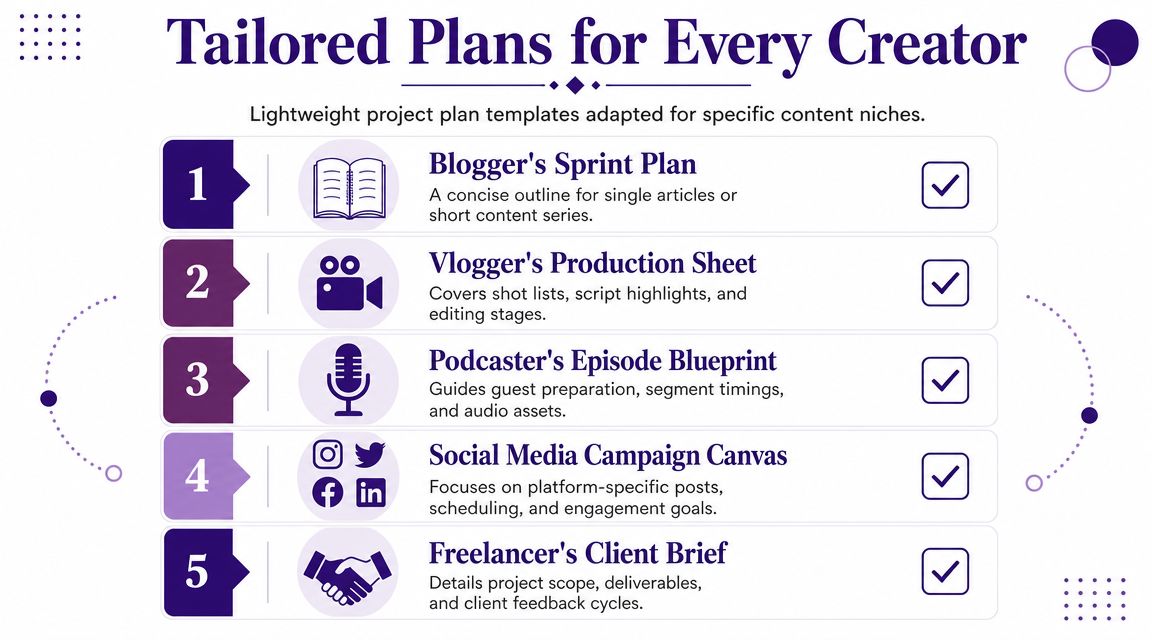
The podcaster's season planner
This version should fit on one page or one dashboard.
Include:
Season concept
What the season is about, who it's for, and how many episodes are in scope.Episode pipeline
Guest confirmed, research complete, outline approved, recorded, edited, show notes drafted, published.Shared production constraints
Recording windows, host availability, editor turnaround expectations, sponsor requirements.
A lightweight template might look like this:
| Field | Example |
|---|---|
| Season title | Founder Stories in Niche Media |
| Episode count | 8 episodes |
| Core deliverables | Full episode, transcript, show notes, clips |
| Key roles | Host, producer, editor, designer |
| Big risks | Guest delays, incomplete prep, late approvals |
The publisher's editorial calendar blueprint
This one works best when multiple writers, editors, and channels are involved.
Keep these fields visible:
- Theme or package title
- Primary article list
- Assignments
- Draft due dates
- Edit rounds
- Publish dates
- Repurposing needs
- Promotion notes
For teams comparing platforms to support this kind of planning, ProdShort's guide to compare content calendar solutions is useful because it frames the trade-offs between simple calendars and more robust workflow tools.
The YouTuber's series bible
A video series needs more production detail than a simple editorial plan. It should track creative and operational status in the same place.
Use headings like these:
Series promise
What the audience should consistently get from every episode.Episode roster
Working title, status, publish target, dependencies.Production status
Script, shot list, filming, rough cut, final cut, thumbnail, upload package.Repurposing checklist
Shorts, captions, newsletter mention, community post, blog adaptation.
A good niche-specific project plan document feels lighter than a corporate template, but it still forces decisions on scope, ownership, and timing.
If you run different formats at once, don't build one mega-template that tries to do everything. Keep a base structure and create variants. That's how you stay organized without turning planning into its own full-time job.
From Plan to Action Turning Your Document into Value
A project plan document only helps if the team uses it after kickoff. Too many creators build one during a launch sprint, feel briefly organized, then abandon it the moment production gets busy.
That defeats the point.
The document should stay open during the life of the work. It should be the place you check when a guest pushes a recording, when editorial feedback conflicts, when a sponsor requests a change, or when you decide whether a finished podcast can also become a blog post, email, and video clip package.
Use the plan as a daily operating tool
The best way to keep a plan alive is to connect it to routines.
During weekly reviews
Check milestone status, blockers, and upcoming approvals.During handoffs
Confirm that the next owner has what they need, not just that the previous person finished their task.During changes
Update scope, timeline, or ownership in the document itself. Don't leave the plan buried in chat threads.
That's also where collaboration quality starts to matter. If your team is expanding beyond solo creation, this guide to project management collaboration is useful for thinking about how shared visibility changes execution.
The real payoff is long-term value
A strong plan doesn't only help you finish the current project. It improves what happens after publication.
When your work is documented well, you can see patterns:
- Which episode formats moved fastest
- Which review stages kept stalling
- Which assets were easy to repurpose
- Which topics deserve a second life as a series, article package, or lead magnet
That's how creators stop treating every release as a one-off event. You start building an operating system around your content library. The project plan document becomes the first layer of that system because it captures intent, structure, ownership, and output in one place.
Finished content has more value when the workflow behind it is organized enough to reuse, revise, and repurpose.
A creator who can plan, publish, and repurpose consistently has a huge advantage over a creator who starts from zero every time.
If you're ready to turn your content library into a more organized, collaborative, and valuable system, Contesimal helps creators and publishing teams structure research, work across human and AI contributors, and uncover new value inside existing content. It's built for the moment when creative output needs to become an actual operating asset, not just a folder full of finished files.