
You know the feeling. A client asks for your strongest work on a narrow topic, a producer needs an old quote for a new episode, or an editor wants to revive a successful idea across several channels. You know the material exists somewhere in your articles, transcripts, presentations, cloud folders, and CMS archives. Finding it is the hard part.
That friction turns valuable intellectual property into digital dust. A document search engine changes the pattern by making your library searchable as a connected body of knowledge, not a collection of isolated files. Once creators and publishers can locate, compare, and reuse their own work, an archive becomes a source of new articles, videos, newsletters, courses, licensing packages, and audience growth.
Why Your Content Library Needs a Search Engine
A prolific creator has published hundreds of articles, whitepapers, interviews, and guides over several years. A potential client asks for evidence of expertise on a very specific subject. The creator searches a laptop folder, Google Drive, a project-management tool, and a CMS archive, then sends a link that's relevant enough but not especially strong.
The problem isn't a lack of expertise. The problem is content findability.
This scenario affects YouTubers, podcasters, bloggers, marketing teams, magazine publishers, authors, and editorial departments. Each group accumulates valuable material in different formats, but ordinary folders force people to remember where an asset was stored. Basic CMS search often depends on exact words in a title or body. Neither approach helps much when someone remembers an idea but not its wording.
From storage room to working library
A document search engine indexes the contents and descriptive information associated with documents, then makes that material available through queries. Instead of asking, “Which folder contains the 2021 audience research report?”, a creator can search for “evidence about keeping viewers engaged after the first minute” and investigate the results.
That distinction matters for repurposing. Search can reveal:
- Source material: Articles, transcripts, notes, reports, and interviews that support a new project.
- Related themes: Older work that connects with a current audience question.
- Reusable formats: Quotes for social posts, sections for newsletters, or research for a video script.
- Commercial opportunities: Archived expertise that can support a workshop, sponsorship package, paid report, or licensing offer.
A useful overview of modern options is this guide to best AI search engines by features, especially if you're comparing systems that combine retrieval with language understanding.
Practical rule: If your team repeatedly asks, “Where did we publish that?”, your archive needs better discovery, not more folders.
Faster retrieval can shorten client responses, help editors revive proven concepts, and reduce the temptation to create every new piece from a blank page. The revenue opportunity comes from turning forgotten material into a reliable supply of fresh, useful outputs.
Core Components That Power Document Search
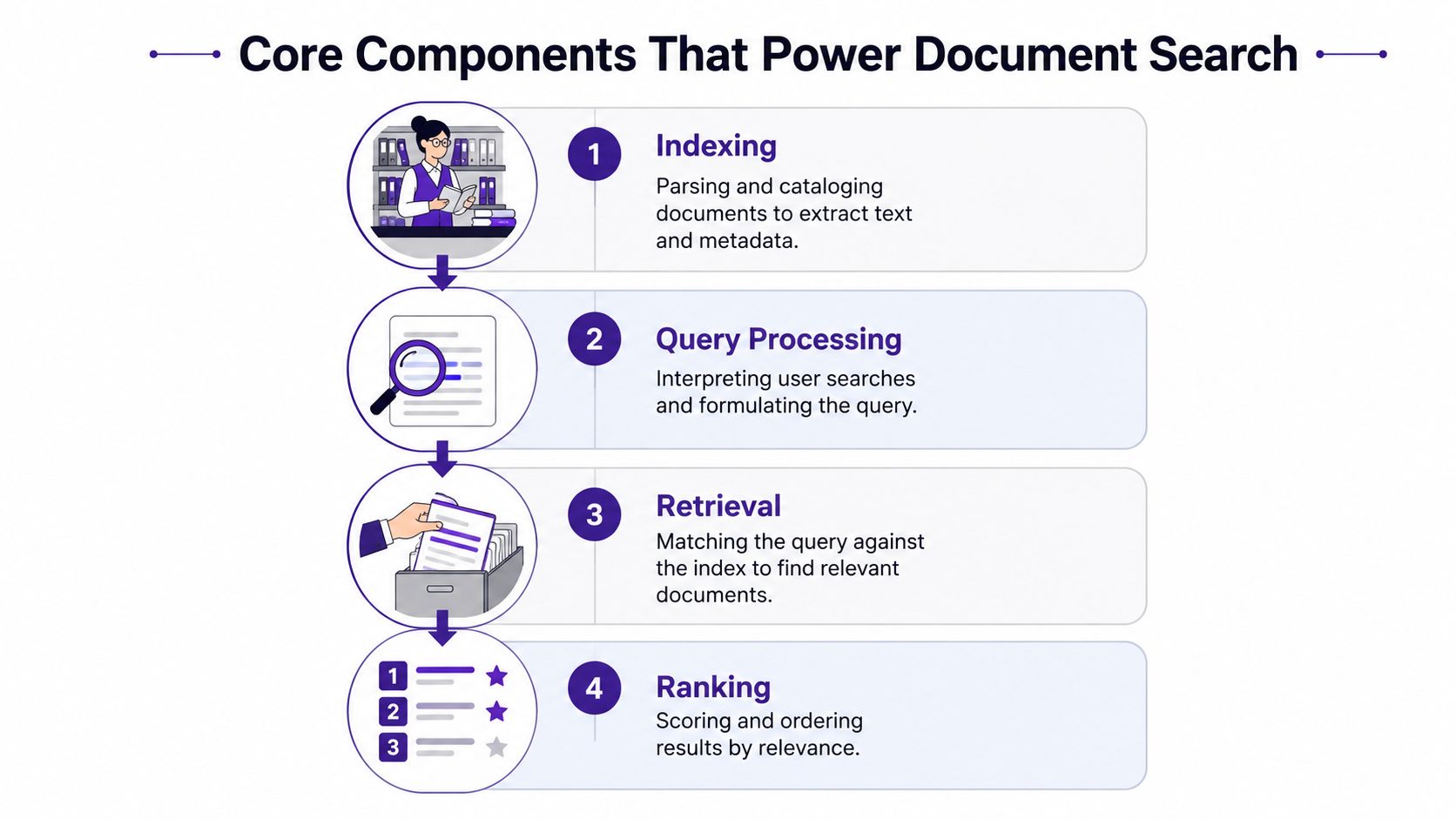
A document search engine works like a highly organized librarian with a fast reference desk. The librarian first catalogs the collection, interprets a question, finds plausible books, and places the strongest answers at the front of the queue. Four connected components perform that work digitally.
Indexing creates the map
Indexing is the preparation stage. The system reads supported documents, extracts text, identifies fields, and records metadata such as author, date, topic, file type, and source. It may also divide long documents into smaller passages so a result can point to the relevant section instead of returning an entire book or transcript.
A useful explanation of this foundation appears in what document indexing means. For content teams, indexing quality determines what the engine can find later. A transcript without speaker names, an article without publication dates, or a report stripped of headings loses context before anyone searches it.
Query processing interprets the request
When you type a search, the system analyzes the request. It may remove unhelpful words, recognize phrases, identify filters, or separate a known title from an exploratory question. Query processing helps distinguish “find the exact episode called Audience Retention” from “find ideas about keeping listeners engaged.”
A creator's natural language meets the structure of the library. Good systems support both direct lookup and open-ended discovery.
Retrieval finds candidates
Retrieval searches the index for documents or passages that could answer the query. A traditional inverted index resembles the index at the back of a textbook. Instead of reading every page, the engine looks up a term and jumps to the documents associated with it.
Retrieval usually produces a candidate set rather than a final answer. The engine needs another stage to decide which candidates deserve the highest positions.
Ranking decides what appears first
Ranking scores candidates according to relevance. Exact term matches, the location of a phrase, document fields, recency, authority signals, and semantic similarity can all influence the order. Ranking is vital because creators rarely inspect every result. They usually act on what appears near the top.
Embeddings add another layer. They represent text as mathematical vectors, allowing a system to connect related ideas even when the wording differs. “Revenue growth” and “increasing sales” may be conceptually close, while an exact product code still needs precise lexical matching.
The process is easier to understand in motion, so this short document search engine walkthrough can complement the architecture above.
Keyword vs Semantic vs Hybrid Search Approaches
Search architecture determines what your team can discover and what it might miss. Keyword search behaves like a precise librarian who looks for the words you provide. Semantic search behaves more like a researcher who understands related ideas. Hybrid search combines both behaviors.
| Approach | Best For | Limitations | Ideal Content Type |
|---|---|---|---|
| Keyword search | Known titles, names, identifiers, and exact phrases | Misses relevant material that uses different wording | Structured articles, product documentation, legal or technical files |
| Semantic search | Exploratory questions, themes, paraphrases, and related concepts | Can be less reliable for exact codes, names, and citations | Long-form editorial libraries, interviews, transcripts, research notes |
| Hybrid search | Libraries that need both precision and discovery | Requires more tuning and evaluation | Mixed archives containing articles, media transcripts, tables, and metadata |
Keyword search favors certainty
Lexical search is valuable when you know what you're looking for. A query for a person's name, episode title, product identifier, or distinctive phrase can return a focused set of matches quickly. It's also easier to explain to users because the connection between the query and result is visible.
Its weakness appears when the creator remembers the meaning but not the wording. Searching for “audience retention” may miss a valuable article titled “Why Viewers Leave Early” if the exact phrase never appears.
Semantic search supports exploration
Semantic search uses embeddings to compare meaning rather than relying only on shared words. A podcaster could ask for “stories about rebuilding trust after a failed launch,” then discover interviews that discuss recovery without using that exact language.
This approach helps with idea development, research, and thematic clustering. It can also return surprising connections, but that flexibility creates risk. A result may sound related while failing to contain the precise evidence or wording an editor needs.
For a deeper comparison of the two approaches, see semantic search versus keyword search.
Hybrid search covers both jobs
Hybrid retrieval runs lexical and semantic methods against the same corpus, then combines their results through reciprocal-rank fusion or weighted score blending. BM25 is strong at exact-term matching, while embeddings help recover synonymy and paraphrase. The combination is useful when a library contains names, identifiers, rare terminology, transcripts, and broad editorial themes, as described in this hybrid search engineering guide.
A creator working with video should also treat transcription as part of search preparation. An automated video transcription guide can help clarify the workflow for turning spoken material into searchable text, though transcripts still need useful metadata and quality checks.
The right choice depends on your query patterns. Known-item lookup favors keywords. Research and discovery favor semantics. A varied content library usually benefits from a hybrid design.
Evaluating Search Solutions for Content Organizations
A feature list won't tell you whether a search solution will help your publishing operation. You need to test it against the questions your creators, editors, researchers, and sales teams ask.
Start with a representative sample of the library. Include polished articles, old PDFs, transcripts, tables, drafts, metadata, and files with inconsistent naming. Then build a query set from real work, such as “find interviews about creator burnout,” “show every report mentioning a specific industry,” or “locate the source behind this claim.”
Four evaluation lenses
Technical performance should measure whether the right material appears near the top. Recall@10 and mean reciprocal rank are useful retrieval measures, and a practical latency budget of roughly 300 to 500 milliseconds can leave room for reranking without noticeably harming the experience, according to hybrid search evaluation guidance. That source also reports Recall@5 of 0.816 for hybrid retrieval plus neural reranking versus 0.644 for BM25-only on mixed text-and-table financial question-answering workloads. Those figures belong to that benchmark context, not to every content library.
Content handling covers file formats, OCR, transcript ingestion, tables, metadata extraction, language support, permissions, and version control. A search tool that finds clean articles but ignores captions, speaker labels, or publication dates may create false confidence.
Business impact connects retrieval to publishing outcomes. Track time to locate source material, time to republish, successful content rediscovery, reuse across channels, and revenue that can be linked to revived assets.
Ownership cost includes setup, integrations, relevance tuning, maintenance, access controls, and growth. A technically impressive system can still be a poor choice if editors need engineering support for routine changes.
| Evaluation Category | Key Metrics | Content Org Priority | Benchmark Target |
|---|---|---|---|
| Technical retrieval | Precision, recall@10, MRR, latency | High | Define from real queries and user expectations |
| Content coverage | Formats, metadata, transcripts, tables | High | Matches the actual library |
| Workflow value | Time to republish, rediscovery, reuse | High | Improvement over the current process |
| Commercial value | Licensing, lead support, paid products | High | Tied to an agreed attribution model |
| Ownership | Setup, maintenance, scaling, governance | Medium to high | Sustainable for the available team |
Test exact and semantic queries separately. A strong solution should handle both a precise file request and an open-ended research question.
For broader context, enterprise search for knowledge teams explains why retrieval becomes operational infrastructure when organizations manage large internal collections.
Real-World Use Cases for Creators and Publishers
Search becomes commercially meaningful when it changes what a team publishes or sells. The same archive can support different workflows depending on whether the owner is a marketer, independent researcher, publisher, or educator.
A marketing team finds campaign building blocks
A B2B team can search for a customer problem, industry term, or recurring objection across whitepapers, blog posts, webinars, and sales enablement files. The team might retrieve a technical explanation, a customer interview transcript, and a practical checklist, then turn those assets into an email sequence, social posts, and a landing page.
The value comes from assembling a coherent campaign without repeating research. Search also exposes gaps. If an important topic appears in many internal documents but not in public content, the team has a clear candidate for a new article or video.
An independent writer reconnects scattered research
A writer researching a book or documentary may have notes in plain-text files, interviews in transcripts, and background material in PDFs. A semantic query can surface passages connected by theme, while metadata filters narrow the results by source, date, person, or project.
That workflow makes old work useful again. A forgotten interview can provide a fresh angle for a newsletter, a chapter, a script, or a speaking proposal.
A publisher activates its archive
A digital publisher can search an archive by topic, audience, geography, format, or editorial theme. Semantic clustering may reveal that older articles belong to a newer vertical market, creating possibilities for curated packages, syndication, licensing, or updated collections.
An archivist also benefits from stronger taxonomy. Digital asset taxonomy guidance recommends reviewing search logs for popular terms and no-result searches, because those patterns reveal vocabulary gaps and findability problems.
Video educators can search transcripts and course materials for recurring questions, then shape those findings into lessons, worksheets, or a paid course. The engine doesn't create the editorial judgment. It brings the raw material within reach.
Implementation Patterns and Integration Strategies
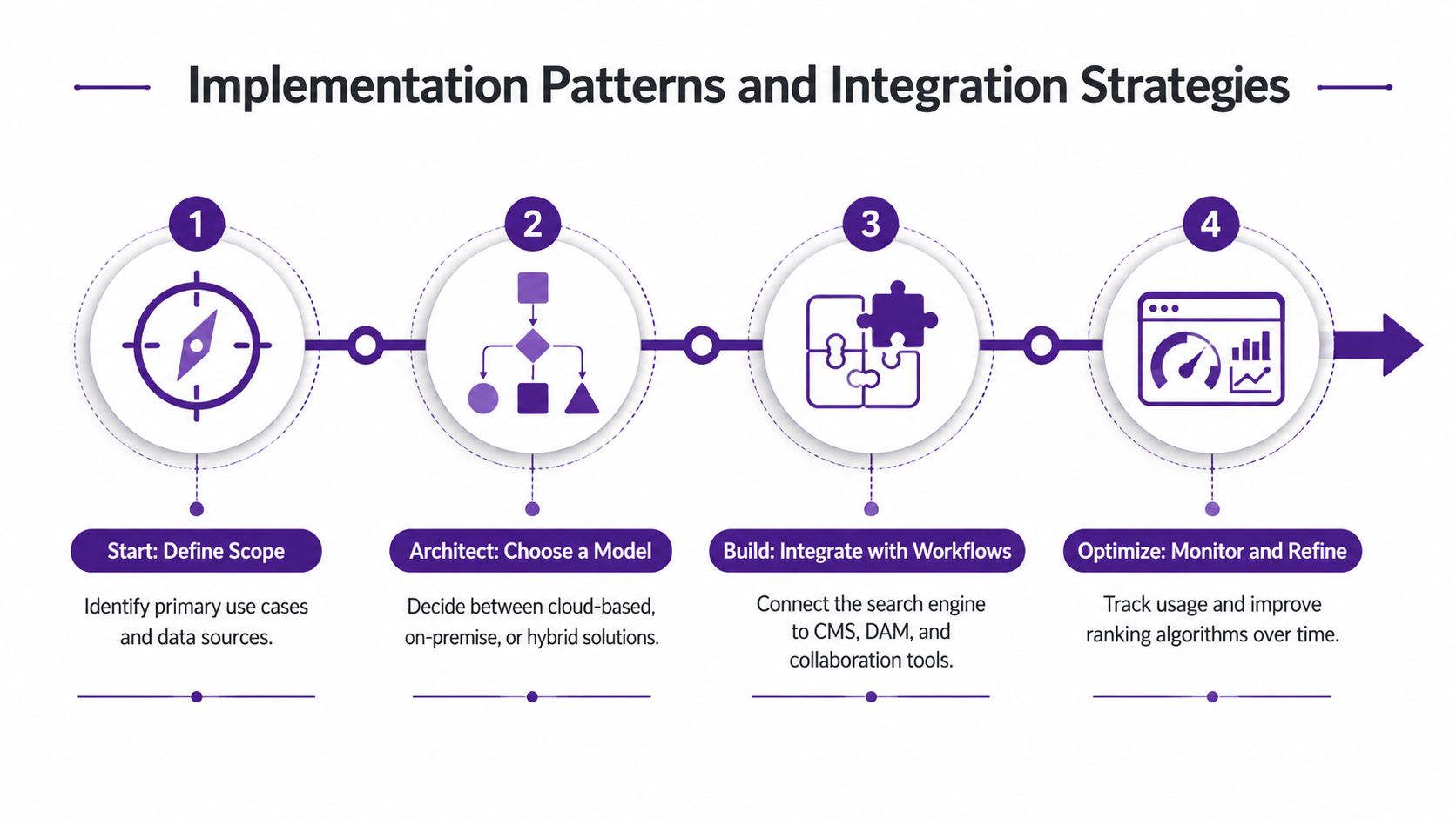
The best implementation starts with a content audit, not a technology demo. List the repositories your team uses, identify the formats inside them, note ownership and permissions, and mark the assets most likely to support immediate repurposing.
Choose the integration pattern
A standalone search platform can index existing repositories and provide a separate discovery interface. This works when the archive is spread across cloud storage, a CMS, shared drives, and media systems.
An embedded search API places discovery inside an existing product. Editors can search from a CMS, producers can find transcripts beside an episode record, and marketers can retrieve source material without changing tools.
A workflow-augmented system connects search to research, collaboration, and repurposing. Contesimal is one example of this category. It supports importing document archives and text documents, using AI-powered keyword search, and locating recurring themes across a content library.
Build a useful first version
Start with a focused collection rather than indexing everything at once. Choose content with clear commercial or editorial value, then standardize the fields that matter, such as title, creator, publication date, format, audience, rights status, and project.
Modern DAM guidance emphasizes stakeholder-designed categories, metadata schemas, controlled vocabulary, templates, and machine-assisted tagging. It also describes how taxonomy extraction can be automated from asset metadata through unsupervised decision-tree learning, which can reduce reliance on manual organization. See the guidance on taxonomy in digital asset management for the governance side of the work.
Create a feedback loop
Log searches, no-result queries, abandoned results, and documents users open. Editors should be able to flag a result as useful, irrelevant, outdated, or restricted. Those signals help tune ranking and reveal missing tags, synonyms, duplicate files, and weak metadata.
Integrate the search layer with the tools your team already uses, whether that's WordPress, HubSpot, a digital asset manager, or a custom publishing platform. The goal isn't to create another destination. It's to place discovery where people already plan, edit, and distribute content.
Getting Started with Document Search Today
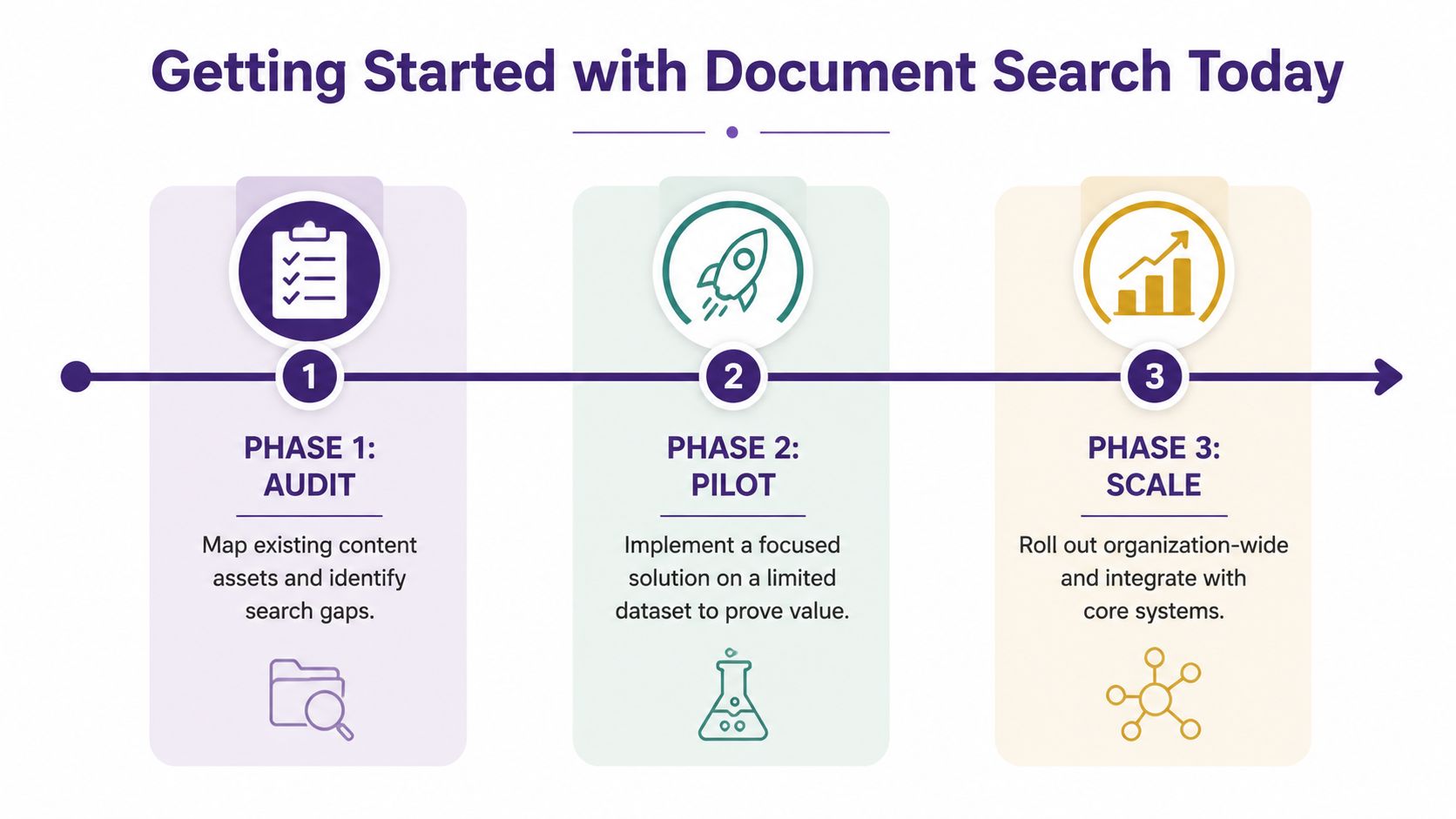
A practical rollout has three phases: audit, pilot, and scale.
Phase one, audit
Map your articles, videos, transcripts, research files, books, and campaign assets. Review search logs, interview creators about repeated retrieval problems, and identify dormant material that could support current audience interests.
Phase two, pilot
Choose a focused collection and test exact, semantic, and hybrid queries. Measure retrieval quality, time to find source material, successful reuse, and user satisfaction. Set a review period that gives the team enough time to test ordinary work rather than one polished demonstration.
Phase three, scale
Connect the search experience to your CMS, DAM, collaboration tools, and repurposing workflow. Add permissions, metadata rules, taxonomy governance, and regular relevance reviews. Track gains over the rollout period, from earlier rediscovery to faster publishing and clearer revenue attribution.
You don't need to rebuild your entire content operation before learning whether search can help. Start with one archive, one audience problem, and one repurposing workflow that could produce a quick editorial or commercial win.
Contesimal helps content organizations import archives, search documents and media-related knowledge, organize material through layered taxonomies, and collaborate with AI-assisted research workflows. Visit Contesimal to explore how your existing library can become a searchable source for new stories, campaigns, products, and revenue.