
A content lead opens the team's shared drive and finds a familiar kind of mess: old PDFs, interview transcripts, raw video captions, and image dumps from years of publishing. The files contain valuable research and reusable ideas, but the search results return a jumble of unrelated material. Editors spend their time opening files, guessing what they contain, and applying inconsistent tags.
Document classification AI gives that archive a structure. It reads the content inside a file and assigns it to a category from a controlled list, such as contract, press release, product brief, or research note. For content teams, the important question isn't which model produces the highest score. The harder question is whether the organization has designed labels that people can understand, maintain, and trust.
Why Content Teams Need Document Classification AI
Maya, a content lead at a mid-size publisher, starts Monday by opening a shared drive. It contains 14,000 unsorted files, including old PDFs, interview transcripts, raw video captions, and image dumps from the last seven years. The team knows the archive holds research for future articles, podcast episodes, videos, and newsletters, but nobody has a reliable way to find the right material.
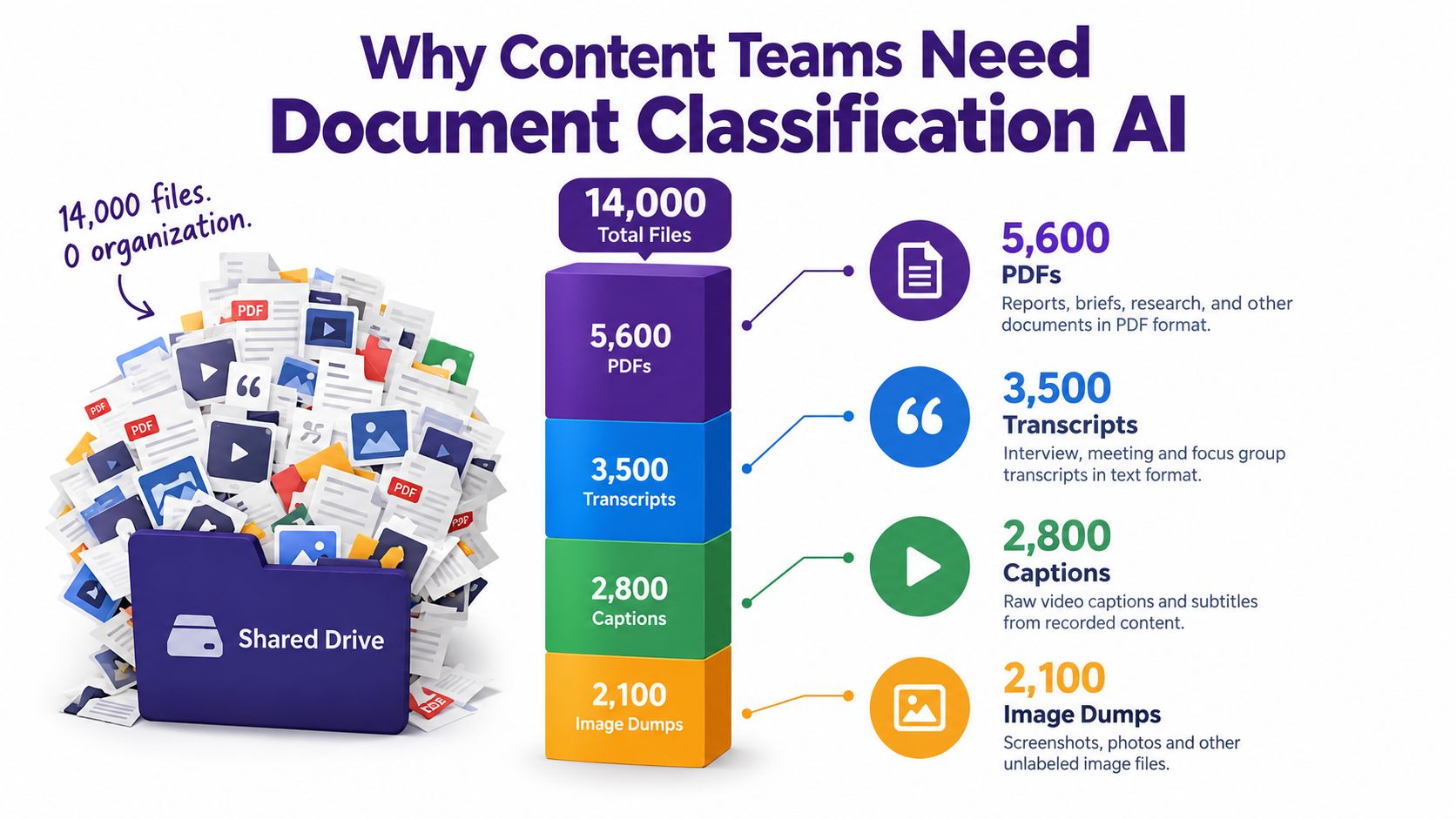
The immediate problem looks like search. The underlying problem is classification. If one editor labels a file “product news,” another uses “launch,” and a third leaves it untagged, the search system can't reliably connect those records. The archive becomes a warehouse where the boxes have labels, but every person uses a different labeling system.
What the system actually does
A document classifier examines the available content and predicts one or more labels from an approved taxonomy. It can use text extracted from a PDF, a transcript, a web page, or a scanned image. A publisher might define categories such as:
- Editorial research: interviews, source notes, background reports, and reading lists.
- Production assets: scripts, captions, shot lists, and episode outlines.
- Commercial material: proposals, sponsorship documents, and product briefs.
- Governance records: contracts, permissions, policies, and compliance documents.
The first payoff is discoverability. Consistent labels turn a large archive into a set of useful filters. A producer can find interview transcripts about a topic, while an editor can locate every draft associated with a particular series.
The second is automation. Instead of asking a person to triage every upload, the system can suggest a category when a file arrives. People still review uncertain cases, but they don't need to perform the same repetitive sorting task for every document.
The third is governance. A label can trigger retention rules, access controls, review queues, or compliance workflows. A contract shouldn't be treated like a casual brainstorm, and a private interview transcript shouldn't automatically receive the same permissions as a published article.
Practical rule: Classification creates value when the archive and the live publishing workflow use the same taxonomy.
That shared structure matters for creators, publishers, marketers, and production teams. Once older articles, podcast transcripts, video captions, and new uploads use compatible labels, the content library becomes easier to search, reuse, update, and repurpose. The goal isn't merely to organize files. It's to make past work available for the next piece of content.
How Document Classification AI Actually Works
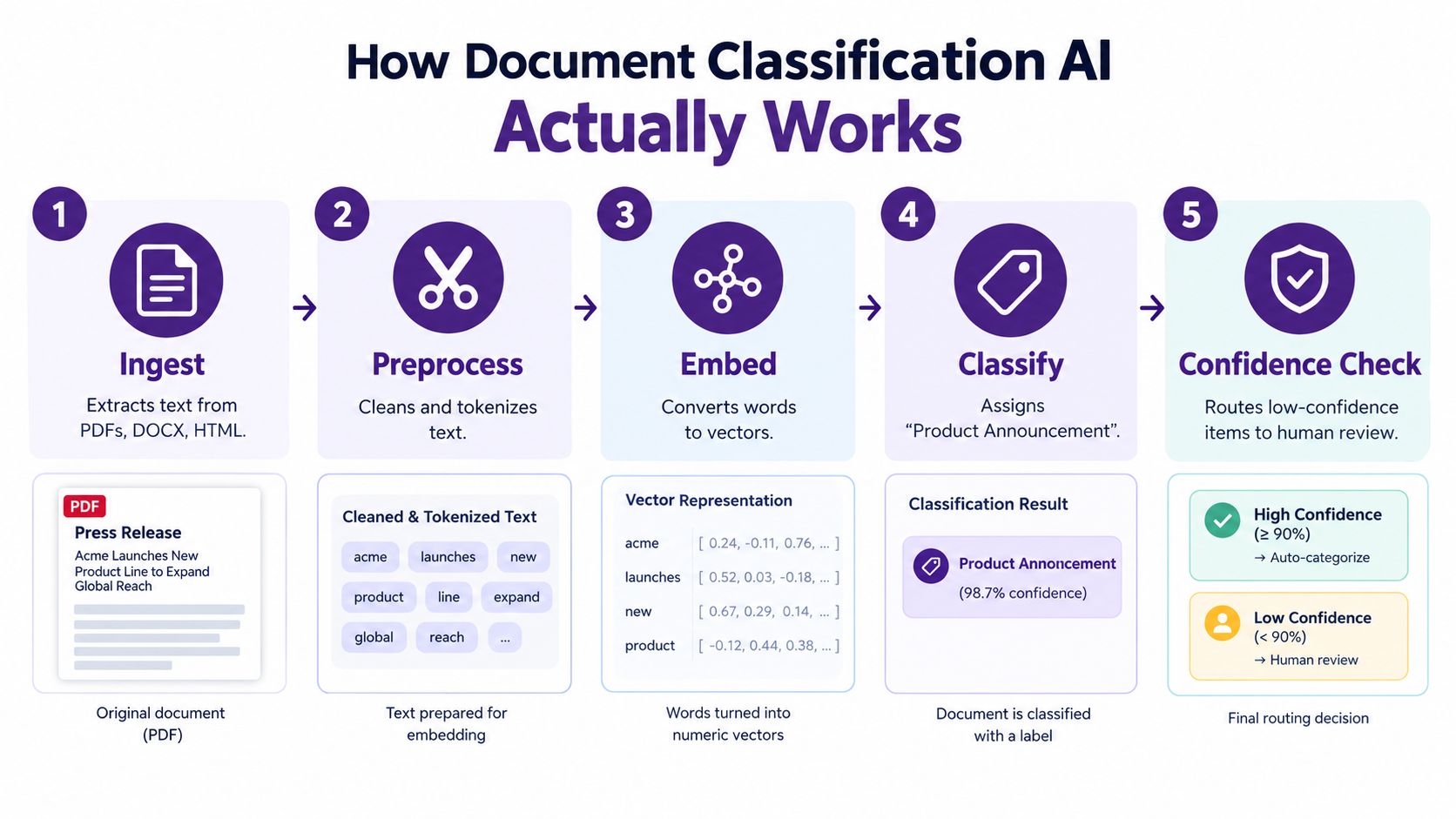
A classifier doesn't “understand” a document in one magical step. It moves through a pipeline, and every stage affects the final label. A press release provides a simple example. Suppose the approved taxonomy includes Product Announcement, Company News, and Research Note.
From file to usable signal
Ingest comes first. The system receives a PDF, DOCX file, HTML page, or image. It extracts machine-readable text from digital files and uses OCR when the source is a scan. If ingestion misses the headline or extracts columns in the wrong order, later stages inherit the damage.
Preprocess cleans the extracted material. Depending on the system, this can include tokenization, lowercasing, stop-word handling, removal of repeated headers, and chunking long documents into smaller windows. A classifier may need to separate navigation text from the actual article, or distinguish a footer from the body of a press release.
Represent converts language into a form the model can compare. Older systems may use TF-IDF, which gives greater weight to terms that help distinguish documents. Modern systems often create dense embeddings, numerical representations that place semantically similar text near one another.
Score compares the document representation with the available labels. A press release containing a launch date, product name, feature description, and media contact information may score more strongly against Product Announcement than against Research Note.
Decide applies a threshold and a routing policy. The system can return the top label, assign several labels, or send the item to a human reviewer when confidence is too low. The final label is the part people see, but the upstream extraction, cleaning, representation, and scoring stages determine whether that label is useful.
For a broader explanation of how language systems process and interpret text, the LLMrefs guide to natural language processing for SEO offers helpful context. Teams working with document workflows can also explore intelligent document processing as a related concept that combines extraction, interpretation, and routing.
A production system must also handle malformed files, mixed-language content, duplicate documents, tables, captions, and long packets. A clean demo can hide these problems. Real archives rarely arrive in a clean demo format.
Three Main Approaches to Document Classification AI
The three common approaches differ less in their marketing labels than in what they require from the content team. The right choice depends on the stability of the taxonomy, the amount of labeled material, the size of the label set, and the cost of a mistake.
Supervised learning
A supervised classifier learns from examples that humans have already labeled. If the team has a stable set of categories and a trustworthy training collection, this approach can produce consistent results and predictable operating costs.
It works well for established workflows, such as routing every incoming document into a known editorial or legal category. Its weakness appears when labels change, rare categories lack examples, or historical labels contain contradictions. A model can only learn the distinctions represented in its training data.
Zero-shot classification
A zero-shot system receives the document and category descriptions, then predicts a label without being trained specifically on the team's archive. The team might describe a category in plain language, such as “a document announcing a new product, feature, or service.”
This makes zero-shot classification useful for new projects and changing taxonomies. It can also help a team test whether its proposed labels are understandable before investing in a large annotation project. The tradeoff is less control over repeatability, output formatting, and borderline decisions.
Embedding-based retrieval
Embedding-based classification represents both the document and the label descriptions as vectors. The system then retrieves the labels whose meanings are closest to the document. This approach is useful when the label set is large or when the team wants classification to connect naturally with semantic search and recommendations.
| Approach | Data Needed | Training Effort | Inference Cost | Best Fit |
|---|---|---|---|---|
| Supervised learning | Clean labeled examples | Model training and maintenance | Usually predictable | Fixed categories and repeatable decisions |
| Zero-shot classification | Label names or descriptions | Little or no task-specific training | Can vary by model and document length | New or frequently changing categories |
| Embedding-based retrieval | Label descriptions and document representations | Index construction and tuning | Efficient for search-heavy workflows | Large taxonomies and flexible discovery |
A practical decision rule is simple. Choose supervised learning when labels are stable and precision matters most. Choose zero-shot classification when the taxonomy is still changing or labeled examples are scarce. Choose embeddings when scale, semantic search, and adaptability matter more than maximum precision on every borderline item.
Many production systems combine the approaches. Retrieval can narrow the candidate labels, while a classifier or language model makes the final decision. That design separates the problem of finding plausible categories from the problem of choosing among them.
Model Options from Classical ML to Large Transformers
Model selection should begin with the archive, not with the newest model announcement. A short, clean collection with well-defined categories may reward a compact classical model. A multilingual archive of scans, transcripts, and mixed layouts may need a more capable system.
Start with a baseline
Logistic regression, Naïve Bayes, and support vector machines can classify TF-IDF features with limited infrastructure. They are easy to inspect, fast to run, and useful for establishing a baseline before a team introduces more complex models.
Classical methods also expose data problems quickly. If a simple model performs poorly, the cause may be weak labels, missing text, or overlapping categories rather than insufficient model capacity. Research on document classification has repeatedly moved between statistical methods and neural architectures, with TF-IDF becoming an important information-retrieval milestone in 1972 and transformer-based models reshaping document understanding in 2017. The historical progression is outlined in ABBY's document classification guide.
Fine-tuned encoders such as DistilBERT, RoBERTa, and DeBERTa offer a middle path. They can provide strong language representations while remaining more controllable than a general-purpose conversational model. Teams may prefer them for private deployment, repeatable outputs, and predictable integration with an existing machine-learning stack.
Use larger models selectively
Instruction-tuned systems such as GPT-4o, Claude, and Gemini, along with open models such as Llama and Qwen, can help when labels are fuzzy, multilingual, or poorly represented in the training set. They can interpret category descriptions and borderline cases that a keyword-based system may miss.
The cost is operational. Larger models can increase inference expense, latency, privacy considerations, and dependence on a vendor. They can also produce labels outside the approved taxonomy unless the application validates every output.
Multimodal models such as LayoutLMv3 and ColPali are useful when layout carries meaning. A form, invoice, magazine page, and scanned contract may contain similar words but very different visual structures.
| Model Family | Examples | Typical Accuracy | Cost and Latency | Best Fit |
|---|---|---|---|---|
| Classical ML | Logistic regression, Naïve Bayes, SVM | Strong baseline on clean text | Low infrastructure cost and fast execution | Small, stable, text-heavy collections |
| Fine-tuned encoders | DistilBERT, RoBERTa, DeBERTa | Strong task-specific performance | Moderate training and serving requirements | Production classification with controlled labels |
| Instruction-tuned LLMs | GPT-4o, Claude, Gemini | Flexible on ambiguous language | Higher variable cost and latency | Sparse labels, multilingual content, fuzzy categories |
| Open language models | Llama, Qwen | Depends heavily on tuning and data | Infrastructure and maintenance burden | Private or customizable deployments |
| Multimodal models | LayoutLMv3, ColPali | Useful where layout is decisive | Greater processing complexity | Scans, forms, PDFs, and image-rich documents |
The actual negotiation is between accuracy, cost, latency, GPU capacity, vendor dependence, and explainability. A model that wins a benchmark may still be a poor fit if the team can't audit its decisions or afford to run it across the full archive.
Evaluation Metrics That Actually Matter in Practice
A model score only helps when the team understands what it measures. Accuracy asks how many predictions were correct overall. Precision asks how often a predicted label was right. Recall asks how many of the documents that truly belonged to a label the system found. F1 balances precision and recall.
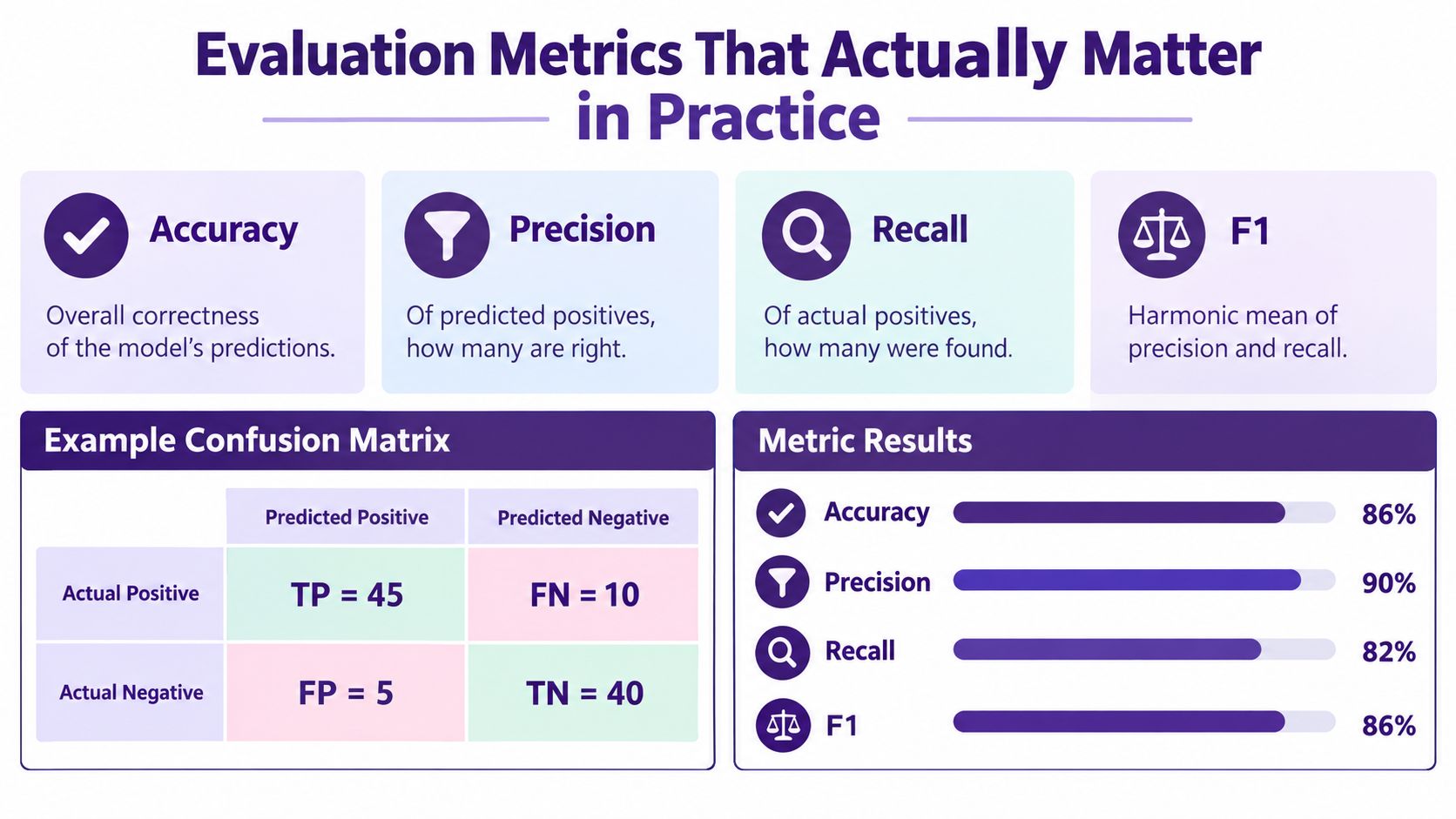
Consider an illustrative binary tagging example with 1,000 articles. Suppose the confusion matrix contains 45 true positives, 5 false positives, 10 false negatives, and 40 true negatives for one label. Those four values describe different failure modes:
- Accuracy: The share of all decisions that were correct. In this example, it is 86%.
- Precision: Of the articles labeled positive, the share that belonged there. In this example, it is 90%.
- Recall: Of the articles that belonged to the label, the share the system found. In this example, it is 82%.
- F1: The balance between precision and recall. In this example, it is 86%.
The broader 1,000-article example can also include 120 mislabeled items, but teams should not treat that total as a complete diagnosis. They need to know which labels produced false positives, which labels produced false negatives, and whether one dominant category hides weak performance elsewhere.
Read the averages carefully
Macro averaging gives every class equal weight. It reveals whether the system performs badly on small or rare categories. Micro averaging pools decisions across classes, so common categories have more influence. A content archive with a few huge categories and many small ones can look excellent under micro averaging while failing the categories editors care about most.
Top-k accuracy can help when categories overlap. If the correct label appears among the model's leading suggestions, a human may resolve the case quickly even though the top prediction was wrong. Calibration matters when scores trigger actions such as automatic routing, access changes, or deletion. A confidence score should correspond to a meaningful likelihood of correctness, not merely rank one option above another.
Track accuracy for a broad health check, precision when wrong assignments create risk, recall when missing a document is costly, and macro F1 when rare categories matter. A beautiful score on a dominant class can conceal a classifier that does little for the rest of the taxonomy.
The Hidden Problem of Taxonomy Design and Label Drift
A better model can't repair a taxonomy that editors interpret differently. If Product Update and Product Announcement overlap, the classifier may be behaving reasonably when it chooses either one. The organization has asked it to solve an ambiguous policy question.
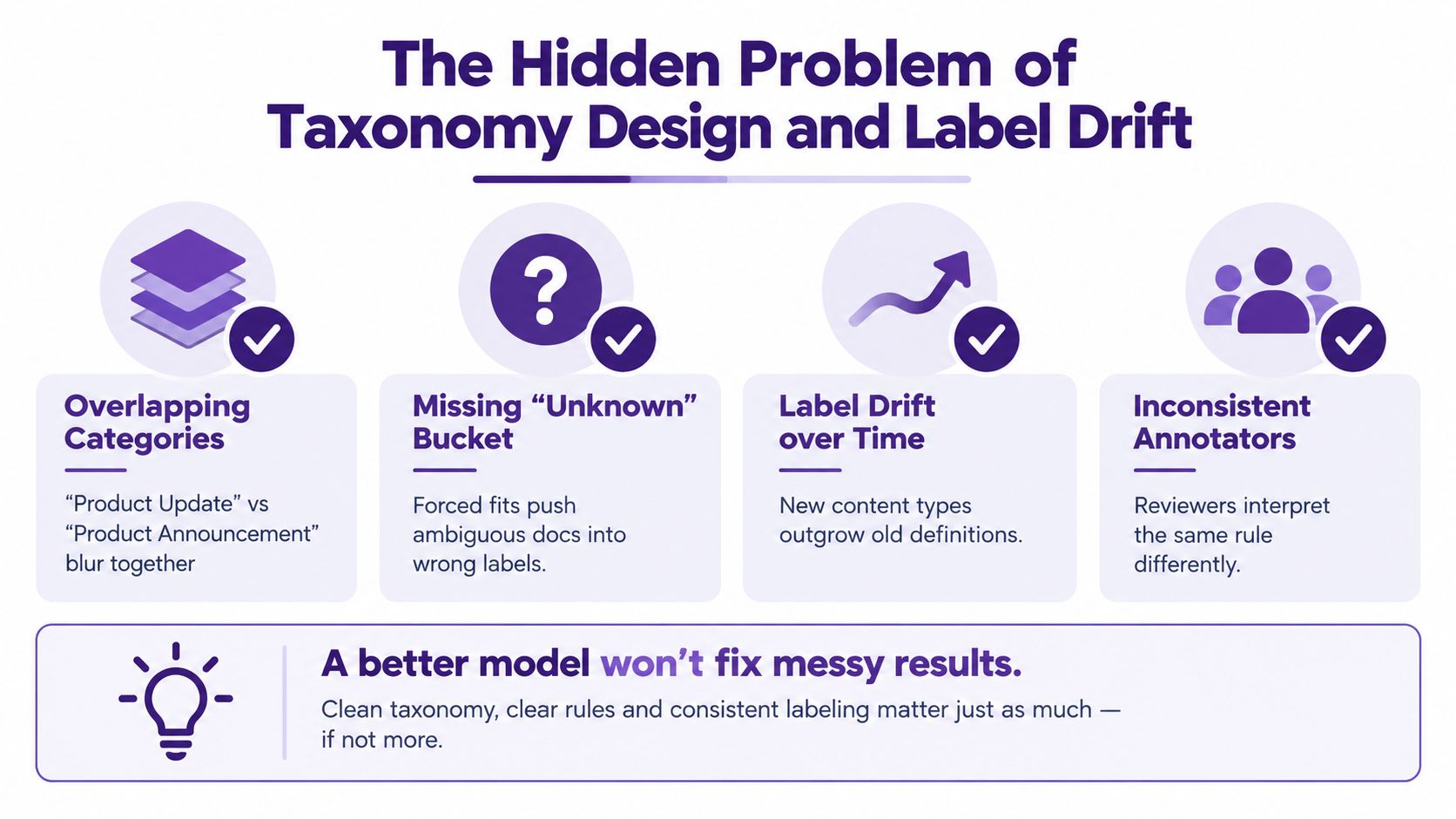
Taxonomy design fails in predictable ways:
- Overlapping categories: A “News” bucket absorbs everything urgent, while narrower labels lose meaning.
- Missing unknown options: Ambiguous documents get forced into a category they don't fit.
- Unclear hierarchy: A “Tutorial” label is split across subcategories without rules for choosing between them.
- Inconsistent annotation: Editors apply a “Legal” label differently across regions or business units.
Drift arrives quietly
Label drift happens when the language, topics, and workflows in the archive change. A category that made sense for a publisher's earlier output may become too broad after the team launches a podcast, adds video production, or begins publishing research reports. New formats create new documents, while old definitions remain in the system.
The danger is gradual degradation. The classifier continues returning valid-looking labels, so nobody notices that precision is falling. An LLM-based system can add another failure mode by inventing a category, varying its output between runs, or returning a plausible label that isn't in the approved taxonomy. Dedicated monitoring is needed because these errors aren't always visible in a normal editorial workflow, as discussed in Logic's analysis of AI document classification reliability.
Governance beats gradient descent when the category definitions are unclear.
Write a short definition and at least one positive and negative example for every important label. Give reviewers an adjudication queue for disagreements. Audit a sample of recent predictions regularly, watch for new document types, and send low-confidence items to people rather than forcing them into a category.
Teams also need a versioned taxonomy. When a label is renamed, retired, split, or merged, record the change and decide how historical documents should be treated. Document classification levels can help teams think about how broad or specific their categories should be before implementation begins.
Integrating Document Classification AI into Content Platforms
Classification becomes useful when it meets the tools a content team already uses. A file should not receive a label in an isolated experiment and then disappear into another system. The label needs to travel with the asset through storage, search, review, and reuse.
A practical flow starts when an editor uploads an interview transcript to a digital asset manager. An ingestion service extracts the text, sends it to a classifier, and receives suggested labels such as Interview, Research, and a topic category. A webhook can notify the editorial platform, while a bulk endpoint can process older files during an archive backfill. The search index then exposes those labels as facets, and the editorial dashboard shows them for approval.
Choose the integration surface
An embedded widget is suitable when users need classification inside an existing interface. A headless API gives engineers more control over ingestion, taxonomy synchronization, and routing across a CMS, DAM, or collaboration system. A managed workflow handles more of the operational process, including queues, monitoring, and review states.
Contesimal is one example of a content-oriented platform that can sort articles, scripts, and transcripts into custom categories, suggest tags for older libraries, and support layered taxonomies for content collections. For teams comparing implementation patterns, this overview of document classification software provides a useful product-level reference.
Require governance controls regardless of the interface:
- Audit logs: Record the source file, model decision, taxonomy version, reviewer action, and timestamp.
- Confidence thresholds: Define when the system can apply a label automatically and when it must ask for review.
- Override paths: Let editors correct a prediction without fighting the workflow.
- Taxonomy sync: Keep category definitions consistent across the CMS, DAM, search index, and reporting tools.
- Retry handling: Preserve failed or incomplete jobs rather than dropping files without notice.
A labeled transcript should become searchable, reviewable, and available for repurposing. That is the difference between adding AI to an upload screen and building a classification capability into the content operation.
Getting Started with a Practical Adoption Checklist
A content lead can establish a sensible starting point without classifying the entire archive immediately. Begin with four decisions:
- Define the taxonomy: Write clear label descriptions, examples, exclusions, and an “unknown” route for documents that don't belong anywhere.
- Audit label quality: Review a representative sample of at least 500 documents before selecting a model, and record disagreements rather than smoothing them over.
- Choose the deployment model: Compare an API-based service with a self-hosted model using privacy, cost, latency, maintenance, and explainability requirements.
- Select the integration surface: Decide whether the team needs an embedded interface, a headless API, or a managed workflow.
Before automatic tagging goes live, confirm that a human review loop exists. Set a confidence threshold, document what happens below it, and give editors a visible override path. Schedule a label-drift review after 30 days, then adjust the cadence according to how quickly the archive changes.
In the first week, define the labels, sample the archive, and test a small batch with human review. During the first quarter, measure errors by category, revise unclear definitions, connect the classifier to search and editorial workflows, and establish ownership for taxonomy changes. The sequence matters. A modest system with clear governance will usually teach the team more than a large rollout built on uncertain labels.
Contesimal helps content organizations classify, organize, and search documents, transcripts, articles, podcasts, and videos so older work can support new research and production. Visit Contesimal to explore a workflow for turning an unstructured content library into a searchable, reusable knowledge base.