
Your shared drive probably has a folder called “Final,” another called “Final Final,” and a video archive where investor decks sit beside onboarding recordings and raw interview footage. The labels may look organized, but they don't tell an editor who can open a file, how it should be handled, whether it can train an AI search system, or when it should leave the archive.
Document classification levels solve that problem by turning vague sensitivity into operational decisions. The useful question isn't only “How sensitive is this file?” It's also “What is this document for, what stage is it in, what format does it use, who may access it, and what happens next?” A durable archive combines sensitivity tiers with those descriptive layers, so content teams can organize, discover, reuse, and govern their libraries without turning every folder into a special case.
Why Document Classification Levels Matter in Working Archives
A large shared drive fails without warning. Someone shares a draft financial presentation with a broad project group, an old employee record remains in an active workspace, or an AI ingestion pipeline absorbs mislabeled drafts and treats them as approved source material. The directory tree may still look tidy, but the archive has lost the information needed to make safe retrieval, retention, and access decisions.
Classification levels exist before labels appear in a filename or document header. They define the handling logic behind those labels. A four-level enterprise pattern, for example, can connect Public, Internal or Protected, Confidential, and Restricted content to controls such as access restriction, encryption, audit logging, and disposal requirements that increase with risk (Maryland's data classification policy).
What breaks without tiers
- Oversharing: Draft budgets, salary information, or unreleased investor material may inherit the access settings of a general project folder.
- Misapplied retention: A disposal rule may affect an active contract, while an obsolete working copy remains indefinitely because nobody can distinguish the records.
- Noisy AI retrieval: Search and generation tools may treat a transcript, approved article, rough note, and restricted attachment as equally reliable or equally shareable.
Practical rule: A classification label should change an action. If every tier receives the same access, retention, and disclosure treatment, the taxonomy is decoration.
Start with the handling decisions your team needs to make, then name the levels that support them. Editors need to know whether a file can move to a freelancer, whether a producer can download it, whether an archived version can become a source for a new article, and whether a document needs review before publication. The level is the spine of that system, not a security sticker attached after the work is finished.
Common Tier Schemes Used by Governments and Enterprises
A records manager opens an archive and finds Confidential, Restricted, and Internal applied to similar files. The labels sound familiar, yet they may come from different rulebooks. Government schemes classify material against formal disclosure consequences, while enterprise schemes usually organize access, business exposure, contractual duties, and privacy risk.
The U.S. national-security system has three classified levels: Confidential, Secret, and Top Secret. Each represents a higher expected harm to national security under Executive Order 13526 (the National Archives summary of Executive Order 13526). The European Union uses four levels, EU Top Secret, EU Secret, EU Confidential, and EU Restricted. The names overlap with U.S. terminology, but the hierarchy and governing rules are not interchangeable (the Department of Defense document-marking guide).
Enterprise teams need a model tied to ordinary work decisions. A practical four-level structure is Public, Internal or Protected, Confidential, and Restricted, with safeguards increasing as disclosure could cause greater harm. NIST's data-classification guidance provides a separate reference point for connecting information categories with impact and protection needs (NIST SP 800-60 Vol. 1).
| Tier | Government Audience & Handling | Enterprise Audience & Handling |
|---|---|---|
| Public | Unclassified or approved for public release. Preserve integrity and distribute approved versions. | Anyone may access it. Keep the content accurate and controlled. |
| Internal | Not a classified level in the U.S. national-security model. Apply the organization's policy. | Employees and approved collaborators may access it through routine controls. |
| Confidential | Restrict access because unauthorized disclosure could damage national security. | Limit access to relevant teams. Use stronger access controls, encryption, logging, and careful disposal. |
| Restricted | In the EU scheme, Restricted is the lowest official level. The U.S. national-security model does not use it. Apply the governing EU Security Rules or Executive Order 13526 rather than treating it as equivalent to Confidential. | Use need-to-know access and the strictest handling rules for severe business, legal, or privacy risk. |
| Secret or Top Secret | Secret indicates serious damage, while Top Secret indicates exceptionally grave damage to national security. | Avoid these names in ordinary business taxonomies unless a contract or regulation requires them. |
Tier count affects archive quality. Too few levels place unrelated material together. Too many slow decisions and encourage inconsistent labeling. Content teams can compare these choices with document classification methods before naming their own tiers.
The useful test is operational: each label should trigger a defined handling action. “Restricted” should tell an editor who may receive the file, which controls apply, and when review is required. A classification scheme works when its vocabulary remains understandable as the archive grows.
Layered Hierarchies Beyond Sensitivity Labels
A producer searches for an approved interview transcript and finds six files with the same confidential label. The label controls access, but it does not show which project each file supports, whether it is approved, or whether it is a transcript, subtitle file, or recording. A working archive needs those distinctions as separate layers.
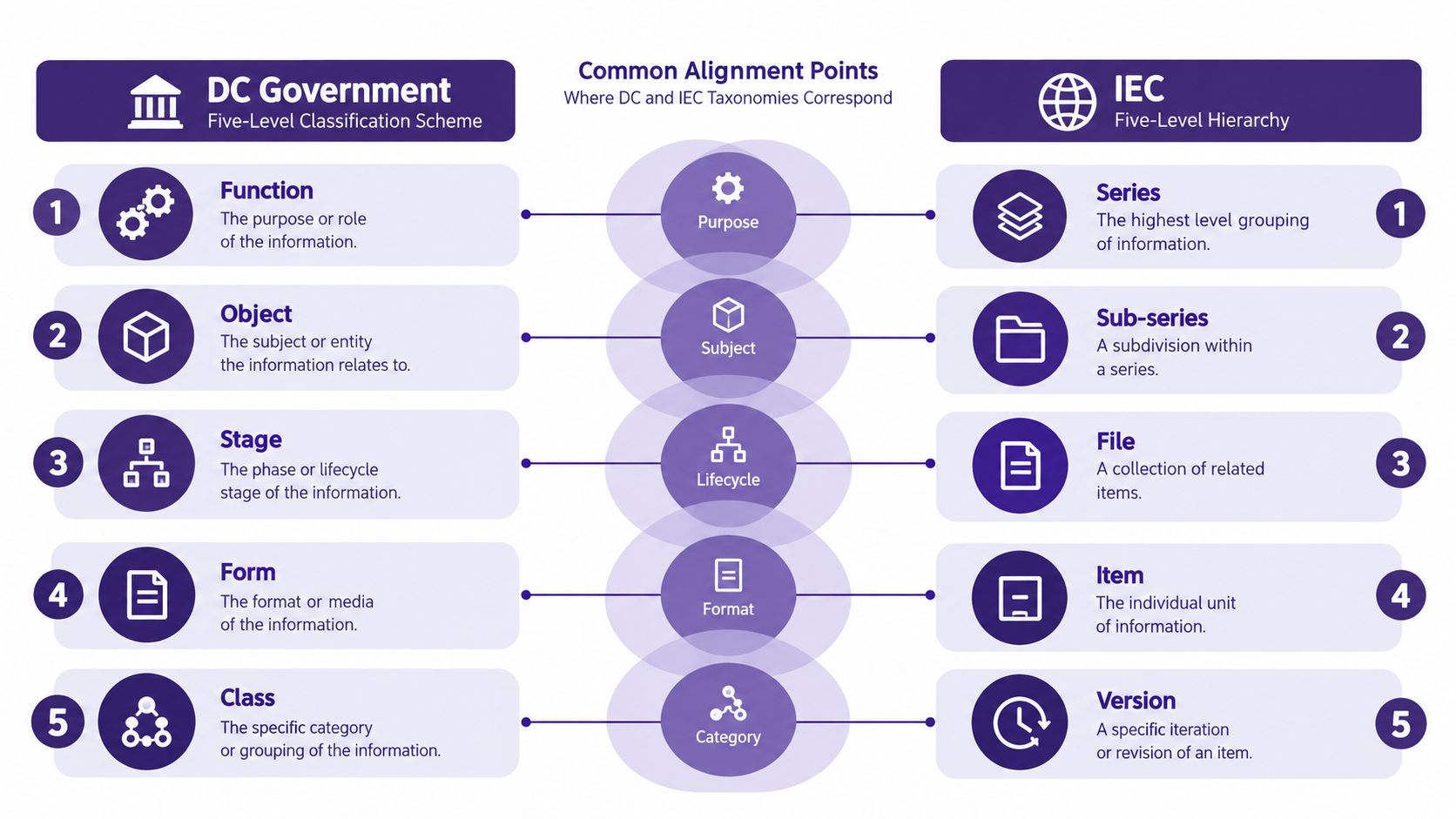
The five-level government model described in AWS's data-classification models separates function, object, stage, form, and class. These questions describe what the content supports, what it is, where it sits in its lifecycle, which format it uses, and how access should be controlled. IEC 61355-1 guidance applies a related hierarchical approach to technical documentation, with required levels A2 and A3 and an optional preceding A1. The result is a structure that supports consistent identifiers and retrieval across complex libraries.
Use the five layers as a naming test:
- Function: Which business or editorial activity does the item support?
- Object: Is it a contract, script, invoice, transcript, image, or presentation?
- Stage: Is it a draft, review copy, approved asset, archived record, or superseded version?
- Form: Is it a PDF, spreadsheet, video, audio file, slide deck, or web page?
- Class: What sensitivity level controls access and handling?
For example, a podcast episode can be recorded as function = audience development, object = episode transcript, stage = approved cut, form = SRT file, and class = Internal. Each value answers a different question. Combining them into one label, such as “Internal approved transcript,” loses structure as soon as the archive adds new teams, stages, or formats.
IEC's hierarchy uses names such as series, sub-series, file, item, and version. The labels can differ, provided the levels remain distinct. A content team might map a documentary series to a project function, an episode transcript to an object, an approved cut to a lifecycle stage, and an SRT file to a form while keeping sensitivity independent.
Layered taxonomies also improve retrieval and repurposing. A producer can filter by function, object, and stage before access rules determine what may be opened. An older asset remains findable by topic and format without losing its rights, status, or handling context.
How the Highest Marked Portion Sets the Document Level
A budget memo may contain an ordinary narrative, then introduce Confidential salary projections in one chart. The chart changes the document's level. The highest-marked portion determines the overall document level, even when the sensitive material occupies only a small part of the file. U.S. State Department guidance applies this rule and requires the overall classification at the top and bottom of every page (State Department classification guidance).
Treat the file like a container: its label must account for its most restricted contents. Do not average levels, select the most common one, or downgrade the document because the controlled passage is brief. A portion may be a paragraph, title, chart, bullet, or slide element, as described in the University of Washington marking booklet.
| Document Scenario | Portions Present | Resulting Level |
|---|---|---|
| Budget memo | Unclassified body and a chart containing Confidential salary projections | Confidential |
| Contract draft | Internal discussion and a Restricted vendor list in an attachment | Restricted |
| Research brief | Public analysis and footnotes citing Top Secret sources | Top Secret |
Apply the rule in an order that a reviewer can reproduce:
- Inspect the entire file, including captions, attachments, footnotes, charts, and embedded objects.
- Mark each portion containing controlled information.
- Find the highest classification present.
- Assign that level to the document banner.
- Record the portion that triggered the result.
That record supports a practical decision: split the file, redact the sensitive material, or keep the whole container at the higher level. The method may appear conservative, yet it removes subjective boundary calls during review. Portion marks show the reason, while the banner gives archive and downstream systems one dependable control.
Portion Marking and Banner Placement Mechanics
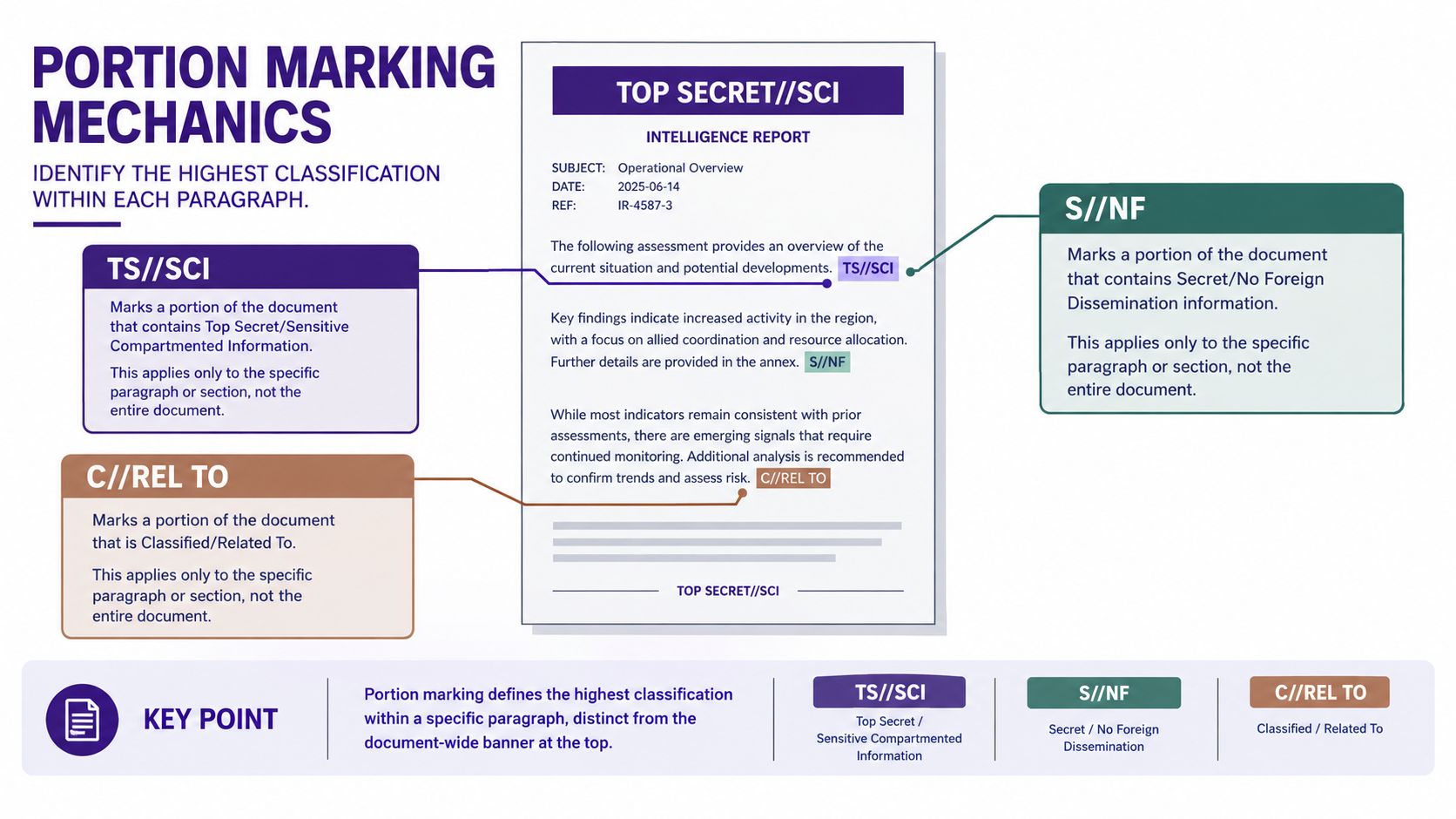
Portion marking labels individual elements. The overall banner labels the document as a container. Those functions aren't interchangeable. A banner can warn that a file is sensitive, but without inline markings, reviewers still can't identify which paragraph, figure, or attachment raised the level.
Use the approved marking vocabulary for the governing scheme. Examples include TS//SCI, S//NF, C//REL TO, UEH, IUO, Internal, and Public. The double slash separates a primary classification from a special-access caveat, while the other terms may reflect handling or organizational conventions. Don't mix these tokens casually. A team should publish a controlled glossary and specify which labels are valid for which document types.
Place the document-wide banner at the top of the page and repeat it at the bottom for multi-page documents. On a cover sheet, put the classification line above the title. Mark paragraphs containing controlled content at their opening, place image markings above the figure or in its caption, and mark attachment title pages separately.
Make the marks machine-readable
Use consistent spacing, capitalization, and punctuation. Don't rely on colored fonts, shields, icons, or page shading as substitutes because PDF conversion, HTML rendering, OCR, and accessibility tools can discard visual styling.
A text-based token survives format changes better. Templates should keep the banner in a stable location, preserve paragraph markers during export, and carry the same classification metadata into the repository record. The Defense Department marking guide provides the abbreviations (U), (C), (S), and (TS) for portion marking, which can serve as a model for explicit, parseable notation (DoD marking guidance).
Naming Conventions for Tier Labels and Identifiers
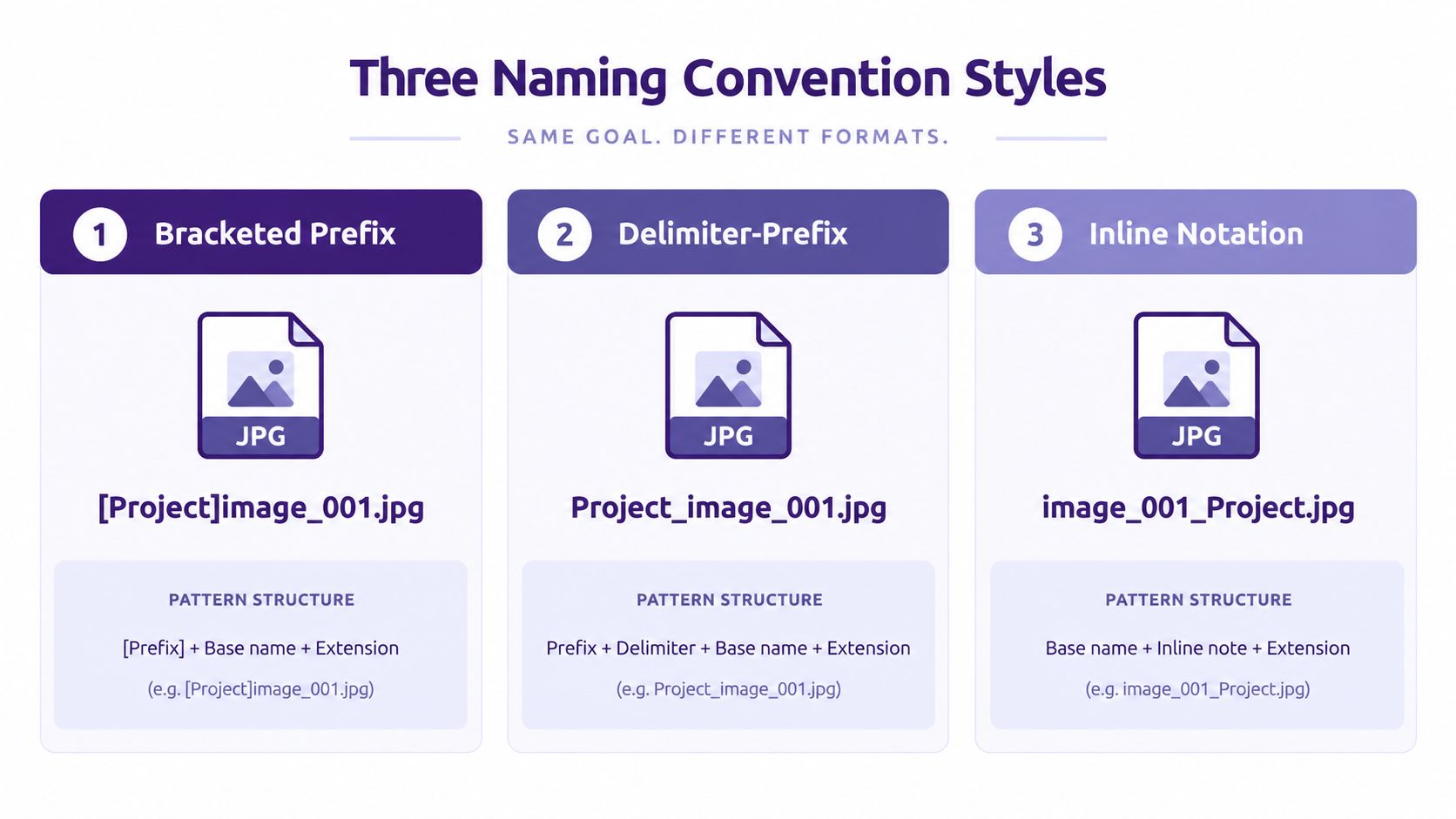
A filename should help a human sort the archive and help software extract metadata. Three common patterns illustrate the trade-offs:
- Bracketed prefix:
[RESTRICTED]-2024-Q3-VendorReview.pdf - Delimiter prefix:
RESTRICTED/2024/Q3/VendorReview.pdf - Inline tag:
VendorReview-RESTRICTED-2024Q3.pdf
The bracketed prefix is visually prominent, but punctuation can complicate search and parsing. The delimiter prefix sorts cleanly when the platform treats the slash as a path or structured separator, although some systems won't accept it in a filename. The inline tag reads naturally and keeps the subject first, but the tier may disappear when a file manager truncates long names.
Choose one fixed position for the tier token. Position one is usually safest when paths are shortened, while a final token before the date can work if your ingestion rules are stable. Use one casing convention, preferably uppercase for a controlled sensitivity token, and keep abbreviations short enough for filenames, filters, and exports. Avoid characters that behave differently across Windows, macOS, S3, and SharePoint, and define a predictable version suffix such as v01 or v02 within your approved pattern.
A filename is an interface. If people and systems can't predict where the tier appears, the archive has no dependable identifier.
Document the rules alongside your metadata management best practices. For legal or production-heavy PDF collections, teams may also use automated Bates numbering online to add stable page identifiers, but Bates numbering doesn't replace a sensitivity token or portion marking.
Filename drift creates hidden migration work. “Confidential,” “CONF,” and “Client-Private” may mean the same thing to different teams, yet downstream systems treat them as separate values. Freeze the vocabulary before the archive grows another generation of inconsistent files.
Mapping Legacy Content Into a New Classification System
Migration starts with evidence, not a proposed folder tree. Pull every folder name, tag, access group, filename prefix, and ad hoc color label into one working inventory. The directory structure usually reflects old team habits, so it can't serve as the only source of truth.
Four passes that keep migration controlled
Inventory creates the raw map. Capture the current location, owner, format, lifecycle stage, access group, existing label, and obvious content type in a spreadsheet. Include orphaned files and shared links, not only content that appears in curated folders.
Normalize turns inconsistent language into a canonical vocabulary. Merge variants such as “HR” and “Human-Resources,” standardize casing, and freeze the source-label list before anyone writes mapping rules.
Map assigns each legacy label to a new function, object, stage, form, class, and retention bucket. Give ambiguous items an explicit fallback bucket, and record the reason for each rule rather than hiding uncertainty in a catch-all folder.
Validate tests whether the rules work outside the person who wrote them. Spot-check a 5% sample against the rules and compare the decisions of two reviewers, using the disagreements to expose gaps (LCSC's mixed-data classification guidance).
Insert a freeze week between mapping and bulk retagging. Content owners can challenge assignments, clarify ambiguous projects, and approve exceptions without interrupting the technical migration. Once the rules are stable, publish the canonical labels, retire the old roots, and preserve the mapping table as an audit artifact.
Classification as a Lifecycle and Governance Workflow
A static label loses value as soon as the document changes. A draft may become an approved asset, an internal research note may become a public article, and a contract may enter a legal hold. Classification belongs at each lifecycle gate, not only on the cover page.
| Stage | Re-evaluation Action | Owner |
|---|---|---|
| Create | Assign an initial level before drafting and define the expected audience. | Content owner |
| Review | Check the highest marked portion and reassess when scope or attachments change. | Editor or reviewer |
| Archive | Confirm whether the file keeps its level, receives approved downgrading instructions, or becomes a separate reference copy. | Records owner |
| Dispose | Apply retention and hold rules using the record's governing classification history. | Records or legal owner |
Government training materials emphasize that overall classification follows the highest level of information in the document and that downgrading or declassification instructions should be specified separately (CDSE classification training guide). That distinction matters because a later status change doesn't erase the document's earlier handling obligations.
Assign a named taxonomy owner. This person maintains definitions, resolves disputes, reviews exception patterns, and schedules quarterly audits. Editors, legal staff, records managers, and security teams can contribute decisions, but ownership can't remain an unnamed IT side task.
Teams evaluating document classification software should test lifecycle triggers, metadata preservation, audit logs, and export behavior, not only the quality of the first automated label. A useful system makes the next decision easier and leaves enough evidence to explain the last one.
Where Most Homegrown Classification Schemes Break Down
Organic schemes usually fail because teams optimize for local convenience. HR creates People-1 through People-5, Legal creates Legal-A through Legal-D, and editorial uses “private” for everything that hasn't been published. Each vocabulary may work inside one department, but cross-team search and reporting become unreliable.
Four warning signs
- Tier inflation: Staff choose Restricted for ordinary internal material because the strongest label feels safest. The meaningful distinction then collapses into one overloaded bucket.
- Parallel taxonomies: Departments create naming roots that can't be compared or joined in a shared archive.
- Missing portion marking: A document banner exists, but a sensitive slide, caption, or attachment has no inline marker.
- Orphaned ownership: No named person can resolve a disputed label, so the file remains blocked or receives an arbitrary default.
Track the ratio of files in each tier, the number of parallel naming roots, the share of long documents without portion markers, and the percentage of files with a documented owner. These measures don't prove that a scheme works, but they reveal where the rules are becoming unusable.
The fix isn't another label. It's a smaller canonical vocabulary, explicit handling rules, a visible exception process, and owners who review real files instead of only maintaining a policy document.
Quick Reference Crosswalk of Major Schemes
A crosswalk is useful during audits, vendor onboarding, and migrations, provided it translates concepts rather than equating labels. The same word can trigger different controls. Restricted might require encryption under one enterprise policy, while another organization reserves it for legally protected material or a records hold. Internal often falls below Confidential in a four-tier enterprise scheme, yet the actual audience and handling rules remain organization-specific.
| Sensitivity Tier | U.S. Gov (3-tier) | DC Gov (5-level) | Enterprise (4-tier) | IEC Multi-Stage |
|---|---|---|---|---|
| Open or public | Unclassified, approved for public access | Level 0 Open Data | Public | No direct sensitivity equivalent |
| Limited internal | Unclassified, organizational handling applies | Level 1 Public Data Not Proactively Released or Level 2 For District Government Use | Internal or Protected | No direct sensitivity equivalent |
| Confidential | Confidential, access restricted because disclosure could cause damage | Level 3 Confidential, including data protected by law, regulation, or contract | Confidential, stronger controls and limited audience | Classification layer is separate from document hierarchy |
| Restricted | Scheme-specific restricted handling; follow the controlling authority | Level 4 Restricted Confidential, reserved for severe disclosure consequences | Restricted, strict need-to-know handling | Classification layer is separate from series, file, item, and version |
| Hierarchical identifier | Not a sensitivity tier | Function, object, stage, form, class | Add as metadata where needed | Series, sub-series, file, item, version |
The DC scheme includes Level 0 Open Data, Level 1 Public Data Not Proactively Released, Level 2 For District Government Use, Level 3 Confidential, and Level 4 Restricted Confidential, the five-level model described earlier in the layered-hierarchies section.
IEC 61355-1 contributes a document-structure hierarchy rather than a direct sensitivity ladder. Its structure uses required A2 and A3 levels, with A1 optional, as noted earlier in the layered-hierarchies section. In practice, that hierarchy can sit beside a sensitivity label: a series may contain files, files may contain items, and versions may inherit or receive their own handling metadata.
Use the table as a translation aid. Before adopting a label, confirm its audience, controls, owner, and place in the hierarchy. Otherwise, a familiar word can conceal a different rule.
Rollout Checklist for Editors and Content Leads
Use the next week to create a working first version:
- Inventory: Deliver a spreadsheet of folders, tags, owners, formats, and access groups.
- Assign ownership: Name the person who decides the highest-marked portion and resolves edge cases.
- Define tiers: Deliver a short memo connecting every level to audience, handling, retention, and disposal.
- Set marking rules: Publish document banners, portion markers, attachment rules, and export templates.
- Standardize names: Deliver one filename pattern with a fixed tier position and version suffix.
- Pilot: Apply the scheme to one collection and record ambiguous items.
- Review: Assign a reviewer for exceptions and schedule a later refinement cycle.
Classify content at intake, not when someone searches for it under pressure. The first version should be practical rather than perfect, then improve after the team has used it in real editorial and archive workflows.
Contesimal helps content organizations classify, organize, and search documents, podcasts, videos, and articles with layered metadata such as topic, audience, format, status, rights, and relationships. Visit Contesimal to explore how your team can turn a governed content library into a more discoverable source for future research and publishing.