
You probably already feel the shift.
A post that used to earn steady search traffic now gets skimmed, summarized, and partially answered before the click ever happens. A podcast episode with great insight sits buried because the transcript is messy. A YouTube archive full of strong ideas still behaves like a pile of disconnected files instead of a real content asset. If you're a creator, publisher, or marketer sitting on years of material, AI Overviews have changed the job.
That change isn't only about ranking a blog post. It's about making your whole library understandable, citable, and reusable across formats. For creators trying to grow from hobbyist output into a real revenue engine, that matters a lot. The new game is simple to describe and harder to execute: organize, understand, and take action on what you've already made so it can create new value across platforms.
A lot of old SEO habits still help. But how to optimize for AI Overviews now depends on clarity, structure, factual precision, and library-level organization. If your content is hard to parse, buried in long intros, or trapped inside unstructured audio and video, AI systems will likely move on to a cleaner source.
Understanding AI Overviews and Why They Matter to Creators
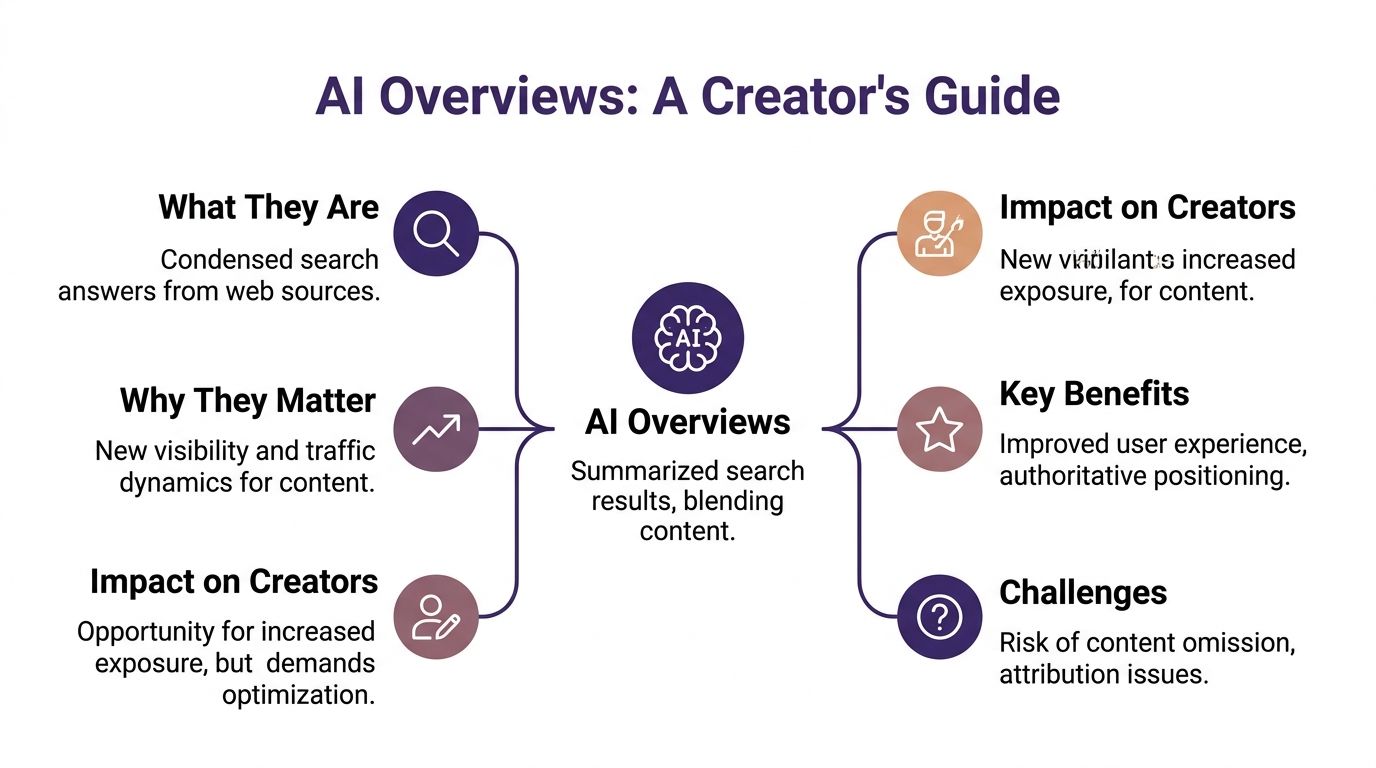
Google's AI Overviews changed the front page of search. Instead of asking users to compare a list of ten blue links, Google increasingly gives them a synthesized answer first, then offers citations and follow-up paths. For creators, that means your work now competes not only to rank, but to be selected as source material.
That sounds threatening if your model depends on clicks. It also opens a different kind of opportunity. Since Google launched AI Overviews in May 2024, 63% of businesses that optimized their content strategy reported positive impacts on organic traffic, visibility, or rankings according to this roundup of AI Overview statistics. The takeaway is practical: teams that adapted didn't just defend visibility, they found new ways to win it.
The real shift is from ranking to being cited
Traditional SEO rewarded pages that earned a strong position. AI Overviews still care about relevance and authority, but they also care about whether your content can be extracted cleanly into an answer. That's a different editorial standard.
Creators feel this fastest because they often publish across formats:
- Bloggers need pages that answer questions fast.
- Podcasters need transcripts and show notes that don't read like raw dumps.
- YouTubers and video teams need descriptions, chaptering, and metadata that turn spoken content into retrievable knowledge.
- Publishers and editors need a connected archive, not isolated articles.
Practical rule: Treat every asset like a potential citation source, not just a piece of content.
If you're still thinking only in terms of keywords and rankings, it's worth taking a detour to learn AEO with SearchMention. Answer engine optimization is a useful frame because it matches what's happening in search behavior. People want the answer first. Your job is to make sure your work is the answer AI can trust.
Why this matters beyond traffic
AI Overviews are also changing how authority gets perceived. If your name, site, or channel appears inside summaries, users start associating you with the topic before they even land on your property. That can help creators who are building playlists, topic clusters, newsletters, premium products, or service lines from an existing library.
For anyone trying to reignite old content and create infinite content value, this isn't another minor SEO tweak. It's part editorial discipline, part information architecture, part business model defense.
Structuring Your Content for AI Readability
Most content doesn't lose AI visibility because the ideas are weak. It loses because the structure makes extraction harder than it should be.
The fix isn't glamorous. It's formatting.

Optimizing for AI Overviews requires a structural approach where paragraphs are kept to two to three sentences, and large-language models frequently utilize content formatted with bullet points and numbered lists to present information according to SE Ranking's guide to optimizing for AI Overviews. That matches what many content teams see in practice. Dense blocks are harder to parse, quote, and summarize.
Build pages around answerable questions
An AI-friendly article usually has a simple shape:
- A direct answer near the top
- Question-based H2s and H3s
- Short paragraphs
- Lists, tables, or step sequences
- A clean conclusion or next step
That same logic applies beyond blog posts. Video descriptions, podcast show notes, help docs, and resource pages all benefit from a stronger question-and-answer structure.
Here's the difference between content that works and content that doesn't:
| Format choice | Works better for AI readability | Usually underperforms |
|---|---|---|
| Opening | Direct answer in the first lines | Long scene-setting intro |
| Paragraphs | Two to three sentences | Walls of text |
| Subheads | Clear questions | Clever but vague labels |
| Detail | Bullets and steps | Long narrative blocks |
| Media support | Captions, alt text, transcripts | Embedded media with little context |
A lot of creators resist this because they think it flattens their voice. It doesn't. You can still sound like yourself. You just can't hide the answer under a dramatic opening anymore.
What to change in existing assets
Start with your best-performing pieces and reformat before rewriting. That usually means:
- Shorten lead paragraphs: Put the answer first, then expand.
- Replace vague subheads: Turn "Why This Matters" into a real user question.
- Break up long sections: Use lists where the content naturally contains steps, examples, or criteria.
- Add visible context to media: Explain what the embedded clip, image, or chart answers.
If you're researching what similar articles already surface for topic discovery, tools that discover articles using artificial intelligence can help you spot the patterns AI systems keep pulling into summaries.
A useful companion idea here is semantic organization. This piece on semantic search vs keyword search is worth reading because AI Overviews don't behave like old-school exact-match retrieval. They respond better to pages that are logically organized around meaning.
Later in your workflow, video can reinforce these formatting habits in your team:
Structure is editorial, not cosmetic
A clean structure does two jobs at once. Humans skim it faster, and machines can map it faster. That's why pages with clear hierarchy often outperform prettier pages that ramble.
Keep your best answer high on the page. If an editor has to hunt for it, an AI system probably won't rescue it for you.
For creators with mixed-media libraries, this principle becomes even more important. The transcript, description, article adaptation, and summary page should all use compatible structure so each format strengthens the others instead of fragmenting your authority.
Authoring Citable Content with Factual Precision
A well-structured page still won't get cited if the actual writing is mushy.
AI Overviews tend to reward content that sounds grounded, specific, and attributable. That means fewer soft generalities and more direct claims supported by real information. If you write in a way that feels hard to quote, you make yourself hard to cite.
What citable writing looks like
Good AIO writing usually does three things fast:
- answers the query early
- states the core point plainly
- gives the reader something solid to anchor on
That anchor can be a definition, a tightly framed explanation, a direct quote, or a specific statistic you can stand behind. What doesn't work is padding. Many creators still write like they're earning attention paragraph by paragraph. In AI search, the page often earns visibility by making the strongest point immediately.
Editorial test: If you pulled one paragraph from the page and dropped it into a summary, would it still make sense on its own?
That question changes how you draft. Each section needs at least one compact, self-contained answer block. Think of it as writing citation-ready paragraphs rather than hoping the model assembles one for you.
Authority now has a distinct writing style
The tone matters more than some writers want to admit. AI models statistically favor authoritative tone, direct quotes, and embedded statistics, and Garrett from Moz notes these elements are 3x more likely to appear in LLM outputs according to Google's AI optimization guide reference. That doesn't mean stuffing pages with numbers. It means grounding claims wherever you can and cutting language that sounds hedged, inflated, or vague.
Here are common trade-offs:
Strong: "AI Overviews changed how searchers get answers. Lead with the answer and support it."
Weak: "As things quickly change, brands may want to consider adapting content strategies."
Strong: "This section answers one question directly, then adds examples."
Weak: "There are many important things to keep in mind when approaching this topic."
Strong: "Use actual expert quotes when you have them."
Weak: "Many experts agree that authenticity is important."
Precision beats performance
Creators sometimes confuse personality with looseness. You can be conversational and still be exact. In fact, exact language usually reads better.
A few habits help:
- Front-load the takeaway. Give the shortest true answer first.
- Use concrete nouns. Say transcript, chapter title, schema block, show notes, product page.
- Name the actor. Editors update the page. Producers clean the transcript. Writers add the quote.
- Cut speculative filler. If you can't verify a claim, say it qualitatively.
This is especially important for publishers who want to upcycle old content into new value. An old interview can become useful again if the recap page states clear takeaways, attributes statements properly, and isolates quote-worthy passages.
The fastest way to lose trust
Don't fake specificity. Don't invent examples. Don't use placeholder authority language. AI systems may still pick up sloppy copy, but over time the cleaner source tends to be easier to reuse.
The writing standard is simple: make every section easy to extract without stripping away its meaning. If your content can survive being quoted out of context, it's much closer to being overview-ready.
Implementing Semantic Markup and Schema
Schema is one of the few technical tasks in this process that gives creators a very direct payoff. It tells search systems what a page is, what kind of answer it contains, and how different parts relate to each other.
You don't need to become a developer to use it well. You just need to stop treating it like optional decoration.
The three schema types that matter most
For most creator and publisher workflows, these are the main ones worth implementing first:
- Article schema for blog posts, explainers, news-style pieces, and educational content
- FAQPage schema for pages that answer a set of clear questions
- HowTo schema for process content with defined steps
Think of schema as machine-readable labeling. Without it, Google has to infer more. With it, you're giving cleaner signals.
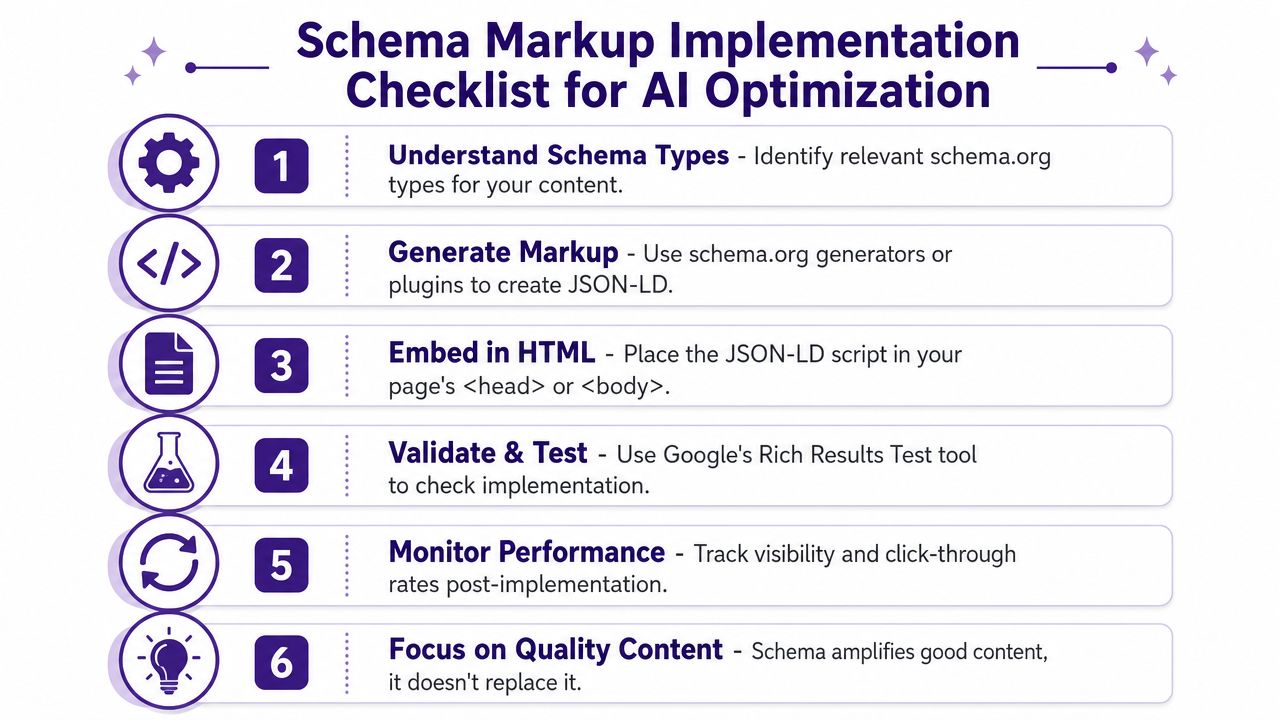
A practical checklist
Use this simple sequence when publishing or updating a page:
Match the page type correctly
Don't put FAQPage on a page that barely contains questions. Don't force HowTo onto a commentary piece.Make the content readable before marking it up
Schema amplifies clarity. It doesn't rescue bad writing.Use semantic HTML
Proper H1 to H6 hierarchy helps the page make sense before the structured data is even read.Place concise answers near relevant headings
If the schema says a page answers a question, the visible content should do that too.Validate the markup
Plugins and generators help, but they also make mistakes. Check the output.
Schema works best when the page already behaves like a good answer. The markup confirms the structure. It doesn't create one.
Where creators usually go wrong
The common mistake isn't failing to install schema at all. It's using markup on pages that still bury the answer, wander off-topic, or mix too many intents together.
Another issue is inconsistency. A creator might have clean Article schema on the blog, but no equivalent discipline on landing pages, episode pages, or repurposed transcript pages. That creates an uneven footprint. Search systems can only work with what you've made legible.
For non-technical teams, a lightweight editorial rule helps: every publish workflow should include a quick schema decision. Is this an article, a FAQ, or a how-to? Once that becomes habit, implementation gets easier and the archive gets cleaner over time.
Unifying Your Content Library with a Smart Taxonomy
Single-page optimization helps. A smart taxonomy is what turns scattered assets into a system.
Most creators don't have a content problem. They have a retrieval problem. The ideas already exist across videos, podcast episodes, blog posts, newsletters, interviews, and notes. But because those assets aren't classified consistently, AI systems can't easily connect them.
Mixed-media libraries are where the gap is biggest
Creators possessing archives have an opportunity to gain ground. The lack of data-driven strategies for optimizing non-textual content such as podcasts, videos, and interviews for AI overviews is a major gap, and Google's AI now increasingly cites structured audio/video transcripts and metadata, while most content teams still lack tools to auto-generate AI-citable snippets from archival media according to Conductor's overview optimization resource.
That matters if your best ideas live off-page. A strong interview buried in a long transcript won't compete well against a plain article that states the same insight cleanly.
What a useful taxonomy includes
A library-level taxonomy doesn't have to be academic. It just has to be consistent enough that humans and AI can follow it.
A solid setup usually includes:
Core topics
Your recurring themes, such as audience growth, metadata, production workflow, monetization, or research methods.Content type labels
Blog post, episode, interview, tutorial, clip, newsletter, case analysis.Audience stage markers
Beginner, working creator, team lead, executive, publisher.Intent tags
Educational, comparison, tactical, strategic, repurposing-ready.Entity references
Products, people, frameworks, recurring series names.
This kind of structure makes repurposing easier too. A video clip can point to the full episode. The episode can point to an article. The article can point to a glossary page or FAQ. Suddenly your archive behaves like a knowledge base instead of a pile of uploads.
Why this changes AI visibility
AI Overviews don't only reward the best isolated sentence. They reward sources that appear coherent across a topic. A taxonomy helps create that coherence because it gives your archive shared language.
If your team works across formats, metadata discipline becomes part of search strategy. This guide to metadata management best practices for content creators is useful because metadata is often where mixed-media libraries subtly fail.
Your transcript is not just accessibility support. It's a retrieval layer. Your tags are not admin work. They're discovery infrastructure.
For publishers, YouTubers, podcasters, and editors in chief, this is the key. Organize the library well enough and your old content starts producing new outputs: quote cards, article drafts, episode summaries, FAQ pages, cross-links, and AI-citable snippets. That's how you create new value from what already exists.
Testing Measuring and Operationalizing Your Strategy
Good AI Overview optimization isn't a one-time cleanup. It's an operating rhythm.
Some pages will get picked up quickly. Others won't move until you revise the opening, split the intent, or add clearer supporting material. The creators who improve fastest are the ones who build a repeatable review loop instead of waiting for a traffic drop to force action.
A workable review cycle
Start with a small set of priority topics. For each one, track whether AI search surfaces your brand, cites your page, or ignores you completely. Those are different outcomes, and they call for different fixes.
A simple workflow looks like this:
Choose a topic cluster
Pick one area where you already have multiple assets.Audit the existing library
Review the article, transcript, clip descriptions, show notes, and related pages.Upgrade the most promising asset
Tighten structure, sharpen answers, improve metadata, and add schema where appropriate.Check overview behavior across prompts
Look for brand mentions versus direct page citations.Refine and repurpose
Turn useful sections into supporting assets around the same topic.
What to measure without overcomplicating it
You don't need an elaborate dashboard to start. You do need consistency.
Industry best practice requires conducting quarterly reviews of a content library to systematically identify repurposing opportunities, using metrics such as page views, conversion rates, and time-on-page to prioritize high-value assets for transformation according to Cloud Present's guide to repurposing content. That's a good baseline because it keeps the process tied to business value, not just curiosity.
A lean scorecard might include:
Visibility signals
Are your pages showing up in AI-led search experiences for the target topic?Citation quality
Is the system citing your site directly, or only mentioning your brand?Engagement quality
Which updated assets still hold attention once users click through?Repurposing potential
Which pages can become clips, FAQs, summary posts, or newsletter modules?
What operational maturity looks like
At first, optimization usually lives with one motivated editor or strategist. That won't scale. The better model is to turn these checks into part of your editorial system.
A mature workflow often includes:
| Role | Practical responsibility |
|---|---|
| Editor | Rewrites openings and section answers |
| SEO lead | Reviews schema, indexing, and query targets |
| Producer | Cleans transcripts and media metadata |
| Content strategist | Maps clusters and repurposing paths |
| Analyst | Reviews visibility and engagement patterns |
Teams that need a broader view of the range of tools may want to explore this overview of content intelligence platforms. The important point isn't adding software for its own sake. It's creating a process that helps humans and AI work together without losing editorial judgment.
Working rule: Measure what gets cited, not just what gets published.
Creators who do this well don't just chase the next post. They reignite the whole library. A past episode becomes a search answer. An older article becomes a better summary page. A forgotten interview becomes a fresh cluster of assets across platforms. That's where the money-making side of repurposing starts to show up.
If you're ready to turn an unruly archive into a usable content engine, Contesimal is built for that job. It helps creators, publishers, and content teams organize mixed-media libraries, collaborate with AI in a practical way, and uncover new value inside articles, videos, podcasts, and research that already exist. For anyone trying to move from scattered output to a real cross-platform content system, it's a smart way to make old content useful again.