
Before you even think about highlighting a textbook or jotting down a single note, we need to talk about the foundation. So many people skip this part, jumping straight into the material. The result? A sprawling, disorganized mess of facts that's more overwhelming than helpful.
A truly effective study guide isn’t just a collection of information. It's a strategic tool, and building one starts with a single, crucial step.
Building the Foundation of Your Study Guide
The first thing you need to do is set a precise learning objective. I can't stress this enough. You have to ask yourself: "What, exactly, do I need to be able to do after using this guide?" This one question will shape every single decision you make from here on out.
Defining Your Core Objective
Think of your objective as your North Star. It’s what keeps you from getting lost in the weeds, especially when you’re dealing with dense textbooks, hours of video lectures, or a massive content library you're trying to repurpose. A vague goal like "study for the history final" is useless. You have to get specific.
Here’s what I mean. Look at the difference in these objectives:
- Explain the three primary causes of the Industrial Revolution and their long-term effects.
- Compare and contrast the key features of Python and JavaScript for web development.
- Outline the step-by-step process for editing a podcast for professional creators.
See how each one starts with an action verb? This small tweak forces you to shift from passively reviewing information to actively engaging with it. It’s a game-changer. And if you really want to streamline this whole process, check out some of the best student productivity apps out there—they can make a huge difference.
Aligning Format with Learning Styles
Once you’ve nailed down your objective, you can start thinking about the format. The best layout depends on both the subject and your own learning style. A one-size-fits-all approach just doesn't work.
The goal isn't just to gather information but to build a solid framework that makes the creation process intuitive and the final product incredibly effective for you or your audience.
For example, if you're a visual learner studying anatomy, your guide should probably be heavy on diagrams and charts, not just text. If you're a podcaster creating a guide on audio editing, you might include links to audio examples to showcase different techniques.
The point is to match the format to your goal. That’s how you create a tool you’ll actually want to use.
Building Your Study Guide's Foundation: The Content Library

Once you know what you want to achieve, it’s time to gather your raw materials. This is where so many creators get bogged down, staring at a massive, disorganized pile of podcast transcripts, video lectures, and old blog posts.
The secret isn’t to consume everything at once. It’s to build a smart, centralized content hub first.
For anyone with an existing archive of work—videos, blog posts, podcasts—you're sitting on a goldmine. Each piece is a dormant asset just waiting to be reignited. Think of this step as mapping out your own intellectual territory before you can draw a clear path for your audience.
Create a Centralized Content Hub
Your first real move is to pull every relevant source into one single, accessible spot. This could be a dedicated folder in Google Drive, a new project in Notion, or a specialized content management system designed for creators. The goal is simple: stop the endless searching and start to organize your content library to create new value.
As you bring your files together, begin tagging and categorizing everything. This simple step is what transforms a chaotic mess into a structured, searchable library.
- By Topic: Tagging with core themes (like "productivity hacks," "content marketing," or "screenwriting structure") lets you group related materials in a snap.
- By Format: Sorting by content type ("video transcript," "interview notes," "research paper") helps you see what kind of source material you're working with.
- By Project: If you're building a guide for a specific course or YouTube series, create a master tag for that project to keep everything consolidated.
Getting this foundation right is non-negotiable. If you need a deeper dive on this, we've put together a guide on how to organize research papers that offers some extra strategies.
Let AI Do the Heavy Lifting
Let's be honest: manually sifting through years of content is a monumental task. This is where AI-powered tools can be a game-changer when you want to make study guides from a large back catalog. Platforms like Contesimal can ingest your entire content library, mapping it out to create a powerful, searchable repository almost instantly.
For YouTubers and media organizations, this means instantly searching across podcasts, videos, and articles to generate layered study guides that reveal hidden patterns and connections in your work, helping you reignite your content library and bring it to life.
This approach isn't just a convenience; it's becoming a necessity. New market research trends show that 65% of modern researchers already use AI for synthesis, giving their teams a serious strategic advantage.
Adopting these tools allows you to find connections in your archive that would have been impossible to spot before. You're not just organizing files; you're turning old content into new, valuable learning assets and building a system for continuous creation.
Turning Raw Notes into Real Knowledge

Alright, you've gathered all your source material and have it neatly organized. Now comes the part where the real magic happens: synthesis. This is the moment you stop being a collector of information and start becoming a true expert, boiling down dense topics into sharp summaries and smart questions.
Just copying and pasting chunks of text won't cut it. That creates a glorified cheat sheet, not a tool for genuine learning. The goal here is to wrestle with the material, force your brain to re-articulate the core ideas, and then poke holes in your own understanding with pointed questions.
Nail the Summary
Think of your summary as the "elevator pitch" for a concept. If you can't explain it in a few clear, concise sentences, you probably haven't fully grasped it yet. That's a good sign you need to go back to the source.
Your summaries need to be punchy and focused on the absolute must-know takeaways. Don't get lost in the weeds with minor details or jargon. Zero in on the "why" and "how" behind the information—that’s where deep comprehension is built. For a closer look at this process, we've shared more on effective note taking on PDF documents.
Ask Questions That Actually Teach
Good questions are the engine of a powerful study guide. They flip the switch from passive reading to active, engaged thinking. For content creators, this means crafting questions that resonate with your specific audience—the YouTubers, bloggers, and podcasters transitioning from hobbyist to professional.
Instead of just asking "What is X?", push for more depth:
- Put it in a scenario: "Imagine you're a podcaster and your viewership has flatlined. How would you use the 'Content Repurposing' framework to create three new pieces of content from a single interview?"
- Compare and contrast: "What are the biggest differences between audience engagement on YouTube versus TikTok, and how should that change a video's call-to-action?"
- Connect cause and effect: "Walk me through how changing a blog post's headline can directly impact its organic search traffic and click-through rate."
This kind of thinking is a goldmine, especially for creators looking to turn their expertise into products. There's a huge opportunity in building study guides from your existing content library; the global education and training market is projected to hit an incredible $681.674 billion by 2033. For creators, that means digging into your archives—old podcast episodes, blog posts, videos—to upcycle old content, create new value, and ultimately make money with it. You can see the full breakdown in the education and training market report.
The art of the study guide isn't just in what you include, but in what you prompt. A good question is worth a thousand bullet points because it forces the learner to build their own connections and arrive at their own understanding.
This back-and-forth between summarizing and questioning is what elevates a pile of notes into a genuine educational asset. It guarantees that whoever uses the guide—whether it's you or your audience—is truly learning, not just skimming.
Designing a Clear and Engaging Layout
Let’s be honest. Even the most brilliant, life-changing content will fall flat if it’s just a giant wall of text. A great layout isn’t about becoming a world-class graphic designer overnight; it's about making your information easy to find, read, and actually remember.
When you make study guides, the visual design is just as crucial as the words on the page. Simple formatting changes can create a clear path for the learner's eyes, guiding them from the big ideas down to the supporting details. This isn’t just for looks—it’s about cutting down the mental effort it takes to learn, which helps the information stick.
Building a Strong Visual Hierarchy
A strong visual hierarchy is like a roadmap. It tells the reader what’s most important before they even read a single word. Headings, subheadings, and lists are your signposts, breaking the journey into easy-to-digest sections.
You don't need fancy software for this, just a consistent game plan.
- Use Headings Strategically: Break your content into major topics with clear, descriptive headings (just like the ones you're reading now). This makes the guide instantly scannable and gives a quick overview of what's inside.
- Lean on Bullet Points: Got a list of steps, a bunch of key facts, or a few crucial takeaways? Bullets are your best friend. They instantly transform a dense paragraph into something far more approachable.
- Embrace White Space: Never, ever underestimate the power of empty space. It gives the reader’s eyes a place to rest, prevents that overwhelming feeling of clutter, and makes the entire guide feel more inviting.
A wall of text is the fastest way to lose someone's attention. The goal is a layout that pulls the reader in and helps them process information efficiently, not one that makes them want to close the tab.
Adding Visual Aids and Color
Once your core structure is solid, you can layer in visual elements that actively boost learning. Visuals aren't just filler; they can make complex ideas click in an instant.
For example, a simple flowchart can explain a multi-step process way better than a long paragraph ever could. A quick pie chart makes statistics immediately understandable. These elements are a lifeline for visual learners and provide a much-needed break from straight text.
Color-coding is another surprisingly powerful tool. Try assigning a specific color to different types of information—maybe green for key definitions, blue for examples, and red for important warnings or "don't forget" notes. This simple visual cue helps the brain categorize and connect ideas across the entire guide, turning it into a cohesive and intuitive learning tool. This is the kind of thoughtful design that separates a good study guide from a great one.
We've all seen how different design choices can either help or hinder learning. Some visuals clarify, while others just add noise. The key is to choose elements that serve a specific purpose, guiding the learner's focus and making the material more memorable.
Below is a quick comparison of common design elements and how they can impact your study guide.
Study Guide Design Elements Comparison
| Design Element | Impact on Learning | Best For | Tool Suggestion |
|---|---|---|---|
| Icons & Symbols | Provides quick visual cues, reducing cognitive load. | Highlighting section types (e.g., a lightbulb for a tip, a checkmark for a to-do list). | Flaticon or built-in icon libraries in tools like Canva. |
| High-Contrast Colors | Draws attention to critical information and improves readability, especially for key terms. | Making headings, callout boxes, and warnings stand out. | Use a color palette generator like Coolors to find accessible, high-contrast pairs. |
| Charts & Graphs | Simplifies complex data, making trends and comparisons easy to grasp. | Presenting statistics, timelines, or process flows visually. | Google Sheets for simple charts or Venngage for more stylized infographics. |
| Bold & Italic Text | Emphasizes key terms, definitions, or phrases without disrupting the flow of a sentence. | Highlighting vocabulary, important names, or single-word concepts. | Standard text formatting options available in any document editor. |
| Custom Illustrations | Creates a unique, engaging feel and can illustrate abstract concepts in a relatable way. | Explaining complex, abstract ideas or adding a branded, personal touch. | Procreate for digital drawing or hiring a freelance illustrator on Fiverr. |
Ultimately, the goal is to create a visual experience that feels intentional and supportive. By selecting the right combination of these elements, you can design a study guide that not only looks professional but also actively enhances the learning process from start to finish.
Turning Your Content Archive into Study Guides
If you're a content creator, your library of blog posts, podcast episodes, and videos isn't just a back catalog—it's a goldmine of raw material. Every piece of content you've ever produced is an asset just waiting to be repurposed into a fresh, valuable learning experience for your audience.
The trick is to stop seeing your archive as a collection of finished products. Instead, think of it as a dynamic source you can draw from to create something new and genuinely useful.
This is about more than just bundling old blog posts into a PDF. It requires a thoughtful audit of your content to find the big, powerful themes that run through your work. What are the core topics you find yourself coming back to again and again? These recurring concepts are the perfect foundation for a cohesive study guide.
From Individual Pieces to Cohesive Modules
First things first, you need to shift your perspective. Stop seeing your content as a series of disconnected articles or episodes. Start looking for the thematic threads that tie them all together.
For instance, a YouTuber who has done a dozen videos on productivity could pull key ideas from each one—time management hacks, focus techniques, tool recommendations—and weave them into a single, comprehensive "Productivity Masterclass" guide.
The workflow looks something like this:
- Content Audit: Go through your entire archive systematically. Tag each piece with its primary and secondary topics. Be thorough.
- Theme Identification: Once everything is tagged, look for clusters. Which topics have you covered the most, and from different angles? These are your pillars.
- Module Creation: Group the related content into logical learning modules. Each module should tackle a specific part of the broader theme you identified.
Leveraging AI to Map Your Content Universe
Let's be real: manually sifting through years of content is a massive time sink. This is where AI-powered tools become a game-changer for creators who want to make study guides without spending weeks on grunt work. Platforms like Contesimal can scan, transcribe, and organize your entire library in minutes, revealing patterns and connections you might have easily missed.
This isn't just about creating new products from old assets; it's about understanding your own work on a deeper level and engaging your audience in a fresh, educational way.
Imagine you want to create a study guide on language learning trends. The market is absolutely exploding—it's projected to jump from USD 85.1 billion in 2025 to a staggering USD 649 billion by 2035. For content teams, this means turning dusty old transcripts into focused study guides that tap into this growth, especially since 40% of learners prefer multimedia study aids. You can see more on the language learning market's massive growth here.
This diagram breaks down a simple three-stage process for designing a study guide that's both well-organized and easy on the eyes.
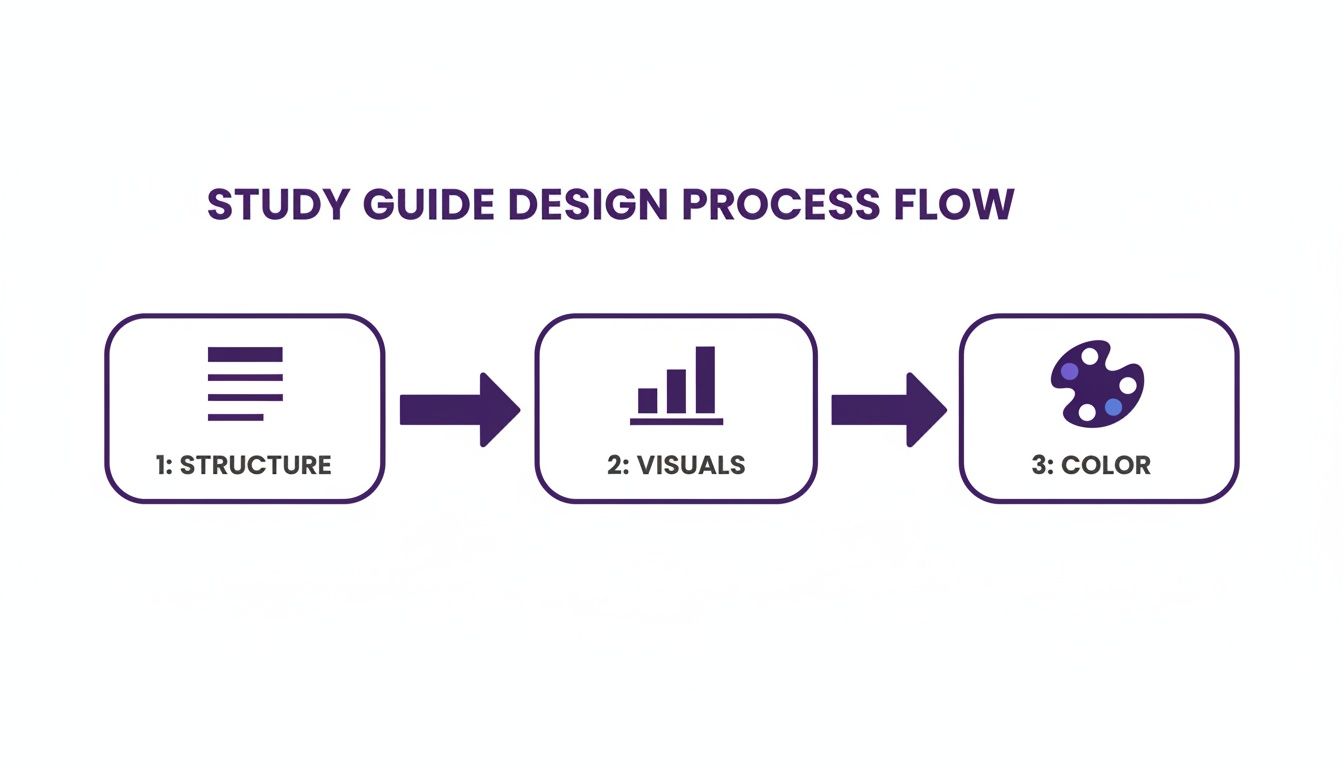
The flow from structure to visuals to color shows that great design is a layered process. You have to start with a solid foundation before you add the aesthetic touches. You can go even deeper with our complete guide on effective content repurposing strategies.
By treating your archive as an interconnected library, you can consistently generate new value and create powerful learning tools that your audience will love.
Common Questions (and Expert Answers) About Making Study Guides
Even the best-laid plans run into a few snags. When you start building out a study guide, a few common questions always seem to pop up. Let's tackle them head-on so you can keep your momentum.
I'm Drowning in Source Material. Where Do I Even Start?
Feeling buried under a mountain of video transcripts, podcast notes, and old blog posts? I get it. It's a super common roadblock for creators. The secret isn't trying to cram everything in; it's about becoming a ruthless, but strategic, editor right from the get-go.
Go back to that core learning objective you defined earlier. That single sentence is now your filter. As you look at every piece of information, every stat, every quote, ask yourself one simple question: "Does this directly help my audience achieve that objective?" If the answer is even a little fuzzy, set it aside. This kind of discipline is what keeps your guide focused and prevents it from turning into an unusable data dump.
How Do I Keep People from Getting Bored?
A study guide is useless the second it feels like a chore. To keep your audience locked in, you have to transform passive reading into an active, hands-on experience. This is about more than just a few bullet points and definitions.
Think about weaving in a variety of interactive elements:
- Scenario-Based Questions: Don't just define a term. Challenge your audience to apply it to a real-world situation they'd actually encounter as a creator.
- Mini-Quizzes: Sprinkle in short, low-stakes questions (multiple-choice or fill-in-the-blank) to break up the text and help lock in key concepts.
- Actionable Checklists: If you're explaining a process for content repurposing, break it down into a simple, step-by-step checklist they can actually use.
These small additions make a world of difference, turning a static document into a dynamic learning tool that actually works.
What’s the “Right” Length for a Study Guide?
Honestly, there's no magic number. The perfect length is dictated entirely by the topic's complexity and your specific learning objective. A guide for a single, focused concept might just be a couple of pages. On the other hand, a comprehensive guide for launching a YouTube channel could be a small book.
The real goal is comprehension, not completion. A shorter guide that's focused, crystal clear, and easy to digest will always beat a long, exhaustive one that just overwhelms the learner.
Focus on the density of value, not the page count. Every single section should serve a clear purpose and push your audience closer to their goal.
Can I Use This Format for Something Non-Academic?
Absolutely. In fact, that's where this gets really interesting for content creators, publishers, and marketers. The core principles of a great study guide—clarity, structure, and actionability—are universal. They work for any subject where you're trying to help someone learn a skill. The structure is perfect for breaking down practical skills, creative workflows, or business frameworks.
For instance, a content creator could build powerful guides on topics like:
- Mastering a specific video editing software.
- A step-by-step SEO strategy for a new blog.
- The proven story structure for writing a screenplay.
Any topic you can break down into core concepts, key processes, and essential takeaways is a perfect candidate for a study guide. This is how you organize your content library to create new value, turning your expertise into a structured, high-value resource that helps your audience get a specific result.
Ready to unlock the hidden value in your content library? Contesimal provides the AI-powered tools you need to scan, organize, and repurpose your entire archive into powerful new assets like study guides, courses, and more. Stop letting your old content collect dust and start creating new value today. Discover what's possible at https://contesimal.ai.