
You've published the interview, edited the episode, uploaded the video, and moved on to the next idea. Months later, a perfect story, quote, or unanswered question is still buried somewhere in a transcript, cloud folder, or hard drive. Your archive keeps growing, but finding the right piece of it takes so long that creating something new feels easier.
That's the problem an AI content management system can solve. It turns a passive collection of files into an active knowledge base, helping creators, publishers, podcasters, and content marketers organize what they already own, understand its themes, and reuse it across channels. The objective isn't to replace your creative judgment. It's to make your past work easier to find, connect, and turn into fresh value.
Your Content Library Is a Goldmine You Cannot See
A growing creator rarely has a content shortage. The shortage is usually context.
A YouTuber may have years of interviews scattered across project folders. A podcaster may remember discussing creative burnout but have no idea which episode, timestamp, or guest mentioned it. A publisher may own articles, books, audio, and video covering the same subject, yet treat every new assignment as if research starts from an empty page.
The archive becomes a museum with no catalog. Valuable material is present, but nobody can reliably locate it.
The hidden cost of starting from scratch
When your team can't search by meaning, it searches by filename. That forces people to remember when something was published, who appeared in it, or which folder held the final export. Those details are fragile, especially when a hobbyist channel becomes a professional operation and more people begin editing, researching, and distributing content.
The result is predictable. Strong older material gets overlooked, while the team spends its energy recreating ideas that already exist in another format. You keep chasing the next upload instead of building a system that lets one useful idea travel further.
An organized archive changes that pattern. A longform conversation can become a source for a video, a newsletter, a short clip, a research note, or a new episode outline. Your library starts behaving less like storage and more like a catalog of reusable intellectual property.
For a practical framework on finding those connections, explore mining your content library for fresh ideas.
Why this matters now
AI adoption in content operations has moved beyond isolated experiments. Adobe's 2026 research reports that nearly half of organizations have embedded generative AI across multiple functions for marketing content creation, while 84% of enterprise marketers using AI tools report significant or somewhat improved productivity (Adobe Digital Trends research).
For creators, the lesson isn't that every task should be automated. It's that content operations now need better infrastructure. If AI can help you identify themes, classify assets, and retrieve relevant material, your archive can support growth without requiring you to publish from zero every time.
Practical rule: Before commissioning more content, learn what your existing library already knows.
What an AI Content Management System Actually Is
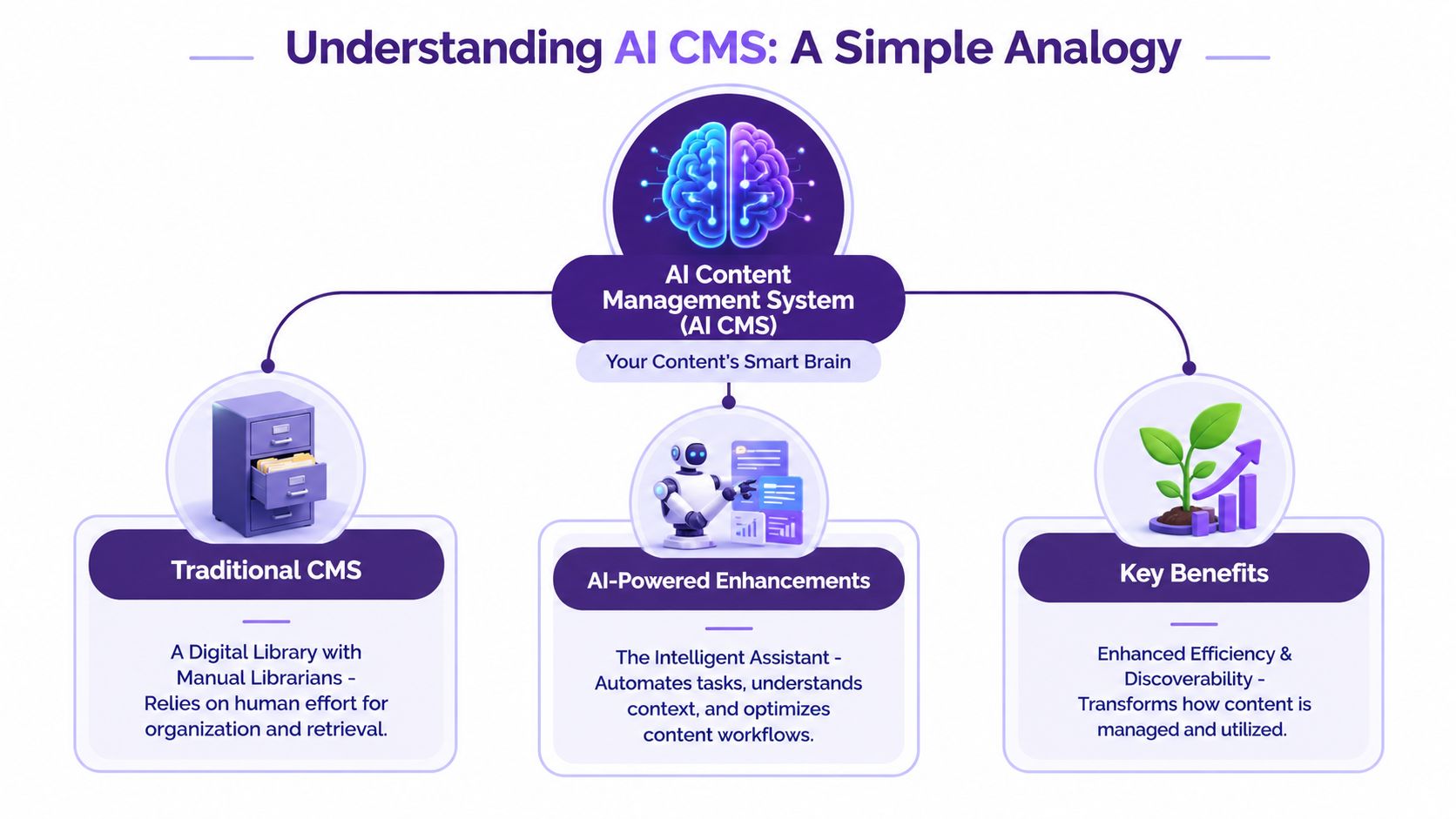
A traditional CMS is like a filing cabinet. It stores documents, videos, and pages in defined locations, but it usually depends on people to name, tag, arrange, and retrieve them. An AI CMS is more like a smart librarian and research assistant working inside that cabinet.
It can process content, identify subjects, connect related ideas, enrich records with metadata, and respond to searches based on meaning rather than exact wording. You're no longer asking, “Which folder contains episode-final-3?” You're asking, “Find every discussion about rebuilding an audience after a failed launch,” and expecting useful results.
From files to knowledge
The important shift is not merely automation. It's the move from file management to knowledge management.
A useful AI content management system can work across different asset types, including transcripts, articles, images, audio, and video. It can help create a shared vocabulary for recurring subjects, people, formats, audiences, and production stages. That vocabulary gives your team a common map of the library.
This matters when several collaborators work on the same creative business. A researcher may describe a topic one way, while an editor uses another phrase and a producer searches by a third. Semantic understanding helps bring those related terms together instead of forcing everyone to guess the original label.
For a deeper look at the role of structured content intelligence, see content intelligence platforms. If your organization is also managing broader digital experiences, Streamlining DXP content with AI offers useful context on how AI can support content workflows beyond a single publishing channel.
What an AI CMS should and shouldn't do
An AI CMS should help you:
- Find relevant material: Search by themes, questions, people, and concepts.
- Organize the archive: Apply consistent categories and metadata.
- Support reuse: Identify relationships between old assets and new ideas.
- Coordinate people: Give researchers, writers, editors, and producers shared visibility.
- Preserve judgment: Keep humans responsible for accuracy, taste, voice, and publication decisions.
It shouldn't become an unreviewed publishing machine. Your audience trusts your interpretation, not merely the speed of your software. The strongest workflow uses AI to surface possibilities and humans to decide which possibilities deserve attention.
The Core Features That Power Your Content Engine
The best way to evaluate an AI CMS is to ignore the marketing language and ask what it lets a creator do on a Tuesday afternoon. Can you locate the right clip? Can a new collaborator understand the archive? Can you turn a research session into several publishable directions without losing source context?
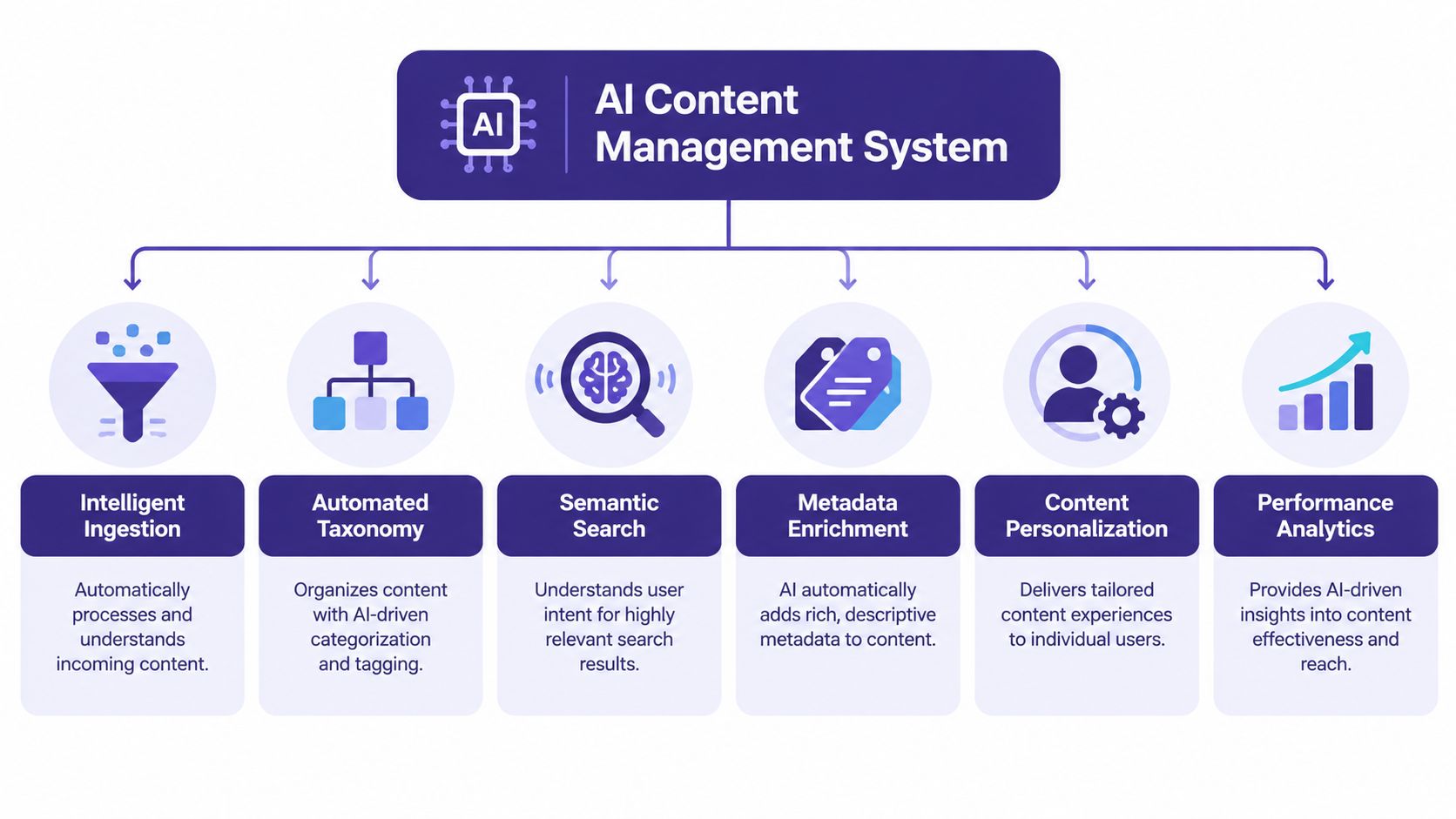
Six capabilities usually determine whether the platform becomes useful infrastructure or just another dashboard.
Intelligent ingestion
Ingestion is the front door. The system should accept the content you already produce, then process it into a form that can be searched and analyzed.
For a podcaster, that may mean bringing in episode audio and transcripts. For a publisher, it may mean importing articles, manuscripts, notes, and media files. The practical value is speed and continuity. You shouldn't have to manually prepare every asset before the system can understand it.
Long, complex files need care. Research on AI-assisted enterprise content extraction found that document size and structural complexity can increase variability in extraction and contextual metadata identification (Uppsala University evaluation). That makes chunking, schema normalization, and human review important for substantial or highly structured material.
Automated taxonomy
Taxonomy is the architecture of your library. It defines how you group subjects, formats, audience needs, production stages, and recurring themes.
A useful taxonomy shouldn't try to describe everything. It should answer the questions your team repeatedly asks. “Which episodes feature independent filmmakers?” and “Where do we have footage about rebuilding confidence?” are more useful than a long list of generic labels.
Semantic search
Keyword search looks for matching terms. Semantic search looks for related meaning.
That distinction changes research. You might search for “creative blocks” and retrieve a conversation that used phrases such as “I couldn't start,” “lost momentum,” or “staring at a blank page.” The system helps you locate the idea even when the original speaker used different language.
Metadata enrichment
Metadata gives each asset useful surrounding information. It can include subjects, names, formats, themes, descriptions, and relationships to other assets.
Automated classification can outperform manual tagging when the vocabulary is clearly defined. One semantic-AI system reported 89% precision and 84% recall, compared with 72% precision and 65% recall for a manual baseline (semantic-AI classification study). Those figures don't eliminate review, but they show why consistent AI-assisted tagging can be valuable across large document, audio, and video libraries.
Collaboration and personalization
A creator business grows when more than one person can contribute without losing the thread. Shared research spaces, annotations, approval states, and source links help your team build meaning together instead of passing disconnected files around.
Personalization can also help when you publish for different audiences. The system may organize related versions or recommend suitable assets for a particular channel, but you still need editorial rules for voice, relevance, and audience sensitivity. For broader background on personalization and AI-enabled CMS infrastructure, review these insights into enterprise CMS and AI.
Performance analytics
Analytics should connect content activity to decisions. Rather than only showing which post received attention, a useful system can help identify recurring subjects, underused assets, and content gaps worth exploring.
Pair those insights with a strong indexing foundation. Document indexing explains why structured retrieval matters before a team can reliably build new work from an archive.
From Archive to Action Common Creator Use Cases
An AI CMS earns its place when it changes what your team can produce from the same underlying knowledge. The most valuable use cases are practical, repeatable, and close to revenue.
Turn one longform asset into a content series
Start with a substantial podcast interview. The system can help locate the central arguments, memorable exchanges, supporting examples, and unanswered questions. From there, your team can plan a video segment, short social clips, an article, a newsletter sequence, and a follow-up interview.
The human editor still chooses the angle. AI helps reveal the raw material and produce variations for review. That distinction matters because repurposing isn't copying. It's adapting one idea to the expectations of different platforms.
A 2026 industry report indicates that repurposed content can generate 60% more engagement than single-format originals, while teams with repurposing workflows produce 47% more content at 35% lower cost per piece (content repurposing ROI report). Treat those figures as directional evidence, not a promise for every channel. Your audience, topic, editing quality, and distribution still determine the outcome.
Build from your back catalog
A YouTuber can search across older episodes for every discussion of a subject, then assemble a thematic compilation. A filmmaker can find unused footage that fits a new story. A blogger can identify related articles that deserve a refreshed guide or internal link.
The advantage is not merely faster retrieval. It's continuity. Your next upload can deepen a concept your audience already recognizes, creating a series instead of a collection of unrelated posts.
Find the next idea inside existing research
Creators often have more research than they can publish. An AI CMS can expose clusters, contradictions, repeated questions, and topics that appear across several assets. Those patterns can become episode concepts, editorial series, or collaboration opportunities.
This is particularly useful for creators moving from hobbyist work toward a revenue-generating operation. Growth brings more guests, editors, sponsors, and distribution decisions. A shared knowledge layer gives those people something more useful than a pile of links.
The archive becomes an editorial partner when your team can interrogate it, not merely browse it.
Create opportunities for monetization
An organized library can support paid research products, premium collections, themed compilations, sponsorship packages, educational material, and licensing conversations. The system doesn't create the business model for you. It makes the underlying assets visible enough to evaluate.
That visibility helps you decide whether an old series should be refreshed, bundled, translated, clipped, or retired. Instead of measuring value only by the original publication date, you can treat content as an asset with multiple possible lives.
How to Choose the Right Platform for Your Business
Creators shouldn't evaluate an AI CMS using only enterprise checklists. A platform can have impressive automation and still fail if it's difficult to use, weak with video, or expensive to operate as your library expands.
Start with the work your team performs repeatedly. If your core archive contains interviews, episodes, articles, and footage, test the platform with real material rather than a polished demo dataset.
| Feature | Why It Matters | What to Look For |
|---|---|---|
| Media support | Your archive may span video, audio, articles, transcripts, and images. | Native handling of your main formats, reliable previews, and useful extraction. |
| Search quality | Exact keywords rarely describe the idea you remember. | Semantic search, filters, timestamps, source context, and transparent results. |
| Taxonomy controls | Inconsistent labels make collaboration and retrieval harder. | Custom categories, controlled vocabulary, editable relationships, and review options. |
| Workflow fit | A tool that creates extra steps won't survive daily use. | Fast ingestion, simple research, annotations, approvals, and export options. |
| Team collaboration | Professional publishing brings in editors, producers, and researchers. | Permissions, shared workspaces, comments, version history, and clear ownership. |
| Integration | Your CMS must connect with the rest of your production stack. | APIs or practical connections to editing, storage, publishing, and scheduling tools. |
| Cost model | Usage can change as your archive and team grow. | Transparent pricing, predictable limits, and a clear view of total operating cost. |
| Human oversight | Incorrect tags or summaries can damage trust. | Review thresholds, source traceability, editing controls, and approval gates. |
Test the platform with difficult material
Use an episode with overlapping topics, a long transcript, imperfect audio, and several speakers. Search for an idea that isn't stated in the title. Then ask a colleague who didn't create the original content to locate the same material.
That test reveals more than a feature list. It shows whether the system understands your archive, whether the interface reduces friction, and whether its results give enough context to support editorial decisions.
A creator-focused tool should feel like part of the studio, not an enterprise project requiring a specialist to operate it.
Your Practical Implementation and Migration Checklist
Migration fails when teams treat it as a file-moving exercise. Your archive needs editorial structure before automation can produce dependable results.
Start with a contained collection
Choose one podcast season, video series, book project, or campaign. Include enough variety to expose problems, but keep the pilot small enough that your team can review the outputs.
Inventory the assets, identify duplicates, note missing transcripts, and decide which files are authoritative. Don't import every abandoned draft on the first pass. An AI CMS can organize confusion, but it can't decide which version represents your final editorial intent without guidance.
Define the language of the library
Create a working taxonomy around subjects, formats, people, audiences, status, and reuse opportunities. Keep the first version practical. Your team can refine it after real searches reveal where categories overlap.
Set rules for names and labels. Decide how you'll distinguish a published episode from raw footage, a transcript from a summary, and an approved asset from an idea. Consistency makes later collaboration much easier.
Build a review loop
The quality challenge is real. 81% of organizations have integrated GenAI into content management to some degree, while 75% identify maintaining quality as their biggest AI challenge (TechTarget content management trends).
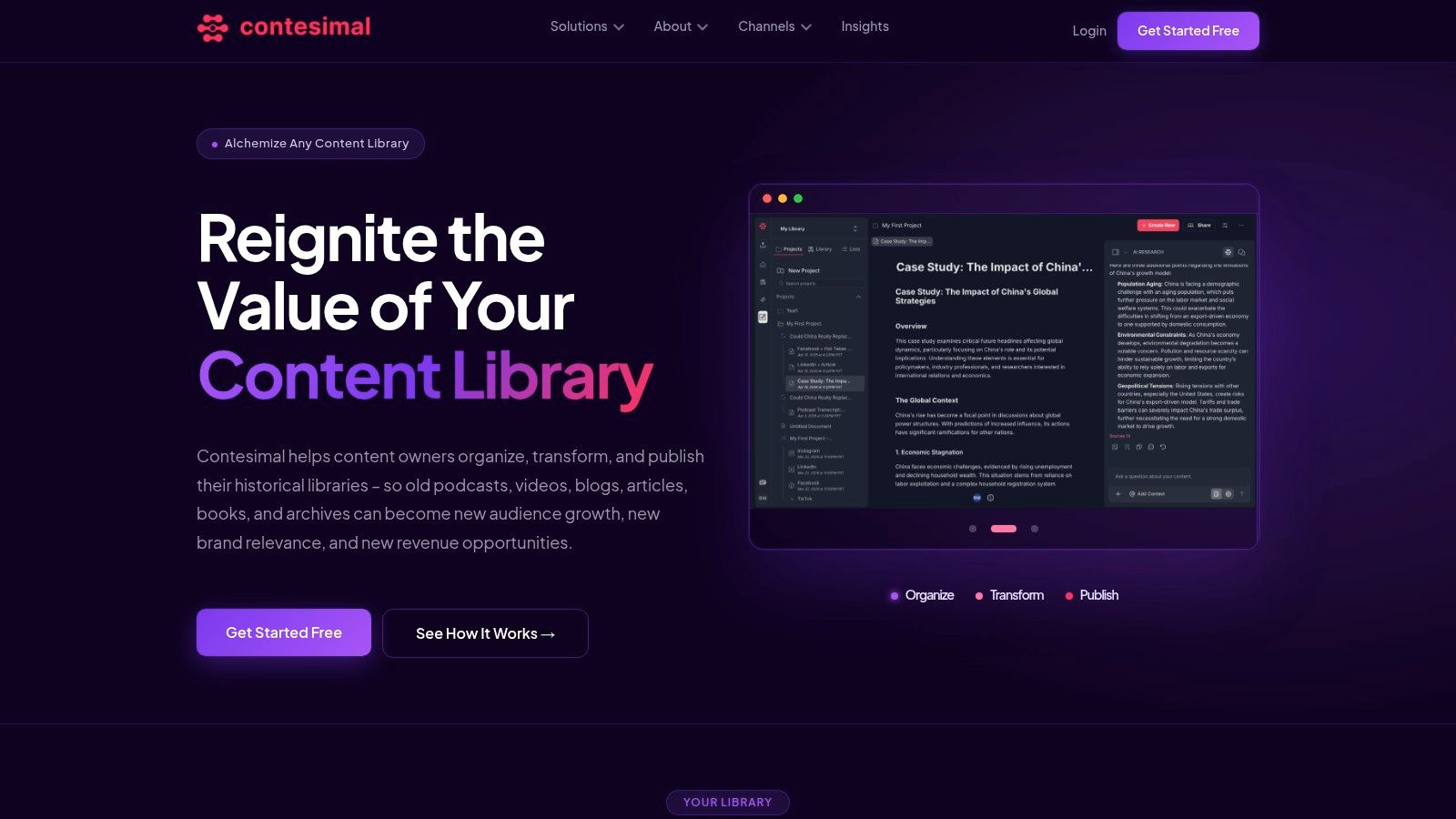
Use AI for discovery, classification, summaries, and variations, then assign humans to verify sources, preserve voice, and approve public-facing work. Contesimal is one platform built around organizing and searching content libraries, combining a chat-based research interface with taxonomy and collaboration workflows.
Train around workflows, not buttons
Show the team how to answer real questions with the archive. Ask them to find a quote, assemble related footage, identify a content gap, and create a reuse brief. Those exercises teach the system's role in the creative process more effectively than a tour of every menu.
Record what works. Refine the taxonomy, search prompts, review rules, and ownership model before expanding the migration.
Measuring Success and Proving Content ROI
A professional creator needs more than a feeling that the archive is “better organized.” Measure whether the system helps people make stronger decisions and create more value from existing assets.
Track the workflow before and after implementation. Useful measures include:
- Research time: How long does it take to find supporting material for a new episode or article?
- Derivative output: How many credible clips, posts, newsletters, or briefs come from a major asset?
- Archive reuse: Which older assets contribute to new published work?
- Editorial speed: How quickly can the team move from an idea to a sourced production brief?
- Collaboration quality: Can a new contributor understand the relevant material without relying on one person's memory?
- Commercial outcomes: Which reused assets support sponsorships, memberships, products, licensing, or other revenue activity?
Avoid treating views or page views as the entire scorecard. They matter, but they don't explain whether the team created efficiently, whether the content strengthened a series, or whether an old asset generated a new commercial opportunity.
Use a simple value model
Compare the platform's total cost with the value of time recovered, production capacity created, and revenue enabled by archive reuse. Keep the calculation honest. Don't count every AI suggestion as finished content, and don't assign revenue to an asset merely because it was tagged.
Enterprise content management provides the infrastructure behind this category. One 2026 market report estimates the sector at USD 44.29 billion in 2026, rising to USD 81.22 billion by 2031 at a 12.89% CAGR, with cloud deployment growing at a 13.91% CAGR through 2031 (Mordor Intelligence enterprise content management market report). That scale doesn't guarantee that every platform fits a creator, but it confirms that organizing and activating digital assets is a substantial business need.
For a creator with a serious archive, an AI CMS isn't just another publishing tool. It's the operating layer that helps your team organize what exists, understand what matters, and take action without abandoning the creative judgment that made the library valuable.
Contesimal helps you organize, search, and collaborate across documents, podcasts, videos, and articles so your existing library can support new research and content ideas. Visit Contesimal to explore a practical way to turn archived work into reusable creative and commercial value.