
Imagine your entire creative universe—every video, podcast, and blog post—not just stored, but actively working for you. The real benefits of a content management system come down to turning your scattered files into a powerful, centralized command center. A CMS is the engine that helps you organize, publish, and ultimately monetize your creative work, turning your passion into a profession.
Your Content Library Reimagined
For most creators—YouTubers, podcasters, and bloggers alike—a growing content library feels less like an asset and more like digital clutter. Videos are stashed on hard drives, podcast audio lives in random cloud folders, and blog drafts are scattered across a dozen different documents. This chaos creates friction, slows you down, and makes it almost impossible to see the bigger picture of what you've built. This is exactly where a Content Management System (CMS) changes the game.
A CMS isn’t just another website builder; it's the foundation for turning a hobbyist channel into a professional, revenue-generating business. It solves the most common creator headaches—chaotic workflows, missed opportunities, and the daily grind of trying to grow your audience across platforms. By giving you a single source of truth for everything you create, it lets you work smarter, not harder.
From Chaos to Command Center
Think of a CMS as the ultimate headquarters for your brand. It's the one place you can go to organize, understand, and take action on all your content. Instead of digging through endless folders to find that one video clip or article, a CMS gives you a structured, searchable database. It's the first step to truly organizing your library so you can create new value from it.
A well-implemented CMS turns your historical content from a passive archive into an active asset. It allows you to reignite your library, find hidden connections, and upcycle old work to create infinite new value.
This centralized approach makes everything easier, from managing permissions for a growing team to scheduling posts across different platforms and maintaining a consistent brand voice. It's the first real step in moving from a solo creator mindset to operating like a scalable media company. And for creators managing all kinds of digital files, it's also worth exploring the best digital asset management software to see how specialized tools can complement a CMS.
The Foundation for Growth and Monetization
Ultimately, a CMS is about building a foundation that can actually scale with you. It supports your growth by ensuring your website can handle more traffic, your workflow can accommodate more collaborators, and your content library can be effectively monetized. It’s the infrastructure you need to transition from just making content to building a real business.
To give you a quick snapshot, the table below breaks down the core advantages we'll be diving into. It highlights how a CMS can directly impact your creative business.
Key CMS Benefits at a Glance
| Benefit Area | Impact for Creators and Businesses |
|---|---|
| Simplified Content Creation | Lets non-technical users create, edit, and publish content without any code, which dramatically speeds up production. |
| Enhanced Collaboration | Provides user roles, permissions, and version control, allowing teams to work together on content projects without tripping over each other. |
| Improved SEO Performance | Offers built-in tools for optimizing content, metadata, and site structure to help you rank higher in search engines. |
| Scalable Content Operations | Supports your growth by managing huge volumes of content and handling increased traffic without performance issues. |
| Centralized Content Hub | Acts as a single source of truth for all digital assets, making it easy to find, reuse, and repurpose everything you've ever made. |
These benefits aren't just features on a checklist; they represent a fundamental shift in how you manage and grow your brand.

Tame Your Workflow and Get Your Team in Sync
If you're a content creator, you know the feeling: that frantic shuffle between shared drives, never-ending email chains, and a sea of Slack messages. One minute you're hunting for a podcast audio file, the next you're digging for a transcript, only to remember the show notes are saved on your local desktop. This isn't just clutter; it's a bottleneck that actively slows down your ability to grow.
This is where a content management system (CMS) steps in and delivers its first, most immediate win: radical efficiency.

A CMS takes that chaotic, manual process and turns it into a clear, organized workflow. No more guessing who has the latest video script. A CMS acts as a single source of truth where every single asset lives, a total game-changer as you transition from a solo hobbyist to a professional team with editors, writers, and collaborators.
This organized setup is the foundation for real collaboration. You can assign specific user roles and permissions, making sure team members only touch what they need to. Your writer drafts the post, your editor polishes it, and you give the final thumbs-up—all inside one system, without a single file getting lost in the shuffle.
Say Goodbye to Manual Errors and Delays
Let's be honest, a huge chunk of a creator's time gets eaten up by administrative busywork. Manually uploading files, formatting text for different platforms, and double-checking that everything goes live on schedule is tedious stuff that pulls you away from actually creating.
A CMS puts these repetitive tasks on autopilot. Picture a content marketing team launching a campaign. Instead of manually posting to the blog, then hopping over to social media, then crafting an email, they can schedule everything to publish at the same time from one dashboard. It's not just a time-saver; it kills the risk of human error.
Key features that make this happen include:
- Version Control: This is your safety net. It tracks every single change made to your content. If an editor accidentally deletes a killer paragraph from your script, you can roll it back to a previous version in seconds. Catastrophe averted.
- Automated Publishing Schedules: Plan your content calendar weeks or even months out. You can set everything to go live during peak engagement hours without even being at your computer.
- Content Templates: Build pre-formatted templates for things like podcast show notes or weekly blog posts. This keeps your branding tight and cuts way down on the setup time for every new piece of content.
Getting systematic like this frees you up to focus on what actually matters: experimenting with new concepts to hit the next viral thing and making high-quality content your audience loves.
A Hub for Human and AI Collaboration
Getting organized with a CMS does more than just clean up your current process. When your entire content library is structured and accessible in one place, it becomes a powerful dataset that AI can actually work with. This allows humans and AI to collaborate in a healthy way, opening the door to discovering hidden patterns in your work, generating fresh topic ideas, and even automating parts of your research.
By organizing your production process within a CMS, you're not just making today's work easier. You're building a structured foundation that allows humans and AI to collaborate effectively, setting the stage for more advanced content strategies down the road.
The impact here is huge. The market for content management systems is expected to hit $47.4 billion, a number driven by the need for central hubs that make teams more productive. In fact, over 70% of enterprises now rely on them to improve their operations—a trend that's just as vital for growing creator businesses. You can discover more insights about the growing CMS market and its impact on productivity.
By bringing order to the chaos of creation, a CMS gives you the speed and collaborative power you need to go from hobbyist to a professional, scalable media brand. It clears out the administrative friction so you can create more, work better together, and ultimately, grow.
Dominate Search Engines with Superior SEO
As a creator, if your audience can't find you, you might as well be shouting into the void. Visibility isn't just a vanity metric; it's the lifeblood of your entire brand, impacting views, engagement, and revenue. This is where a good content management system becomes your secret weapon in the endless quest for better search rankings.
A CMS handles all the complicated, techy stuff behind the scenes, so you can just focus on making great content.

Trying to manage the technical side of search engine optimization (SEO) without a CMS is a total nightmare. You'd be stuck manually coding meta titles, wrestling with sitemaps, and praying every URL is clean enough for Google to read. It's tedious work and incredibly easy to mess up. A CMS automates these mission-critical tasks, giving your content a solid foundation to be discovered.
Making SEO Simple for Everyone
The best part? You don't need to be an SEO guru to get results. Modern CMS platforms are built with intuitive interfaces that turn complex optimizations into simple fields you just fill out.
Think about it from a creator's point of view. A YouTuber can spin up a dedicated landing page for each new video in minutes. They can set a catchy meta title, write a keyword-rich description, and even drop in a full transcript to help Google understand exactly what the video is about. That simple act can massively boost the video's chances of showing up in search.
In the same way, a publisher can make sure every single article is indexed perfectly. A CMS automatically generates and updates your sitemap—think of it like a roadmap you hand-deliver to Google, showing it where all your content lives. This ensures new articles get found fast and old ones aren't left to gather digital dust.
Key SEO Features Baked Right In
Most quality content management systems come loaded with essential SEO tools right out of the box. These features work together to tell search engines that your site is authoritative, organized, and valuable to real humans.
- Clean URL Structures: A CMS builds simple, readable URLs (like
yourblog.com/how-to-repurpose-podcasts) instead of those ugly, code-filled links. This helps both people and search engine bots understand what a page is about at a glance. - Easy Metadata Management: You can effortlessly tweak meta titles and descriptions for every page. This is your chance to write a compelling mini-ad that convinces someone to click your link in the search results.
- Mobile Responsiveness: Modern CMS themes are almost always built to be mobile-friendly, which is a massive ranking factor for Google. Your content will look and work great on any device, with zero extra effort from you.
A well-optimized CMS doesn't just make SEO easier; it makes it a natural part of your publishing workflow. By handling the technical heavy lifting, it frees you to concentrate on the human side of creation—telling great stories and connecting with your audience.
The Power of SEO Plugins and Extensions
Beyond the built-in tools, the real magic of many CMS platforms is their massive ecosystem of plugins. For a platform like WordPress, tools like Yoast SEO or Rank Math become your personal SEO coach, walking you through how to optimize every single piece of content.
These plugins analyze your writing in real-time, suggesting keyword tweaks, checking readability scores, and flagging any technical hiccups. They give you fine-grained control over your on-page and technical SEO, democratizing a field once reserved only for specialists. For any creator trying to go from hobbyist to pro, that level of control is what drives the organic traffic you need to grow your audience and views.
The data backs this up: a jaw-dropping 65% of Google search results come from websites running on a CMS. That gives bloggers, podcasters, and video creators a huge visibility advantage. As these platforms become even more central to doing business online, that dominance is only going to grow. Discover more insights about CMS performance and market trends to see just how much these platforms are shaping the web.
Future-Proof Your Brand with True Scalability
There's a moment every creator hits when the hobby becomes a business. Your whole mindset shifts. You stop thinking about just the next video or post; you start thinking about the next hundred. A simple static website that looks great today can buckle under the weight of a booming content library or a traffic spike from one viral hit.
This is where a content management system (CMS) really earns its keep. It’s not just about today; it's about building for tomorrow. A CMS provides the architectural backbone to make sure that as your audience and your content library grow, your digital home can expand right along with them, without falling apart.
Build on a Foundation That Grows with You
Think of it like building a house. Launching on a simple, static site is like putting up a cozy cabin. It's perfect when it's just you, but what happens when you need to add more rooms, more floors, and invite a whole community inside? A CMS is like starting with the foundation of a skyscraper—it’s designed from the ground up to support massive growth.
When your content library explodes from a few dozen posts to thousands of videos and podcast episodes, a CMS handles the load without breaking a sweat. It’s engineered to manage huge amounts of data and serve it up fast, even when you get a sudden flood of visitors. That means a smooth experience for your audience, which is what keeps them coming back.
Expand Functionality with a Plug-and-Play Ecosystem
Your needs are going to change. A year from now, you might decide to launch an online course, build an email list, or sell merch directly from your site. Without a CMS, each of those ideas would mean calling a developer for expensive, time-consuming custom code.
With a CMS, you tap into a huge ecosystem of plugins and integrations that let you bolt on new features, often with just a few clicks. This modular approach means your website can adapt as your business strategy evolves.
Want to add new tools? It's usually straightforward:
- Email Marketing Tools: Easily connect to services like Mailchimp or ConvertKit to start building your subscriber list.
- E-commerce Capabilities: Add a full-blown online store with something like WooCommerce to sell digital products or physical gear.
- Membership Portals: Wall off exclusive content to create a members-only community and build a recurring revenue stream.
This ability to add new functionality on the fly keeps your website a dynamic asset, not a static brochure.
A scalable CMS gives you the freedom to experiment and grow without being trapped in a rigid technical box. It lets your brand pivot, expand, and grab new opportunities, ensuring your platform helps your growth, not hinders it.
The power of this scalability is written all over the web. A CMS now powers an incredible 68.7% of all live websites. Just look at WordPress, which runs 43.6% of the entire internet—a clear sign of its ability to scale from a tiny personal blog to a massive enterprise site. This widespread trust has pushed the global CMS market from $28.15 billion in 2023 to a projected $54.16 billion by 2032. You can explore more fascinating CMS market statistics to see just how dominant this technology has become.
At the end of the day, choosing a CMS is an investment in your brand’s future. It's the decision to build on a foundation that won't just hold up your success today, but will be ready for the incredible growth you're working toward.
Unlock the Hidden Value in Your Content Library
Most creators see their CMS as a digital assembly line—a tool for cranking out the next blog post, video, or podcast episode. But that’s only half the story. One of the most powerful things a content management system can do is turn your entire library into a living, dynamic asset. It’s not just about what you create today; it’s about reigniting everything you’ve ever made and creating infinite content value.
A CMS brings order to the chaos, transforming a jumble of files into a cohesive, searchable library. This structure is the secret to unlocking the value hidden in your archives. It shifts your content from a passive, "publish-and-forget" model to an active one where every single piece can be repurposed, remixed, and redeployed to make money.
From Dusty Archive to Content Goldmine
Think about your library for a second. How many hours of podcast audio, pages of deep-dive articles, or minutes of video footage are just sitting there, collecting digital dust? For most of us, the answer is a lot. A CMS gives you the framework to tap into all that dormant potential.
By centralizing everything, you create a single source of truth. This simple act makes it possible to finally see the connections between different pieces of content. Suddenly, a series of podcast episodes isn't just a playlist; it's the raw material for an e-book. A long-form article can be broken down into a week's worth of social media snippets, a video script, or an entire email newsletter, letting you take your content across platforms in one click.
The real magic happens when your CMS stops being a simple storage unit and becomes an active hub for creativity. It turns your historical library from a forgotten archive into a 'content goldmine' for new ideas, cross-platform campaigns, and fresh revenue streams.
An organized library is also the perfect fuel for more advanced systems. A tool like Contesimal, for example, can plug into this structured data and use AI to analyze your entire archive, revealing hidden patterns and building rich connections between topics you might not have noticed. This is where you move beyond simple management and into true content intelligence. To see how these systems work together, you can find a deeper explanation of what content intelligence platforms are and how they can supercharge your library.
The Power of Structured Content Repurposing
Structuring your content in a CMS makes repurposing smarter and way more efficient. Instead of manually digging through old folders, you can find, adapt, and reuse assets for new campaigns in a fraction of the time. This doesn't just save you a ton of hours—it also keeps your brand message consistent everywhere.
Just think about what becomes possible:
- A YouTuber can pull key moments from ten older videos to create a new "Top 10 Moments" compilation, breathing new life into their back catalog.
- A podcaster can easily gather all episodes on a specific theme—like "productivity hacks"—and bundle them into a premium audio course for subscribers.
- A blogger can spot their most popular articles and systematically break them down into infographics, Twitter threads, and short-form video scripts to reach totally new audiences.
This kind of strategic reuse multiplies the ROI of every single thing you create. By centralizing your assets in a CMS, you gain the agility you need to build a modern video content marketing strategy that grabs attention and drives growth.
It lets you create more content with less effort, filling your calendar and engaging your audience without starting from scratch every single time. Your content library stops being a graveyard and becomes a wellspring of infinite value—an asset that keeps working for you long after you hit "publish."
Choosing the Right CMS for Your Creative Goals
Knowing you need a CMS is the easy part. The real work is picking the one that actually fits your creative vision. Let’s be clear: not all platforms are built the same. What works wonders for a daily vlogger will likely feel completely wrong for a book publisher. The trick is to match the tool to the job.
Instead of getting lost searching for a single “best” platform, it’s much smarter to think in terms of who you are as a creator. If your world revolves around text and SEO, a CMS like WordPress with its massive library of search optimization plugins is a natural fit. But if you’re a video creator? You need a system that can juggle huge media files, play nice with video hosts, and spin up slick landing pages on the fly.
Aligning Platform Type With Your Needs
The CMS market is basically split into a few different camps, each serving a unique purpose.
You’ve got your traditional, all-in-one systems like WordPress, which are perfect for creators who want simplicity and a massive support community to lean on. On the flip side, you have headless platforms like Contentful. These offer way more flexibility to push content out to websites, apps, and other channels, making them ideal for brands aiming for a true multi-platform presence.
When you’re weighing your options, a good old-fashioned comparison like Shopify vs. WordPress can really clear things up. It shows you how different systems prioritize things like e-commerce versus pure content publishing. For bigger outfits with more complex demands, digging into dedicated enterprise content management solutions is the logical next step.
This flowchart lays out a simple decision tree for pulling value from your content archive by spotting high-potential assets you can put back to work.
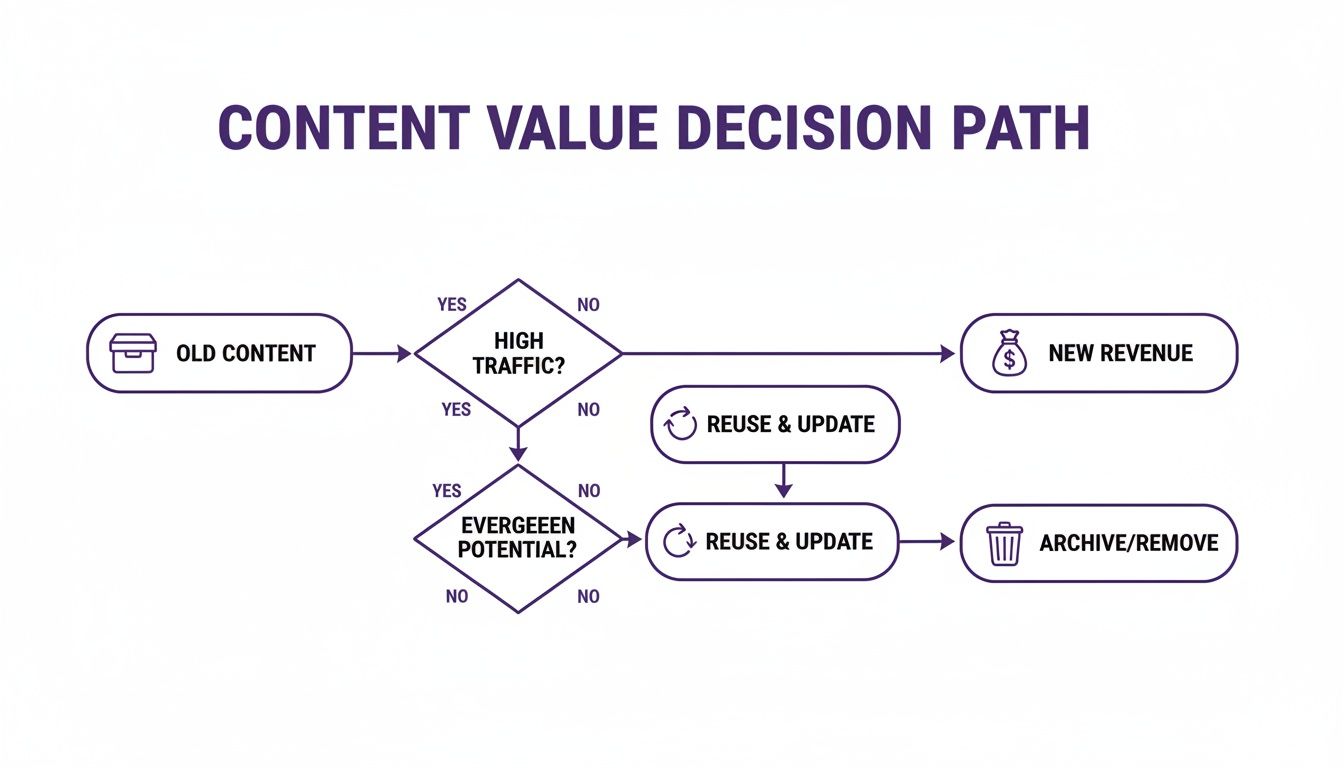
What this visual really drives home is how a good CMS helps you systematically turn your old content into new revenue. It’s not just about storage; it's about strategy.
Your Essential CMS Checklist
To avoid getting paralyzed by choice, measure every potential system against a handful of core criteria. This checklist will help you cut through the marketing fluff and zero in on what actually matters for your brand.
- Cost and Budget: Is it a one-time fee, a monthly subscription, or an open-source platform where you’ll pay for hosting and plugins? Get a handle on the total cost of ownership, not just the sticker price.
- Scalability: Can this thing grow with you? You need to know it can handle a massive library and sudden traffic spikes without crumbling.
- Security: How does the platform protect you from the bad guys? Look for a track record of regular security updates and solid user permission controls.
- Community and Support: When things inevitably break, is there a helpful community forum or a dedicated support team you can actually reach?
Your CMS is the foundation of your digital brand. Choosing a system that aligns with your technical skills, budget, and long-term vision is one of the most important business decisions a creator can make.
Got Questions About Content Management Systems?
Jumping into the world of content management can feel like learning a new language. A lot of questions pop up, especially when you're moving from a hobby to a full-blown operation. Let's clear up some of the most common ones so you can see what a CMS really does for you.
Do I Need to Be a Coder to Use a CMS?
For most of the big players out there, the answer is a hard no. The whole point of a system like WordPress is its friendly interface, built for creators, not developers.
You can write, format, and publish your work using an editor that feels as natural as any word processor. Sure, knowing some code can help with deep customization down the road, but your day-to-day work requires zero coding knowledge. It just works.
What’s the Difference Between a CMS and a Website Builder?
This is a classic point of confusion, and it’s a big one. A website builder is all about one thing: helping you design the look and feel of a site. Its job is almost purely aesthetic.
A Content Management System, on the other hand, is a much bigger deal. It’s built to handle the entire lifecycle of your content—from the first draft to managing a massive library and eventually archiving it. While most modern CMS platforms have website-building tools baked in, their real power is in wrangling dynamic content at scale. For any serious creator, publisher, or marketer, that control is everything.
Here’s a simple way to think about it: a website builder helps you construct the house, but a CMS manages everything happening inside it. It’s the operational hub for your entire content business, not just a design tool.
How Much Is This Going to Cost Me?
The price tag on a CMS can swing from totally free to thousands of dollars a month. It all comes down to what you need.
- Open-Source Platforms: Systems like WordPress.org are free to download and use. You'll still need to cover costs for things like web hosting, a domain name, and any premium themes or plugins you decide to add on.
- All-in-One Platforms: Services like Squarespace or Wix run on a subscription model. Their monthly fees bundle hosting, support, and features into a single, predictable package.
For most creators making that leap from passion project to business, an open-source CMS offers a ridiculously powerful and cost-effective foundation to build on.
Can a CMS Actually Help Me Make Money?
Absolutely. In fact, a good CMS is the bedrock of almost every monetization strategy out there. It’s built to support different revenue models, whether you’re running ads, using affiliate marketing, selling digital products, or launching a paid membership community.
By giving you the professional tools to build a credible site, pull in a larger audience with SEO, and connect smoothly with e-commerce tools, a CMS is non-negotiable for turning your creative work into a real, revenue-generating business.
Ready to unlock the hidden value in your content library? Contesimal uses AI to help you organize, understand, and create new opportunities from your existing assets. We turn your archive into an active goldmine. Discover how to reignite your content at https://contesimal.ai.