
Your content library probably doesn't look like a library.
It looks like a stack of Google Drive folders, exported transcripts, half-labeled video assets, podcast edits called “final_v3_realfinal,” blog drafts in Notion, thumbnails in Dropbox, and social clips scattered across a team chat. You know there's value in there. You also know finding the right asset at the right moment can feel like digging through a junk drawer with expensive taste.
That's where a database stops being “developer stuff” and starts becoming business infrastructure.
If you're learning how to create a database as a creator, publisher, or content team, the goal isn't to become a database administrator. The goal is to build a content brain that helps you organize, find, repurpose, and reuse what you've already made. It's like giving your library a card catalog, a shelf system, and a librarian that never forgets where anything belongs.
Your Content Library is a Goldmine Not a Junk Drawer
A producer is trying to pull every strong quote from a guest you interviewed last year. The clips exist. The transcript exists. The blog adaptation probably exists too. What slows the team down is not a lack of content. It is a lack of structure.
That distinction matters.
Shared drives and folders are fine for storing files, but storage alone does not give a content team a usable archive. A folder tells you where an asset sits. It does not tell you that one webinar became three blog posts, eight social clips, a newsletter, and a sales enablement video. It does not preserve the relationships that make old content profitable.
A database does that job. It works like a digital library's card catalog for your creative operation. Instead of burying assets inside team-specific filing habits, you track the details that make them findable and reusable: title, format, topic, contributor, campaign, publish date, source recording, usage rights, and repurposing status.
That is the shift from a pile of files to a content brain.
Once the archive is structured, the team can answer practical questions without opening twenty tabs or asking the one person who “just knows where everything is”:
- Which podcast episodes featured this guest
- Which blog posts came from this webinar
- Which clips support a topic you want to bring back
- Which assets are approved for reuse in a newsletter, short video, or course module
Those answers affect output. Editorial teams plan faster. Marketers reuse proven material instead of starting from zero. Producers stop recreating assets they already made but could not find.
I have seen content libraries become expensive memory tests. The team remembers a great idea, a great line, or a great segment, but memory does not scale. Metadata does.
If your archive already feels scattered, start by auditing what you have. A practical content inventory template for auditing your existing assets gives you a clear list of files, formats, owners, and gaps before you decide how the database should be structured.
A good database will not make weak content stronger. It will make strong content easier to organize, retrieve, and repurpose.
That is how a library of assets starts acting like an asset itself.
Planning Your Content Brain Relational vs NoSQL
A content team usually feels this decision when the archive starts answering bigger questions than “where is the file?” You want to trace one webinar into clips, articles, emails, and social posts. You want to see every asset tied to a guest, campaign, or topic. At that point, you are not choosing developer jargon. You are choosing how your content brain will remember relationships.
The two common models are relational and NoSQL.
A relational database works like a digital library card catalog. Each type of thing gets a defined home, and the links between those things stay consistent. A NoSQL database works more like a set of flexible project folders, where one folder might contain transcripts, timestamps, sponsor notes, and raw ideas, while another contains a totally different mix.
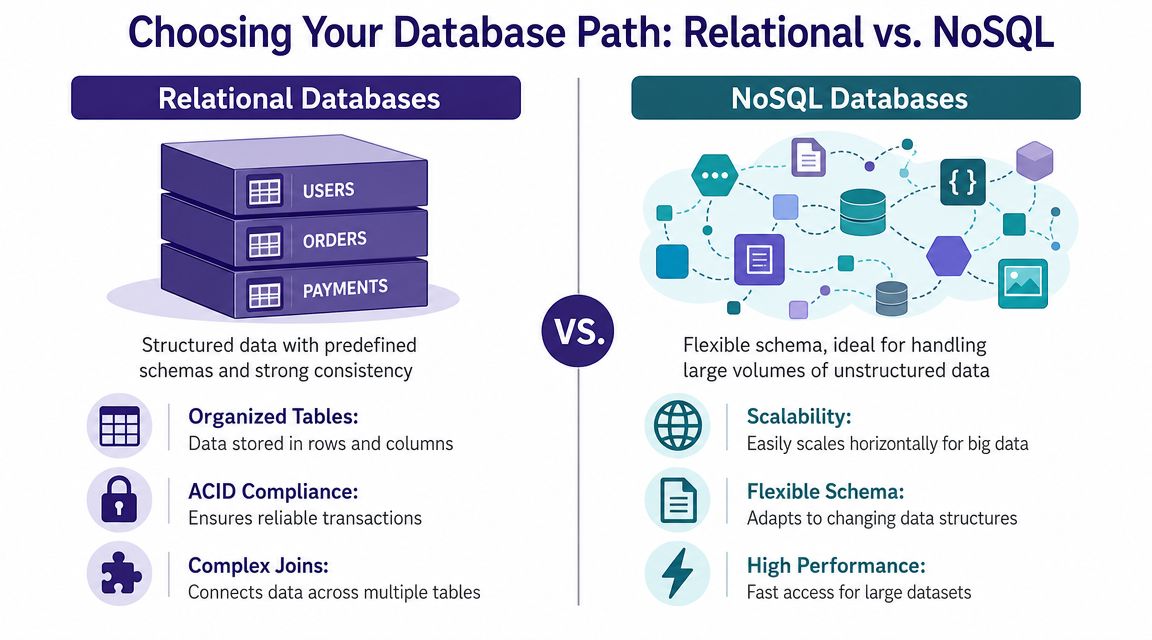
When relational databases fit content teams best
For many publishing teams, agencies, and creator-led media brands, relational is the better default.
The reason is simple. Content operations repeat patterns. Articles have authors. Podcast episodes have guests. Videos belong to series. Assets carry statuses, rights, topics, and publish dates. Relational databases are built for repeated structures and clean connections, which is why they stay useful as the library grows and more people touch it.
Here is where relational databases earn their keep:
| Need | Relational database strength |
|---|---|
| Many assets share the same fields | Tables keep records consistent |
| One asset relates to many people or tags | Keys and relationships keep links clean |
| You want reliable reporting | Structured data makes querying easier |
| Your team needs clear rules | Schemas reduce ambiguity |
In practice, this matters because a content team rarely manages one asset at a time. The team manages families of assets. One interview can lead to a full episode, a transcript, three clips, a blog post, quote cards, and a newsletter mention. In a relational setup, each item can have its own record while still pointing back to the same source. That makes reuse easier and reporting more trustworthy.
It also supports better metadata discipline. If your team is still cleaning that up, these metadata management best practices for content teams will help you decide which fields need to stay standardized.
When NoSQL makes more sense
NoSQL fits teams whose records do not follow one reliable shape.
A documentary production workflow is a good example. One item might need scene notes, release forms, gear details, transcript excerpts, sponsor obligations, archival rights, and rough editorial ideas. Another item might only need a title, a contact, and a few research links. For that kind of uneven material, a document database such as MongoDB can be easier to work with because each record can hold different fields.
NoSQL is often the right choice when:
- Records vary widely. A podcast episode, a licensing agreement, and a research memo may need very different structures.
- The workflow is still forming. Early teams often learn their system by using it.
- You want related material bundled together. Keeping context in one document can simplify some use cases.
The trade-off is control. Flexibility helps early, but it can create inconsistency later if different team members label similar things in different ways.
A practical decision filter
Use the questions your team already asks.
If the team regularly asks, “Show me every asset with this guest,” “Which clips came from this recording,” or “What can we repurpose for this campaign,” relational usually wins because those questions depend on stable relationships between records.
Choose relational if your library has repeated entities such as episodes, contributors, tags, sponsors, campaigns, or source files that need dependable links.
Choose NoSQL if your records are highly variable and the bigger problem is capturing messy information quickly, not enforcing a fixed structure.
If you are unsure, start relational. For content teams, the long-term pressure is usually organization, retrieval, and repurposing. A connected system handles that better than a stack of loosely structured documents.
Designing the Blueprint for Your Database Schema
Once you've chosen a database style, the next job is the blueprint. In database language, that blueprint is your schema.
A schema is just the plan for what you store, how you label it, and how records connect. It's the difference between a shelf full of unlabeled boxes and a catalog where every item has a place, a label, and a reason for being there.

Start with the entities, not the software
For a creator or publishing team, the best schema work starts with business reality. Ask what exists in your operation.
A simple content library often includes entities like:
- Content items such as videos, episodes, articles, newsletters
- Contributors such as hosts, guests, writers, editors
- Tags such as themes, formats, recurring concepts
- Series or campaigns that group assets together
In a relational setup, those become tables. For example:
| Table | Purpose | Example columns |
|---|---|---|
content_items |
The core record for each asset | title, content_type, publish_date, url |
contributors |
People attached to content | name, role, bio |
tags |
Topical labels | tag_name |
content_tags |
Join table linking content and tags | content_id, tag_id |
That last table matters. One article can have many tags, and one tag can apply to many articles. A good schema respects that reality instead of stuffing everything into one messy field.
Metadata is the secret ingredient
Many teams cut corners at this stage and regret it later.
A disciplined design approach specifies metadata for each variable, including its name, type, length, and relationships, and every table should have a unique primary key, according to the clinical database design framework summarized in this medical literature reference on database specifications. For content teams, that means deciding early whether publish_date is a date field, whether content_type comes from a controlled list, and what connects one record to another.
The more precise your metadata, the less time your team spends arguing about what a field means.
If you want a strong operating model for this, these metadata management best practices for content systems are worth applying before your library gets larger.
A relational example and a NoSQL example
A relational record might look like this conceptually:
- A row in
content_itemsfor “Episode 42” - A row in
contributorsfor the host - Another row in
contributorsfor the guest - Linked rows connecting that episode to both people
- Linked rows connecting that episode to tags like
repurposingandaudience growth
A NoSQL version might store more of that in a single document:
- Title: Episode 42
- Type: Podcast
- Host: Name and role embedded in the record
- Guest: Included in the same record
- Tags: Stored as a list in that document
- Transcript summary: Stored right alongside it
Neither model is automatically better. The right one depends on how often you need consistency across records versus flexibility inside records.
What works and what breaks later
Good schema design usually includes:
- Stable names: Use field names that won't feel wrong in six months.
- Clear primary keys: Every record needs one unique identifier.
- Separate concepts: Don't mix people, content, and tags into one all-purpose table.
- Controlled vocabularies: Decide whether a field accepts free text or a fixed list.
What doesn't work is the tempting shortcut of one massive table with columns for everything anyone might ever need. That approach feels quick for a week and punishing after that.
Bringing Your Database to Life with Postgres and MongoDB
At this point, the work becomes tangible. You stop sketching boxes on a whiteboard and create the database.
For a content team, you don't need a huge setup to start. A small PostgreSQL database or a simple MongoDB collection can hold a serious amount of useful structure.

Path A with PostgreSQL
If you choose relational, PostgreSQL is a solid place to begin. Here's a minimal example for a content library.
PostgreSQL example
CREATE TABLE contributors (
  contributor_id SERIAL PRIMARY KEY,
  name VARCHAR(200) NOT NULL,
  role VARCHAR(100),
  bio TEXT
);

CREATE TABLE content_items (
  content_id SERIAL PRIMARY KEY,
  title VARCHAR(255) NOT NULL,
  content_type VARCHAR(50) NOT NULL,
  publish_date DATE,
  url TEXT,
  author_id INT REFERENCES contributors(contributor_id)
);

CREATE TABLE tags (
  tag_id SERIAL PRIMARY KEY,
  tag_name VARCHAR(100) UNIQUE NOT NULL
);

CREATE TABLE content_tags (
  content_id INT REFERENCES content_items(content_id),
  tag_id INT REFERENCES tags(tag_id),
  PRIMARY KEY (content_id, tag_id)
);
This structure does four important things. It gives each table a unique primary key. It separates people from content. It separates tags from content. It creates a bridge table for the many-to-many relationship between content and tags.
Path B with MongoDB
If you choose document-style storage, MongoDB can keep a full content record in one place.
MongoDB example
db.content_items.insertOne({
  title: "Episode 42",
  content_type: "podcast",
  publish_date: "2026-06-01",
  url: "https://example.com/episode-42",
  contributors: [
    { name: "Alex Rivera", role: "host" },
    { name: "Jordan Lee", role: "guest" }
  ],
  tags: ["repurposing", "audience growth"],
  summary: "A conversation about turning older content into new formats."
});
This is easier to read at first because everything lives in one document. The trade-off is that consistency can drift if every record evolves differently and nobody enforces naming rules.
Don't forget performance early
A database that works on day one can still become frustrating after launch if search gets sluggish.
Best practices recommend creating indexes for primary and foreign keys and choosing indexes based on real query patterns, not adding them everywhere, as Redgate explains in its database design principles guide. That matters for creator libraries because people often search by contributor, tag, content type, or date. Those are the places where indexing usually deserves attention first.
For example, in PostgreSQL you might add:
CREATE INDEX idx_content_author_id ON content_items(author_id);
CREATE INDEX idx_content_type ON content_items(content_type);
In MongoDB, you might add:
db.content_items.createIndex({ content_type: 1 });
db.content_items.createIndex({ "contributors.name": 1 });
db.content_items.createIndex({ tags: 1 });
Good indexing follows actual questions. It shouldn't be sprinkled like seasoning on every column.
This video gives a useful visual walk-through if you want to see a database setup process in action.
What to create first
If you're building this for your team, keep the first version small:
- Create the core table or collection first
- Add contributors second
- Add tags or categories third
- Test with real sample records before adding more fields
That order works because it forces you to validate the workflow with actual content, not an imaginary perfect system.
Asking Your Database Questions and Getting Answers
A database earns its keep when it can answer useful questions.
This is the part content teams care about most, even if they don't phrase it in database language. They want to know what exists, what connects, what can be reused, and where the next piece of value is hiding.

Useful questions for a creator library
Here are the kinds of questions a well-built system should answer without drama:
- Show all podcast episodes by a certain host
- Find all assets tagged with a theme
- List all videos published in a recent period
- Pull every item related to one campaign or series
- Find material that can be repurposed into a new format
In SQL, those questions become queries.
SQL examples
Find all podcast content:
SELECT title, publish_date, url
FROM content_items
WHERE content_type = 'podcast';
List all content by a specific contributor:
SELECT c.title, c.publish_date
FROM content_items c
JOIN contributors a ON c.author_id = a.contributor_id
WHERE a.name = 'Alex Rivera';
Find content tagged with repurposing:
SELECT c.title
FROM content_items c
JOIN content_tags ct ON c.content_id = ct.content_id
JOIN tags t ON ct.tag_id = t.tag_id
WHERE t.tag_name = 'repurposing';
Each query reflects a business question. That's why schema design matters so much. If the structure is sloppy, the answers are too.
MongoDB examples
In MongoDB, the same logic looks a little different.
Find all podcasts:
db.content_items.find(
  { content_type: "podcast" },
  { title: 1, publish_date: 1, url: 1 }
);
Find records with a contributor named Alex Rivera:
db.content_items.find(
  { "contributors.name": "Alex Rivera" },
  { title: 1, publish_date: 1 }
);
Find content tagged with repurposing:
db.content_items.find(
  { tags: "repurposing" },
  { title: 1 }
);
Why keyword matching isn't the whole story
Traditional database queries are great when your fields are clean and your tags are consistent. But content teams often want something fuzzier. They don't just want exact matches. They want related ideas, recurring themes, and concept-level retrieval.
That's why it helps to understand the difference between semantic search and keyword search in content retrieval systems. Keyword search finds what you named directly. Richer search experiences try to find what you meant.
A database stores the facts. A search layer determines how easily humans can surface meaning from those facts.
The real-world payoff
When people learn how to create a database, they often focus on setup. The bigger win is retrieval.
A searchable content database can support editorial calendars, series planning, sponsor packaging, archive mining, and repurposing workflows. It turns “what do we have on this topic?” from a scavenger hunt into a routine query.
Keeping Your Content Library Safe and Sound for the Long Haul
A database isn't a one-time project. It's a living asset. If your content library matters to the business, the system holding its structure needs basic care.
Most long-term problems don't come from dramatic technical failures. They come from quiet neglect. No backup plan. Too many people with access. Schema changes made directly in production because someone “just needed one field.”
Backups are creative insurance
Your database may not contain the full media files, but it can still hold the map to your operation. Titles, tags, contributor links, rights notes, content status, and relationships can be difficult to rebuild if they disappear.
Set up regular backups from the beginning. Keep them documented. Make sure more than one person knows where they are and how to restore them.
A backup you've never tested is only a nice intention.
Security should be boring and strict
Creative teams often treat infrastructure access casually because the people involved know each other. That's fine until someone leaves, shares credentials, or connects a tool with more permissions than it needs.
Keep the rules simple:
- Use unique credentials: Don't share one database login across the whole team.
- Limit permissions: Editors and marketers usually don't need the same access as developers or admins.
- Remove stale access: When contractors roll off, close the door behind them.
- Document ownership: Someone should clearly own the database, even if several people use it.
Migrations keep change orderly
Your content strategy will change. New formats appear. Old taxonomies become too vague. A field that once felt useful becomes a mess.
That's normal. The mistake is changing schema ad hoc.
A migration is a structured update to the database. Instead of manually editing tables and hoping everyone remembers what changed, you record the change in a repeatable way. That makes updates safer, easier to review, and easier to reproduce across environments.
A maintenance mindset that works
The healthiest teams treat the database the way a publisher treats an archive room. It needs rules, stewardship, and occasional renovation.
A practical maintenance rhythm looks like this:
- Review the schema periodically when editorial needs change.
- Audit metadata quality so tags, formats, and contributor fields stay consistent.
- Watch search behavior to see what people look for.
- Refine indexes carefully when query patterns become clear.
- Back up and test restores before you need them in a crisis.
The database doesn't need constant tinkering. It needs disciplined stewardship.
That's the answer to how to create a database for a content team. Build it with structure. Query it with purpose. Maintain it like the asset it is.
If your team wants a practical way to organize, search, and realize more value from an existing content library, Contesimal is built for that job. It helps creators and publishers turn scattered archives into usable knowledge so teams can find what matters, collaborate around it, and create new value from work they already own.