
You shipped the API. The endpoints work. Postman calls return clean JSON. Then someone asks for documentation, and the room goes quiet because everyone knows what comes next: a rushed README, a stale reference page, and a support queue full of questions that should never have been asked twice.
That's usually where a solid API documentation template example earns its keep. Not as a writing exercise, but as an operating system for how your team explains the product. Good docs lower confusion, shorten onboarding, and stop the same authentication and error-handling questions from bouncing between engineering, support, and product.
A lot of teams fail here for a simple reason. They start with a blank page instead of a structure. If your docs have no repeatable shape, every new endpoint becomes a fresh argument about where examples go, how much auth detail to include, and whether error payloads deserve their own page. They do.
Strong documentation also behaves like strong content architecture. The same way creators need consistent systems to organize and repurpose a content library, engineering teams need a reusable framework to keep docs coherent over time. If you've ever had to untangle a sprawling knowledge base, the same lessons from structure in writing apply here. Clear structure makes updates faster and usage easier.
This guide gives you a practical starter kit. You'll get a docs-as-code folder layout, an annotated endpoint page, a GraphQL variation, an SDK variation, and a reusable error format you can put into version control today.
Why a Great API Documentation Template Matters
Most API documentation fails long before anyone debates wording. It fails at the template level.
If the template doesn't force authors to include authentication rules, request examples, response examples, and error cases, those details get skipped. Developers consuming the API then fill in the gaps with guesswork. Guesswork turns into failed requests, support tickets, and brittle integrations.
Bad docs create repeat work
A weak template usually produces the same symptoms:
- Missing context: The page lists an endpoint but never explains when to use it.
- Thin examples: There's a path and method, but no realistic payload.
- Auth confusion: Tokens, scopes, or headers appear in one page and vanish in the next.
- Error blindness: Teams document happy-path responses and leave failure behavior implicit.
That last one causes more pain than is typically anticipated. If a developer can't tell the difference between invalid input, expired credentials, and a missing resource, they can't build reliable handling logic.
Practical rule: If support has answered the same integration question more than once, your template is missing a required field.
A template reduces decision fatigue
A good template does something deceptively simple. It removes unnecessary choices for the author.
Instead of asking, “What should this endpoint page include?” the template answers it in advance. That gives every new page the same minimum quality bar. It also makes review easier because reviewers can check for completeness, not just prose quality.
Consider a production checklist in a studio. You don't want the crew deciding from scratch how to mic each interview or export each episode. You want a repeatable process that still leaves room for craft. API docs work the same way.
The Anatomy of Modern API Documentation
A developer lands on your docs with a token in one tab, Postman in another, and a deadline. They do not want a tour of your API. They need the shortest path to a successful call, then enough detail to build against it without opening a support ticket.
That changes how modern API documentation should be structured. The docs need to work as a small system of pages with clear jobs, not as a single reference dump. In practice, that usually means separating onboarding, reference, and task guides so each page can answer one class of question well.
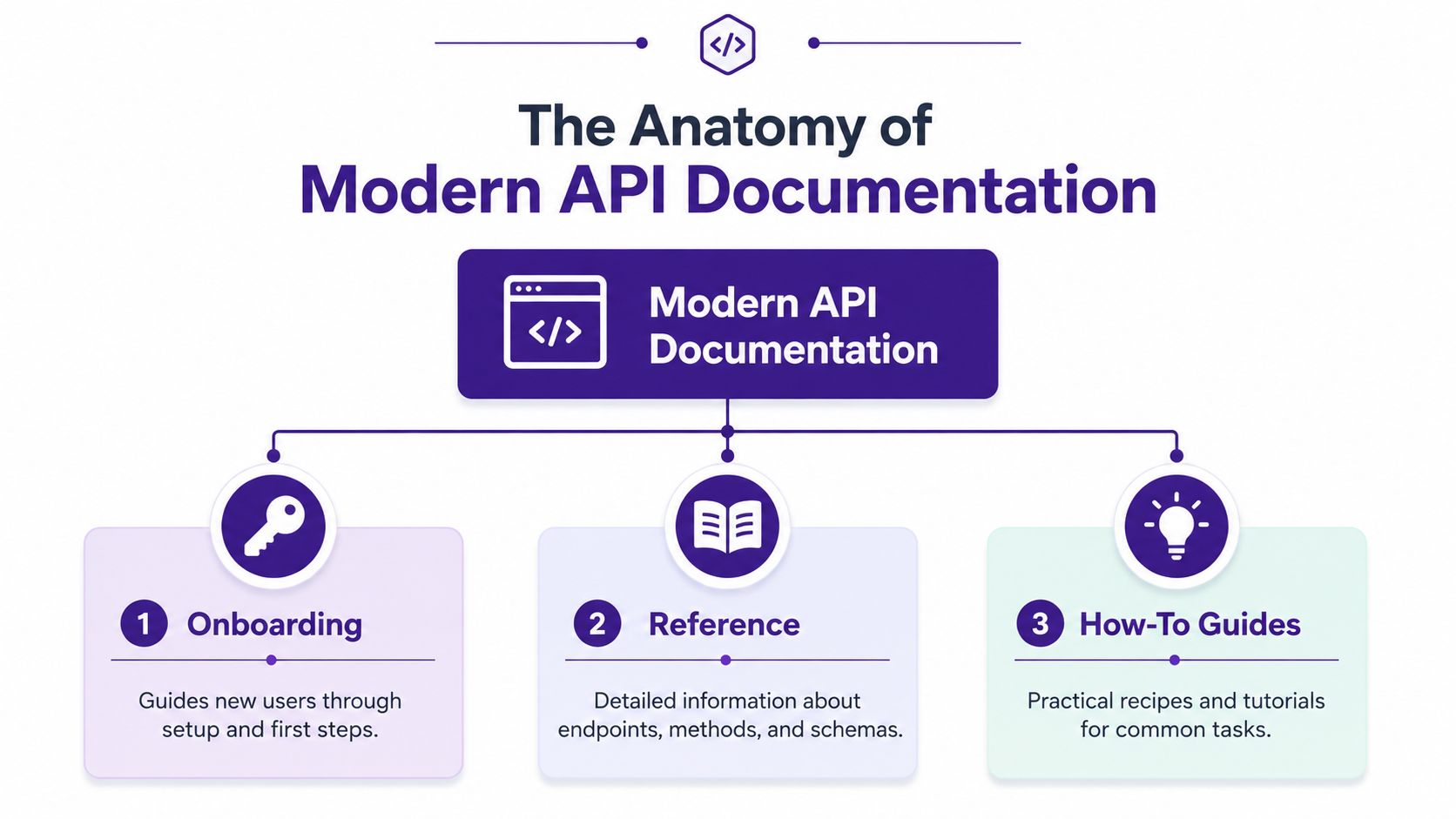
Three pillars that do the real work
| Pillar | What it answers | Typical pages |
|---|---|---|
| Onboarding | How do I make my first successful request? | Overview, authentication, environments, first request |
| Reference | What does this endpoint, field, or type do exactly? | Endpoints, schemas, parameters, headers, status codes |
| How-to guides | How do I complete a real task with this API? | Create a user, sync contacts, handle webhooks |
This split matters because readers arrive with different intent. An engineer evaluating your API needs setup steps and a working example. A backend developer debugging a production issue needs exact parameter behavior and error payloads. Support and solutions teams often need business rules and edge-case explanations more than raw endpoint detail.
Terminology also matters more than teams expect. If your docs mix product language, protocol terms, and internal naming, even a well-organized portal becomes harder to use. A useful reset for shared vocabulary is this API guide for developers.
Structure by task, not by endpoint count
Teams often start with endpoint pages because the spec already exists. That is a reasonable starting point, but it produces thin docs if the template stops there.
A modern template should map to the work developers are trying to finish:
- Onboarding content gets a new user from credentials to a successful request.
- Reference content answers exact implementation questions without forcing readers to scan guides for field definitions.
- Task guides connect multiple endpoints, retries, auth rules, and edge cases into one workflow.
This is also where docs-as-code helps. When the structure is explicit, each content type can live in its own file, follow its own review checklist, and evolve without turning the whole docs set into one oversized page. That file-level separation is what makes the template reusable across REST references, GraphQL operations, and SDK docs later in the article.
What strong API docs include by default
Modern API documentation usually includes the same core content types, even when the delivery format changes:
- Quickstarts with copy-paste examples
- Reference pages with request, response, and schema details
- Workflow guides for common integration tasks
- Authentication and environment setup
- Error behavior with status codes and payload examples
- Change visibility through release notes or changelogs
The trade-off is maintenance. More content types mean more surface area to keep current. The fix is not to cut sections. The fix is to give each section a clear role and a predictable place in the folder structure, so updates stay manageable and reviewers can spot gaps quickly.
A good API documentation template example does more than list sections on a page. It gives teams a repeatable content model they can store in Git, review like code, and adapt across API styles without rewriting the whole system.
A Complete File and Section Template Structure
The easiest way to keep docs maintainable is to stop treating them like one giant page. Large documentation sets age badly when all content lives in a monolith. Reviews get harder, ownership gets blurry, and updates collide.
The OpenAPI best-practices guidance recommends a design-first, single-source-of-truth approach with reuse through components and $ref, plus splitting larger specs along natural URL hierarchies so they're easier to review and maintain in a docs-as-code workflow, as outlined in the OpenAPI Specification best practices.
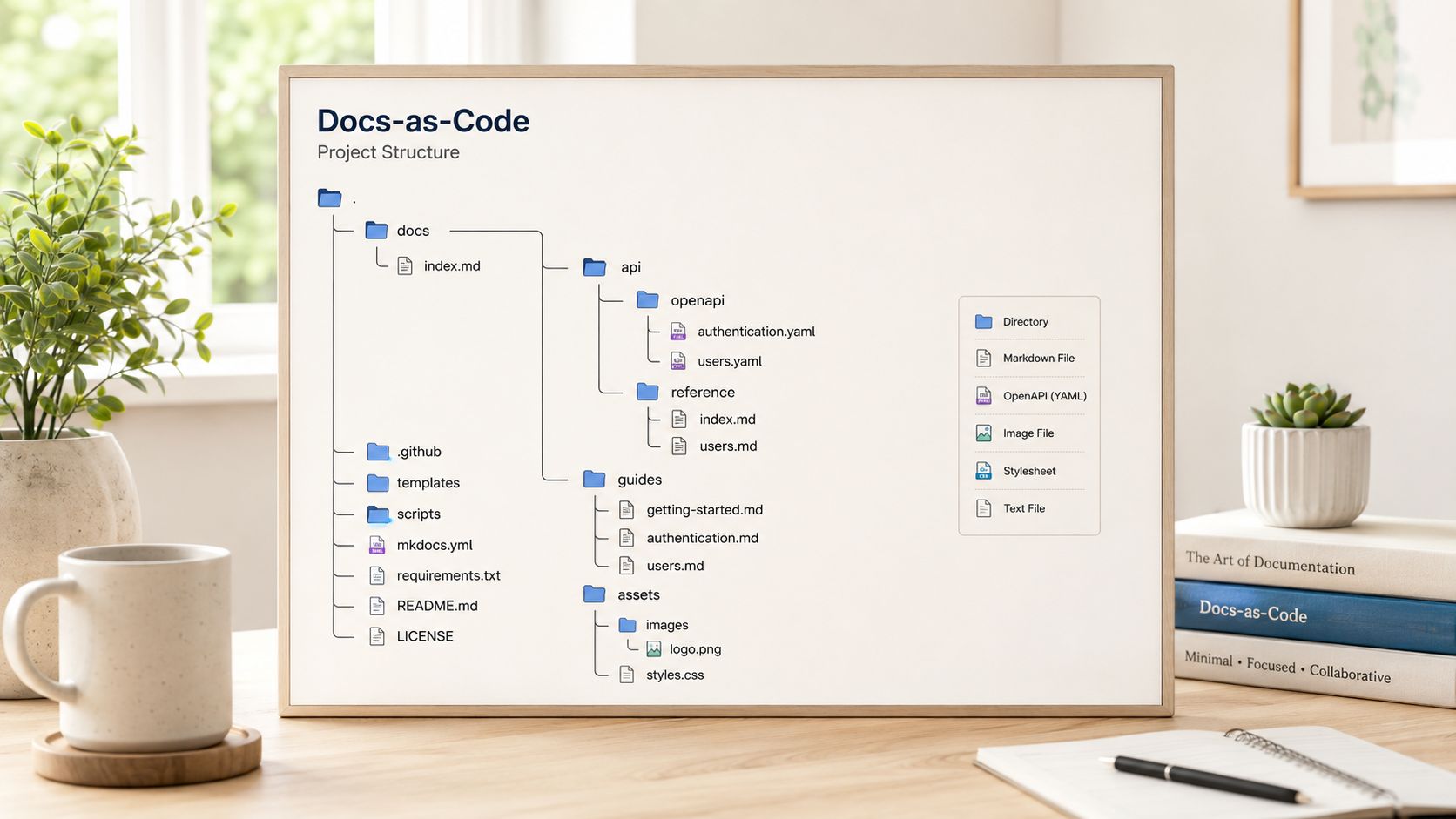
A starter folder structure you can actually use
Here's a practical layout for a version-controlled documentation project:
docs/
  index.mdx
  getting-started/
    overview.mdx
    authentication.mdx
    environments.mdx
    first-request.mdx
  guides/
    create-your-first-user.mdx
    paginate-results.mdx
    handle-errors.mdx
  api/
    overview.mdx
    endpoints/
      users/
        _category_.json
        get-user-by-id.mdx
        list-users.mdx
        create-user.mdx
      auth/
        _category_.json
        create-token.mdx
        revoke-token.mdx
    schemas/
      user.mdx
      error.mdx
      pagination.mdx
  graphql/
    overview.mdx
    queries/
      user-query.mdx
    mutations/
      create-user-mutation.mdx
    types/
      user-type.mdx
  sdk/
    javascript/
      client-initialization.mdx
      users-getById.mdx
    python/
      client-initialization.mdx
      users-get_by_id.mdx
  errors/
    error-format.mdx
    common-errors.mdx
  changelog/
    index.mdx
openapi/
  openapi.yaml
  paths/
    users.yaml
    auth.yaml
  components/
    schemas.yaml
    parameters.yaml
    responses.yaml
If you already manage a sprawling editorial system, the logic will feel familiar. This is basically a technical version of a structured content inventory, and the same planning habit behind a content inventory template helps here too.
What each part is doing
The docs folder
This holds human-facing content. It includes onboarding, guides, endpoint pages, schema explanations, SDK docs, and changelogs.
Use .mdx if your docs platform benefits from embedded components like tabs, callouts, or API playground widgets. Use plain Markdown if you want a simpler stack.
The openapi folder
This is the machine-readable source of truth. Keep reusable definitions in components/. Split path definitions by resource area such as users or auth.
That split matters because your API surface usually grows by resource family, not alphabetically.
Category files and index pages
In tools like Docusaurus, _category_.json helps control labels and sidebar structure. index.mdx files act as landing pages that explain a section before readers fall into individual references.
What works and what doesn't
Works well
- One file per endpoint: Easier review, cleaner ownership
- Shared schema pages: One place to explain recurring objects
- Dedicated guides: Keeps task-based content out of endpoint reference
- Separate changelog area: Users can inspect changes without diffing pages manually
Usually fails
- A single “API Reference” page: Hard to scan and harder to maintain
- Examples hidden in guides only: Readers expect examples at the endpoint level
- Auth details repeated inconsistently: Centralize the rule, then summarize where needed
- No error section: Readers need a predictable place to troubleshoot
Treat your docs repo like code. Small files, clear ownership, and reusable parts beat a giant page every time.
REST API Endpoint Documentation Example
The core test of any API documentation template example is simple: can it document one endpoint completely, with no guessing left for the reader?
Postman's API documentation guidance emphasizes endpoint-level reference data such as method, URL path, parameters, accepted data types, authentication, status and error codes, plus representative examples. That's the right baseline for a usable reference page, as shown in Postman's API documentation overview.

Example page for GET /api/v1/users/{id}
Below is a complete page you can adapt.
---
title: Get user by ID
description: Retrieve a single user record by its unique ID.

---

## Summary

Returns one user object.

## Endpoint

`GET /api/v1/users/{id}`

## Authentication

Requires a bearer token in the `Authorization` header.

## Path parameters

| Name | Type | Required | Description |
|---|---|---|---|
| `id` | string | Yes | Unique identifier for the user |

## Query parameters

| Name | Type | Required | Description |
|---|---|---|---|
| `include` | string | No | Comma-separated related resources to include |

## Headers

| Header | Required | Description |
|---|---|---|
| `Authorization` | Yes | Bearer token used to authorize the request |
| `Accept` | No | Set to `application/json` |

## Example request

```bash
curl -X GET "https://api.example.com/api/v1/users/usr_123"
  -H "Authorization: Bearer YOUR_TOKEN"
  -H "Accept: application/json"
Success response
Status: 200 OK
{
  "id": "usr_123",
  "email": "alex@example.com",
  "name": "Alex Rivera",
  "status": "active",
  "created_at": "2026-01-15T10:30:00Z"
}
Error responses
404 Not Found
Returned when no user exists for the supplied id.
{
  "error": {
    "code": "user_not_found",
    "message": "No user was found for the provided ID."
  }
}
401 Unauthorized
Returned when the bearer token is missing or invalid.
{
  "error": {
    "code": "unauthorized",
    "message": "Authentication is required to access this resource."
  }
}
Notes
- User IDs are case-sensitive.
- Use the
includeparameter only for supported related resources.
### Why this layout works

The page starts with intent, not protocol trivia. “Returns one user object” gives the reader immediate orientation. Then it narrows into endpoint mechanics, parameter constraints, and copy-paste examples.

That order matters. Developers usually ask three questions in sequence:

1. **What does this endpoint do**
2. **How do I call it**
3. **What comes back when it works or fails**

If your page answers those in a different order, readers scroll more than they should.

For a visual walkthrough of how strong API docs improve implementation clarity, this short video is worth a look:

<iframe width="100%" style="aspect-ratio: 16 / 9;" src="https://www.youtube.com/embed/7nm1pYuKAhY" frameborder="0" allow="autoplay; encrypted-media" allowfullscreen></iframe>

### Small details that improve the page

- **Use realistic values:** `usr_123` is better than `string`
- **Name auth explicitly:** Don't make users infer bearer token usage
- **Separate success from failure:** Error behavior deserves visible space
- **Keep examples runnable:** `curl` should work after token replacement

> A request example without a matching response example is half a page, not a complete page.

One more practical note. If the endpoint supports optional expansions, filtering, or pagination, don't bury those in a separate guide only. Keep task guides for workflows, but keep endpoint-specific behavior on the endpoint page too.

## Adapting the Template for GraphQL and SDKs

A good template system shouldn't break the moment your stack changes. REST, GraphQL, and SDK docs describe different surfaces, but the reader still needs the same core things: purpose, inputs, auth context, output shape, examples, and failure behavior.

What changes is the unit of documentation.

### How the pattern shifts for GraphQL

In REST, the unit is usually an endpoint. In GraphQL, it's often a query, mutation, or type.

Here's a GraphQL mutation page using the same pattern:

```md

---
title: createUser mutation
description: Create a new user record.

---

## Summary

Creates a user and returns the created object.

## Operation type

`mutation`

## Authentication

Requires a bearer token.

## Arguments

| Name | Type | Required | Description |
|---|---|---|---|
| `input` | `CreateUserInput!` | Yes | Input object containing user fields |

## Example mutation

```graphql
mutation CreateUser {
  createUser(input: {
    email: "alex@example.com"
    name: "Alex Rivera"
  }) {
    id
    email
    name
    status
  }
}
Example response
{
  "data": {
    "createUser": {
      "id": "usr_123",
      "email": "alex@example.com",
      "name": "Alex Rivera",
      "status": "active"
    }
  }
}
Common errors
- Validation errors on invalid input fields
- Authentication errors when the token is missing or invalid
The shape is familiar even though the protocol changed. Summary. Auth. Inputs. Example operation. Example output. Failure notes.

### How the pattern shifts for SDKs

SDK docs document functions or methods rather than transport details. Readers care less about raw headers and more about initialization, arguments, return values, and exceptions.

Here's the same resource documented as a JavaScript SDK method:

```md

---
title: users.getById
description: Fetch a user by ID from the JavaScript SDK.

---

## Summary

Returns one user object for the provided ID.

## Signature

`client.users.getById(id, options?)`

## Parameters

| Name | Type | Required | Description |
|---|---|---|---|
| `id` | string | Yes | Unique identifier for the user |
| `options` | object | No | Additional request options |

## Returns

A promise that resolves to a user object.

## Example

```js
const user = await client.users.getById("usr_123");
console.log(user.email);
Errors
Throws an error when the request fails or the user does not exist.
### What stays constant

Use the same content logic across all three surfaces:

- **Start with purpose**
- **List required inputs clearly**
- **Show a runnable example**
- **Document output shape**
- **Explain failure modes**

That consistency is what makes the template a system instead of a one-off file. A developer moving from your REST docs to your SDK docs shouldn't have to relearn how to read your site.

## Documenting Error Payloads and Status Codes

Teams often document errors like they're apologizing for them. A bare list of `400`, `401`, and `500` isn't enough. Readers need to know what the error means, what payload to expect, and what to do next.

The fastest way to improve an API documentation template example is to give errors a standard card format.

### A reusable error entry format

Use one block per error with the same fields every time:

```md
### 401 Unauthorized

**Meaning**
The request could not be authenticated.

**When it happens**
- The `Authorization` header is missing
- The token is invalid
- The token has expired

**Example payload**

```json
{
  "error": {
    "code": "unauthorized",
    "message": "Authentication is required to access this resource."
  }
}
How to fix it
Generate a valid token, include it in the Authorization header, and retry the request.
This format does two important things. It explains cause, and it gives a recovery path. That's far more useful than a status code table with no operational advice.
### Error docs should answer these questions
- **What failed**
- **Why it failed**
- **What the payload looks like**
- **How the developer should respond**
For GraphQL teams, a schema inspection tool can help when you're validating types and documenting expected structures around operations and errors. The [Graphql Schema Viewer by Digital ToolPad](https://www.DigitalToolpad.com/tools/graphql-schema-viewer-validator) is useful when you want to inspect schema shape before turning it into human-facing docs.
> Error documentation is part of the product experience. Developers meet it on their worst day, not their best one.
### A compact status code table for overview pages
A short table still helps on summary pages:
| Status code | Meaning | Where to document details |
|---|---|---|
| `200 OK` | Request succeeded | Endpoint page |
| `400 Bad Request` | Input was invalid | Error catalog and endpoint notes |
| `401 Unauthorized` | Authentication failed | Auth guide and error catalog |
| `404 Not Found` | Resource does not exist | Endpoint page and error catalog |
| `500 Internal Server Error` | Unexpected server failure | Error catalog |
The detailed payloads belong in your error reference, but common endpoint-specific failures should also appear directly on the endpoint page.
## Best Practices for Writing and Maintenance
A good template reduces structural guesswork. It does not keep a page accurate after the API changes, and it does not turn vague writing into useful documentation.
The teams that get lasting value from a docs template treat it as a maintained repo, not a one-time content dump. That matters even more with a docs-as-code starter kit like the one in this article, where endpoint pages, auth guides, changelogs, and examples live in a file structure developers can review in pull requests. The folder layout gives you consistency. The writing and maintenance process determine whether developers can trust what they read.
### Write for execution, not description
Reference docs should help a developer make the next request correctly. That means every page needs plain language, realistic examples, and enough context to prevent avoidable mistakes.
A few habits raise quality fast:
- **Use active, instructional language:** Write “Send the token in the `Authorization` header” instead of “The token should be sent.”
- **Define domain terms once and keep them stable:** If your product uses `workspace`, `organization`, and `account`, document the differences and do not switch labels between pages.
- **Show real payloads:** Include fields a developer will see, with believable values and required headers.
- **Design for scanning:** Clear subheads, short paragraphs, and code blocks beat long explanatory text.
- **Document constraints where they matter:** Call out enum values, case sensitivity, pagination limits, idempotency behavior, and time formats next to the relevant example.
Strong API writing usually comes down to removing friction. Teams that want to sharpen that skill set can get useful editorial guidance from this guide on [mastering technical writing skills](https://rewritebar.com/articles/best-practices-for-technical-writing).
### Keep docs in the same change path as code
Documentation drift usually starts with a familiar release pattern. The endpoint changes on Tuesday. The OpenAPI file gets patched on Wednesday. The human-written docs stay untouched until someone in support reports that the example no longer works.
Preventing that drift takes process.
A workflow that holds up in practice looks like this:
1. **Require doc updates in the same pull request** for any behavior, schema, auth, or error change
2. **Review examples like test fixtures** so sample requests and responses match production behavior
3. **Assign maintainers by domain** such as billing, users, webhooks, and authentication
4. **Version docs deliberately** when a breaking change affects request shape or response fields
5. **Archive or redirect outdated pages quickly** so developers do not find conflicting instructions
6. **Run doc checks in CI where possible** for broken links, missing frontmatter, invalid code fences, or stale generated snippets
The annotated file-and-folder approach proves advantageous. Ownership becomes clearer when `/docs/authentication.md`, `/docs/errors.md`, and `/reference/users/create-user.md` each have an obvious home and reviewer. It also makes adaptation easier when one team documents REST endpoints from OpenAPI and another documents GraphQL operations or SDK methods in neighboring directories with the same editorial rules.
### Common maintenance failures
| Common failure | Better approach |
|---|---|
| Docs are updated after launch | Ship docs in the same release cycle as the code change |
| One writer owns every page | Split ownership by API domain and review docs like code |
| Examples use placeholder values only | Use realistic payloads that mirror actual requests |
| Generated reference replaces all narrative docs | Keep generated schema details, then add human-written context and workflows |
| Versioned APIs share one mixed page | Separate versions clearly in files, navigation, and examples |
One trade-off deserves a direct callout. Auto-generated reference is fast to produce and useful for coverage, especially for parameters, schemas, and operation lists. It does not replace explanation. Developers still need onboarding paths, migration notes, caveats, and examples that show how the API behaves in a real integration.
## Integrating Your Template with Documentation Tools
A Markdown template becomes much more valuable once it fits into a publishing workflow your team can maintain without ceremony. That's where docs-as-code pays off.
OpenAPI created a durable foundation for this. OpenAPI 2.0 was donated to the OpenAPI Initiative in 2015, and the specification advanced to OpenAPI 3.0 in 2017, giving teams a vendor-neutral way to define endpoints, parameters, request and response bodies, authentication, and error handling in a reusable structure. Postman's template approach also frames API documentation as a Markdown-based framework teams can fork, edit, preview, and update as the API evolves in [Postman's API documentation template](https://www.postman.com/templates/collections/api-documentation/).

### How the workflow fits together
A practical setup often looks like this:
- **Write Markdown or MDX files** in a repo alongside your spec files
- **Keep OpenAPI as structured source data** for endpoints and schemas
- **Use a site generator or docs platform** such as Docusaurus, Nextra, ReadMe, or Stoplight
- **Build and deploy automatically** from version control
- **Review doc changes like code changes**
That combination gives you a clean split between human explanation and machine-readable structure. The spec handles exact API shape. The docs pages handle onboarding, examples, guidance, and edge cases.
### Why this approach scales better
When teams use a shared template plus OpenAPI, they stop rebuilding conventions for every product area. Auth pages look related to billing pages. SDK docs feel like part of the same system. Changelog entries attach to the same release habit.
If you're building a broader internal knowledge system around docs, handbooks, and product references, this practical guide on [how to make a wiki](https://contesimal.ai/blog/how-to-make-a-wiki/) is useful because the underlying problem is the same: structure first, then scale.
### A sensible tool choice
Different stacks fit different teams:
- **Docusaurus** works well when docs live close to engineering workflows
- **Nextra** is a good fit for teams already comfortable with Next.js
- **ReadMe** is strong when you want a hosted developer portal feel
- **Stoplight** fits teams centered heavily on spec-driven API design
The tool matters less than the operating model. Pick one that makes writing, reviewing, and publishing easy enough that the team will keep doing it.
---
A good API doc template doesn't just help developers publish cleaner reference pages. It helps teams turn scattered knowledge into a reusable system that compounds over time. That same principle applies far beyond engineering docs. [Contesimal](https://contesimal.ai) helps teams organize large content libraries, surface useful knowledge across old and new assets, and turn archives into practical value. If your work depends on finding structure inside a growing body of content, it's worth a look.