
Monday morning, a content lead opens a folder with 200 podcast transcripts, three years of webinars, and a publishing calendar that still needs fresh output by Friday. The bottleneck is rarely ideas. It is choosing the model that can sort, retrieve, rewrite, and package that library into assets people will use.
This is the central question behind "best chat gpt model."" Content teams do not need a benchmark winner in the abstract. They need the model that fits the job, the budget, the review process, and the risk level of the material. A researcher may care about long-context recall and grounded summaries. A publisher may care more about consistency, private retrieval, and editorial control. A podcast team may need fast repurposing across show notes, clips, newsletters, and sponsor copy.
Model choice matters because many AI products are wrappers around the same foundation models. The interface changes. The underlying trade-offs often do not. Pick the right model and the rest of the workflow gets easier to set up, especially if your team is building repeatable repurposing systems instead of one-off prompts.
This guide takes a practical angle. It focuses on ROI, not leaderboard theater. You will see where each model fits, where it falls short, and how to match it to real workflows for podcasters, publishers, and researchers. We also cover implementation details that matter in production, including how a content repurposing workflow can plug into platforms such as Contesimal's guide to AI content creation workflows.
One detail is easy to miss. "Best" changes by use case. Translation-heavy teams, for example, may judge output quality very differently from editorial teams building source-backed articles. This GPT-4 vs Claude comparison for translation is a good example of how task-specific evaluation changes the winner.
Your archive already contains the raw material for new revenue. A strong model helps you find it, structure it, and publish it without turning your stack into a science project.
1. OpenAI, ChatGPT (GPT-4.1 family and current GPT models)
A content lead pulls a podcast transcript, three old blog posts, and a pile of research notes into one workspace. By the end of the afternoon, they need a publishable brief, newsletter copy, social cutdowns, and a clean summary for sales. OpenAI is still the model family I’d test first for that kind of mixed workload because it handles ambiguity well and usually requires less prompt babysitting than cheaper options.
That matters for ROI. Content teams do not get value from benchmark wins alone. They get value from fewer editing passes, cleaner structured outputs, and APIs that fit into production without custom glue code everywhere.
Where OpenAI earns its place
OpenAI works best as the default generalist for teams that need one stack to cover drafting, extraction, classification, and workflow automation.
In practice, that makes it a strong fit for:
- Podcasters: Turn transcripts into episode summaries, clip hooks, guest quote pullouts, sponsor reads, and follow-up emails.
- Publishers: Convert source material into article briefs, first drafts, metadata, FAQs, and archive refreshes.
- Researchers: Summarize dense inputs, compare sources, tag themes, and format findings for editors or clients.
- Operations teams: Use function calling, retrieval, and structured outputs inside repeatable pipelines instead of one-off prompts.
The ecosystem is part of the appeal. Teams that want to connect model output to approval steps, content libraries, and repurposing systems can pair OpenAI with a practical AI content creation workflow for repurposing published assets without rebuilding their process from scratch.
Practical rule: Choose OpenAI first when your team needs one model family that can go from raw source material to draft, tags, summaries, and structured data in the same workflow.
Real trade-offs
OpenAI is rarely the cheapest option for high-volume production. That shows up fast if you process long transcripts, large research sets, or multilingual archives every day.
The product lineup also changes often. Smart teams build around capabilities, output formats, and QA checks instead of hard-coding every workflow to a single model name. That reduces rework when pricing, rate limits, or model availability shift.
I also would not treat OpenAI as the automatic winner for every specialty task. Translation is a good example. The GPT-4 vs Claude comparison for translation is useful if your archive includes interviews, articles, or product content that has to hold meaning across languages.
Best fit by use case
For content teams, the decision is usually less about "best model" and more about "best first system."
OpenAI is a strong choice if you want:
- one vendor that can support ideation, drafting, extraction, and app integrations
- fast setup for repeatable editorial workflows
- reliable performance across many content formats, not just one narrow task
If I were advising a publisher or podcast network starting from zero, I’d use OpenAI as the baseline in the decision matrix. Then I’d test specialist alternatives only where the economics or output quality clearly beat it. That is the practical path for teams that care about shipping, not experimenting for its own sake.
2. Anthropic, Claude (Sonnet/Opus line)
Claude is what I recommend to teams that care about calm, clean writing more than flashy feature breadth.
It tends to fit editorial environments well. If you hand it a messy brief and ask for a disciplined summary, a neutral rewrite, or a structured synthesis, Claude usually behaves like an editor instead of an excited intern.
Best fit for editorial and long-context work
Anthropic’s strength is instruction following with a strong safety posture. That matters when your archive includes sensitive interviews, legal review, medical-adjacent copy, or material that can’t tolerate loose paraphrasing.
I especially like Claude for:
- Editorial synthesis: Summarizing source-heavy material without making the prose feel overproduced.
- Long-context review: Working through long manuscripts, policy docs, transcripts, and research bundles.
- Safer collaboration: Giving junior editors and researchers a model that tends to follow tighter boundaries.
This is one of the better options when a publisher wants AI involved, but doesn’t want the room to feel like the model is freelancing.
Claude often works best when the brief says “stay close to the source” instead of “be creative.”
What it doesn’t do as well
Claude is not where I’d go first for broad multimodal experimentation or image-heavy production flows. If your team wants text, voice, visual understanding, and developer tooling all under one roof, OpenAI and Google usually feel more expansive.
There’s also a practical issue many teams discover late. Billing and access can get awkward depending on region and whether you’re using a third-party platform.
That doesn’t make Claude worse. It makes it less frictionless for some organizations.
For creators, a key question is whether you need a model that feels restrained. If yes, Claude earns its place near the top. If your work involves adapting a book chapter into a clean newsletter, condensing a podcast transcript into an executive brief, or preparing research summaries that an editor can trust at first read, Claude is usually a strong choice.
I wouldn’t call it the single best chat gpt model alternative for every use case. I would call it one of the best for teams that value discipline, long-context reading, and lower-drama output.
Website: Anthropic
3. Google, Gemini 1.5 (Pro/Flash) via Gemini API
A content team uploads three years of transcripts, a backlog of briefs, and a pile of source PDFs. The question is not who writes the cleverest paragraph. The question is which model can read the whole stack, keep track of it, and return something usable.
Gemini 1.5 earns attention on that kind of work. For podcasters, publishers, and research teams, its real value is not novelty. It is throughput across large source sets.
Where Gemini fits best
Gemini 1.5 Pro and Flash make sense when your workflow starts with ingestion. You need the model to review long material, compare documents, and pull patterns across an archive before anyone asks it to draft.
That creates a clear split:
- Pro: Better for higher-stakes synthesis, nuanced summaries, and tasks where editors will inspect the reasoning.
- Flash: Better for faster turnaround, bulk classification, and repeatable production jobs.
- Google AI Studio: Useful for testing prompts and evaluating workflows before you wire them into production.
For ROI-driven content operations, that matters. A podcast team can map recurring themes across episode transcripts. A publisher can mine old articles for refresh candidates. A research team can compare reports, extract claims, and hand editors a cleaner brief. If you are building search-driven editorial systems, this guide to using AI for SEO workflows that connect research to publishing is a useful companion.
Platforms like Contesimal also benefit from this style of model selection. Gemini is often a strong fit when the platform job is to process a content library first, then generate derivative assets such as outlines, metadata, summaries, and repurposed drafts.
The trade-offs to plan for
Google gives teams range, but it also gives them product sprawl. AI Studio, Gemini API, Vertex AI, changing model labels, and evolving documentation can slow decisions if nobody owns the stack.
That friction shows up early. Content leads usually care about output quality and speed. Ops and engineering teams have to sort out access, deployment path, and which version belongs in which workflow.
I would choose Gemini when the bottleneck is archive analysis, content repurposing at scale, or source-heavy synthesis. I would not choose it first if the priority is the simplest possible buying path or the most familiar team-wide workflow on day one.
Use Gemini for library-scale reading and synthesis. Choose something else if your team needs the easiest ecosystem to standardize around.
Gemini is easy to underrate because its best use cases are operational. It helps teams turn large content libraries into usable assets, which is where a lot of AI ROI shows up.
Website: Google AI for Developers
4. xAI, Grok (4.x/4.1 fast reasoning family)
Grok is the model I’d reach for when the brief starts with, “We need this fast, and we need current context.”
That’s its real appeal. Speed plus live search context changes the shape of the work.
Where Grok earns a spot
Grok is useful for:
- Live editorial support: Summarizing breaking developments into internal briefs.
- Research with current context: Pulling timely signals when older model knowledge isn’t enough.
- Interactive workflows: Voice-driven collaboration and rapid back-and-forth review.
That matters for creators working close to current events, trend commentary, or social-driven content planning. If your production cycle runs on fresh information, static knowledge cuts it.
For search-heavy content planning, this practical take on AI for SEO pairs well with a tool like Grok.
Where it still feels less mature
Grok’s smaller ecosystem is the obvious constraint. OpenAI and Google have broader third-party support, more familiar enterprise pathways, and more teams already trained on their workflows.
Pricing can also feel less straightforward because details often live in docs and console layers instead of one public page. That’s manageable for technical teams, but annoying for creators trying to compare stacks quickly.
Still, I wouldn’t dismiss it. Some teams don’t need the broadest ecosystem. They need a model that can keep up with a newsroom rhythm or a social content engine.
The best use case is not “replace everything with Grok.” It’s “use Grok where time-sensitive context matters, then hand the approved material into your main editing and publishing system.”
Website: xAI
5. Meta, Meta AI assistant (Llama-powered)
Meta AI is the easiest model on this list to try and the hardest to treat as a serious production system.
That doesn’t mean it’s weak. It means it lives where your audience already spends time.
Best for frictionless ideation
If you want a free assistant for brainstorming hooks, drafting rough captions, summarizing comments, or pressure-testing angles inside consumer apps, Meta AI is convenient.
That convenience is the whole point.
You can use it across Meta surfaces many creators already touch every day:
- Facebook and Instagram: Quick idea generation around posts and audience themes.
- Messenger and WhatsApp: Casual draft help and conversational planning.
- Web access: Lightweight support without setting up a developer stack.
For creators still moving from hobby to operator, that low-friction entry matters. Sometimes the best model is the one your team will use.
Why it usually isn’t the final answer
Meta AI is not an enterprise-grade content operations platform. You won’t choose it for deep retrieval across sensitive archives, strict governance, or structured production automations.
Features also vary by app and region, which makes standardization harder.
So where does it fit? Early-stage ideation. Audience-facing experimentation. Fast brainstorming while you’re already inside the platforms where distribution happens.
There’s another reason to pay attention to Meta’s assistant layer. A lot of content teams overbuild too early. They jump into expensive workflows before they’ve even proven which archive assets deserve repurposing. Meta AI can be a cheap way to test angles before you formalize a bigger system.
If your need is “help me think while I’m publishing,” Meta AI is useful. If your need is “help my team organize and monetize a five-year content library,” you’ll outgrow it quickly.
Website: Meta AI
6. Meta, Llama 3.1 (open-weights models; self-host or use via clouds)
Llama 3.1 is not the easiest option. It might be the smartest option if data control matters more than convenience.
This is the pick for teams that don’t want all their archive intelligence to live inside someone else’s default product.
Why teams choose open weights
Llama 3.1 gives organizations flexibility.
You can self-host it, run it through cloud providers, or build a private workflow around it. That makes sense for:
- Publishers with sensitive archives
- Research groups with internal corpora
- Media teams that need custom guardrails
- Organizations that care about data residency and deployment control
The practical advantage is architectural freedom. You can shape the system around your archive instead of shaping your archive around a vendor.
What the freedom costs
Self-hosting is work. Even managed deployment still asks more from your technical team than using ChatGPT or Claude out of the box.
There’s also a common misunderstanding here. Open weights does not mean no strings attached. You still need to understand the license and operational requirements.
That’s why I usually separate “best chat gpt model for creators” from “best model strategy for organizations.” For a solo creator, Llama often adds too much overhead. For a publisher building a private research layer across documents, transcripts, and editorial notes, it can be exactly right.
Operator’s note: If governance and deployment control are part of the buying conversation, Llama deserves a serious look even when a frontier model scores higher in raw convenience.
Website: Meta Llama on GitHub
7. Mistral AI, Mistral Large/Small (and Codestral)
Mistral is one of the most practical picks for teams that care about efficiency without dropping into bargain-bin quality.
I wouldn’t call it the headline answer for every creator. I would call it a smart operations choice.
Why budget-conscious teams like it
Mistral’s hosted models and open model options make it attractive for cost-sensitive pipelines. That’s useful when you’re doing high-volume summarization, multilingual adaptation, or embedded product chat where every request adds up.
It’s a good fit for:
- Bulk summarization
- Instruction-following tasks
- Code-adjacent helper workflows
- Lightweight RAG applications
- Products that need responsive chat at scale
This is one of those vendors that tends to be appreciated by builders more than casual users. The appeal is less “wow factor” and more “this works and the economics don’t hurt.”
Where it falls short
Mistral doesn’t have the same broad multimodal shine as some hyperscaler options. Its ecosystem is also smaller, so integrations may require more deliberate setup.
That matters if your team wants a stack that many outside tools already support. It matters less if your team is building a focused workflow around text, retrieval, and structured output.
For creators, the strongest use case is behind-the-scenes production. Think transcript chunking, archive labeling, categorization, and cost-conscious content preprocessing. Those aren’t glamorous tasks, but they’re often the jobs that generate revenue from a neglected library.
If your current workflow burns premium-model budget on repetitive prep work, Mistral is worth testing.
Website: Mistral AI
8. Cohere, Command (R / R+ / A families)

Cohere is the model family I think more publishers should evaluate, especially if their real problem is grounded retrieval rather than flashy general chat.
This is a knowledge-work tool first.
Strong choice for retrieval and structured answers
Command models are designed for retrieval-heavy use cases and structured extraction. That makes them a strong fit when you want answers tied closely to source material.
For content teams, that means:
- Archive search that stays grounded
- Structured extraction from interviews and documents
- Long-form summarization with source discipline
- Defensible internal knowledge assistants
If you’ve ever watched a model produce a polished answer that felt plausible but slippery, Cohere’s positioning makes immediate sense. It’s trying to keep the model close to the evidence.
The practical limitation
Cohere has a smaller public footprint in general consumer AI conversation. It’s not the model family most creators casually stumble into, and its multimodal profile is less expansive than OpenAI or Google.
But that can be a good thing. It often signals a vendor focused less on hype and more on enterprise retrieval use cases.
For research-led teams, this matters. When your value comes from surfacing the right quote, passage, or precedent from your own archive, grounded output beats broad improvisation.
I’d shortlist Cohere for publishers building internal search, knowledge bases, research assistants, and source-aware editorial tools. I wouldn’t make it my first pick for highly creative voice work or all-purpose multimodal experimentation.
Website: Cohere
9. DeepSeek, V3.x (chat) and R1 (reasoning) via DeepSeek API
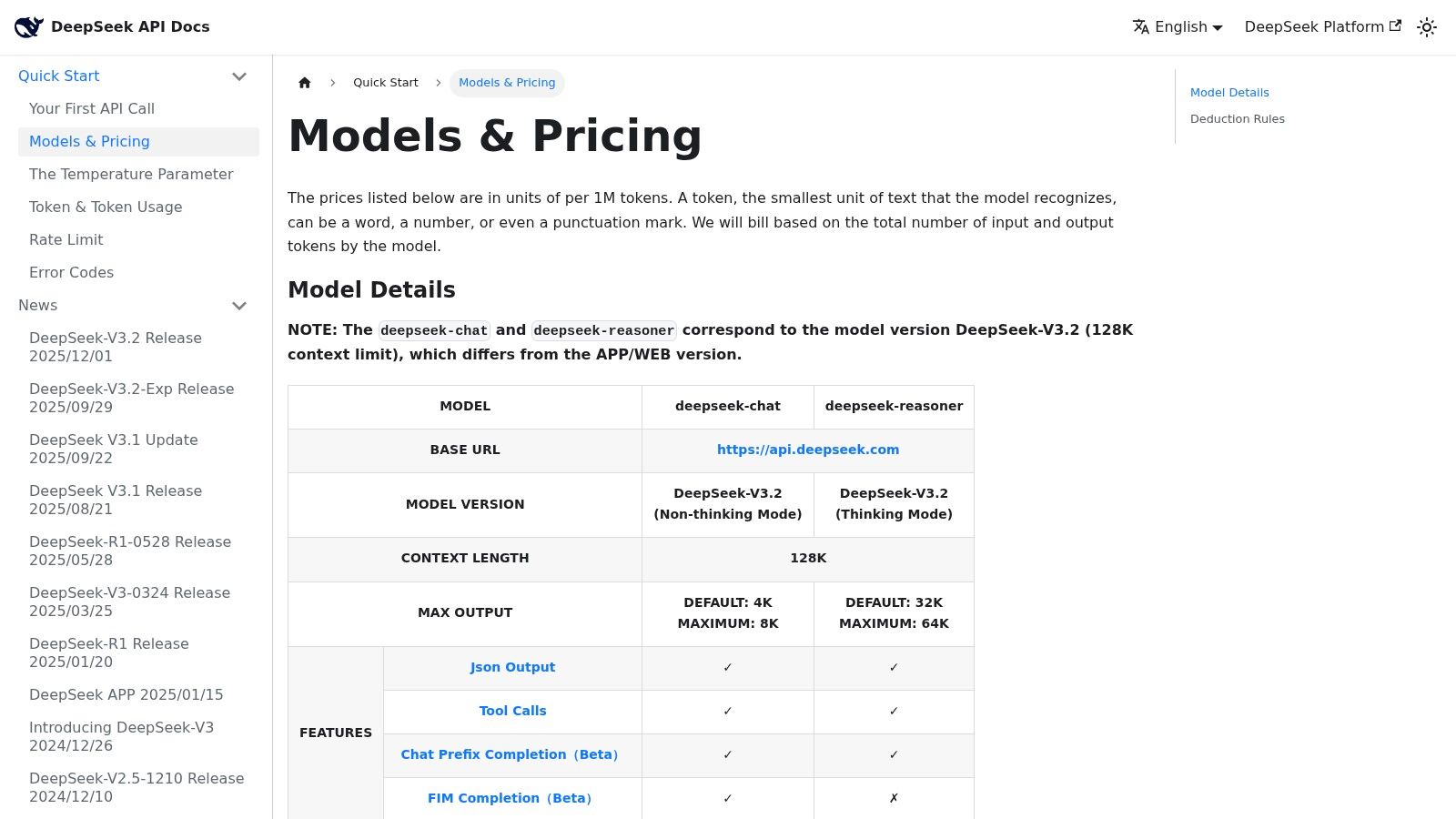
DeepSeek changed the conversation because it forced teams to ask a less glamorous question. Are we overspending on tasks that don’t need frontier polish?
That question matters a lot in content operations.
Best for high-volume ingestion economics
DeepSeek’s appeal is straightforward. Low costs, chat and reasoning options, and cache-aware pricing for repeated context. If you’re processing huge amounts of transcript or document material, those mechanics can matter more than prestige.
I’d consider DeepSeek for:
- Large-scale transcript ingestion
- Archive summarization
- Repeated-context workflows
- Reasoning-heavy preprocessing before editorial review
This is especially relevant for teams organizing historical libraries. A lot of archive work is repetitive. You classify, summarize, tag, cluster, and extract before any polished creative output happens.
One underserved angle in best chat gpt model discussions is cost efficiency for that kind of production workload. Tom’s Guide notes that GPT-4o mini delivered reasoning at 60% lower cost than GPT-4o while maintaining 85-90% performance on coding and math benchmarks in recent 2025 tests, highlighting why many teams now compare smaller, cheaper models for bulk work instead of defaulting to premium tiers (Tom’s Guide on choosing the right ChatGPT model).
Why enterprises still hesitate
US enterprises and regulated organizations may need extra diligence around governance, support expectations, and deployment risk. That’s not unique to DeepSeek, but it’s more noticeable when a vendor’s biggest appeal is aggressive pricing.
So my advice is simple. Use DeepSeek where scale economics dominate and where human review already exists downstream. Don’t use low-cost reasoning as an excuse to skip editorial control.
Website: DeepSeek API pricing and docs
10. IBM, Granite (watsonx.ai foundation models)
IBM Granite is not chasing the “which chatbot feels smartest in a demo” contest. That’s exactly why some organizations should take it seriously.
Best for governed enterprise workflows
Granite inside watsonx.ai fits teams that need auditability, governance, and hybrid deployment more than open-ended creative sparkle.
That usually means:
- Large organizations with compliance needs
- Private retrieval across sensitive files
- Hybrid or on-prem requirements
- Procurement-heavy environments that need vendor support
If your content library includes regulated material, legal records, internal reports, or enterprise knowledge that can’t drift casually through consumer-style tools, IBM becomes much more relevant.
Where it’s less exciting
For open-ended creative work, Granite may not feel as lively as the top frontier chat brands. And IBM’s platform packaging can be more complex to evaluate than a single-model API.
Still, complexity is sometimes the cost of seriousness. The buyer for Granite is not asking, “What’s the most fun model for brainstorming hooks?” They’re asking, “Can this fit our governance model and survive procurement review?”
For creators, Granite usually isn’t the best chat gpt model alternative. For institutions with compliance obligations and internal archives, it can be the most realistic option on the shortlist.
Website: IBM watsonx
Top 10 ChatGPT-Style Model Comparison
| Vendor / Model | Best for (core use cases) | Context & Multimodal | Safety / Deployment | Cost profile | Unique advantage |
|---|---|---|---|---|---|
| OpenAI, ChatGPT (GPT-4.1 family) | General reasoning, coding, document-heavy workflows, tool integration | Multimodal inputs; large context (model-dependent); strong dev tooling | Enterprise-ready security, governance, hosted SaaS, fine-tuning where available | Premium models are higher-cost; enterprise plans available | Top-tier model quality + mature ecosystem and tool/plugin support |
| Anthropic, Claude (Sonnet/Opus) | Instruction-following, long-context editorial, summarization, compliant generation | Very long context windows; text-first (image/video limited) | Strong safety/alignment; API + availability via Bedrock/Vertex | Competitive Sonnet pricing vs premium tiers | Excellent alignment and safety for editorial and research |
| Google, Gemini 1.5 (Pro/Flash) | Long-document analysis, multimodal ingest, rapid prototyping in AI Studio | Very large context windows; multimodal; speed (Flash) vs quality (Pro) variants | Google Cloud integrations; managed API with usage billing | Competitive for long-doc tasks; limited free tier | Large context + Google Cloud developer ergonomics |
| xAI, Grok (4.x/4.1) | Real-time research, live editorial assistants, voice agents | Live web/X search integration; Voice Agent API; low latency models | Provisioned throughput options; smaller third‑party ecosystem | Pricing varies by tier; details in docs/console | Real-time web integration and fast-response footprint |
| Meta, Meta AI assistant (Llama-powered) | Free consumer ideation, on-platform summaries and Q&A | Expanding voice and multimodal across Meta apps; in‑app search | Consumer-focused; not an API product; limited enterprise SLAs | Zero entry cost for end users on supported apps | Frictionless distribution where audiences already are |
| Meta, Llama 3.1 (open-weights) | Private deployments, self-hosting, data residency and customization | Large-context variants; multiple sizes (8B/70B/405B) | Open-weights with license restrictions; self-host or cloud hosts | Cost control via self-hosting; requires MLOps overhead | Open-weight flexibility for private, customizable deployments |
| Mistral AI, Mistral Large/Small (Codestral) | Cost-sensitive pipelines, multilingual summarization, code agents | Good latency; fewer multimodal features than hyperscalers | Hosted + open models; flexible deployment choices | Competitive pricing; good cost/latency for high volume | Strong code/instruction-following at lower cost |
| Cohere, Command (R / R+ / A) | RAG, long-form summarization, precise grounded answers from archives | Optimized for retrieval and structured outputs; text-focused | Enterprise contracts, data handling controls, deployment options | Enterprise-friendly pricing; transparent token docs | Retrieval-grounded outputs with enterprise governance |
| DeepSeek, V3.x & R1 | Very large-scale ingestion, bulk summarization, cost-sensitive workflows | Primarily text-focused; input-cache pricing to cut repeated-context costs | API access; enterprises may require extra governance diligence | Very low per-token prices; caching reduces unit economics | Aggressive pricing and cache model for massive scale |
| IBM, Granite (watsonx.ai) | Regulated enterprises needing governance, auditability, hybrid RAG | Foundation models for instruction, code, embeddings; enterprise tooling | Strong compliance, auditability, hybrid/on‑prem deployment options | Published tiers; SKUs and costs can be complex | Compliance-first platform with IBM enterprise support |
From Model to Money: Putting Your AI to Work
A content lead with 400 podcast episodes, five years of newsletters, and a messy drive full of webinar transcripts does not have a model problem first. They have a retrieval and packaging problem.
The model choice matters, but only after the team defines the job. A podcaster trying to turn old interviews into clip banks needs strong transcript handling and pattern extraction. A publisher working across a large archive needs reliable retrieval and citation discipline. A research team building premium briefs needs models that can read dense source material, separate signal from noise, and hold structure over long outputs.
That is why benchmark chasing rarely improves revenue. Useful AI programs start with unit economics and workflow design. Which model reduces editorial hours on tagging, summarization, quote extraction, clustering, repackaging, or research synthesis? Which one fits your governance requirements? Which one keeps quality high enough that your team will use the output?
A practical model-to-workflow map looks like this:
- OpenAI fits teams that want broad capability, mature tooling, and the fastest path from prototype to production.
- Claude fits editorial workflows that benefit from restraint, stronger structure, and cleaner long-form drafting behavior.
- Gemini fits archive-heavy operations where long-context review and multimodal inputs affect throughput.
- Grok fits workflows that depend on current events, live discourse, or recent web context.
- Meta AI fits lightweight ideation inside Meta’s consumer platforms, where convenience matters more than deep system design.
- Llama fits teams that need deployment control, private customization, or lower-level orchestration.
- Mistral and DeepSeek fit high-volume processing jobs where cost per run shapes the business case.
- Cohere fits retrieval-heavy systems where grounded answers and structured outputs matter more than general-purpose creativity.
- Granite fits regulated teams that need governance, auditability, and enterprise controls from the start.
For content teams, the first win usually comes from organizing existing assets. Tag the archive. Standardize metadata. Cluster recurring topics. Pull reusable quotes and examples. Build a searchable layer across transcripts, documents, articles, and notes. Then connect those assets to publishing workflows so editors, producers, and marketers can reuse them without starting from scratch every time.
That is where ROI shows up early.
The pattern across enterprise adoption is already clear from the broader market data cited earlier. AI is shifting from experiment to operating layer. The teams getting value are not asking a chatbot to produce random blog posts. They are using models inside defined systems with review steps, source material, and measurable output targets.
A rollout that works usually stays narrow at first:
- Start with one archive workflow: transcript tagging, summary generation, quote extraction, topic clustering, title ideation, or search enrichment.
- Choose one primary model: avoid testing half the market at once.
- Set a human review standard: check facts, tone, source fidelity, and edge cases before publishing.
- Measure business outputs: time saved, assets recovered, reuse rate, production speed, and content published from existing material.
- Expand only after one workflow sticks: stable processes beat scattered pilots.
For podcasters, this can mean turning back-catalog episodes into newsletter issues, short clips, guest insight pages, and sponsor-friendly topic collections. For publishers, it often means making the archive easier to search, improving internal research speed, and repackaging evergreen material into new formats. For research teams, it means turning interviews, PDFs, and notes into structured briefings that analysts can review instead of drafting from a blank page.
The revenue angle is straightforward. Better retrieval gets more value from work you already paid to produce. Better classification makes libraries reusable. Better summarization shortens the path from raw material to publishable asset. Once those systems are in place, AI starts contributing to margin, output, and speed.
Platforms such as Contesimal are built around that operating model. They help teams organize large content libraries, work across AI and human contributors, surface patterns inside archives, and turn old podcasts, videos, documents, and articles into usable inventory for new content, research products, and audience growth.